

How Many Cold Emails Should You Send Per Day?
You just watched your bounce rate hit 14% on a Tuesday morning campaign. The domain you spent three months warming up is now flagged, and your ops lead is asking what went wrong. The answer is almost always the same: too many emails, too fast, to addresses that didn't exist.
The safe range for how many cold emails per day you can send is 20-50 per inbox. That number keeps your sender reputation intact while generating enough volume to fill pipeline. Three variables shift it: how old your domain is, how far along your warmup is, and whether your list is verified. But here's what most guides miss - the real constraint isn't your inbox limit. It's whether those emails reach real people at valid addresses.
Why Every Guide Gives a Different Number
Head over to r/coldemail and you'll find one user planning to send 250 emails per day from a single inbox while the same thread has people insisting you shouldn't exceed 30 per account. Both are technically right - for completely different situations.
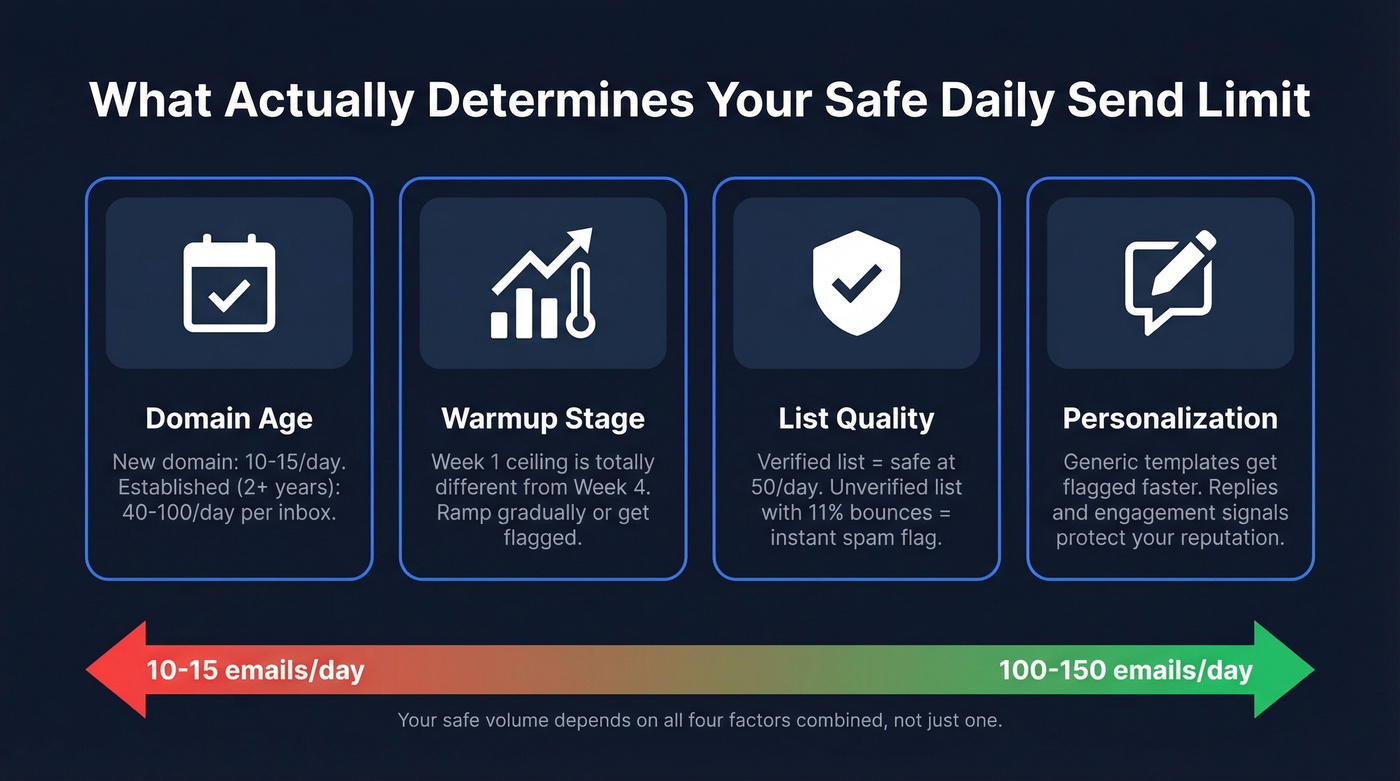
The number shifts based on four factors:
- Domain age. A domain registered last week has zero reputation. One you've been sending from for two years has built-in trust. New domains start at 10-20/day, while established domains with strong reputations can run 40-100/day per inbox - and higher volumes are possible once mailboxes are fully warmed and performance metrics stay clean.
- Warmup stage. Where you are in the ramp matters more than any single "safe number." Week one and week four have completely different ceilings.
- List quality. Send 50 emails to verified addresses and you're fine. Send 50 to a purchased list with 11% bounces and you've just told Gmail you're a spammer. (If you want a deeper framework, see email deliverability and email bounce rate.)
- Personalization level. Generic templates get flagged faster than tailored messages. ESPs track engagement signals - replies, opens, forwards - and personalized emails generate more of them. (More on this in AI cold email outreach and email copywriting.)
A brand-new domain with an unverified list should send 10-15/day. An established domain with verified data and warm mailboxes can safely push to 100-150.

ESP Caps vs. Safe Sending Limits
Google Workspace lets you send 2,000 emails per day. That doesn't mean you should send anywhere near that for cold outreach.
The technical limit is not a safe cold email daily limit. Not even close. (Related: email velocity.)
| ESP | Technical Limit | Safe Cold Email Limit |
|---|---|---|
| Google Workspace | 2,000/day | 100-150/day |
| Microsoft 365 | 10,000 recipients/day | 100-150/day |
| Gmail (free) | 500/day | 20-50/day |
Microsoft recently introduced the Tenant External Recipient Rate Limit (TERRL), which caps total external recipients across your entire tenant - not just per mailbox. TERRL is determined by the number of Exchange Online licenses in use and applies to tenants with fewer than 500 licenses. Exceeding it triggers throttling even if individual mailboxes are well under their personal caps. Microsoft's own recommendation: use Azure Communication Services or a third-party sender for high-volume external email.
The gap between "technical limit" and "safe limit" is where domains go to die.
Your Week-by-Week Warmup Schedule
Warmup isn't optional. It's the difference between landing in the inbox and landing in spam. Here's a concrete day-by-day ramp for a new mailbox on a new domain, based on practitioner playbooks and what we've seen work in production:
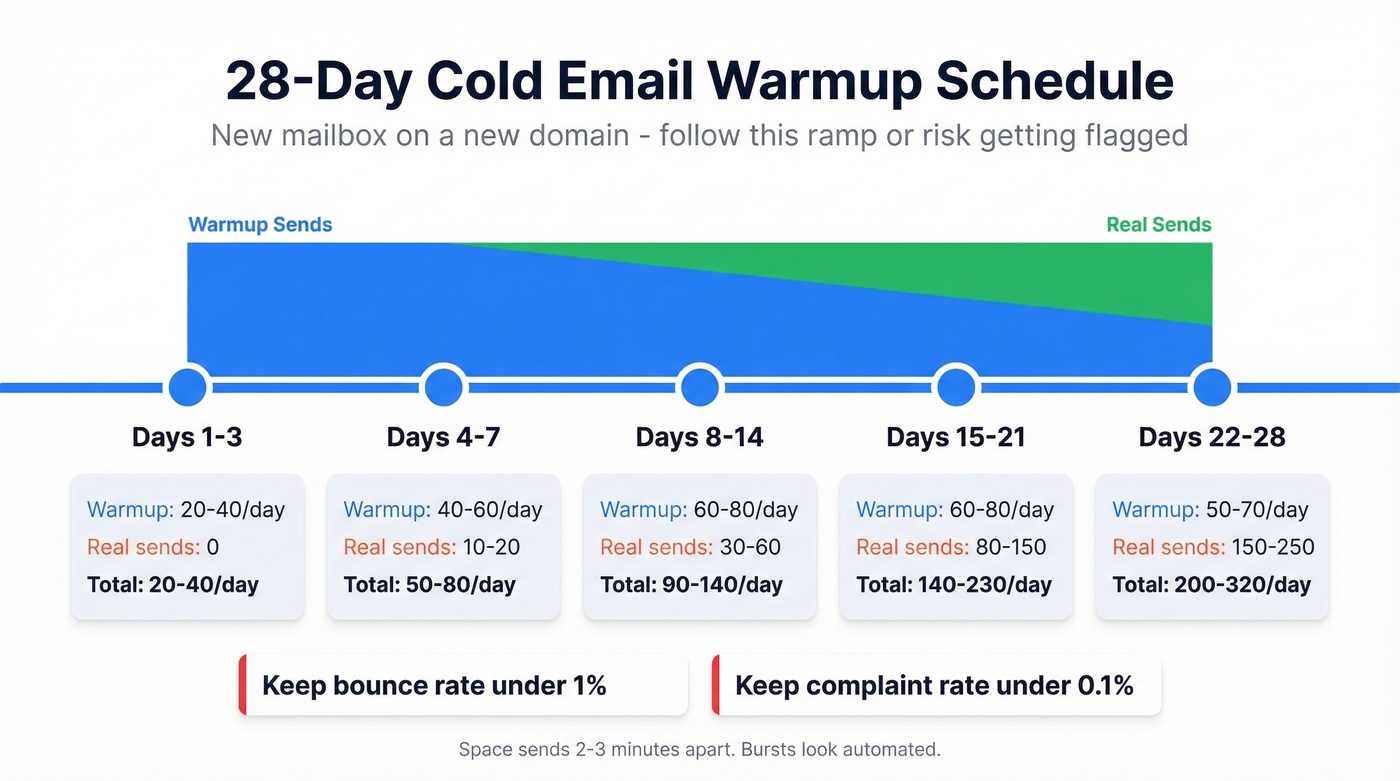
| Period | Warmup Sends | Real Sends | Total/Day |
|---|---|---|---|
| Days 1-3 | 20-40 | 0 | 20-40 |
| Days 4-7 | 40-60 | 10-20 | 50-80 |
| Days 8-14 | 60-80 | 30-60 | 90-140 |
| Days 15-21 | 60-80 | 80-150 | 140-230 |
| Days 22-28 | 50-70 | 150-250 | 200-320 |
Space sends 2-3 minutes apart. Rapid-fire bursts look automated to ESPs and will get you flagged faster than high volume alone.
The warmup-to-real-send ratio matters just as much as the raw numbers. Start with warmup:real at 1:1, then taper as your reputation builds:
| Real Sends/Day | Warmup Ratio |
|---|---|
| 0-50 | 1:1 |
| 50-200 | 1:2 |
| 200-400 | 1:4 |
Two hard thresholds to watch: keep bounce rate under 1% and complaint rate under 0.1%. Even a 2-3% bounce rate can trigger extended spam placement. Crossing 0.3% complaints triggers aggressive filtering from Gmail and Microsoft. If either metric spikes, pause real sends and run warmup-only for 3-5 days. (If you need remediation steps, see how to improve sender reputation and email spam checker.)
After proper warmup, expect 30-40% open rates and 5-10% reply rates as your baseline.

You just read it: keep bounces under 1% or your warmup is wasted. Prospeo's 5-step verification delivers 98% email accuracy - the same data that took Stack Optimize to $1M ARR with under 3% bounce rates and zero domain flags across every client campaign.
Send 50 emails a day and actually reach 50 real people.
2026 Benchmarks and Reply Rates
Let's calibrate expectations with real data. Instantly analyzed billions of cold email interactions across thousands of workspaces for their 2026 benchmark report:
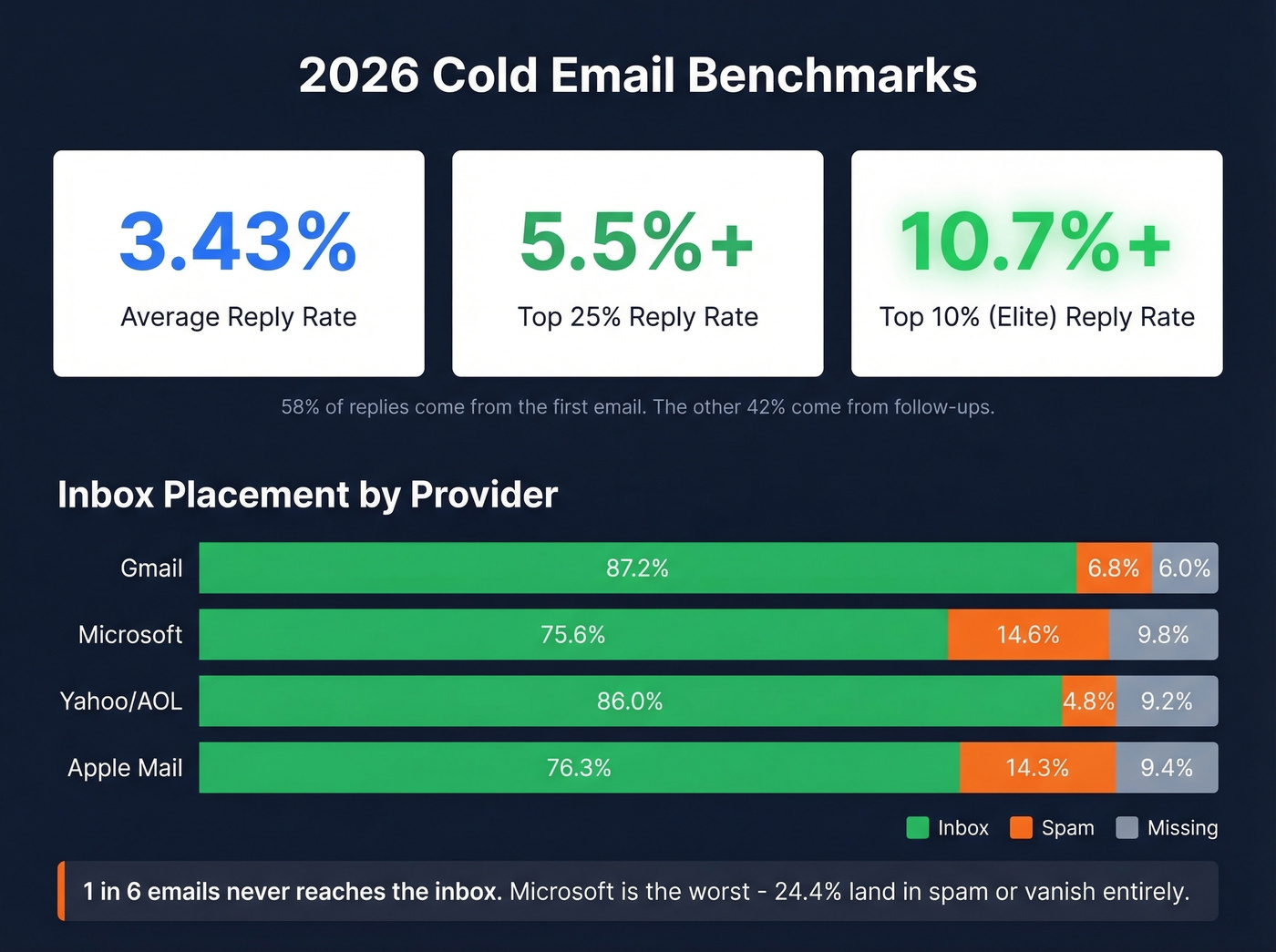
- Average reply rate: 3.43%
- Top quartile: 5.5%+
- Top 10% ("elite"): 10.7%+
58% of replies come from the first email. The remaining 42% come from follow-ups - skip them and you leave nearly half your replies on the table. Sweet spot for sequence length: 4-7 touchpoints. Beyond 7, diminishing returns unless each step adds new value. (For follow-up structure, use these cold email follow-up templates.)
Best-performing first emails clock in under 80 words. Tuesday and Wednesday are peak reply days.
On the deliverability side, roughly 1 in 6 emails never reaches the inbox:
| ISP | Inbox | Spam | Missing |
|---|---|---|---|
| Gmail | 87.2% | 6.8% | 6.0% |
| Microsoft | 75.6% | 14.6% | 9.8% |
| Yahoo/AOL | 86.0% | 4.8% | 9.2% |
| Apple Mail | 76.3% | 14.3% | 9.4% |
Gmail dropped from 89.8% inbox placement in early 2024 to 87.2% by Q4 2024 after bulk-sender enforcement kicked in. Microsoft is notably worse - about 24.4% of emails to Microsoft recipients land in spam or go missing entirely.
Here's the thing: if your average deal size is under $10k, you probably don't need to send more than 50 outbound emails a day. The teams obsessing over raw volume are usually the ones ignoring reply quality. Twenty-six highly personalized emails to the right people will outperform 200 generic blasts every single time - and you won't have to rebuild your infrastructure every quarter.
The Data Quality Factor
Bad data is the single biggest reason cold email campaigns fail. Not subject lines. Not send times. Not volume. When 17% of cold emails never reach the inbox, deliverability problems like bounces and filtering are usually part of the story - and invalid addresses are one of the fastest ways to poison sender reputation.
Flip the question. Your daily send count matters less than how many of those emails hit a real person. Send 100 emails to a verified list with under 1% bounces and your domain stays healthy. Send 50 to an unverified list with 8% bounces and you're in trouble. (If you're building lists, see how to generate an email list and data enrichment services.)
We've seen this play out firsthand. Stack Optimize built from $0 to $1M ARR running client campaigns using Prospeo's verification - 94%+ deliverability, under 3% bounce, and zero domain flags across all clients. The foundation was verifying every single address before it entered a sequence. Prospeo's 5-step verification process catches invalid addresses, spam traps, honeypots, and catch-all domains before they tank your sender reputation. At 98% email accuracy with a 7-day data refresh cycle, it's the layer that makes all the volume advice in this article actually work.
How to Scale Past 100 Emails/Day
The math is straightforward: 7 domains x 26 emails/day per inbox = 182 emails/day. That's the multi-domain approach, and it works.
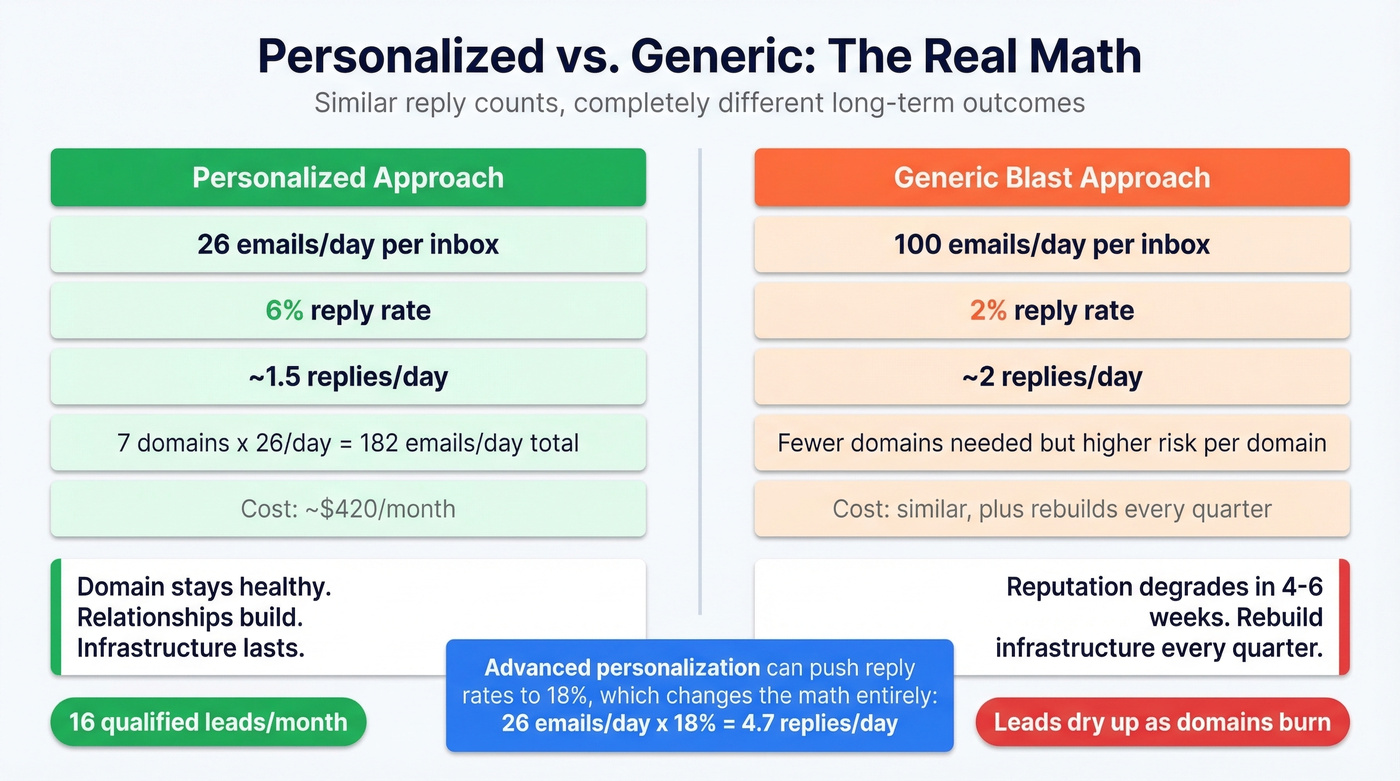
A practitioner on r/Entrepreneur shared their exact playbook. They went from 3 domains to 7, capped each at 26 sends/day, cut email length from 141 words to under 56, and added personalized first lines referencing specific company events. Reply rate doubled from 3% to 6%, bounce rate dropped from 11% to under 2%, and the whole stack costs $420/month generating 16 qualified leads/month.
Let's do the ROI math on volume vs. personalization:
- 26 personalized emails/day x 6% reply rate = ~1.5 replies/day
- 100 generic emails/day x 2% reply rate = 2 replies/day
Similar output - but the personalized approach protects your domain, builds real relationships, and doesn't require you to burn through infrastructure every quarter. The trade-off: 26 personalized emails at ~3 minutes each takes about 80 minutes of writing time per day. Worth it. Advanced personalization can push reply rates to 18%, which changes the math entirely. (For subject line testing, see cold email subject line examples.)
Some teams ask whether AI-generated emails can shortcut the personalization step. AI first lines help with throughput, but they still need human review - ESPs are increasingly flagging templated AI patterns the same way they flag generic blasts.
The generic approach slowly degrades your reputation over 4-6 weeks until you're sending into a void.
Infrastructure costs for a proper multi-domain setup run $300-500/month. Verify every address before it enters your sequence - Prospeo handles this at 98% accuracy with catch-all verification, and integrates directly with Instantly, Smartlead, and Lemlist so verification fits into your existing workflow without extra steps.
Bad data forces you to cap volume. Clean data lets you scale it. Prospeo refreshes 300M+ profiles every 7 days - not the 6-week industry average - so the contacts you pull today are still valid when your warmup hits full speed next month.
Stop rebuilding infrastructure every quarter because your data decayed.
The Infrastructure Checklist
Before you send a single cold email, run through this list. Skip any step and you're gambling with your domain.
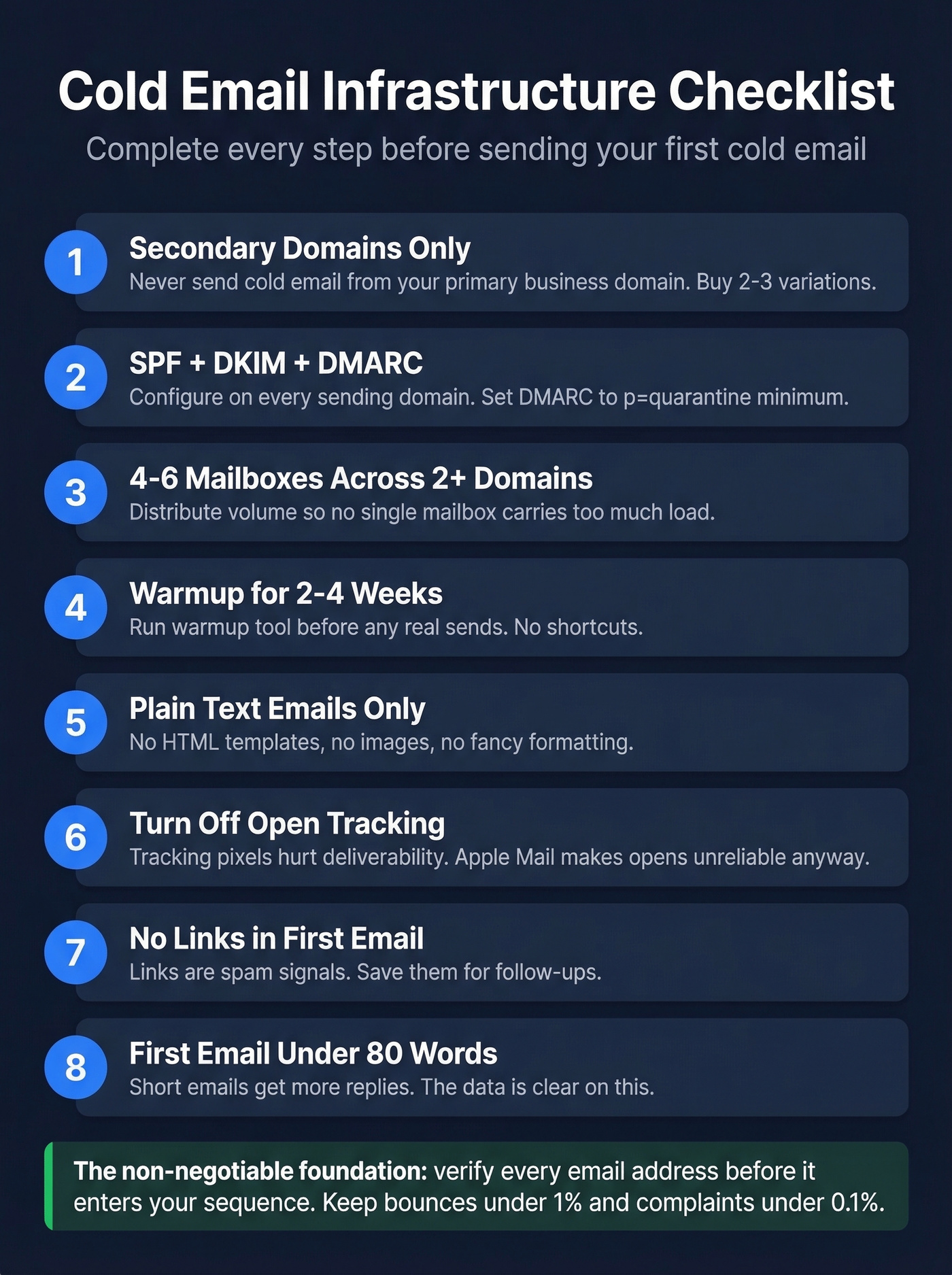
- Secondary domains only. Never send cold email from your primary business domain. Buy 2-3 variations.
- SPF + DKIM + DMARC configured on every sending domain. Set DMARC to
p=noneminimum;p=quarantineis better. (If you want to validate setup, see how to verify DKIM is working and DMARC alignment.) - 4-6 mailboxes across 2+ domains. Distribute volume so no single mailbox carries too much load.
- Warmup tool running 2-4 weeks before any real sends. No shortcuts. (Tooling options: unlimited email warmup.)
- Plain text emails. No HTML templates, no images, no fancy formatting.
- Open tracking off. Apple Mail Privacy Protection makes opens unreliable - and tracking pixels hurt deliverability.
- No links in the first email. Links are spam signals. Save them for follow-ups.
- First email under 80 words. The Instantly benchmarks confirm shorter emails win.
- Spread sends throughout the day. Even if your limit is 150, sending them all in one burst triggers spam filters.
- Verify your list within 72 hours of sending. Email addresses decay fast - someone valid last month can bounce today.
- Target under 1% bounce rate. Above this? Stop sending and clean your list.
- Run seed/placement tests before launching any new domain or campaign.
- Comply with CAN-SPAM, GDPR, and CASL. CAN-SPAM requires an opt-out mechanism, a physical address, and non-deceptive headers. Don't skip compliance.
FAQ
Can you send 1,000 cold emails a day?
Yes, but not from one inbox. You'd need 7-10 domains with multiple warmed-up mailboxes each, sending 20-50/day per inbox. Budget $300-500/month for domains, workspace seats, warmup tools, and a sending platform. The ongoing work is list quality and deliverability monitoring - keeping each mailbox within safe limits is what makes the system sustainable.
What happens if you exceed safe sending limits?
Your sender reputation degrades over 4-6 weeks. Emails land in spam, reply rates crater, and eventually your domain gets blocklisted. Recovery takes 2-4 weeks of reduced volume and warmup-only sends. In severe cases, you retire the domain entirely.
What's the 30 30 50 rule for cold email?
The 30 30 50 rule allocates effort across your campaign: 30% to list building and verification, 30% to personalization and copywriting, and 50% to follow-up sequences. The percentages intentionally exceed 100% to emphasize that follow-ups deserve outsized attention - since 42% of replies come from follow-up emails, not the initial send.
How long does email warmup take?
Two to four weeks minimum. Start with warmup-only sends at 20-40/day, then gradually layer in real sends. Most mailboxes reach safe operating capacity of 60-150 real sends/day by week four, depending on engagement and list quality. Rushing this is the single most common mistake we see.
How do you verify an email list before sending?
Upload a CSV or verify individual addresses through a tool that checks for invalid addresses, catch-all domains, spam traps, and honeypots. Prospeo's bulk verification handles this at 98% accuracy with a 7-day data refresh cycle - and its free tier includes 75 verifications/month. Always verify within 72 hours of sending, since email addresses decay faster than most teams realize.