

How to Choose the Best Email Domain for Business in 2026
84.24% of B2B sending domains have zero DMARC protection. That's not a typo - it's the current state of email authentication, even after Gmail and Yahoo started enforcing sender requirements. Choosing the best email domain isn't just about the name. It's your reputation, your deliverability, and increasingly, your ability to land in the inbox at all.
The good news: getting this right isn't complicated. It's a sequence of five decisions - TLD, domain name, registrar, hosting, and authentication - and most teams only need an afternoon to set it up properly.
What You Need (Quick Version)
If you're short on time, here's the entire playbook in three lines:
- Domain extension: Get a .com. If it's taken, .net or .org. Avoid .xyz, .info, .biz.
- Registrar: Porkbun (~$11/yr for .com, transparent renewals, free WHOIS privacy).
- Email hosting: Google Workspace ($7/user/mo) for most businesses. Then authenticate with SPF, DKIM, and DMARC before sending a single email.
That's it. The rest of this guide explains why, and covers the edge cases that trip people up.
Which TLD to Pick
Your domain extension affects how spam filters treat you from day one. Some TLDs carry so much abuse that Spamhaus reports over 40% of registered domains on certain extensions are spam-related. Filters know this, and they adjust accordingly.
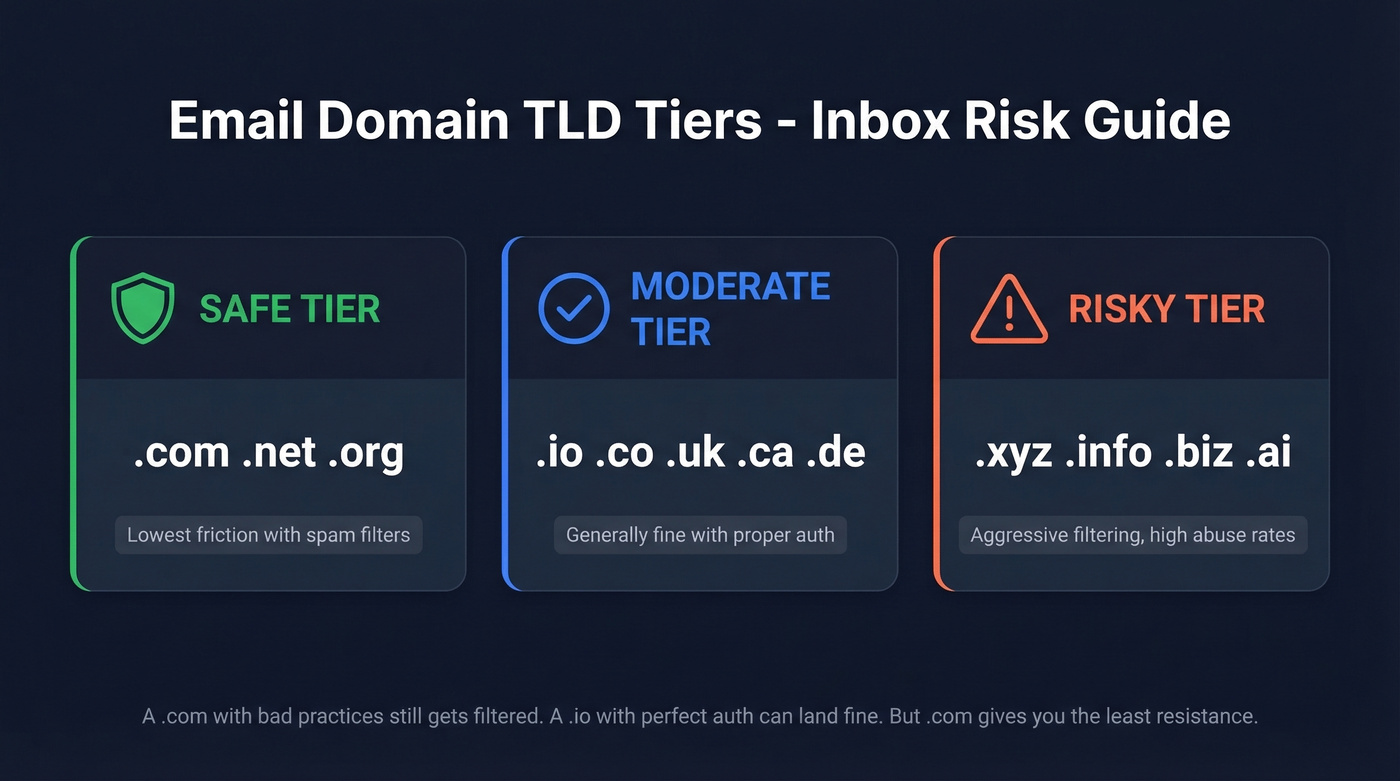
Sender and domain reputation drives roughly 79% of email delivery issues. The TLD you choose is the starting line for that reputation.
| Tier | Extensions | Inbox Risk |
|---|---|---|
| Safe | .com, .net, .org | Lowest friction |
| Moderate | .io, .co, .uk, .ca, .de | Generally fine |
| Risky | .xyz, .info, .biz, .ai | Aggressive filtering |
Here's the thing: a .com with terrible sending practices will still get filtered. And a .io domain with perfect authentication and clean lists can land in the inbox just fine. But all else being equal, .com gives you the least resistance.
The .ai extension deserves a special callout. It's trendy for tech companies, but it sits in the risky tier because of high abuse rates. If you're building a brand on .ai, plan to invest more in warm-up and authentication to compensate.
How to Pick a Domain Name
Keep it simple. Your email domain should match your company name or be an obvious variation of it.
firstname@yourcompany.com is the gold standard. Skip hyphens and numbers - they look spammy and they're hard to dictate over the phone. Keep it under 15 characters if possible, since every extra character increases typo risk.
For cold outbound, use secondary domains. Patterns like brandhq.com, getbrand.com, or trybrand.com protect your primary domain's reputation while keeping brand recognition intact.
Don't overthink the name. Overthink the authentication.

A perfect domain setup means nothing if you're sending to bad email addresses. Prospeo delivers 98% verified email accuracy - so your authenticated domain stays clean and your bounce rate stays under 4%.
Protect your new domain's reputation with data that actually connects.
Top Registrars Compared
Registrar pricing is one of the most deceptive markets in SaaS. The first-year price is designed to hook you. The renewal price is where they make money.
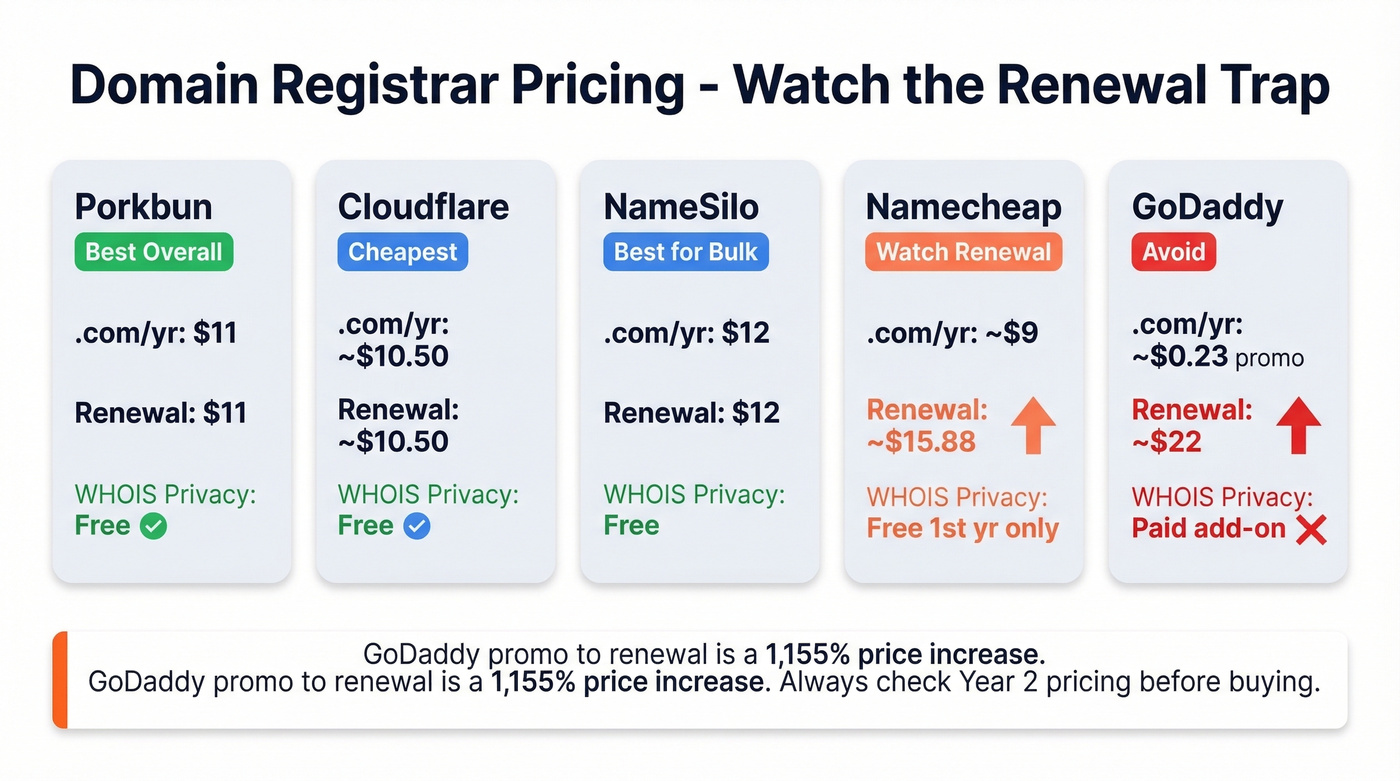
One common trap: a .com listed at $1.99 for the first year that renews at $24.99 - a 1,155% increase. GoDaddy is the worst offender here, with intro prices as low as $0.23 that require a three-year upfront commitment. The consensus on r/HostingHostel is clear: avoid GoDaddy. The aggressive upsells and longstanding community suspicion about domain front-running make it a poor choice.
| Registrar | .com/yr | Renewal/yr | WHOIS Privacy | Verdict |
|---|---|---|---|---|
| Porkbun | $11 | $11 | Free | Best overall |
| Cloudflare | ~$10.50 | ~$10.50 | Free | Cheapest (at-cost pricing) |
| NameSilo | $12 | $12 | Free | Best for bulk |
| Namecheap | ~$9 first year | ~$15.88 | Free 1st yr | Watch the renewal |
| GoDaddy | ~$0.23 promo | ~$22 | Paid add-on | Avoid |
Porkbun is our default recommendation. Transparent pricing, free WHOIS privacy, solid support, and no renewal surprises. Cloudflare is usually cheaper because they price domains at-cost, but their support is weaker unless you're on a paid plan. NameSilo is the pick for teams managing 10+ domains for cold outbound - their bulk pricing and management tools are built for portfolios.
Email Hosting for Custom Domains
Most people overthink hosting and underthink authentication. Pick a provider, set it up, and spend your energy on SPF/DKIM/DMARC instead.
| Provider | Starting Price | Storage | Best For |
|---|---|---|---|
| Google Workspace | $7/user/mo | 30 GB pooled (Business Starter) | Most businesses |
| Microsoft 365 | ~$6/user/mo | 50 GB mailbox | Microsoft shops |
| Proton Business Suite | ~$12.99/user/mo | 1 TB per user | Privacy-first teams |
| Zoho Mail | $1/user/mo | 5 GB | Budget-conscious |
| Hostinger | $0.35/user/mo | 10 GB | Cheapest option |
Google Workspace at $7/user/mo is the right answer for most businesses. The $14 and $22 tiers add more storage and AI features, but the base plan covers everything most teams need - ecosystem integration, deliverability reputation, and admin controls that are hard to beat. Skip Workspace if your team is privacy-obsessed or allergic to Google's data practices.
Microsoft 365 makes sense if your team already lives in Outlook and SharePoint. You get a 50 GB mailbox at a slightly cheaper entry point, and Copilot AI is baked into higher tiers.
Proton Business Suite at $12.99/user/mo is the premium privacy pick - SOC 2 Type II certified, strong encryption, and support for up to 15 custom domains with 1 TB storage per user. The tradeoff is a walled-garden approach that limits third-party integrations.
Zoho at $1/user/mo and Hostinger at $0.35/user/mo exist for teams where every dollar matters. They work. They're not fancy.
I'll say something that might be unpopular: if your average contract value is under $5k, Zoho at $1/user/mo plus proper authentication will outperform a $22/user/mo Google Workspace plan with sloppy DNS records every single time. The hosting provider matters far less than what you do after setup.
How to Authenticate Your Domain
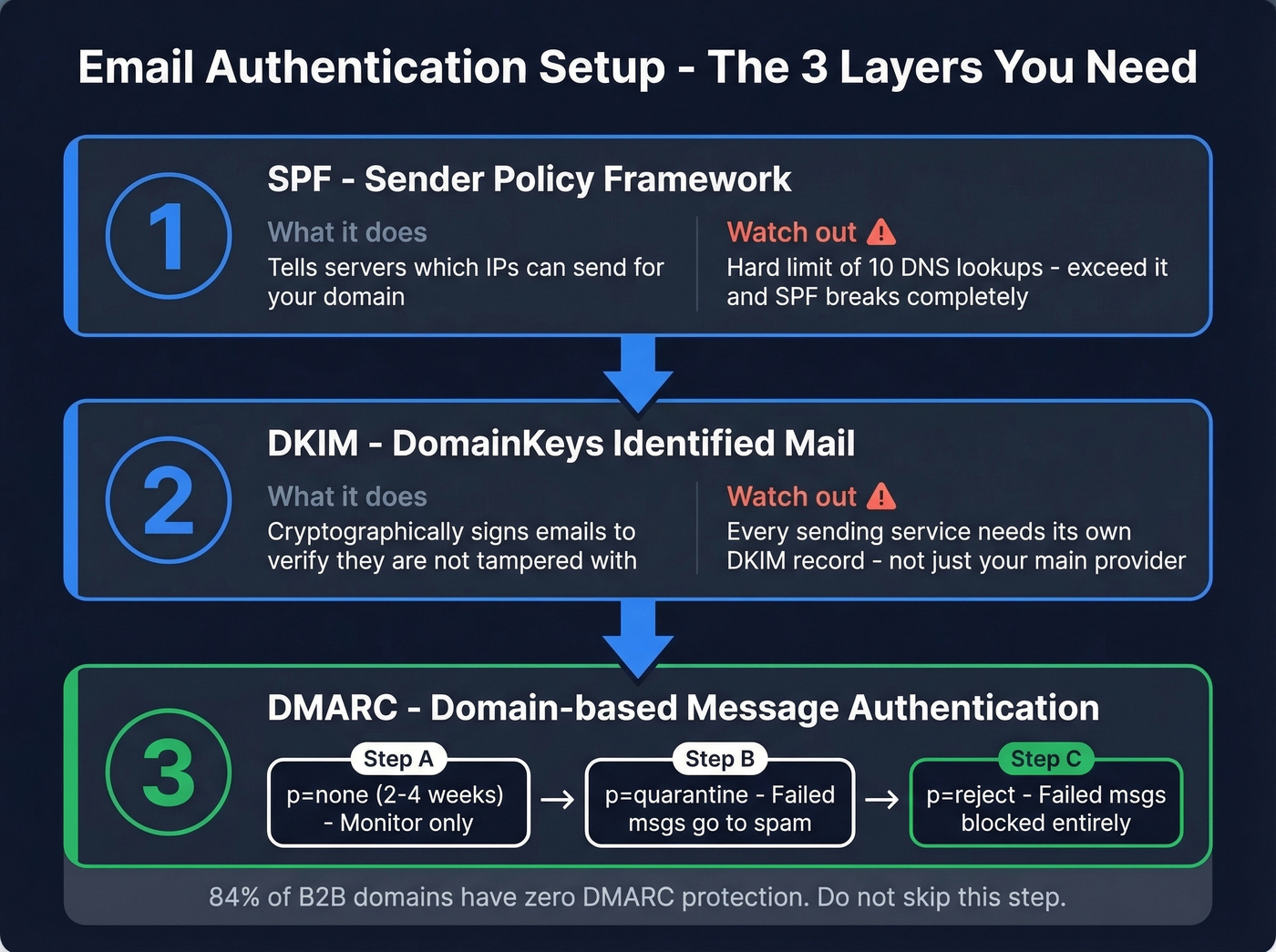
This is the section that actually determines whether your emails reach the inbox. We've audited hundreds of cold email setups, and the most common failure is teams that spend hours picking the perfect domain name and then skip authentication entirely. Don't be that team.
SPF (Sender Policy Framework)
SPF tells receiving servers which IP addresses are authorized to send email on behalf of your domain. The critical constraint: SPF has a hard limit of 10 DNS lookups. Exceed it, and SPF breaks completely - the receiving server treats it as if you have no SPF record at all.
Every third-party service you authorize adds lookups. Google, your CRM, your marketing tool, your outreach platform - they all count. Audit regularly. If you need a refresher on syntax, see these SPF record patterns.
DKIM (DomainKeys Identified Mail)
DKIM cryptographically signs your emails so receivers can verify they haven't been tampered with. Use 2048-bit keys - anything shorter is outdated. Rotate them every 6-12 months.
The mistake we see most often: teams set up DKIM for Google Workspace but forget to configure it for their outreach tool or marketing platform. Every sending service needs its own DKIM record. After setup, run a quick check to verify DKIM is working.
DMARC (Domain-based Message Authentication)
DMARC ties SPF and DKIM together and tells receivers what to do when authentication fails. The progression matters:
- Start at p=none for 2-4 weeks. This monitors without blocking anything.
- Move to p=quarantine. Failed messages go to spam instead of inbox.
- Graduate to p=reject. Failed messages get blocked entirely.
Don't jump straight to reject - you'll block legitimate emails from services you forgot to authenticate. For teams sending from subdomains like mail.yourdomain.com, use relaxed alignment. Strict alignment can break authentication for subdomain senders. If you want the technical nuance, read this guide on DMARC alignment.
DMARC adoption surged 75% between 2023 and 2025, climbing from 27.2% to 47.7% among the top 1.8 million domains. That still means over half of major domains aren't fully protected. Gmail and Yahoo now throttle senders who exceed a 0.3% spam complaint rate, and bulk senders without authentication see inbox placement drop by double digits.
Checking Your Domain Reputation
Domain reputation is receiver-specific - there's no single universal score. You need to check multiple sources.
Google Postmaster Tools gives you a Gmail-specific reputation grade, but you need enough sending volume for data to populate. Talos Intelligence from Cisco provides a broader view - a "neutral" rating often just means low volume, not a clean bill of health. MXToolbox and multiRBL check your domain against dozens of blocklists simultaneously.
For teams buying expired or aged domains for cold outbound, check their history before purchasing. An expired domain can carry toxic spam reports, bad backlinks, and blocklist entries from its previous owner. Run it through MXToolbox and Talos first. An "old" domain that's been continuously registered is fundamentally different from an "expired" domain that lapsed and was re-purchased. Expired domains carry risk. Old domains with clean records are gold.
Monitoring reputation is reactive. Verifying your contact list before sending is proactive - and far cheaper than recovering a blacklisted domain. Prospeo's 5-step verification process catches invalid addresses, removes spam traps, and handles catch-all domains before they hit your sending infrastructure. At 98% email accuracy with honeypot filtering built in, it's the fastest way to protect the domain you just invested in. If you want more options, compare email reputation tools and keep an eye on your email bounce rate. Verifying 1,000 contacts costs about $10. Rebuilding a blacklisted domain costs months.
Setting Up Domains for Cold Email
Never send cold email from your primary business domain.
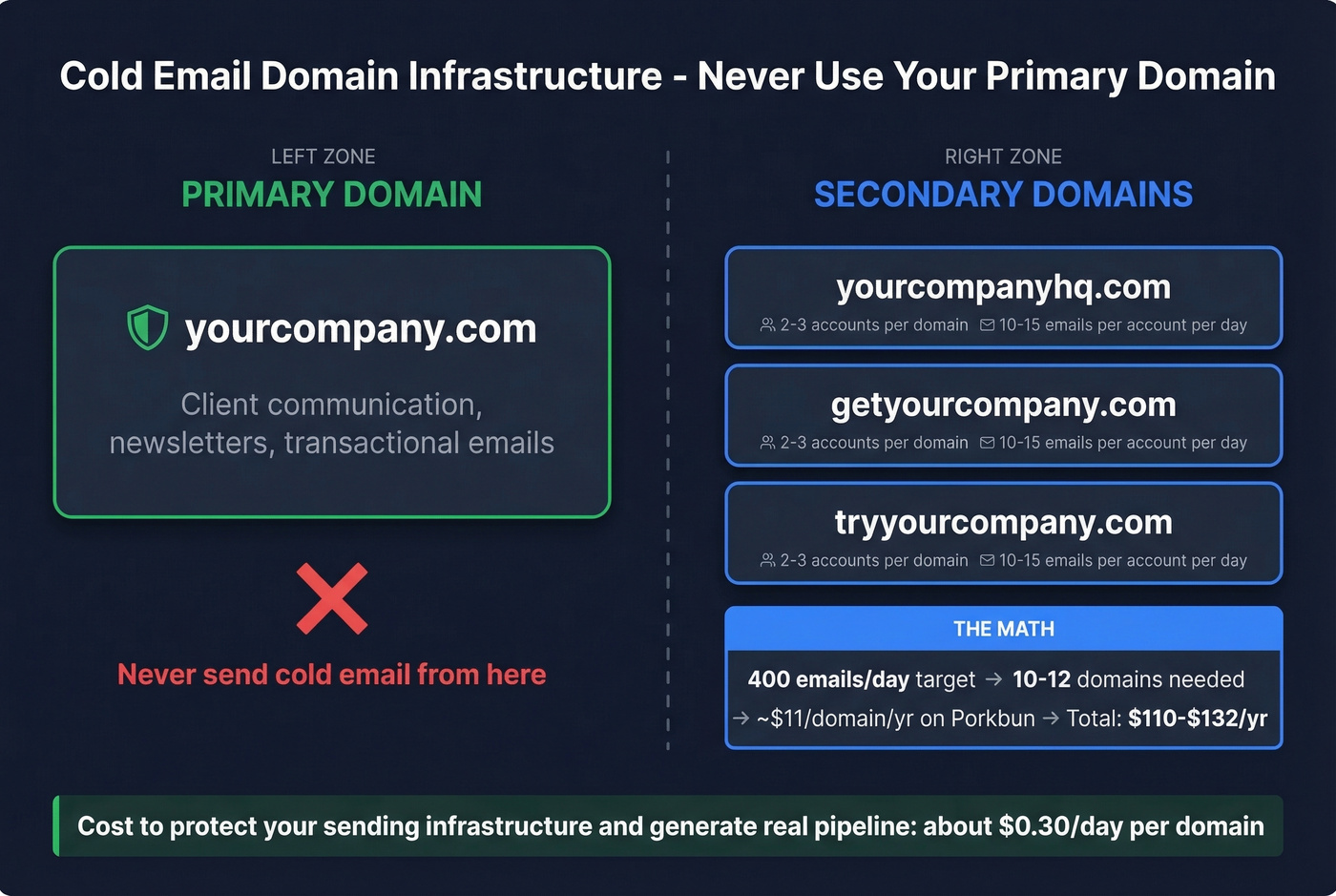
This is the single most important rule in cold outbound infrastructure. One bad campaign, one spam trap hit, and your main domain's reputation takes damage that can take weeks to repair.
Buy secondary domains with recognizable variations: brandhq.com, getbrand.com, trybrand.com. The practitioner consensus on r/coldemail is consistent: 2-3 email accounts per domain, 10-15 emails per account per day. That gives you roughly 30-45 sends per domain daily.
Let's do the math. If you want to send 400 emails per day, you need approximately 10-12 domains. Each domain costs $11/yr on Porkbun. That's $110-$132/yr in domain costs to protect a sending infrastructure that generates real pipeline. Cold email still delivers roughly $36 in ROI for every $1 spent, and 60% of replies come after the second follow-up. The infrastructure investment is trivial compared to the return.
Warm-up is non-negotiable. Plan for 14 days minimum, 21 days recommended. Start with 10-20 emails per day the first week, then gradually increase. Keep warm-up running even after campaigns launch. To avoid burning domains, manage your email velocity and follow a proven B2B cold email sequence.
When you're running 10+ domains and thousands of contacts, data quality makes or breaks your infrastructure. Prospeo verifies emails in real time so you're not burning fresh domains on dead addresses - the free tier gives you 75 verified emails per month to start.
You just spent an afternoon setting up SPF, DKIM, and DMARC. Don't waste that effort on unverified contact lists. Prospeo's 5-step verification removes spam traps and honeypots before they torch your sender reputation.
Clean authentication deserves clean data - starting at $0.01 per email.
FAQ
Can I use a free email (Gmail/Yahoo) for business?
Free email addresses can't be authenticated with SPF/DKIM/DMARC on your own domain, which kills deliverability and brand credibility. A custom domain email costs under $1/month with Zoho or ~$7/month with Google Workspace - there's no legitimate reason to skip it for business use.
Is .io as good as .com for email deliverability?
Close, but not equal. The .io extension sits in the moderate risk tier - most spam filters treat it fine, but .com has the lowest friction across every major inbox provider. If the .com is available, get it. If not, .io works with proper authentication.
How long until a new domain can send email safely?
Plan for 2-3 weeks of warm-up before running real campaigns. Start with 10-20 emails per day the first week, then gradually increase. After warm-up, your sending behavior and engagement rates matter more than domain age for inbox placement.
How do I stop my emails from going to spam?
Authenticate your domain with SPF, DKIM, and DMARC. Verify your contact list before sending to catch invalid addresses and spam traps. Keep your spam complaint rate below 0.3%. Catching bad addresses before they damage your sender reputation is always cheaper than recovering from a blacklist.
How many domains do I need for cold outbound?
Divide your daily send target by 40. Want to send 400 emails per day? You need roughly 10 domains with 2-3 inboxes each, sending 10-15 emails per inbox per day. Budget about $11/domain/year on Porkbun - roughly $110-$132/year total.