

BIMI and DMARC: How to Get Your Brand Logo in Every Inbox
You've spent months getting DMARC to enforcement, your SPF and DKIM are clean, and now someone on the marketing team asks: "Can we get our logo to show up in Gmail?" That's BIMI. The connection between BIMI and DMARC is simpler than most guides make it sound - if you avoid the pitfalls that break roughly half of published BIMI records.
What You Need (Quick Version)
Before you invest 20 minutes reading the full walkthrough, here's the checklist. If any of these aren't in place, stop and fix them first:
- DMARC at p=quarantine (pct=100) or p=reject - p=none won't work (see DMARC Alignment)
- SPF and DKIM passing on all sending sources (use these SPF Record Examples to sanity-check syntax)
- An SVG Tiny 1.2 PS logo under 32KB, square format
- [A VMC or CMC](https://docs.digicert.com/en/certcentral/manage-certificates/verified-mark-certificates - vmc-/common-mark-certificate - cmc-.html) depending on which mailbox providers you care about
- HTTPS hosting for both the SVG file and certificate PEM file
Roughly half of BIMI records that get published are invalid. The rest of this guide covers every pitfall so you don't join them.
What Is BIMI and Why Does It Need DMARC?
SPF verifies that your sending server is authorized. DKIM cryptographically signs your messages. DMARC ties SPF and DKIM together and tells receiving servers what to do with messages that fail - quarantine them or reject them outright. BIMI - Brand Indicators for Message Identification - sits on top of all three, essentially saying: "This sender is authenticated, here's their logo."
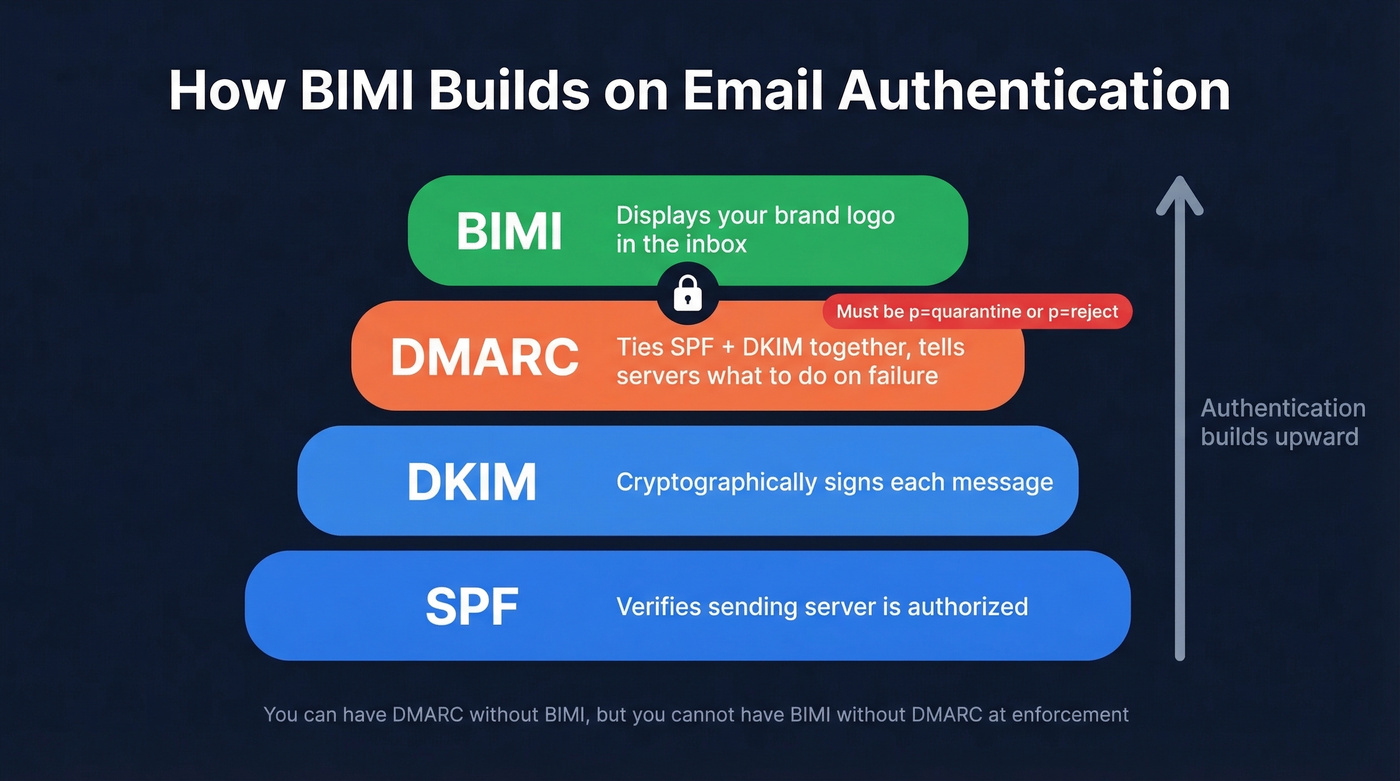
Here's the thing most people miss: BIMI doesn't work with DMARC set to p=none. That monitoring-only policy is fine for getting started with DMARC, but BIMI requires enforcement. Your DMARC policy must be p=quarantine or p=reject. No exceptions. This single requirement is what keeps BIMI adoption low - most domains haven't made it to enforcement yet.
BIMI also isn't just a DNS record. Mailbox providers evaluate your sender reputation before displaying your logo. A technically perfect setup can still fail if your domain has deliverability problems (see our Email Deliverability Guide).
Adoption in 2026: Where Things Stand
A Validity analysis of 13,000 domains found that 90.85% had no BIMI record at all. Of the remaining domains, the split was almost perfectly even: 4.57% had a valid record, and 4.58% had an invalid one. Let's be honest - that means roughly half of everyone who tried got it wrong.
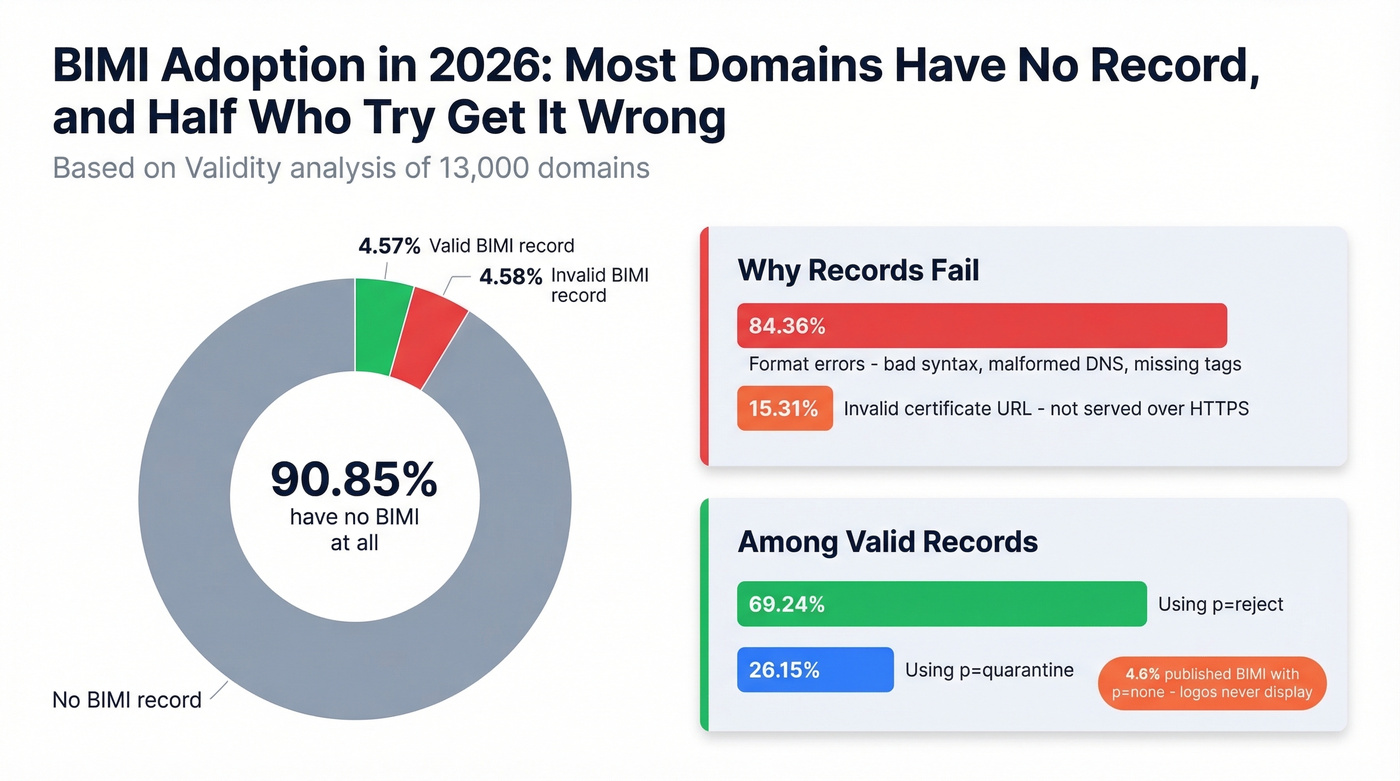
The error breakdown is telling. Among invalid records, 84.36% were format errors - malformed DNS records, bad syntax, missing tags. Another 15.31% had invalid "a" tag values, usually because the certificate URL wasn't served over HTTPS. These aren't exotic edge cases. They're basic implementation mistakes.
Among domains that did get it right, 69.24% used p=reject and 26.15% used p=quarantine. A stubborn 4.60% published BIMI records while still on p=none, which means their logos never display. The pct=100 requirement on quarantine policies is another silent gotcha: if your quarantine policy applies to less than 100% of messages, logo display just fails without any error.
Does BIMI Improve Email Performance?
Probably, but the data isn't airtight. A Yahoo pilot showed a 10% increase in engagement for BIMI-enabled senders. Red Sift and Entrust have cited directional benchmarks like up to a 39% open rate increase, 34% higher purchase likelihood, and 120% improvement in brand recognition.
Those numbers sound great, but methodologies vary and sample sizes aren't public. Treat them as directional rather than definitive. The more defensible argument is brand recognition and trust - your logo appearing consistently in inboxes reinforces legitimacy in a way that's hard to measure with open rates alone.
If you're already at DMARC enforcement, the incremental cost of adding BIMI is so modest that you'd be foolish not to implement it. The certificate costs less than a single month of most email tools. Even if the engagement lift is half what the studies suggest, the brand value alone pays for itself within a quarter.
Which Email Clients Support BIMI?
This is the part that determines whether the investment is worth your time. Microsoft is the major holdout.
| Provider | BIMI Support | Certificate Needed |
|---|---|---|
| Gmail | Yes | VMC or CMC |
| Apple Mail | Yes | VMC required |
| Yahoo Mail | Yes | VMC recommended |
| Fastmail | Yes | None required |
| Zoho Mail | Yes | VMC recommended |
| Outlook | No | N/A |
One Apple-specific nuance: Apple Mail's BIMI display depends on DKIM-signed authentication results being stamped into message headers by the receiving mailbox provider. If that header isn't present, Apple won't display your logo even with a valid VMC.
BIMI records are domain-specific. If you send from marketing.yourdomain.com and sales.yourdomain.com, each needs its own record at the appropriate subdomain.
Skip BIMI for now if your audience skews heavily toward Outlook - it won't move the needle today. For Gmail-heavy audiences, which covers most B2B outbound, it's absolutely worth implementing.

BIMI and DMARC protect your brand in the inbox. But a branded logo means nothing if your outbound emails bounce. Prospeo's 98% email accuracy and 5-step verification keep your bounce rate under 4% - the same threshold BIMI demands for logo display.
Don't let bad data undo the deliverability you just built.
How BIMI and DMARC Work Together
Let's break this down, because the two get confused constantly. DMARC is an email authentication protocol that protects your domain from spoofing. BIMI is a visual reward for having that authentication in place. You can have DMARC without BIMI, but you can't have BIMI without DMARC at enforcement. Think of DMARC as the security gate and BIMI as the branded badge you earn for passing through it.
VMC vs. CMC: Which Certificate?
Gmail's October 2024 launch of Common Mark Certificate support was the biggest accessibility change in BIMI's history. Before CMCs, you needed a Verified Mark Certificate, which requires a registered trademark. That locked out startups, small businesses, and anyone who hadn't gone through the trademark process.
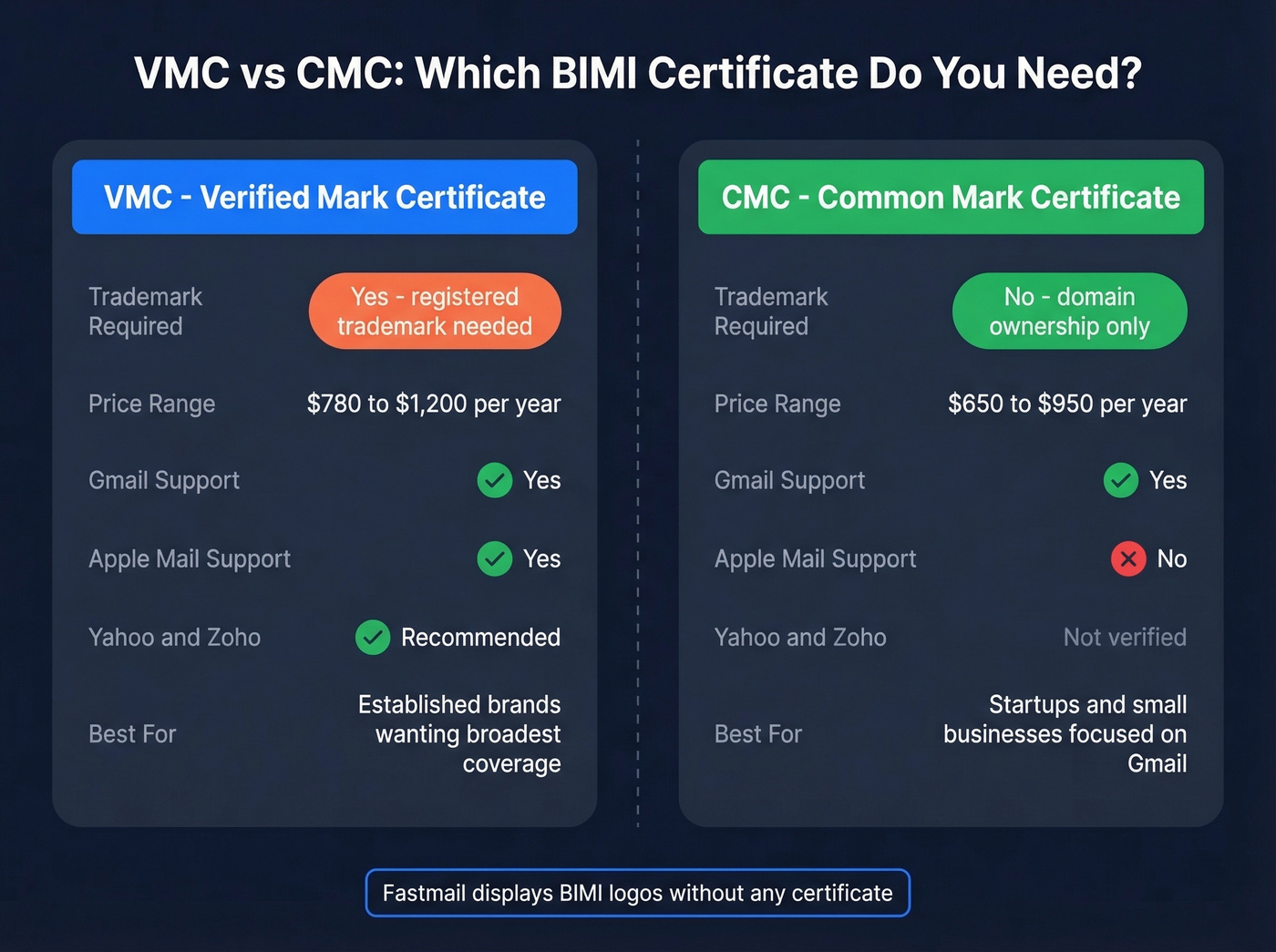
Use a CMC if you don't have a registered trademark, you primarily care about Gmail, and you want the lowest barrier to entry. CMCs verify domain ownership only.
Use a VMC if you have a registered trademark and need logo display in Apple Mail, or you want the broadest provider coverage. Yahoo and Zoho also recommend VMCs.
For teams that only care about Fastmail, skip the certificate entirely - Fastmail displays logos without one.
Here's what you'll pay:
| Certificate | Reseller Price | DigiCert Direct |
|---|---|---|
| VMC | ~$780/yr | ~$1,200/yr |
| CMC | ~$650/yr | ~$950/yr |
The fact that certificate pricing is this opaque for a sub-$1,200 product is absurd. Outside of DigiCert, most CAs - GlobalSign, SSL.com - hide behind contact forms. The r/DMARC community has flagged this repeatedly, and we share their frustration.
Entrust's public certificate business transitioned to Sectigo in 2025, with VMC end-of-issuance in May 2025. Resellers like SSL2BUY offer meaningful savings if you're comfortable buying through a third party.
Step-by-Step BIMI Setup
Budget around 10-20 hours of internal time, plus $650-$1,500 for the certificate and $0-$500 for SVG preparation if your design team can't handle SVG Tiny 1.2 PS conversion.
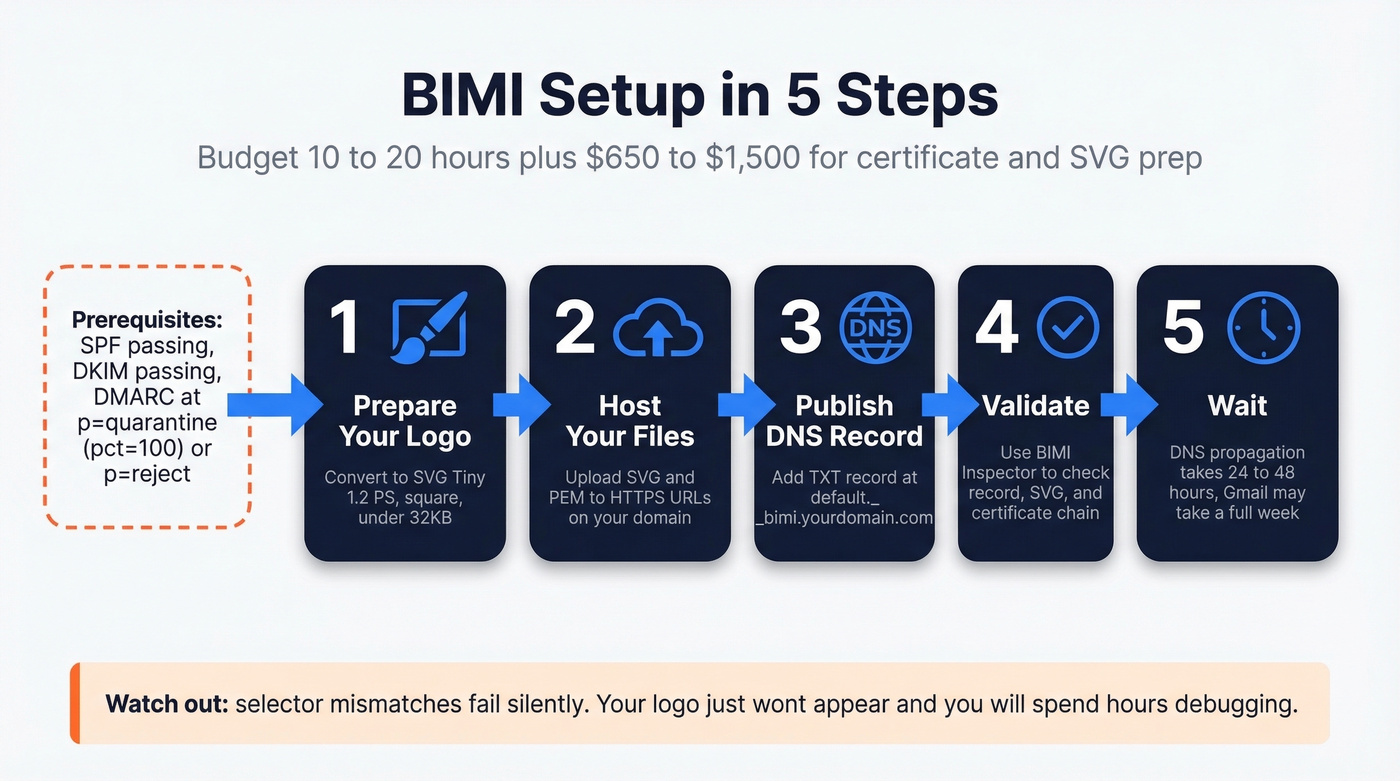
Prerequisites - confirm all before starting:
- SPF passing for all sending sources
- DKIM passing with valid signatures (if you’re unsure, see How to Verify DKIM Is Working)
- DMARC at p=quarantine with pct=100, or p=reject
- Logo prepared as SVG Tiny 1.2 PS
- VMC or CMC purchased and PEM file in hand
Step 1: Prepare your logo. Convert to SVG Tiny 1.2 PS format, square, under 32KB. This is where most implementations stall - details in the SVG section below.
Step 2: Host your files. Upload the SVG and certificate PEM to HTTPS URLs on your domain. Both must return correct MIME types and valid SSL certificates.
Step 3: Publish the DNS record. Add a TXT record at the default._bimi selector:
default._bimi.yourdomain.com TXT "v=BIMI1; l=https://yourdomain.com/logo.svg; a=https://yourdomain.com/vmc.pem"
Step 4: Validate. Use the BIMI Inspector to check your record, SVG compliance, and certificate chain.
Step 5: Wait. DNS propagation takes 24-48 hours. After that, logo display depends on the mailbox provider's caching cycle and your sender reputation. Gmail often takes several days after detecting a valid record. Give it a full week before troubleshooting.
One pitfall that fails silently: selector mismatches. If you're using a BIMI-Selector header in your emails, the selector value must match the DNS record exactly. A mismatch won't throw an error - your logo just won't appear, and you'll spend hours debugging.
SVG Requirements and Troubleshooting
SVG Tiny 1.2 PS Checklist
This is where implementation gets painful. The SVG Tiny 1.2 PS profile is a security-focused subset of SVG that strips out almost everything modern designers use:
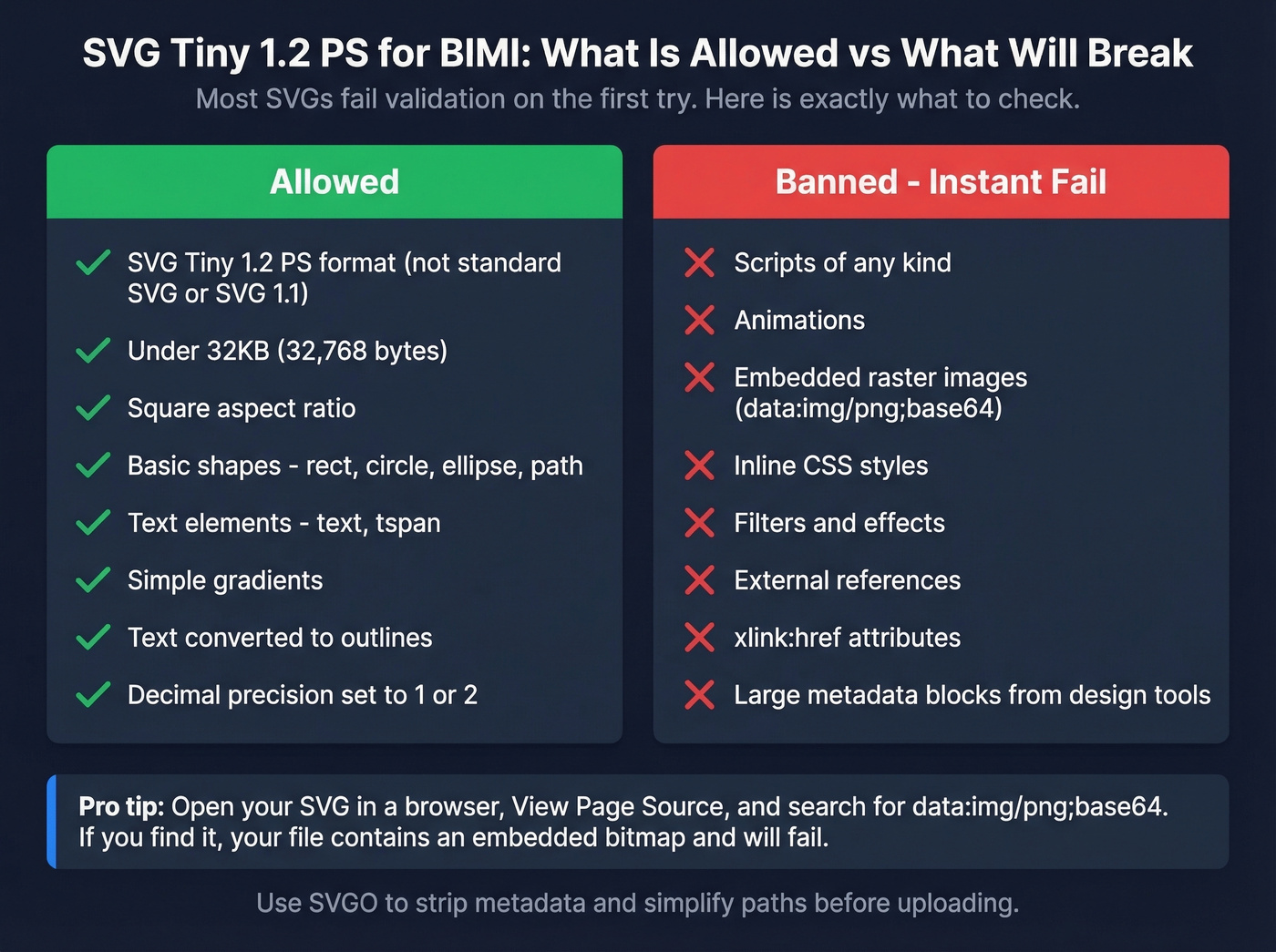
- Format: SVG Tiny 1.2 PS - not standard SVG, not SVG 1.1
- Size: Under 32KB (32,768 bytes)
- Shape: Square aspect ratio
- Allowed elements:
rect,circle,ellipse,path,text,tspan, simple gradients - Banned: Scripts, animations, embedded raster images, inline styles, filters/effects, external references,
xlink:hrefattributes
Most SVGs fail validation on the first try. Use SVGO to strip metadata, reduce node counts, and limit colors. The Reddit consensus on r/DMARC is that SVG conversion is the single biggest blocker in implementation - we've seen the same thing in our own experience.
Fixing SVG Validation Failures
When your SVG fails validation, open the file in a browser, hit View Page Source, and search for data:img/png;base64. If you find it, your SVG contains an embedded bitmap image - a common export artifact from Illustrator and Figma. That's an instant fail.
When exporting from Illustrator, use File > Save As > SVG, select the SVG Tiny 1.2 profile, convert text to outlines, and set decimal precision to 1-2. This avoids most compliance issues at the source.
Next, search for xlink:href= and url(#...) references. Both break Tiny 1.2 PS compliance. Remove them in a code editor. Also strip any large metadata blocks - some design tools embed enormous chunks of unnecessary data that balloon your file size well past the 32KB limit.
If you're seeing SVG_FETCH_ERROR ... response body exceeds ... 65535, your file is over the limit. Run it through SVGO with aggressive settings, reduce gradient complexity, and simplify paths.
Hosting is the other common failure point. Wix and Squarespace are known blockers for hosting SVGs. WordPress URLs can break validation with query strings or redirects. S3 works but requires proper SSL configuration. GitHub Pages sometimes serves the wrong content type. Whatever you use, confirm the URL returns Content-Type: image/svg+xml over HTTPS with a valid certificate.
Sender Reputation: The Hidden Factor
Here's what most guides skip entirely: mailbox providers don't just check your DNS record and certificate. They evaluate your sender reputation before displaying your logo. A domain with high bounce rates, spam complaints, or inconsistent sending patterns can have a technically perfect BIMI setup and still never see a logo in Gmail.
This creates a direct link between your outbound data quality and your inbound brand identity. Look - if your sales team is blasting sequences with unverified email lists, those bounces damage the same sender reputation your authentication investment depends on. We've seen teams spend months implementing BIMI only to realize their double-digit bounce rate from bad prospecting data was suppressing logo display the entire time.
Keeping bounce rates under ~3% is a common deliverability benchmark for protecting sender reputation (see Email Bounce Rate and How to Improve Sender Reputation). Prospeo's email verification - 98% accuracy with catch-all handling, spam-trap removal, and honeypot filtering - keeps outbound bounce rates well below that line. Stack Optimize, one of Prospeo's customers, maintained sub-3% bounce rates and zero domain flags across all their clients. That's the kind of sending hygiene that lets your brand logo actually appear.
You just invested hours locking down SPF, DKIM, and DMARC. One batch of unverified emails can crater the sender reputation BIMI depends on. Prospeo refreshes 300M+ contacts every 7 days - so your outbound never risks the domain you worked so hard to protect.
Start with 75 free verified emails. No credit card, no contracts.
FAQ
Does Outlook support BIMI?
No. Microsoft hasn't implemented BIMI support across Outlook.com, Hotmail, or Microsoft 365, and there's no public timeline for adoption. If your audience is primarily Outlook users, BIMI won't deliver visible results today.
Do I need a trademark for BIMI?
Not anymore. Gmail now accepts CMCs, which require only domain ownership verification - no trademark needed. Apple Mail and Yahoo still prefer or require VMCs, which do need a registered trademark. If Gmail is your primary target, a CMC at ~$650/yr gets you in.
What DMARC policy does BIMI require?
Your policy must be p=quarantine with pct=100, or p=reject. A p=none policy will never trigger logo display. Many domains set pct=50 during rollout and forget to bump it to 100, which causes BIMI to silently fail.
How long until my logo appears?
DNS propagation takes 24-48 hours. After that, display depends on the mailbox provider's caching cycle and your sender reputation. Gmail often takes several days after detecting a valid record - give it a full week before troubleshooting.
Can bad outbound data prevent my logo from displaying?
Yes. High bounce rates damage sender reputation, which mailbox providers factor into logo display decisions. Verifying contact data before sending and keeping bounce rates under ~3% protects the domain reputation your entire email authentication stack depends on.