

Blind Copy in Email: The Complete Guide to BCC
Your marketing team just sent a product update to 500 customers - and every single email address is visible in the CC field. Competitors can see your client list. Customers are hitting Reply All to complain. Someone's already forwarded the thread to your legal team.
This is the nightmare blind copy was built to prevent, and it happens more often than anyone admits.
The short version: BCC stands for Blind Carbon Copy. Recipients in the BCC field are hidden from everyone else on the email. Use it to protect privacy in group emails and prevent Reply All chaos. If a BCC recipient replies, the reply goes only to the sender; if they hit Reply All, it goes to the sender plus everyone in To/CC - but it still never reveals other BCC'd people. And if you're BCC'ing more than about 50 people, you've outgrown BCC entirely. Use a mail merge tool or email service provider instead.
What Does Blind Copy Actually Mean?
BCC stands for "blind carbon copy." The term traces back to the carbon paper era, when typists placed carbon sheets between pages to create duplicate copies of a letter. A "blind" copy was one sent to someone without the other recipients knowing. Merriam-Webster's first known use citation dates the concept to at least 1948, and the feature has been baked into email clients since the earliest days of electronic messaging.
It's the most misunderstood feature in email. Gmail keeps the BCC field tucked away until you toggle it on, which is why CC-instead-of-BCC disasters keep happening year after year.
At the protocol level, BCC addresses appear in the SMTP envelope (the RCPT TO command) but get stripped from the message headers before delivery. That's why the hiding is absolute, not cosmetic. You don't need to understand SMTP to use BCC, but knowing this explains why no amount of header-digging will reveal who was blind copied.
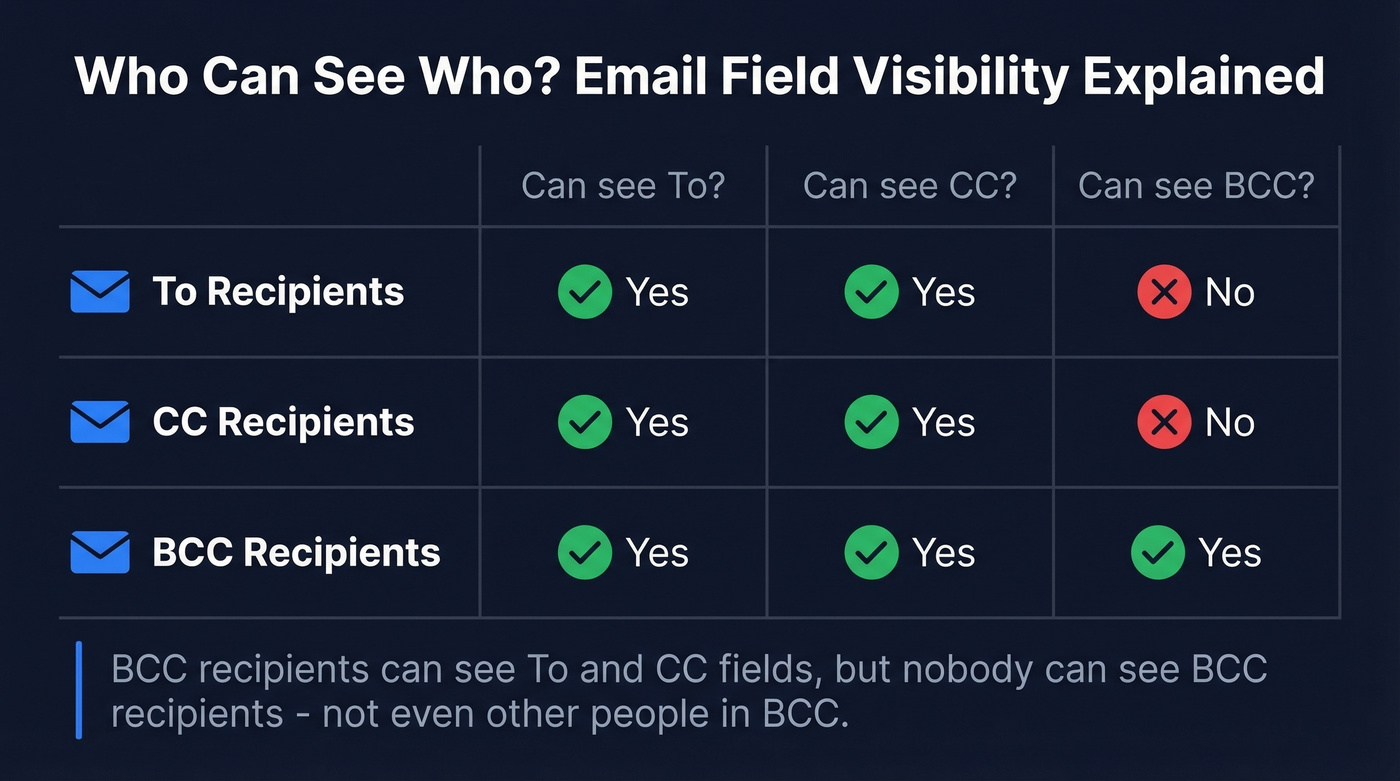
Here's the visibility breakdown:
| Field | Visible to To? | Visible to CC? | Visible to BCC? |
|---|---|---|---|
| To | Yes | Yes | Yes |
| CC | Yes | Yes | Yes |
| BCC | No | No | No (can't see other BCCs either) |
BCC recipients can see who's in the To and CC fields. But nobody - not To, not CC, not other BCC recipients - can see who's in BCC.
BCC Mistakes That Made Headlines
These aren't hypotheticals. We've seen this exact scenario play out at companies we've worked with, and the fallout is always worse than people expect.
Running Warehouse (May 2024): An email about updated terms of service exposed nearly 1,000 customer email addresses due to a CC/batching failure. Nearly a thousand customers could suddenly see each other's contact information.
Australia DFAT (September 2020): The Department of Foreign Affairs and Trade accidentally exposed the personal details of nearly 3,000 Australian citizens in a COVID-related travel email. One misclick, thousands of people compromised.
Serco (May 2020): The outsourcing firm exposed the email addresses of nearly 300 contact tracers by using CC instead of BCC. During a pandemic. When those tracers' identities were supposed to be confidential.
And it's not just traditional email. One Outlook user described accidentally hitting "Cancel Meeting" on a calendar invite with dozens of client addresses - the cancellation notice went out immediately and exposed every recipient. Meeting updates can expose recipient lists in similar ways, depending on the calendar client and how the invite was originally sent.
How to BCC in Gmail, Outlook & Apple Mail
Gmail
Desktop: Click Compose, then click "Bcc" in the top-right of the compose window (next to the To field). The BCC field appears. Add your recipients and send.
Mobile: Tap Compose, then tap the down arrow next to the "To" field. This reveals both CC and BCC fields.
Pro tip: if you've organized contacts into Google Contacts labels, type the label name directly into the BCC field to populate the entire group. Gmail caps BCC at roughly 500 recipients per message for most accounts, and if you hit the limit, the send can be blocked or fail silently.
Outlook
In classic Outlook, go to the Options tab in a new message and click "Bcc" to reveal the field. In newer versions, enable it from Options (Show fields > Show Bcc), and once it's on, it stays visible for future messages until you turn it off.
After sending, you can verify BCC recipients by opening the message in Sent Items. In Outlook's message header, a "+" indicator (like "+11") shows there are additional recipients beyond what's displayed.
Apple Mail
Open a new message, then look for the dropdown or menu option to enable "Bcc Address Field." Once enabled, the BCC row appears in your compose window. It stays visible until you manually hide it again.

If you're BCC'ing more than 50 recipients, you've outgrown BCC. Prospeo lets you build targeted contact lists with 30+ filters, then push verified emails straight into your outreach tool - no CC disasters, no bounces, no exposed recipient lists. 98% email accuracy, $0.01 per lead.
Ditch the BCC field. Send smarter outreach that actually lands.
What Happens When a BCC Recipient Replies?
This is where most people get confused, and the confusion causes real problems.
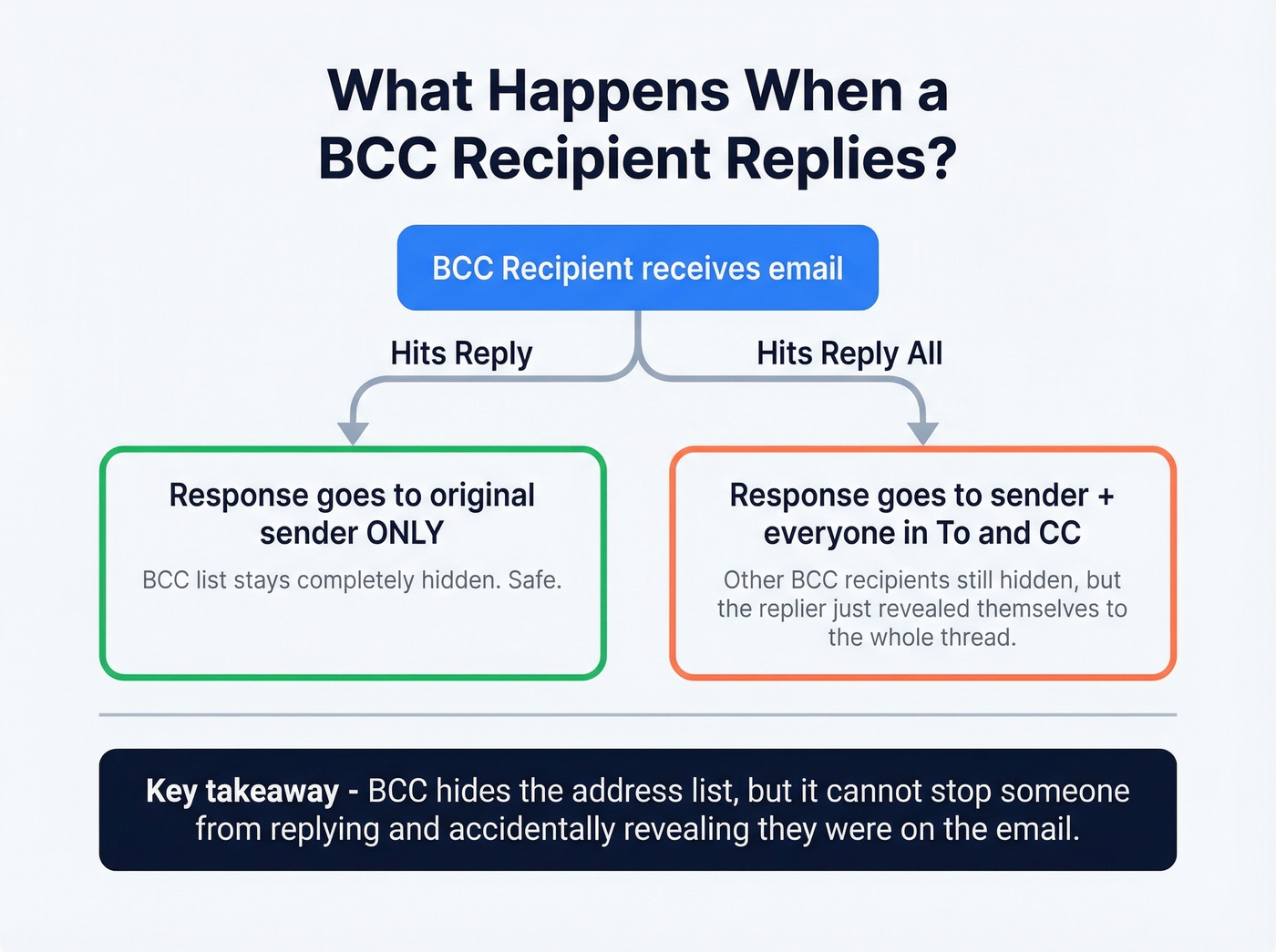
Reply: The response goes to the original sender only. It doesn't reveal the BCC list.
Reply All: The response goes to the sender plus everyone in the To and CC fields. It still doesn't reveal other BCC recipients - their addresses were stripped from the message headers entirely.
Here's the thing, though: BCC hides addresses, but it doesn't prevent someone from replying. If a BCC'd person hits Reply All, the To and CC recipients will see that response and wonder why someone they didn't know was on the email is suddenly in the thread. The blind copy protects the list, not the secret.
BCC Etiquette: When to Use It (and When Not To)
Use BCC when:
- You're sending to a group of people who don't know each other - event invites, customer announcements, vendor updates. Their email addresses are personal data. Protect them.
- You want to prevent a Reply All storm. Twenty people on a CC thread and one person hits Reply All with "Thanks!" - now everyone's inbox is a disaster.
- You're introducing someone and then dropping off the thread. BCC yourself on the intro, then the conversation continues without you cluttering the To field.
Skip BCC when:
- You're secretly looping in your manager to "document" a conversation. This is technically functional and relationally destructive. In our experience, the BCC-your-boss move backfires more often than it helps.
- You're trying to send a newsletter. BCC wasn't built for this, and it'll hurt you at scale.
- You're emailing a small team where transparency matters. If everyone should know who's in the conversation, use CC.
One sysadmin on r/sysadmin described receiving a vendor blast with hundreds of competitor email addresses visible in CC. Their response? Reply All to publicly call out the sender - and CC the sender's IT and HR departments. That's the kind of professional damage a single missing "B" causes.
BCC and Compliance: HIPAA, GDPR, CAN-SPAM
BCC helps with privacy, but it's not a compliance strategy on its own. Let's be honest - too many teams treat it like one.
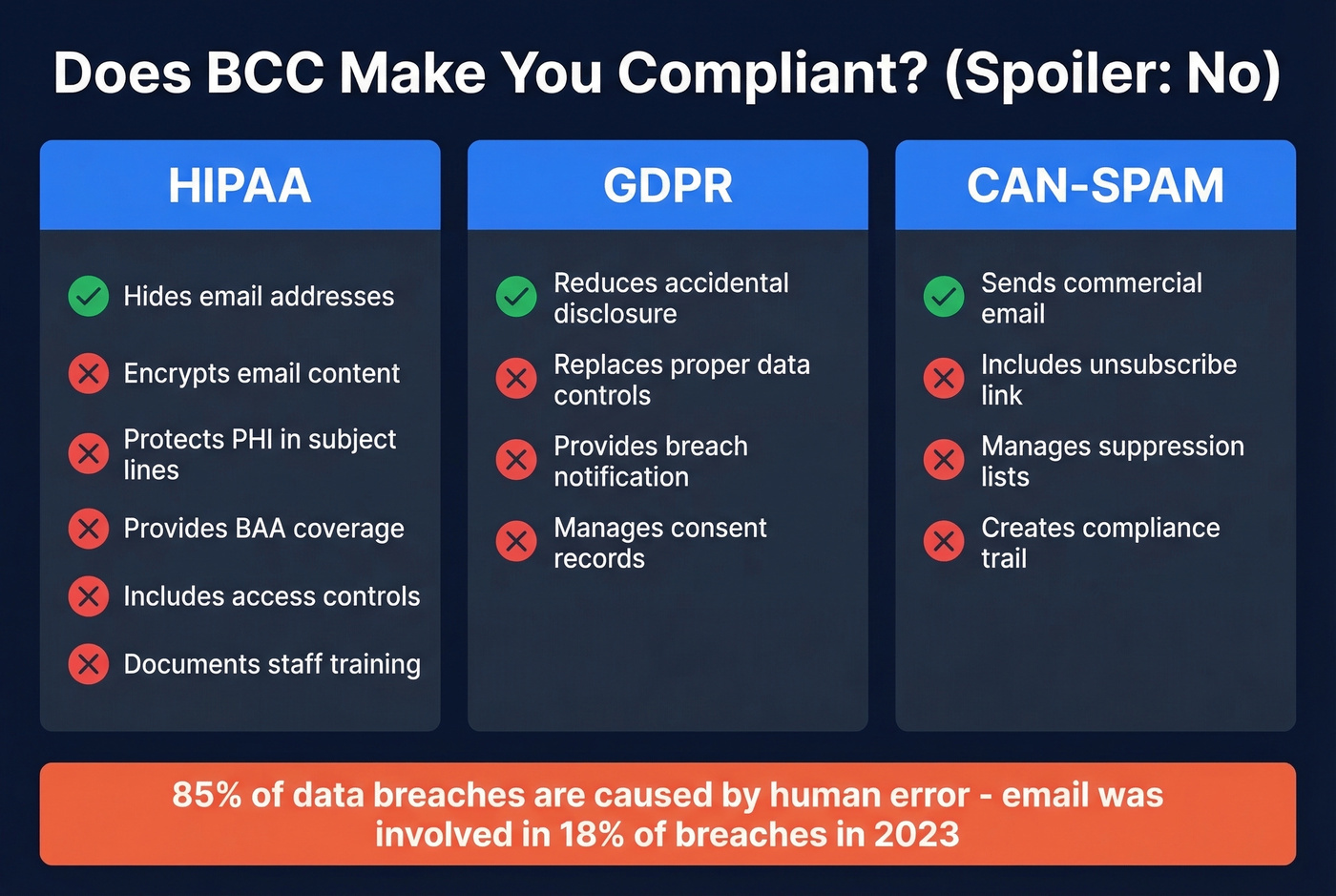
HIPAA: BCC is not sufficient for HIPAA-compliant group emails. You still need encryption, a HIPAA-compliant email service, patient consent, a Business Associate Agreement, access controls, and staff training. BCC hides addresses. It doesn't encrypt content or protect PHI in subject lines.
GDPR: Email addresses are personal data under GDPR. Exposing them via a CC mistake can constitute a personal data disclosure and may trigger breach notification obligations. BCC reduces the risk of accidental disclosure, but it doesn't replace proper controls and incident response.
CAN-SPAM: CAN-SPAM requires a functioning unsubscribe mechanism in every commercial email. BCC provides none - no unsubscribe link, no suppression list management, no compliance trail. This alone disqualifies BCC as a newsletter tool.
One stat worth knowing: 85% of data breaches are attributable to human error, and email was involved in 18% of breaches in 2023. The CC-instead-of-BCC mistake is one of the most common vectors.
When to Stop Using BCC
Look, most people using BCC for anything beyond five or ten recipients are already misusing it. BCC was designed for hiding a few recipients on a personal or small-group email. It was never designed for bulk sends, and using it that way creates real problems: spam filters flag you, your sender reputation takes a hit, and repeated misuse can get your domain blacklisted. You get no analytics - no opens, no clicks, no bounces, no unsubscribe tracking. There's no personalization, no branding, and no way to know if anyone actually read your message.
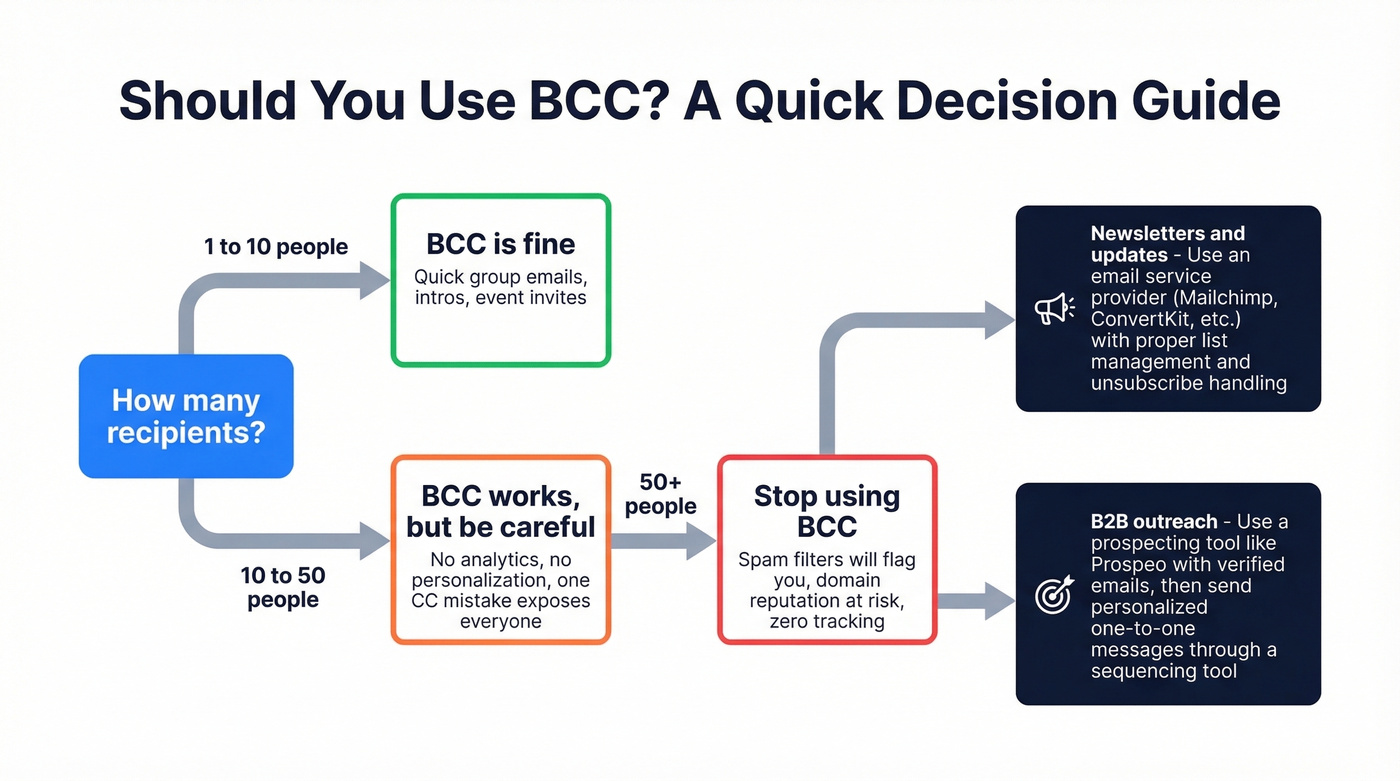
If you're BCC'ing more than about 50 people, you've outgrown BCC. For newsletters, use an email service provider with proper list management and compliance features.
For B2B outreach, the stakes are even higher - you're one CC mistake away from exposing every prospect's address to each other. Tools like Prospeo let you build targeted prospect lists with 98% email accuracy and real-time verification, so every message goes to a real inbox as a personalized one-to-one send. No BCC gymnastics, no exposed addresses, no bounces tanking your domain reputation.
If you're building lists for outbound, it also helps to understand email deliverability, manage email velocity, and keep your email bounce rate under control.

BCC protects privacy but kills personalization. Every recipient gets the same generic message. Prospeo gives you 143M+ verified emails with 50+ data points per contact - so you can send targeted, one-to-one emails at scale without risking a Reply All catastrophe.
Replace blind mass emails with data-driven outreach that books meetings.
FAQ
Can BCC recipients see each other?
No. BCC recipients can't see other BCC recipients. Their addresses are stripped from message headers at the SMTP level before delivery, making the hiding absolute rather than cosmetic.
Does BCC prevent Reply All?
No. A BCC recipient can still hit Reply All, which sends their response to the sender and everyone in To/CC - revealing their own presence in the thread, though not other hidden recipients.
Is BCC safe for HIPAA compliance?
BCC alone isn't HIPAA-compliant. You also need end-to-end encryption, a compliant email service, patient consent, a signed BAA, and documented staff training. BCC only hides addresses.
What's the maximum BCC limit in Gmail?
Gmail caps BCC at roughly 500 recipients per message for most accounts. Workspace admins may see slightly different limits. For larger sends, use a dedicated mail merge tool or ESP.
What's a better alternative to BCC for outreach?
Use a verified contact data platform to build targeted lists and send personalized emails individually. Each prospect gets a one-to-one message with no exposed addresses, full deliverability tracking, and bounce rates under 4%.