

Boomerang for Gmail: Pricing, Reviews, Pros & Cons
Your Boomerang trial just expired, and now you're staring at 10 credits a month wondering if this thing is worth paying for. Gmail added Schedule Send years ago, so the question is fair: does Boomerang still earn its price tag in 2026?
Here's the full breakdown so you can decide without guessing.
30-Second Verdict
Boomerang is worth it if you rely on conditional follow-ups and return-if-no-reply reminders - features Gmail's native Schedule Send can't touch. The Pro plan at $14.98/mo is the sweet spot. If you only schedule a handful of emails per week, skip it entirely - Gmail does that for free.
Boomerang holds a 4.6/5 on G2 across 420+ reviews, which is solid for a productivity extension that's been around this long.
Pricing Breakdown
All prices below reflect annual billing.
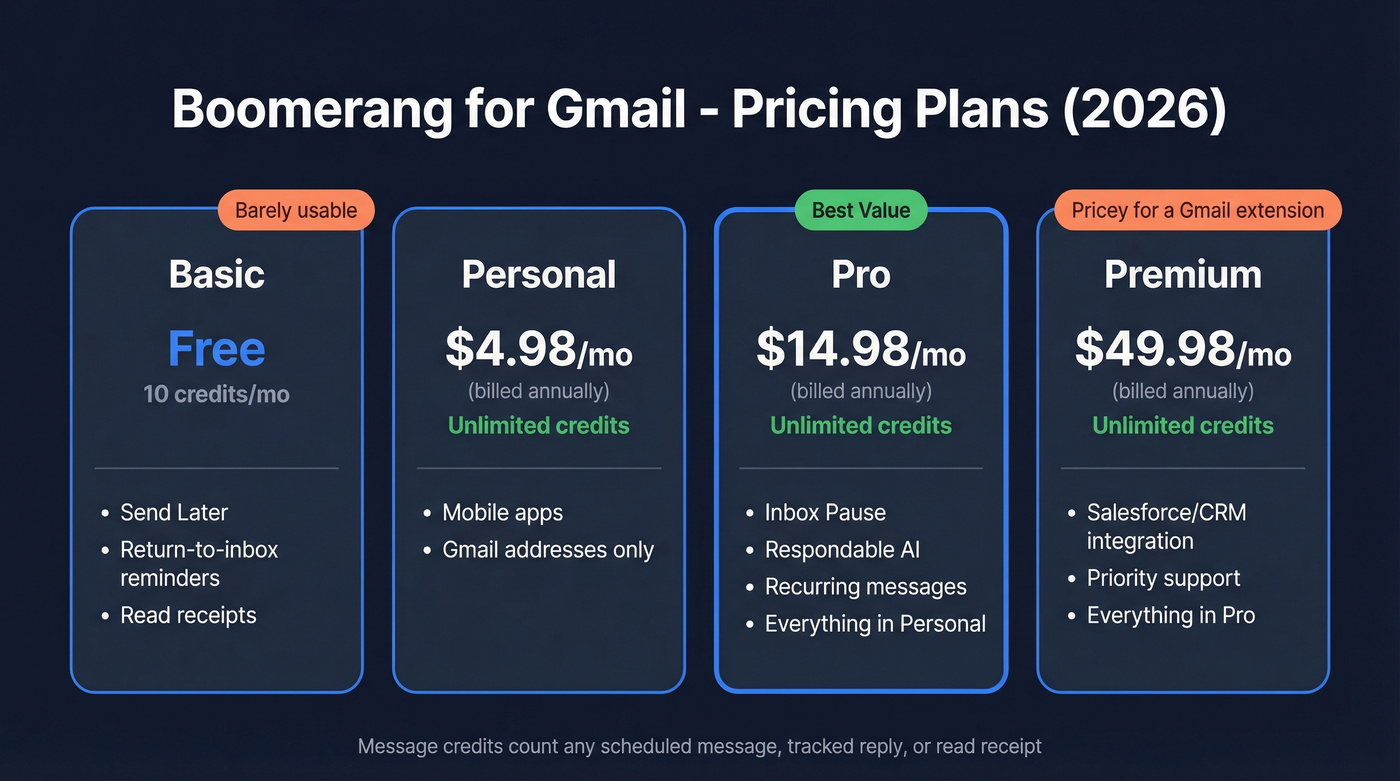
| Plan | Price (Annual) | Message Credits | Key Features |
|---|---|---|---|
| Basic | Free | 10/month | Send Later, return-to-inbox reminders, read receipts |
| Personal | $4.98/mo | Unlimited | Mobile apps, Gmail addresses only |
| Pro | $14.98/mo | Unlimited | Inbox Pause, Respondable AI, recurring messages |
| Premium | $49.98/mo | Unlimited | Salesforce/CRM integration, priority support |
The credit system trips people up. Message credits count any message scheduled with Boomerang or using any combination of its features - Send Later, Response Tracking, Read Receipts. Ten credits a month means the free plan is a permanent trial, not a real tier.
Pro is the plan most people actually need. It unlocks Inbox Pause, the Respondable AI writing assistant, and recurring messages. Premium only makes sense if you need Salesforce integration, and at $49.98/mo for a Gmail extension, that's a tough sell unless your CRM integration workflow absolutely demands it.
What Boomerang Does That Gmail Can't
Gmail's Schedule Send lets you pick a date and time. That's it.
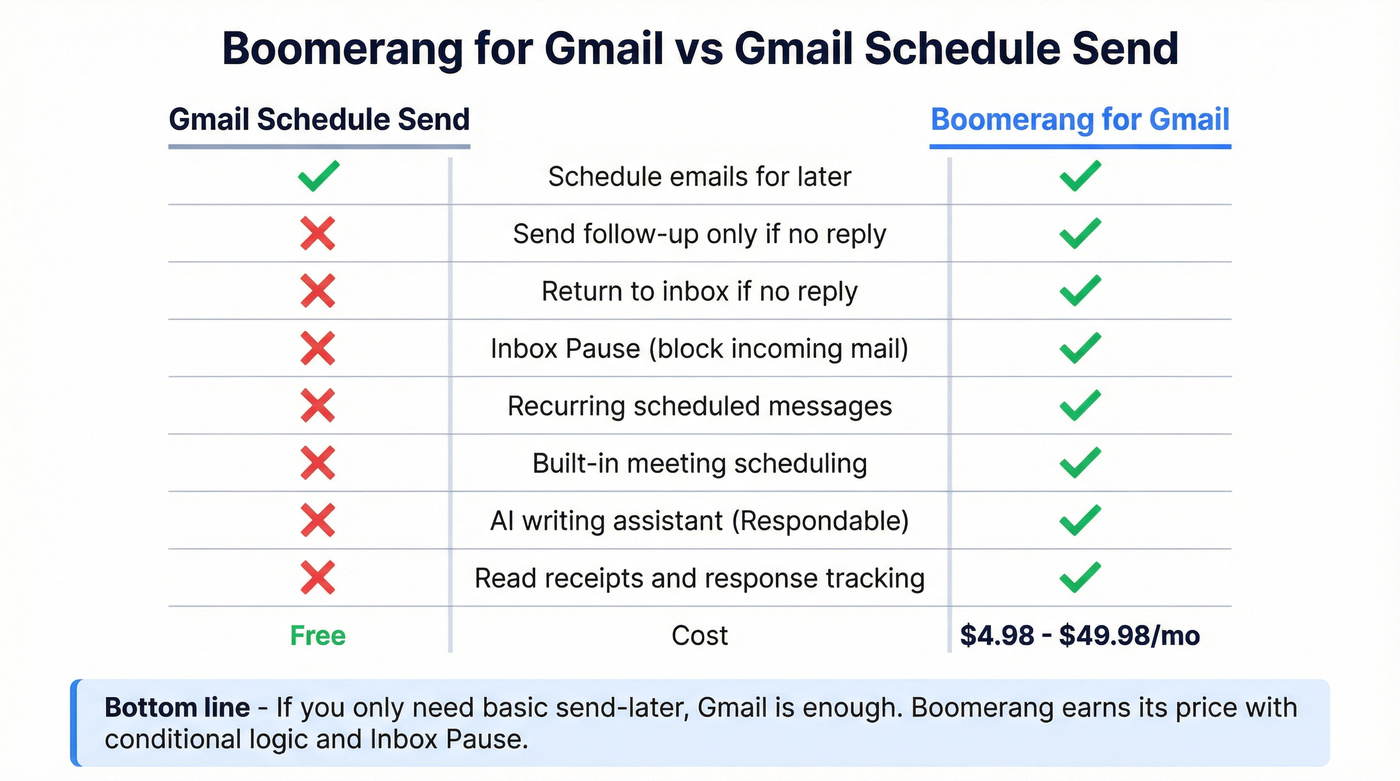
Boomerang's real value lives in the conditional logic Gmail doesn't offer. The killer feature is "send a follow-up only if the recipient hasn't replied." One Reddit user described being "completely dependent on Boomerang" specifically for this - scheduling birthday emails, conditional follow-ups, and return-to-inbox reminders that only fire when someone goes silent. Gmail simply can't replicate that workflow, and we've looked for workarounds. There aren't any good ones.
Inbox Pause is the other standout. You block incoming email for a set window so you can actually focus. Boomerang also includes meeting scheduling features that work inside Gmail, so you can propose times without the tab-switching dance (and tighten up your professional meeting request email while you’re at it).
Real User Pros and Cons
Pros:
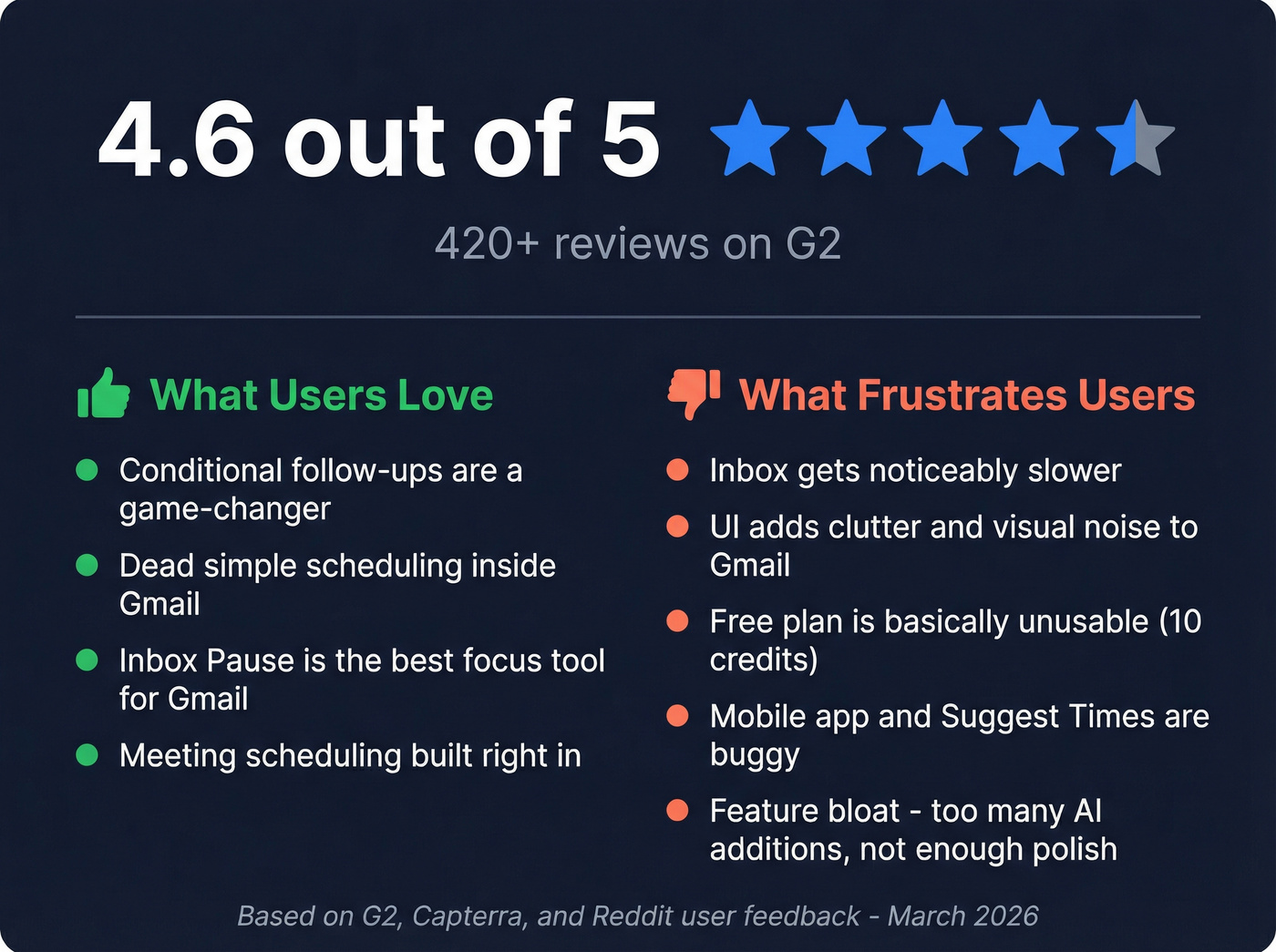
- Conditional follow-ups change how you manage email. One G2 reviewer called "return to inbox if recipient didn't reply" the feature that transformed their entire workflow.
- Scheduling is dead simple - minimal learning curve, works right inside Gmail's compose window.
- Inbox Pause on Pro and above is one of the best focus tools available for Gmail users.
- Meeting scheduling is built in, so you can suggest times directly from your inbox.
Cons:
- Inbox performance takes a hit. This is the #1 frustration across reviews - slow loading and syncing issues, especially with advanced paid features enabled.
- The UI adds visual clutter to Gmail. Boomerang injects buttons, banners, and icons that make the interface feel busy.
- The free plan's 10 credits are basically useless for real work.
- Mobile app experience is mediocre, and the entire product is English-only - a real limitation for international teams.
- Suggest Times is buggy. Time zone handling isn't always reliable, and recipients sometimes hesitate to click embedded time buttons.
- Feature bloat is creeping in. Boomerang keeps adding AI features instead of refining the core scheduling experience, which is frustrating when the basics still have rough edges.

Boomerang's conditional follow-ups are powerful - but they're worthless if half your emails bounce. Prospeo verifies addresses across 300M+ profiles with 98% accuracy at $0.01/email. Pair verified data with your scheduling workflow and every follow-up hits a real inbox.
Stop scheduling perfectly timed emails to addresses that don't exist.
Is Boomerang Safe?
Look, giving a browser extension access to your email makes people nervous, and it should. Boomerang's security posture is actually solid though. They don't store message bodies - only message headers for identifying and scheduling emails. Authentication runs through Google OAuth 2.0, so Boomerang never sees your password.
Parent company Baydin, Inc. completes SOC 2 Type II audits annually, and their data centers hold ISO 27001 certifications. They've also passed Google's OAuth API verification process, which includes a privacy policy review and security assessment. For a Gmail extension, that's about as buttoned-up as it gets.
Alternatives Worth Considering
| Tool | Starting Price | Best For |
|---|---|---|
| Gmail Schedule Send | Free | Basic send-later |
| Mixmax | $29/user/mo | Full sales engagement |
| Gmelius | $19/user/mo | Team shared inbox (4.7/5 on Capterra) |
| GMass | ~$20-50/mo | Mass email campaigns |
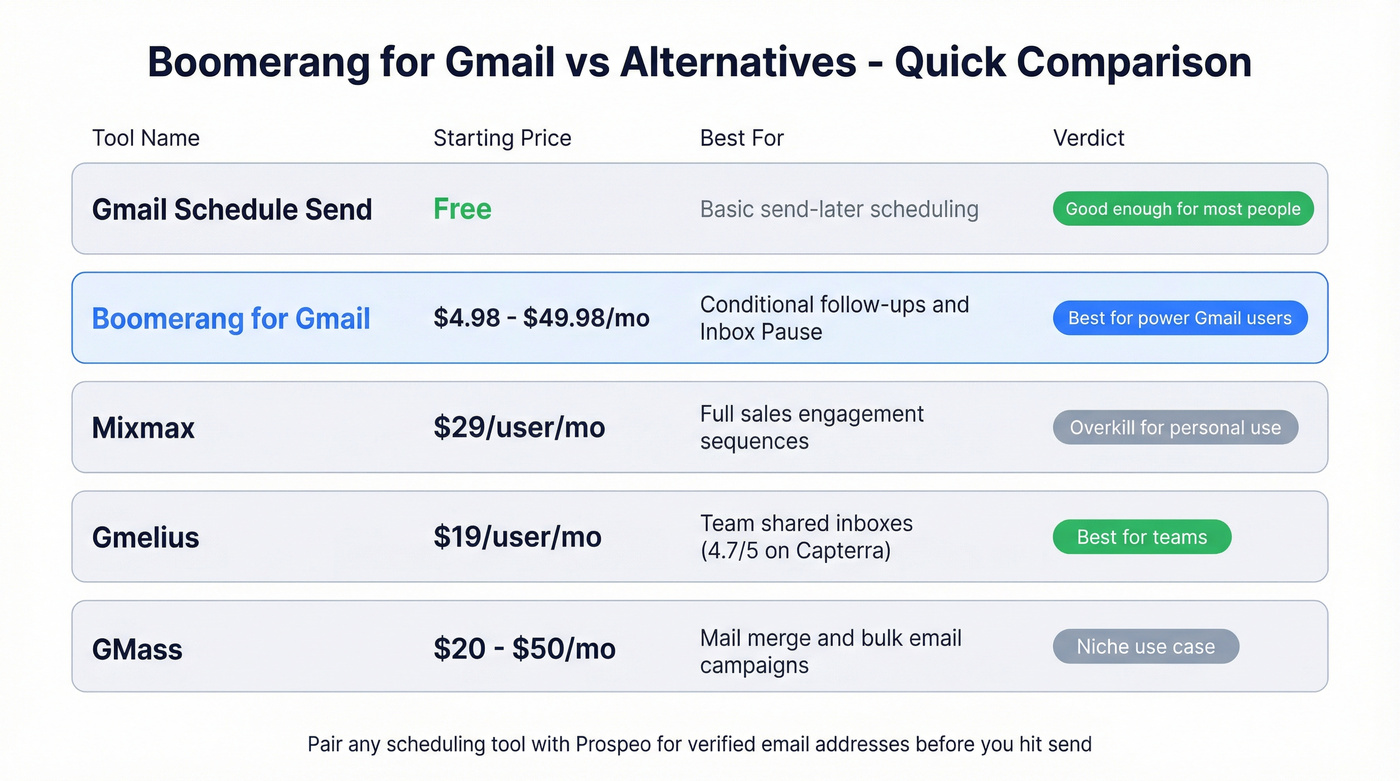
Gmail's built-in scheduling covers most of what casual users need. Mixmax is overkill for personal productivity but makes sense for sales teams running sequences. Gmelius is the pick for teams sharing support@ or sales@ inboxes. GMass is purpose-built for mail merge and bulk sends.
Our honest take: Boomerang is the best Gmail scheduling extension on the market. But most people don't need a Gmail scheduling extension. If your workflow is "send this email Tuesday at 9 AM," Gmail does that natively. You're paying for conditional logic and Inbox Pause - make sure you'll actually use them before pulling out your card.
Pair It With Verified Data
Boomerang schedules the email, but if you're doing outbound, you need verified addresses before you hit send. We've seen too many teams build beautiful follow-up sequences only to watch half their emails bounce. Prospeo handles verification with 98% email accuracy across 300M+ professional profiles, so your carefully timed follow-ups land in real inboxes. The free tier gives you 75 verified emails per month - enough to test the workflow before committing.
If you’re building lists first, start with email finder extensions or a company email address finder, then run them through a best email verification tool to protect deliverability.

You're evaluating $14.98/mo for smarter email scheduling. Now make sure the addresses you're scheduling to are real. Prospeo's free tier gives you 75 verified emails per month - enough to test your entire Boomerang follow-up sequence with contacts that won't bounce.
Verify 75 emails free this month - no contract, no credit card.
Who Should Pay for Boomerang
Pay for Pro ($14.98/mo) if you:
- Rely on conditional follow-ups (send only if no reply)
- Manage 20+ active email threads daily
- Need Inbox Pause to protect focus time
Freelancers and consultants managing client communication get the most value here. Enterprise sales teams should look at dedicated platforms instead (especially if you’re running a full outbound sales playbook with sequences and tracking).
Skip Boomerang if you:
- Schedule fewer than 5 emails per week - Gmail's free Schedule Send is enough
- Need team collaboration - Gmelius is built for that
Best plan for most people: Pro at $14.98/mo. The free tier isn't usable, Personal is too limited, and Premium is overpriced for what it adds. That's the honest verdict - solid tool, narrow use case, and only worth the money if you'll actually lean on the features Gmail can't match.
FAQ
Is Boomerang for Gmail free?
Boomerang offers a free Basic plan, but it's limited to 10 message credits per month - barely enough to test the extension. For any real scheduling or follow-up workflow, you'll need Personal ($4.98/mo) at minimum or Pro ($14.98/mo) for the full feature set.
Does Boomerang slow down Gmail?
Yes. Many users report noticeable performance lag, and G2 reviews frequently cite slow inbox loading and syncing issues, especially with advanced features enabled. If inbox speed matters to you, test the free plan first before committing.
What's the best Boomerang for Gmail alternative?
For basic scheduling, Gmail's built-in Schedule Send is free and covers most needs. For sales teams needing sequences and tracking, Mixmax is the stronger choice. For verified contact data before outbound sends, Prospeo offers 75 free email lookups per month at 98% accuracy - a useful complement to any scheduling tool.
Is Boomerang safe to use with my Gmail account?
Boomerang uses Google OAuth 2.0 authentication and never stores email bodies - only message headers. Parent company Baydin holds SOC 2 Type II certification and has passed Google's OAuth API verification, making it one of the more security-conscious Gmail extensions available.