

Boomerang Pricing, Reviews, Pros and Cons: Is It Worth It in 2026?
"Boomerang" is at least four different products - Boomerang for Gmail, Boomerang.ai (meeting scheduling), Bloomerang (nonprofit donor management), and Boomerang Parental Control. This review covers Boomerang for Gmail/Outlook: the email productivity extension that handles scheduling, reminders, and follow-ups.
30-Second Verdict
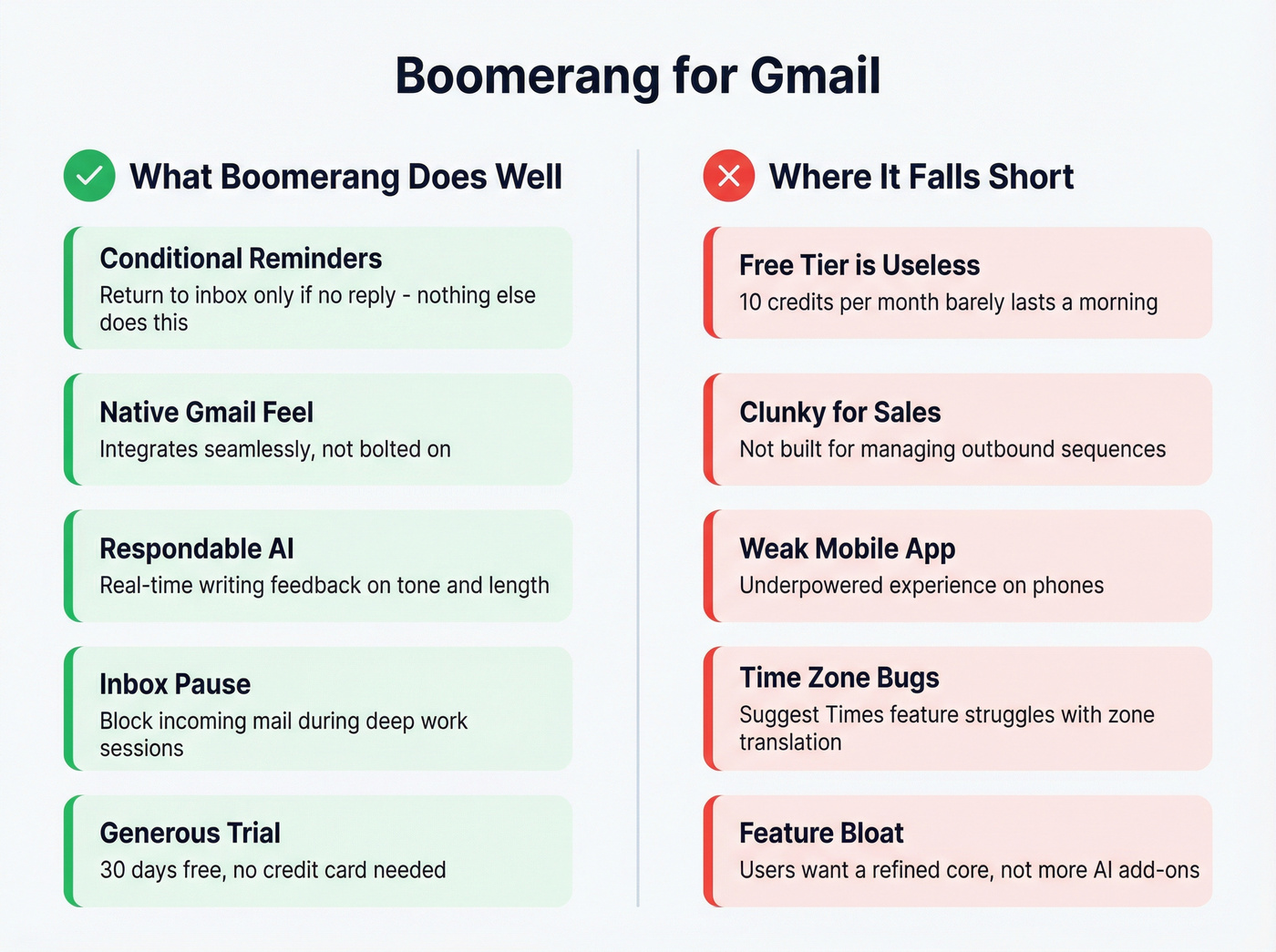
Use Boomerang if you live in Gmail and rely on conditional reminders. The "return to inbox if no reply" workflow is genuinely unique, and Reddit users describe themselves as "completely dependent" on it. The Pro plan at $14.98/mo unlocks the full feature set.
Skip it if you only need Send Later - Gmail does that natively for free now. And if your emails are bouncing, that's not a timing problem. That's bad contact data, and no inbox extension fixes it (see Email Bounce Rate).
Pricing Breakdown
All prices below reflect annual billing. Boomerang shows per-month prices billed annually on its pricing pages.
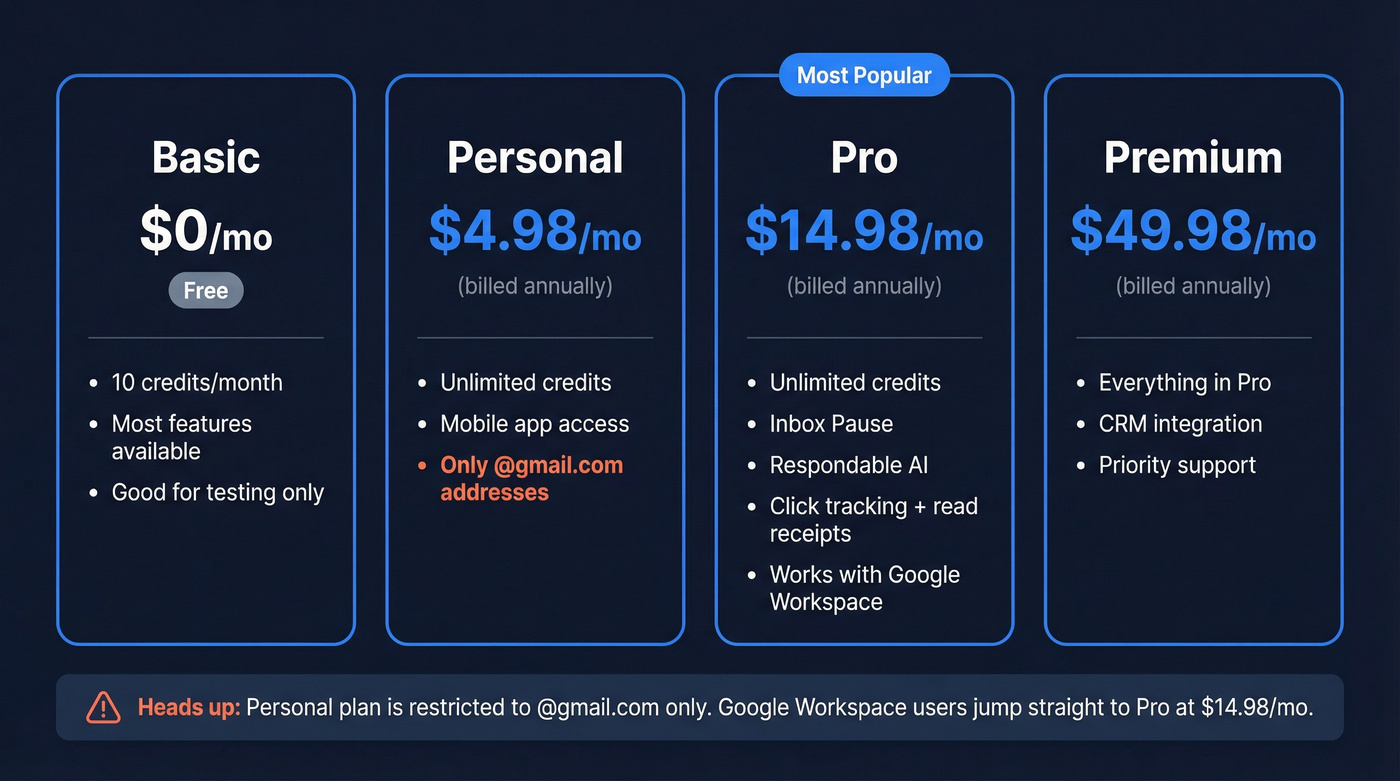
| Plan | Price/mo | Credits | Key Unlocks |
|---|---|---|---|
| Basic | Free | 10/mo | Most features, limited |
| Personal | $4.98 | Unlimited | Unlimited credits + mobile apps |
| Pro | $14.98 | Unlimited | Inbox Pause, Respondable AI |
| Premium | $49.98 | Unlimited | CRM, priority support |
Here's the gotcha most review sites miss: the Personal plan is restricted to @gmail.com addresses. If you're on Google Workspace - which most business users are - you can use Basic for free, but the first paid tier with unlimited credits is Pro at $14.98/mo. That's a meaningful jump for an inbox add-on.
"Message credits" count every action: scheduled sends, response tracking, read receipts. Ten credits on the free tier vanish fast. We burned through them before lunch during testing.
Outlook users pay slightly more ($4.99/$14.99) with a shorter 14-day trial versus Gmail's 30-day Pro trial. Enterprise plans include custom service agreements and dedicated training - contact sales for pricing. Teams pricing requires a quote through Boomerang's group subscription page, but expect a volume discount off Pro/Premium annual rates.
Reviews and Ratings
| Platform | Rating | Reviews |
|---|---|---|
| G2 | 4.6/5 | 420 (75% five-star) |
| GetApp | 4.7/5 | 183 |
| Capterra / Software Advice | 4.5/5 | 39 |
Low-star reviews are rare overall, and sentiment skews overwhelmingly positive. The complaints that do surface tend to cluster around the same few issues we'll cover in the cons section.

Boomerang is great at reminding you to follow up - but follow-ups don't matter if your emails bounce. Prospeo verifies 300M+ professional emails at 98% accuracy with a 7-day refresh cycle, so you're never emailing outdated contacts. Free tier: 75 emails/month, no credit card.
Fix the data before you optimize the timing.
Pros
- Conditional "return if no reply" reminders - this is the feature. Nothing else replicates "boomerang it back to me only if they don't respond within 3 days." Reddit users cite scheduling birthday messages, conditional follow-ups, and timed inbox returns as the workflows that make it indispensable (for outbound, compare with follow up email software).
- Tight Gmail integration - a top praise theme on G2. It feels native, not bolted on.
- Respondable AI writing feedback (Pro+) gives real-time suggestions on tone, length, and subject line effectiveness before you hit send (pair it with these email subject line examples).
- Inbox Pause blocks new emails during focus time. We've seen teams use this as their primary deep-work tool.
- 30-day free Pro trial, no credit card - generous enough to actually evaluate the tool.
Cons
- Free tier is barely functional. Ten credits per month is a demo, not a plan.
- Clunky for sales workflows. One Reddit user on r/sales put it bluntly: "quite clunky and not efficient at all" for managing follow-up reminders across prospects. If you're running outbound sequences, this isn't the tool (see sequence management).
- Mobile app and internationalization are weak. Multiple reviews flag the mobile experience as underpowered, and the English-only interface limits international teams.
- "Suggest Times" can be buggy with time zone translation issues, which defeats the purpose of a scheduling feature.
- Feature bloat complaints are growing. G2 reviewers mention cluttered UI and syncing issues - users want a refined core, not more AI add-ons stacked on top.
Is It Worth It in 2026?
Let's be honest: Gmail's native Send Later makes Boomerang's free tier completely pointless in 2026. If scheduling emails is all you need, you already have the tool. Don't pay $15/mo for it.
Where Boomerang earns its keep is the conditional logic layer. If your workflow depends on "remind me only if they haven't replied," "return this thread on Tuesday," and "pause my inbox during this meeting" - there's no free substitute that does all three well. Daily Gmail power users who rely on that reminder ecosystem will find the Pro plan worthwhile.
Everyone else should test the 30-day trial and see if the habits stick before committing.
Alternatives Worth Considering
| Tool | Starting Price | Best For |
|---|---|---|
| Right Inbox | $5.95/mo | Budget scheduling + reminders |
| Mailbutler | $4.95/mo | Lightweight email productivity |
| Mixmax | $12/mo | Sales teams wanting tracking + scheduling |
| Yesware | $19/mo/user | Full sales engagement suite |
| Gmail native | Free | Basic Send Later |
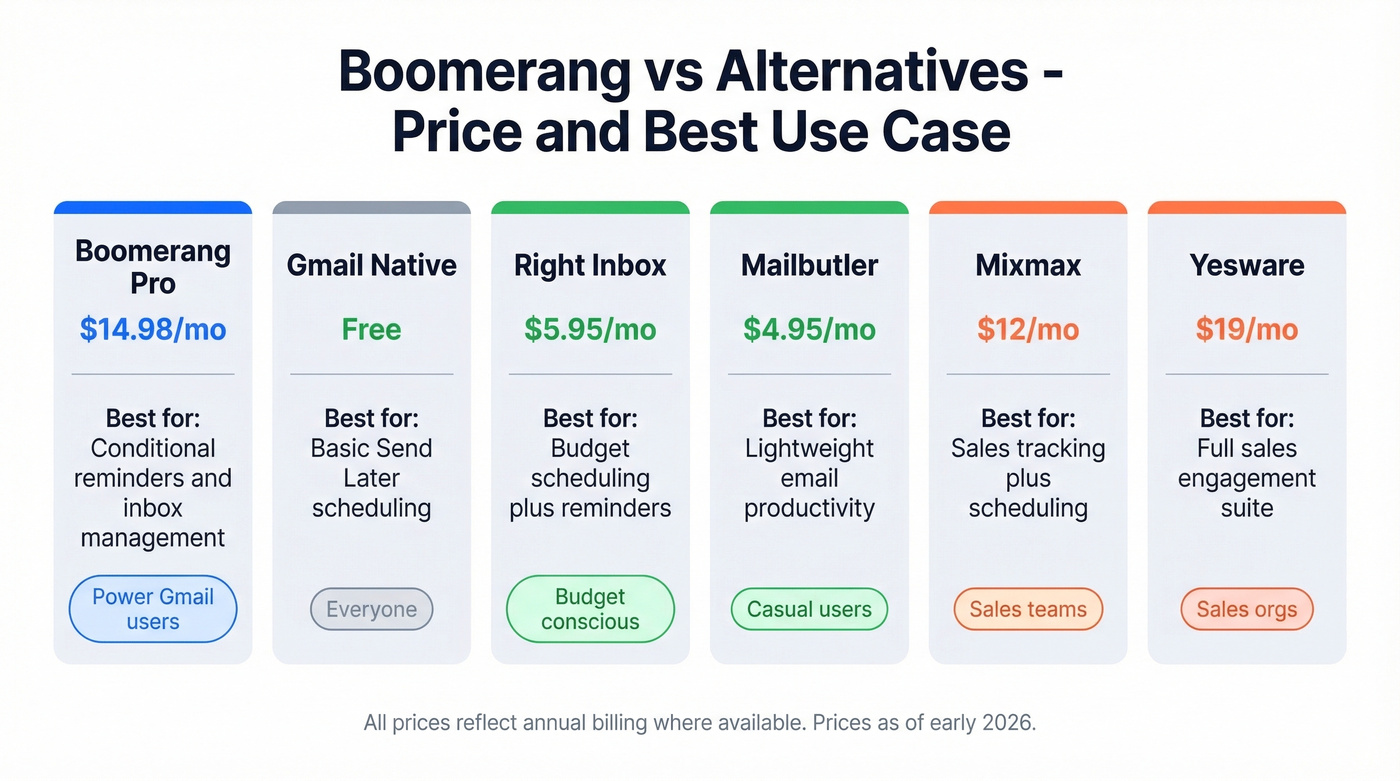
Right Inbox and Mailbutler cover scheduling and basic reminders at roughly a third of Boomerang Pro's cost. Neither matches the conditional reminder depth, but for lighter use cases they're solid picks.
Mixmax is the better choice for sales teams who want email tracking, templates, and scheduling in one package (or see more Mixmax alternatives). Yesware goes further into full sales engagement - sequences, analytics, CRM sync - but at $19/mo per user, you're paying for a different category of tool entirely. FollowUpThen is another option Reddit users mention, though reviews suggest it's even clunkier than Boomerang for sales use cases.
If you're doing outbound and emails are bouncing, the problem isn't timing - it's data. Prospeo pulls from 300M+ professional profiles and verifies emails at 98% accuracy, with data refreshed every 7 days so you're not emailing people who changed jobs last month (more on email deliverability). The free tier gives you 75 emails per month to test, no credit card required.

Reddit users call Boomerang "clunky" for sales workflows - because inbox extensions weren't built for outbound. Prospeo gives you verified emails at $0.01 each, 125M+ direct dials, and intent data across 15,000 topics. That's the actual sales stack upgrade.
Stop scheduling emails to addresses that don't exist.
FAQ
Is Boomerang for Gmail free?
Technically yes - the Basic plan offers 10 message credits per month at no cost. In practice, 10 credits cover a single morning of email scheduling. Most users hit the limit within days and need to upgrade to Personal ($4.98/mo) or Pro ($14.98/mo) for unlimited credits.
What does Boomerang Pro include that Basic doesn't?
Pro ($14.98/mo) unlocks unlimited message credits, Inbox Pause, Respondable AI writing feedback, click tracking, and read receipts. Basic caps you at 10 credits with no AI features. For Google Workspace users, Pro is effectively the first usable paid tier since Personal only supports @gmail.com addresses.
Is Boomerang good for sales teams?
It's decent for individual follow-up reminders but weak for managing outbound at scale. Reddit users on r/sales call it "clunky" for prospect management. Sales teams running sequences are better served by Mixmax ($12/mo) or Yesware ($19/mo). If bounced emails are the real issue, Prospeo's 98% verified email accuracy solves the data problem Boomerang can't touch - free for 75 emails/month.
Does Gmail Send Later replace Boomerang?
For basic email scheduling, yes. Gmail's native Send Later handles timed sends without any extension. Where Boomerang still wins is conditional reminders ("return if no reply"), Inbox Pause, and AI writing feedback - features Gmail doesn't offer natively.