

The Best Follow Up Email Software for 2026
A Belkins analysis of 16.5 million cold emails found that peak reply rates hit 8.4% - from a single email. Every follow-up after that delivers diminishing returns, and four or more emails in a sequence triples unsubscribe rates and more than triples spam complaint risk. So the follow up email software you pick matters less than the data you feed it. If even 5-10% of your list bounces, your domain reputation tanks and no sequencer can save you.
Here's our hot take: most teams shopping for automated follow-up tools are solving the wrong problem. They obsess over sequencer features when their real issue is list quality. We've watched teams burn three domains in a month because they skipped verification. The best sequencer is the one paired with verified data.
Quick Picks
| Pick | Best For | Starting Price |
|---|---|---|
| Prospeo | Verified data before sequencing | Free / ~$0.01/email |
| Instantly | Flat-fee volume scaling | $47/mo |
| Smartlead | Agency multi-client campaigns | $39/mo |
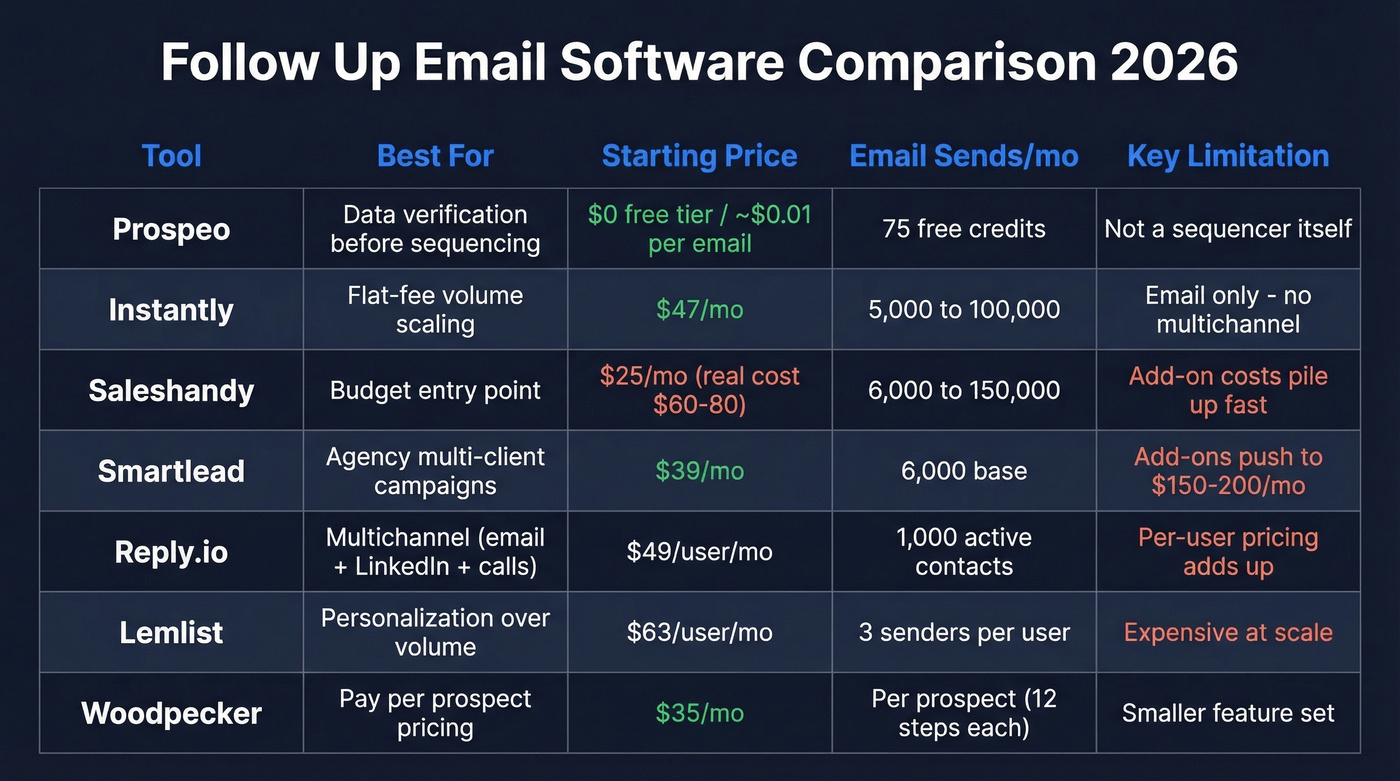
The Best Follow Up Email Tools for 2026
Prospeo - Verify Before You Sequence
Your sequencer is only as good as the emails you feed it. Prospeo sits upstream of every tool on this list, verifying contact data before a single follow-up goes out. The database covers 300M+ professional profiles and 143M+ verified emails at 98% accuracy, refreshed on a 7-day cycle - compared to the 6-week refresh most competitors run. If you’re comparing providers, start with data enrichment and verification accuracy, not sequencer UI.
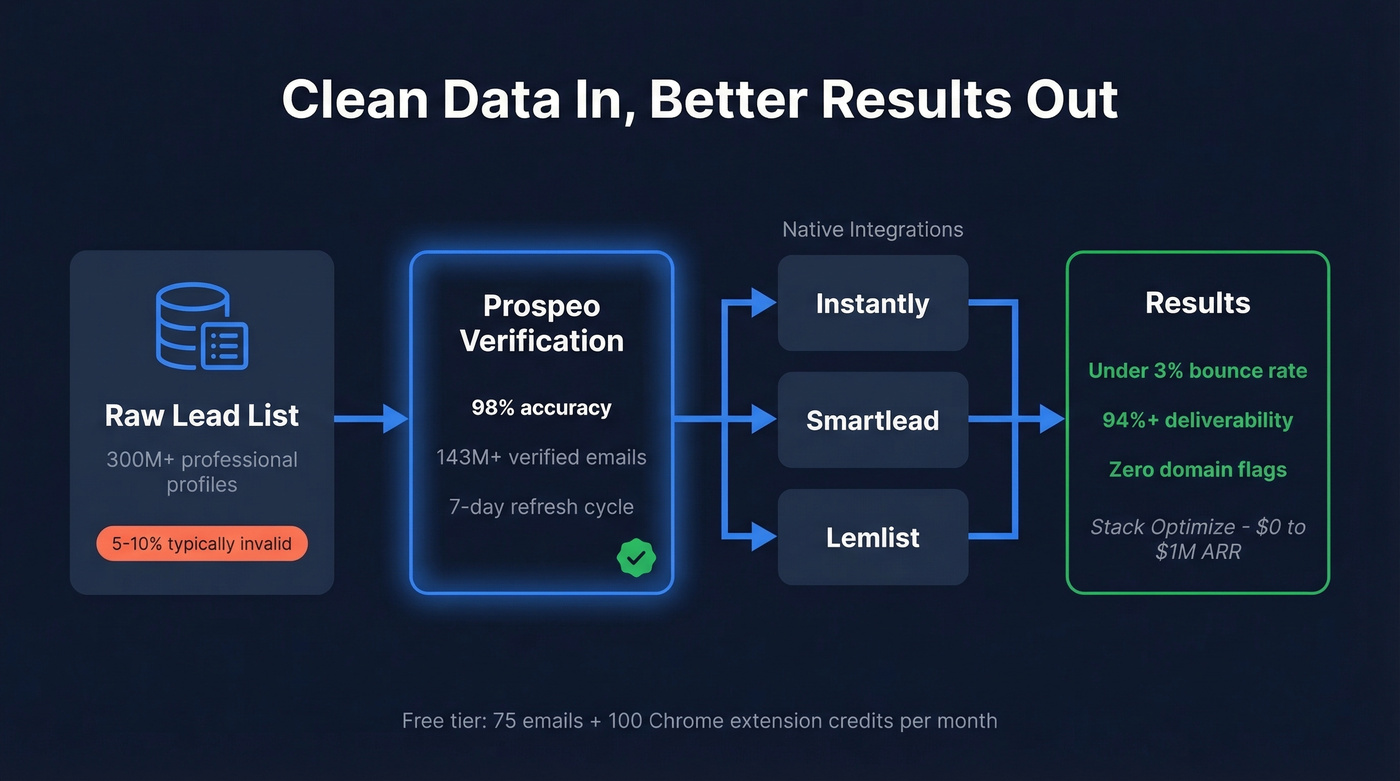
The proof point that matters: Stack Optimize built from $0 to $1M ARR using Prospeo, maintaining 94%+ deliverability, under 3% bounce rates, and zero domain flags across all their clients. That's what clean data looks like in production.
It integrates natively with Instantly, Smartlead, and Lemlist, so verified contacts flow straight into your sequences. The free tier gives you 75 emails plus 100 Chrome extension credits per month to test. Paid plans run about $0.01 per email - a rounding error compared to the cost of a burned domain. If you’re troubleshooting bounces, use an email bounce rate benchmark as your baseline.
Use this if you're running any outbound sequencer and want to guarantee your list won't wreck your sender reputation.
Instantly - Best for Flat-Fee Scaling
Instantly's pricing model is the reason agencies love it. The Growth plan at $47/mo gets you unlimited email accounts, unlimited warmup, and 5,000 sends per month. Hypergrowth jumps to $97/mo for 100,000 sends. Light Speed at $358/mo adds dedicated IP sharding and rotation.
The deliverability network spans 4.2M+ accounts, giving Instantly a real edge on warmup infrastructure. The flat-fee model means adding mailboxes doesn't spike your bill - a massive advantage if you're running 20+ sending accounts. Reddit users on r/coldemail regularly note that Instantly's built-in lead verification costs extra, which is another reason to verify upstream with a dedicated tool before loading your sequences. If you’re scaling safely, pair warmup with email velocity limits.
Skip this if you need multichannel from one platform. Instantly is email-first. For LinkedIn and calls, look at Reply.io or Lemlist.
Saleshandy - Watch the Add-Ons
Saleshandy's Starter plan headlines at $25/mo billed annually, which looks like a steal. Here's the thing: that gets you 6,000 emails per month and a 10-account sender rotation limit per sequence. Starter includes 1,000 one-time verification credits and 50 lead finder credits - once those run out, you're buying add-ons. Real monthly cost lands closer to $60-80/mo for most teams doing serious volume.
The Pro plan at $69/mo billed annually is where Saleshandy gets competitive - 150,000 emails per month, 100 sender accounts per sequence, and Salesforce/HubSpot integrations included. If you're going to use Saleshandy, skip Starter and go straight to Pro. For messaging that doesn’t feel templated, keep a swipe file of sales follow-up templates.
Smartlead - Built for Agencies
Smartlead's Base plan at $39/mo includes 2,000 contacts, 6,000 sends, and 2,000 verified prospect emails per month. That's the hook for agencies managing multiple client inboxes.
Add-ons are where costs climb. SmartDelivery for inbox placement testing runs $49/mo, and dedicated servers cost $39/server/month. A fully loaded agency setup can hit $150-200/mo once you stack SmartDelivery plus a couple of servers, but that's still cheaper than per-seat alternatives when you're managing ten clients.
For single-brand teams, Instantly's simpler pricing makes more sense. If you’re building a broader outbound stack, compare it against other SDR tools before committing.
Reply.io - Multichannel Done Right
Reply.io is the pick when email alone isn't enough. The email-only plan starts at $49/user/mo for 1,000 active contacts. Multichannel at $89/user/mo adds LinkedIn and SMS/calls automation. LinkedIn automation is $69/mo per account, calls and SMS add $29/mo - so a three-person team running full multichannel lands at $400-500/mo.
That's not cheap, but LinkedIn message plus visit combos hit 11.87% reply rates - about 41% higher than email alone. If multichannel drives your pipeline, Reply.io earns its price. If you want to systematize the whole motion, map it to proven sales prospecting techniques.
Lemlist - Personalization Over Volume
Lemlist's Email Pro plan runs $63/user/mo billed annually and includes three email senders per user. Multichannel Expert at $87/user/mo adds LinkedIn automation and a built-in dialer. Extra senders cost $9/mo each.
We've seen teams pick Lemlist specifically for its dynamic images, custom landing pages, and liquid syntax that makes follow-ups feel handwritten. If your strategy leans on personalization over volume - say, targeting 200 high-value accounts instead of blasting 10,000 - this is the right fit. The per-user pricing stings at scale, though, so it works best for small, focused teams. For more structure, build a repeatable B2B cold email sequence.
Woodpecker - Pay Per Prospect
Woodpecker prices by contacted prospects per month rather than seats, starting around $35/mo. Each prospect gets up to 12 campaign steps, and a $29/mo LinkedIn add-on is available per account. The agency panel adds $27/mo per active client. G2 rates it 4.5/5 from 105 reviews, with users praising ease of use and support responsiveness.
It's a solid pick for smaller teams that want predictable costs tied directly to outreach volume rather than seats or sends.

Every follow-up tool on this list depends on clean data. Prospeo delivers 98% email accuracy on a 7-day refresh cycle - so your sequences land in inboxes, not spam folders. Stack Optimize ran zero domain flags across all clients using Prospeo-verified lists.
Stop burning domains. Verify your list at $0.01 per email.
Instantly, Smartlead, Lemlist - none of them can fix a bad list. Prospeo integrates natively with all three, feeding 143M+ verified emails straight into your sequences. Under 3% bounce rates, no add-on verification costs, no contracts.
Plug verified data into your sequencer in under two minutes.
How Many Follow-Ups Should You Send?
The Belkins dataset of 16.5M cold emails makes this clear: reply rates peak with the first email at 8.4% and decline from there. Four or more emails in a sequence triples unsubscribe rates and more than triples spam complaint risk.
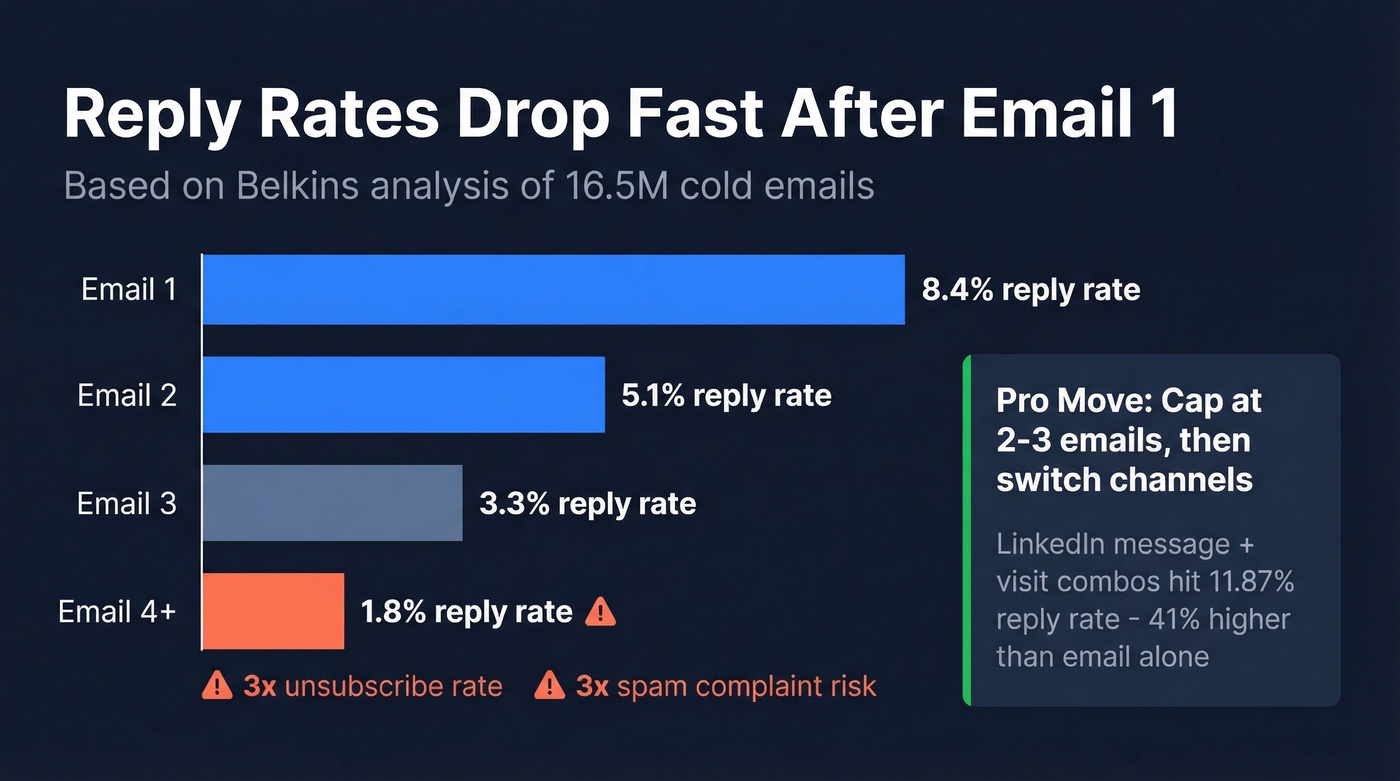
Cap your automated follow-ups at two or three, then switch channels. That same dataset found LinkedIn message plus visit combos pulling an 11.87% reply rate. Your domain reputation will thank you. If you want the deeper benchmarks, see follow-up email reply rate data.
Mistakes That Kill Reply Rates
"Bumping" emails. "Just following up" is the laziest sentence in sales. Each follow-up needs a new angle - a relevant case study, a different pain point, a specific insight about their business. If you need better language, learn how to say just checking in professionally.
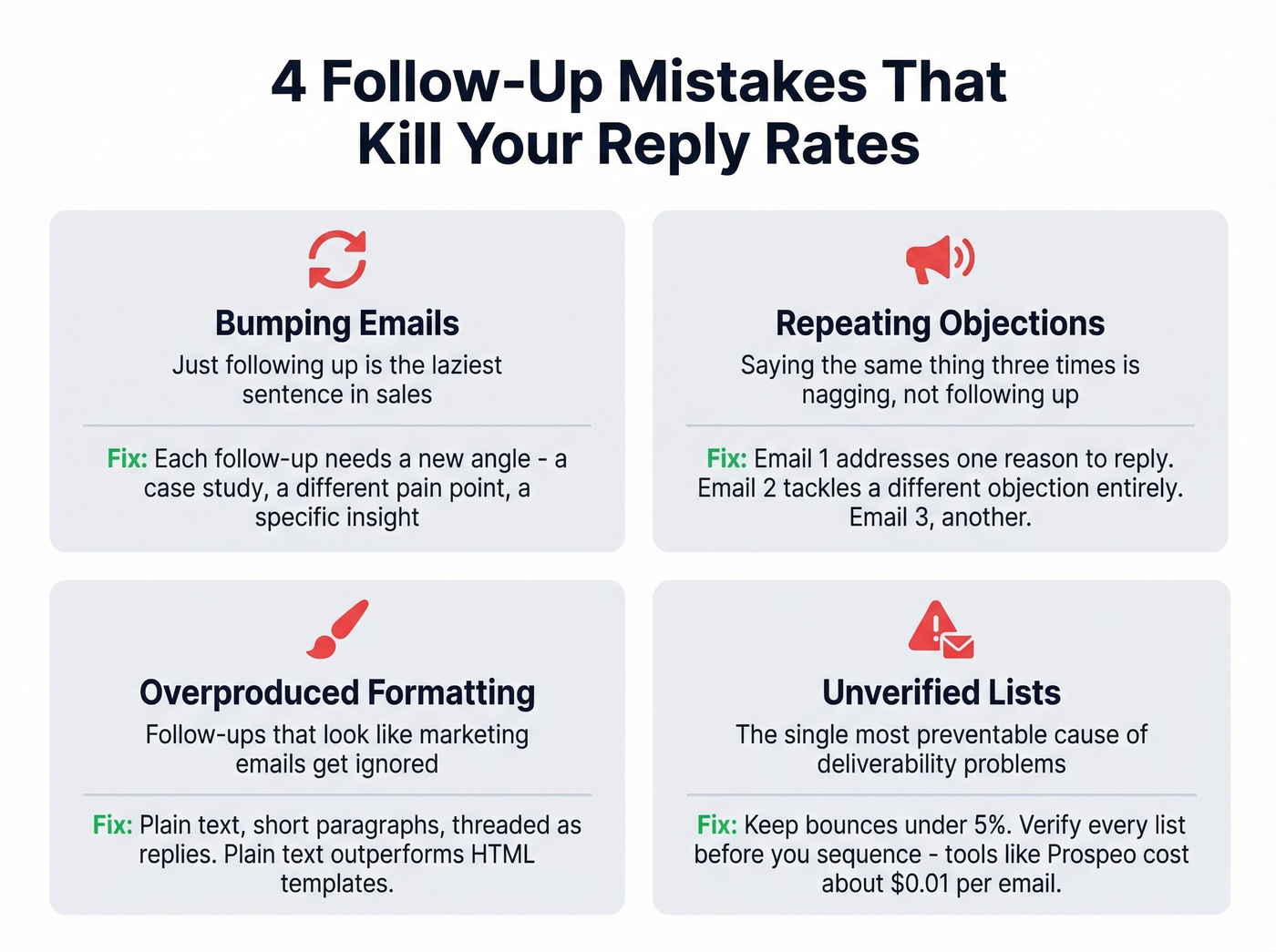
Repeating objections. Your first email addresses one reason to reply. Follow-up two should address a different objection entirely. Follow-up three, another. If you're saying the same thing three times, you're not following up - you're nagging.
Overproduced formatting. Follow-ups that look like marketing emails get ignored. Plain text, short paragraphs, threaded as replies - that's what gets read. We ran a quick test last quarter and plain-text replies outperformed HTML templates by a wide margin. If you’re diagnosing inboxing issues, start with an email deliverability guide.
Unverified lists. Keep bounces under 5%. Verify before you sequence, every time. This is the single most preventable cause of deliverability problems, and it's the one teams skip most often.
FAQ
What's the difference between follow up email software and a CRM?
CRMs store contacts and track deals. Follow up email software automates sequences, tracks opens and replies, and manages send timing across multiple mailboxes. Most sequencers integrate with Salesforce, HubSpot, and Pipedrive so data flows both ways.
Do I need email verification before running follow-up sequences?
Yes. Sending to unverified lists causes bounces that damage sender reputation. Keep bounces under 5%. Prospeo's 98%-accuracy verification at ~$0.01/email catches invalid addresses before they reach your sequencer. Instantly and Saleshandy offer built-in verification, but at extra cost and lower accuracy.
Is cold follow-up email legal?
Cold follow-up is legal if you comply with CAN-SPAM (US), GDPR (EU), and CASL (Canada). Include a clear unsubscribe link, use a real business address, and honor opt-outs within 10 business days. Most sequencers handle unsubscribe management automatically.
What about Mixmax?
We excluded Mixmax at $89/user/mo - it's Gmail-native and better suited for internal follow-ups and account management than cold outbound sequences. If you're running cold campaigns, the tools above are purpose-built for that workflow.