

How to Say Just Checking In Professionally - And Why It Matters
You're staring at a draft email. The cursor blinks after "Hey Sarah, just checking in on..." and you already know it's heading straight to the archive folder. With 392.5 billion emails expected daily in 2026, your follow-up needs to earn its open - and that tired phrase doesn't cut it.
Learning how to say "just checking in" professionally is really about learning to write follow-ups that deserve a reply.
Why "Just Checking In" Fails
The phrase isn't offensive. It's just invisible. A ZeroBounce [analysis of over 1 million work emails](https://www.prnewswire.com/news-releases/nearly-a-quarter-of-email-lists-decay-each-year-new-report-finds-302697945.html) found "check in" appeared 4,286 times, behind "follow up" at 5,755 and "reaching out" at 6,117. You're competing with thousands of identical openers in every inbox.
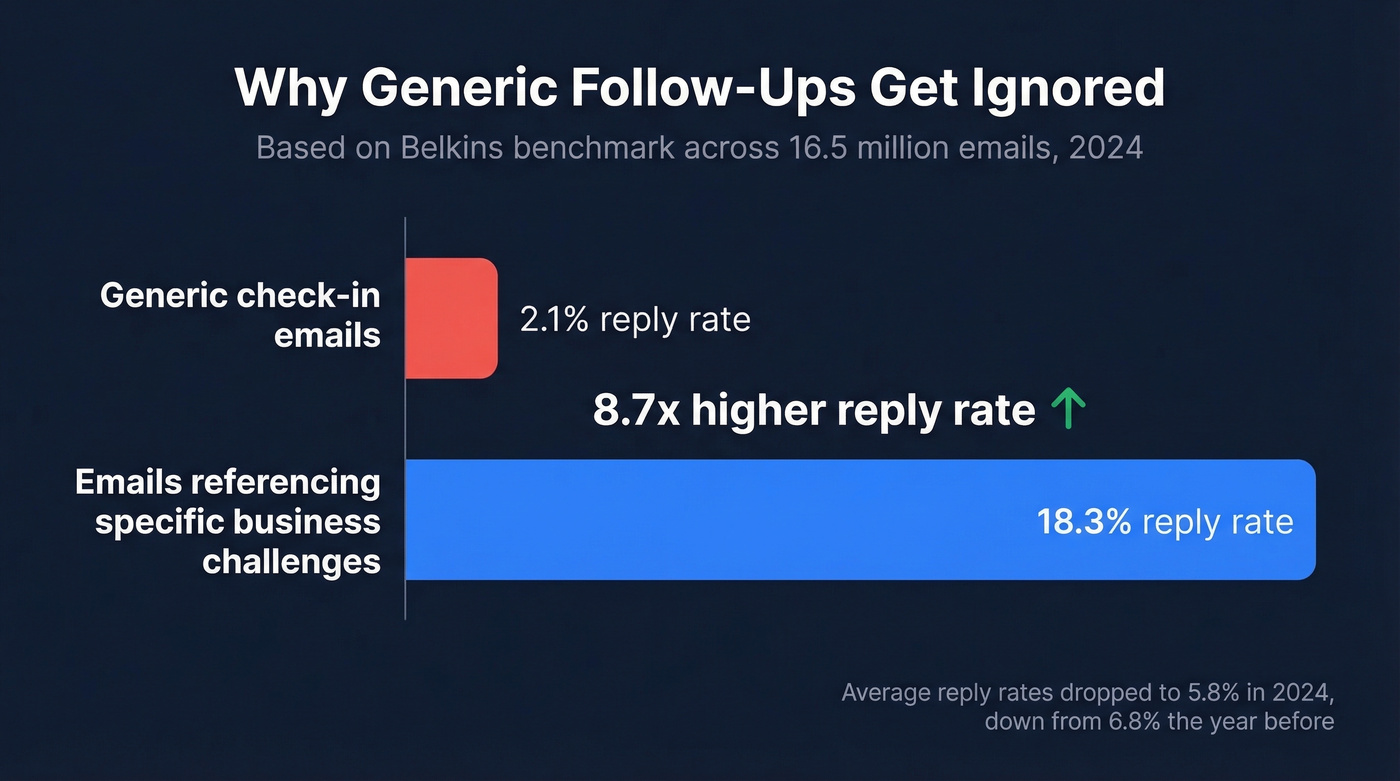
The numbers tell the rest of the story. In 2024, Belkins' benchmark across 16.5 million emails showed average reply rates dropped to 5.8%, down from 6.8% the year before. Emails referencing specific business challenges pulled an 18.3% reply rate versus 2.1% for generic messages - an 8.7x difference. And don't trust open rates as a counter-signal: Apple Mail Privacy Protection has inflated them by 10-30% since 2021. Reply rate is the only metric that matters.

There's a perception problem too. Campaign Monitor data shows the average professional receives 120+ emails per day, and anything that reads like autopilot gets filtered mentally before it's filtered technically. One Reddit user described their boss scheduling a meeting to discuss their "tone" after lines like "just checking if there's an update on this" were interpreted as passive-aggressive. Without vocal cues, the phrase can land anywhere from forgettable to hostile.
Here's the thing - "just" minimizes your own importance, and "checking in" doesn't tell the reader what you actually need. It's a non-ask wrapped in a non-reason. Every follow-up should answer two questions: why are you writing, and what should the reader do next?
Professional Alternatives by Scenario
One sales process auditor documented the shift on Reddit: a client sending seven generic "checking in" emails over three weeks got a 3% response rate. Switching to value-driven follow-ups over two weeks hit 31%. The difference wasn't volume. It was relevance.
After a Meeting or Proposal
Reference a specific discussion point and ask for a micro-commitment. "Following up on the integration timeline we discussed Thursday - I mapped out a 3-week rollout plan. Worth a 15-minute review?" This works because it proves you were listening and gives the recipient a low-effort next step. If you want plug-and-play copy, start with these sales follow-up templates.
Awaiting a Decision
Add a deadline or context shift. "Our implementation team has two open slots in March - wanted to flag that before scheduling fills up. Any update on timing?"
Share a new resource. "While you're evaluating, I put together a comparison sheet covering the three concerns your team raised. Attached - happy to walk through it live."
Re-Engaging After Silence
The breakup email is the single most underrated follow-up tactic. We've tested dozens of re-engagement approaches, and the breakup consistently outperforms because it removes pressure:
| Generic Bump | Breakup Email |
|---|---|
| "Just checking in again..." | "I'll assume the timing isn't right. If things change next quarter, I'm here." |
| Feels needy, easy to ignore | Feels respectful, triggers loss aversion |
| ~3% reply rate | ~10-15% reply rate |
Pair the breakup with a relevant resource - a case study, a stat, a link - so even non-responders get value.
Internal and Recruiting Follow-Ups
Internal follow-ups need the same precision. Skip "checking in on that thing" and try: "I've finished the revenue section of the Q2 dashboard but need your team's churn numbers by Friday to hit the board deadline. Can you confirm that works?" (If you're building a repeatable process, this is basically sequence management in miniature.)
For recruiting, lead with specifics: "The team was impressed with your API architecture experience. We'd love to move to a technical round - does next week work?"
The Follow-Up Structure That Gets Replies
Boomerang's research found that emails between 50 and 125 words get the highest response rates. Every sentence needs to earn its spot.
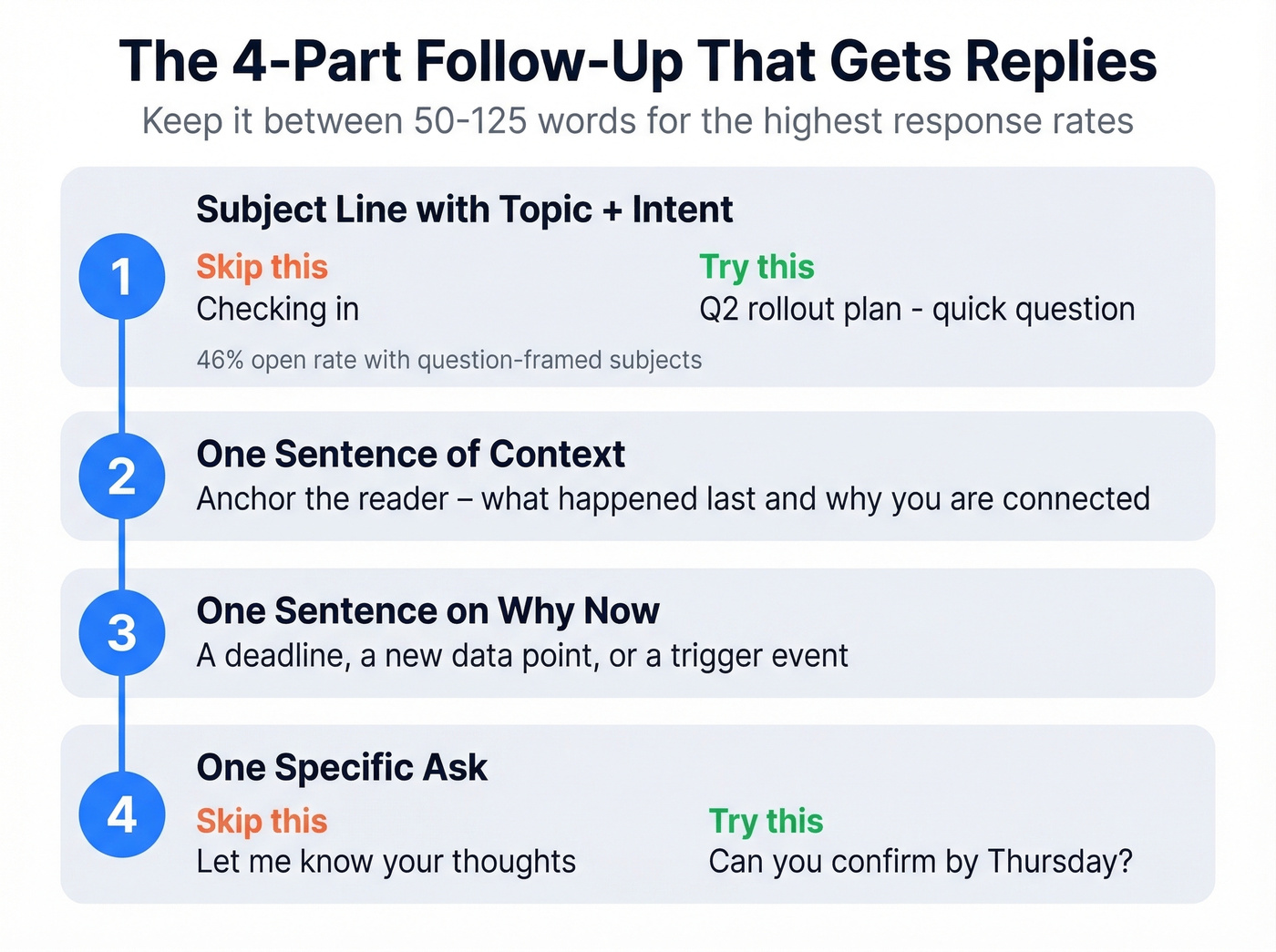
- Subject line with topic + intent. Not "Checking in" - try "Q2 rollout plan - quick question." Question-framed subject lines hit 46% open rates across 5.5 million emails. For more options, use these email subject line examples.
- One sentence of context. Anchor the reader: what happened last, and why you're connected.
- One sentence on why now. A deadline, a new data point, a trigger event.
- One specific ask. Not "let me know your thoughts." Try "Can you confirm by Thursday?" (More rules and examples: email call to action.)
If you only change one thing about your follow-ups, change the subject line. It's the highest-leverage fix - everything else is irrelevant if the email never gets opened.

A perfectly crafted follow-up still fails if it bounces. Prospeo verifies emails in real time with 98% accuracy on a 7-day refresh cycle - so your value-driven follow-ups actually land in the inbox, not the void.
Stop perfecting emails that bounce. Verify first at $0.01 each.
When to Send Your Follow-Up
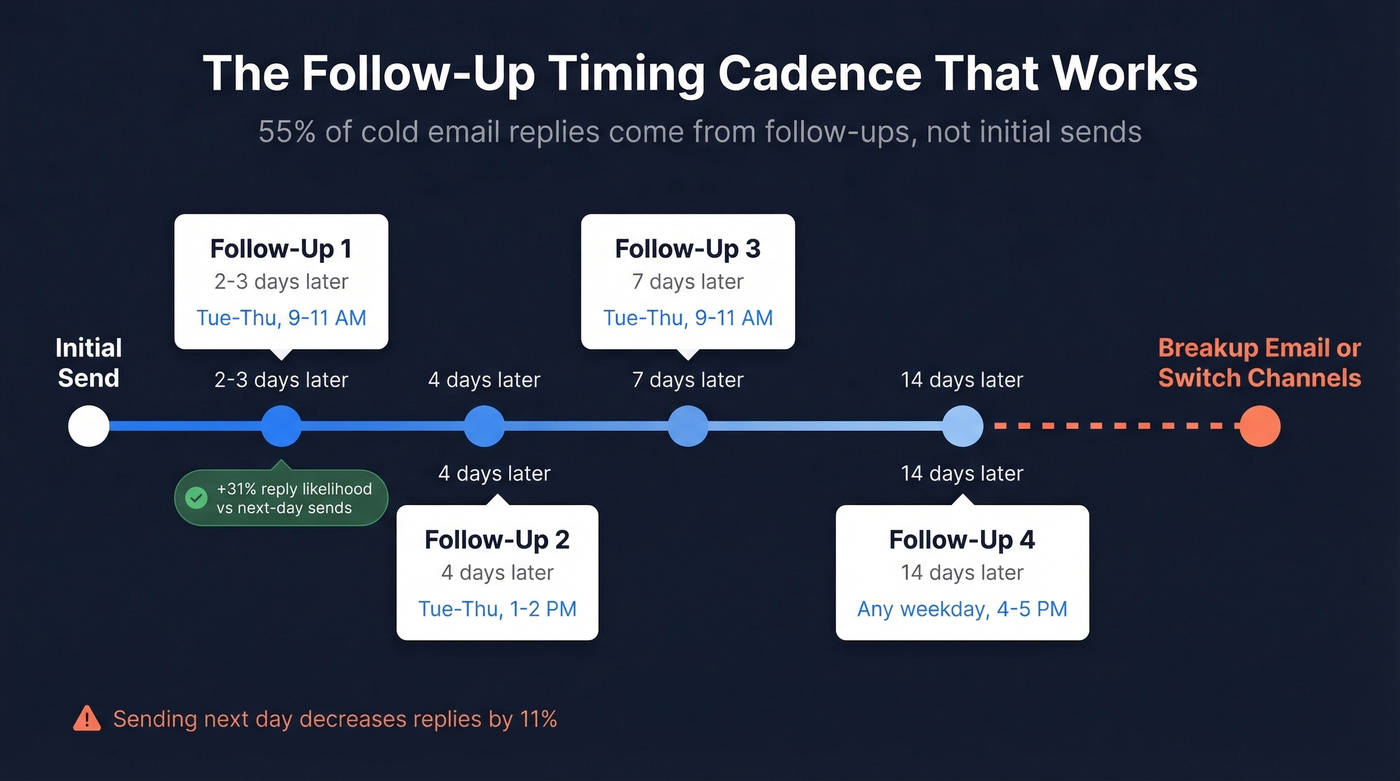
55% of cold email replies come from follow-ups, not initial sends. But timing matters more than most people realize. If you want a deeper timing playbook, see when should i follow up on an email.
| Follow-Up # | Days After Previous | Best Window |
|---|---|---|
| 1st | 2-3 days | Tue-Thu, 9-11 AM |
| 2nd | 4 days | Tue-Thu, 1-2 PM |
| 3rd | 7 days | Tue-Thu, 9-11 AM |
| 4th | 14 days | Any weekday, 4-5 PM |
Waiting three days before your first follow-up correlates with a 31% increase in reply likelihood. Sending the next day actually decreases replies by 11%. We've seen teams get anxious and fire off a same-day bump - it almost always backfires. The graduated cadence gives recipients breathing room while keeping you top of mind.
Three Mistakes That Kill Follow-Ups
1. Bumping with no new information. If your instinct is to type "I just wanted to check in on my last email," resist it. That's worse than sending nothing. Every touch needs something new: a resource, a question, a deadline. And even a perfect follow-up fails if the email bounces - Prospeo verifies emails in real time with 98% accuracy on a 7-day refresh cycle, and there's a free tier to test it. (If you're troubleshooting deliverability, start with email bounce rate and the email deliverability guide.)
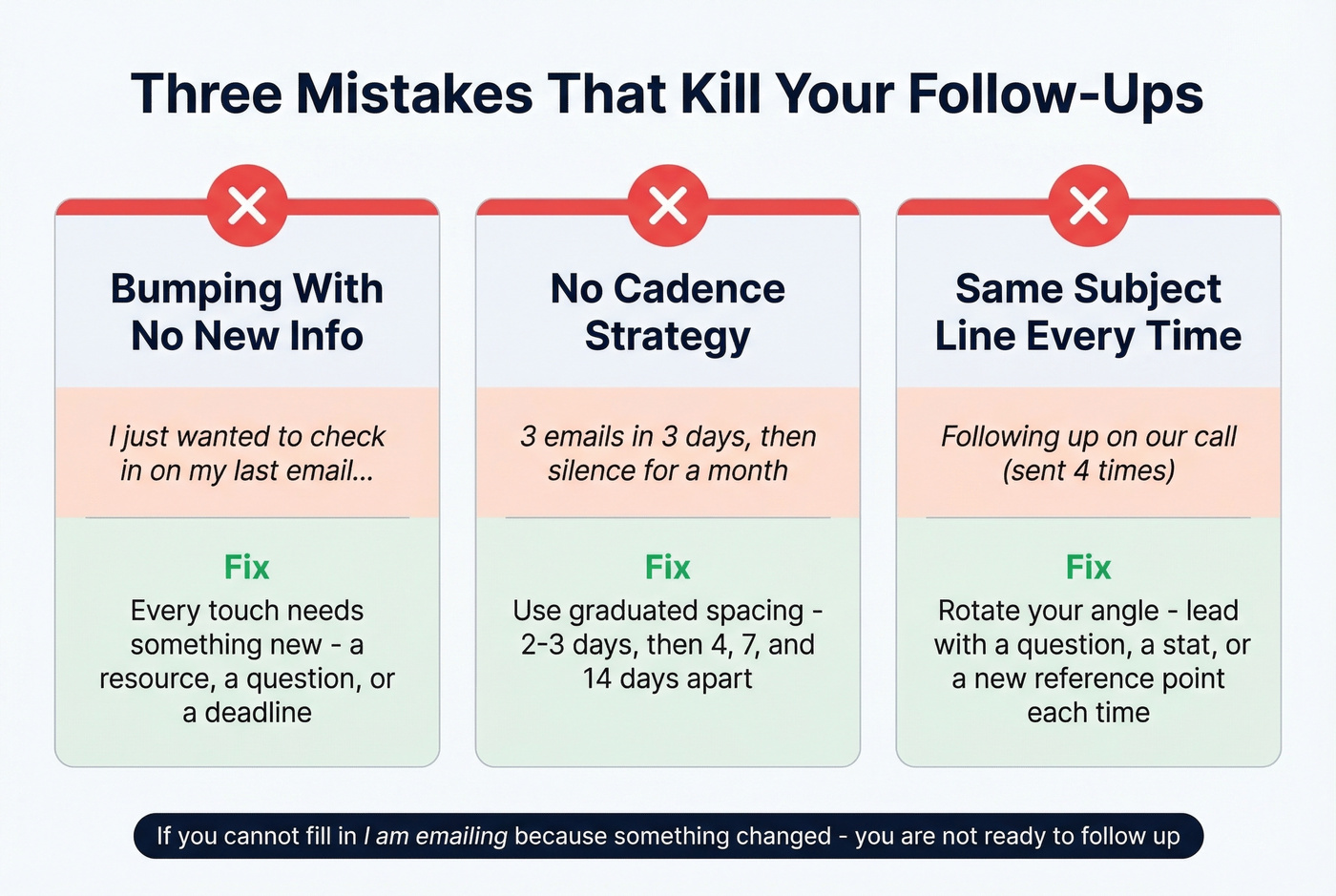
2. No cadence strategy. Three emails in three days, then silence for a month, signals desperation followed by abandonment. Use the graduated spacing above and stick to it.
3. Same subject line every time. If "Following up on our call" didn't get opened the first time, it won't work the second time either. Rotate your angle - lead with a question, a stat, or a new reference point on each touch. (More data-backed ideas: subject lines that get opened.)
Before and After Examples
Before:
Subject: Just checking in
Hi Sarah, just checking in on the proposal I sent last week. Let me know if you have any questions. Looking forward to hearing from you!
After:
Subject: Q2 rollout - two open implementation slots
Hi Sarah, following up on the integration proposal from last Tuesday. Our implementation team has two slots opening in March, and I wanted to flag that before they fill. Can you confirm by Friday whether your team is ready to move forward?
The subject line signals topic and urgency. The body drops the filler, adds a time-sensitive reason for writing, and closes with a specific ask and deadline. Same intent, completely different reply odds.
Let's be honest: most people agonize over email body copy when the real problem is they have no reason to write. If you can't fill in "I'm emailing because _____ changed since we last spoke," you aren't ready to follow up. Wait until you have something. Knowing how to follow up professionally means knowing when not to send.
You just rebuilt your follow-up sequence with better copy, smarter timing, and specific asks. Now make sure you're sending to real, verified contacts. Prospeo's 300M+ database with 30+ filters lets you find decision-makers and confirm their emails before your first touch.
Great follow-ups deserve verified contacts. Get 75 free emails to start.
FAQ
Is "just checking in" rude?
Not rude - just ineffective. It signals you have nothing new to add, making it easy to ignore. In workplace settings without vocal tone cues, it can even read as passive-aggressive. Replace it with a specific reason and a clear ask.
How many follow-ups should you send?
Three to five, spaced with graduated timing: 2-3 days, then 4, 7, and 14 days apart. After five touches with no reply, switch channels - try a phone call, a different contact at the company, or a breakup email that removes pressure.
What's the best subject line for a follow-up email?
Lead with the topic plus your intent - "Q2 rollout plan - quick question." Question-framed subject lines hit 46% open rates across 5.5 million emails studied. Skip vague lines like "Checking in" or "Following up" with no context.