

Calendar Meeting Invitation Email Samples (With Calendar Description Templates)
"Quick Chat" - no agenda, no context, no time zone. That's the meeting-invite version of walking into someone's office and saying, "Got a minute?" and then staring at them until they guess why you're there.
The numbers back up why this goes sideways: 64% of recurring meetings get scheduled without an agenda, 35% of invites land with less than 24 hours' notice, and 29% of recurring meetings have 7+ participants, per Flowtrace's meeting research: https://www.flowtrace.co/collaboration-blog/meeting-invite-rules-best-practices-for-organizers. Half the room probably shouldn't be there, and the other half shows up cold.
Let's fix it. Below are copy-paste calendar meeting invitation email samples (internal, external, cold outreach, 1:1, reschedules) plus calendar event description templates you can drop straight into Google Calendar or Outlook.
What every invite needs
YouCanBookMe frames a solid baseline as the "4 Ws" (Who, What, When, Where): https://youcanbook.me/blog/meeting-invitation-email. We agree, and we'd add two more because this is where invites usually fall apart: agenda and RSVP expectations.
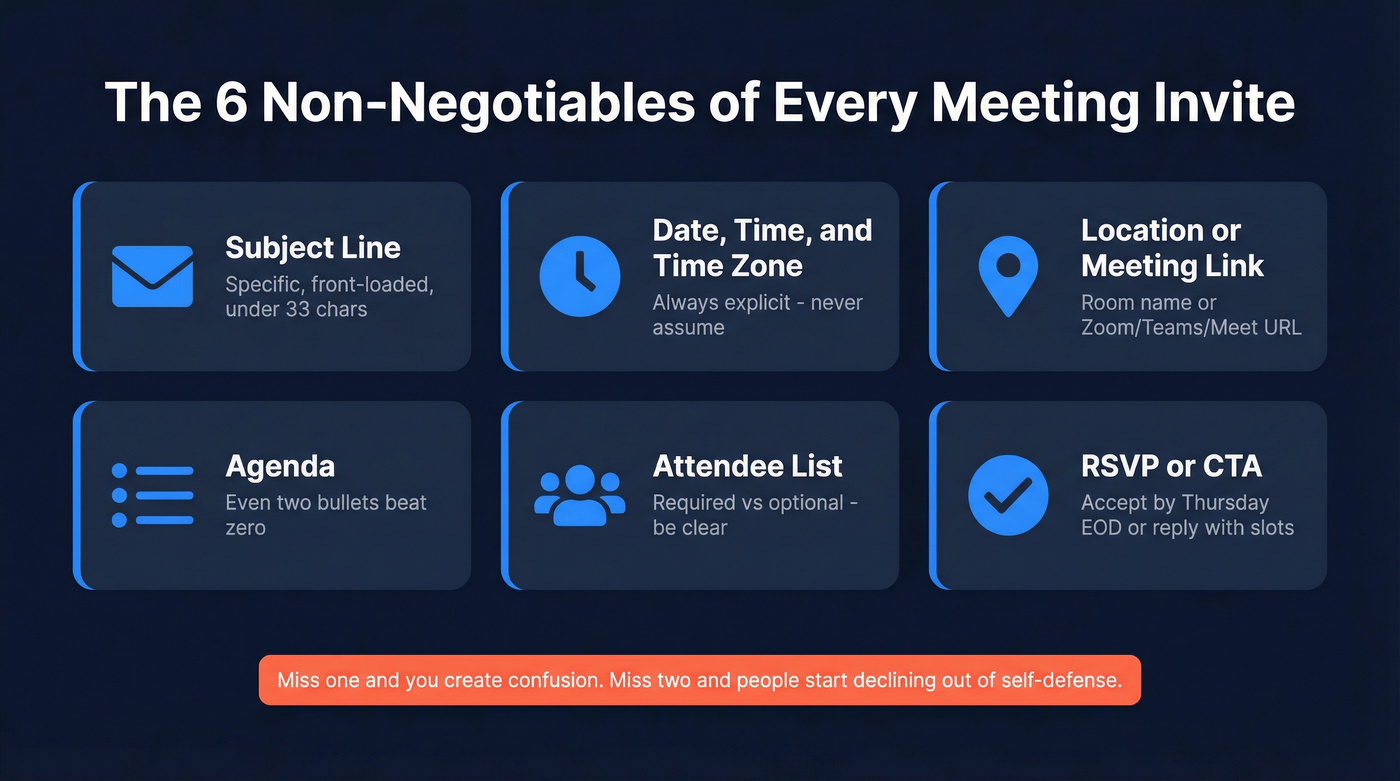
Include these every time:
- Subject line: specific, front-loaded, and short enough to survive mobile truncation (use these email subject line examples if you need a starting point)
- Date, time, and time zone: always explicit (and written the same way every time)
- Location or meeting link: room name or Zoom/Teams/Meet URL
- Agenda: even two bullets beat zero
- Attendee list: who's required vs optional
- RSVP / CTA: "Please accept by Thursday EOD" or "Reply with your preferred slot" (more email call to action patterns here)
Miss one and you're creating confusion before the meeting even starts. Miss two and people start declining out of self-defense.
Meeting invitation email samples
Team meeting
Subject: Q3 Pipeline Review - Tues 2pm ET
Hi team,
Scheduling our weekly pipeline review for Tuesday, June 10 at 2:00 PM ET (18:00 UTC).
Agenda
- Pipeline movement since last week
- Deals at risk (flag yours)
- Forecast adjustments + next steps
Join: Zoom link
Please accept the calendar invite so I've got an accurate headcount. If you can't make it, drop your update in #sales-pipeline beforehand.
Thanks, [Name]
Client / external meeting
Subject: [Company] + [Client] Kickoff - Jun 12
Hi [First Name],
Looking forward to kicking off our engagement. I've scheduled a meeting for Thursday, June 12 at 10:00 AM ET / 15:00 London.
Agenda
- Introductions and roles
- Project scope + timeline review
- Immediate next steps
Join: [Teams link]
If this time doesn't work, reply with 2-3 options that do and I'll move it.
Best, [Name]
Cold outreach meeting request (time not set yet)
Subject: 15 min - [specific outcome]
Hi [First Name],
We work with teams like [similar company] to [specific outcome]. I can walk you through what we did and what to copy - 15 minutes, no pitch deck.
Would any of these work?
- Tuesday, June 10 at 11:00 AM ET
- Wednesday, June 11 at 2:00 PM ET
If it's easier, grab a slot here: [scheduling link]
[Name]
A quick (and slightly annoying) reality from our outbound tests: the best invite copy in the world doesn't help if the email bounces. That's why teams often run a real-time verification pass before sending meeting requests; Prospeo verifies addresses at 98% accuracy, so you're not burning a good domain on bad data (see our full email deliverability guide if you want the deeper playbook).
One-on-one check-in
Subject: 1:1 Check-In - Friday 3pm
Hi [Name],
Our regular 1:1 is set for Friday, June 13 at 3:00 PM ET.
Standing agenda
- Your top priority this week
- Blockers I can help with
- Career/growth topic (optional)
Add anything you want to cover to the shared doc before we meet.
[Name]
Reschedule / follow-up
Subject: Rescheduled: Strategy Sync -> Jun 16
Hi [Name],
Moving our strategy sync to Monday, June 16 at 1:00 PM ET. Updated calendar invite attached.
Same agenda as before - prep doc is [here]. Need to reschedule again? Reply to this email or click [reschedule link] and I'll find another slot.
Thanks, [Name]
"You didn't accept the invite" nudge (internal)
Use this sparingly. Nobody likes being policed, but sometimes you need a clean headcount.
Subject: Quick nudge: accept/decline for Tues 2pm?
Hey [Name] --
Can you accept or decline the calendar invite for Tues 2pm ET when you get a second? I'm finalizing the agenda and want to make sure we've got the right folks in the room.
If you're a "no," all good - just decline and I'll share notes after.
Thanks, [Name]
Calendar event description templates
Most guides stop at the email. That's a mistake.
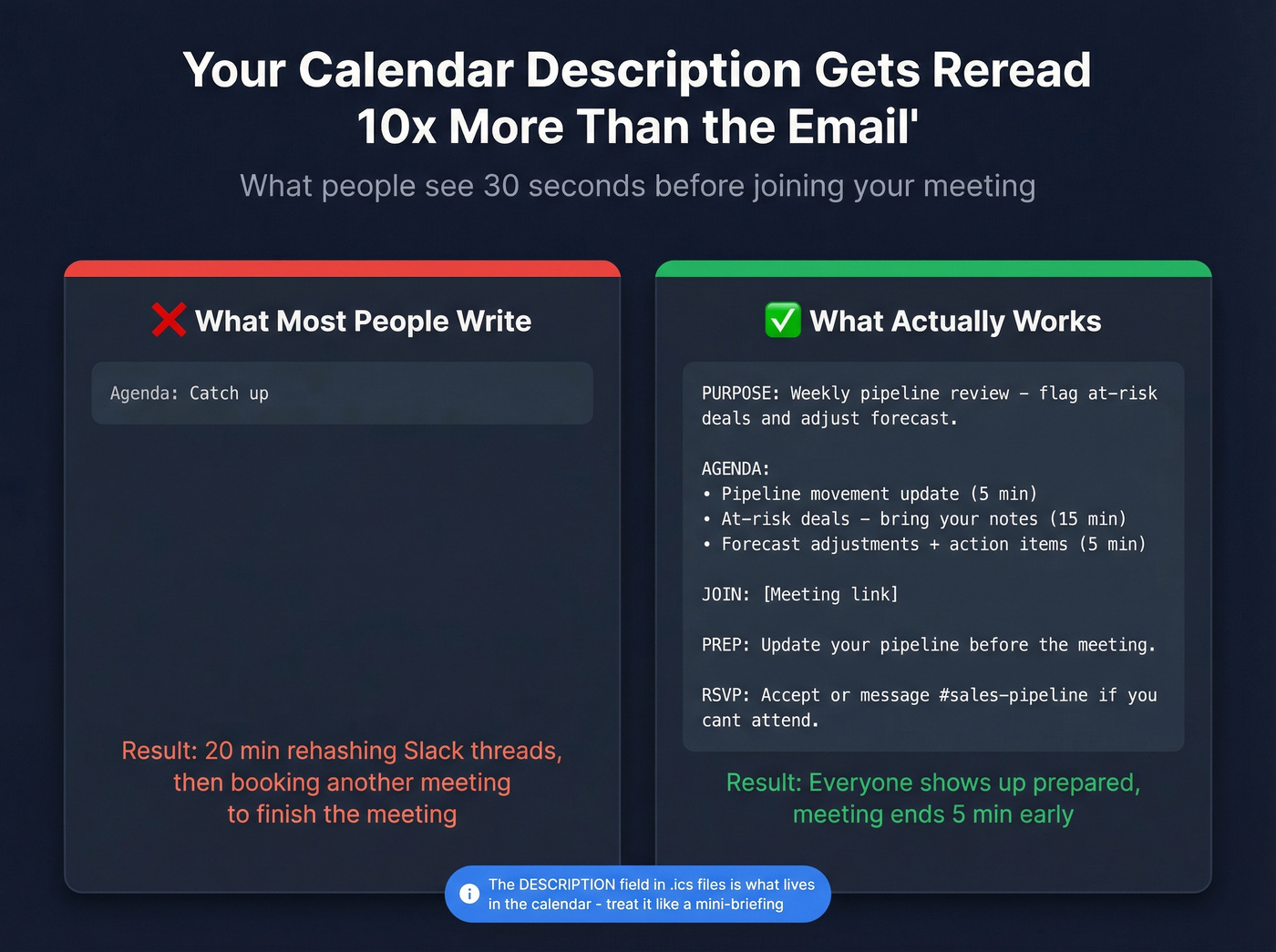
The calendar invite description - the text that actually lives in someone's calendar - is what people reread 30 seconds before joining. In our experience, it gets reread 10x more than the original email, especially for recurring meetings where the email is long gone.
Under the hood, calendar invites are based on iCalendar (.ics) and RFC 5545. The SUMMARY is your title, DESCRIPTION is the body, and LOCATION is where the link or room goes. So yes, the description field matters a lot more than people treat it.
Internal team meeting description
PURPOSE: Weekly pipeline review - flag at-risk deals and adjust forecast.

AGENDA:
• Pipeline movement update (5 min)
• At-risk deals - bring your notes (15 min)
• Forecast adjustments + action items (5 min)

JOIN: [Zoom/Teams/Meet link]

PREP: Update your pipeline in Salesforce before the meeting.

RSVP: Accept this invite or message #sales-pipeline if you can't attend.
External / client meeting description
PURPOSE: Project kickoff - align on scope, timeline, and immediate next steps.

AGENDA:
• Introductions and roles (5 min)
• Scope + deliverables walkthrough (15 min)
• Timeline + milestones (5 min)
• Q&A and next steps (5 min)

JOIN: [Meeting link]

PREP: Review the attached SOW before the call.

CONTACT: Questions? Reply to this invite or email [organizer@company.com].
Recurring 1:1 description
PURPOSE: Weekly check-in - priorities, blockers, growth.

STANDING AGENDA:
• Top priority this week (5 min)
• Blockers I can help with (10 min)
• Career/growth topic - optional (5 min)

SHARED DOC: [link to running notes doc]

NOTE: Add your talking points to the doc before we meet.
Skip-this template: "generic catch-all description"
Skip this if you want people to show up prepared:
Agenda: Catch up
Real talk: that line is how you end up spending 20 minutes rehashing Slack threads, then booking another meeting to finish the meeting.

You just crafted the perfect meeting invite - specific subject line, clear agenda, time zones included. Now imagine it bouncing because the email address is dead. Prospeo's 98% email accuracy and 7-day data refresh means your calendar invites actually land in the right inbox.
Stop perfecting invites that never arrive. Verify first.
Subject line rules (that actually hold up)
Front-load the topic. Belkins analyzed 5.5 million emails and found 2-4 word subject lines had the highest open rate (46%): https://belkins.io/blog/b2b-cold-email-subject-line-statistics.
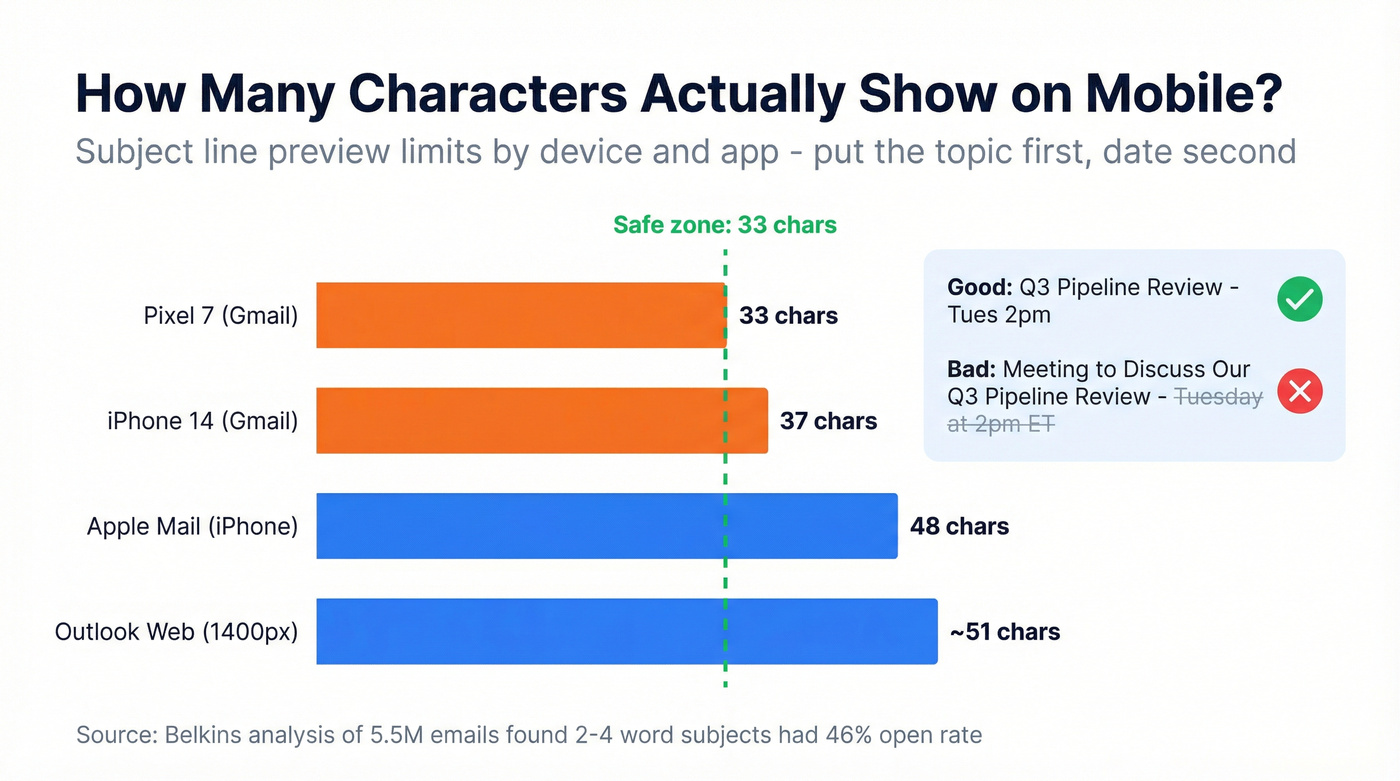
Word count isn't the whole story, though. What matters is what survives truncation on mobile, because that's where a lot of people first see your invite.
| Device / App | Character limit (subject preview) |
|---|---|
| Pixel 7 (Gmail) | 33 chars |
| iPhone 14 (Gmail) | 37 chars |
| Apple Mail (iPhone) | 48 chars |
| Outlook web (1400px) | ~51 chars |
EmailToolTester has a good breakdown of subject line character limits across clients: https://www.emailtooltester.com/en/blog/email-subject-lines-character-limit/. If you put the date/time at the end, there's a decent chance it gets chopped, and now your invite looks like every other vague calendar blob.
A few subject lines we keep coming back to:
- "Q3 Pipeline Review - Tues 2pm"
- "Kickoff: [Client] + [Company]"
- "15 min - reducing churn 30%"
- "1:1 Check-In - Friday 3pm"
- "Rescheduled: Strategy Sync -> Mon"
If you're building these for outbound, pair the subject with a tight opener from our emails that get responses playbook.
Time zone formatting (don't get cute)
Three-letter time zone abbreviations are ambiguous. CST can mean Central Standard Time (US) or China Standard Time. That's not a fun mistake to debug after someone misses the call.
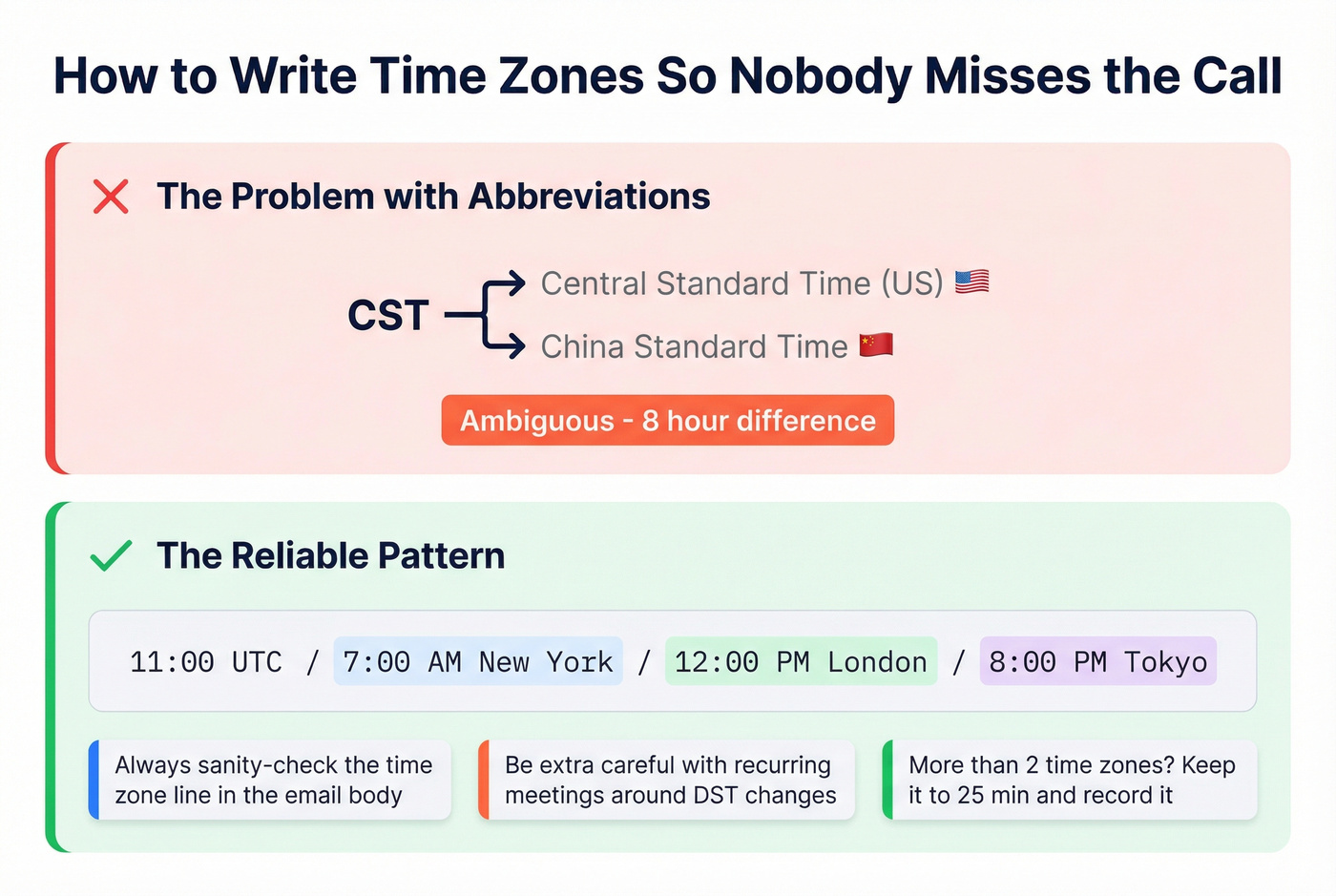
A practical approach, echoed in Workplace StackExchange threads, is to use UTC plus city-local times: https://workplace.stackexchange.com/questions/97212/how-do-i-express-meeting-time-to-international-recipients.
Use this pattern:
"11:00 UTC / 7:00 AM New York / 12:00 PM London / 8:00 PM Tokyo"
One more gotcha: people have reported cases where copied meeting details display the wrong time zone in email clients even when the calendar event itself is correct. There's a long-running Microsoft Teams thread on it: https://www.reddit.com/r/MicrosoftTeams/comments/1q7cmzw/email_invite_incorrect_time_zone/. The fix is boring but reliable: always sanity-check the time zone line in the email body, and be extra careful with recurring meetings around DST changes.
Hot take: if you've got attendees in more than two time zones, keep it to 25 minutes, run it off a tight agenda, and record it. Rotate the sacrifice, too - don't always punish APAC or EMEA.
Quick best practices
- Default to 25- or 50-minute meetings so people can breathe between calls
- Send invites 48+ hours in advance (you're already ahead of the 35% who don't)
- Use Optional attendees aggressively; required should mean required
- Always include an agenda, even if it's two bullets
- Proofread the time zone line; one wrong offset wastes everyone's morning
- Record and share notes for anyone who can't attend live
- Save your best-performing invite templates so you can reuse them across campaigns (store them alongside your sales follow-up templates so reps actually use them)
Cold outreach meeting requests live or die on deliverability. Teams using Prospeo's verified contact data book 35% more meetings than Apollo users - because every invite reaches a real person at a real address, not a bounce log.
Send meeting requests to verified emails at $0.01 each.
FAQ
What's the difference between a meeting invite email and a calendar invite?
The email is the message in someone's inbox. The calendar invite is the .ics event that lands in their calendar app with the time, link, and description. Use both: the email gives context, and the calendar event makes it hard to miss.
How long should a meeting invitation subject line be?
Aim for under 33 characters if you want the full subject to show on most mobile inboxes. Belkins' 5.5M-email analysis found 2-4 word subject lines performed best, but the bigger rule is simple: put the topic first, then the date/time.
How do I verify a prospect's email before sending an invite?
Use a real-time verification tool before you send. Prospeo checks addresses at 98% accuracy and includes a free tier (75 verifications per month), which is usually enough to validate a prospect list before you start booking meetings.