


Calendly Pricing, Reviews, Pros and Cons: Is It Worth It in 2026?
You just got the Calendly renewal invoice. $1,920 for a 10-person team on the Teams plan - and half those reps barely use it beyond a single booking link. The question isn't whether Calendly works. It does. The question is whether you're on the right plan, or paying for one at all.
30-Second Verdict
Calendly holds a 4.7/5 on Capterra from over 4,000 reviews and powers scheduling for 80% of Fortune 500 companies. It's the default for a reason. But "default" doesn't mean "right for everyone."
- Solopreneurs who just need a booking link: Skip Calendly. TidyCal at $39 lifetime is the move.
- Sales teams needing round-robin + routing: Calendly Teams at $16/seat/month billed annually. Budget accordingly.
- Enterprise (30+ users, need SSO/SCIM): Enterprise starts at $15k/year. Renewals often land 5-15% cheaper - always push back.
- Everyone: Calendly can't book meetings if nobody sees your link. Fix your prospect data first.
Pricing Breakdown for 2026
Here's what you'll actually pay across all four tiers:
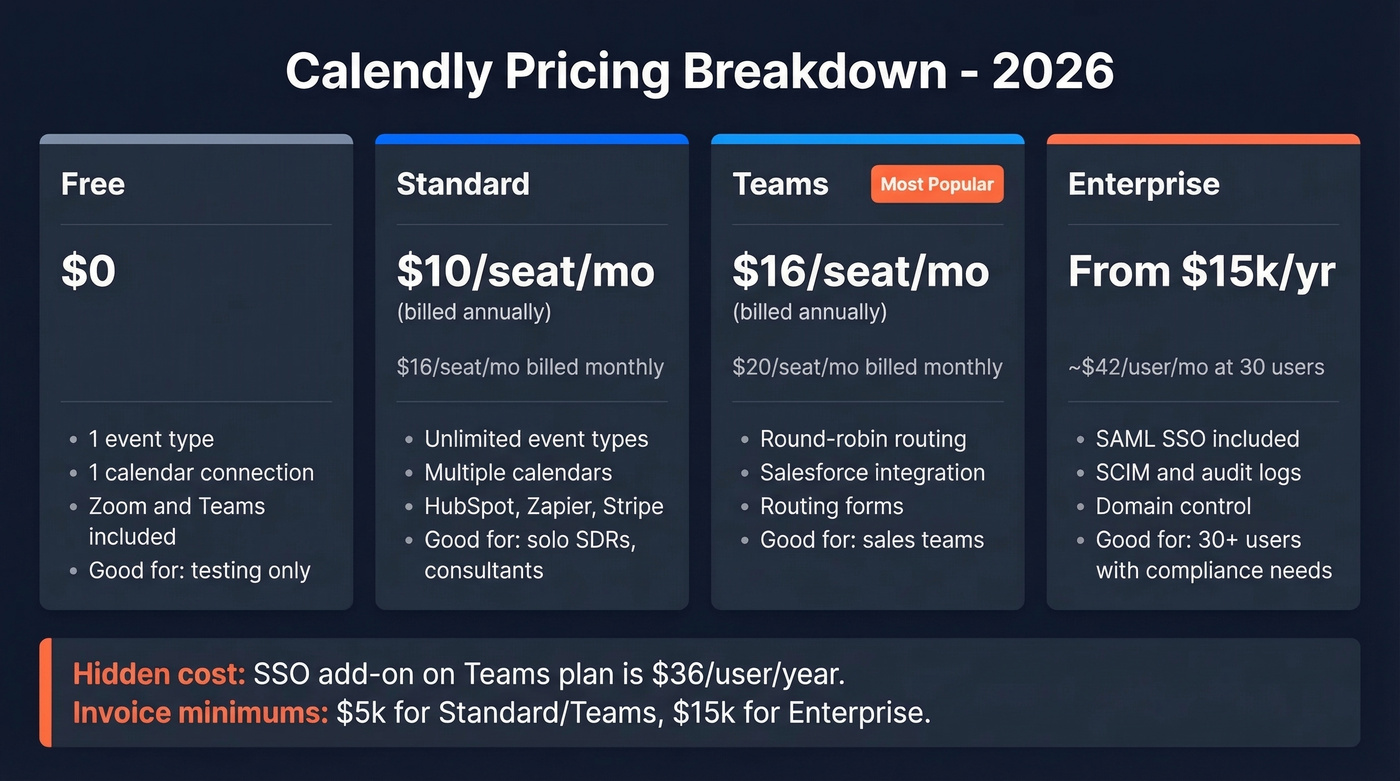
| Free | Standard | Teams | Enterprise | |
|---|---|---|---|---|
| Annual billing | $0 | $10/seat/mo | $16/seat/mo | From $15k/yr |
| Monthly billing | $0 | $16/seat/mo | $20/seat/mo | Annual only |
| Annual savings | - | ~20% | ~20% | - |
Hidden cost: SSO on the Teams plan isn't included - it's an add-on at $36/user/year. Enterprise includes SSO by default, which partly explains the price jump.
Invoice payment requires minimums: $5,000 for Standard/Teams, $15,000 for Enterprise. If you're a 3-person team on Standard, you're paying by credit card.
The 14-day free trial applies to all paid plans. After it expires, you drop to Free - not a lower paid tier. In our experience, that's enough time to evaluate Teams features, but don't build workflows around them until you've committed.
For enterprise buyers, the math works out to roughly $42/user/month at the 30-user minimum ($15k / 30 / 12). For around 100 users, budget approximately $30k/year as a starting point and negotiate from there.
What Each Plan Gets You
The free plan is a demo, not a product. You get one event type and one calendar connection - though it does include video conferencing integrations with Zoom and Teams, so it's not entirely stripped. You'll outgrow it within a week if you run more than one type of meeting.

Standard unlocks what most individuals actually need: unlimited event types, multiple calendar connections, and integrations with HubSpot, Mailchimp, Stripe, and Zapier. For a solo SDR or consultant, this is the real starting line.
Teams is where sales orgs land. Round-robin distribution, lead qualification via routing forms, Salesforce integration, and connections to Marketo and Pardot. Standard doesn't support the routing logic that makes inbound scheduling work, so most sales teams end up here whether they planned to or not.
Enterprise layers on compliance: SAML SSO, SCIM, domain control, audit logs, and Microsoft Dynamics integration. If your security team requires these, you don't have a choice. If they don't, Teams with the SSO add-on will save you thousands.
What Users Love
It just works. 84% of G2 reviewers give it five stars. Share a link, someone picks a time, it's on both calendars. Polished and reliable.
The universal praise across every review site is the same: three emails to find a meeting time becomes zero. That alone justifies the tool for most teams.
The integration library covers what sales and CS teams already use - Zoom, Google Calendar, Outlook, Salesforce, HubSpot, Stripe, Zapier. Routing forms are genuinely useful for inbound demo requests, qualifying and routing to the right rep automatically. And the learning curve is almost nonexistent; new reps set up and start booking within minutes.

Calendly can't book meetings if nobody clicks your link. The real bottleneck isn't scheduling - it's reaching the right people. Prospeo gives you 98% accurate emails and 125M+ verified mobile numbers so your booking links actually land in front of decision-makers.
Fix your prospect data before optimizing your scheduling tool.
The Real Drawbacks
Here's the thing: the "Calendly link" backlash is real. Reddit threads on r/sales consistently flag that receiving a scheduling link feels impersonal. One user put it bluntly - there's no moment where the recipient actually confirms, the meeting just appears on their calendar. In cold outreach, this hurts response rates.
The free plan is a teaser. One event type and one calendar isn't functional for anyone running a real business.
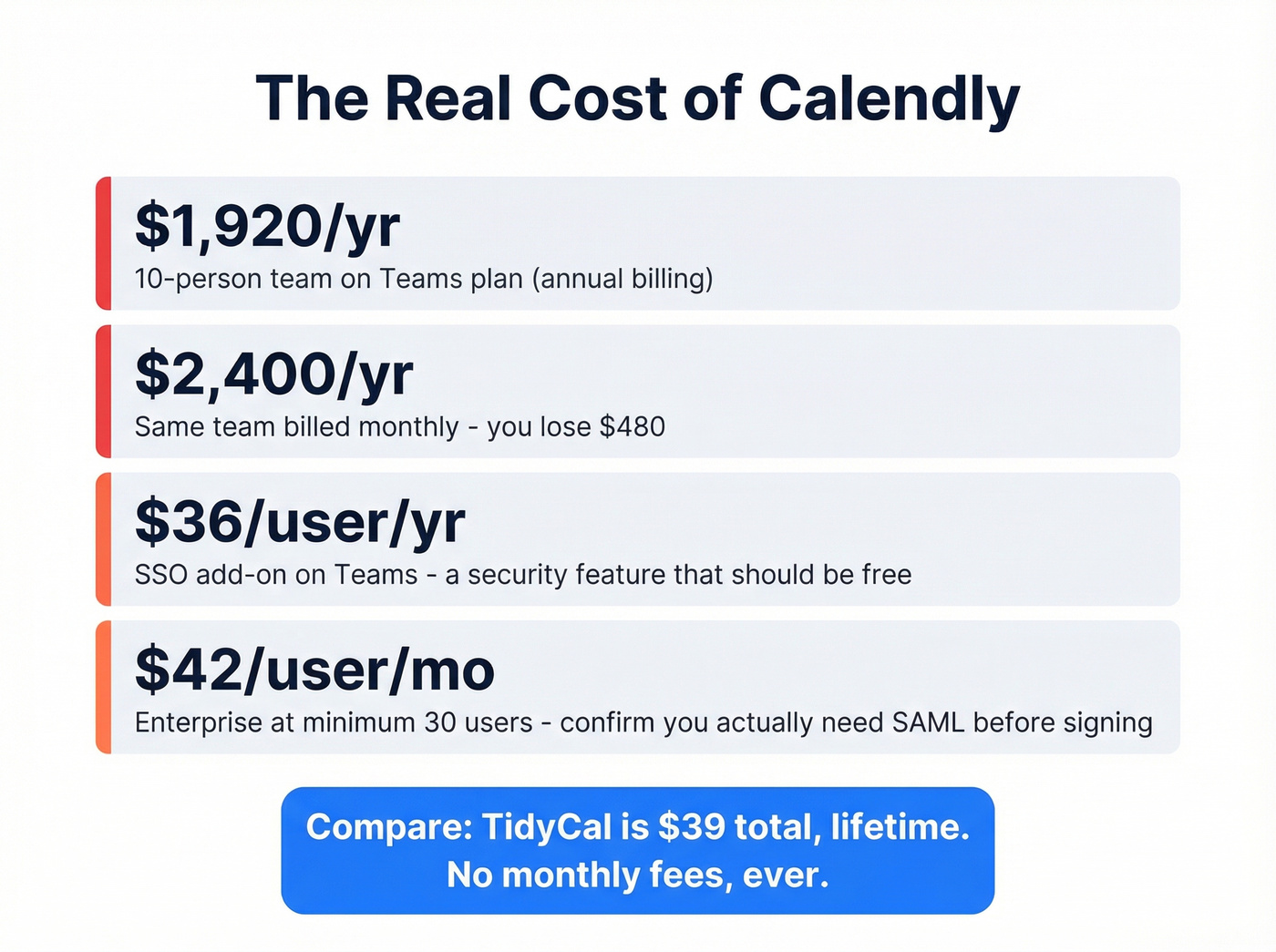
Per-seat costs scale fast. A 10-person team on Teams pays $1,920/year on annual billing, or $2,400 monthly. That's real money for a scheduling tool, and it's the number-one complaint we see in user reviews alongside "expensive advanced features" and aggressive feature gating - Salesforce integration alone requires the Teams tier.
SSO as a paid add-on on Teams is indefensible in 2026. Charging $36/user/year for a security feature should embarrass any product team. And the mobile app, while functional, lags noticeably behind the desktop experience.
Is Calendly Worth It?
Use it if you're a sales team running inbound demos with round-robin routing. The Teams plan at $16/seat/month is the real product for revenue teams, and the Salesforce + routing combo justifies the cost.
If you're building a repeatable outbound motion, pair scheduling with a tighter sales process and better sales prospecting techniques.
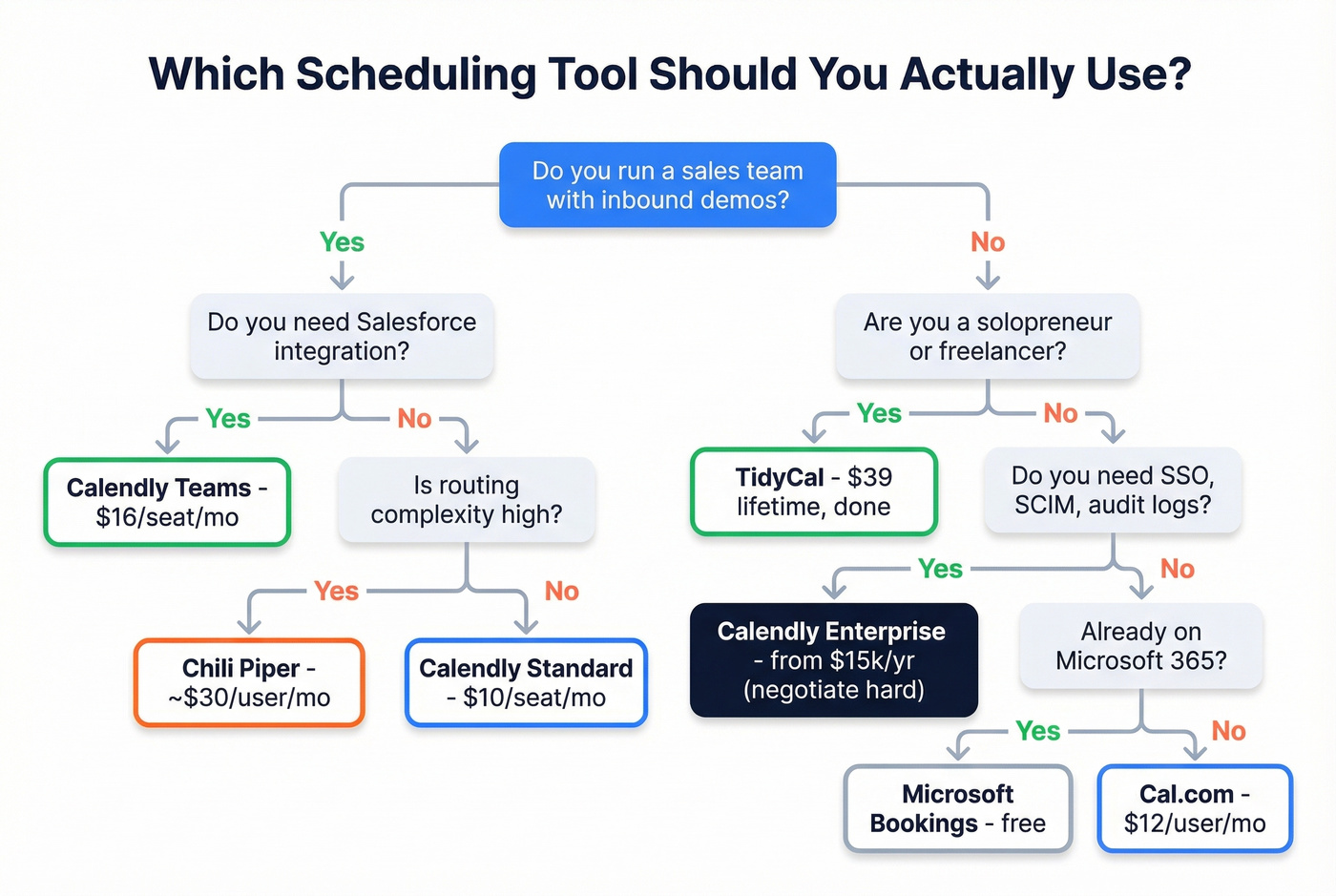
Skip it if you're a solopreneur or freelancer. TidyCal at $39 lifetime does 90% of what you need without a recurring bill. Microsoft Bookings is free if you're already on M365.
Think hard if you're evaluating Enterprise. At $42/user/month for the minimum deployment, you're paying a premium for compliance features. We've seen teams overpay for Enterprise when Teams plus the SSO add-on would've covered them - confirm your security team actually requires SAML and audit logs before signing.
Let's be honest: Calendly is the best scheduling tool for sales teams. But most people evaluating it aren't sales teams - they're consultants and founders who'd be better served by a $39 lifetime tool and spending the savings on better prospect data.
Alternatives Worth Considering
The best alternative depends on what's actually driving you away - price, flexibility, or feature gaps.
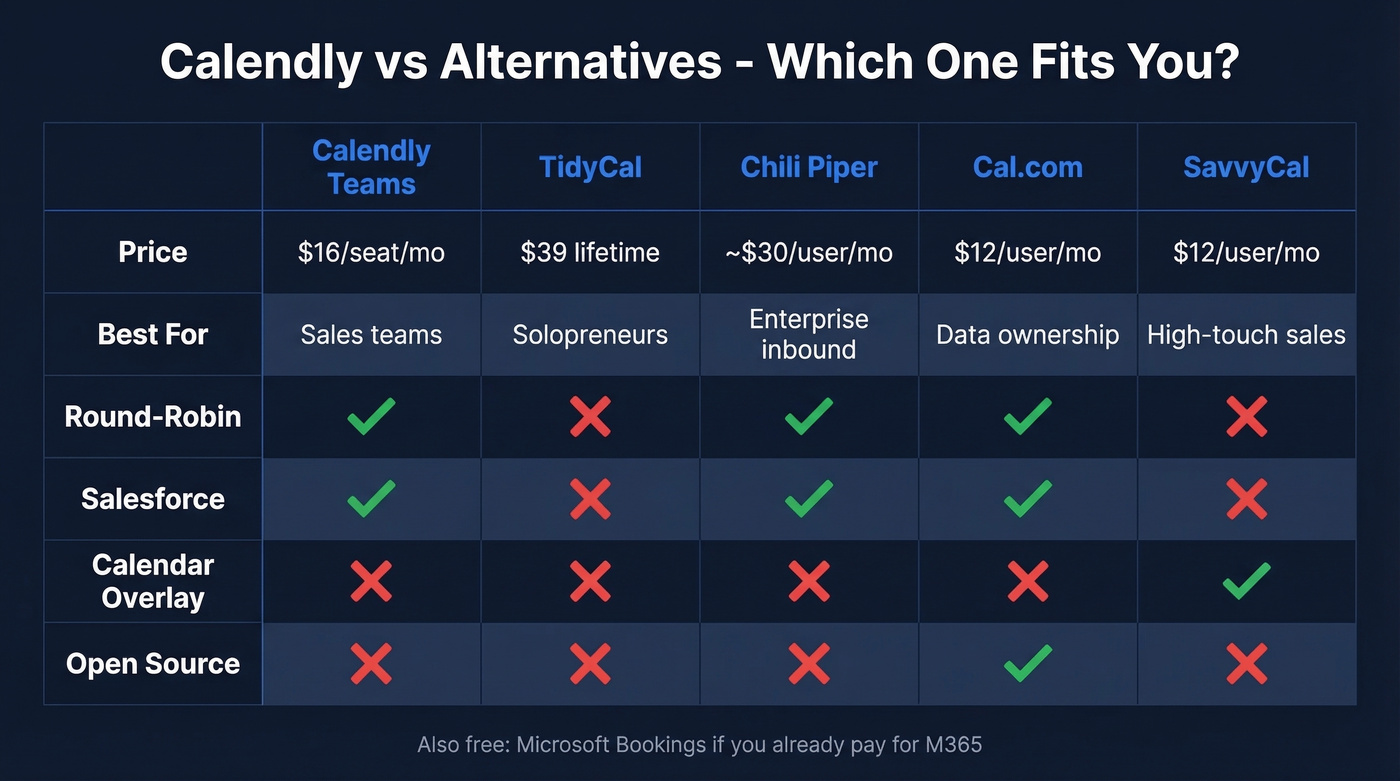
If it's price, TidyCal wins outright. One payment of $39 gets you lifetime access - booking pages, calendar sync, multiple event types. No monthly fees, ever. For solopreneurs, this is the obvious answer and the one we recommend most often.
On the opposite end, Chili Piper is the enterprise-grade option for complex inbound routing. When Calendly's routing forms feel too basic for your GTM motion, Chili Piper's form routing and instant booking justify its roughly $30/user/month starting price.
Cal.com takes the open-source route. Self-host for free, or use their cloud product starting around $12/user/month. Reddit users switching from Calendly frequently cite per-seat pricing fatigue and design rigidity as the trigger. If data ownership matters more than polish, Cal.com deserves a serious look.
SavvyCal solves a specific UX problem: invitees overlay their own calendar on top of yours to find mutual availability. It's a small change that makes a real difference in high-touch sales where sending a bare booking link feels too transactional. Plans start around $12/user/month.
Microsoft Bookings is free with any M365 Business subscription. If your org already pays for Microsoft, adding another scheduling tool for basic use cases is just waste.
If you're comparing tools for a full outbound stack (not just scheduling), start with a ranked list of SDR tools and then map what you actually need for cold email marketing.
Fix Your Contact Data First
Calendly books the meeting - but only if the right person actually sees your outreach. One of our customers, Meritt, tripled their pipeline from $100K to $300K/week after switching to Prospeo for verified contact data, dropping their bounce rate from 35% to under 4%. The scheduling tool matters far less than whether prospects actually open your email.
If you're seeing bounces, fix the root cause with an email bounce rate audit and a proper email deliverability guide.

You're debating $16/seat/month for Calendly - but bad prospect data costs you entire deals. At $0.01 per verified email, Prospeo delivers the contacts that fill your calendar. Teams using Prospeo book 35% more meetings than Apollo users.
Spend less on scheduling. Invest in data that actually books meetings.
FAQ
Is Calendly really free?
Technically yes, but the free plan limits you to one event type and one calendar connection. Most users hit the paywall within days. For anything beyond basic personal scheduling, expect to pay $10-$16/seat/month.
Can you negotiate Calendly Enterprise pricing?
Yes - renewals typically see 5-15% discounts off list price. For around 100 users, budget approximately $30k/year as your starting point and negotiate with multi-year commitments or upfront payment for extra leverage.
What's the cheapest scheduling alternative?
TidyCal at $39 lifetime - one payment, no monthly fees, covers booking pages and calendar sync. Microsoft Bookings is free if you're already on M365. Either replaces Calendly for basic use cases.
How do I improve meeting booking rates from outbound?
The scheduling tool matters less than whether prospects actually open your email. Verified contact data with low bounce rates keeps your domain reputation intact and your booking links landing in real inboxes instead of dead addresses.