


Calendly vs Doodle: Which Scheduling Tool Actually Fits Your Workflow?
An ops manager needs to coordinate a 12-person quarterly review across three time zones. She sends a Calendly link - but Calendly's poll only does yes/no, so half the group marks "no" to every slot without indicating which times could work. She switches to Doodle, sends the poll to the VP of Sales, and he gets hit with an auto-play video ad before he can vote.
Here's the real takeaway when you compare Calendly vs Doodle: these tools aren't competitors. They solve different jobs, and picking the wrong one creates friction you didn't need.
30-Second Verdict
Use Calendly if you need 1:1 booking links for sales demos, recruiting screens, or client-facing scheduling. It's the polished, business-grade option.
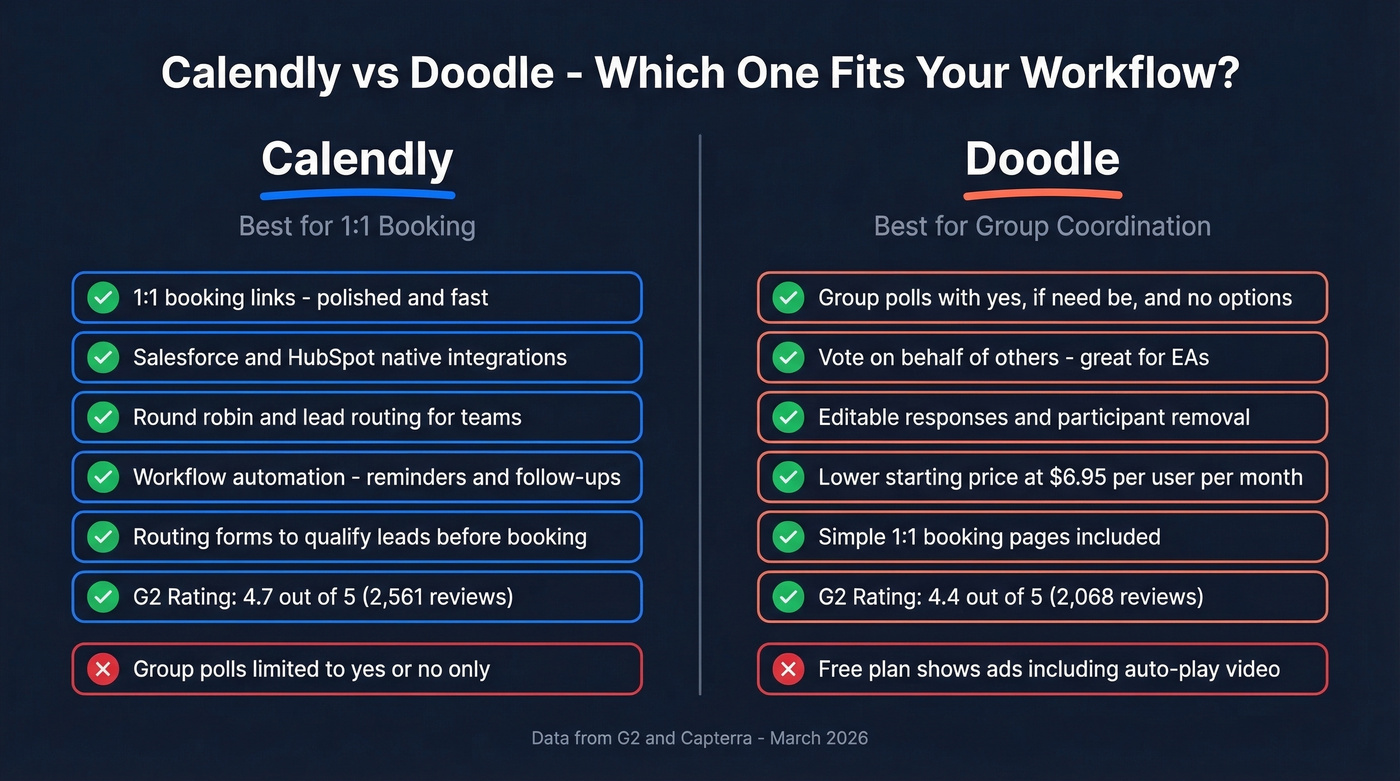
Use Doodle if you're coordinating group availability across teams, departments, or external participants who don't share your calendar system.
Skip both if your real bottleneck isn't scheduling - it's finding verified emails and direct dials to fill those calendar slots in the first place.
At a Glance
| Feature | Calendly | Doodle |
|---|---|---|
| Core model | 1:1 booking links | Group polls + booking |
| Free plan | 1 event type, 1 calendar | Ads shown to invitees |
| Starting paid | $10/seat/mo (annual) | $6.95/user/mo (annual) |
| Group scheduling | Yes/no meeting polls | "If need be" polling |
| Team features | Round robin, routing forms | Admin controls |
| Payment integrations | Stripe, PayPal, Stax | Stripe only |
| G2 rating | 4.7/5 (2,561 reviews) | 4.4/5 (2,068 reviews) |
| Capterra rating | 4.7/5 (4,071 reviews) | 4.6/5 (1,837 reviews) |
Calendly has more reviews, higher ratings, and deeper feature gating. Doodle competes on price and group coordination - but its free tier comes with real tradeoffs.
How Each Tool Works
Calendly
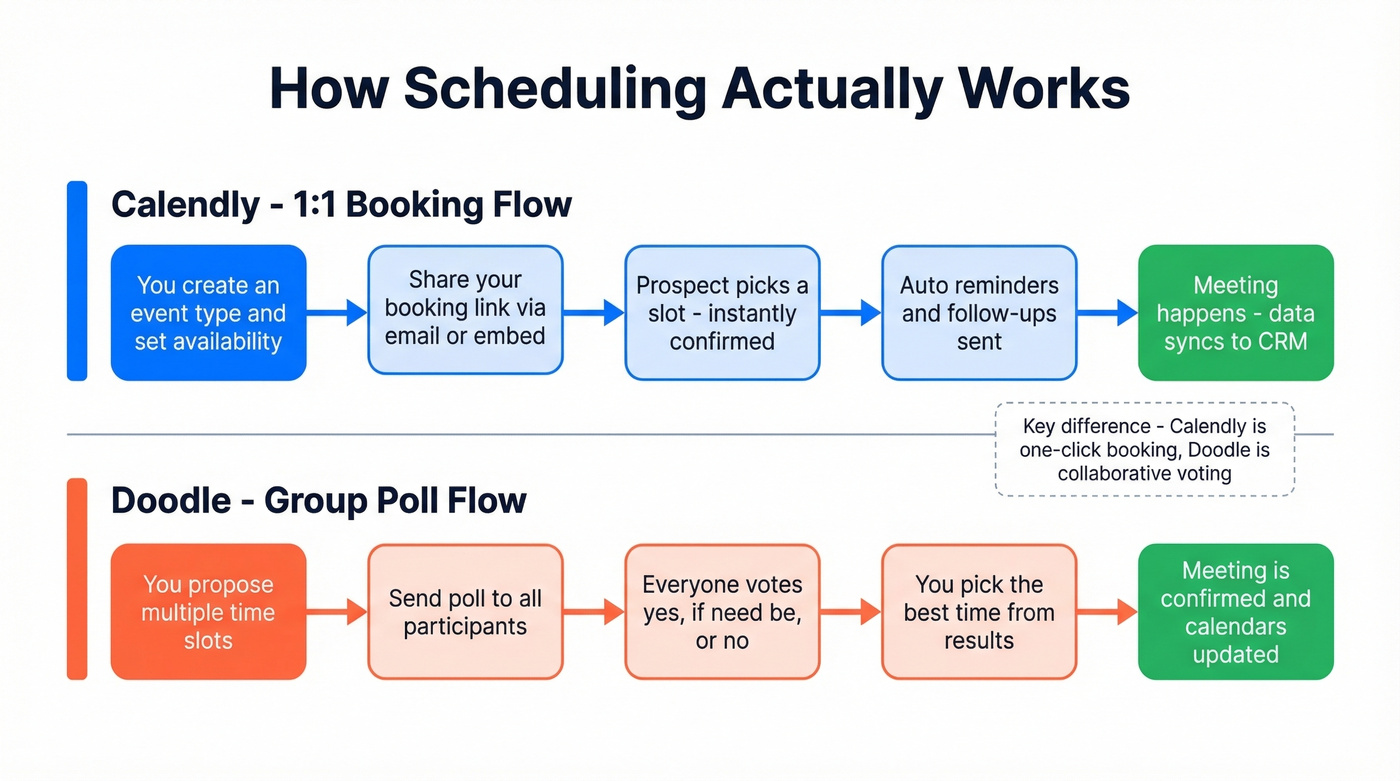
Calendly is a booking-link engine. You create event types, set availability rules, and share a link. Invitees pick a slot and it's confirmed instantly - no back-and-forth.

The Standard plan ($10/seat/mo) unlocks what most teams actually need: up to 6 connected calendars, buffer times, max bookings per day, one-use or expiring links, and embed options. Calendly also offers routing forms that qualify leads before they book - a genuine differentiator for sales teams running inbound. We've seen teams cut their qualification calls in half just by adding a two-question routing form to their booking page.
If you're building a repeatable outbound motion, pair scheduling with sales prospecting techniques that consistently generate qualified conversations.
Calendly does have a meeting poll feature, but it's limited to yes/no responses. No "if need be" option, which makes it clunky for groups larger than four. For 1:1 scheduling, though, nothing in the market is more polished. Calendar syncing issues with Apple/iCloud show up in G2 pros/cons rollups, so test your calendar connections during a trial if you're on Apple.
Doodle
Doodle's core is the group poll. You propose time slots, send the poll out, and everyone marks availability - including an "if need be" option that Calendly's poll lacks entirely. That three-state response (yes / if need be / no) is what makes Doodle genuinely better for multi-person coordination.

Doodle has shipped meaningful updates through 2025-2026: vote on behalf of others (great for EAs managing executive calendars), editable responses, and participant removal. Free users can also connect Stripe and collect payments for meetings scheduled with Doodle 1:1 and Booking Page. The product updates addressed several long-standing complaints from Reddit threads about UX regressions.
Doodle offers 1:1 booking pages now too, but they're simpler than Calendly's. Buffer times, booking limits, one-use links - Calendly goes deeper on all of those controls.
Feature Breakdown
| Category | Calendly | Doodle |
|---|---|---|
| Integrations | Zoom, Meet, Teams, Salesforce, HubSpot, Stripe, PayPal, Zapier | Video conferencing + Stripe; Zapier for more |
| Automation | Reminders, follow-ups, managed workflows | Basic reminders |
| Payments | Stripe + PayPal + Stax | Stripe only |
| Security/admin | SSO/SAML, SCIM, audit log (Enterprise) | Enterprise security features (custom) |
Integrations are where Calendly pulls ahead decisively. Salesforce and HubSpot native integrations mean meeting data flows directly into your CRM without Zapier middleware. Doodle connects to the basics - video conferencing and Stripe - but if you're running a sales tech stack, you'll feel the gaps fast.
If you're evaluating your broader stack, it helps to map scheduling into your sequence management and CRM workflow.
Automation is another Calendly strength. Managed workflows let teams set consistent reminders and follow-ups without everyone building their own setup from scratch. Doodle handles basic reminders but doesn't offer anything resembling workflow automation.
If you want to reduce drop-off after a booked meeting, use proven sales follow-up templates instead of reinventing every reminder.
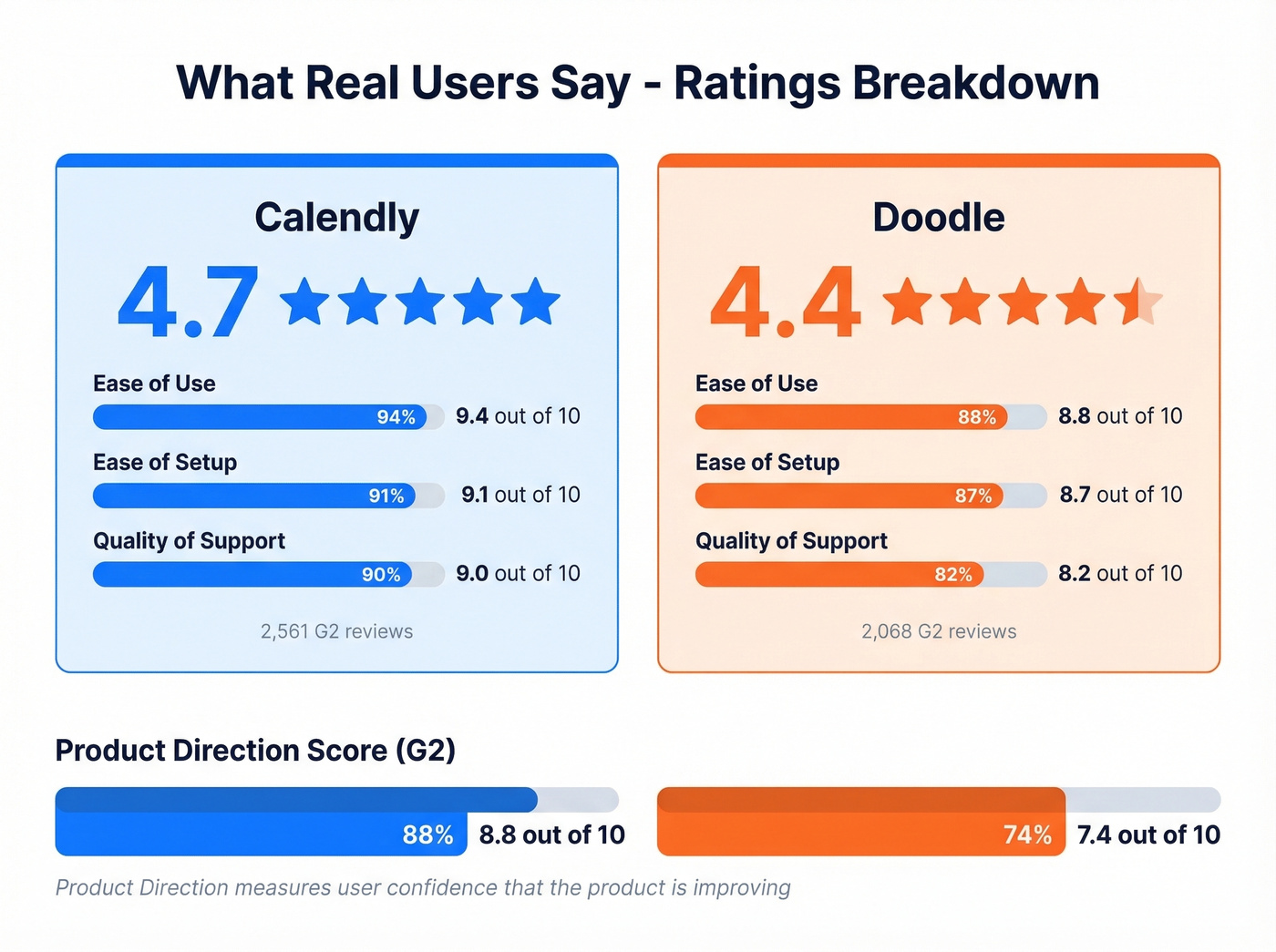
Team and enterprise features tell a similar story. Calendly's Teams plan ($16/seat/mo) includes round-robin assignment, lead routing, Salesforce, and advanced admin features. SSO is available as a security add-on on Teams, while Enterprise starts at $15,000/year and includes SSO/SAML, SCIM provisioning, and audit logs. Doodle can work well for coordination, but Doodle's Product Direction score on G2 sits at 7.4 vs Calendly's 8.8, suggesting users aren't confident the gap is closing.
Let's be honest: if you need group polls, none of Calendly's enterprise features matter. And if you need CRM-connected 1:1 booking, none of Doodle's polling features matter. The tools serve different workflows.

The best scheduling tool in the world can't help if your calendar is empty. Before you optimize how meetings get booked, solve the upstream problem: finding verified emails and direct dials for the people you actually want to meet. Prospeo gives you 300M+ profiles with 98% email accuracy at $0.01/lead.
Stop optimizing empty calendars. Start filling them with verified contacts.
Pricing Compared
Calendly
| Plan | Price | Key Limits |
|---|---|---|
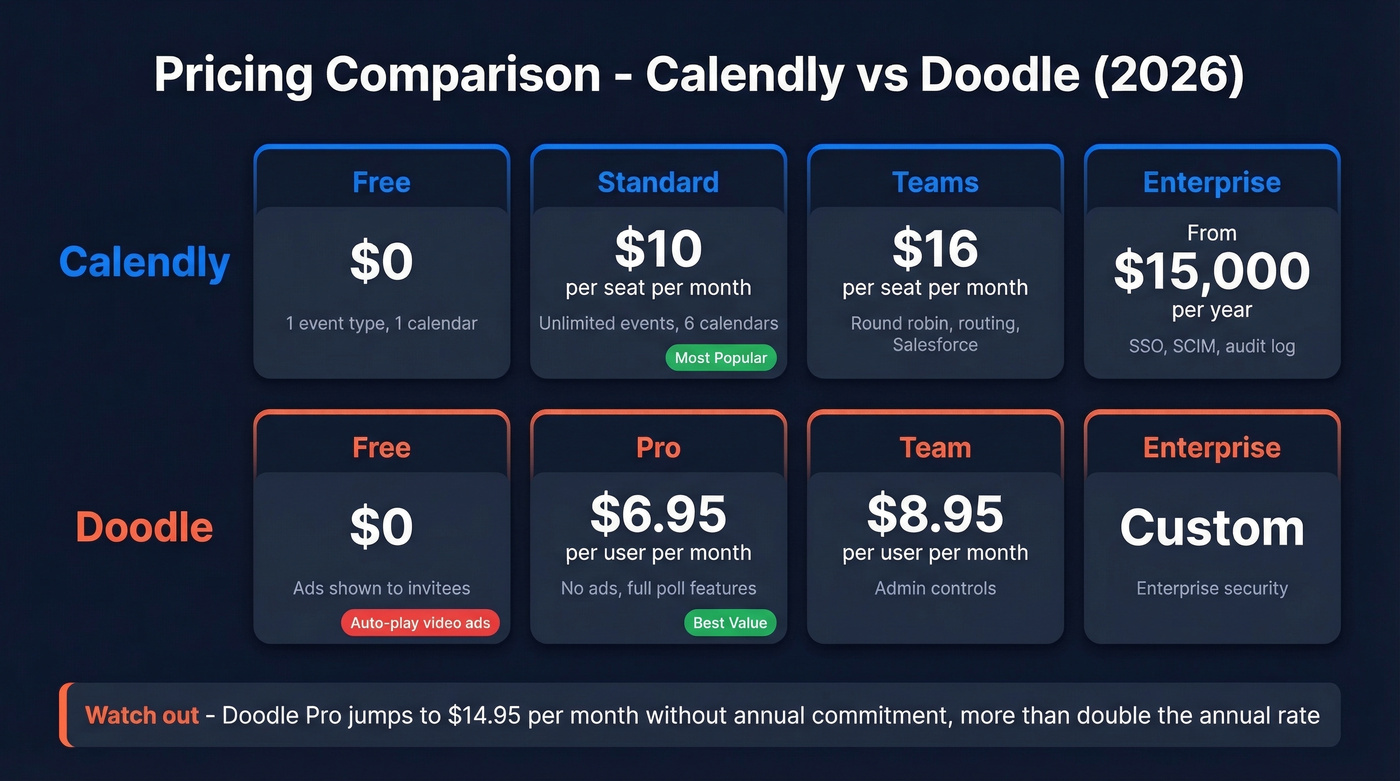
| Free | $0 | 1 event type, 1 calendar |
| Standard | $10/seat/mo (annual) | Unlimited events, 6 calendars |
| Teams | $16/seat/mo (annual) | Round robin, routing, Salesforce |
| Enterprise | From $15,000/year | SSO/SAML, SCIM, audit log |
Doodle
| Plan | Price | Key Limits |
|---|---|---|
| Free | $0 | Ads shown to invitees |
| Pro | $6.95/user/mo (annual) | No ads, full poll features |
| Team | $8.95/user/mo (annual) | Admin controls |
| Enterprise | Custom | Enterprise procurement + security |

Doodle Pro at $6.95/mo is roughly 30% cheaper than Calendly Standard at $10/mo - meaningful for teams buying 10+ seats. But watch the monthly-vs-annual trap: Doodle Pro jumps to $14.95/mo without an annual commitment, more than double the annual rate. Calendly's monthly premium is smaller ($12 vs $10).
Calendly Enterprise at $15,000/year is overkill for most mid-market teams. Unless you absolutely need SSO/SAML, SCIM, and audit logs, the Teams plan at $16/seat/mo gets you most of the value at a fraction of the cost.
What Users Actually Say
Calendly
Calendly holds a 4.7/5 on both G2 and Capterra. G2 category scores are strong: Ease of Use 9.4, Setup 9.1, Support 9.0. The complaints are consistent - missing features on the free plan (54 mentions), calendar syncing issues (46 mentions), and pricing concerns (38 mentions). None are dealbreakers, but test the calendar sync during your trial if you're on Apple.
If you're trying to improve show rates and conversion after booking, track the right funnel metrics instead of relying on anecdotes.
Capterra data shows Calendly skews heavily toward small business users (77% of reviewers), which makes sense given the self-serve pricing model.
Doodle
Doodle scores 4.4/5 on G2 and 4.6/5 on Capterra, with a more distributed user base (61% small business on Capterra vs Calendly's 77%). Users praise Doodle for reducing group scheduling back-and-forth, but the free plan's ads - including auto-play video - are a recurring complaint. The 2022 Reddit backlash about UX regressions was harsh. Doodle's 2025-2026 updates have addressed several of the admin and editing gaps, but the Product Direction score of 7.4 vs Calendly's 8.8 remains a red flag.
The Problem Neither Tool Solves
We've seen sales teams booking 40 demos a week through Calendly where half the prospects on a sequence have outdated email addresses - bounced invites, no-shows, wasted slots. The scheduling tool isn't the bottleneck. Contact data is.
If you're fixing data quality, start with data enrichment services and a clean verification workflow.

Prospeo covers 300M+ professional profiles with 98% email accuracy and a 7-day data refresh cycle. Find verified contact data for your prospects, then send them the Calendly or Doodle link.
If you're building lists from scratch, these free lead generation tools can help you source targets before you verify them.
Calendly and Doodle handle the scheduling. But who are you scheduling with? Teams using Prospeo book 26% more meetings than ZoomInfo users because 98% accurate emails and 30% mobile pickup rates mean outreach actually lands.
Book 26% more meetings by reaching real buyers with verified data.
Alternatives Worth Knowing
Cal.com is the open-source Calendly alternative gaining real traction. More generous free tier, a self-hosted option for data sovereignty, and a feature set that covers most core scheduling needs. If you're frustrated with Calendly's pricing tiers, start here.
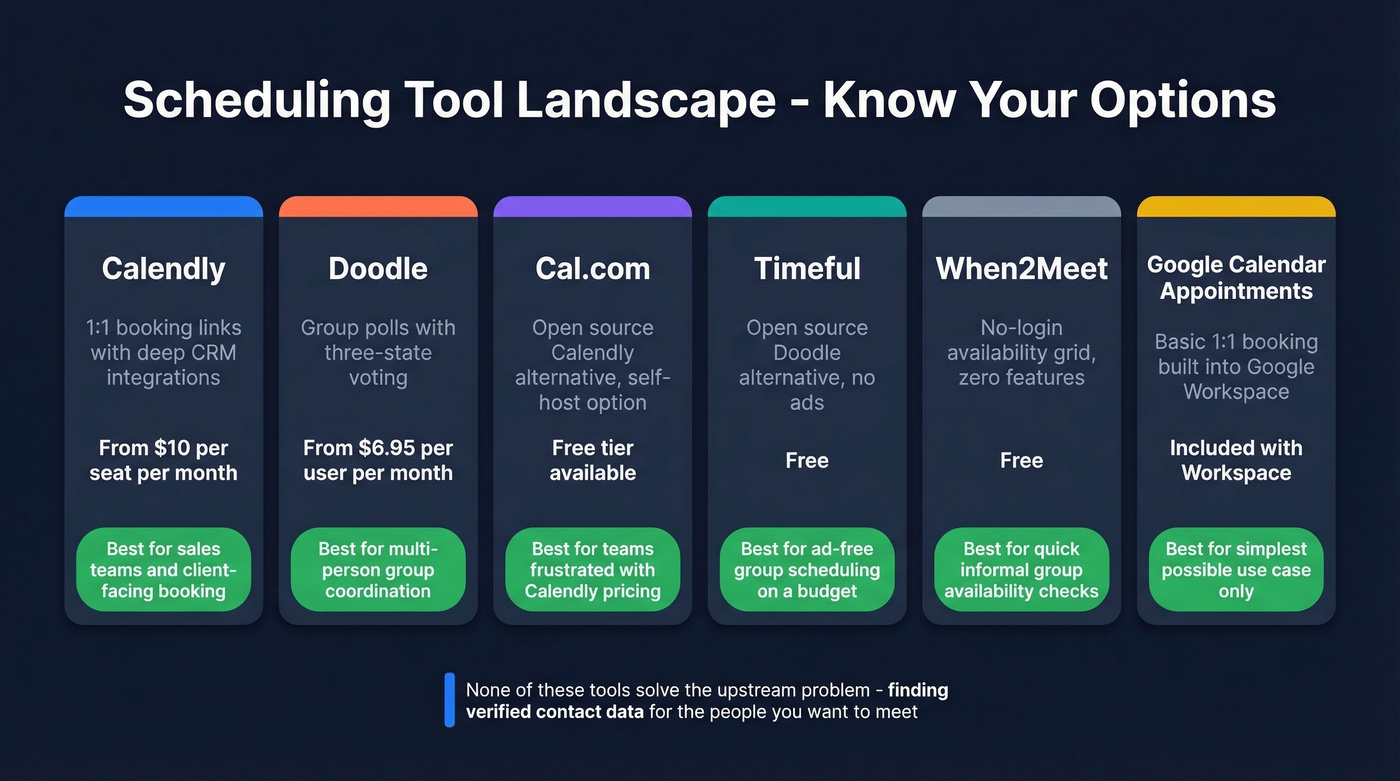
Timeful (formerly Schej) is an open-source Doodle alternative with no ads and Google/Outlook/Apple Calendar integration. Early-stage but promising. Free.
When2Meet is the no-login availability grid academics have used for years. Zero features, zero friction. Free.
Google Calendar Appointment Schedules offers basic 1:1 booking built into Google Workspace. Skip this if you need anything beyond the simplest use case - it's bare-bones.
Final Verdict
Calendly wins for 1:1 business scheduling. The booking controls, CRM integrations, and team features are deeper than anything Doodle offers. If your workflow is "prospect books a slot on my calendar," Calendly is the default choice.
Doodle wins for group coordination - but only on a paid plan. The free tier's ads are a dealbreaker for professional use. At $6.95/mo, Doodle Pro removes the ads and unlocks the polling features that actually make it useful.
If you need both, use both. They don't conflict. And if your real issue is getting prospects to see the booking link in the first place, fix your contact data before you optimize your scheduling stack.
FAQ
Can I use Calendly and Doodle together?
Yes. Calendly handles 1:1 booking links; Doodle handles group polls. They solve different problems and don't conflict - no integration needed between the two.
Is Doodle really free?
Technically yes, but the free plan shows ads - including auto-play video - to every invitee. For any professional context, you'll want Pro at $6.95/mo with annual billing.
Which is better for large groups?
Doodle. Its "if need be" three-state polling handles multi-person coordination far better than Calendly's binary yes/no poll. For groups over five people, Doodle is the clear pick.
Does Calendly work with Outlook?
Yes. The free plan connects one calendar. Standard ($10/seat/mo) connects up to six, which is where most business users land.
How do I reduce no-shows on booked meetings?
Start with verified contact data - if your booking link goes to an outdated email, the prospect never sees it. Pair accurate contact info with Calendly's built-in reminder workflows for the best results.