

Campaign Cleaner: Pricing, Reviews & Honest Pros and Cons (2026)
$99/mo for a tool that fixes your email HTML before it tanks your sender reputation. That's Campaign Cleaner's pitch - and after running the Basics tier through a batch of client newsletters, it delivers.
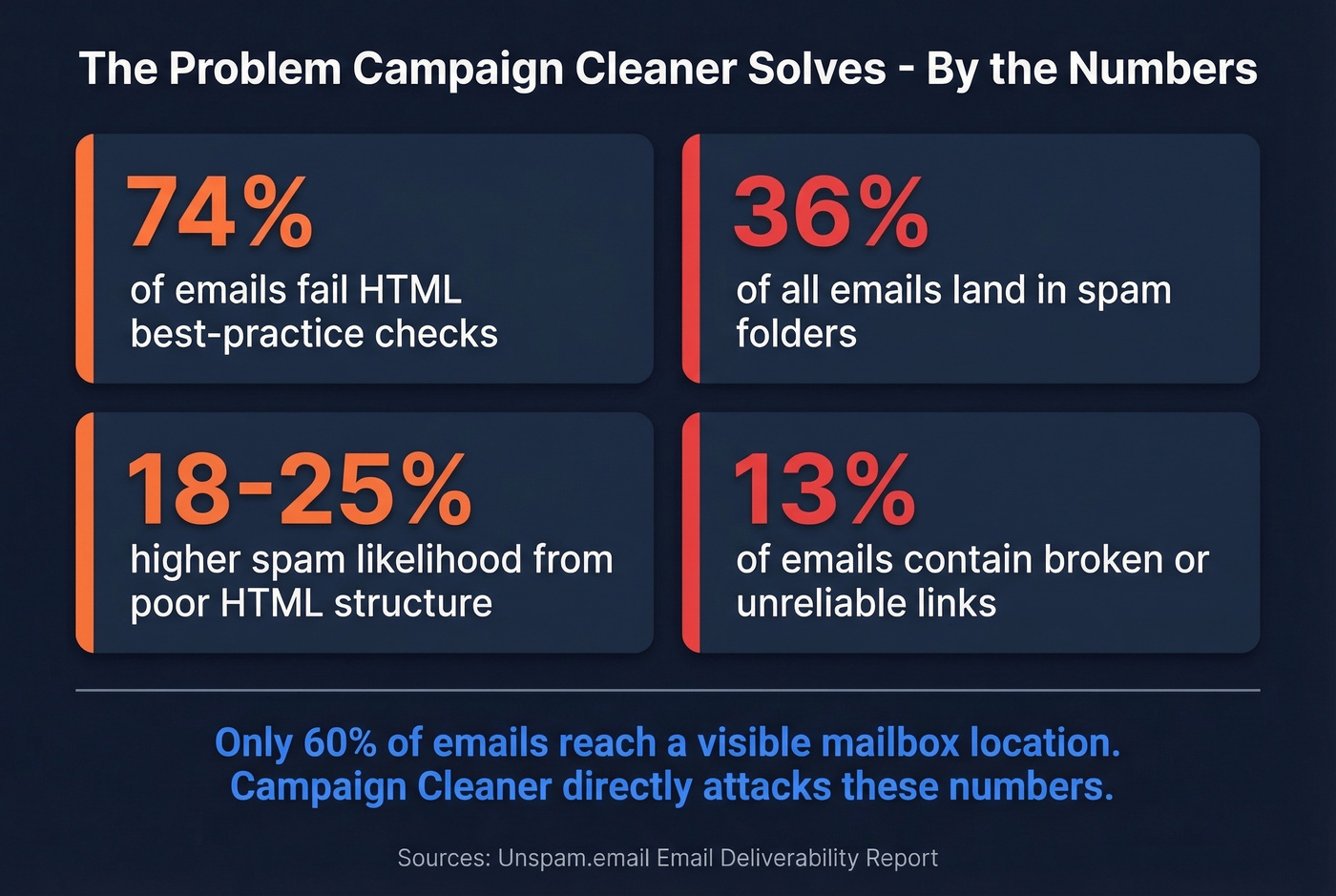
A perfect 5.0/5 on Capterra from 17 reviews and a genuinely useful free tier make it the best-value email HTML optimization tool available right now. The catch: a tiny review footprint means you're betting on the product, not the crowd.
What Campaign Cleaner Does
Campaign Cleaner isn't an ESP. It's an email HTML optimization platform. Paste in your newsletter code, hit the Clean Campaign button, and it automatically handles CSS inlining, corrects unclosed tags, minifies HTML, detects spam triggers, checks broken links, runs inbox placement testing across Gmail/Yahoo/Hotmail/Apple Mail, and gives you inbox previews including dark mode.
It also specializes in Microsoft 365 deliverability - a pain point most competing tools barely acknowledge.
The founder built ZeroBounce and Unlock The Inbox before this, and he's a listed contributor to the DMARC standard (RFC 7489). Campaign Cleaner's own data suggests most customers see a 5-15% boost in open and click-through rates over time as sender reputation builds. That claim lacks independent verification, but the underlying logic is sound: only 60% of emails reach a visible mailbox location, 36% land in spam, and 4% get blocked entirely. Fixing HTML structure directly attacks those numbers.

Pricing Breakdown for 2026
Four options. No hidden fees.
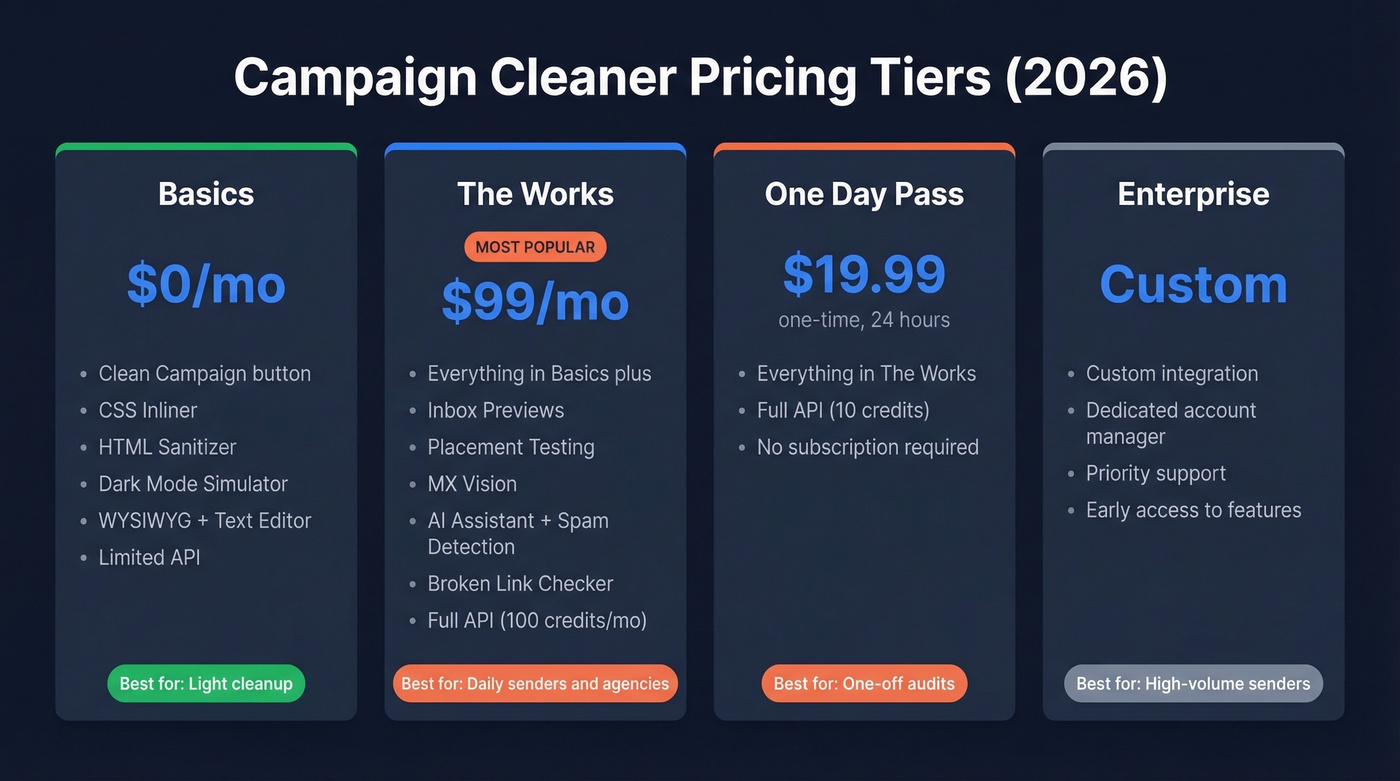
| Basics | The Works | One Day Pass | Enterprise | |
|---|---|---|---|---|
| Price | $0/mo | $99/mo | $19.99 (24 hrs) | Custom |
| Key features | Clean Campaign, CSS Inliner, HTML Sanitizer, Dark Mode Simulator, WYSIWYG + Text Editor | + Inbox Previews, Placement Testing, MX Vision, AI Assistant, spam trigger detection, broken link checker, blacklist link check | Everything in The Works | Custom integration, dedicated AM, priority support, early access |
| API access | Limited | Full (100 credits/mo) | Full (10 credits) | Negotiated |
| Best for | Light cleanup | Daily senders, agencies | One-off audits | High-volume senders |
The Basics tier is genuinely useful - not a crippled trial designed to frustrate you into upgrading. The One Day Pass at $19.99 is clever for freelancers who need a deep audit on a single campaign without committing monthly. Free trial access to The Works is available if you contact them directly.
Pros
One-click cleanup saves real time. Capterra reviewers highlight the one-click "Green Button" workflow - paste HTML, click once, done. It also includes SpamAssassin scoring and AI spam trigger detection. We ran it against a batch of templates that had been giving us rendering headaches in Outlook, and it caught issues we'd have spent 45 minutes debugging manually.
It solves a quantified problem. 74% of emails fail HTML best-practice checks, poor HTML structure increases spam likelihood by 18-25%, and 13% of emails contain broken or unreliable links. Campaign Cleaner directly addresses all three.
Transparent pricing. The free tier is real. $99/mo is straightforward. Compare that to Litmus hiding behind sales walls after its shift to sales-led pricing.
Founder-level support you won't find elsewhere. Free 15-minute deliverability call from a DMARC RFC contributor, with a focus on diagnosing what's actually hurting inbox placement in Microsoft 365 environments specifically.

Campaign Cleaner fixes your HTML. But 36% of emails landing in spam isn't just a code problem - it's a data problem. Prospeo's 5-step email verification catches spam traps, honeypots, and dead addresses before they tank your sender reputation. 98% accuracy at $0.01/email.
Stop optimizing templates for a list full of invalid addresses.
Cons
Tiny review footprint. 17 Capterra reviews and 1 review on G2 with an inactive profile for over a year. Not alarming for a tool founded in 2023, but it limits buyer confidence. You're trusting the founder's track record more than the crowd here.
Automation can over-flag. The single G2 review notes that heavy automation sometimes flags legitimate content as spam-risky. Power users will want more granular control over what gets flagged versus what gets auto-fixed.
Campaign Cleaner vs Email on Acid vs Litmus
Let's be honest - review sites list Gmail and Mailchimp as Campaign Cleaner "alternatives." Those are ESPs, not HTML optimization tools. The actual competitive set is these three.
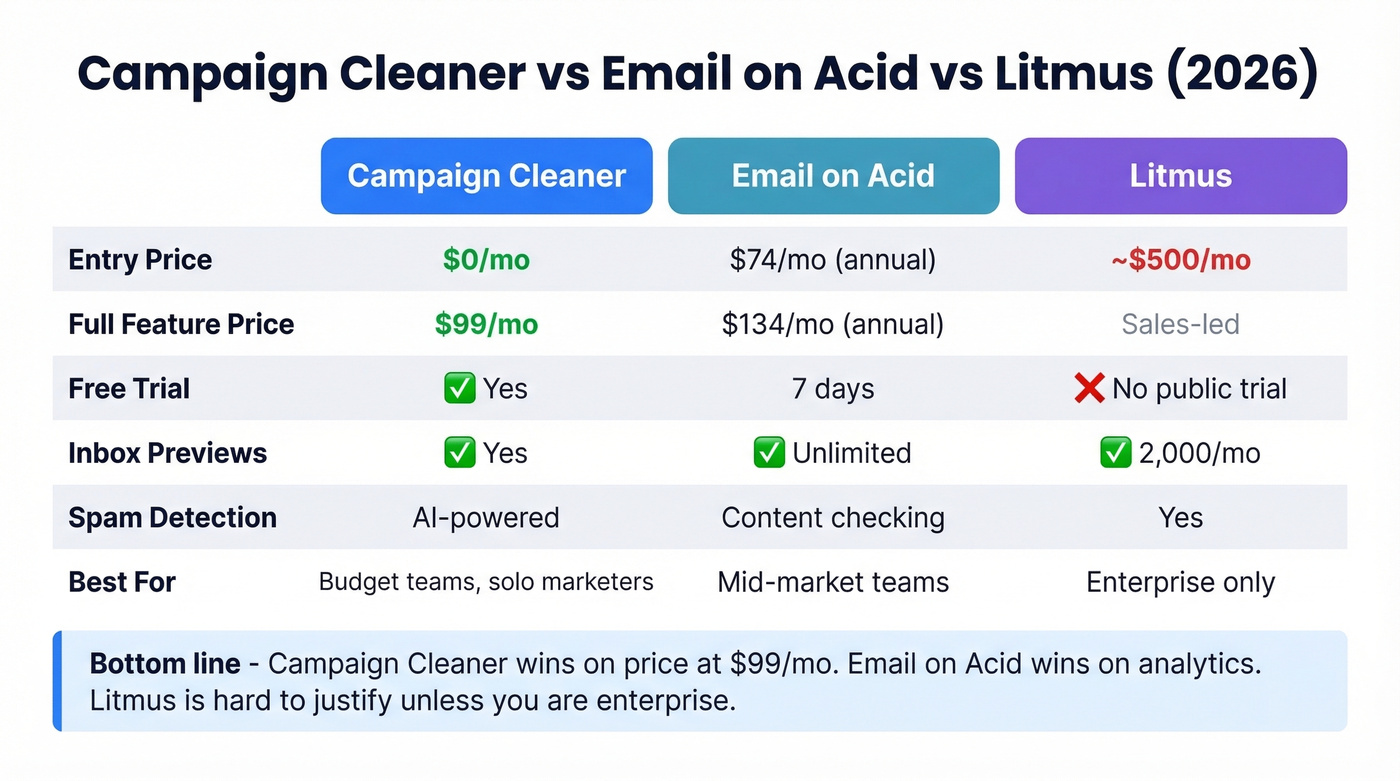
| Campaign Cleaner | Email on Acid | Litmus | |
|---|---|---|---|
| Entry price | $0/mo (Basics) | $74/mo annual ($99/mo monthly) | ~$500/mo (Core) |
| Full-feature price | $99/mo | $134/mo annual ($179/mo monthly) | Sales-led |
| Free trial | Yes (contact them) | 7 days / 5 tests | No public trial |
| Users included | User management | 1 (Basics) / 3 (Premium) | 5 (Core) |
| Inbox previews | Yes | Yes (unlimited previews/projects) | Yes (2,000/mo) |
| Spam detection | Yes (AI-powered) | Yes (content checking) | Yes |
| Best for | Budget-conscious teams, solo marketers | Mid-market teams needing analytics | Enterprise with unlimited budget |
Campaign Cleaner wins on price and simplicity - $99/mo is hard to beat. Email on Acid Premium is stronger on analytics and multi-user collaboration at $134/mo annual. Litmus is hard to justify unless you're enterprise and need the Validity ecosystem. After the August 2025 pricing change that's been widely discussed, Litmus Core is often pegged around ~$500/mo - a 151% increase that pushed a lot of mid-market teams to look elsewhere.
If your campaign ROI doesn't justify $500/mo in tooling, Litmus isn't in your consideration set anymore. Campaign Cleaner at $99/mo gives small teams most of what they need. The remaining gap is analytics depth you probably won't use.
Skip Campaign Cleaner if you only need rendering previews and nothing else - Email on Acid Basics at $74/mo is cheaper for that specific use case.
We didn't find meaningful Reddit threads on Campaign Cleaner - the tool is still too new for significant community chatter. That'll change as the review base grows, but right now you're relying on Capterra sentiment and the founder's track record.
The Deliverability Stack
Campaign Cleaner fixes your email's code. But if your list contains invalid addresses, bounces still wreck sender reputation regardless of how polished your HTML is. We've seen teams optimize every pixel of their templates and still land in spam because 15% of their list was dead.
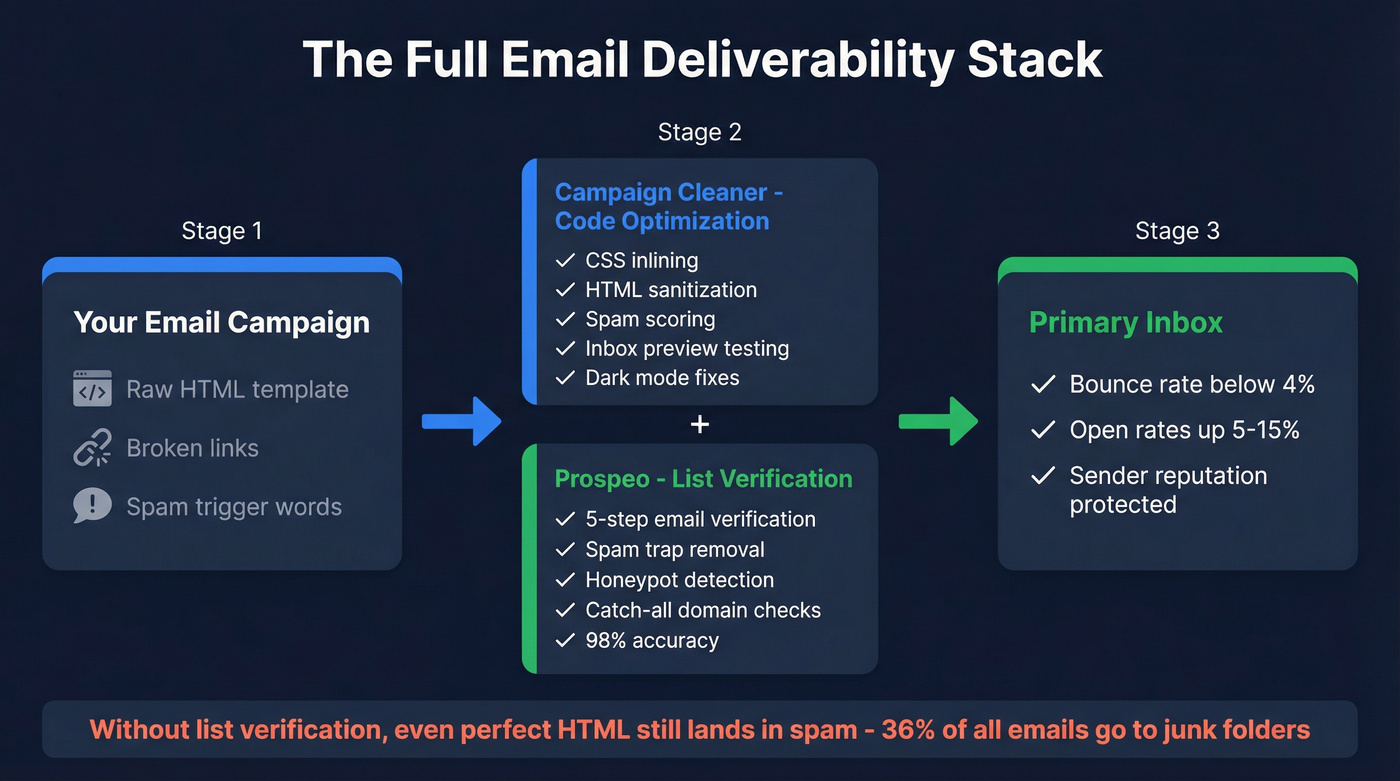
That's where email verification comes in. Prospeo handles the data side with 98% email accuracy through a 5-step verification process that catches spam traps, honeypots, and handles catch-all domain verification. Bulk verification runs about $0.01/email. HTML optimization plus list verification is the full inbox placement stack - one without the other leaves a gap.

Final Verdict
Campaign Cleaner is a buy for solo email marketers and small teams who care about landing in the primary tab. Start with the free Basics tier - in our experience, it's genuinely useful for quick cleanups without any upgrade pressure. Move to The Works at $99/mo if you send regularly and need inbox placement testing.
And pair whichever tool you pick with email deliverability best practices and email verification. Clean code plus clean data is the full deliverability stack - that's the real takeaway from any honest look at Campaign Cleaner's pricing, reviews, and trade-offs.
You're spending $99/mo to perfect your email HTML. Don't waste it on bounces. Prospeo bulk verification eliminates invalid contacts, catch-all traps, and honeypots - the deliverability killers that no amount of CSS inlining can fix. Teams using Prospeo cut bounce rates below 4%.
Complete the deliverability stack - clean code plus verified contacts.