

How to Check If an Email Address Is in Use (2026)
You type an email address into a verification tool, hit "check," and get back... "unknown." Or "risky." Or "accept-all." Here's the thing: trying to check if an email address is in use is a probabilistic exercise, not a binary one - and most people figure that out only after they've tanked a campaign's deliverability.
There's a second version of this question that comes up constantly: "Can I check if someone has an account on a specific website using their email?" Short answer - no, and platforms work hard to make sure you can't.
What You Need (Quick Version)
- Single email, right now? Use Hunter's free verifier or Email Hippo for a quick OK/Bad/Unverifiable result.
- Cleaning a list in bulk? ZeroBounce or Bouncer. Both handle catch-all detection with pay-as-you-go pricing.
- Building prospect lists from scratch? Prospeo's email finder pre-verifies every address before returning it, so you skip post-collection list cleaning entirely.
How Email Verification Works
Most verification tools follow the same core framework under the hood: basic format checks, domain checks, an SMTP-level probe, then risk filtering. Some vendors describe 30+ steps - those are usually deeper sub-checks layered on top of the same pipeline.
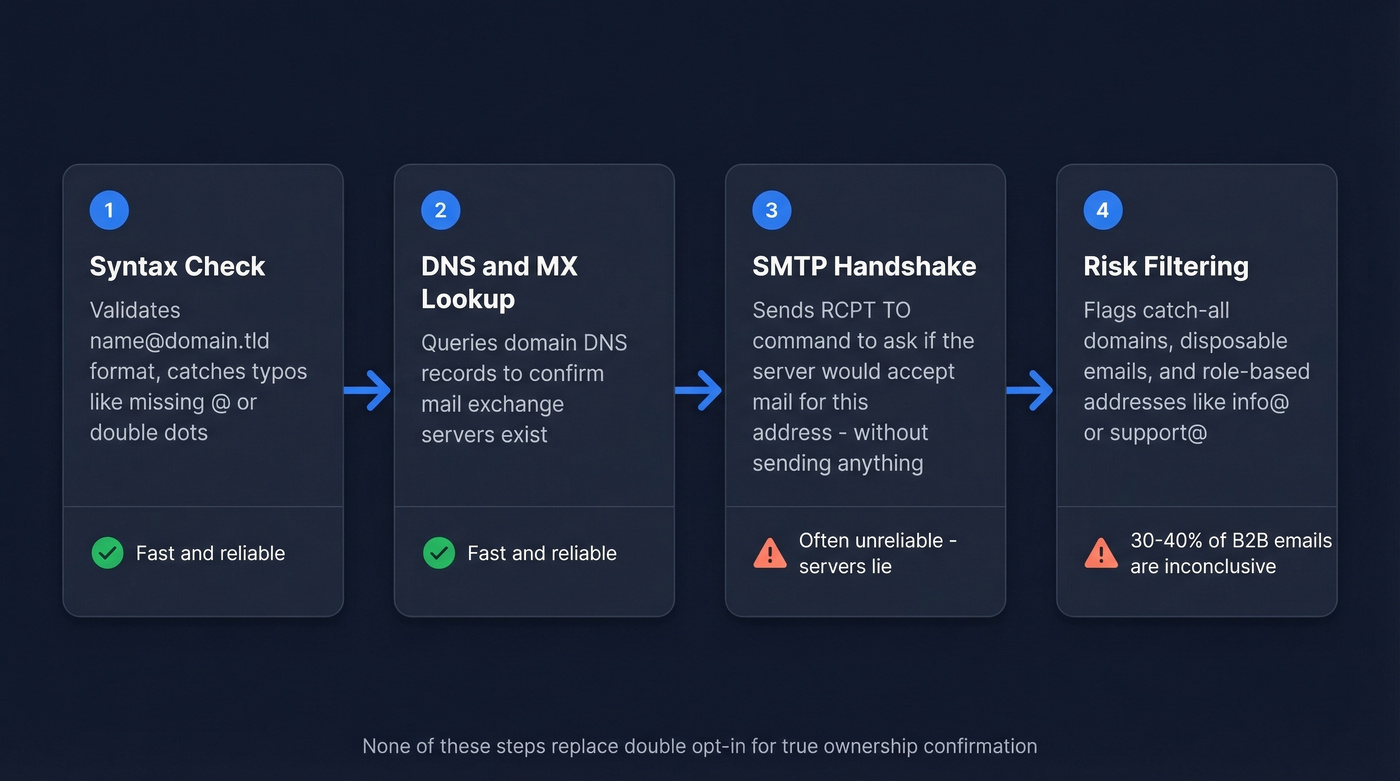
Step 1: Syntax check. Is the format valid? Does it follow name@domain.tld rules? This catches typos like missing @ signs or double dots. Trivial, but it filters out obvious junk.
Step 2: DNS and MX lookup. The tool queries the domain's DNS records to confirm mail exchange servers exist. No MX records means the domain can't receive email. Dead end.
Step 3: SMTP handshake. This is where it gets interesting - and unreliable. The tool opens a connection to the mail server and issues a RCPT TO command, essentially asking "would you accept mail for this address?" without actually sending a message. If the server rejects the recipient, the email probably doesn't exist. But many servers accept the command regardless, then silently discard the message to prevent user enumeration. An older command called VRFY was designed for exactly this purpose, but virtually all modern servers disable it to prevent abuse. And greylisting - where servers intentionally reject the first attempt expecting a retry - breaks instant probes entirely.
Step 4: Catch-all, disposable, and role-based filtering. The tool flags addresses on catch-all domains that accept everything, disposable email services, and role-based addresses like info@ or support@ that typically aren't tied to a real person.
For true ownership confirmation, none of this replaces double opt-in - sending an actual email with a confirmation link.
Why Verification Results Aren't Always Accurate
Even after all four steps, a huge chunk of your list will come back as "unknown" or "risky." In our testing, catch-all domains are the single biggest source of these inconclusive results.
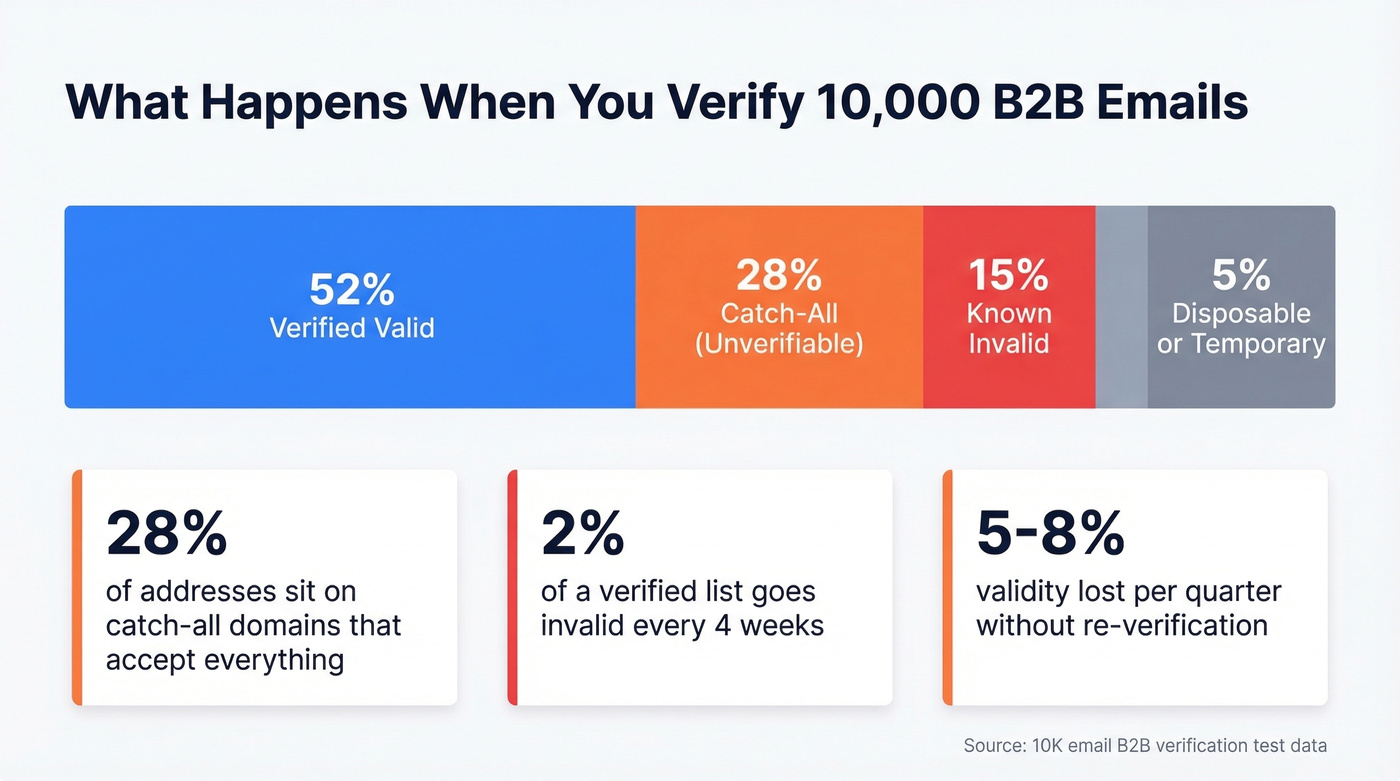
30-40% of B2B email addresses sit on catch-all domains. These servers accept mail to any address - real or fabricated - so SMTP probes can't distinguish a working inbox from a black hole. In a 10,000-email B2B test, 28% of addresses were catch-all, 15% were known invalid, and 5% were disposable. Nearly half the list couldn't be definitively verified.
Major consumer email providers often prevent reliable mailbox-level SMTP probing and return ambiguous responses even when the address exists. Enterprise security gateways from Proofpoint, Mimecast, Barracuda, and Microsoft Defender add another layer of interference. Lists decay fast, too - roughly 2% of a verified list becomes invalid within 4 weeks as people change jobs and mailboxes get deactivated. We've seen lists lose 5-8% validity in a single quarter when teams skip re-verification.
Let's be honest: if your bounce rate is already under 2% and your list is under 5,000 contacts, you probably don't need a dedicated verification tool at all. A good email finder with built-in verification will save you more time and money than bolting on a separate cleaning step.

Why check if an email is in use after the fact? Prospeo's email finder runs every address through 5-step verification - catch-all handling, spam-trap removal, honeypot filtering - before it ever hits your list. 98% accuracy across 143M+ verified emails at ~$0.01 each.
Skip the verification step entirely. Start with emails that work.
Why Platforms Block Account Lookups
Checking whether an email has an account on a specific service is called account enumeration, and it's a recognized security vulnerability. You've seen the fix in action - password reset pages that say "If this account exists, a reset link has been sent" instead of "No account found with this email." That identical response for valid and invalid addresses is intentional.
Platforms also guard against timing attacks, where the slight delay caused by sending an actual reset email reveals account existence. Modern applications normalize response times to close this gap. If you're trying to verify whether an address is registered on a specific platform like Gmail or Slack, you're out of luck by design.
Best Tools for Validating Email Addresses
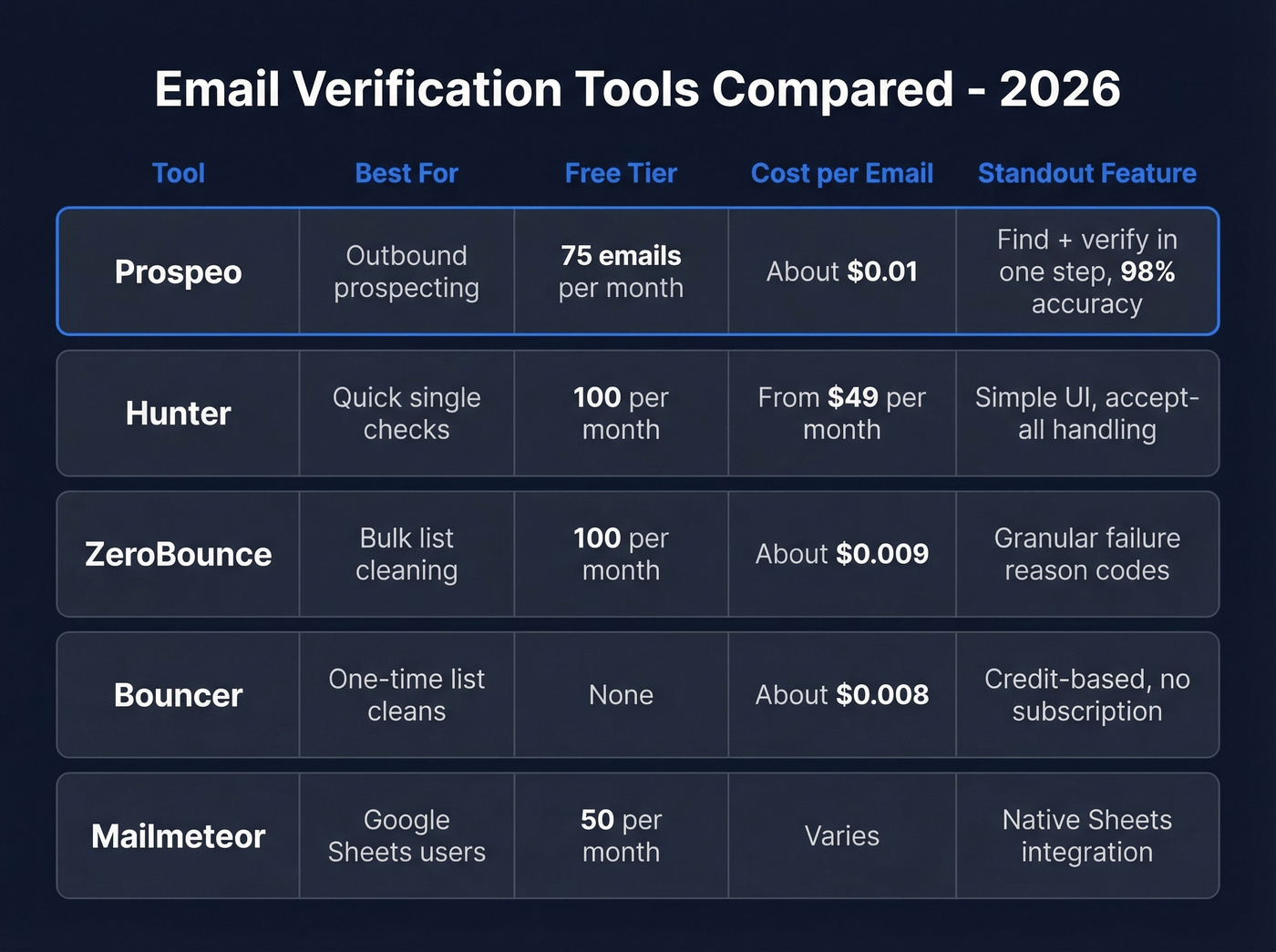
| Tool | Best For | Free Tier | Paid Pricing | Key Strength |
|---|---|---|---|---|
| Prospeo | Outbound prospecting | 75 emails/mo | ~$0.01/email | Find + verify in one step |
| Hunter | Quick single checks | 100/mo | From $49/mo | Simple, fast UI |
| ZeroBounce | Bulk list cleaning | 100/mo | ~$18/mo for 2K | Granular result codes |
| Bouncer | One-time list cleans | None | $8 per 1K | Flexible credit-based pricing |
| Mailmeteor | Google Sheets users | 50/mo | Paid plans available | Native Sheets integration |
Prospeo
Prospeo works upstream from the verification problem. Its email finder runs every address through 5-step verification - including catch-all handling, spam-trap removal, and honeypot filtering - before an address ever reaches you. That's 98% accuracy across 143M+ verified emails, refreshed on a 7-day cycle while the industry average sits at 6 weeks. For outbound teams, this means you start with data you can trust instead of playing the "find emails, clean list, hope for the best" game. Real results back this up: Snyk cut their bounce rate from 35-40% to under 5% after switching, and GreyScout dropped from 38% to under 4%.
Hunter
The go-to for quick, one-off checks. The free tier gives you 100 verifications per month, and the interface is dead simple. Hunter can verify accept-all addresses with several major email providers using a proprietary solution, making it a solid option for spot checks. Skip this if you need bulk cleaning - the free tier runs out fast, and paid plans start at $49/mo.
ZeroBounce
The better choice when you need to understand why an address failed, not just that it did. Their result codes break down risky addresses by category - catch-all, abuse, disposable - which helps you make smarter decisions about borderline contacts. At ~$18/mo for 2,000 verifications, it's reasonable for mid-volume teams.
Bouncer
Works well for one-time list cleans and teams that prefer buying credits over subscriptions. Commonly priced around $8 per 1,000 verifications. If you're cleaning a list once before a big campaign and don't want a recurring bill, this is the move.
Mailmeteor
Lives inside Google Sheets, which is either its killer feature or completely irrelevant depending on where your lists live. The 50 free verifications per month are limiting, but the workflow is frictionless if Sheets is your home base.
Catch-all domains make 30-40% of B2B emails unverifiable with standard tools. Prospeo's proprietary infrastructure handles catch-all detection built in, refreshes every 7 days, and delivered under-5% bounce rates for teams like Snyk and GreyScout.
Bounce rates drop when your data is verified before you send.
Best Practices After Verification
Re-verify every 60-90 days. What was valid last quarter might bounce today. This isn't optional - it's the minimum for maintaining deliverability. If you're tracking bounces closely, use these bounce rate benchmarks to stay out of trouble.
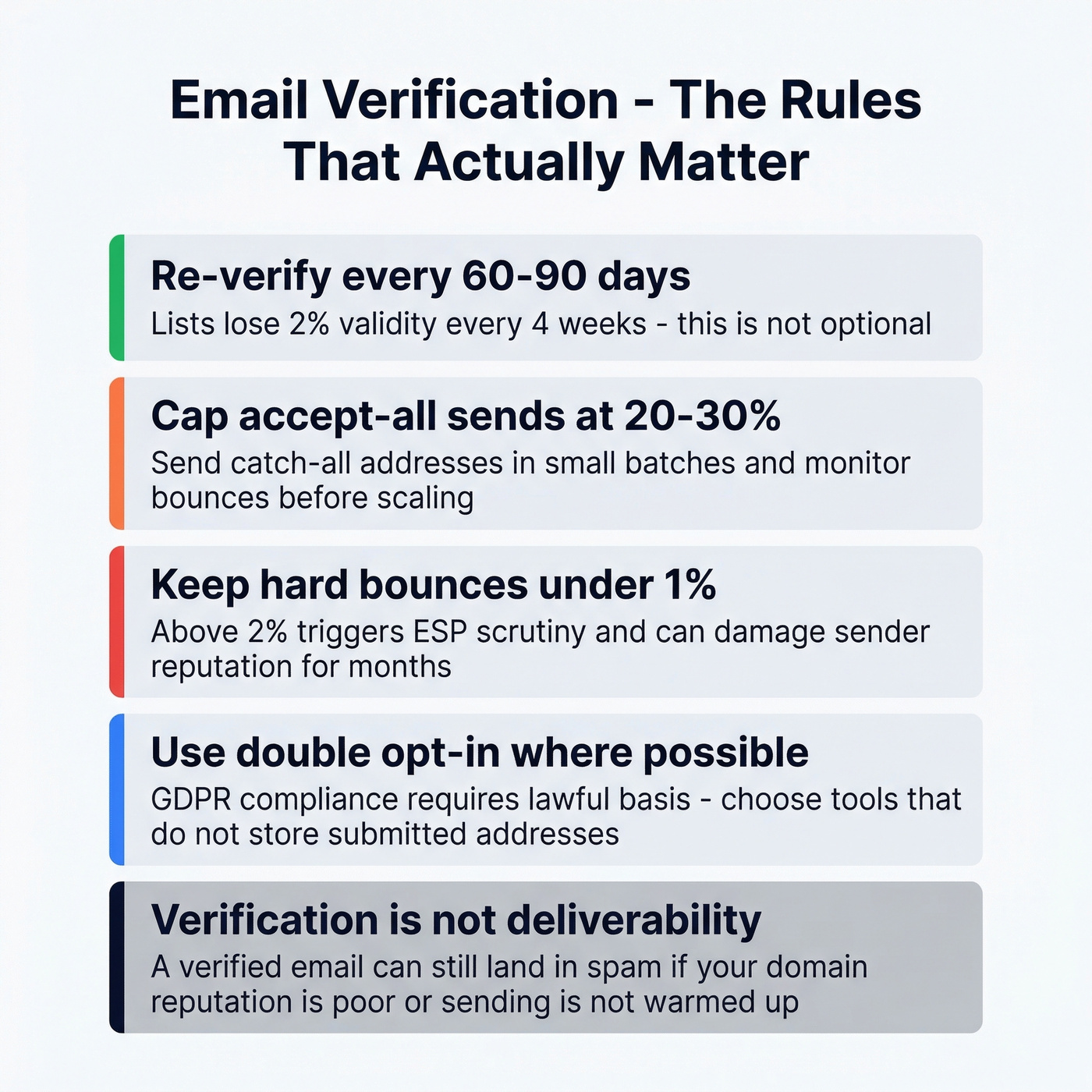
Don't treat "accept-all" as confirmed valid. Send these addresses in small batches and monitor bounce rates before scaling. The consensus on r/coldemail is to cap accept-all sends at 20-30% of any given campaign until you've established a baseline.
Keep hard bounces under 1%. Bounce rates above 2% trigger scrutiny from ESPs and can damage your sender reputation for months. If you're seeing issues, focus on sender reputation before you scale volume.
Stay GDPR compliant. Use double opt-in where possible, choose tools that don't store submitted addresses, and maintain a lawful basis for processing. This compliance checklist covers the details.
Verification isn't deliverability. A verified email can still land in spam if your domain reputation is poor or you haven't warmed up your sending infrastructure. Verification filters undeliverables - it doesn't replace good sending practices. For the full picture, follow an email deliverability checklist.
FAQ
How can I check if an email exists without sending a message?
Verification tools use SMTP handshake probes to test whether a mail server accepts an address without delivering a message. Results are probabilistic - catch-all domains and provider-level blocking mean 30-40% of B2B emails return inconclusive results. For true ownership confirmation, double opt-in is the only reliable method.
Why does my email verifier return "unknown" or "risky"?
The recipient's domain is likely a catch-all server that accepts all mail regardless of whether the mailbox exists. Catch-all domains make up around 28% of a typical B2B dataset. Enterprise security gateways can also block verification probes entirely, forcing tools to return an ambiguous status.
How often should I re-verify my email list?
Re-verify every 60-90 days at minimum. Roughly 2% of a verified list becomes invalid within 4 weeks as people change jobs and mailboxes get deactivated. Skipping quarterly re-verification can cost you 5-8% list validity per quarter.
Is there a tool that gives you already-verified emails?
Prospeo's email finder pre-verifies every address through 5-step validation before you see it - 98% accuracy, 75 free emails/month at prospeo.io/email-finder. You skip post-collection verification entirely, which saves both time and credits.