

How to Check If an Email Address Exists Without Sending an Email
You exported 5,000 webinar leads and need to know which ones are real before you hit send. The instinct is to fire off a test message and see what bounces. Don't. Every hard bounce chips away at your sender reputation, and once that's damaged, even your legitimate emails start landing in spam.
The smarter move is to check if an email address exists without sending anything - but here's the thing most guides won't tell you: treat every verification result as a probability, not a binary yes/no.
What You Need (Quick Version)
- Manual SMTP probing works in theory but breaks on major providers, secured mail servers, and catch-all domains. It's a learning exercise, not a production workflow.
- Verification tools combine syntax, DNS, SMTP, and historical signals for $24-$189 per 10,000 emails. That's the practical answer for most teams.
- Pre-verified data skips the problem entirely by verifying addresses before you ever see them.
Reliability ranking, weakest to strongest: syntax < DNS < SMTP < dedicated tools.
Four Methods to Validate an Email Address
Syntax Validation (Low Reliability)
A regex check catches typos and malformed addresses - missing @ signs, double dots, spaces. It proves the format is correct. It proves absolutely nothing about whether the mailbox exists.
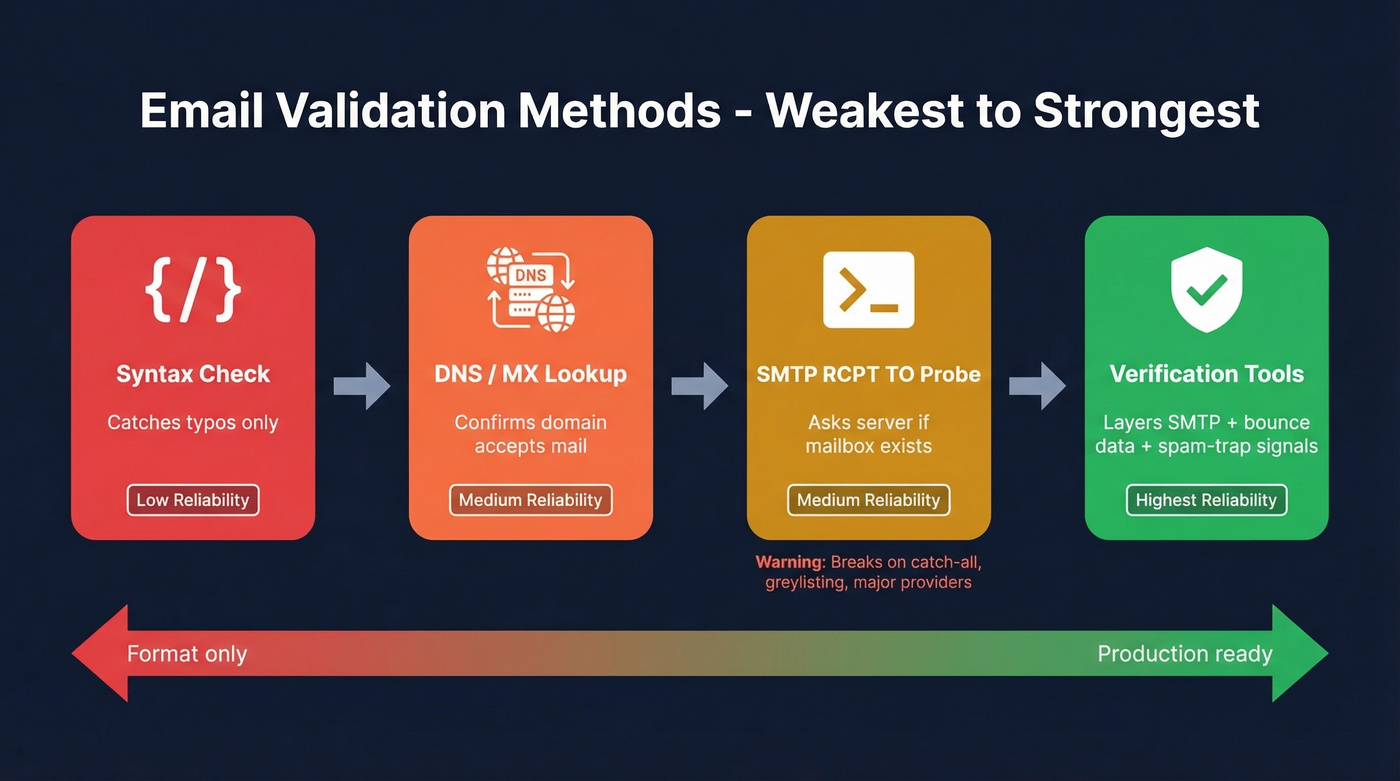
DNS / MX Record Lookup (Medium Reliability)
This confirms the domain accepts email. Run:
nslookup -type=mx example.com
On Linux/macOS, dig mx example.com does the same thing. If MX records come back, the domain has a mail server. That still doesn't mean john@example.com is a real person with a real inbox - it just means the domain is configured to receive mail somewhere.
SMTP RCPT TO Probe (Medium Reliability)
You open an SMTP session directly with the recipient's mail server and ask if the address exists - without actually delivering a message. This is the most common way people try to verify an email address without sending anything.
telnet mail.example.com 25
HELO yourdomain.com
MAIL FROM:<you@yourdomain.com>
RCPT TO:<target@example.com>
QUIT
A valid mailbox typically returns 250 2.1.5 Ok. An invalid one returns 550 5.1.1 Recipient address rejected : User unknown.
Sounds clean. In practice, it's messy. Your ISP will likely block port 25 outright, many mail servers return ambiguous responses on purpose, and probing at any volume gets your IP blocklisted fast. We've tested this on fresh IPs and seen blocklisting kick in after as few as 50-100 probes against a single provider.
Email Verification Tools (Highest Reliability)
Dedicated tools combine all three checks above with behavioral and historical signals - past bounce data, engagement patterns, spam-trap databases. That layered approach is why they consistently outperform any single method.
Why Manual SMTP Verification Breaks
Even if you get the SMTP handshake working, four problems make it unreliable at scale.
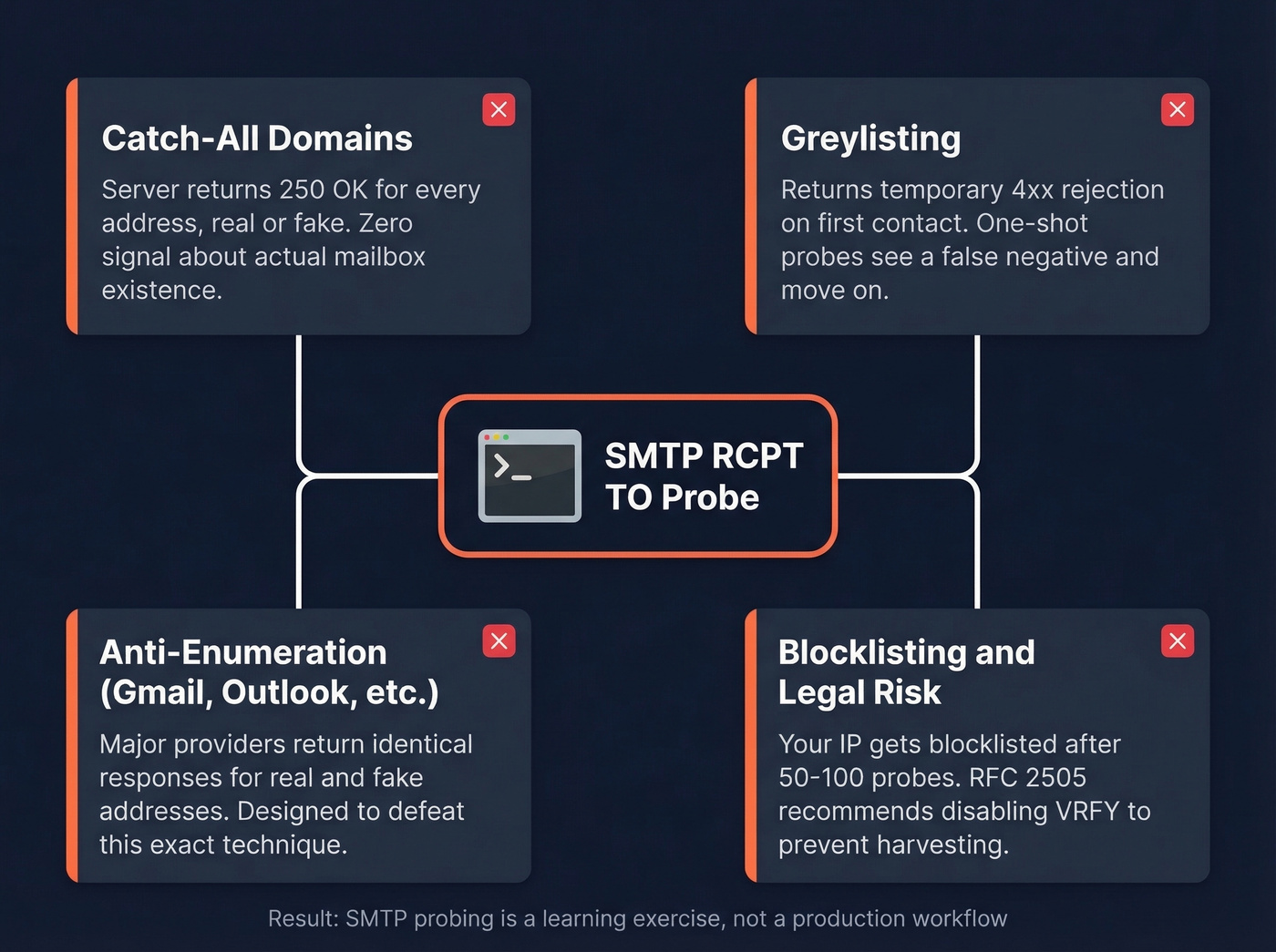
Catch-all domains accept mail for any recipient. Send RCPT TO for a completely fake address like xk7q9z@example.com and you'll still get 250 OK. The detection trick: probe a random non-existent address first. If it's accepted, the domain is catch-all and SMTP verification is useless for every address on it.
Greylisting returns temporary 4xx rejections on first contact, expecting legitimate senders to retry. A one-shot SMTP probe sees a rejection and marks the address as unknown - a false negative that looks like a real one.
Anti-enumeration by major providers is the biggest killer. Many mail servers intentionally obscure mailbox existence to stop enumeration. Some accept at RCPT TO then reject later at DATA. Others return identical responses for real and fake addresses. They're designed to defeat exactly this technique.
Blocklisting and legal risk round it out. RFC 2505 recommends disabling VRFY specifically to prevent directory harvesting, and using RCPT TO to work around mailbox-discovery controls is widely treated as abusive behavior.


SMTP probes break on catch-all domains, get blocklisted after 50 attempts, and can't touch major providers. Prospeo's 5-step verification handles catch-all detection, spam-trap removal, and honeypot filtering before you ever see an address - 98% accuracy at $0.01/email.
Skip the SMTP headaches. Start with emails that are already verified.
Best Email Verification Tools
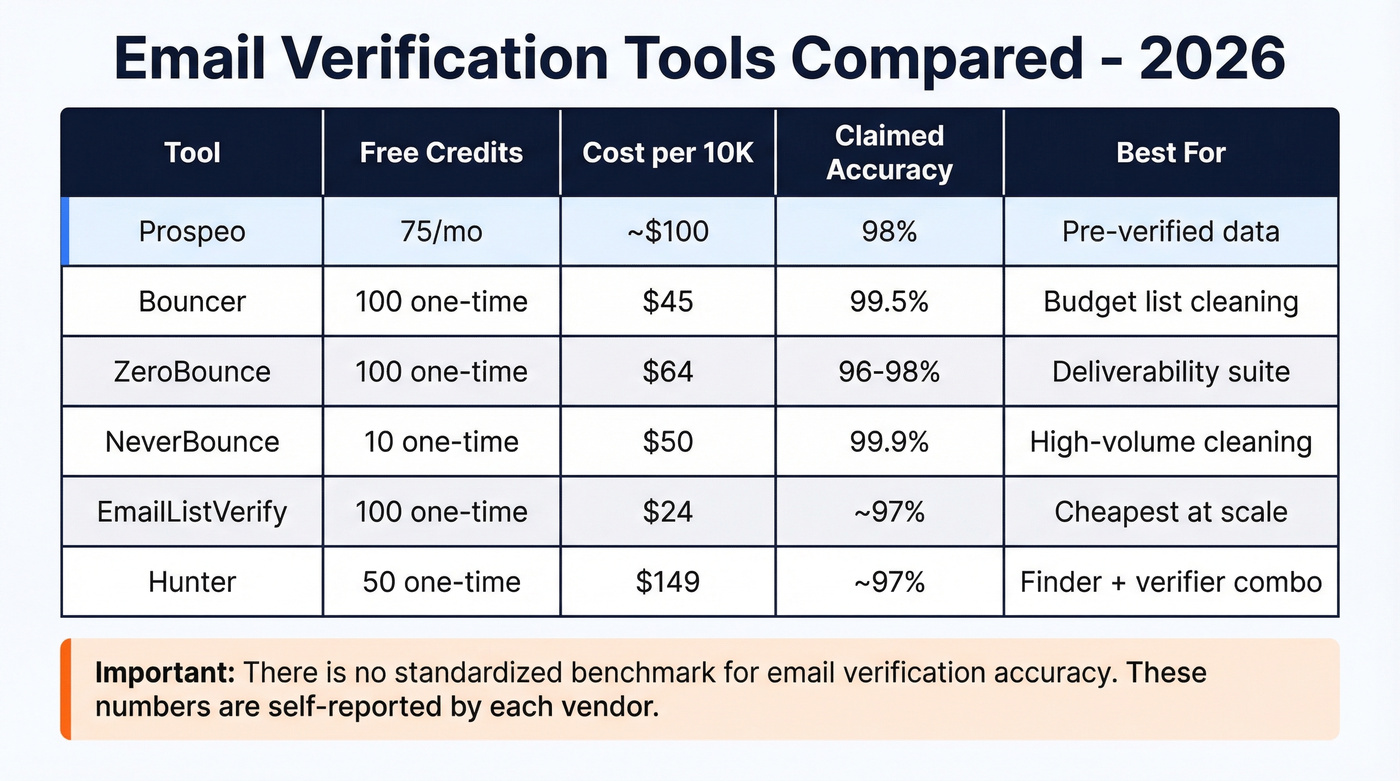
Most tools advertise ~96-99%+ accuracy. Let's be honest: there's no standardized benchmark for email verification, so those numbers are marketing, not methodology. I've watched teams trust self-reported accuracy, blast a full list, and burn their sender reputation in a single campaign.
Prospeo takes a different approach. Instead of verifying a questionable list after the fact, you start with pre-verified data. Its email finder draws from 143M+ verified emails using a 5-step verification process with catch-all handling, spam-trap removal, and honeypot filtering on a 7-day data refresh cycle. The result is 98% email accuracy at roughly $0.01 per email, with a free tier of 75 emails per month.
| Tool | Free Credits | Price / 10K | Claimed Accuracy | Best For |
|---|---|---|---|---|
| Prospeo | 75/mo | ~$100 | 98% | Pre-verified data |
| Bouncer | 100 | $45 | 99.5% | Budget list cleaning |
| ZeroBounce | 100 | $64 | 96-98% | Deliverability suite |
| NeverBounce | 10 | $50 | 99.9% | High-volume cleaning |
| EmailListVerify | 100 | $24 | ~97% | Cheapest at scale |
| Hunter | 50 | $149 | ~97% | Finder + verifier combo |
Here's a strong opinion: if your deal sizes are modest - say under five figures - you probably don't need to verify after finding. You need data that's already verified. Starting with clean data costs less and protects your domain from day one. Most teams are solving the wrong problem.
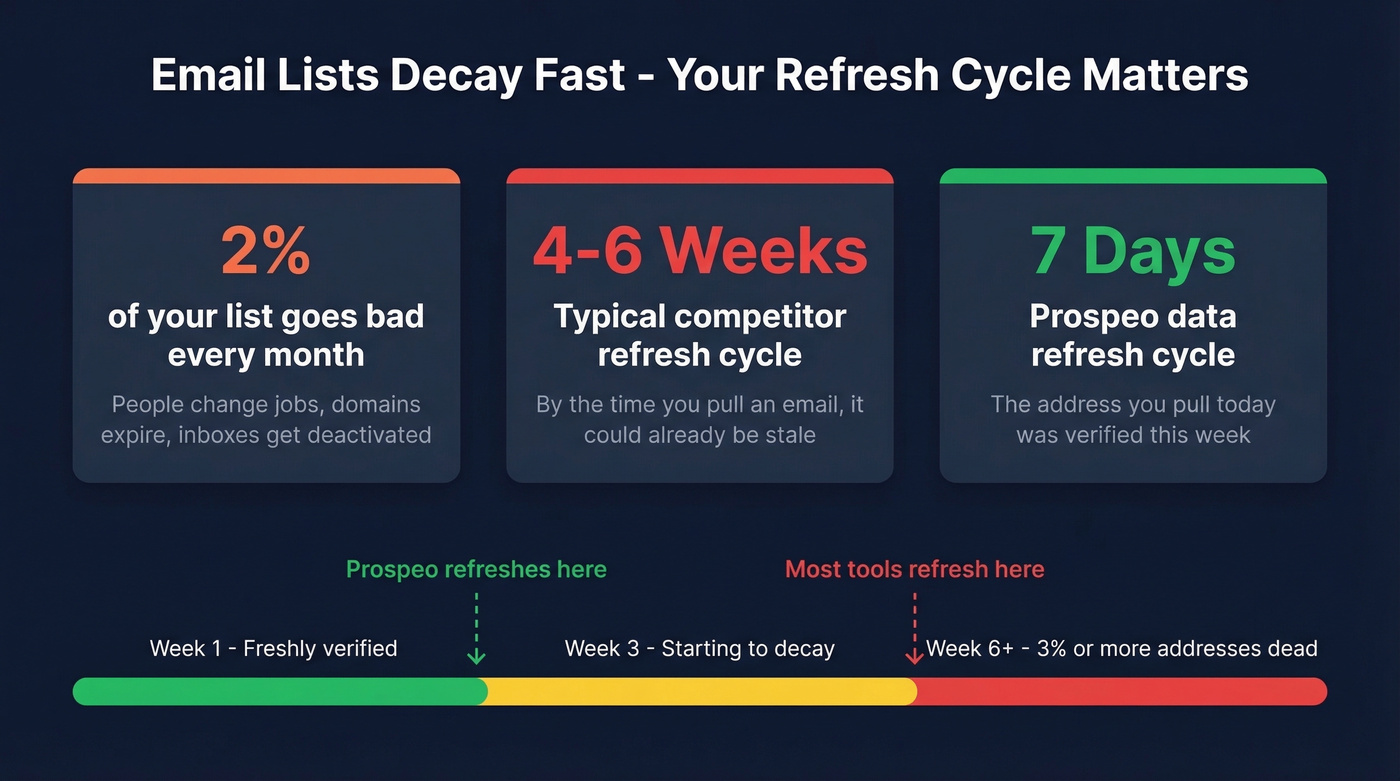
Your list decays 2% every month. Prospeo refreshes all 143M+ verified emails every 7 days - not every 6 weeks like competitors. That means the address you pull today was verified this week, not last quarter.
Clean data from day one beats cleaning dirty data every time.
What to Do With Each Result
Valid - send with confidence. Invalid - remove immediately, no exceptions.
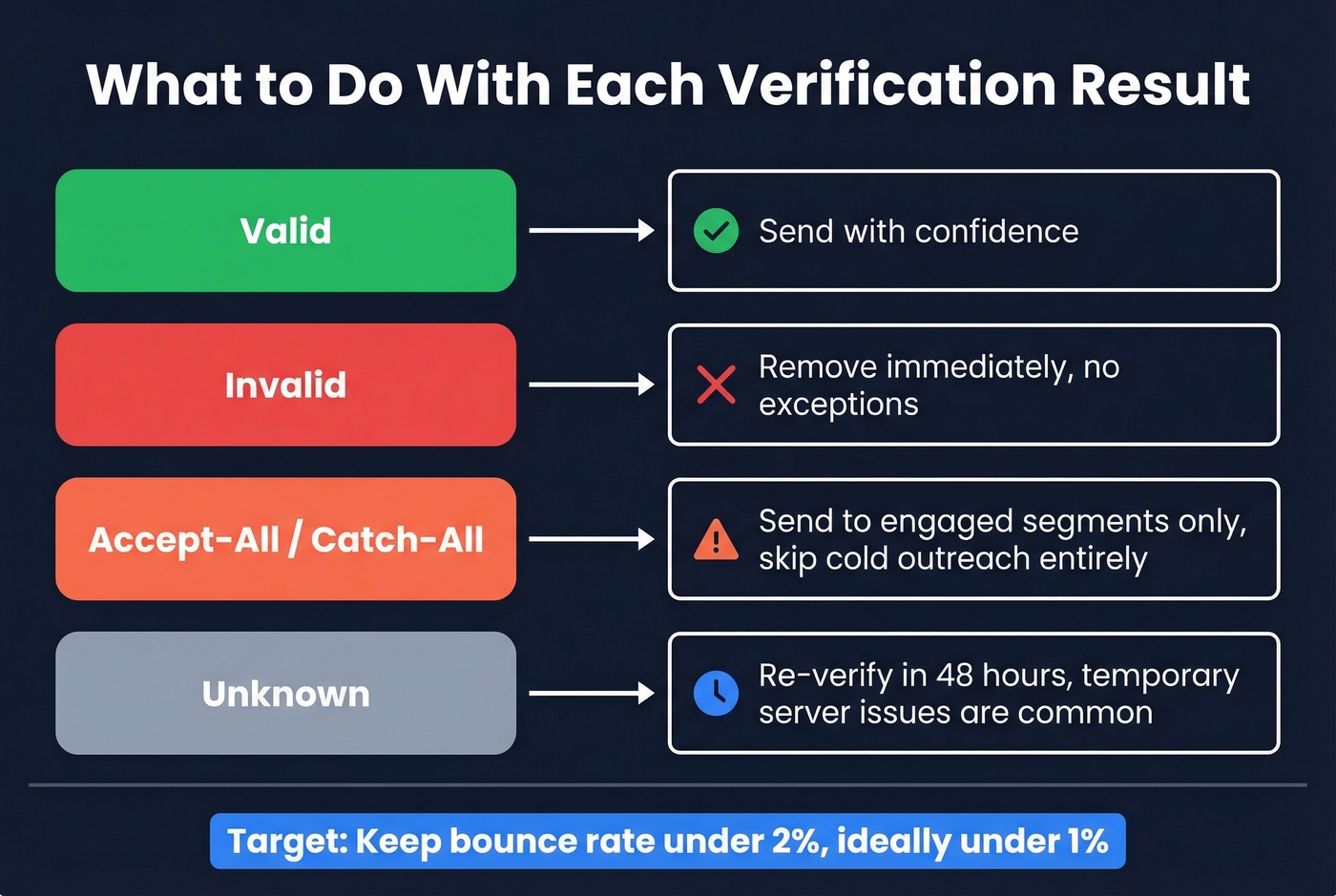
Accept-all / catch-all - this is where most teams trip up. These addresses accepted the probe but the server accepts everything, so you have zero signal about whether the mailbox is real. Send to engaged segments only and skip cold outreach entirely.
Unknown - re-verify in 48 hours. Temporary server issues cause this more often than you'd think.
Your target: keep bounce rates under 2%, ideally under 1% (see email bounce rate benchmarks and fixes).
Keep Your List Clean Over Time
Email lists decay at roughly 2% per month. People change jobs, domains expire, inboxes get deactivated. A list you verified six weeks ago has already degraded.
Re-verify before every major send. Not quarterly. Not monthly. Before every send.
A Dropcontact benchmark that actually sent 20,000 real emails found hard bounce rates ranging from 0.9% to 3.6% even among top-performing tools. That's the gap between "verified" and "actually deliverable." We've seen teams lump "valid" and "accept-all" together, blast the full list, and wonder why their bounce rate spiked. Accept-all is a question mark, not a green light.
For teams running ongoing outbound, tools with frequent data refresh cycles reduce the need for repeated re-verification on sourced contacts. A 7-day refresh catches job changes and deactivated inboxes before they become bounces - compared to the 4-6 week refresh cycle that's standard across most providers. If you're doing cold outreach at scale, pair this with a cold email marketing process that prioritizes deliverability.
FAQ
Can you verify a Gmail address without sending an email?
Not reliably. Gmail intentionally obscures mailbox existence - SMTP probes return ambiguous responses regardless of whether the address is real. A verification tool that layers SMTP checks with historical deliverability signals will give you a meaningful confidence score, but even then, Gmail addresses carry more uncertainty than corporate domains.
How accurate are free email verification tools?
Free tiers are mainly useful for testing a tool before committing. Most cap free verifications at 50-1,000 lookups - enough to evaluate results on a sample but nowhere near enough for production use. Prospeo's free tier includes 75 emails per month with full 5-step verification, while ZeroBounce and Bouncer each offer 100 one-time credits.
How often should you re-verify an email list?
Before every major send. If your list sat untouched for a quarter, assume 5-6% of it is dead. That's not a guess - it's simple math from the ~2% monthly decay rate that Validity's research has documented across industries.
Is SMTP verification legal?
SMTP probing itself isn't illegal in most jurisdictions, but RFC 2505 recommends disabling VRFY to prevent directory harvesting. Bulk probing is widely treated as abusive behavior and can trigger blocklisting. For production use, a dedicated verification tool handles compliance and deliverability risks so you don't have to.