

How to Check If an Email Is Valid - Without Sending a Single Message
You cleaned your list, hit send on 2,000 emails, and 150 bounced. Your ESP flags your account. Your domain reputation takes a hit that'll take weeks to repair. The frustrating part? You thought those emails were good.
Before you check if an email is valid, you need to understand why so many "verified" addresses still bounce. The catch-all problem, the "unknown" results, the gap between what verification tools promise and what they actually deliver - it's messier than most guides admit. The target everyone should know: keep your total bounce rate below 2%.
Here's the short version depending on what you need right now:
Verify a single email. Use a free checker - ZeroBounce gives you 100 free monthly verifications when you sign up with a business domain, and Hunter's free plan includes up to 100 verifications per month. Paste the address, get a result in seconds.
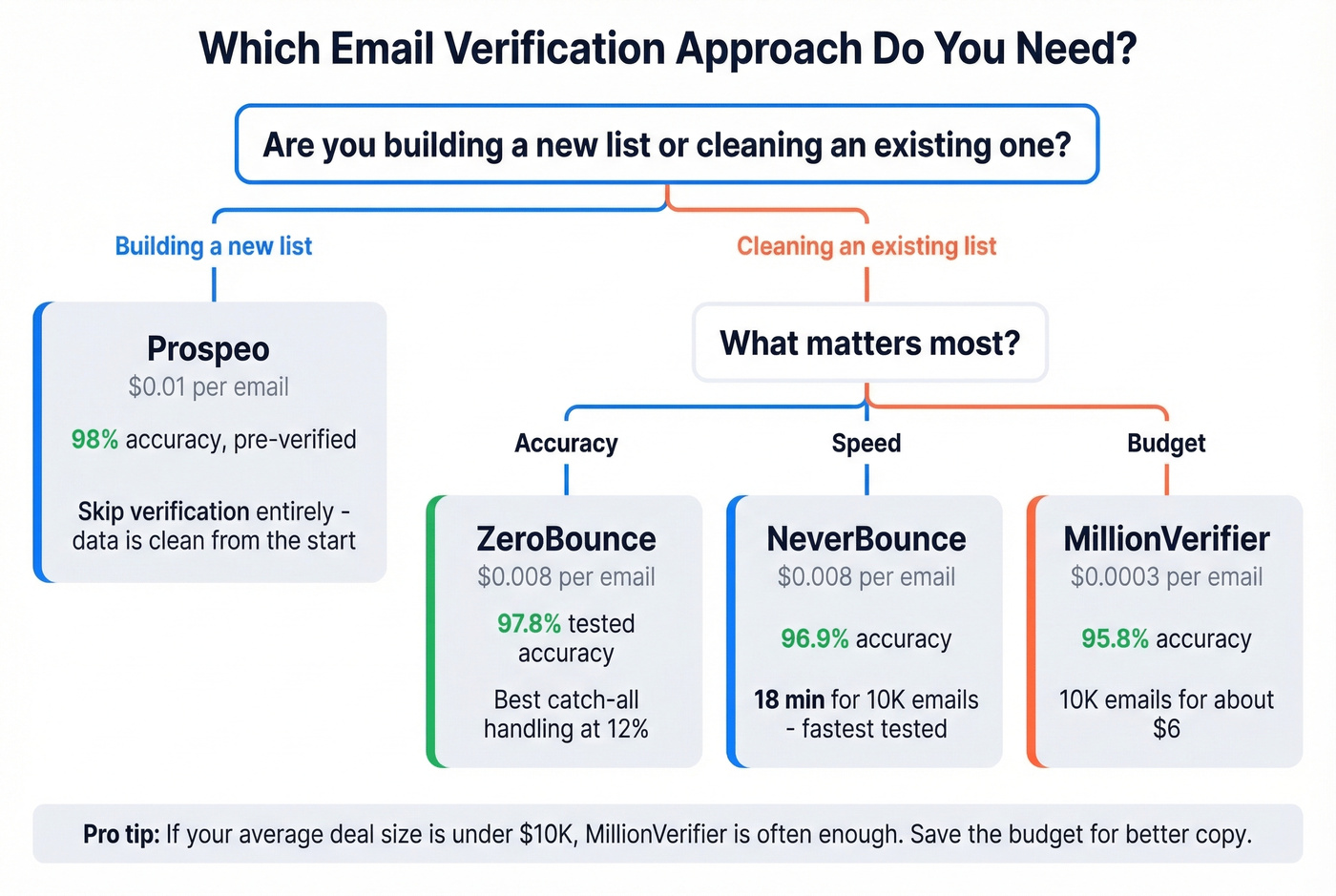
Clean an existing list. ZeroBounce for accuracy, MillionVerifier if budget matters more than catch-all handling. Upload your CSV, pay per email, download the cleaned file.
Skip verification entirely. Use a platform like Prospeo that pre-verifies emails before you ever see them. Its 5-step verification pipeline - including catch-all handling and spam-trap removal - delivers 98% accuracy across 143M+ verified emails. You're not cleaning dirty data; you're starting with clean data.
How Email Verification Actually Works
Quick distinction worth knowing: validation checks whether an email follows the right format (syntax). Verification confirms whether the mailbox actually exists. Most people mean both when they ask how to verify an address.
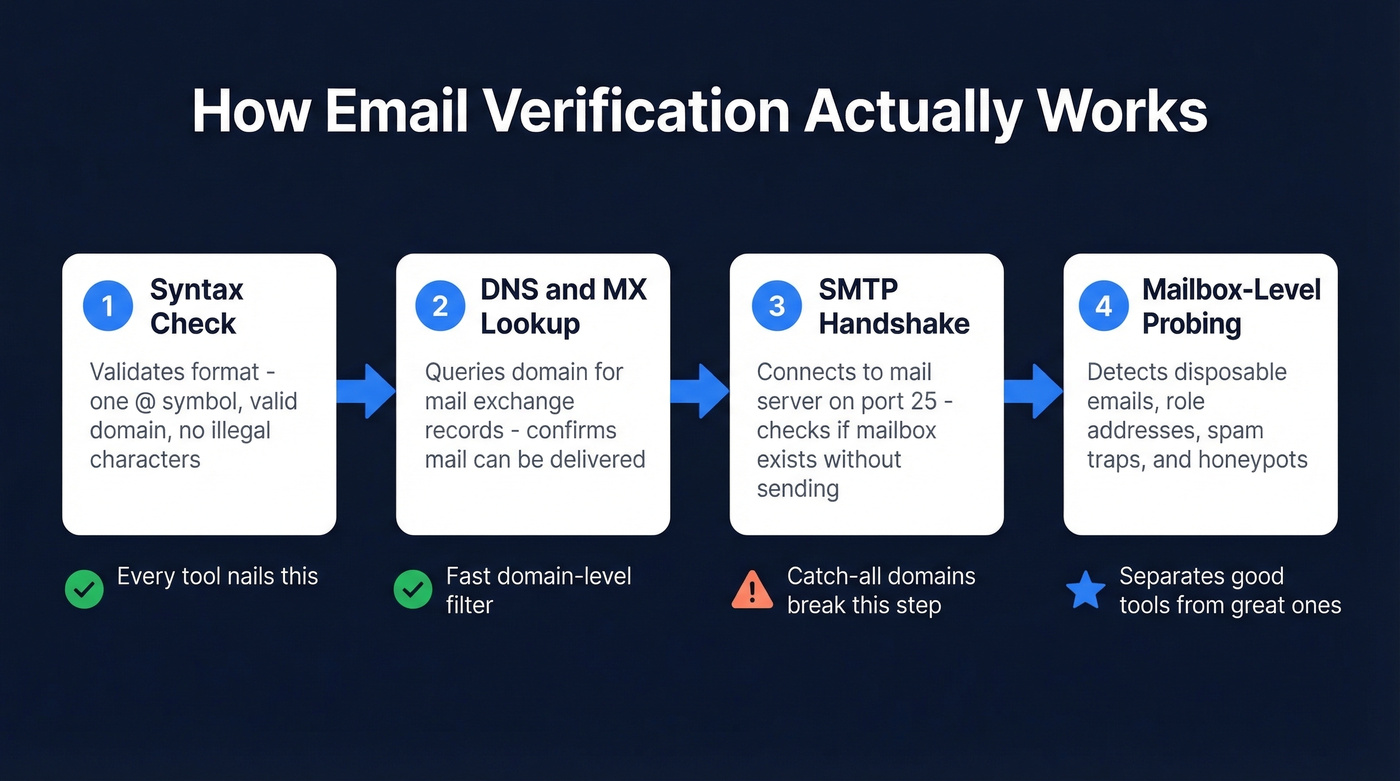
Every verification tool runs the same basic pipeline. The difference is how well each layer is implemented and what happens when results are ambiguous.
Syntax and Format Check
The tool checks whether the email follows basic formatting rules - exactly one @ symbol, a valid domain structure, no illegal characters, no leading or trailing periods in the local part. It catches typos like john@@company.com or jane.doe@company (missing TLD). Every tool nails this step. It's table stakes.
DNS and MX Record Lookup
The tool queries DNS for the domain's MX (Mail Exchange) records. If a domain has no MX record and no A-record fallback, mail can't be delivered there. Period. This step weeds out completely fake domains and domains that have been decommissioned, and it's the fastest way to confirm deliverability at the domain level before investing time in deeper checks.
SMTP Handshake
Here's where it gets interesting. The tool opens a connection to the mail server on port 25 and initiates an SMTP conversation - EHLO, MAIL FROM, RCPT TO - without actually sending a message. The server's response to the RCPT TO command reveals whether the mailbox exists. A 250 OK means the server accepted the recipient. A 550 User Unknown means it didn't.
This step makes "verify without sending" possible. But it's also where things break down, because modern mail servers don't always play along.
Mailbox-Level Probing
The best tools go beyond the basic SMTP handshake. They check for disposable email providers, role-based addresses (info@, sales@), known spam traps, and honeypots. They also factor in historical bounce data and engagement signals. Think of verification as a probability score, not a binary truth.
Double opt-in remains the gold standard for signup flows - if someone confirms their email by clicking a link, you know it's real. But for outbound prospecting, you don't have that luxury. You're relying on these four layers to give you the best possible confidence.
The Catch-All Problem
Here's the thing most verification guides gloss over: 30-40% of B2B email addresses sit on catch-all domains. A catch-all domain accepts mail for any address - real.person@company.com and completely.fake.nonsense@company.com both get a 250 OK from the server. SMTP verification literally can't tell the difference.
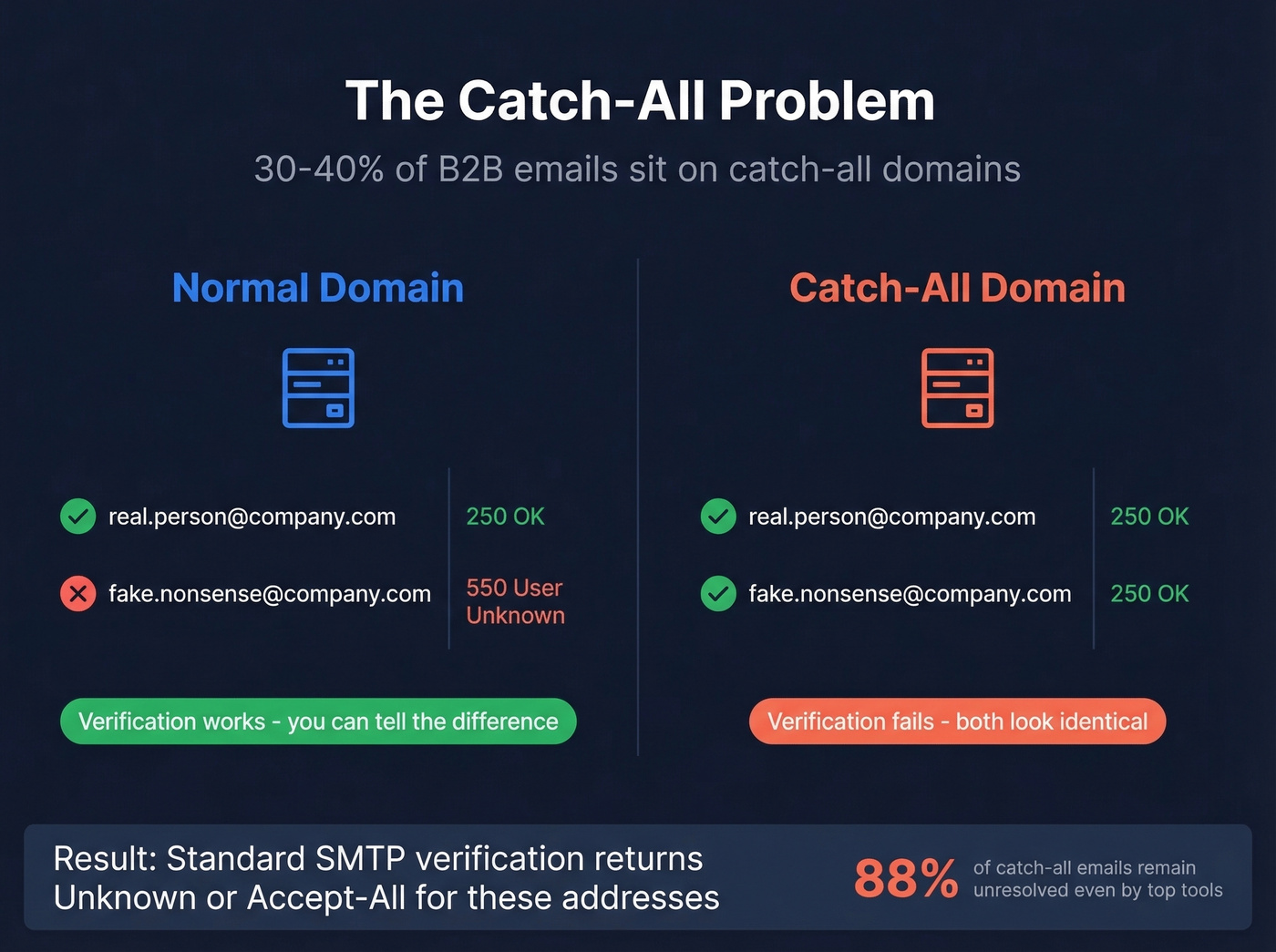
For a huge chunk of your B2B list, the best any standard verifier can do is return "catch-all" or "unknown."
Enterprise Secure Email Gateways - Proofpoint, Mimecast, Barracuda, Microsoft Defender - make it worse. They actively block verification probes through greylisting and rate limiting. A perfectly valid email behind a Proofpoint gateway might come back as "unknown" simply because the gateway refused to cooperate. If you're trying to verify addresses on a catch-all domain, even the best tools can only give you a probability, not a guarantee. Any tool that tells you otherwise is oversimplifying.
Why "99% Accuracy" Is Misleading
Every verification tool claims 97-99% accuracy, and none of them define it the same way. We've spent a lot of time digging into third-party benchmarks, and the numbers tell a different story than the marketing pages.
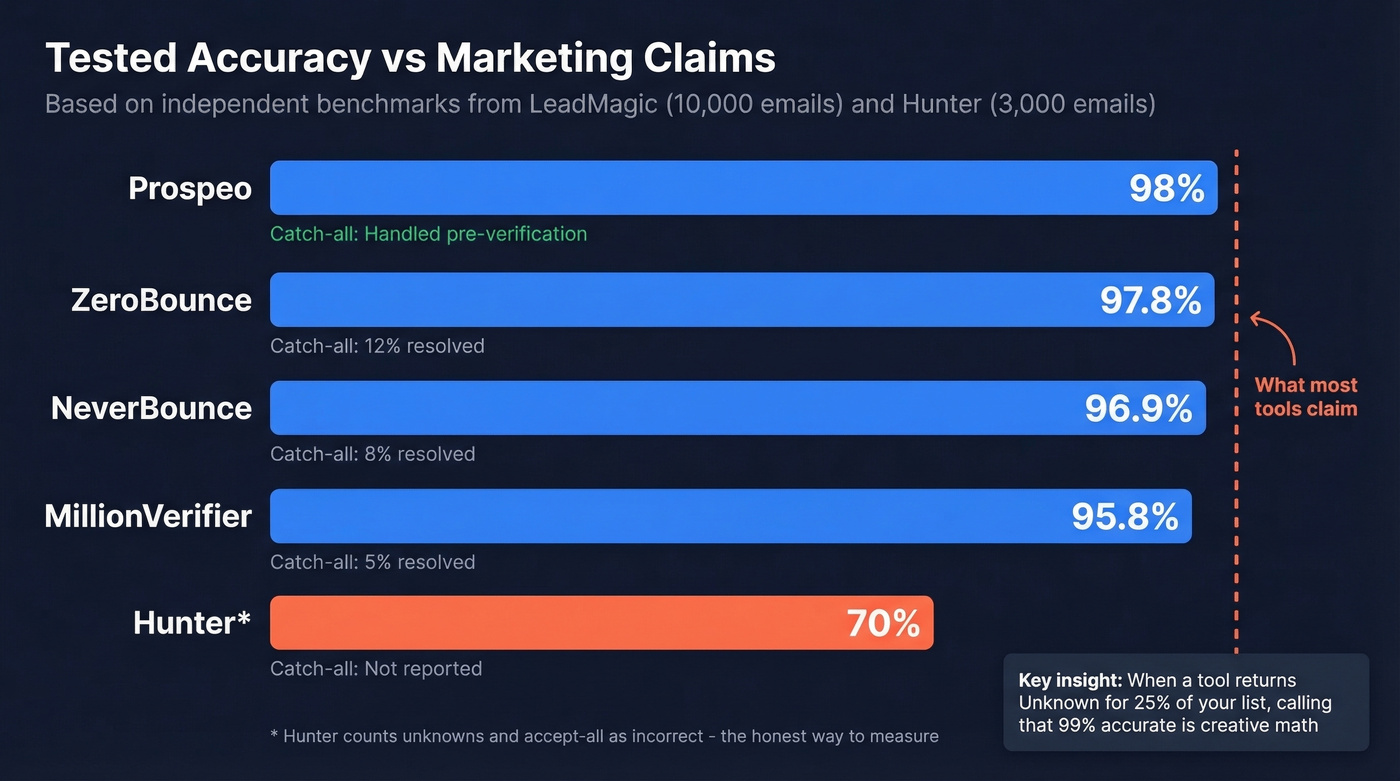
Hunter ran a benchmark against 15 verifiers using 3,000 business emails (2,700 real plus 300 invalid). The top scorer - Hunter itself - hit 70%. Not 99%. Not 95%. Seventy percent. They counted "unknown" and "accept-all" results as incorrect predictions, which is the honest way to measure. When a tool returns "unknown" for 25% of your list, calling that 99% accurate is creative math. Hunter also segmented by company size, and accuracy varied across segments - meaning your results depend heavily on who you're targeting.
LeadMagic's 10,000-email test told a more nuanced story. ZeroBounce scored 97.8% accuracy but only resolved 12% of catch-all addresses. NeverBounce hit 96.9% with 8% catch-all resolved. MillionVerifier came in at 95.8% but resolved just 5% of catch-alls. The accuracy number looks great until you realize a third of your list is still a question mark.
Our take: If your average deal size is under $10k, you probably don't need ZoomInfo-level data or premium verification. MillionVerifier at $0.0003/email and 95.8% tested accuracy is often enough for high-volume list cleaning. Save the budget for better copy.

You just read why catch-all domains make 30-40% of your B2B list unresolvable. Prospeo's 5-step verification pipeline handles catch-all detection, spam-trap removal, and honeypot filtering before an email ever reaches your list. 143M+ emails at 98% accuracy - no post-hoc cleaning required.
Start with clean data instead of cleaning dirty data.
DIY - Manual SMTP Verification
If you want to understand what's happening under the hood, you can run the SMTP check yourself. Open a terminal and start with a DNS lookup:
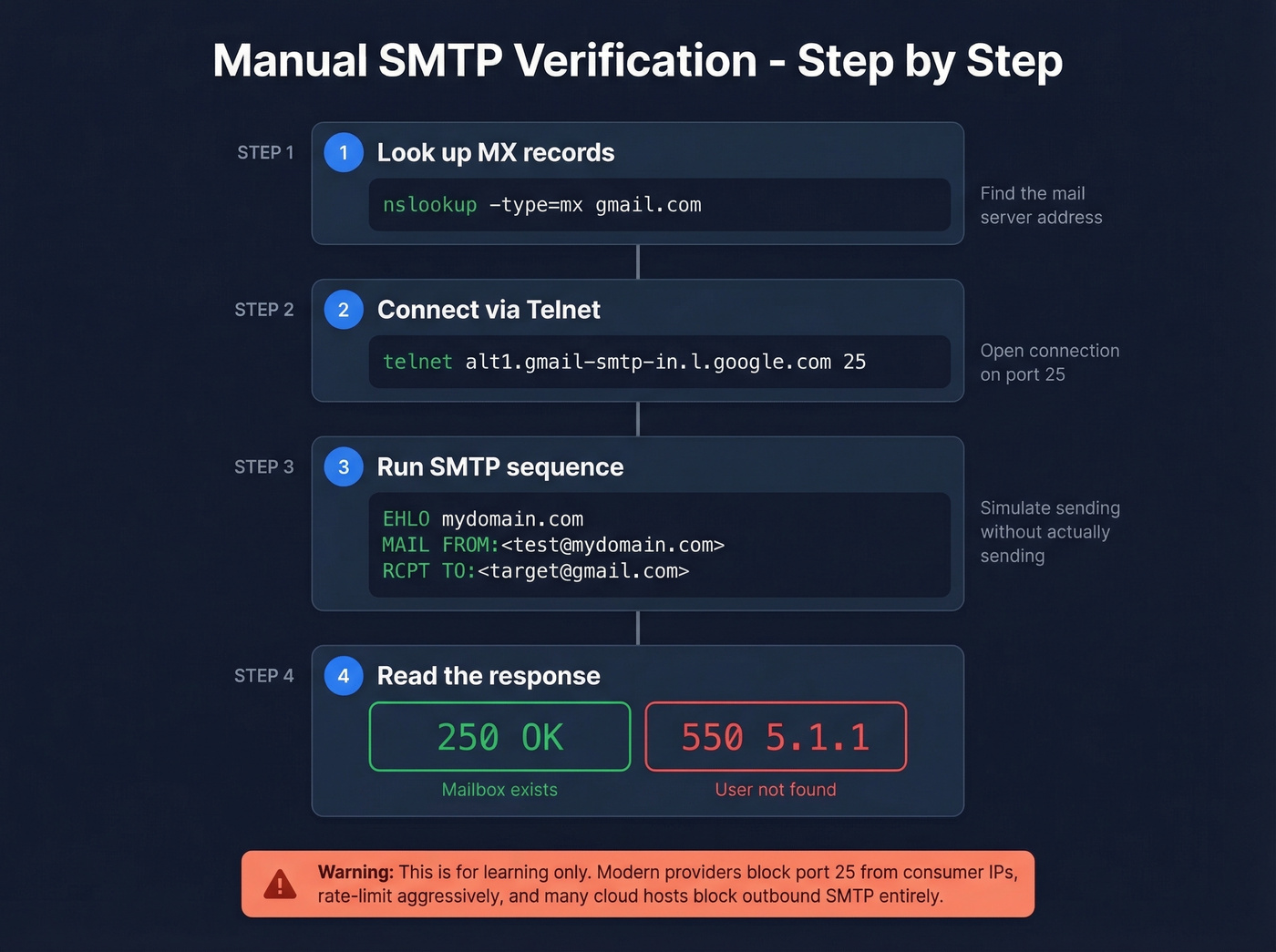
nslookup -type=mx gmail.com
This returns the MX records and their priority. Grab the highest-priority server, then connect via telnet:
telnet alt1.gmail-smtp-in.l.google.com 25
Once connected, run the SMTP sequence:
EHLO mydomain.com
MAIL FROM:<test@mydomain.com>
RCPT TO:<target@gmail.com>
A 250 response to RCPT TO means the server accepted the recipient. A 550 5.1.1 means the user doesn't exist. Type QUIT to close the connection.
This works for learning, but don't expect to scale it. Modern providers block port 25 connections from consumer IPs, rate-limit aggressively, and many cloud hosts block outbound SMTP entirely.
Best Tools to Verify Email Addresses
We've organized this by approach - pre-verified data first, then standalone verifiers ranked by accuracy and value.
| Tool | Cost/Email | Accuracy (Tested) | Catch-All | Best For |
|---|---|---|---|---|
| Prospeo | ~$0.01 | 98% | Yes | Pre-verified data |
| ZeroBounce | $0.008 | 97.8% | 12% resolved | List cleaning |
| NeverBounce | $0.008 | 96.9% | 8% resolved | Speed + reliability |
| MillionVerifier | $0.0003 | 95.8% | 5% resolved | Budget bulk |
| Hunter | ~$0.0245 | 70%* | Not reported | API access |
*Hunter's benchmark counts unknowns and accept-all as incorrect, producing lower absolute accuracy numbers.

Prospeo - Start With Clean Data
Most tools on this list clean data after you've already collected it. Prospeo takes a different approach: every email in its 143M+ database has already passed a 5-step verification pipeline - syntax, DNS, SMTP, catch-all handling, and spam-trap/honeypot removal - before you ever see it.
The practical difference matters. When Snyk rolled Prospeo out to 50 AEs, their bounce rate dropped from 35-40% to under 5%. Stack Optimize built to $1M ARR running client campaigns at 94%+ deliverability with bounce rates under 3% and zero domain flags. At ~$0.01 per email with 75 free emails per month, no contracts, and self-serve signup, the barrier to testing is basically nonexistent. The 7-day data refresh cycle means contacts are never more than a week stale - compared to the 6-week industry average, that's a meaningful edge for outbound teams hitting time-sensitive accounts.
ZeroBounce - Best for List Cleaning
ZeroBounce is the tool we'd recommend for cleaning an existing list you've already built. In LeadMagic's 10,000-email test, it scored 97.8% accuracy - the highest of any standalone verifier tested. It processed 10K emails in 22 minutes at ~$65.
Highest tested accuracy among standalone verifiers. Solid API. 100 free verifications per month to test before committing (with a business domain signup). The tradeoff: only 12% of catch-all addresses resolved. That's the best in the test, but 88% of catch-all emails still come back as "unknown." At $0.008 per email, you're paying for accuracy, not volume.
Use this if you have an existing list of 5,000-50,000 contacts and need to verify addresses before a campaign. Skip this if you're prospecting from scratch - start with pre-verified data instead.
NeverBounce - The Speed Pick
NeverBounce hit 96.9% accuracy in the same 10K test, processed the list in 18 minutes (fastest tested), resolved 8% of catch-alls, and cost ~$50 for 10K emails. At $0.008 per email, it's priced identically to ZeroBounce.
The speed advantage matters for teams running time-sensitive campaigns. If you need a list cleaned in under 20 minutes before a launch, NeverBounce is the pick. The accuracy gap versus ZeroBounce is less than a percentage point - close enough that speed becomes the tiebreaker.
MillionVerifier - Budget King
MillionVerifier costs $0.0003 per email. That's not a typo. You can verify 10,000 emails for about $6 versus $50-65 at NeverBounce or ZeroBounce. The tradeoff is real: 95.8% accuracy and only 5% catch-all resolution. It also took 35 minutes for 10K - nearly double NeverBounce's speed.
For massive lists over 100K where you can tolerate a higher unknown rate, this is the move. Skip it if catch-all domains are a big chunk of your target market.
Hunter, Bouncer, and the Rest
Hunter scored 70% in their own benchmark - the highest in their test, because unknowns and accept-all results count against accuracy. At ~$0.0245 per email, it's the most expensive option here. The free plan (up to 100 verifications/month) is useful for spot-checking individual addresses. Best for developers who want a clean API.
Bouncer offers 100 free verifications at ~$0.008/email - a solid mid-tier option and a safe fallback if ZeroBounce or NeverBounce don't fit your workflow. Kickbox gives 100 free credits at ~$0.008/email. Clearout runs ~$0.004/email at volume, good bulk value. EmailListVerify charges $24 for 10K emails, making it a budget alternative to the mid-tier tools. Emailable offers 250 free verifications - worth testing before you commit elsewhere.
MillionVerifier costs $0.0003/email but still leaves a third of your catch-all list unresolved. Prospeo costs $0.01/email and gives you verified, deliverable contacts from a 300M+ database refreshed every 7 days. Snyk's 50 AEs dropped bounce rates from 35-40% to under 5%.
Skip the verification step entirely - every Prospeo email is already verified.
What Bounce Rate Should You Target?
The universal rule: keep total bounces below 2%. Above 2%, ESPs start paying attention. Above 5%, you risk account suspension.
For context, Mailchimp's analysis of billions of emails found the average hard bounce rate is 0.21% and the average soft bounce rate is 0.70%. Most well-maintained lists run well under the 2% threshold.
| Industry | Bounce Type | Rate |
|---|---|---|
| Software & Web App | Hard bounce | 1.37% |
| Software & Web App | Soft bounce | 0.49% |
| Architecture & Construction | Hard bounce | 1.54% |
| Architecture & Construction | Soft bounce | 0.54% |
| Ecommerce | Total bounce | 0.19% |
| Financial Services | Total bounce | 1.20% |
| Construction/Manufacturing | Total bounce | 2.20% |
Hard and soft bounce rates are reported independently across sources and don't always sum neatly. If you're in software or tech, anything under 1% total is solid. Construction and manufacturing teams should watch their lists more carefully - those industries trend higher due to less standardized email infrastructure.
Mistakes That Kill Deliverability
Treating verification as a one-time cleanup. B2B lists decay fast. Average professional turnover in 2023 was 41% annually. A list that's clean today will have 25-30% bad addresses in 12 months. Verify every 3-4 months minimum.
Ignoring "unknown" and catch-all results. Dumping all unknowns into your send list is a bounce rate disaster. Segment them, send to a smaller test batch first, and monitor bounces before scaling.
Sending to role-based addresses. Addresses like info@, sales@, and support@ often route to shared inboxes or get flagged by spam filters. They inflate your complaint rate even when they don't bounce.
Skipping re-verification before campaigns. You verified your list six months ago. Great. It's stale now. Always re-verify before a major send.
If you want the full picture beyond list hygiene, read our email deliverability breakdown and the practical checklist for how to improve sender reputation.
And the one that burns the most money: choosing the cheapest tool without understanding what you're giving up. MillionVerifier at $0.0003/email resolves only 5% of catch-all addresses. ZeroBounce at $0.008/email resolves 12%. That difference matters when 30-40% of your B2B list sits on catch-all domains. The cheapest tool isn't the best tool - it's the tool that leaves the most risk on the table.
If you're building lists from scratch, it also helps to understand how to generate an email list and when to use data enrichment services versus verification.
FAQ
How do you check if an email address is valid?
Combine syntax validation, DNS/MX record lookup, and SMTP handshake verification - either manually via terminal or through a tool like ZeroBounce, NeverBounce, or Prospeo. Free tiers from most verifiers handle single addresses. For lists, upload a CSV to a bulk verification service and download the cleaned results.
Can you verify an email without sending a message?
Yes. SMTP handshake verification probes the mail server's response to a recipient address without delivering any mail. Every tool in this guide uses this method as a core layer. It works for most domains, though catch-all servers and enterprise security gateways can limit effectiveness.
What's a catch-all domain?
A catch-all domain accepts mail for any address, whether the mailbox exists or not. SMTP verification can't distinguish real from fake - the server returns "accepted" for everything. About 30-40% of B2B emails sit on catch-all domains, making this the biggest gap in standard verification.
How often should I re-verify my email list?
Every 3-4 months minimum. B2B lists decay 25-30% annually due to job changes, company closures, and domain migrations. For lists over 50K contacts, monthly re-verification is better - quarterly is the absolute floor for any active outbound program.
What's the difference between a hard bounce and a soft bounce?
A hard bounce is a permanent delivery failure - the address doesn't exist or the domain is dead. A soft bounce is temporary - full inbox, server downtime, message too large. Hard bounces damage sender reputation directly, and ESPs will throttle or suspend accounts that exceed thresholds (typically 2%+).