

Best Chrome Extension Email Grabbers: Which Ones Actually Work?
A cold email campaign lives or dies on data quality. Install the wrong chrome extension email grabber, blast 500 "verified" emails, and watch your bounce rate climb past 20% while your domain reputation tanks. One user on r/coldemail reported exactly that - tools labeling emails as verified when a fifth of them bounced on the first sequence.
We've tested dozens of these extensions, and the gap between the best and worst is staggering. Some are regex scrapers that pull whatever looks like an email from the page's HTML. Others query a database of pre-verified B2B records. That distinction is the difference between a 25% bounce rate and a 3% one.
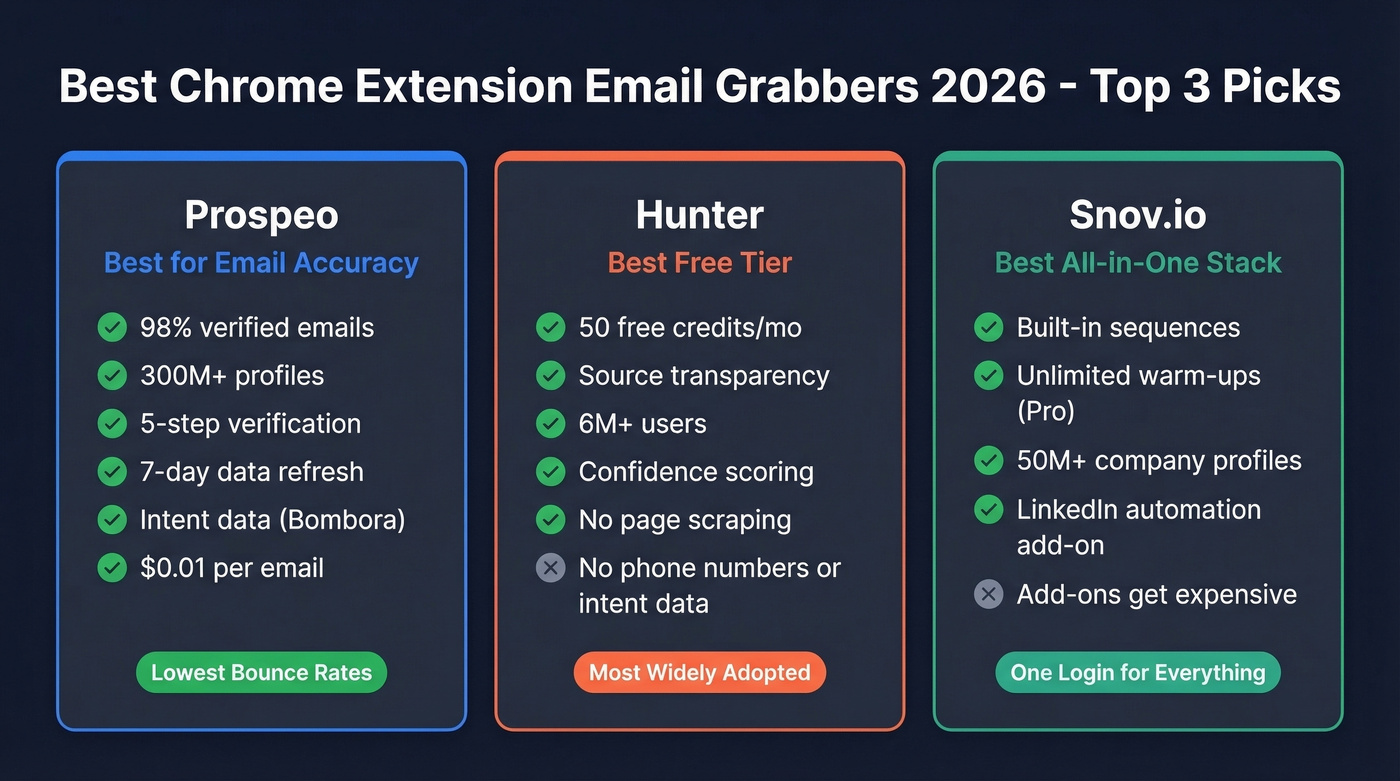
Our Picks (TL;DR)
- Prospeo - Best for email accuracy and data freshness. 98% verified emails from 300M+ profiles, refreshed every 7 days.
- Hunter - Best free tier with source transparency. 50 free credits/mo, shows exactly where each email was found.
- Snov.io - Best all-in-one outreach stack. Built-in sequences and unlimited warm-ups on Pro.
Best Email Grabber Extensions for 2026
Prospeo
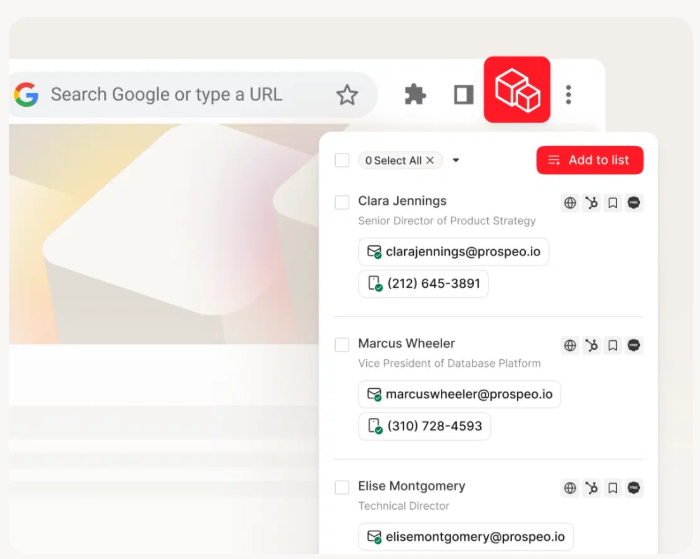
Prospeo's Chrome extension isn't a page scraper - it's a front door to a database of 300M+ professional profiles, 143M+ verified emails, and 125M+ verified mobile numbers. Every record goes through a 5-step verification process with catch-all handling, spam-trap removal, and honeypot filtering. The entire database refreshes on a 7-day cycle, roughly six times faster than the industry average of 6 weeks.
The platform also layers intent data across 15,000 Bombora topics, so you can prioritize prospects who are actively researching your category. That's not a gimmick - it means your SDRs aren't just finding emails, they're finding emails for people who are already in-market.
Use this if you care about deliverability above everything else. Snyk's sales team switched to Prospeo and saw bounce rates drop from 35-40% to under 5%, generating 200+ new opportunities per month. The extension has 40,000+ users and pushes contacts directly into Salesforce, HubSpot, Smartlead, Instantly, Lemlist, Clay, Zapier, or Make.
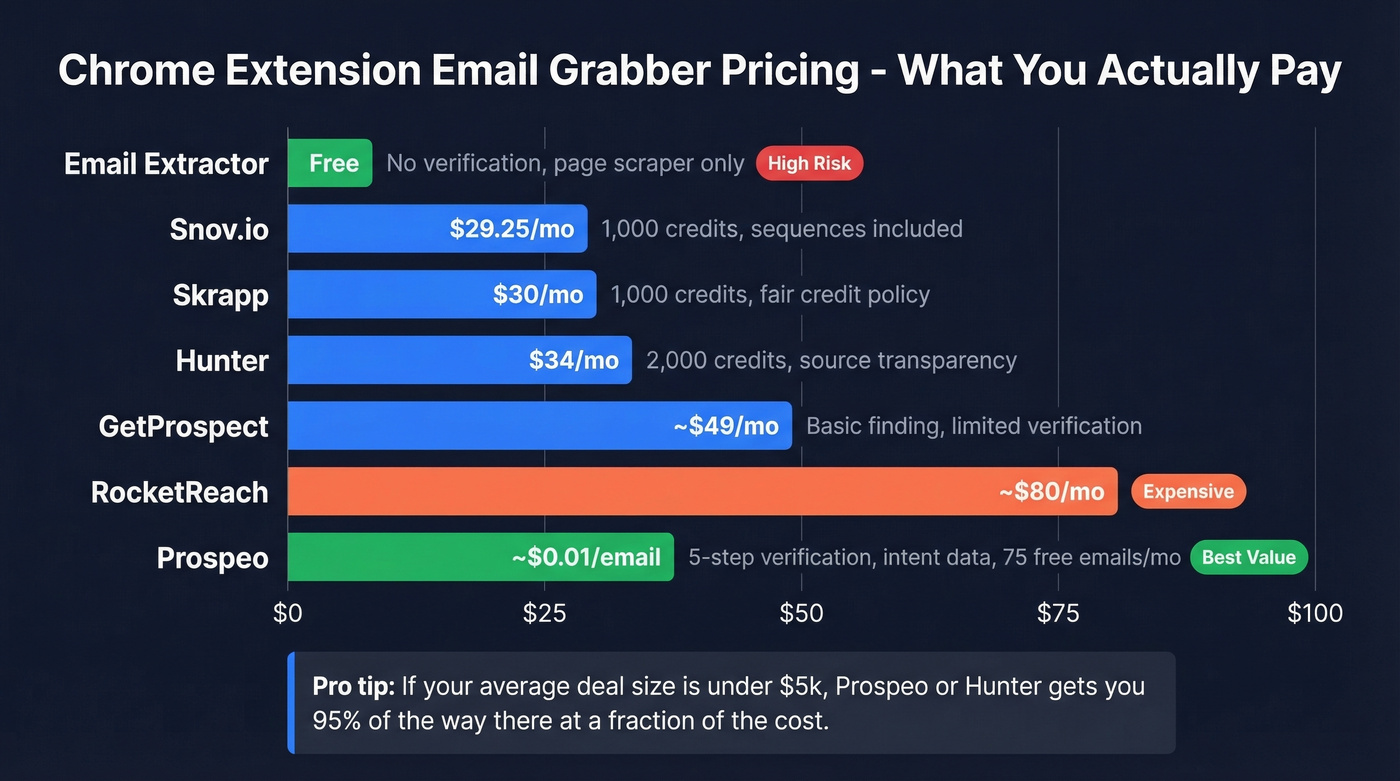
Pricing: Free tier gives you 75 emails + 100 Chrome extension credits/month. Paid plans run about $0.01 per email - no annual contracts, no sales calls required. See pricing details.
Hunter
Hunter takes a transparency-first approach that's rare in this space. When the extension returns an email, it shows the public source where it was found and the discovery date - you can see exactly why Hunter thinks an address is valid. Emails get either a "Verified" label or a confidence score, and you can manually trigger re-verification. With 12,000+ reviews across platforms and 6M+ users, it's the most widely adopted tool on this list.
Use this if you want to audit the data before you trust it. Hunter's 50 free credits/month make it the easiest tool to test without commitment, and the extension explicitly doesn't scrape pages you visit - results come from Hunter's own crawlers. That matters for compliance.
Skip this if you need phone numbers or intent data alongside emails. Hunter is focused on email finding and outreach sequences, not a full data platform.
Pricing: Free (50 credits/mo), Starter $34/mo annual (2,000 credits), Growth $104/mo annual (10,000 credits).

Snov.io
Snov.io is the pick when you want email finding, sequences, and campaign workflows without stitching three tools together. The Starter plan ($29.25/mo annual) includes 1,000 credits and 5,000 recipients. Pro ($74.25/mo annual) bumps that to 5,000 credits and 25,000 recipients, and includes unlimited mailbox warm-ups - a real differentiator for teams running high-volume outbound.
Here's the thing: if you're building an outreach stack from scratch and want one login, Snov.io covers 50M+ company profiles and the Chrome extension feeds directly into its sequencing engine. The LinkedIn automation add-on runs $69/mo per slot on top of your base plan, which adds up fast.
Skip this if you only need verified emails. You're paying for workflow features you won't use.
Skrapp
Skrapp's standout feature is its Fair Credit Policy - you don't get charged for emails that come back as invalid or unknown. Credits also roll over month to month. The free tier gives you 100 credits/mo, and the Professional plan starts at $30/mo for 1,000 credits. Skrapp claims 97%+ verification accuracy with daily database refreshes.
Skip this if you need mobile numbers or intent data. Skrapp is focused squarely on email finding and verification.
RocketReach
The same r/coldemail user who complained about 20%+ bounce rates ended up choosing RocketReach, reporting that bounce rates "dropped a lot" when targeting mid-size SaaS companies. It's a solid accuracy pick, but it comes at a price - expect to pay ~$80-$300/user/month depending on the plan.
Not worth it if you're budget-conscious or need a generous free tier.
GetProspect
GetProspect offers a free tier and paid plans from ~$49/mo. It handles basic email finding and list building but lacks multi-step verification, phone numbers, and the database scale of the top tools above.
Email Extractor
Email Extractor is a free Chrome extension that pulls emails it can detect on the page - no database, no verification. Fine for collecting publicly listed emails from a company's contact page, but don't trust it for outreach. You'll end up with info@ addresses and dead ends.
Pricing Comparison
Credit-based pricing dominates this category, but what a "credit" buys varies wildly. Some tools charge one credit per email lookup regardless of result. Others, like Skrapp, only deduct credits for valid finds. Annual billing typically saves around 30% over monthly, and most tools gate advanced features - warm-up, sequences, intent data - behind higher tiers.
If you're comparing tools beyond just extension UX, it helps to look at broader data enrichment services and how they handle refresh cycles and verification.
| Tool | Free Tier | Paid (Annual) | Credits/mo | Verification | CRM Integrations |
|---|---|---|---|---|---|
| Prospeo | 75 emails + 100 ext. | ~$0.01/email | Credit-based | 5-step | Salesforce, HubSpot, Smartlead, Instantly, Lemlist, Clay, Zapier, Make |
| Hunter | 50 credits/mo | $34/mo | 2,000 | Confidence score | HubSpot, Salesforce, Pipedrive |
| Snov.io | Trial available | $29.25/mo | 1,000 | Yes | HubSpot, Salesforce, Pipedrive |
| Skrapp | 100 credits/mo | $30/mo | 1,000 | Fair Credit | CRM sync |
| RocketReach | Limited | ~$80/mo | Varies | Yes | Salesforce, HubSpot |
| GetProspect | Available | ~$49/mo | Varies | Yes | CRM export |
| Email Extractor | Unlimited | Free | N/A | No | None |
Let's be honest: if your average deal size is under $5k, you probably don't need RocketReach-level pricing. Prospeo or Hunter will get you 95% of the way there at a fraction of the cost.

Most Chrome email grabbers scrape the page and hope for the best. Prospeo's extension queries 300M+ profiles verified through a 5-step process - with catch-all handling, spam-trap removal, and honeypot filtering. That's why teams like Snyk dropped from 35-40% bounce rates to under 5%.
Get 75 free emails and 100 extension credits - no credit card, no sales call.
Scrapers vs. Database Finders
This is the single most important distinction in this category, and most people miss it.
If you want a deeper breakdown of tools that only scrape pages, compare them against dedicated options in our guide to email scraper Chrome extensions.
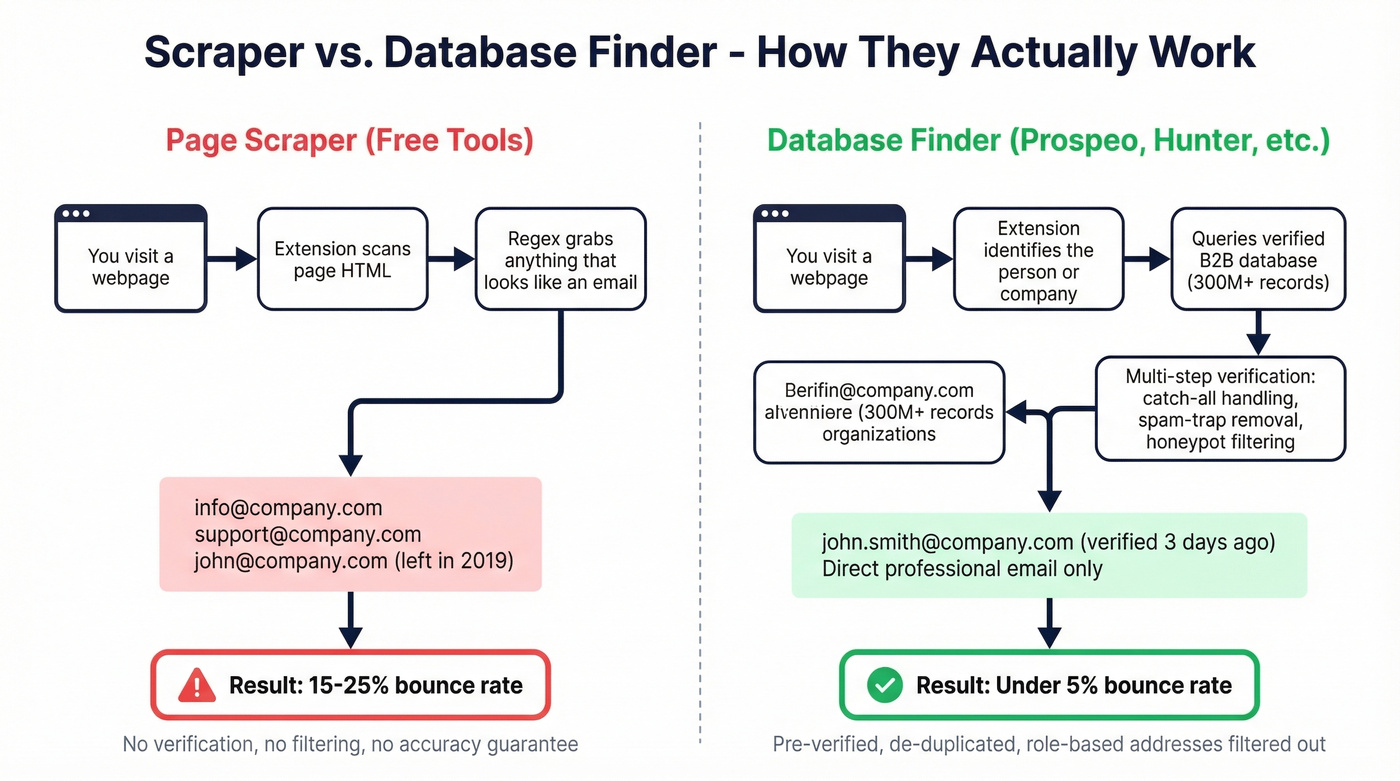
If the extension only reads the page you're on, it's a scraper. If it queries a database of verified records, it's a finder. Your bounce rate hangs on that difference. Regex scrapers pull whatever looks like an email from the HTML - info@ addresses, support@ inboxes, outdated personal emails from a 2019 team page that nobody's updated since the company was half its current size. Database-backed finders match the person you're looking at against pre-verified B2B records.
A Dropcontact benchmark testing 15 tools across 20,000 real contacts found hard-bounce rates ranging from 0.9% to 3.6% among top performers. The worst tools weren't even close. In our experience, database-backed finders consistently deliver under 5% bounce rates, while scrapers routinely blow past 15-20%.
Beyond the scraper-vs-finder distinction, look for de-duplication, role-based filtering to exclude info@ and support@ addresses, and bulk export options. These features separate tools built for outbound teams from glorified regex parsers.
If you're trying to reduce bounces systematically, pair your finder with email reputation tools and a clear email deliverability guide.
Staying GDPR Compliant
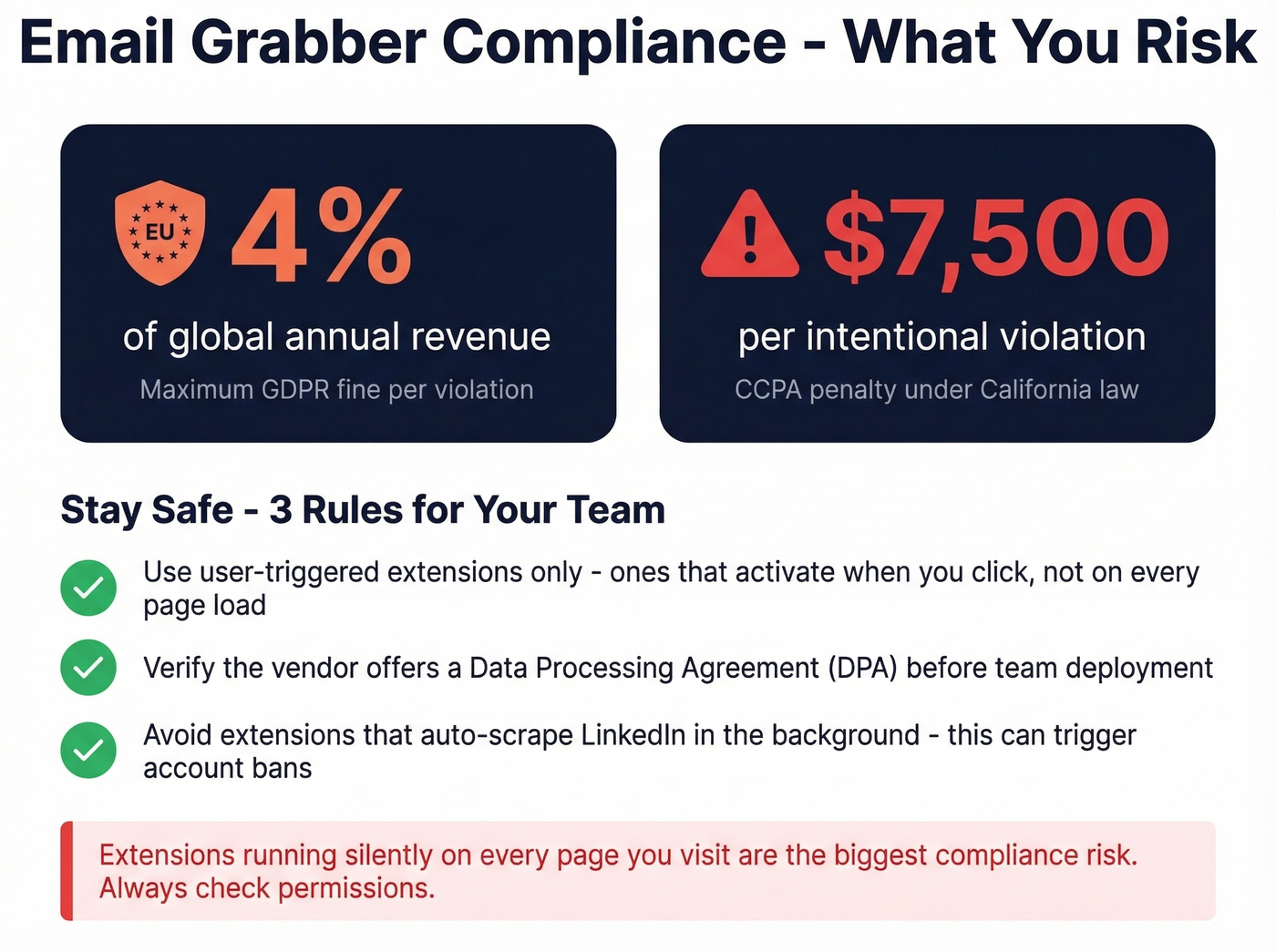
GDPR fines run up to 4% of global revenue, and CCPA penalties hit $7,500 per violation - these aren't theoretical. Extensions that auto-scrape professional networking platforms in the background can trigger account warnings or outright bans. Stick with user-triggered tools that only activate when you click, not ones running silently on every page load. Before deploying any email finder extension across your team, verify that its data collection practices are GDPR compliant and that the vendor offers a DPA.
For outbound teams, it also helps to align compliance with your broader cold email marketing process and sales prospecting techniques.
Chrome Extension Email Grabber FAQ
Are free email grabber extensions accurate?
Most free extensions are regex scrapers that pull whatever looks like an email from page HTML - including role-based addresses and outdated contacts. Expect 20%+ bounce rates from basic scrapers vs. under 5% from database-backed finders. For cold outreach, always use a tool with real verification behind it.
What's the difference between an email scraper and an email finder?
A scraper reads visible text on the webpage you're visiting and grabs anything formatted like an address. A finder queries a B2B database of pre-verified records matched to real professionals. Scrapers are free but unreliable - they'll grab info@ and support@ addresses that'll never convert. Finders cost money but deliver emails you can actually send to.
Can email grabber extensions get my account banned?
Extensions that auto-scrape professional networking platforms in the background can trigger warnings or account restrictions. Choose user-triggered tools that only activate on click, and confirm the extension's data collection is GDPR compliant.
Which email grabber has the best free plan?
Prospeo offers 75 free emails plus 100 Chrome extension credits per month with full 5-step verification - the strongest free tier for verified data. Hunter gives 50 free credits monthly with source transparency. Skrapp provides 100 credits with its Fair Credit Policy that only charges for valid results.