

Clay AI Prospecting: What It Does, What It Costs, and When It's Overkill
You've seen the fifth post this week hyping Clay AI prospecting, and you're wondering if your three-person outbound team actually needs it. A rep on r/sales asked the same thing - "What is the deal with Clay?" - and the answers were split. Here's the honest breakdown: what Clay does well, what it costs in credits, and when a simpler tool gets you to the same place faster.
What Clay Actually Is
Clay is a spreadsheet-like workspace that connects to 150+ data providers and lets you build enrichment workflows without code. Think of it as an orchestration layer - it doesn't own the data. It pulls from dozens of providers and stitches results together in one table.
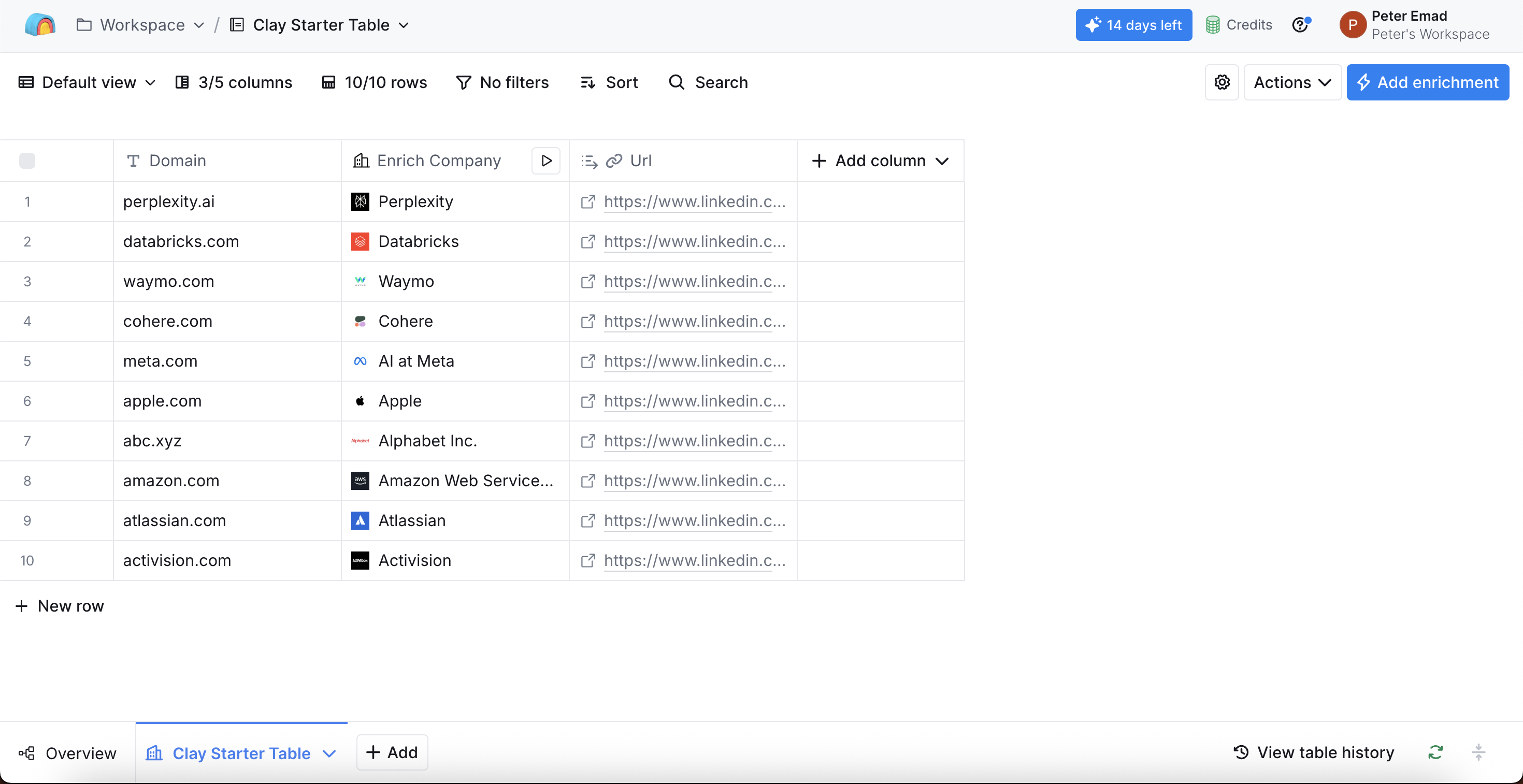
The standout feature is Claygent, a GPT-4-powered AI agent that visits websites, extracts specific information, and returns structured fields. About 30% of Clay customers use Claygent daily, generating roughly 500,000 research and outreach tasks per day. Clay grew 10x year-over-year for two consecutive years, which explains the hype cycle. It has 100K+ users, a 4.7/5 rating on G2 (188 reviews), and customers like Intercom, Notion, and Verkada.
Here's the thing: most Clay guides show you the flashiest workflows. The teams actually getting ROI are doing boring stuff - waterfall enrichment, CRM hygiene, lead scoring. Start there.
How Outbound Workflows Run
A typical workflow follows four steps:
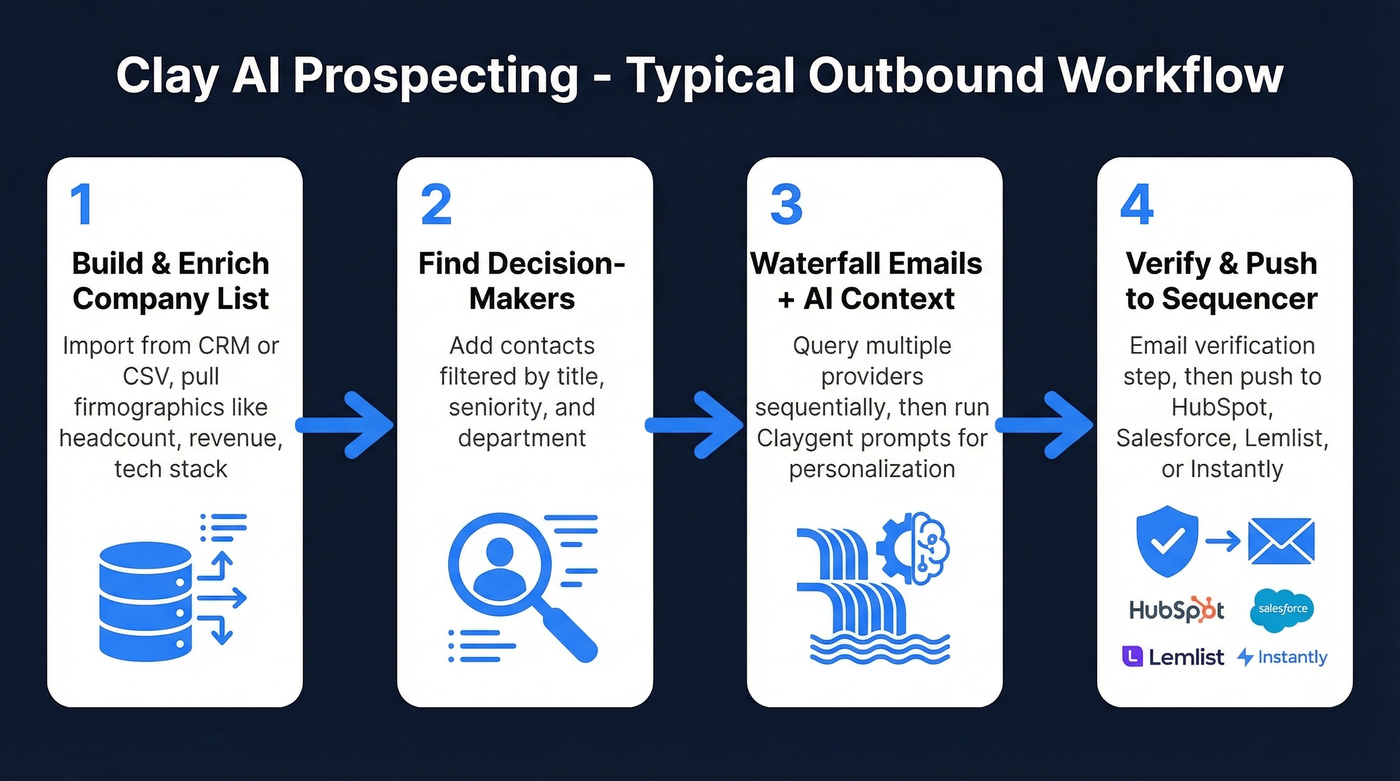
- Build and enrich a company list - import from your CRM, upload a CSV, or use Clay's built-in tools, then pull firmographics like headcount, revenue, and tech stack.
- Find decision-makers - add contacts by title and seniority.
- Waterfall for emails + add AI context - Clay queries multiple providers sequentially until it finds the best available match, then Claygent runs prompts to personalize. Per Clay University: "Infer this company's pricing strategy from their pricing page" returns a 2-sentence summary you can drop into a personalization field.
- Verify and push - add an email verification step before loading into HubSpot, Salesforce, Lemlist, Instantly, or Smartlead.
Each step can be customized with different providers and logic without writing a single line of code, which is what makes Clay appealing to RevOps teams who want granular control over their data pipeline.

What Clay Actually Costs
| Plan | Monthly Price | Credits/Month |
|---|---|---|
| Free | $0 | 100 |
| Starter | $149 | 2,000 |
| Explorer | $349 | 10,000 |
| Pro | $800 | 50,000 |
| Enterprise | ~$30,400/yr median | Custom |
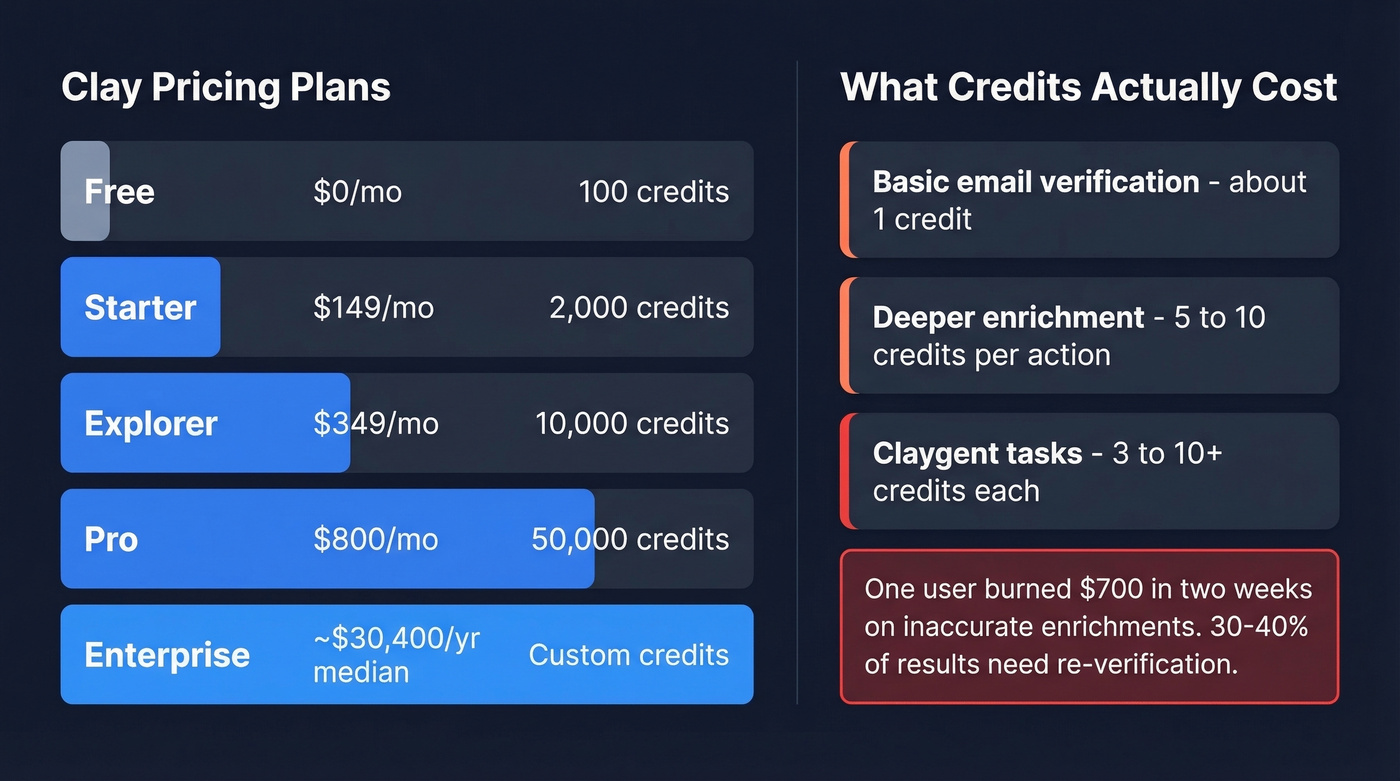
Enterprise contracts range widely - Vendr data shows a median of $30,400/year across 19 purchases, with some hitting $154,000/year.
Credits don't map 1:1 to actions. Basic email verification costs ~1 credit. Deeper enrichment runs 5-10 credits. A Claygent task can eat 3-10+ depending on complexity. One blogger burned through $700 in two weeks on inaccurate enrichments.
Clay's credit system is the single biggest hidden cost in B2B sales tools right now. You can't reliably predict monthly spend until you've run your workflows for a full billing cycle. We've watched teams blow through a Starter plan's credits in four days during onboarding, then scramble to upgrade mid-month.

Clay credits are unpredictable. Prospeo isn't. Get 300M+ profiles with 98% email accuracy at ~$0.01/email - no credit guessing, no 30-40% re-verification rates. Data refreshes every 7 days, not every 6 weeks.
Stop paying twice for data that needs cleanup.
Honest Pros and Cons
What works: Clay centralizes multi-source enrichment in one workspace, offers strong CRM and sequencer integrations (called out in 18 G2 "Integrations" mentions), and Claygent adds genuine research depth that static databases can't match. Teams report the biggest wins when they combine waterfall enrichment with automated CRM pushes, eliminating hours of manual data entry per week.
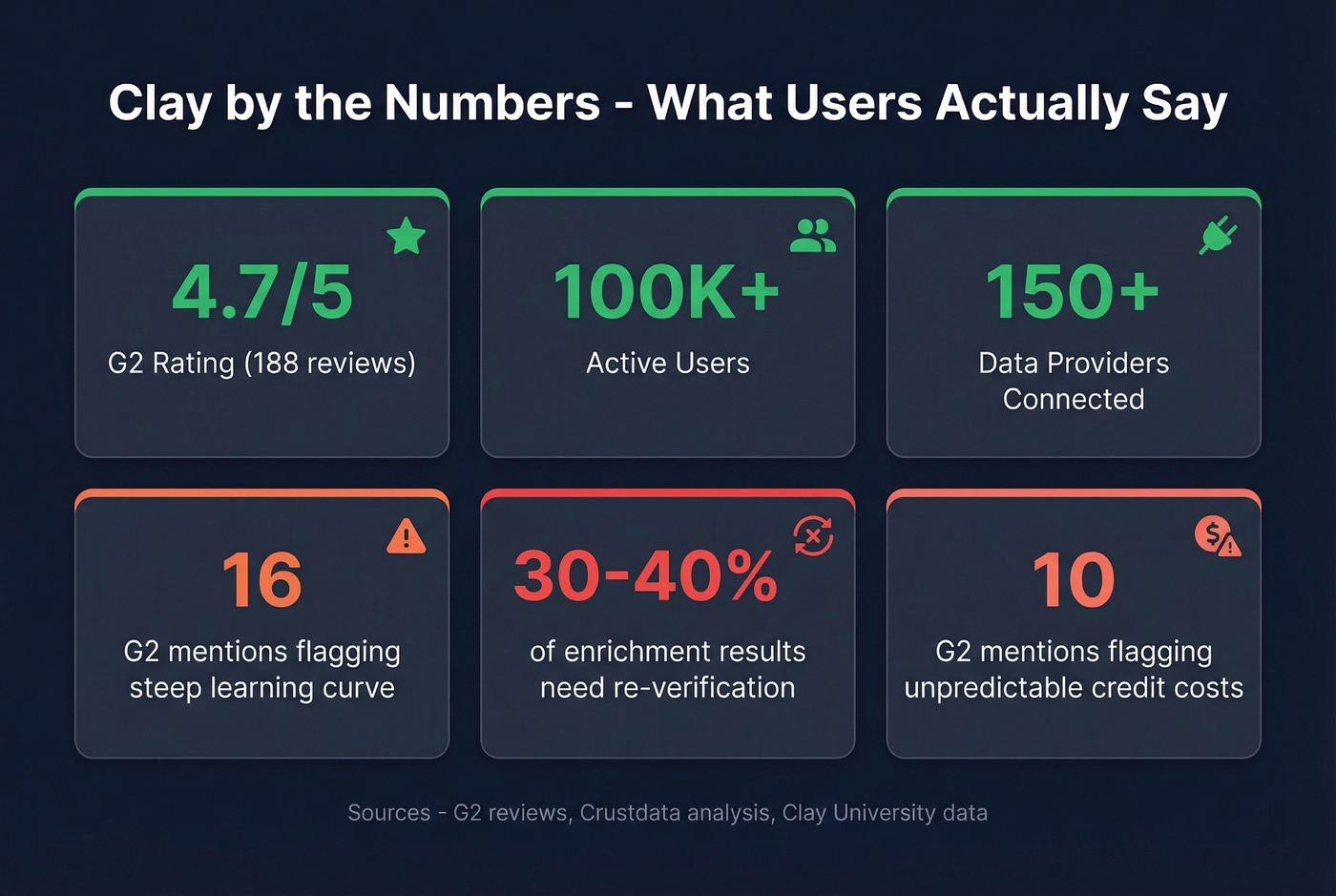
What doesn't: The learning curve is the top complaint across 16 G2 mentions. Credit consumption is unpredictable - 10 mentions flag cost, 6 flag limited credits. Setup is time-consuming (5 mentions), and 30-40% of enrichment results need re-verification. That last stat should give you pause. If you're running 10,000 enrichments a month and a third come back unreliable, you're paying twice - once for the enrichment, again for the cleanup.
Building GTM Workflows in Clay
Where Clay really shines is connecting prospecting to your broader go-to-market motion. Teams building GTM workflows in Clay typically chain together data enrichment, scoring, and sequencer triggers so that a new ICP-fit account flows from identification to personalized outreach without manual handoffs.
A common setup: a Salesforce trigger fires when a new account is created, Clay enriches the account with firmographics and technographics, Claygent researches the company's latest funding round or product launch, and the enriched contact gets pushed into Instantly or Lemlist with a personalized first line. The entire sequence runs on autopilot once configured. But that configuration is where the real time investment lives - we've seen teams spend 20+ hours building their first production-ready workflow, and that's with someone who already understands no-code tools.
The trend heading into 2026 is toward deeper intent-signal integration, pulling in Bombora or 6sense data as enrichment columns to prioritize accounts showing active buying behavior.
When Clay Is Overkill
Let's be honest: if you have fewer than five outbound reps and no RevOps person, Clay is probably overkill.
The learning curve takes real time - 2-4 weeks is a realistic ramp for non-technical teams. Credit burn during ramp-up is real money. One Reddit user put it well: the Sales Nav-to-Clay-to-HubSpot pipeline feels far less "one-click" than simpler alternatives. Not every team needs a full orchestration layer. Sometimes the complexity adds friction rather than removing it.
Here's how to route your decision:
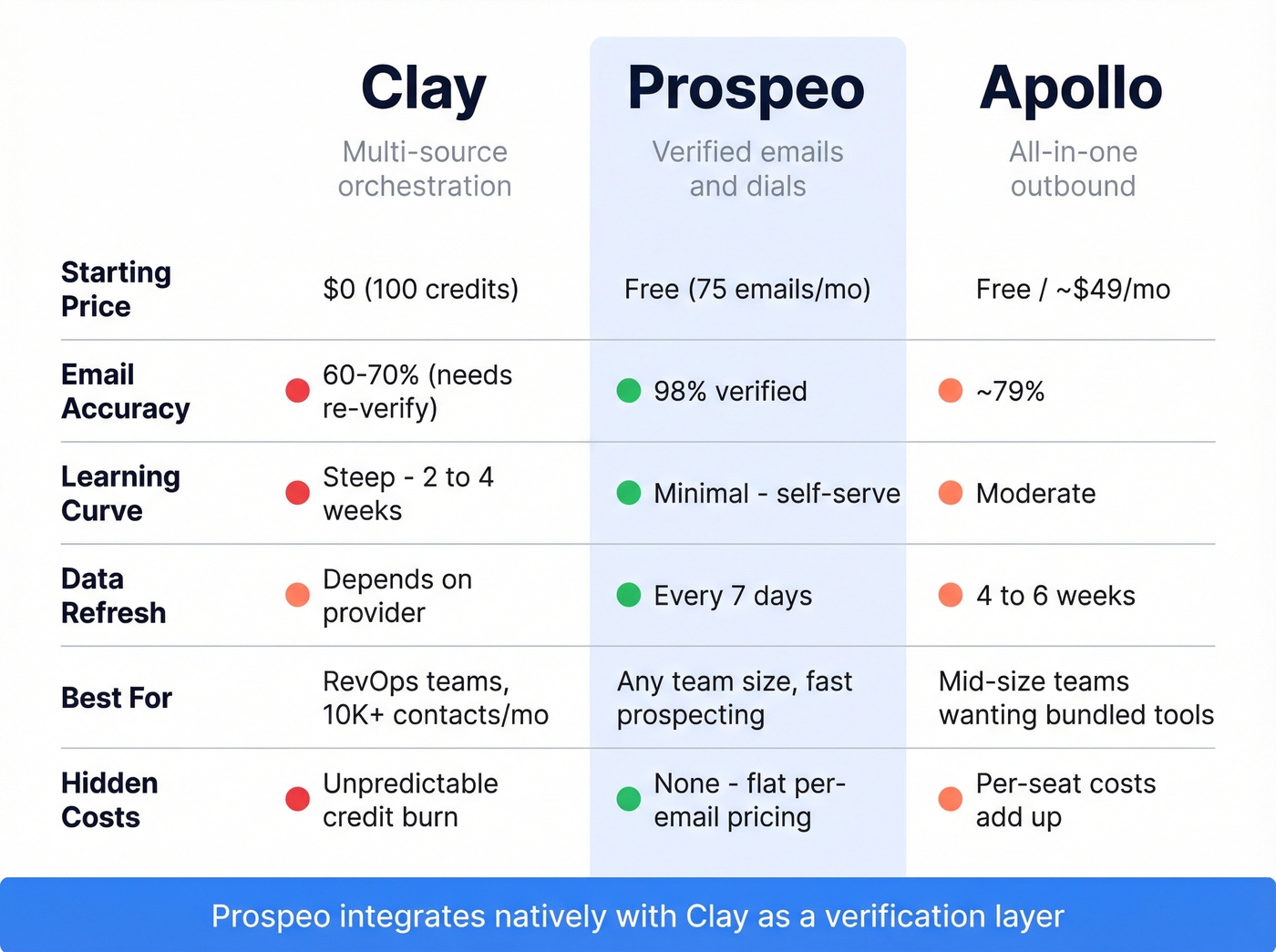
You just need verified emails and direct dials without complexity. Prospeo gives you 300M+ profiles with 98% email accuracy on a 7-day data refresh cycle. Search by 30+ filters including buyer intent and technographics, export verified contacts, push to your sequencer. Free tier included, paid plans from ~$0.01/email, no contracts. Prospeo also has a native Clay integration, so you can use it as a verification layer inside Clay workflows if you do go that route.

You want an all-in-one outbound platform. Apollo (~$49-99/mo per user) bundles sequences, a dialer, and a database in one tool. Less powerful enrichment, but less complexity too.
You need enterprise intent data + a massive US database. ZoomInfo ($15-40K/year) offers push-button prospecting with less flexibility but minimal learning curve.
| Clay | Prospeo | Apollo | |
|---|---|---|---|
| Best for | Multi-source orchestration | Verified emails & dials | All-in-one outbound |
| Starting price | $0 (100 credits) | Free (75 emails/mo) / ~$0.01/email | Free / ~$49/mo |
| Email accuracy | Varies (30-40% need re-verify) | 98% verified | ~79% |
| Learning curve | Steep (2-4 weeks) | Minimal (self-serve) | Moderate |
| Data refresh | Depends on provider | 7 days | 4-6 weeks |
Skip Clay if you're a solo founder or small team that just needs accurate contact data fast. The orchestration power is wasted if your workflow is "find emails, send sequences, follow up." If you're comparing options, start with a shortlist of sales prospecting databases and pick the simplest stack that hits your volume and accuracy targets.
Already using Clay? Prospeo plugs in natively as a verification layer. But if you just need verified emails, direct dials, and 30+ search filters - including buyer intent and technographics - you can skip the orchestration entirely and prospect in minutes.
Same results, zero learning curve, 75 free emails to prove it.
FAQ
Is Clay free?
Yes - a free plan with 100 credits/month exists. That's enough to test a single workflow, not to run production outbound. Paid plans start at $149/month for 2,000 credits. A 14-day Pro trial is available without a credit card.
How long does Clay take to learn?
Expect 2-4 weeks to proficiency for non-technical teams. The learning curve is the single most-cited drawback in user reviews, with 16 separate mentions on G2. Teams experienced with no-code automation tools tend to ramp in under a week.
Can I use Clay just for finding emails?
You can, but it's expensive for that single use case. Each enrichment costs 5-10 credits, and 30-40% of results need re-verification. A dedicated email finder at ~$0.01/email with 98% accuracy is a better fit for that workflow - purpose-built beats Swiss Army knife when you only need one blade.
Is Clay AI prospecting worth it for small teams?
For teams under five reps with no RevOps support, setup time and credit costs typically outweigh the benefits. Clay delivers the most value when you have a dedicated ops person building and maintaining workflows, plus enough outbound volume - think 10K+ contacts/month - to justify the credit spend. Below that threshold, simpler tools get you 80% of the result at 20% of the cost and complexity.