

Best Client Database Software for Every Business Size in 2026
You've got a file called "Client_List_FINAL_v3_REAL.xlsx" sitting in a shared Drive folder. Two people edited it last week. Neither told the other. Now you've got duplicate rows, a missing column of phone numbers, and no idea which version is current. That's not a client database - it's a liability.
91% of companies with 10+ employees already use a CRM, but half of micro-businesses still don't. If you're somewhere in between - outgrowing spreadsheets but not ready for Salesforce - you're in the right place.
Our Picks (TL;DR)
| Category | Tool | Price | Why |
|---|---|---|---|
| Best free start | Google Sheets / Airtable | Free | Sheets for ~100 clients; Airtable for structured records (1,200 free) |
| Best budget CRM | Bigin by Zoho | $7/user/mo | Core pipeline + contact management at a fraction of most CRM pricing |
| Best mid-market CRM | Salesflare | From $29/user/mo (annual) | Auto data capture, zero manual entry |
| Best for data quality | Prospeo | Free tier, ~$0.01/email | 98% email accuracy, 7-day refresh, keeps any database alive |
How we evaluated: We tested and compared 15+ tools across pricing, ease of setup, data quality features, automation depth, and real user sentiment from Reddit and G2. Every tool on this list earned its spot by solving a specific problem better than the alternatives.
If you only remember one thing: the tool you pick matters less than whether the data inside it stays accurate. Most contact databases start rotting the day you build them.
Do You Actually Need a CRM?
Not everyone does. The Reddit threads on this topic are surprisingly consistent - people searching for client management tools often don't want pipelines, deal stages, or forecasting dashboards. They want structured records, some file attachments, and a way to not lose track of clients.
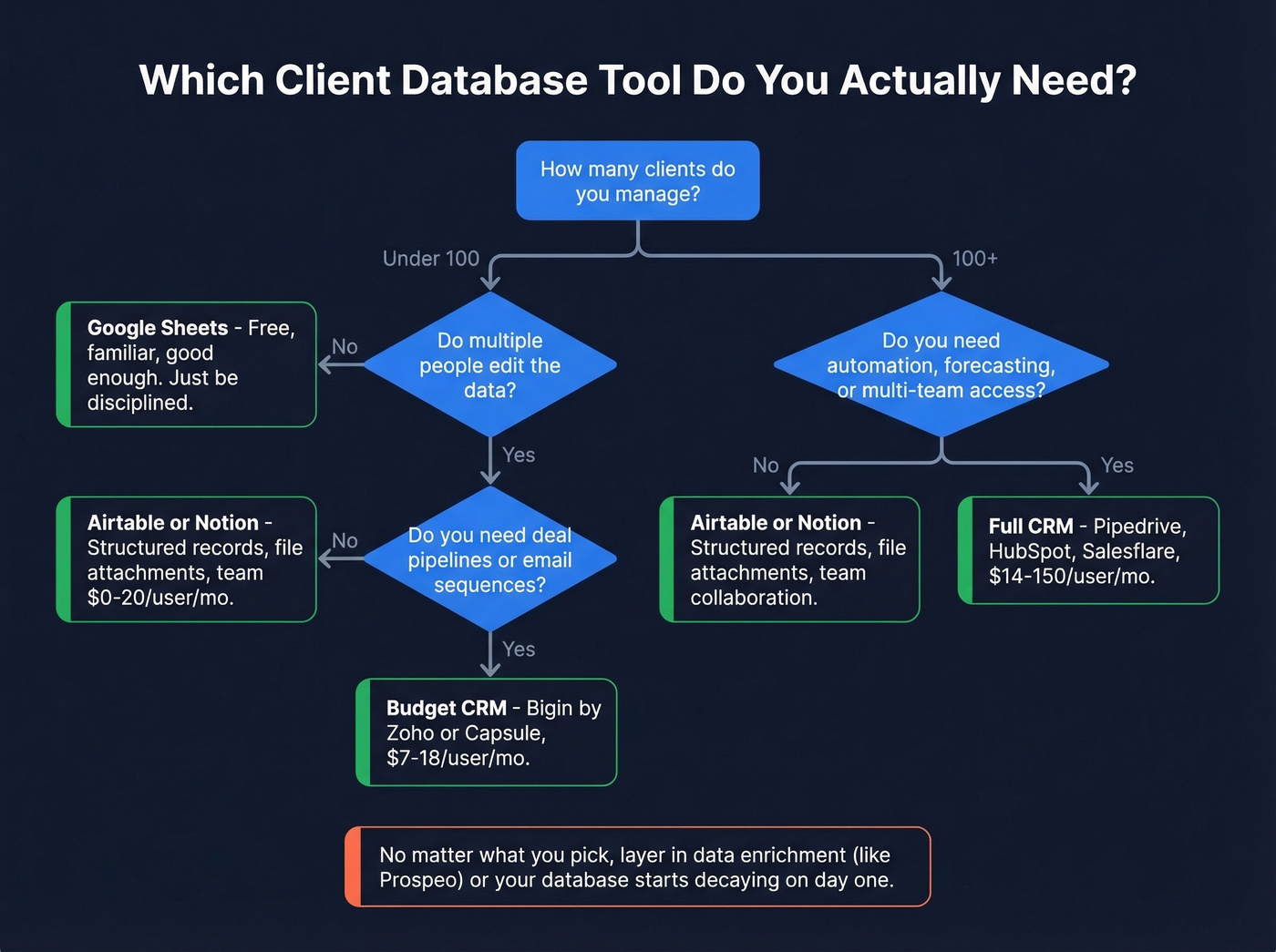
Every tool on this list (except spreadsheets) is cloud-based, which means automatic backups, no IT setup, and centralized access control compared to a file on someone's laptop. If you're worried about compliance with GDPR and similar regulations, CRMs offer encryption and audit trails that spreadsheets can't match.
Under 100 Clients? Use a Spreadsheet
Google Sheets is free, familiar, and handles basic contact lists fine. Name, email, phone, notes, last contact date - done. Excel works the same way: slightly better for complex formulas, slightly worse for real-time collaboration. You don't need software for this. You need discipline.
The problems start when a second person touches the file, or when you cross ~100 rows and start losing track of who you called last Tuesday. One Reddit user running a small ecommerce shop asked whether a spreadsheet was the best option for tracking name, address, email, phone, customer-since date, number of orders, and total spent. For that exact use case? A spreadsheet is fine. The moment you need to automate follow-ups or share access with a growing team, it's not.
Need Structure Without Pipelines?
This is the contractor and freelancer sweet spot. A plumber who needs customer addresses, equipment types, and attached PDF invoices doesn't need a CRM. They need Airtable or Notion - structured records with relational views and file attachments.
On Reddit, users in this exact situation consider MySQL because they don't realize simpler tools exist. You don't need a database engineer. You need a $10-20/user/month tool with a drag-and-drop interface.
Need Automation and Team Access?
Once you've got 3+ people touching client data, follow-up reminders that matter, and email sequences to track, you've crossed the CRM threshold. The 32% of UK SMEs still using spreadsheets for contact management are leaving money on the table - not because spreadsheets are bad, but because they can't automate the follow-up that closes deals.
Here's the thing: if your average deal size is under $5k and you have fewer than 200 clients, you probably don't need a CRM at all. A well-maintained Airtable base with a data enrichment layer will outperform a CRM that nobody bothers to update.
The Business Case for Organized Client Data
Let's talk numbers, because "you should organize your contacts" isn't a compelling argument for spending money. CRM adoption delivers an average $8.71 return per $1 invested. Teams using CRM see sales increase by 29%, productivity jump 34%, and forecast accuracy improve 42%.
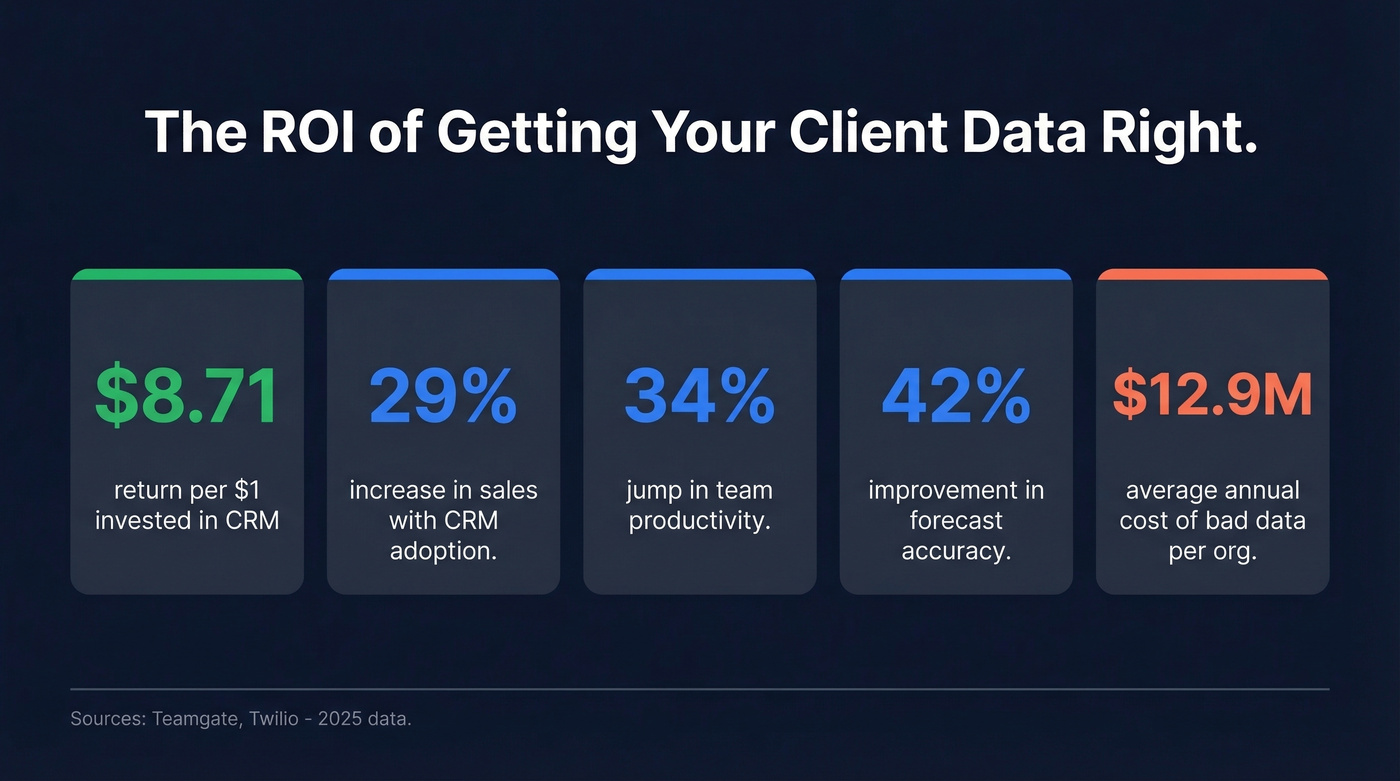
On the flip side, bad data costs the average organization $12.9M per year. For a 10-person team, that translates to wasted rep hours, bounced emails, and lost deals you never knew you lost. Customer retention improves up to 27% with proper CRM adoption. The database isn't just a filing cabinet - it's the infrastructure your revenue runs on.
Spreadsheet vs Lightweight Database vs CRM
| Feature | Spreadsheet (Sheets/Excel) | Lightweight DB (Airtable/Notion) | CRM (Pipedrive/HubSpot/etc.) |
|---|---|---|---|
| Price | Free | $0-20/user/mo | $7-150/user/mo |
| Max records | Unlimited (slow at scale) | 1,200 free (Airtable) | Unlimited on most plans |
| Multi-user | Basic (version conflicts) | Good | Built for teams |
| Automation | Manual/formulas only | Basic | Advanced workflows |
| Security | Minimal | Role-based | Encryption + audit trails |
| Integrations | Limited | Moderate | Extensive |
| Learning curve | None | Low | Moderate-High |
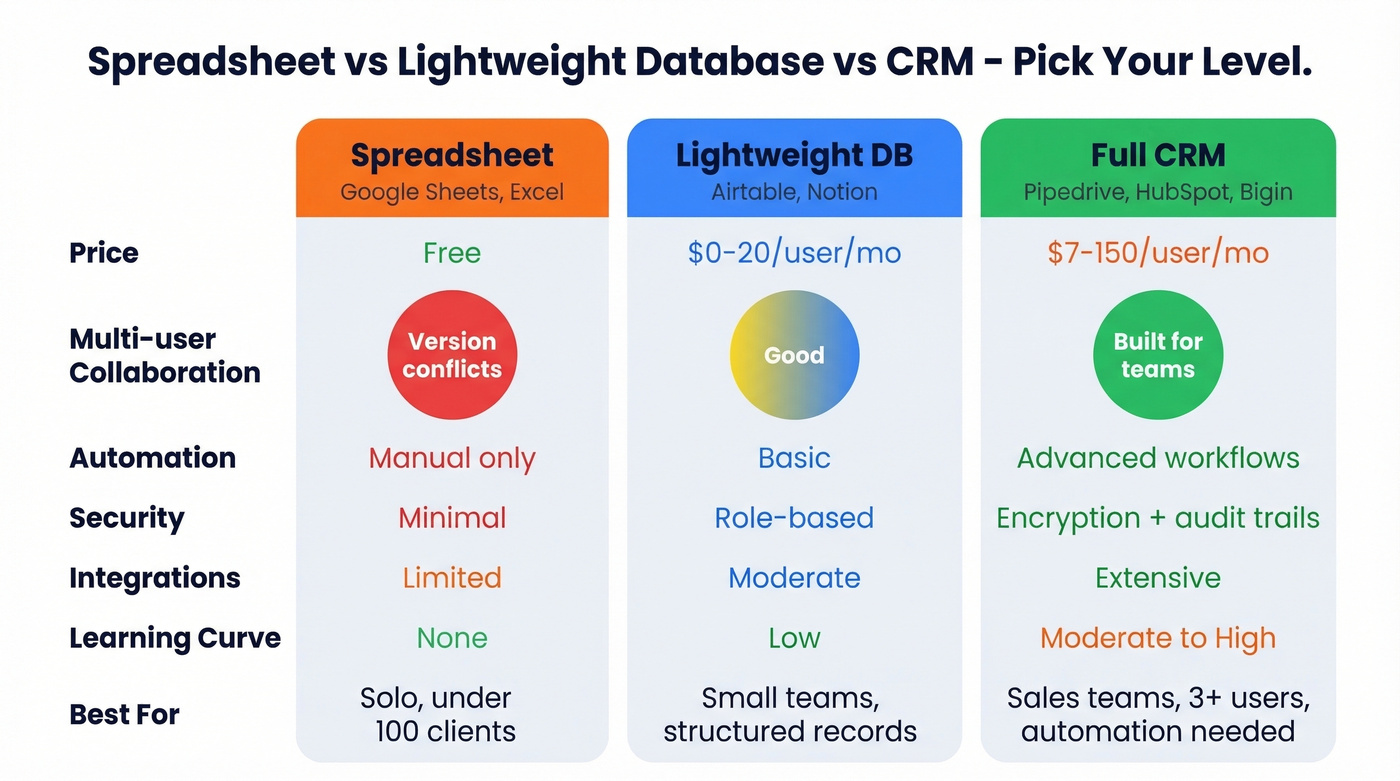
The version conflict problem is the real spreadsheet killer. Two people edit the same row, one overwrites the other, and nobody notices until a client gets the wrong invoice. CRMs solve this with access controls, audit trails, and real-time sync. Lightweight databases like Airtable sit in the middle - better collaboration than Sheets, less overhead than a full CRM.

A client database is only as good as the data inside it. Prospeo enriches your CRM or CSV with 50+ data points per contact at a 92% match rate - emails verified to 98% accuracy, refreshed every 7 days instead of the industry-standard 6 weeks.
Stop managing a database full of dead contacts. Enrich it.
Best Client Database Tools in 2026
Google Sheets
Free, universal, and good enough for under 100 clients. No automation, no access controls, and version conflicts will bite you eventually. But if you're a solo operator tracking 40 customers, don't overthink it. A well-structured Sheet beats a poorly configured CRM every time.
Airtable
Airtable is the tool people discover when they realize they want a database, not a spreadsheet, but definitely not a CRM. It gives you relational views, file attachments, forms for data entry, and a gallery view that makes client records pleasant to browse.
The free tier caps at 1,200 records, which is plenty for most small teams. Paid plans start at $20/user/month and unlock more records, automations, and sync options. We've seen construction teams running 30+ active projects migrate from Notion to Airtable specifically because they needed printable Gantt views and stronger relational features - that migration trigger comes up constantly in project-heavy industries.
The sweet spot: contractors, consultancies, and small teams who need structured client records with attached documents but don't need deal pipelines or email sequences.
Notion
Notion works as a contact management tool if your team already lives in it for docs and project management. At $10/user/month, it's cheaper than Airtable and the all-in-one workspace means fewer tabs. The database views are solid for basic contact management - filter by status, sort by last contact date, link records to project pages.
The tradeoff: Notion's relational database features are weaker than Airtable's, and it doesn't support printing a timeline/Gantt view, which is a real blocker for some teams. If you're choosing between the two from scratch, Airtable wins on data structure. If you're already paying for Notion, try the database feature before adding another tool.
Prospeo
The data inside your client database is decaying right now. Prospeo isn't a CRM - it's the layer that keeps any database alive.

The platform covers 300M+ professional profiles with 143M+ verified emails and 125M+ verified mobile numbers. Email accuracy sits at 98%, which matters when your outreach depends on actually reaching people. CRM and CSV enrichment returns 50+ data points per contact with a 92% API match rate - job title, company size, tech stack, funding stage, and direct dials.
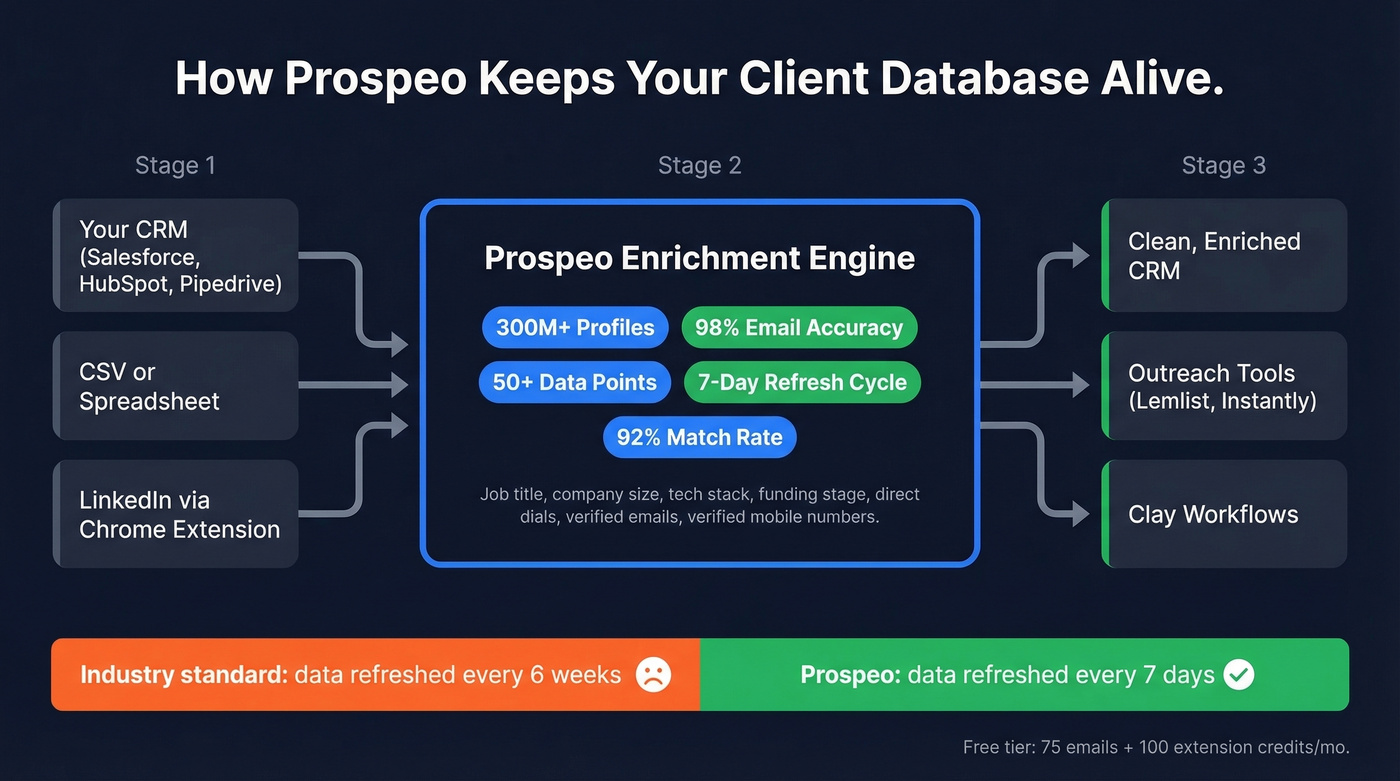
The real differentiator is the 7-day data refresh cycle. The industry average is six weeks. In a world where 30% of your contact data goes stale every year, weekly refreshes are the difference between a living database and a graveyard of disconnected numbers.
Pricing is credit-based at roughly $0.01 per email. The free tier gives you 75 emails and 100 Chrome extension credits per month. No contracts, no sales calls, self-serve onboarding. Native integrations with Salesforce, HubSpot, Lemlist, Instantly, and Clay mean enriched data flows straight into whatever CRM you picked from this list.
Bigin by Zoho
Use this if you're a team of 1-10 who wants a real CRM without the sticker shock. At $7/user/month, Bigin does pipeline management, email integration, and mobile access. There's a free plan to test it.
Skip this if you need advanced reporting, marketing automation, or deep customization. Bigin is intentionally simple - that's the point, but it means you'll outgrow it once your sales process gets complex.
For the price, it's the most underrated CRM on this list.
Capsule CRM

Capsule is clean, simple, and built for service businesses. The free tier covers 2 users and 250 contacts. Starter plans run $18/user/month. It integrates with Xero, Mailchimp, and Google Workspace - the exact stack most consultancies and agencies already use.
Capsule won't wow you with AI features or intent data. It'll give you solid contact management, task tracking, and a pipeline view that doesn't require a training session to understand. For accountants, lawyers, and consultants managing client relationships rather than high-velocity sales, it's a better fit than Pipedrive or HubSpot.
Freshsales
Growth plan at $9/user/month, Pro at $39, Enterprise at $59. Built-in phone, email, chat, and AI lead scoring. The UI can feel cluttered compared to Pipedrive, but the feature density per dollar is hard to beat. 21-day trial.
Pipedrive
Pipedrive is the sales-focused CRM everyone's heard of. Plans start at $14/user/month (Lite), scaling to $39, $49, and $79 for higher tiers. The visual pipeline is genuinely good - drag deals across stages, see your forecast at a glance.
The warning: Pipedrive can become a "glorified spreadsheet" if you only use it for data entry and deal dragging. The sentiment on r/sales is consistent - teams that don't invest in automation and workflow setup end up with an expensive contact list. Use the automation features or you're wasting money.
Salesflare
We helped a B2B team switch from manual CRM entry to Salesflare and they saved roughly 5 hours per rep per week. It pulls contact info automatically from emails and calendar events - no logging, no copy-pasting, no "I forgot to update the CRM" excuses. Growth plan at $29/user/month, Pro at $49, Enterprise at $99. The 30-day trial is generous enough to know if it fits.
monday CRM
Basic at $12-15/user/month, Standard $17-20, Pro $28. Highly customizable workflows make it better for project-heavy teams than pure sales organizations. If you're already on monday.com for project management, the CRM add-on makes sense. Otherwise, Pipedrive or Bigin are better starting points for sales-driven teams.
HubSpot CRM
HubSpot is the default recommendation, and for good reason - the free tier offers unlimited contacts, email tracking, and a decent pipeline view. For a solo founder or two-person team getting started, it's hard to argue against free.
But let's talk about the pricing cliff. Small teams on Reddit consistently flag this: you outgrow free fast, and Sales Hub Professional jumps to $90/seat/month plus a $1,500 onboarding fee. A 5-person team goes from $0 to $6,900 in year one. That's a brutal jump for a company that just wanted organized contacts six months ago.
Look - if you're a 3-person team, Bigin or Capsule gives you most of what you need at a fraction of the cost. HubSpot makes sense if you plan to grow into marketing automation, content management, and a full GTM stack. For teams that just need organized contact records with some pipeline features, it's overkill.
Zoho CRM
Standard $14/user/month, Professional $23, Enterprise $40, Ultimate $52. Feature-rich but complex - the learning curve is steeper than Pipedrive or Capsule. Best for teams already in the Zoho ecosystem where everything connects natively. 15-day trial.
Attio
AI-native CRM starting at $29/user/month with a 14-day trial. Modern UI, relationship intelligence, and a design philosophy that feels like it was built in 2026 rather than 2012. Best for tech-forward teams who want AI-first workflows. Still early - we haven't tested it deeply enough to recommend it over established options, but it's on our radar.
Salesforce
Pro Suite at $100/user/month. Enterprise $150-300/user/month. Implementation typically runs $5,000-$50,000+.
Salesforce is overkill for 90% of businesses reading this article. If you have fewer than 50 employees and no dedicated Salesforce admin, you'll spend more time configuring it than using it. Skip this unless you're at a scale where the complexity pays for itself.
Bitrix24
Free plan with unlimited users - that's the hook. Paid plans start at $49/month for the Basic tier. Bitrix24 tries to be everything: CRM, project management, HR, website builder. Jack of all trades, master of none. Best for budget-conscious teams who want an all-in-one and don't mind a cluttered interface.
Honorable mentions: Flowlu (project-heavy), Really Simple Systems (UK-focused), ActiveCampaign (marketing-first).
Full Comparison Table
| Tool | Starting Price | Free Tier | Best For | Key Limitation |
|---|---|---|---|---|
| Google Sheets | Free | Yes | Solo, <100 clients | No automation, version conflicts |
| Airtable | $20/user/mo | 1,200 records | Records + attachments | 1,200-record free cap |
| Notion | $10/user/mo | Limited | Teams already in Notion | Weak relational features |
| Prospeo | ~$0.01/email | 75 emails/mo | Keeping your database accurate | Enrichment layer, not a CRM |
| Bigin by Zoho | $7/user/mo | Yes | Teams of 1-10 | Limited reporting |
| Capsule CRM | $18/user/mo | 2 users, 250 contacts | Service businesses | 250-contact free cap |
| Freshsales | $9/user/mo | No (21-day trial) | Feature density on a budget | Cluttered UI |
| Pipedrive | $14/user/mo | No (14-day trial) | Deal-driven sales teams | Needs automation setup to justify cost |
| Salesflare | $29/user/mo | No (30-day trial) | B2B teams who hate data entry | Higher starting price |
| monday CRM | $12/user/mo | No | Project-heavy teams | Paid per seat |
| HubSpot CRM | Free / $90/seat/mo | Unlimited contacts | Teams growing into marketing | Steep pricing cliff at paid tiers |
| Zoho CRM | $14/user/mo | No (15-day trial) | Zoho ecosystem users | Steep learning curve |
| Attio | $29/user/mo | No (14-day trial) | Tech-forward teams | Still early-stage |
| Salesforce | $100/user/mo | No | 50+ employees with admin | Expensive, complex, needs dedicated admin |
| Bitrix24 | $49/mo (team) | Unlimited users | Budget all-in-one | Cluttered, master of none |
Five Mistakes That Kill Your Data
1. No clear objectives. You start collecting data without deciding what you need it for. Six months later, you've got 2,000 contacts with no industry field, no company size, and no way to segment. Define your fields before you import a single row.
2. Choosing the cheapest tool. Free CRMs are great - until you need email sequences, custom reports, or API access. Then you're paying for add-ons that cost more than a mid-tier tool would have. Budget for where you'll be in 12 months, not where you are today.
3. No data ownership. Someone has to own the database. Not "the team." A person. Without clear ownership, nobody deduplicates, nobody standardizes formats, and nobody notices when 200 contacts have "N/A" in the phone field.
4. Never enriching or verifying data. Your database is decaying at ~30% per year. A third of your contacts will be wrong by next January. Automated enrichment catches these changes before they compound - weekly refresh cycles beat quarterly audits every time. If you want a deeper breakdown of workflows and vendors, start with lead enrichment.
5. Using your CRM as a glorified spreadsheet. If you're just logging names and dragging deals across a pipeline, you're paying $50/month for a data dump. Use the automation. Set up the workflows. Otherwise, go back to Sheets and save the money.

Why Your Database Is Dying
Contact data decays faster than most teams realize. Nearly three-quarters of B2B contact data becomes outdated within 12 months. About 43% of phone numbers change. Over 65% of job titles shift. And 65% of contact data collected through web forms is invalid from the start - meaning the rot begins before you even save the record.
For smaller teams, the cost shows up as bounced email sequences, disconnected phone numbers, and reps wasting hours chasing ghosts. Here's the hygiene checklist that actually works:
- Validate at entry. Don't let bad data in the front door. Use form validation and real-time email verification.
- Standardize formats. Phone numbers, addresses, company names - pick a format and enforce it.
- Audit quarterly at minimum. Run deduplication, flag incomplete records, and purge contacts that haven't engaged in 12+ months.
- Enrich continuously. A 7-day refresh cycle catches job changes, new phone numbers, and updated titles within a week - turning a static list into a living client database.
- Assign ownership. One person reviews data quality monthly. No exceptions.
You've picked your database tool. Now keep the data in it from rotting. If you're building outbound on top of that database, pair it with a simple sales prospecting routine so the data actually turns into revenue.
Bad data costs the average org $12.9M/year. Prospeo's 5-step verification eliminates bounces, spam traps, and stale records - at roughly $0.01 per email. No contracts, no sales calls. Just accurate client data that stays accurate.
Your database started rotting the day you built it. Fix that now.
FAQ
What's the difference between a client database and a CRM?
A client database stores contact information - names, emails, phone numbers, notes. A CRM adds automation, pipeline management, reporting, and workflow tools on top of that data. Every CRM contains a contact database, but not every contact database needs to be a CRM. If you just need organized records, Airtable or Notion works fine.
Can I use a spreadsheet as my contact database?
Yes, for under 100 clients with a single user. Beyond that, you'll hit version conflicts, security gaps, and zero automation. Once a second person needs access or you cross a few hundred records, graduate to Airtable or a lightweight CRM like Bigin ($7/user/month).
How often should I clean my data?
Quarterly at minimum. B2B contact data decays roughly 30% per year - 43% of phone numbers and 65% of job titles change within 12 months. Automated enrichment with a weekly refresh cycle handles this continuously, catching changes before they compound into bounced campaigns and wasted rep hours.
What's the best free client database tool?
Google Sheets for pure simplicity, Airtable for structured records (1,200-record free limit), or HubSpot CRM Free for teams needing pipeline views. Pairing any of these with a data enrichment layer keeps contact data verified and current as you grow.
How do I migrate from a spreadsheet to a CRM?
Export your spreadsheet as CSV, clean duplicates, standardize formatting, map columns to CRM fields, import, then verify accuracy post-import. Most CRMs include a CSV import wizard. Budget 2-4 hours for under 1,000 contacts - it's less painful than you think.