

Contact Enrichment: What It Is, Why It Fails, and How to Do It Right
A RevOps lead we know enriched 50,000 contacts in a single automated batch last quarter. Thirty percent came back worse - rep-verified direct dials overwritten with generic switchboard numbers, job titles swapped to roles people left two years ago, and 2,400 brand-new duplicates cluttering Salesforce. That's not an edge case. That's what happens when you trust the defaults.
Poor data quality costs the US economy $3.1 trillion per year, and the average organization bleeds $12.9M annually from bad data decisions. Contact enrichment is supposed to fix this. Most of the time, it makes things worse - because teams skip verification, trust inflated accuracy claims, and let automation overwrite fields it shouldn't touch.
The Short Version
Enriching contacts means appending missing data - emails, phones, titles, firmographics, technographics, intent signals - to your existing CRM records. The concept is simple. The execution is where teams get burned.
The fix comes down to three principles: enrich in stages (cheap fields first, deep-enrich only ICP matches), verify independently before syncing to your CRM, and never let automation overwrite rep-confirmed fields.
What Is Contact Enrichment?
It fills gaps in your contact and account records using external data sources. A raw CRM record might have a name, company, and a pattern-guessed email. After enrichment, that same record carries a verified email, direct mobile number, current job title, company revenue, headcount, tech stack, and even intent signals showing whether they're actively researching your category.

The data types break into clear buckets: contact-level (email, phone, title, department), firmographic (revenue, headcount, industry, location), technographic (tools they use), and intent (topics they're researching). Each has different sources, different accuracy profiles, and different decay rates.
Here's the thing most teams miss: enrichment and verification aren't the same operation. Enrichment adds data. Verification confirms that data is actually accurate. You need both, in sequence. B2B data decays roughly 2.1% per month, which means nearly a quarter of your database goes stale every year. This isn't a one-time project - it's ongoing maintenance.
Why Most Enrichment Fails
The Accuracy Gap
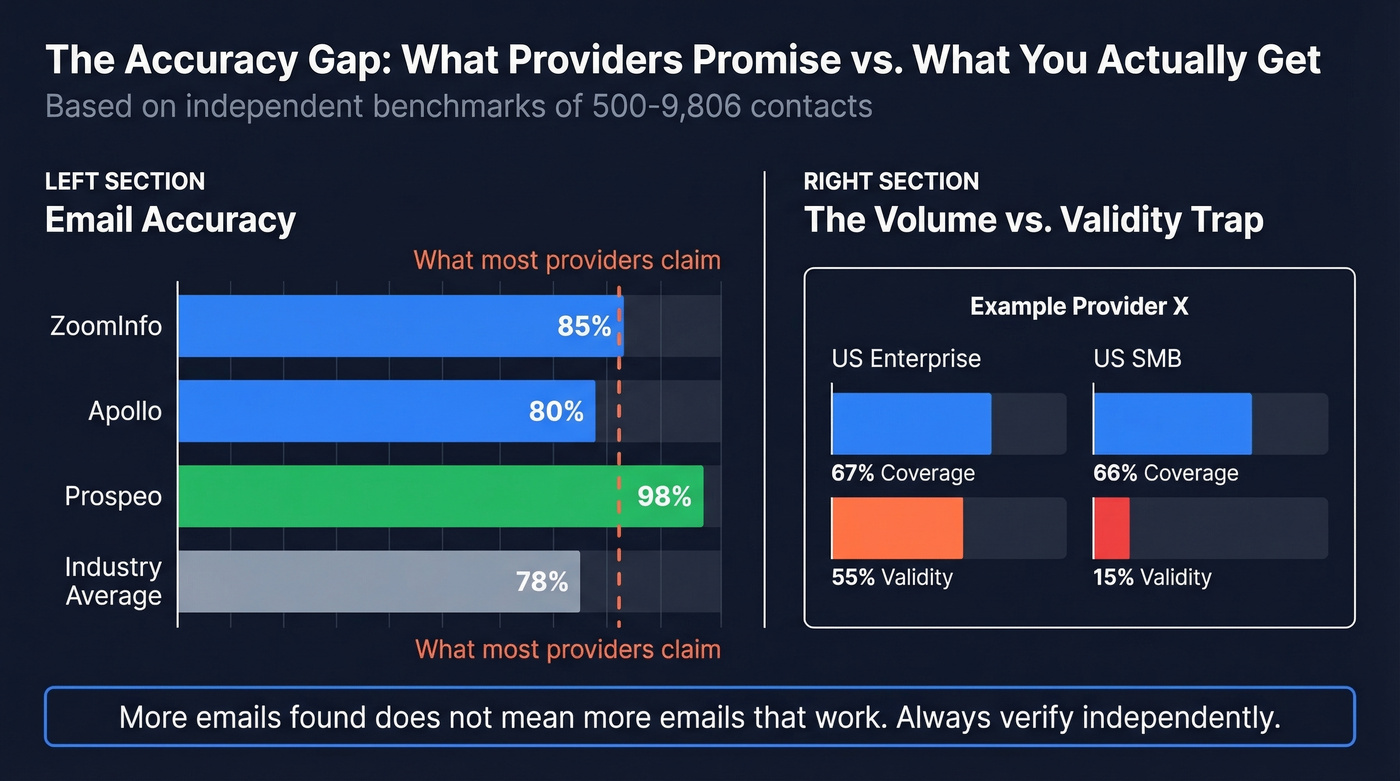
Every enrichment provider promises 90%+ accuracy. Nobody consistently hits that number. A Cotera test of 500 manually verified contacts across Apollo, ZoomInfo, Lusha, and Clearbit found email accuracy ranging from 72% to 91% and phone accuracy from 58% to 79%. That's a massive spread, and it means the "90% accurate" claim on a vendor's homepage is a best-case scenario for a specific segment.
One agency founder on Reddit captured the frustration well: "Every list provider promises 90% accuracy," but in practice bounces shoot up and titles are outdated. They'd tried Apollo, ZoomInfo, and manual scraping - still "hit or miss."
Coverage Doesn't Equal Accuracy
A Growth Today test of 9,806 contacts across 10 providers exposed something counterintuitive: the providers finding the most emails often had the worst validity rates. Wiza hit 67% coverage in the US Enterprise segment but only 55% validity. In US SMB? 66% coverage, 15% validity. Two-thirds of the emails they "found" would bounce or hit dead inboxes.
This is the volume-vs-validity trade-off, and it's the single most important concept to understand before you spend a dollar on enrichment tools. A provider that returns fewer results but verifies each one will outperform a provider that fills every field with unverified guesses. Every time.
The Overwrite Disaster
Let's break down that 50,000-contact disaster. Rep-verified direct dials got overwritten with stale numbers. Job titles were swapped to outdated roles. The system created 2,400 duplicate records. And the provider's confidence scores showed 95% across the board.
The problem? Confidence measures match certainty, not freshness. A system can be 95% confident it matched the right person and still serve you a phone number from 2023.
HubSpot's enrichment introduces the same kind of matching errors at scale. One user enriched roughly 2,000 records and found wrong names, wrong titles, and wrong profile matches across a significant portion of the batch. At scale, the damage compounds silently.

The overwrite disasters described above happen when enrichment providers skip verification and refresh data every 6 weeks. Prospeo's 5-step verification catches catch-all domains, spam traps, and honeypots before data ever touches your CRM - delivering 98% email accuracy and a 92% API match rate across 50+ data points per contact.
Enrich your CRM with data that doesn't decay in a month.
How Enrichment Models Work
Three models dominate, and each makes a different trade-off.
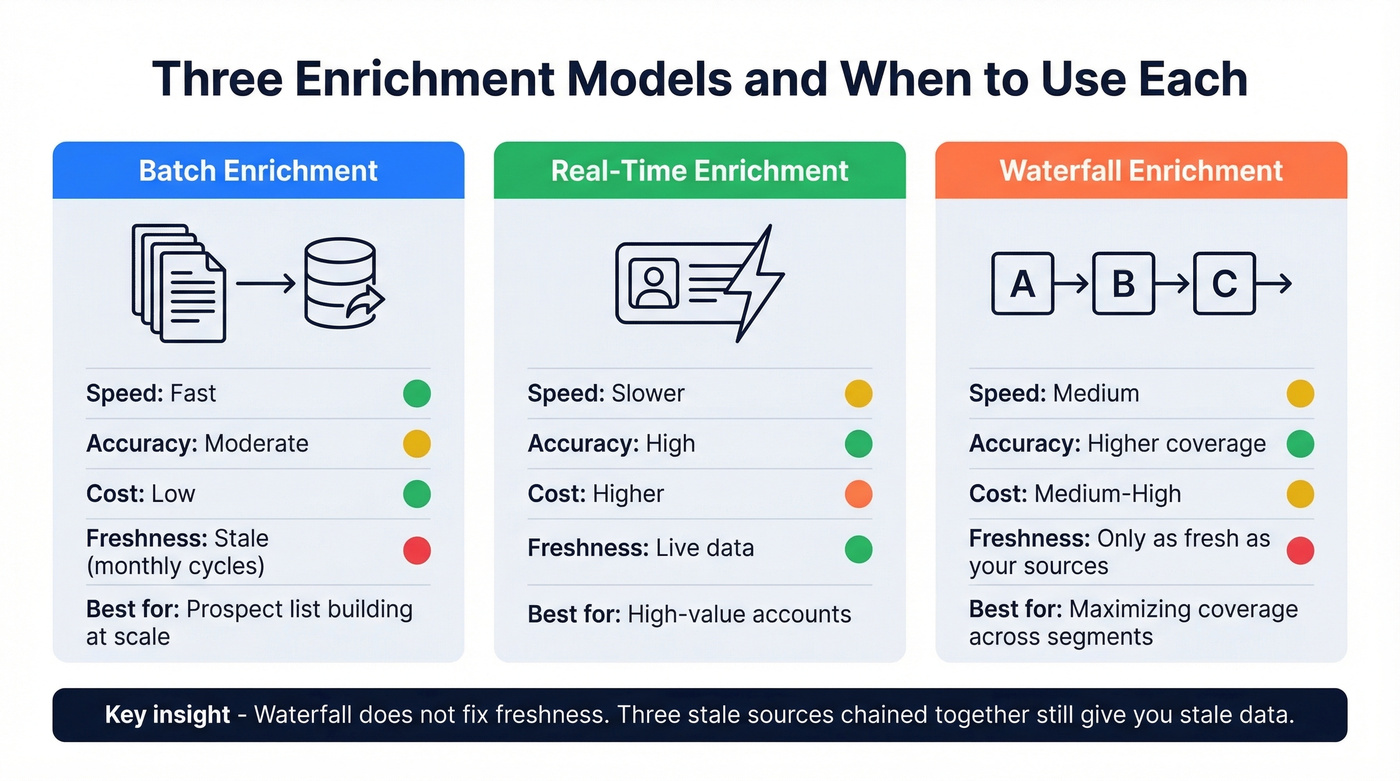
Batch enrichment uploads a list and returns it enriched. Batch tools like Apollo and ZoomInfo typically update on monthly or quarterly cycles, so you're working with data that could be weeks old. Fast and cheap, but freshness suffers. This is the most common approach for prospect list building, where teams need to process thousands of records before launching a campaign.
Real-time enrichment queries sources live at the moment you request data - higher accuracy, higher cost, slower throughput. Use this for high-value accounts where stale data costs you a deal.
Waterfall enrichment chains multiple providers sequentially - if Provider A doesn't have an email, try Provider B, then C. Coverage goes up, but each additional provider increases compliance surface area and creates overwrite risk.
Here's the contrarian insight most waterfall evangelists skip: waterfall doesn't fix freshness. If all three providers in your chain last refreshed six weeks ago, chaining them together just gives you three stale answers instead of one. A 7-day refresh cycle versus a 6-week cycle isn't a minor difference - it's the difference between reaching someone at their current company and leaving a voicemail at a job they left last month.
| Model | Speed | Accuracy | Cost | Freshness |
|---|---|---|---|---|
| Batch | Fast | Moderate | Low | Stale (monthly) |
| Real-time | Slower | High | Higher | Fresh |
| Waterfall | Medium | Higher coverage | Medium-High | Depends on sources |
How to Build an Enrichment Pipeline
The teams that get this right follow a staged approach. We've tested variations of this workflow across dozens of client databases, and the order matters more than most people think.
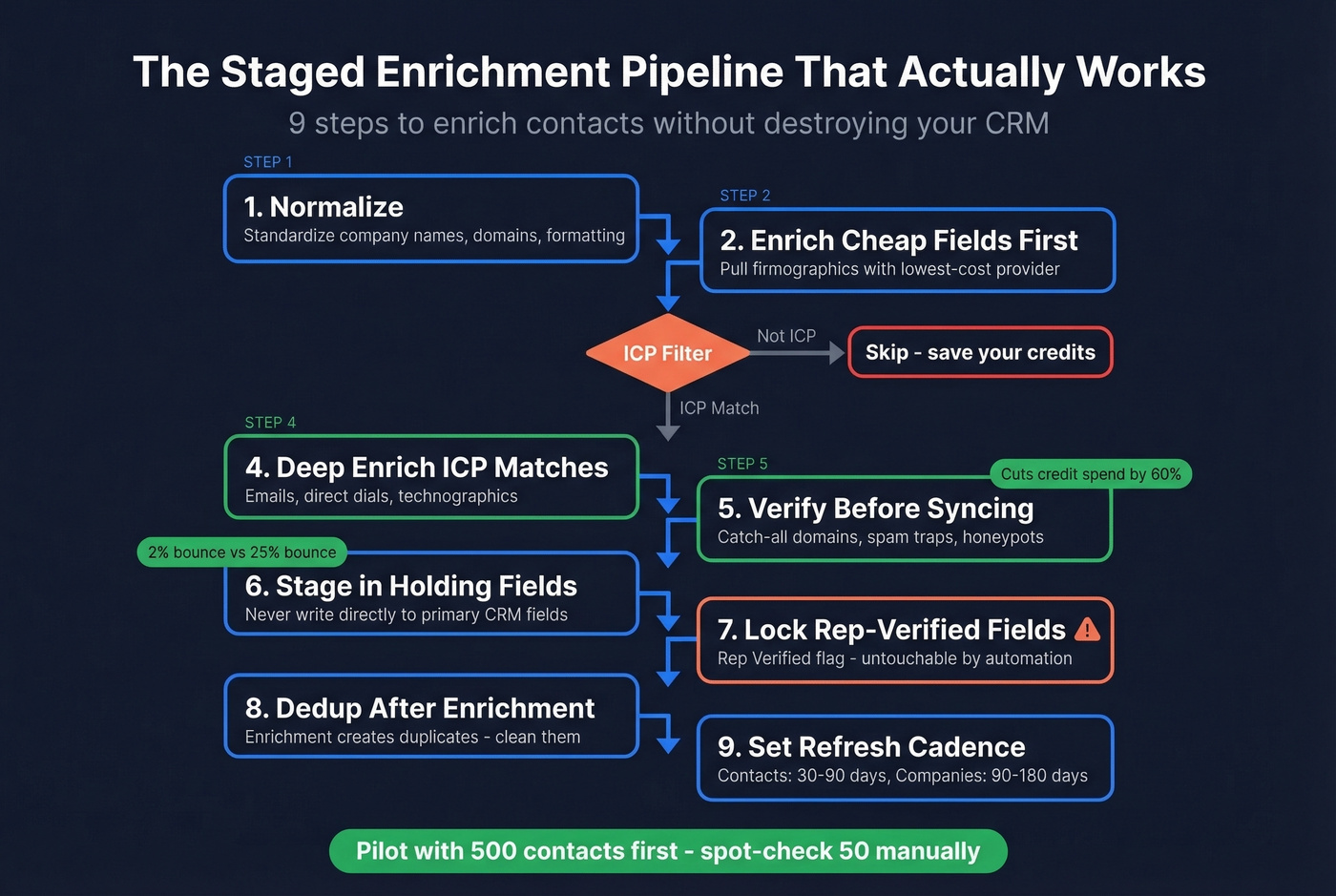
- Normalize first. Standardize company names, domains, and formatting before enriching. Garbage in, garbage out.
- Enrich cheap fields first. Pull firmographic data using your lowest-cost provider. This lets you filter before spending credits on expensive fields.
- ICP-filter before deep enrichment. Don't spend 10 credits per contact enriching companies outside your ideal customer profile. This staged approach cuts credit consumption by 60%.
- Deep-enrich ICP matches. Now pull emails, direct dials, and technographic data for contacts that actually matter - every credit goes toward prospects who fit your target segment.
- Verify before syncing. Run enriched emails through real-time verification that catches catch-all domains, spam traps, and honeypots before anything touches your CRM. This single step is the difference between a 2% bounce rate and a 25% bounce rate.
- Stage in holding fields. Never write enriched data directly to primary CRM fields. Use staging fields, then promote data only when confidence thresholds are met.
- Lock rep-verified fields. Create a "Rep Verified" flag. Any field with that flag is untouchable by automation. This one rule would've prevented the 50K-contact disaster.
- Dedup after enrichment. Enrichment creates duplicates. Run dedup as a post-processing step.
- Set a refresh cadence. Every 30-90 days for contact-level fields, every 90-180 days for company-level.
Pilot everything. Start with 500 contacts. Spot-check 50 manually. If accuracy drops below 85%, recalibrate your provider mix before scaling.
Best Contact Enrichment Tools in 2026
Prospeo
Best for: Outbound agencies scaling campaigns without burning domains, and RevOps teams running enrichment via API.
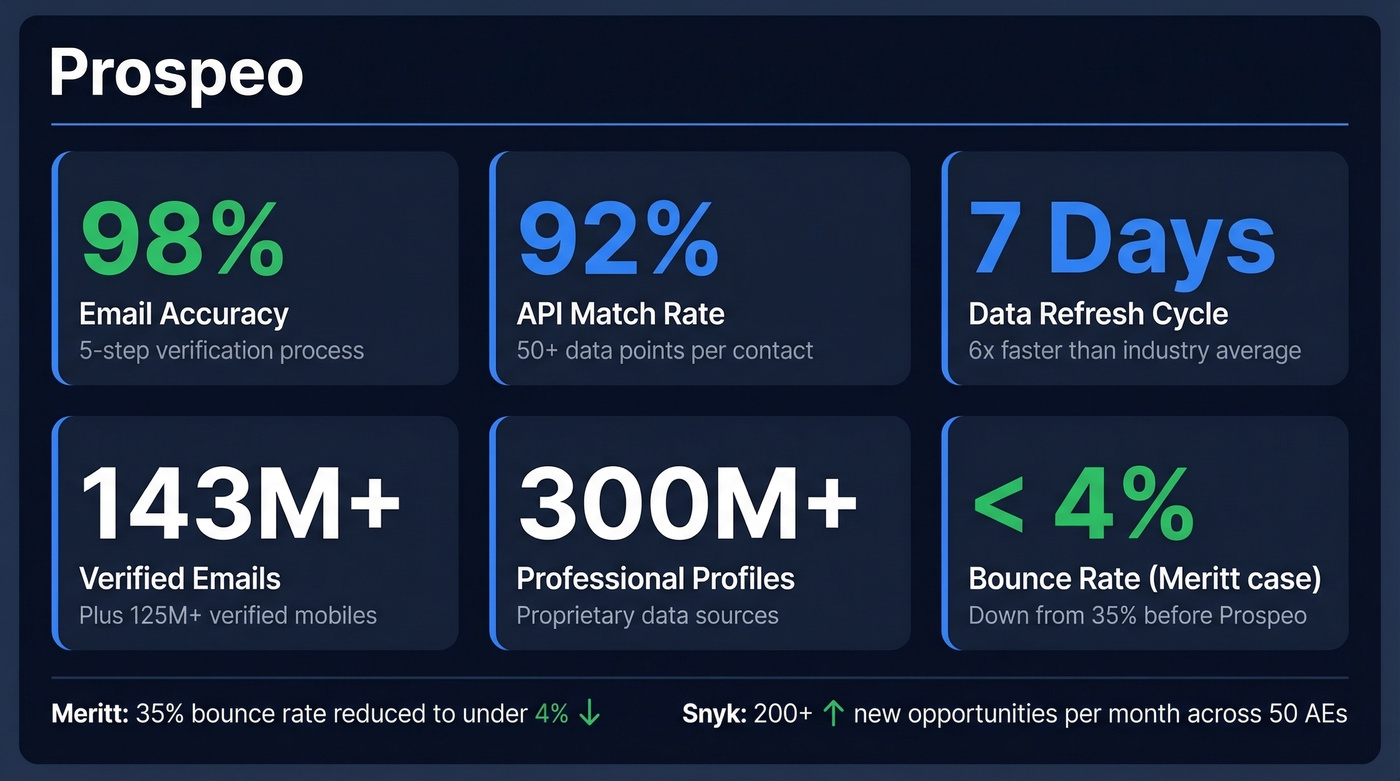
Prospeo runs 300M+ professional profiles through a proprietary 5-step verification process - catch-all handling, spam-trap removal, honeypot filtering - delivering 98% email accuracy on 143M+ verified emails and 125M+ verified mobile numbers. The 7-day data refresh cycle is roughly six times faster than the industry average.
In Growth Today's test of 9,806 contacts across 10 providers, Prospeo hit 94% email validity in the US Enterprise segment.
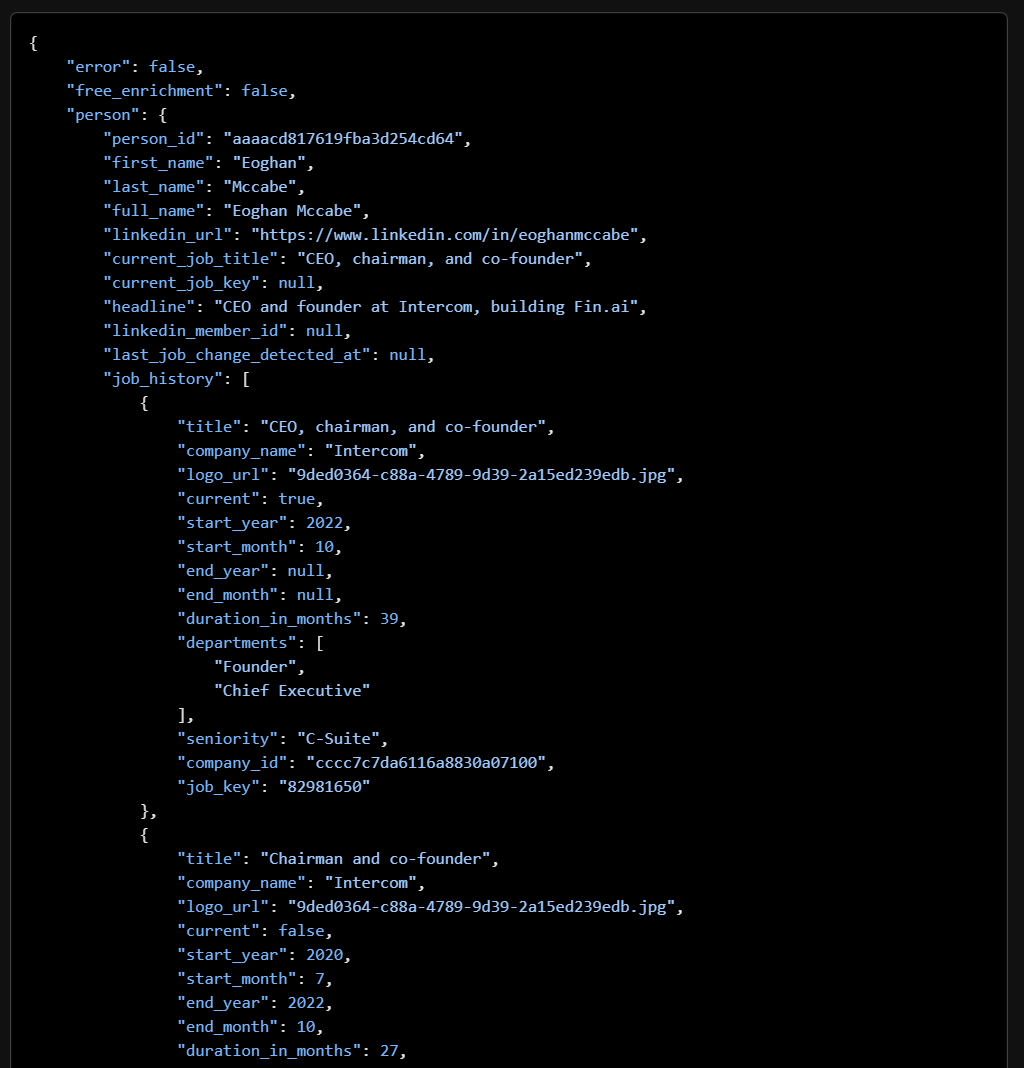
The email-finding infrastructure is proprietary, so you're not getting the same recycled records every other provider serves. Each enrichment returns 50+ data points, the API match rate sits at 92%, and intent data tracks 15,000 topics via Bombora so you can layer enrichment with in-market signals.
Real results: Meritt went from a 35% bounce rate to under 4% after switching, and Snyk cut bounces from 35-40% to under 5% while generating 200+ new opportunities per month across 50 AEs.
Pricing starts at roughly $0.01 per email with 10 credits per mobile number. The free tier gives you 75 emails and 100 Chrome extension credits monthly - no contract, no sales call required.
Apollo.io
Apollo is the obvious starting point for teams that need firmographic depth on a budget. The database is broad, the UI is intuitive, and the free tier lets you kick the tires before committing. Where Apollo falls short - and this is well-documented - is email accuracy. Benchmarks commonly cite around 80% email accuracy, and Nexuscale's analysis of Apollo-sourced lists found bounce rates of 25-35%. The consensus on r/gtmengineering is blunt: "Apollo isn't reliable" for email without additional verification.
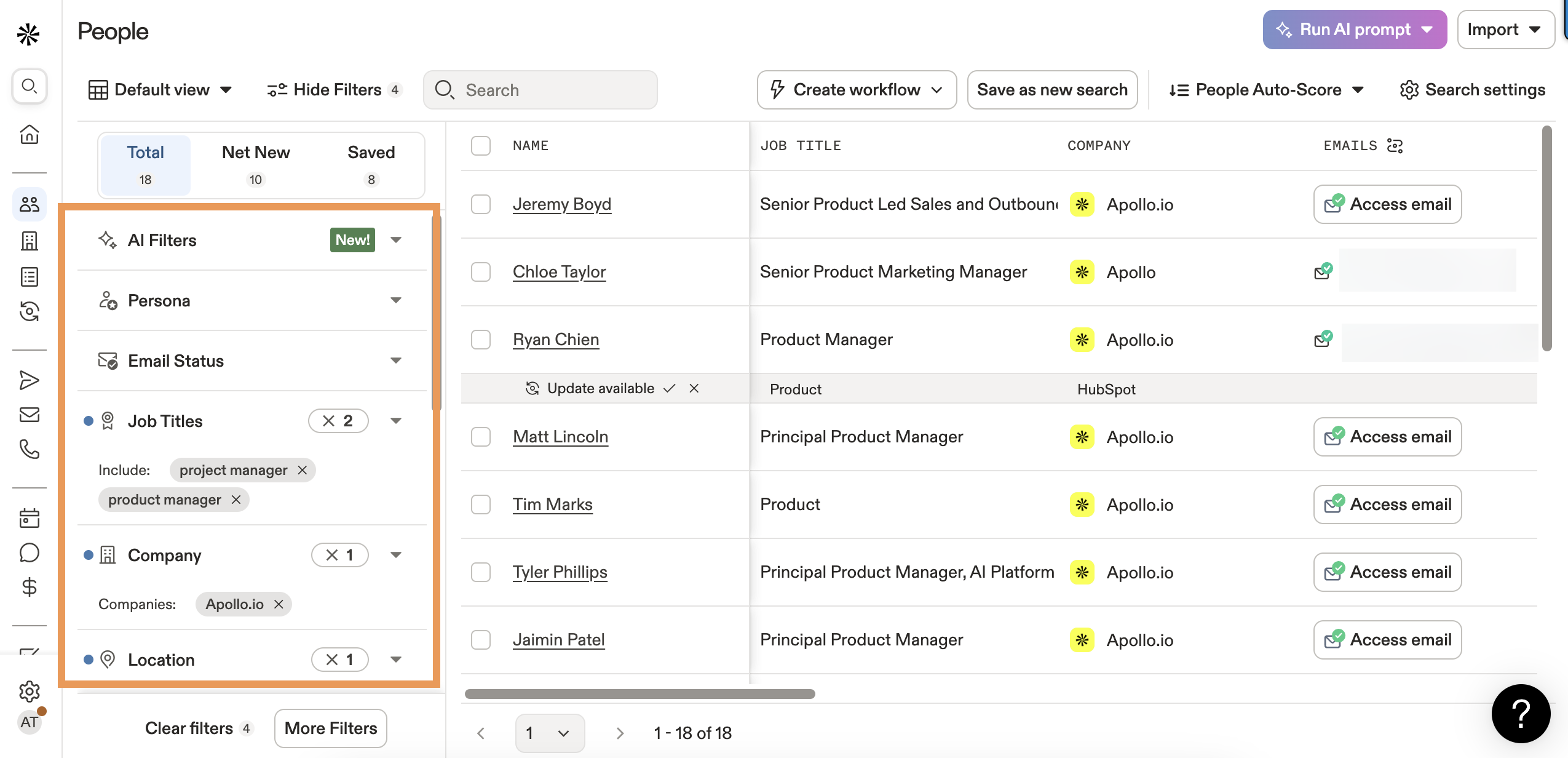
Use Apollo for company data, technographic signals, and initial prospecting. Verify every email before it hits a sequence. One thing to watch: unused credits expire at the end of each billing cycle, so plan your enrichment batches accordingly.
Pricing runs from a free tier to $59/user/month (Basic), $99 (Professional), and $149 (Organization). Full enrichment costs 5-10 credits per contact, so that free tier covers maybe 10-20 fully enriched records.
ZoomInfo
ZoomInfo is the enterprise default - 260M+ contacts across 100M companies, with the deepest US database in the market. If you're a 200-person sales org running ABM, ZoomInfo delivers breadth that smaller providers can't touch. You'll need dedicated ops resources and budget to match.
The trade-offs are real. "Inaccurate data" is the most-cited complaint on G2 with 219 mentions. Independent benchmarks commonly cite roughly 85% email accuracy, and there's no built-in email verification - you'll need a separate tool for that.
Pricing starts at $14,995/year for Professional (5,000 credits, up to 3 users), $24,995 for Advanced, and $39,995 for Elite. That works out to about $3 per contact before verification costs.
Our take: ZoomInfo is still the best all-in-one platform for enterprise sales orgs. But if your average deal size is under $25k, you're paying for breadth you'll never use. Most teams under 50 reps get better ROI from a verification-first tool paired with Apollo's firmographic layer.
Cognism
Skip this if you're selling exclusively into North America. Choose this if you need EMEA phone data with GDPR compliance baked in. Cognism invests heavily in compliant mobile data for EU and UK markets - where ZoomInfo wins on US depth, Cognism wins on European coverage. Custom pricing typically runs $8,000-$15,000/year for small-to-mid teams.
Lusha
Lusha is a quick-lookup tool for individual reps who need a phone number right now - not for ops teams processing thousands of records. It's browser-based, so bulk workflows require workarounds. Free tier gives you 70 credits/month, Pro starts at $49.90/month for 3 users. Good for supplementing, not for primary enrichment.
Clay
Clay isn't a data provider - it's an orchestration layer that chains multiple providers (Apollo, Hunter, People Data Labs, Clearbit, and others) in waterfall sequences. It's powerful for ops teams who want granular control over how they enrich B2B contact data across multiple sources. Starts at $149/month, and you're still paying for underlying data providers on top. Other waterfall-focused options include BetterContact and FullEnrich, both aggregating 20+ providers under a single subscription.
If you're evaluating vendors broadly, start with a ranked list of the best data enrichment tools and narrow down by your workflow.
Clearbit / Breeze Intelligence
Now part of HubSpot as Breeze Intelligence. Convenient if you're already in the HubSpot ecosystem, but quality concerns are documented - see the enrichment errors mentioned earlier. Entry pricing is $45/month (100 credits), with enterprise tiers running $18,000-$80,000/year. Requires a HubSpot subscription.
Tool Comparison
| Tool | Email Accuracy | Refresh Cycle | Starting Price | Built-in Verification? |
|---|---|---|---|---|
| Prospeo | 98% | 7 days | ~$0.01/email | Yes (5-step) |
| Apollo | ~80% | Monthly/quarterly | $59/user/mo | No |
| ZoomInfo | ~85% | Monthly/quarterly | $14,995/yr | No |
| Cognism | ~90% | Varies | ~$8,000/yr | Partial |
| Lusha | Not published | Varies | $49.90/mo | No |
| Clay | Depends on sources | Depends on sources | $149/mo | No |
True Cost Per Contact
This is the table most comparison articles won't show you. Sticker price means nothing if you're paying for verification on top.
| Tool | Sticker Price | True Cost (incl. verification) |
|---|---|---|
| Prospeo | ~$0.01/email | ~$0.01 (included) |
| ZoomInfo | ~$3.00/contact | ~$3.50+ (extra) |
| Apollo | ~$0.20-1.60 | ~$0.40-2.00 (extra) |
| Lusha | ~$0.70-1.40 | ~$1.00-1.80 (extra) |
If you're also comparing sources (not just enrichers), use this accuracy-first roundup of the best B2B databases.
That staged enrichment pipeline you just read about? Prospeo was built for it. Filter with 30+ search criteria before spending credits, deep-enrich only ICP matches with verified emails at $0.01 each and direct dials from 125M+ verified mobiles, then sync clean data to Salesforce or HubSpot - all on a 7-day refresh cycle.
Cut enrichment waste by 60% and bounce rates to under 4%.
Compliance Essentials
Enrichment creates compliance exposure. Every external data source you touch adds regulatory surface area, and waterfall setups multiply this - chaining five providers means five sets of data collection practices you need to vet.
The GDPR principles that matter most: you need a lawful basis for processing (legitimate interest with a documented assessment, not "we bought a list"), you can only use enriched data for its stated purpose, and you should only enrich fields you'll actually use. You're also legally obligated to keep personal data accurate - stale enrichment data violates this principle - and you need retention policies so data enriched 18 months ago and never used gets purged. CCPA applies similar principles for California residents. Before signing with any provider, verify how they collected the data and whether they can demonstrate compliance.
For a deeper framework on risk, audits, and vendor vetting, see our guide to B2B compliance and the checklist for a GDPR compliant database.
FAQ
What's the difference between enrichment and verification?
Enrichment appends missing data points like emails, phones, and titles. Verification confirms that data is deliverable and accurate. They're sequential steps - enrich first, verify before syncing. Skipping verification is how teams end up with 25%+ bounce rates that torch sender reputation.
How often should I re-enrich my CRM?
Every 30-90 days for contact-level fields (email, phone, title) and every 90-180 days for company-level fields. At 2.1% monthly decay, a database enriched in January is 12-15% stale by July. Existing customer records deserve the same refresh cadence as new prospects.
Is waterfall enrichment worth the complexity?
For coverage, yes - chaining 2-3 providers fills gaps no single source can. But waterfall doesn't fix freshness, and each provider adds compliance risk. Start with two providers maximum, measure validity rates independently, and add a third only if coverage gaps persist above 20%.
Which enrichment tool has the best email accuracy?
Independent tests show most providers range 72-91%. In our experience, Prospeo's 98% email accuracy with a 7-day refresh cycle and built-in 5-step verification consistently outperforms - backed by Growth Today's test showing 94% validity in the US Enterprise segment and customer results with bounce rates under 5%.
What bounce rate should I target after enrichment?
Under 2% per send. Above that threshold, ESPs start throttling your sending domain and deliverability degrades across all campaigns. If you're consistently above 2%, either your source data is too stale or your verification process isn't catching bad addresses before they hit sequences.