

Contact Filtering: What It Is, Why It Matters, and How to Do It Right
You pull 10,000 contacts, filter by ICP, launch the campaign. Bounce rate: 12%. Half the "valid" contacts haven't been updated in eight months. The problem isn't your filters - it's the data underneath them.
Three truths before we go deeper. Contact filtering is only as good as the data it operates on. An analysis of nearly 1 billion email addresses found that 19.6% of contacts in active databases are deliverability risks - invalid, disposable, or spam traps. Your filters can't fix that. Clean first, filter second. Verify emails, merge duplicates, and standardize fields before you build segments. Otherwise you're organizing garbage into neat little piles.
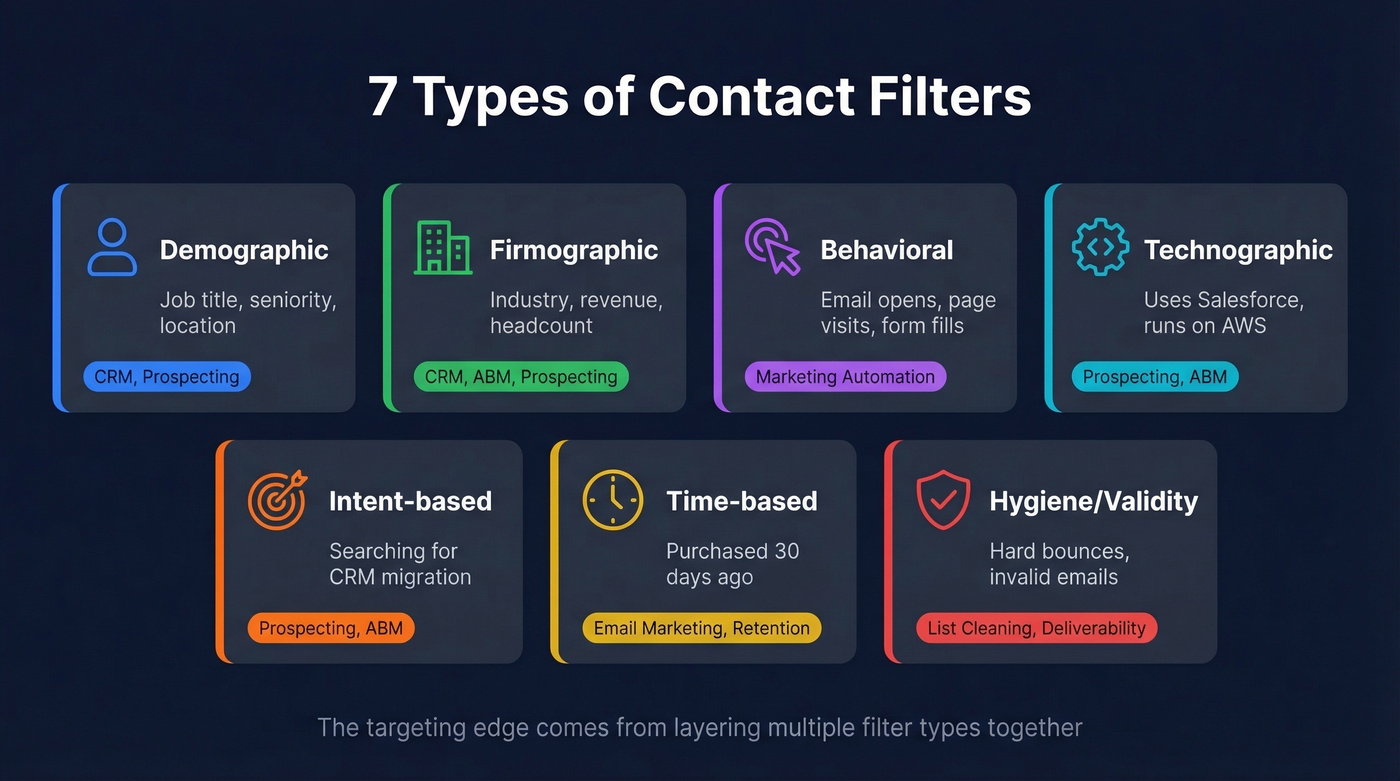
And basic demographic filters are table stakes - the targeting edge comes from layering intent signals, technographics, and behavioral data on top of firmographics.
What Is Contact Filtering?
Contact filtering is the process of narrowing a database of contacts into smaller, focused groups you can act on. Filters turn a sprawling list into something workable.
The concept spans every tool that touches contact data. In a CRM like HubSpot (free tier or $15/seat Starter) or Salesforce Sales Cloud Starter ($25/user/month), filtering means building dynamic views based on lifecycle stage, deal status, or engagement history. In email marketing, it's segmenting subscribers by behavior. In sales prospecting, it's narrowing a 300M-record database down to a few hundred accounts that match your ICP - using sales lead filters to surface the contacts most likely to convert. Even consumer tools like Gmail have filtering - users on Reddit regularly ask how to display contacts from one label without seeing everything else.
The common thread: you have more contacts than you can act on, and filtering is how you decide which ones deserve attention right now.
Why Filtering Matters for Revenue
CRM data decays roughly 25% per year. People change jobs, companies get acquired, email addresses go stale. Without active filtering, your database becomes a liability instead of an asset.

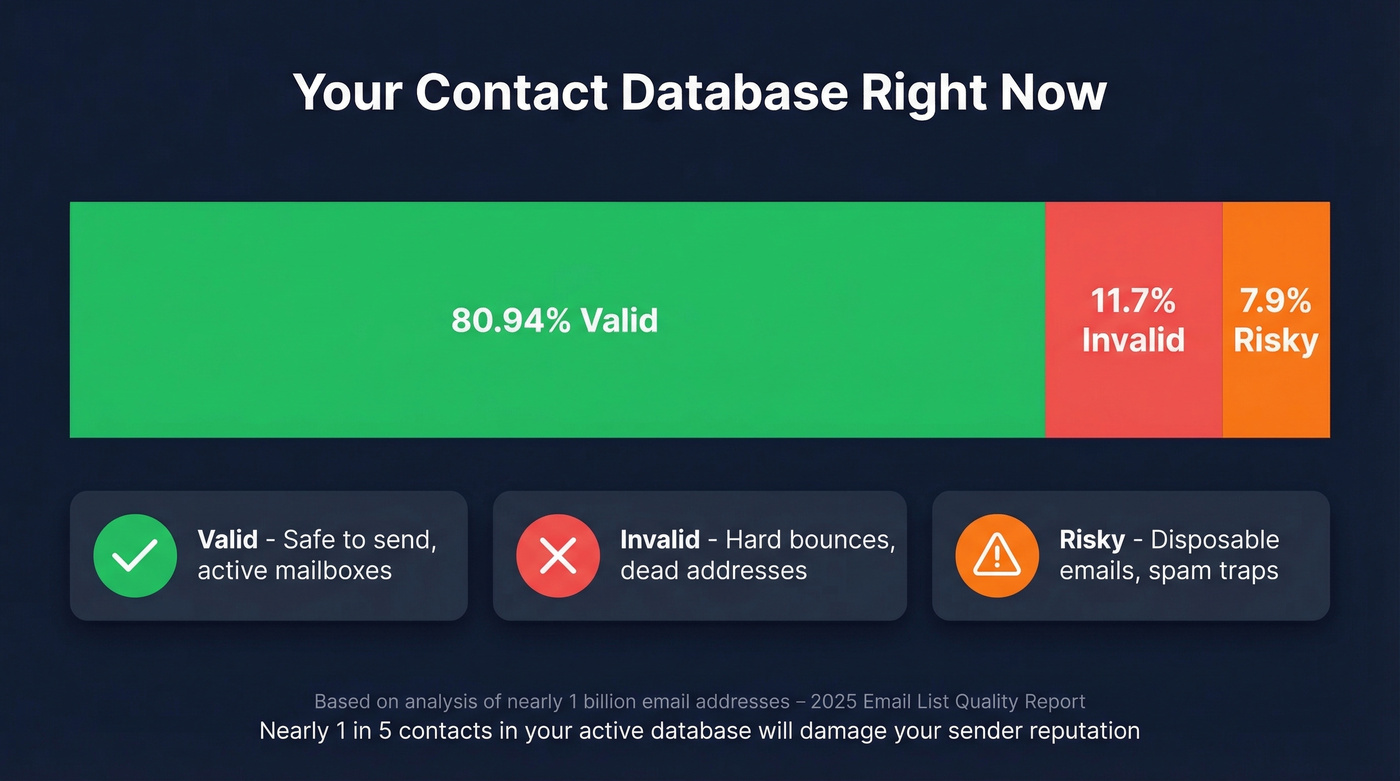
That billion-email analysis found 80.94% of contacts were valid, 11.7% were invalid (hard bounce risk), and 7.9% were risky - disposable addresses and spam traps. Nearly one in five contacts in your active database will damage your sender reputation on the next campaign.
On the upside, businesses moving to a CRM often see a 29% jump in sales and a 34% lift in productivity. Filtering is the mechanism that makes a CRM usable rather than just a data warehouse you pay for monthly.
How Boolean Filter Logic Works
Most modern platforms use boolean logic - AND/OR filter groups. HubSpot's filter system is a clean example: filters within the same group use AND logic, while separate filter groups use OR logic.
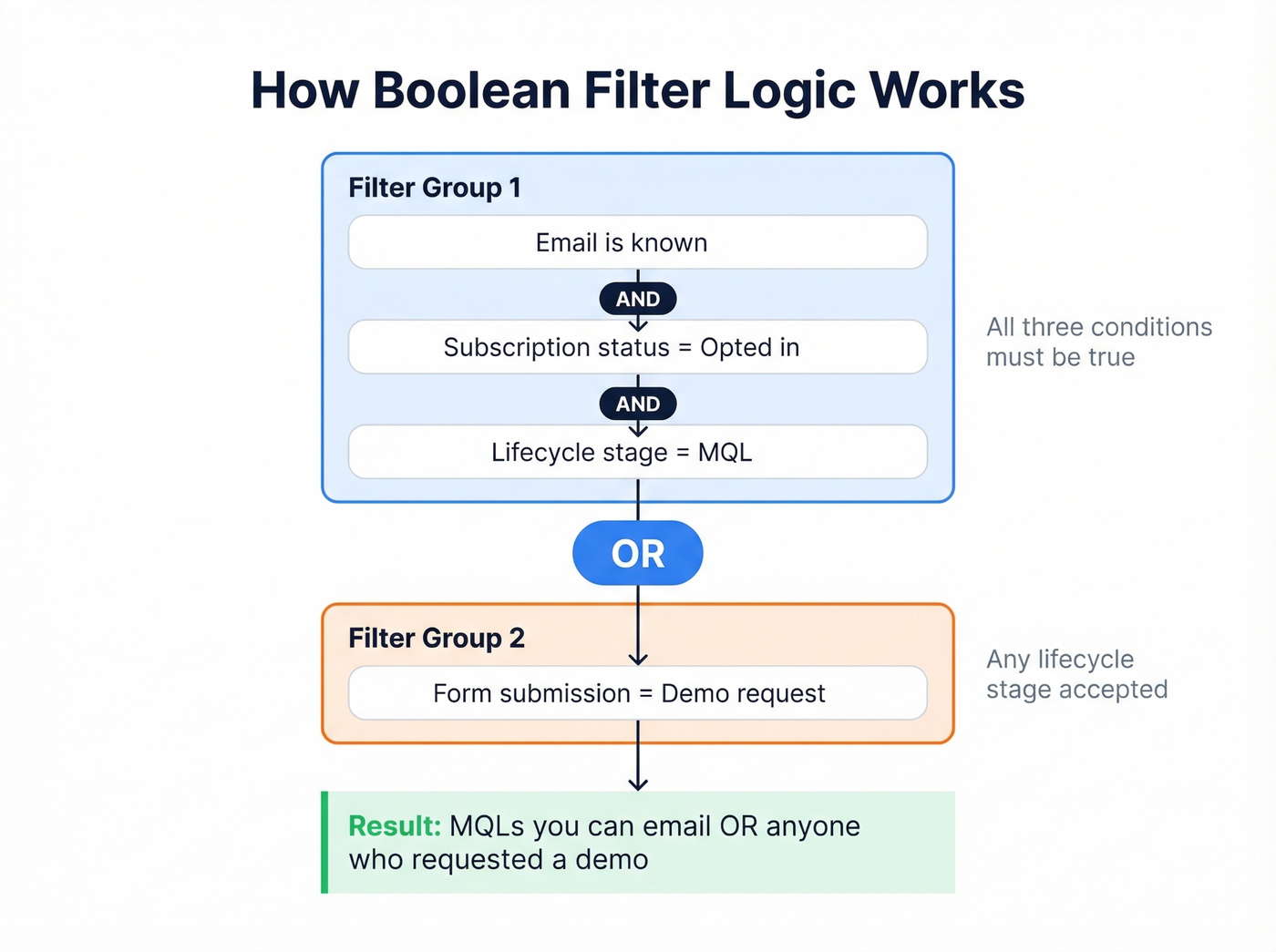
A practical example: you want MQLs you can email. Your filter is "Email is known" AND "Subscription status = opted in" AND "Lifecycle stage = MQL." All three conditions must be true. Add a second filter group with OR logic, and you can include a different audience - say, demo requesters regardless of lifecycle stage.
The payoff is saving and reusing these filters. Build a filter once, save it as a segment, and it updates dynamically as contacts enter or leave the criteria. No manual list-building every Monday morning.
Types of Contact Filters
| Filter Type | What It Filters | Example Criteria | Where Used |
|---|---|---|---|
| Demographic | Individual attributes | Job title, seniority, location | CRM, prospecting |
| Firmographic | Company attributes | Industry, revenue, headcount | CRM, ABM, prospecting |
| Behavioral | Actions taken | Email opens, page visits, form fills | Marketing automation |
| Technographic | Tech stack | Uses Salesforce, runs on AWS | Prospecting, ABM |
| Intent-based | Research signals | Searching for "CRM migration" | Prospecting, ABM |
| Time-based | Relative dates | Purchased 30 days ago | Email marketing, retention |
| Hygiene/Validity | Data quality | Hard bounces, invalid emails | List cleaning, deliverability |
Brevo's dynamic date filters illustrate time-based filtering well - you can target customers who purchased exactly 30 days ago for a reorder prompt. These filters update automatically as time passes, which is the difference between a static list and a living segment.

This article proves that contact filtering only works on clean data. Prospeo gives you both: 30+ filters - intent, technographics, funding, headcount growth - layered on top of 300M+ profiles with 98% email accuracy and a 7-day refresh cycle. No stale records. No organizing garbage into neat piles.
Filter fewer contacts, book 26% more meetings than ZoomInfo users.
Filtering for Sales Prospecting
Filtering by job title and company size is the bare minimum. Every competitor does that. The edge comes from layering technographic signals and intent data on top of your firmographic criteria.

Use this approach if you're running account-based outbound and need to narrow a massive database to in-market accounts across multiple dimensions - firmographics, tech stack, funding signals, and active research behavior.
Skip it if you're just pulling a list of "VPs of Marketing at SaaS companies." Basic sales lead filters from any tool will handle that.
Here's the thing: most teams don't need more contacts. They need fewer, better-filtered contacts. We've watched teams triple their reply rates by cutting their prospect list in half and adding intent and technographic layers. A few-hundred-person list filtered by active buying signals will outperform a 5,000-person list filtered by title alone, every single time.
Some teams also add community listening - monitoring Slack groups and niche forums for recurring pain signals - as an additional filter layer before building their outbound lists. The consensus on r/sales tends to agree that stacking qualitative signals on top of quantitative filters is where the real targeting advantage lives.
Filtering Email Prospects for List Hygiene
Before you filter for campaigns, verify the data. Real-time email verification catches the ~20% of contacts that would otherwise create deliverability risk. Learning to filter email prospects before launch is the difference between a healthy sender reputation and a blacklisted domain.
The hygiene checklist that keeps your list clean:
- Remove hard bounces immediately - these are dead addresses that will never deliver
- Monitor soft bounces and purge contacts that soft-bounce across three or more consecutive campaigns
- Set a monthly or quarterly cleaning cadence - with 25% annual decay, filters go stale fast
- Verify at point of capture - 7.6% of emails are invalid and 4.57% are risky at the moment someone fills out your form
Real-time verification at entry is the single highest-leverage hygiene practice. It's cheaper to reject a bad email on the way in than to clean it out later.
Common Filtering Mistakes
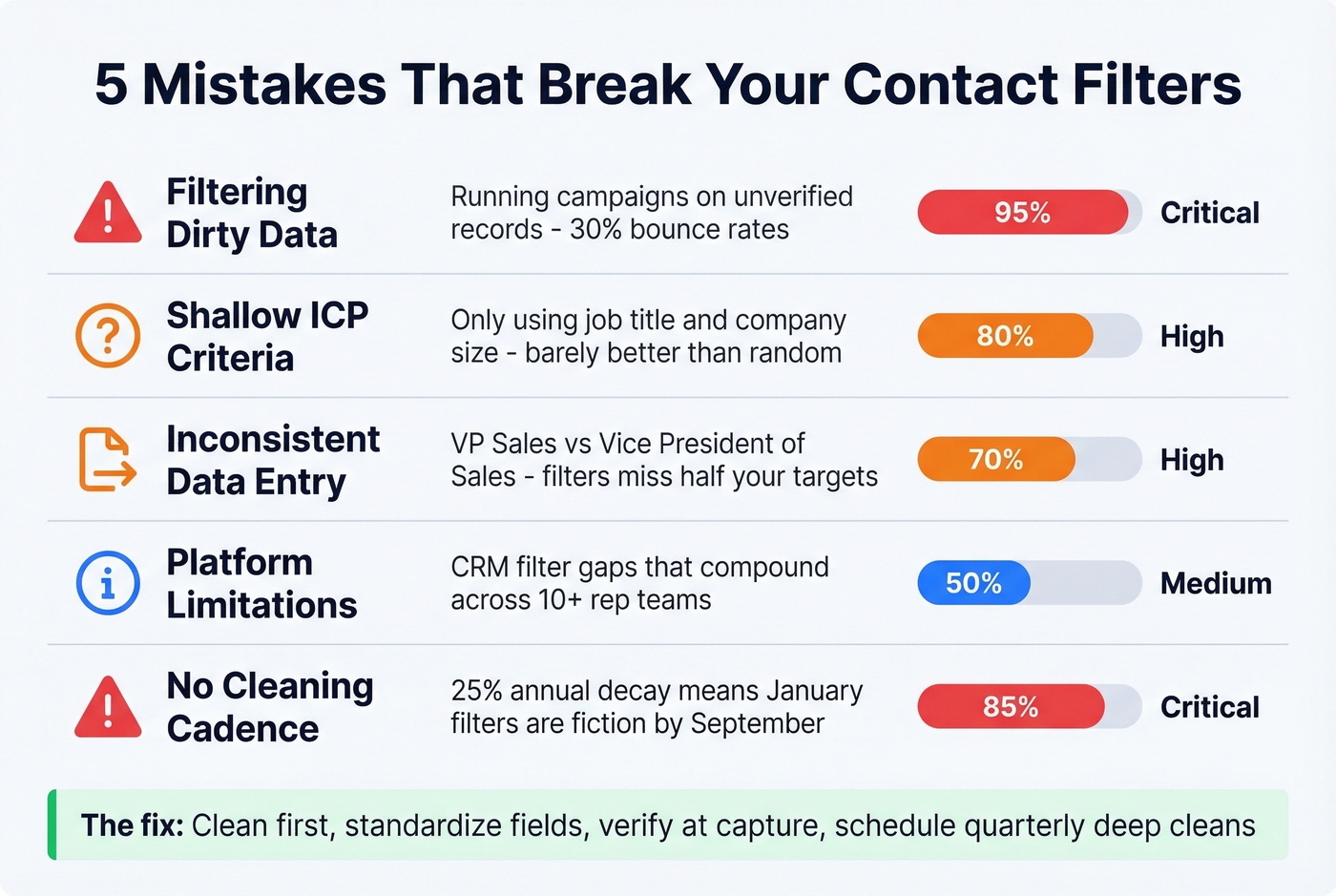
Filtering Dirty Data
If your CRM hasn't been cleaned in six months, your filters are building segments from stale records. We've seen teams launch campaigns against "high-intent" segments where 30% of the emails bounced because nobody verified the underlying data. Clean first. Always.
Shallow ICP Criteria
Filtering only on job title and company size gives you a list, not a targeted audience. Layer in technographics, intent signals, and trigger events like funding rounds or executive hires - or accept that your "filtered" list is barely better than a random sample.
Inconsistent Data Entry
One rep writes "VP Sales," another writes "Vice President of Sales," a third uses "Head of Sales." Your title filter misses half your targets. Standardize field formats and enforce entry rules before you trust any filter output. Good prospect organization starts with consistent data - without it, even the most sophisticated boolean logic falls apart.
Platform Limitations
HubSpot users on Reddit have flagged this exact frustration - you can't build a filter based on the contact owner's department. You have to manually list every owner by name, then update the filter every time someone gets hired or leaves. Small frustrations like this compound across a team of 10+ reps and become a real time sink.
No Cleaning Cadence
That 25% annual decay rate means a filter you built in January is operating on significantly degraded data by September. Schedule quarterly deep cleans - deduplication, re-verification, status updates - or your filters slowly become fiction.
Daily Filtering Best Practices
In our experience, the teams that get the most from their filters follow a strict priority sequence every day:
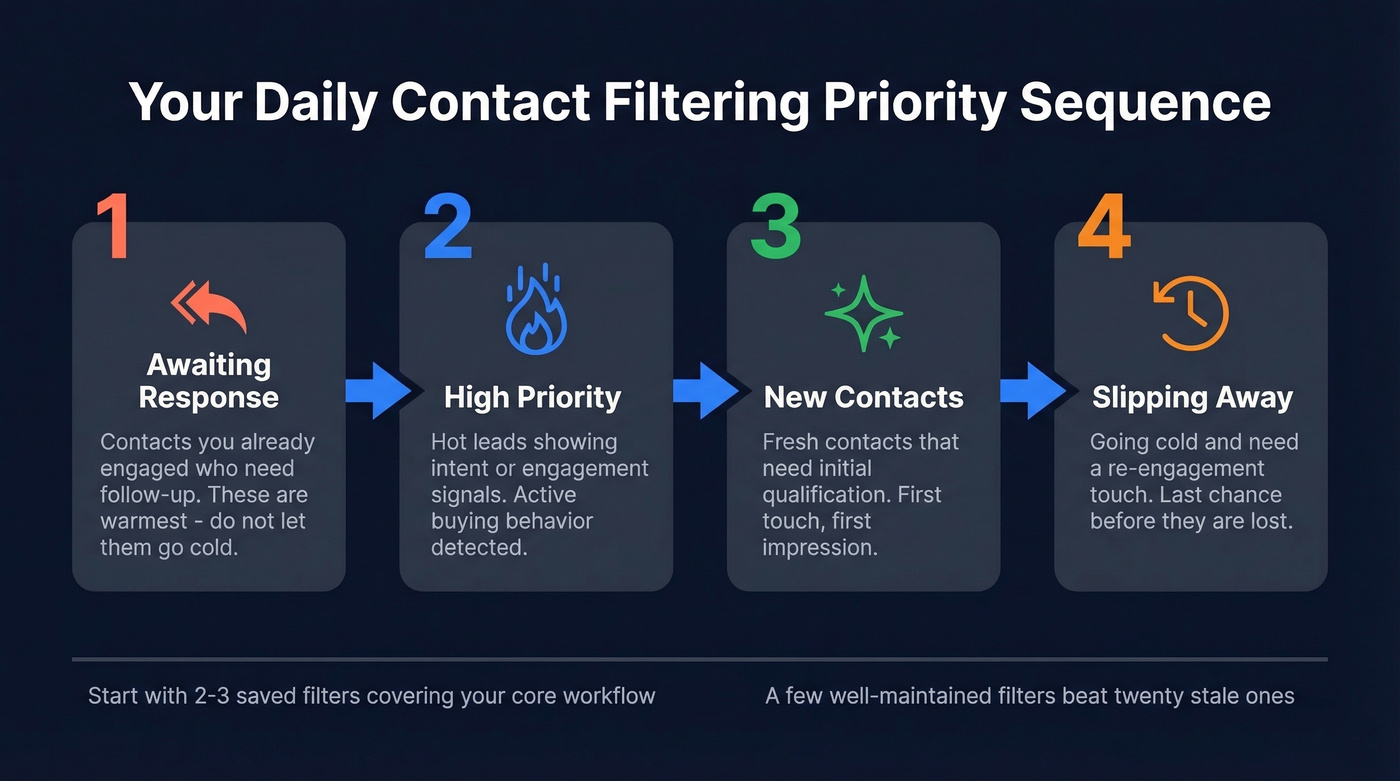
- Awaiting Response - contacts you've already engaged who need follow-up
- High Priority - hot leads showing intent or engagement signals
- New - fresh contacts that need initial qualification
- Slipping Away - contacts going cold who need a re-engagement touch
Keep statuses and tags updated as you work. Start simple - two or three saved filters covering your core workflow - and adjust as you learn which behaviors actually predict conversion. Let's be honest: most teams over-engineer their filter setup on day one and then never maintain it. A few well-maintained filters beat twenty stale ones.
You just read that 19.6% of contacts in active databases are deliverability risks. Prospeo's 5-step verification with spam-trap removal and catch-all handling eliminates that problem before you ever hit send. Real-time verification at $0.01 per email - the highest-leverage hygiene practice at the lowest cost.
Verify first, filter second - 75 free emails to prove it works.
FAQ
What's the difference between contact filtering and segmentation?
Filtering narrows a contact list by specific criteria; segmentation groups contacts into persistent, reusable audiences. Filtering is the mechanism, segments are the output. Most CRMs like HubSpot and Salesforce use filters to build and maintain dynamic segments automatically.
How often should I clean my contact database?
Clean active email lists monthly at minimum. CRM data decays roughly 25% per year, so run quarterly deep cleans - deduplication, re-verification, status updates - to prevent filters from operating on stale records that tank deliverability.
Can I filter contacts by buyer intent signals?
Yes. Platforms like Prospeo let you filter by intent data across 15,000 topics via Bombora, layered with firmographic and technographic criteria. This surfaces contacts actively researching solutions in your category - not just contacts matching a static ICP definition.
What's a good free tool for filtering prospects?
HubSpot's free CRM offers basic filtering by lifecycle stage and deal status - solid for teams just getting started. For prospecting-specific filtering with intent and technographic layers, Prospeo's free tier includes 75 email credits and 100 Chrome extension credits monthly with access to 30+ search filters.