

How to Build a Contact List That Doesn't Suck
Contact list building is the bottleneck nobody talks about. You've got 200 accounts in a spreadsheet and zero contacts. Your manager wants 60 dials a day, and you're spending half your time finding phone numbers instead of actually selling. A rep on r/LeadGeneration described it perfectly - doing granular research on every prospect while hitting dial targets meant "constantly working late" and "falling asleep at the laptop."
The problem isn't effort. It's workflow.
What You Need (Quick Version)
Two tracks, depending on your motion:
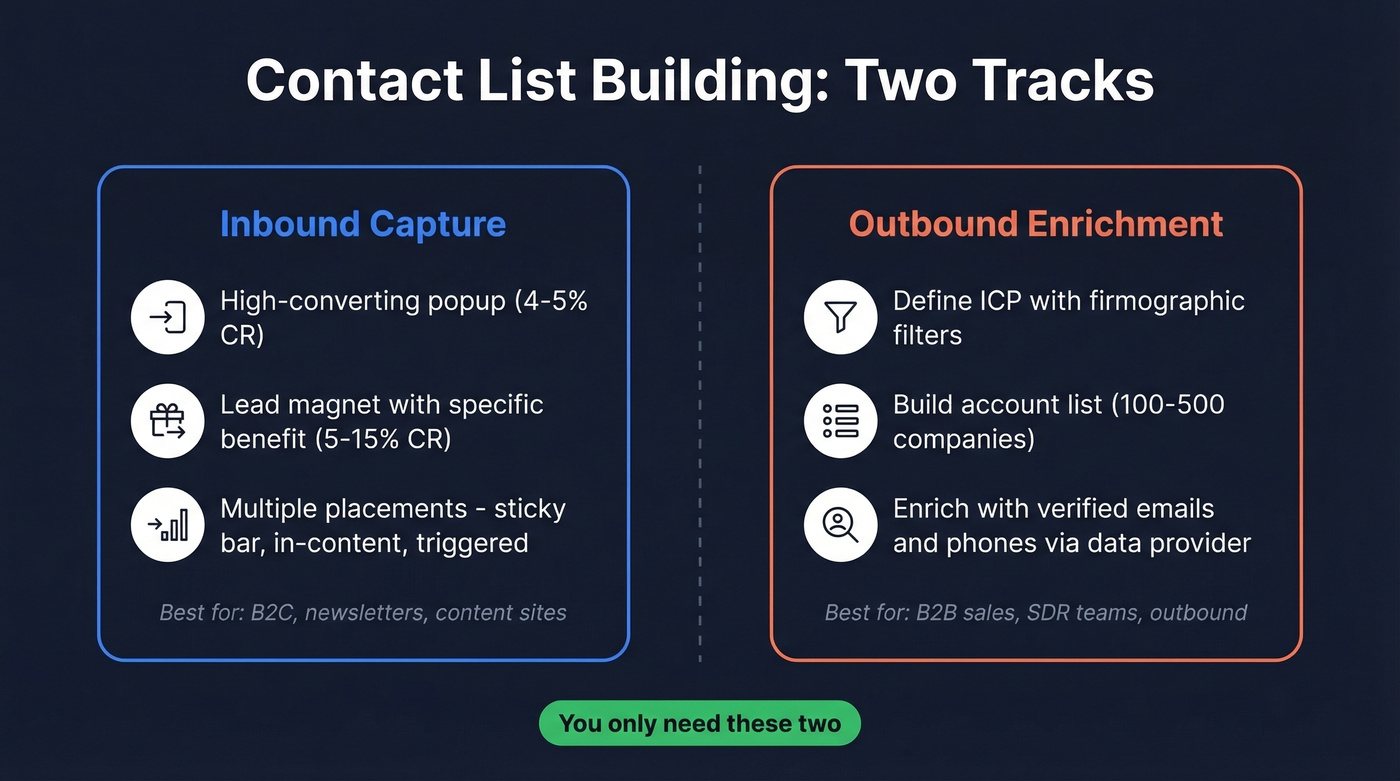
- B2C / newsletter: One well-placed popup with a specific-benefit CTA, plus a lead magnet converting 5-15%.
- B2B / outbound: Define your ICP, build an account list, then use a data provider to pull verified contacts. Upload a CSV, filter by job title, download verified emails and phone numbers.
You don't need 10 tactics. You need two - one for inbound capture, one for outbound enrichment.
Capture Inbound Contacts
Your signup form is the entire game. Most people get it wrong by burying a generic "Subscribe to our newsletter" box in the footer.
Popup Benchmarks That Matter
Not all popups perform equally. Here's what a dataset of 875 widgets across 214 sites found:
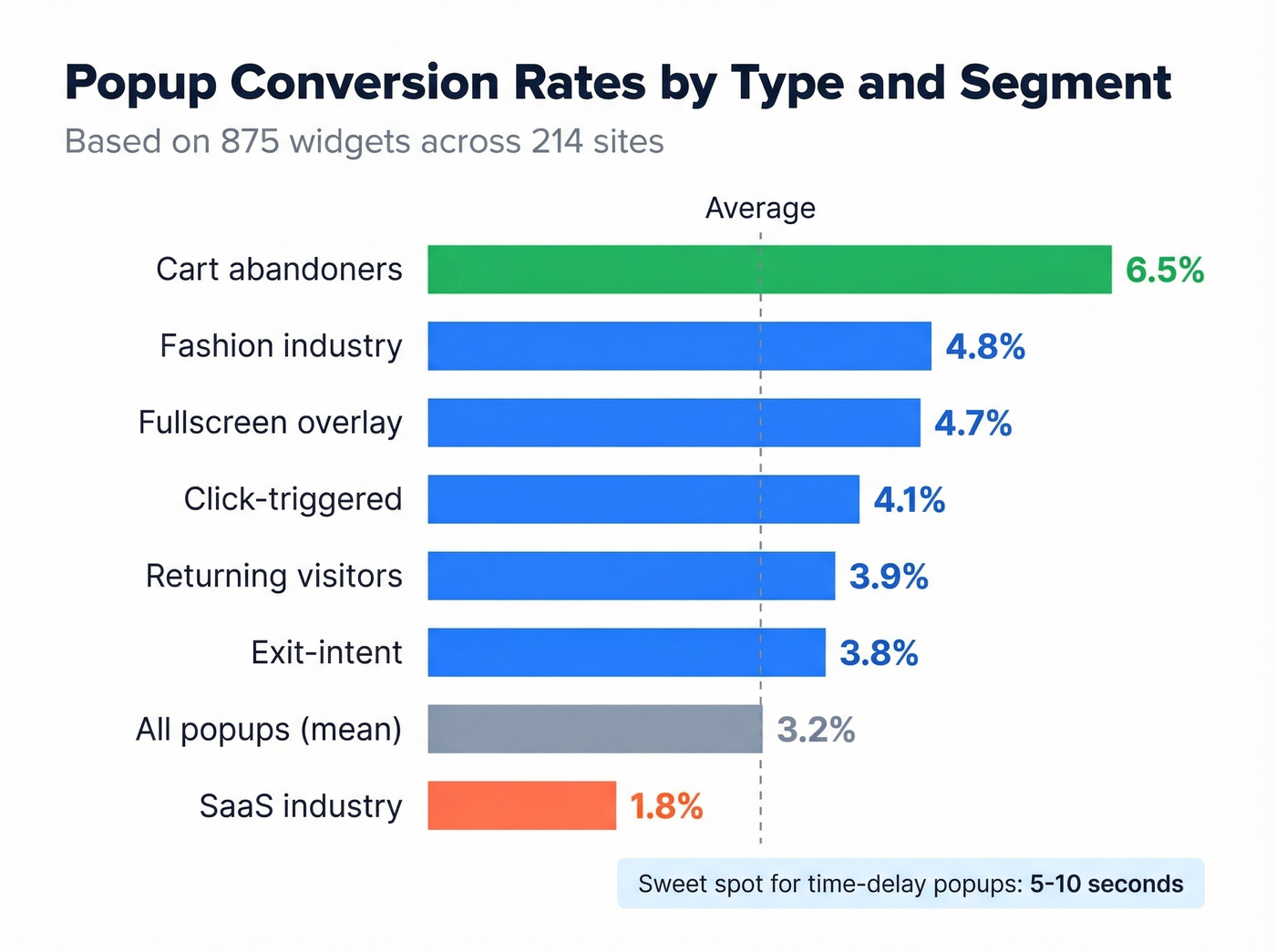
| Trigger / Segment | Conversion Rate |
|---|---|
| All popups (mean) | 3.2% |
| Exit-intent | 3.8% |
| Click-triggered | 4.1% |
| Fullscreen overlay | 4.7% |
| Returning visitors | 3.9% |
| Cart abandoners | 6.5% |
| SaaS industry | 1.8% |
| Fashion industry | 4.8% |
A fullscreen overlay at 4.7% will beat a generic time-delay popup at 2.9% by a wide margin. Cart abandoner targeting hits 6.5% - if you're in e-commerce and not running this, you're leaving subscribers on the table. The benchmarked sweet spot for time-delay popups is 5-10 seconds.
Don't rely on a single placement. Use a sticky bar, an in-content form, and a triggered popup. Multiple touchpoints compound your capture rate without feeling spammy if each one offers a clear reason to subscribe. Segment from the start - even a single "What's your role?" dropdown at signup makes your first email dramatically more relevant. And don't ignore offline capture: a QR code at your booth or on receipts feeds directly into your email list.
Lead Magnets Worth Building
"Sign up for my newsletter" is the weakest CTA in marketing. Nobody wakes up wanting more email. They want a specific outcome - a template that saves them time, a checklist that prevents mistakes, a calculator that answers a question they've been putting off.
Lead magnets that deliver instant gratification convert between 5% and 15%. Templates and checklists sit at the reliable end of that range. Interactive formats like quizzes and ROI calculators push toward the higher end because they create a personalized result the visitor actually wants to see.
For e-commerce, seasonal timing matters too - BFCM popups see roughly +65% uplift over baseline, and Christmas campaigns around +42%.
How to Build a B2B Contact List
The inbound playbook doesn't apply when you're doing outbound. You're not waiting for people to come to you - you need to go find them.
The Three-Step Workflow
Step 1: Define your ICP. Industry, company size, geography, tech stack. "SaaS companies with 50-500 employees using Salesforce" is an ICP. "Tech companies" isn't.
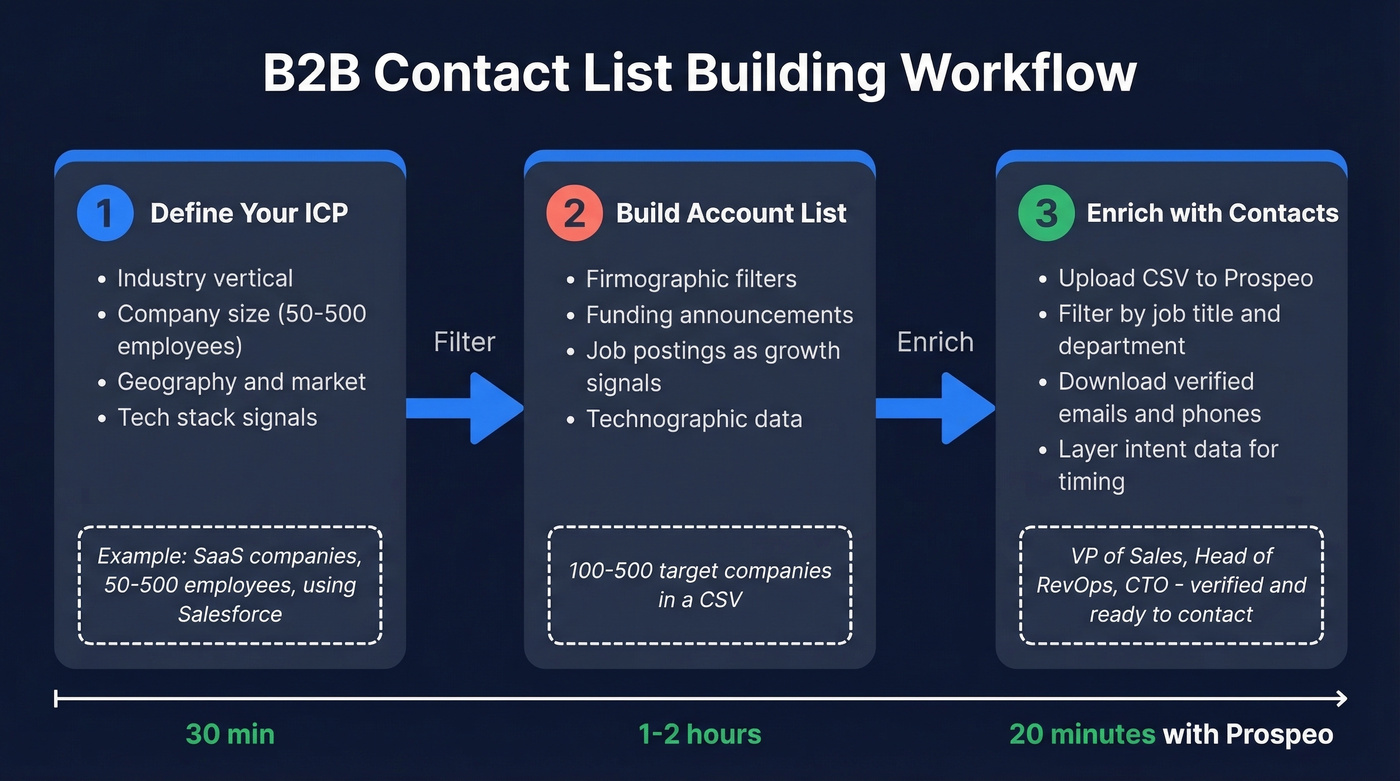
Step 2: Build an account list. Use firmographic filters, funding announcements, job postings, or technographic signals to identify 100-500 target companies.
Step 3: Enrich with contacts. This is where most teams stall. You've got companies - now you need the VP of Sales, the Head of RevOps, the CTO. Manually copying contact info from each company's website is a recipe for burnout, and it's the difference between a productive sales day and one wasted entirely on research.
Picking a Data Provider
The tool you pick for step 3 determines whether this takes 20 minutes or 20 hours.
We've tested most of the major players, and Prospeo handles the accounts-to-contacts workflow faster than anything else we've seen. Upload your CSV of target companies, filter by job title and department using 30+ search filters, and download verified emails and verified mobile numbers. The database covers 300M+ professional profiles with 98% email accuracy and a 7-day data refresh cycle - which matters because at least 23% of email data decays annually. You can layer in intent data across 15,000 Bombora topics to prioritize accounts showing buying activity in the last 30, 60, or 90 days, so you're reaching out while the problem is top of mind instead of six months after they've already signed with a competitor. Pricing runs about $0.01 per email, with a free tier of 75 emails + 100 Chrome extension credits per month to test before committing.

Apollo is the other tool that comes up constantly. It starts at $49/user/month and covers a huge database, but the consensus on r/revops is that it's "too noisy" - too much manual cleanup, too many irrelevant results. In that same thread, Clay gets dismissed because it's trying to do too much for teams that just need to turn accounts into contacts; it's a workflow automation platform, not a focused enrichment tool. ZoomInfo solves the noise problem with better filtering, but you're looking at $15K-$25K/year minimum. For a startup or mid-market team, that's hard to justify when the core need is straightforward list enrichment.
Here's the thing: if your average deal size is under $10K, you probably don't need ZoomInfo-level tooling. The ROI math just doesn't work. A focused enrichment tool at $0.01/email gets you 90% of the way there at 5% of the cost.

Your accounts-to-contacts workflow shouldn't take 20 hours. Upload your CSV, filter 300M+ profiles by title and department, and download 98%-accurate emails at $0.01 each - with data refreshed every 7 days so you're not emailing people who left six months ago.
75 free verified emails per month. No contract. No sales call.
23% of your email list decays every year. Prospeo's 7-day refresh cycle and 5-step verification - including catch-all handling, spam-trap removal, and honeypot filtering - keep your bounce rate under 2% so your sender reputation stays intact.
Stop verifying separately. Get contacts that are already verified.
Verify and Maintain Your List
Your contact list is decaying right now. ZeroBounce's analysis of emails verified throughout 2025 found that at least 23% of an email list degrades yearly, and over 9% of checked emails were catch-all addresses that can't be validated without sending. Some B2B databases see closer to 30% annual churn.

The deliverability math is unforgiving: keep total bounces below 2%, and hard bounces under 1%. Exceed those thresholds and your sender reputation takes damage that can take weeks to recover from. Standalone verification tools charge anywhere from $6 to $80 per 10,000 emails depending on the provider. Use double opt-in for inbound lists - it adds friction, but the contacts who confirm are dramatically more engaged.
In our experience, quarterly re-verification catches the worst decay before it tanks your deliverability. Skip this and you'll spend more time repairing your sender reputation than you ever saved by skipping the cleanup.
Mistakes That Kill Your Results
Buying lists. Purchased lists are loaded with spam traps, outdated addresses, and people who never consented. Your deliverability tanks, and you're one complaint away from a compliance headache.
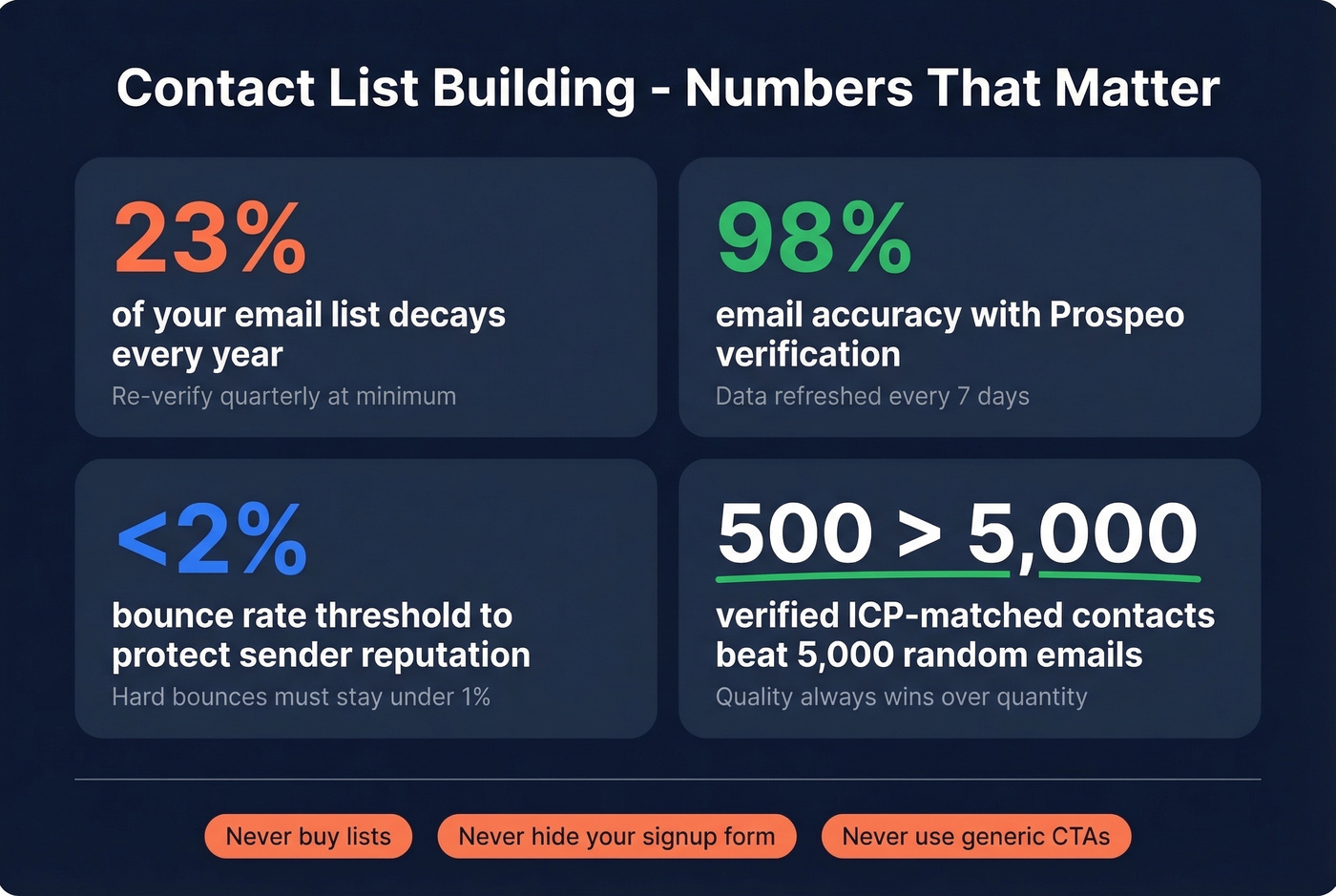
Hiding your signup form. A single footer form is invisible. Use multiple placements - sticky bars, in-content CTAs, triggered popups - so visitors actually see the offer.
Weak CTAs. "Subscribe to our newsletter" tells the visitor nothing. State the specific benefit: "Get the weekly teardown of one winning cold email - every Tuesday." If you're also running outbound, pair this with a tighter sales prospecting workflow so your list turns into meetings.
Prioritizing quantity over quality. Freebie seekers who never open your emails drag down engagement metrics and hurt deliverability for the contacts who actually matter. Let's be honest - a list of 500 verified, ICP-matched contacts will outperform a list of 5,000 random emails every single time.
Compliance Rules with Real Penalties
Building a contact list without compliance awareness is gambling with six-figure fines:
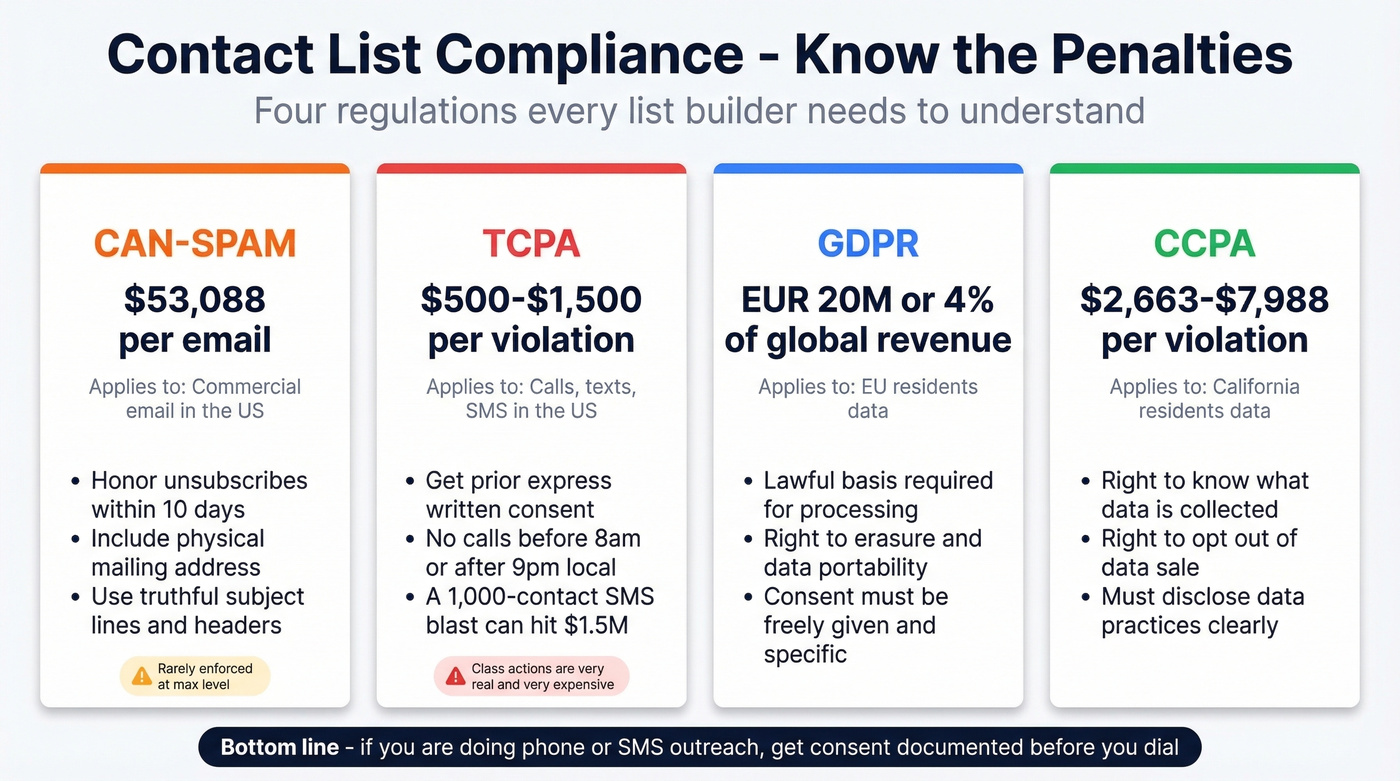
- CAN-SPAM: Up to $53,088 per email. You can email cold, but you must honor unsubscribes within 10 business days, include a physical address, and use truthful headers.
- TCPA: $500-$1,500 per violation. A 1,000-contact SMS campaign without prior express written consent can hit $1.5M. No marketing calls or texts before 8am or after 9pm local time.
- GDPR: Up to EUR 20M or 4% of global annual revenue, whichever is higher.
- CCPA: $2,663-$7,988 per violation.
The CAN-SPAM per-email penalty is almost never enforced at that level, but TCPA class actions are very real and very expensive. If you're doing any phone or SMS outreach, get consent documented before you dial. If you need the deeper legal breakdown, see Is It Illegal to Buy Email Lists?.
FAQ
How often should I clean my contact list?
Quarterly at minimum. Email lists decay 23%+ per year, and 9%+ of addresses are catch-all domains that silently accept everything. Re-verify before any major campaign to keep bounces under 2%.
Is it legal to buy a contact list?
Technically legal under CAN-SPAM's opt-out model, but practically a terrible idea. Purchased lists contain spam traps and outdated emails - risking fines up to $53,088 per email and lasting sender reputation damage.
What's the fastest way to build a B2B contact list?
Upload a CSV of target accounts to a data provider, filter by job title and department, and download verified emails and phone numbers. You go from account list to enriched contacts in minutes instead of hours of manual research.
What's a good free tool for contact list building?
Prospeo's free tier gives you 75 verified emails and 100 Chrome extension credits per month - enough to test enrichment on real accounts. Hunter offers 25 free searches/month but caps enrichment features. Apollo has a free plan with limited exports and lower data accuracy.