

Best Contact Management Software in 2026 (12 Picks)
The average sales rep's tech stack runs 8.3 tools costing $187/month - and 73% of teams report overlap that wastes $2,340 per rep per year. Most of that bloat starts with one bad decision: picking the wrong contact management software, then bolting on extras to compensate. The CRM market hit $112.91B in 2025 and is heading toward $262B by 2032, so there's no shortage of options. The problem isn't finding a tool. It's finding the right one before you've wasted a quarter on something that doesn't fit.
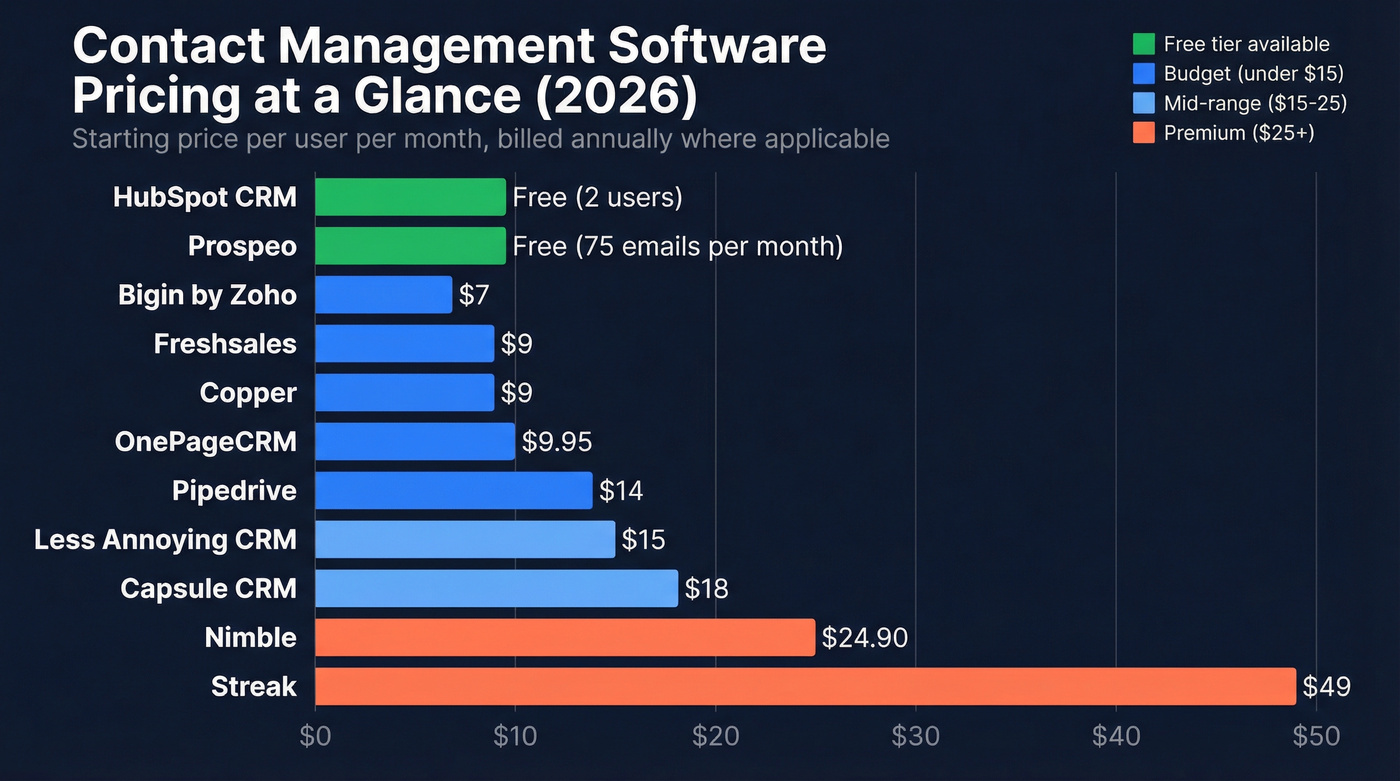
Here's the thing most "best of" lists won't tell you: if your average deal is under five figures and your team is under 10 people, you don't need a full CRM. A lightweight contact manager paired with good data will outperform an enterprise platform your reps refuse to update. The best tool is the one your team opens every day - and that's almost always the simplest one that covers your requirements.
Here are 12 picks for 2026, sorted by what actually matters.
Our Picks (TL;DR)
| Pick | Best For | Starting Price |
|---|---|---|
| Prospeo + lightweight CRM | Verified contact data | Free (75 emails/mo) |
| HubSpot CRM | Free starting point that scales | Free (2 users) |
| Bigin by Zoho | Budget teams under $10/user | $7/user/mo |
HubSpot is the default starting point for teams that want marketing automation down the road. Bigin does 80% of what small teams need for the price of a coffee. And no CRM on this list matters if the data inside it is garbage - which is where a dedicated data layer earns its keep.
CRM or Contact Manager - Which Do You Need?
Before you compare tools, figure out which category you're shopping in. A contact manager stores and organizes people - names, emails, notes, conversation history. A CRM adds pipelines, automations, reporting, and team analytics on top of that foundation. The distinction matters because it drives your cost, learning curve, and integration requirements.
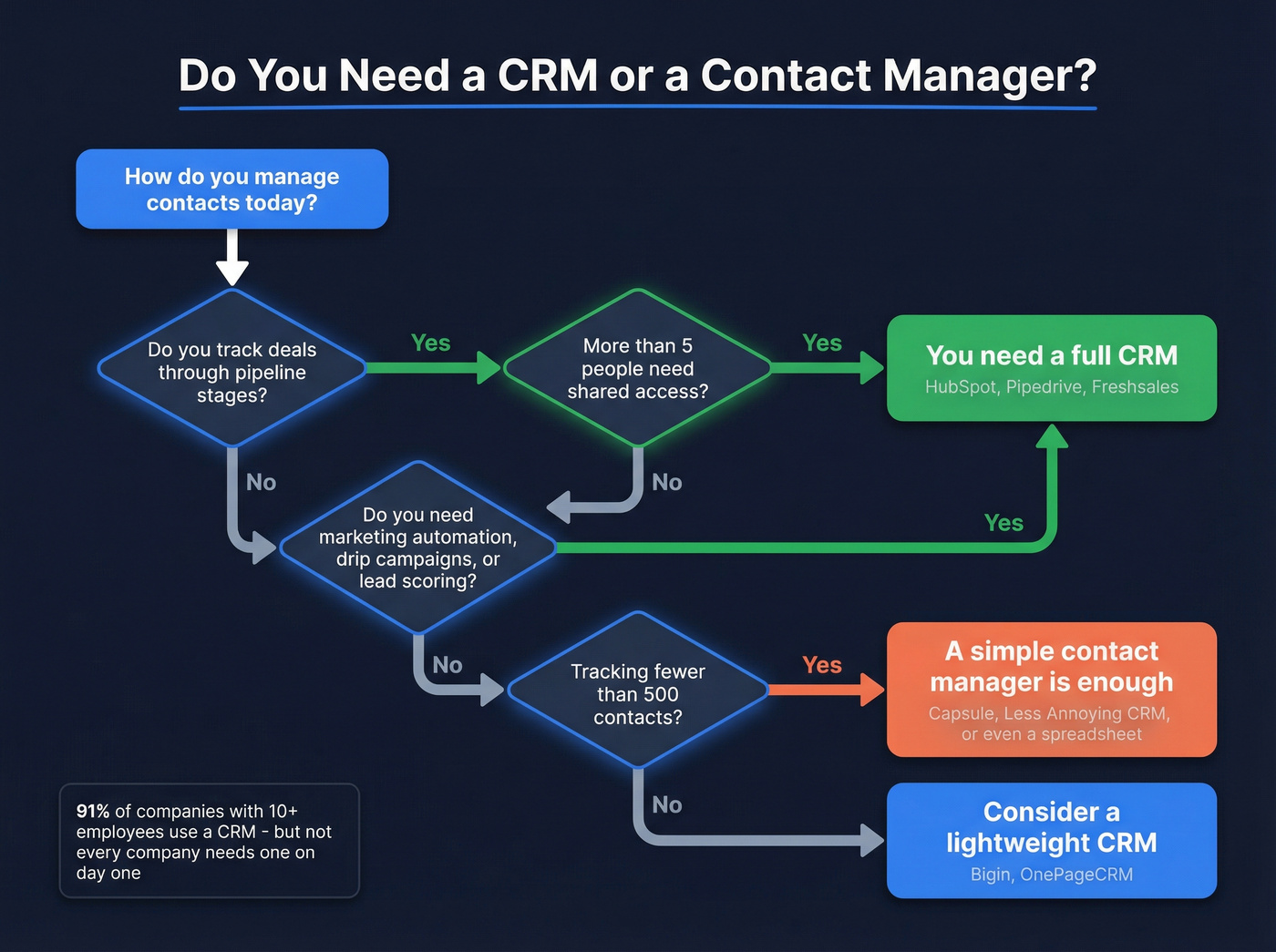
Here's a quick decision framework:
- Do you manage a sales pipeline with stages and deal values? You need a CRM.
- Do more than 5 people need shared access? CRM. Permissions and collaboration features matter at that scale.
- Do you need marketing automation - drip campaigns, lead scoring, workflows? CRM, full stop.
- Are you a solopreneur or consultant tracking 200-500 contacts and conversations? A simple contact organizer (or even a well-organized spreadsheet) is enough.
If you're a solopreneur tracking 200 contacts, you don't need Salesforce. 91% of companies with 10+ employees use a CRM, but that doesn't mean every company needs one on day one.
Best Contact Management Software in 2026
Prospeo - Best for Verified Contact Data
Your CRM is only as good as the data inside it. Prospeo solves the upstream problem - it's a B2B data platform with 300M+ professional profiles, 143M+ verified emails, and 125M+ verified mobile numbers with a 30% pickup rate, all refreshed on a 7-day cycle. The industry average for data refresh is six weeks. That gap matters when you're running outbound sequences and every stale record burns your domain reputation.

The Chrome extension (40,000+ users) captures verified contacts from any website or company profile in one click. Native integrations push data straight into HubSpot, Salesforce, Smartlead, Instantly, Lemlist, Clay, Zapier, Make, and more. Pricing is credit-based - roughly $0.01 per email - which means you pay for what you use instead of per-seat licensing that punishes growing teams.
We've seen teams cut bounce rates from 35%+ down to under 4% just by adding a verification layer before contacts hit the CRM. That's the difference between sequences that build pipeline and sequences that torch your sender reputation.
Use this if: You're running outbound and need verified emails and direct dials flowing into your CRM without manual cleanup. The free tier gives you 75 emails and 100 Chrome extension credits per month to test it.
HubSpot CRM - Best Free Starting Point
HubSpot is the obvious entry point for teams that want a CRM they can grow into. The free plan supports two users with contact management and deal tracking. It's genuinely useful at that tier - not a crippled trial designed to force an upgrade.
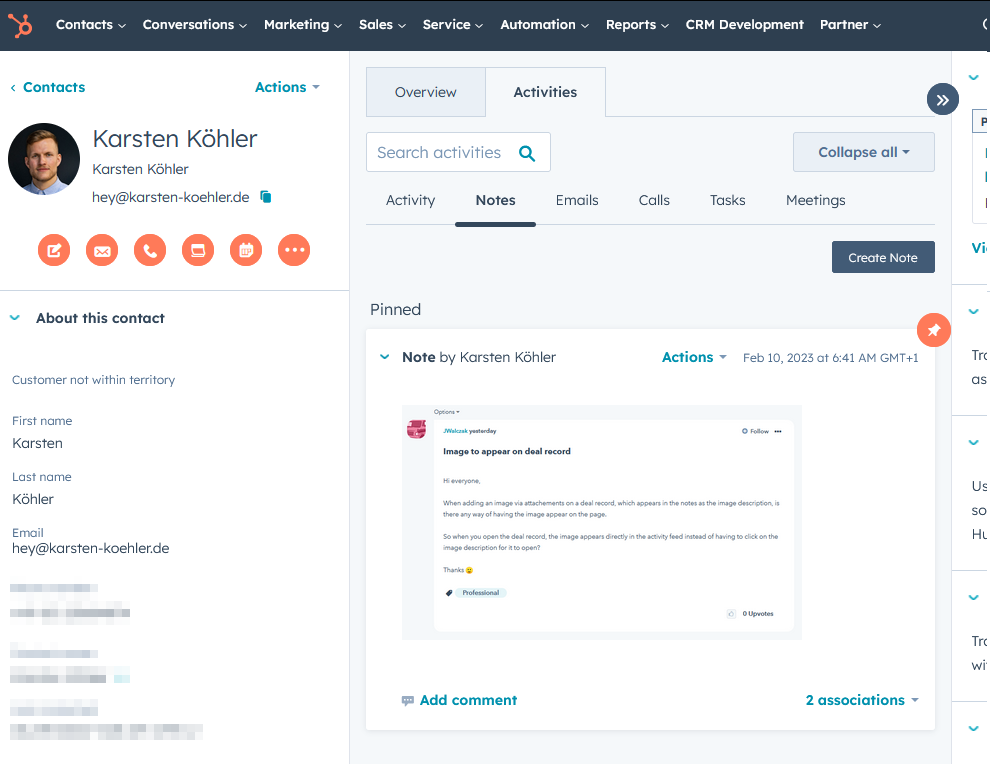
The catch is what happens next. Starter plans begin at $15/user/month, but once you need marketing automation, custom reporting, or more than basic sequences, you're looking at Professional tiers in the $90-100+/user/month range. The ecosystem is HubSpot's real strength - marketing, sales, service, and CMS all connected. But it can feel bloated if all you need is a tool for managing contacts without the platform overhead.
Use this if: You want a free CRM that can scale into full marketing automation as you grow. Skip this if: You need simplicity and don't want to navigate a platform that'll constantly nudge you toward paid features.
Bigin by Zoho - Why It Beats HubSpot for Small Teams
At $7/user/month - less than a single HubSpot Starter seat - Bigin is the cheapest paid option on this list that doesn't feel like a compromise. There's a free plan and a 15-day trial on paid tiers if you want to kick the tires first.
If you're deciding between the two, see our Bigin vs HubSpot breakdown.
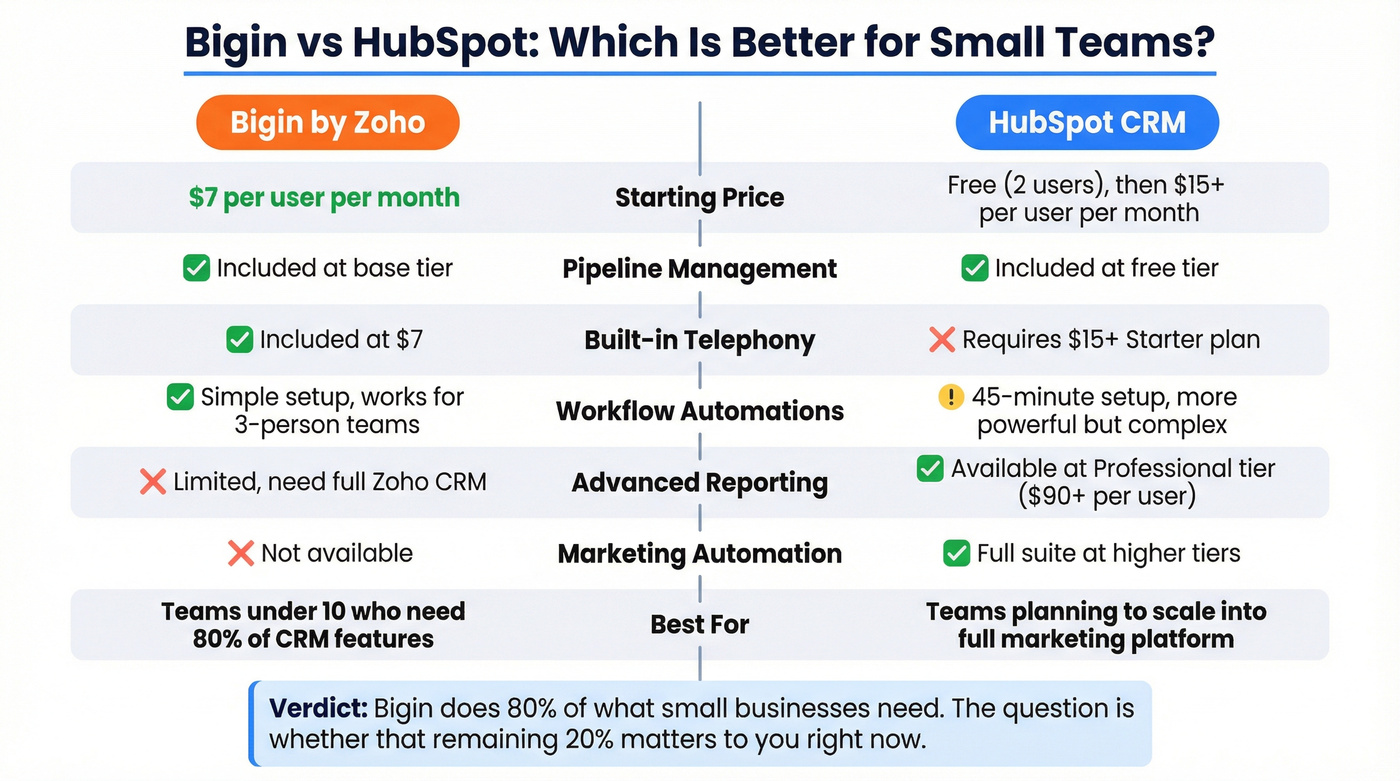
Here's what you get for that price versus what you'd pay elsewhere:
- Pipeline management + contact organization + built-in telephony - all included at $7. HubSpot charges $15+ before you get comparable telephony.
- Workflow automations that actually work for a three-person team, without the 45-minute setup HubSpot's workflow builder demands.
- What's missing: Advanced reporting, complex automations, and deep customization. That's where you'd graduate to full Zoho CRM or another platform.
Bigin does 80% of what most small businesses need. The question is whether that remaining 20% matters to you right now - and for most teams under 10 people, it doesn't.
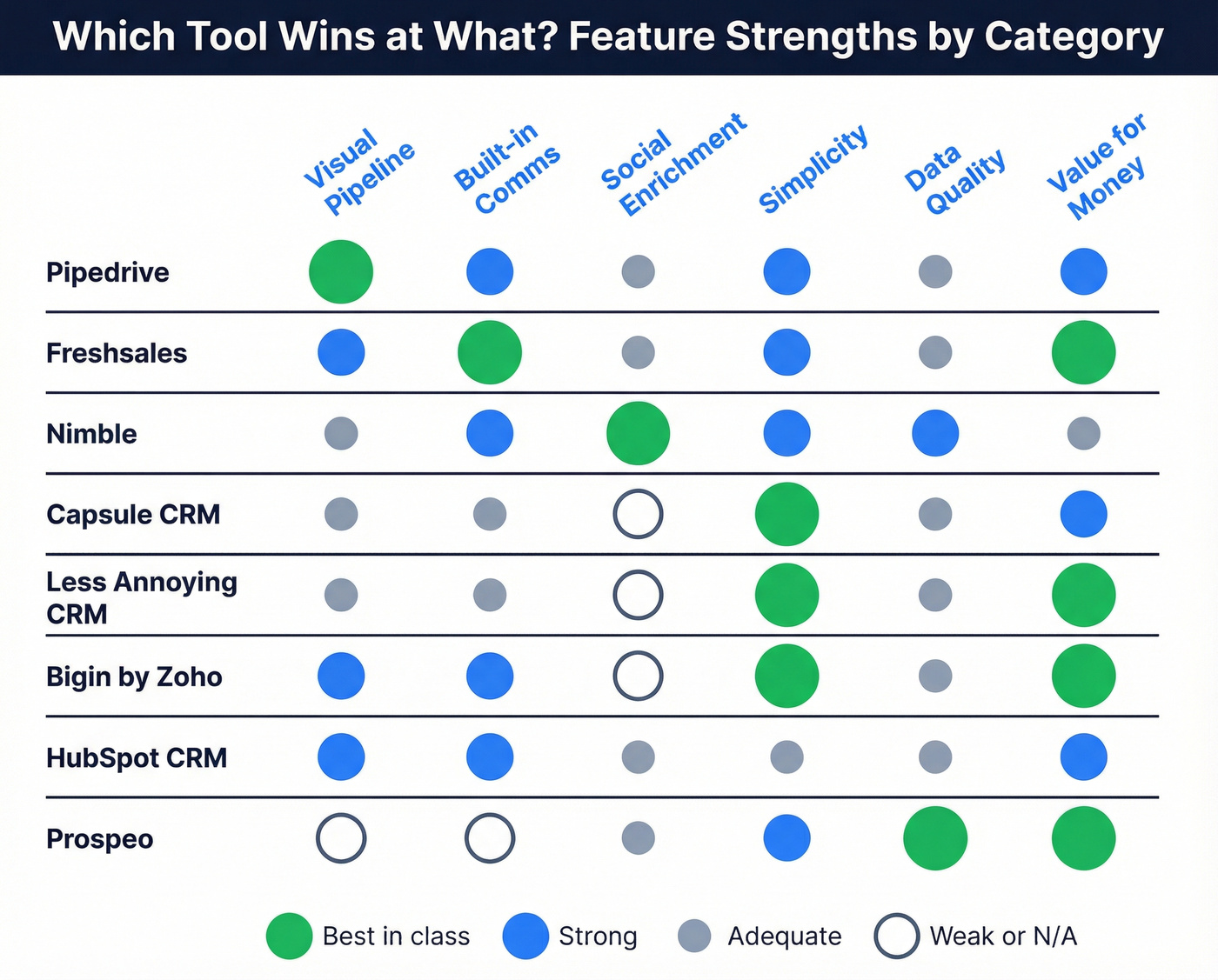
Pipedrive - Best Visual Pipeline
Skip this if you need marketing automation, a free tier, or you're not running a structured sales process. Pipedrive doesn't try to be everything, and that's exactly why the teams who love it really love it.
If you're considering it, compare options in our Pipedrive alternatives guide.

Pipedrive was built by salespeople who wanted to see their deals, not manage a database. The visual pipeline is the best in this price range - drag-and-drop stages, activity-based selling methodology, and a UI that makes reps want to update their deals. The consensus on r/sales and r/smallbusiness is that Pipedrive consistently ranks highest for "actually enjoyable to use," which matters more than any feature checklist when you're fighting adoption.
Plans start at $14/user/month with no free plan (14-day trial instead). That's a deliberate choice - it's a sales CRM with strong contact organizer features baked in, not a contact manager that bolted on a pipeline.
Use this if: You're a sales-driven team that lives in pipeline view and wants reps to actually log activities.
Freshsales - Best Built-In Communication
Freshsales bundles phone, email, and chat into the CRM itself - no separate dialer or email tool needed. Starting at $9/user/month, it's a strong pick for teams that want fewer tools in their stack. The built-in communication suite won't match dedicated platforms like Outreach or Salesloft, but for teams that don't already have a dialer and sequencer they love, consolidation beats complexity.
Use this if: You want calling, email, and chat inside your CRM without third-party integrations. Skip this if: You already have a dedicated dialer and sequencer - the built-in tools will feel like a downgrade.
Capsule CRM - Simplicity Done Right
Capsule starts at $18/user/month billed annually with a free plan. The interface is clean to the point of being refreshing - no feature overload, no confusing navigation. It's built for non-technical teams who need business contact software with basic pipeline tracking and task management without a week of onboarding.
Use this if: Your team isn't technical and you need something everyone will actually adopt. Skip this if: You need advanced automations, custom objects, or deep reporting.
Nimble - Best for Social Enrichment
Nimble's standout feature is automatic social profile syncing - it pulls in context from social networks and enriches your contacts without manual data entry. Pricing is a single tier at $24.90/user/month billed annually or $29.90 monthly, with a 14-day trial and no free plan.
If social context is core to your motion, pair this with a social selling strategy that your team can actually execute.
The trade-offs are real. Bulk email caps at 100/user/day, storage is just 2 GB per seat, and advanced automation requires third-party tools. For teams that value social context over raw volume, it works well. For heavy outbound teams, it'll feel constraining fast.
Use this if: You sell through relationships and want automatic social context on every contact. Skip this if: You run high-volume outbound - the email and storage caps will bottleneck you quickly.
OnePageCRM - Action-Focused Sales
OnePageCRM is built around a "Next Action" methodology - every contact has a next step, and the system won't let you forget it. Professional starts at $9.95/user/month billed annually, Business at $19.95/user/month. All plans include unlimited contacts, deals, fields, and tags, but feature gates matter: Professional gets one pipeline and 250 bulk emails/day, Business unlocks multiple pipelines and 450/day.
Use this if: Your sales process is follow-up intensive and you need a system that enforces discipline. Skip this if: You need multiple pipelines on a budget - that's locked to the Business tier.
Less Annoying CRM - No-Nonsense Simplicity
Less Annoying CRM exists for a reason: people are tired of CRMs that require a consultant to set up. One plan, $15/user/month, monthly billing only, no tiers, no upsells, 30-day trial. It does contact management, pipeline tracking, calendars, and tasks. That's it.
For a lot of small businesses, that's exactly enough.
Use this if: You want zero complexity and zero surprises on your invoice. Skip this if: You'll outgrow it within a year - there's nowhere to upgrade to.
Streak - For Gmail Power Users
Streak lives entirely inside Gmail - no separate app, no context switching. Free plan is limited but functional. Paid plans start at $49/user/month billed annually, which is steep for what's essentially a CRM sidebar. Worth it if your entire workflow lives in Gmail; overkill otherwise.
Copper - For Google Workspace
Copper integrates deeply with Google Workspace - Docs, Sheets, Calendar, Gmail. Starting at $9-12/user/month billed annually, it's a solid Google-native CRM. If your company runs on Google, Copper feels invisible in the best way. It's also a strong pick for Mac users since the web-based interface and Google integrations work seamlessly on macOS without any platform-specific quirks.
If you're evaluating options, start with our Copper CRM alternatives.
NetHunt - Gmail-Native CRM
NetHunt sits inside Gmail with strong duplicate prevention and required-field enforcement - two features that prevent the data rot most contact databases suffer from. Pricing runs around $24/user/month billed annually. Rated 4.7 on G2 and 4.8 on Capterra. A solid pick if you want Gmail-native with more structure than Streak offers.

Every contact management tool on this list depends on one thing: clean data. Prospeo feeds 300M+ verified profiles into your CRM with 98% email accuracy and a 7-day refresh cycle - so your reps stop wasting time on bounced emails and disconnected numbers.
Stop managing bad contacts. Start with data that's already verified.
Pricing Comparison
Credit-based models deserve attention here - paying for data consumed rather than seats occupied changes the math entirely for growing teams.
| Tool | Free Plan | Paid From | Billing | Trial |
|---|---|---|---|---|
| Prospeo | Yes (75 emails/mo) | ~$0.01/email | Credits | Free tier |
| HubSpot CRM | Yes (2 users) | $15/user/mo | Annual/Monthly | Free plan |
| Bigin by Zoho | Yes | $7/user/mo | Annual | 15 days |
| Pipedrive | No | $14/user/mo | Annual/Monthly | 14 days |
| Freshsales | - | $9/user/mo | Annual | - |
| Capsule | Yes | $18/user/mo | Annual | - |
| Nimble | No | $24.90/user/mo | Annual/Monthly | 14 days |
| OnePageCRM | No | $9.95/user/mo | Annual/Monthly | 21 days |
| Less Annoying | No | $15/user/mo | Monthly only | 30 days |
| Streak | Yes (limited) | $49/user/mo | Annual | Free plan |
| Copper | No | $9-12/user/mo | Annual | - |
| NetHunt | No | ~$24/user/mo | Annual | - |
Notable mention: InfoFlo offers a rare $99/user one-time perpetual license - no monthly fees at all. Worth a look if you hate subscriptions.
How to Choose the Right Tool
Five criteria matter more than everything else. We've seen teams spend months evaluating 15 tools when they could've narrowed to two in an afternoon by focusing here.
Ease of use. Can a new rep be productive in under 30 minutes? If onboarding takes a week, adoption will crater. AI-native CRMs are hitting 7-day time-to-value versus 90 days for traditional platforms - a gap worth watching, though for pure contact management, a clean UI still beats an AI chatbot bolted onto a confusing interface.
Contact organization. Tags, filters, segmentation, custom fields. If you can't slice your database by industry, deal stage, and last-touch date in under 10 seconds, the tool is slowing you down. A good contact organizer should make searching feel instant, not like a chore.
Activity tracking. Emails, calls, meetings, notes - all logged automatically. Manual logging is where CRM adoption goes to die. Look for tools that capture activities without reps thinking about it.
Integrations. Your contact manager needs to talk to your email, calendar, sequencer, and data tools. That 73% overlap waste stat comes from tools that don't integrate well, forcing teams to buy bridges and middleware.
Data ownership and export. Can you export your contacts cleanly? Some tools make it surprisingly hard to leave. Check the export options before you commit - CSV export with all fields should be table stakes.
Mistakes That Kill CRM Adoption
CRM returns $8.71 for every $1 spent and drives 27% higher customer retention - but only if your team actually uses it.
Let's be honest: most CRM failures aren't about the software. They're about how teams roll it out. Here are the five mistakes we see over and over.
Skipping goal-setting. Teams buy a CRM without defining what success looks like. Set 2-3 measurable goals before implementation, like "reduce response time to inbound leads by 50%." Without targets, you'll never know if the tool is working.
Choosing the wrong CRM for your size. A 5-person team on Salesforce is like driving a semi truck to get groceries. About a third of small business owners confirm they feel outmatched by their CRM's complexity - and that's usually a sign the tool is too big, not that the team is too small.
Neglecting training. Over 20% of sales pros don't know how to get the most from their CRM. A 30-minute onboarding session isn't training. Budget for ongoing enablement, not just setup.
Ignoring data quality. Garbage data in, garbage insights out. Reddit threads on r/salesforce and r/CRM consistently flag data hygiene as the #1 adoption killer - and it's the mistake that compounds fastest. Schedule quarterly cleanups, standardize entry formats, and set required fields.
Overcomplicating the setup. Custom objects, 47 pipeline stages, mandatory fields on every screen. Nearly 1 in 5 businesses report that poor integrations and overly complex configurations cause real pain. Start with core workflows, then layer on complexity as your team matures.
Your CRM Is Only as Good as Your Data
You can pick the perfect contact management software from this list and still fail if your contact data is bad. We've watched this play out dozens of times - a team imports 5,000 contacts, launches their first outbound sequence, and 38% of emails bounce. Or worse, a rep spends 45 minutes building a targeted list, dials 20 numbers, and reaches three people.
The problem isn't the CRM. It's the data feeding it.

This is where a dedicated data layer changes the equation. Instead of trusting stale records from a list broker or a database that refreshes every six weeks, you need verification happening upstream - before contacts ever hit your CRM. One of our customers, Snyk, had 50 AEs running bounce rates of 35-40% before overhauling their data workflow. They dropped to under 5%, and AE-sourced pipeline jumped 180%. That's not a marginal improvement. That's a different business.
The CRM enrichment approach returns 50+ data points per contact, with a 92% API match rate and 83% of leads coming back with contact data to keep records current automatically. Native integrations with HubSpot, Salesforce, Lemlist, Instantly, and Clay mean the data flows where it needs to go without manual imports.
If you're seeing decay over time, build a process around CRM hygiene and ongoing verification.
Teams using stale contact data see 35%+ bounce rates that destroy sender reputation. Prospeo cuts that to under 4% with 5-step verification and weekly data refreshes - at roughly $0.01 per email. No per-seat pricing. No annual contracts.
Feed your CRM verified contacts for a penny each.
FAQ
What's the difference between a contact manager and a CRM?
A contact manager stores and organizes people - names, emails, phone numbers, notes, and conversation history. A CRM adds sales pipelines, workflow automations, reporting dashboards, and team analytics on top of that. If you just need to track people and conversations without pipeline stages or lead scoring, a dedicated contact manager is enough.
What's the best free option in 2026?
HubSpot CRM is the strongest free pick with its two-user plan, built-in deal tracking, and access to the broader HubSpot ecosystem. Bigin by Zoho offers more customization flexibility on its free tier. For data quality, Prospeo's free plan (75 verified emails + 100 Chrome extension credits per month) pairs with any CRM to keep records accurate from day one.
How much does a paid tool typically cost?
Most tools range from $7-$25/user/month billed annually. Bigin by Zoho starts at $7, Freshsales at $9, and HubSpot Starter at $15. InfoFlo is an outlier with a $99/user one-time perpetual license. Credit-based models like Prospeo (~$0.01/email) avoid per-seat costs entirely, which benefits growing teams.
How do I keep contact data accurate over time?
Use a verification tool to validate emails before importing - 98% accuracy means you're not burning domain reputation on bounces. Schedule quarterly data cleanups, standardize entry formats across your team, and set required fields to prevent incomplete records. Automated enrichment that refreshes on a 7-day cycle prevents the slow decay that makes databases useless within a year.
Can I use these tools without a sales team?
Absolutely. Solopreneurs use contact managers for networking and client tracking. Consultants manage referral relationships. Recruiters track candidates and hiring managers. Nonprofits manage donors and volunteers. You don't need a pipeline to benefit from organized, searchable contact records - the core value is knowing who you know and what you've discussed.