

CPQ Meaning: What Configure, Price, Quote Really Is in 2026
A rep sends a $200K quote to a prospect. Wrong pricing tier, an unbuildable product bundle, and the contact name is misspelled. The deal stalls for two weeks while finance untangles the mess, and the champion goes quiet.
That scenario plays out constantly at companies still running quotes through spreadsheets and tribal knowledge. Understanding CPQ meaning - and what the software actually does - is the first step toward killing that problem for good.
The Short Version
CPQ stands for Configure, Price, Quote. It's software that automates three things: assembling valid product configurations, applying the right pricing logic, and generating professional quote documents. If your reps spend hours building quotes in spreadsheets and still get pricing wrong, CPQ fixes that.
- Quote speed: CPQ can cut quote turnaround from hours to minutes - one practitioner reported going from nearly three hours to under five minutes for complex configurations.
- Market momentum: The CPQ market hit $3.46B in 2025 and is growing at ~15.6% CAGR, projected to reach $10.89B by 2033.
- The #1 failure point: It's not the software. It's dirty data and messy processes underneath it.
What Does CPQ Stand For?
CPQ is an acronym for three sequential steps that sales teams perform every time they build a quote for a complex product or service.
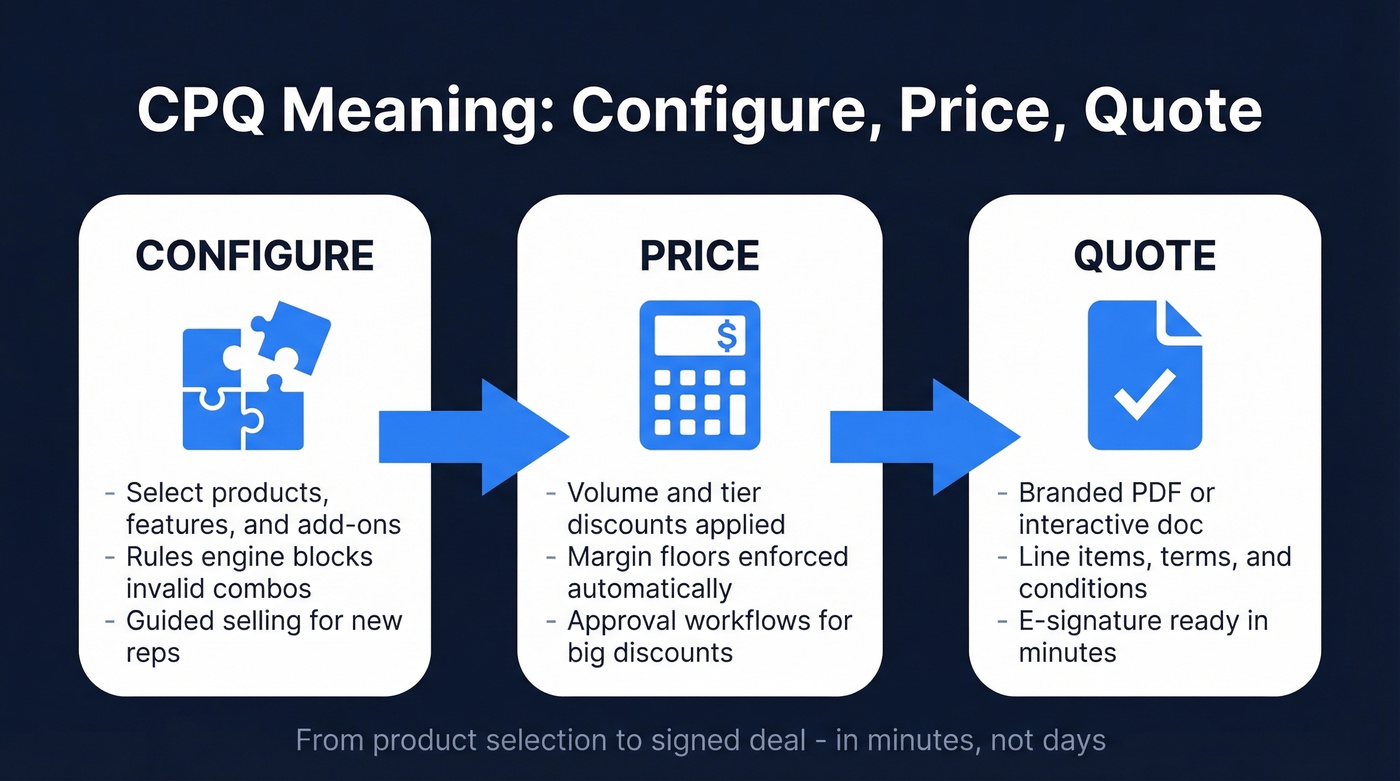
Configure is the first step. A rep - or a buyer in self-service scenarios - selects products, features, options, and add-ons from a catalog. The CPQ engine enforces rules, preventing invalid combinations, flagging dependencies, and ensuring what gets quoted can actually be built or delivered. Think of it as guardrails around a product catalog that might have thousands of valid permutations.
Price is where the math happens. The system applies the correct pricing logic based on volume discounts, contract terms, customer-specific agreements, margin floors, and promotional rules. Instead of a rep guessing at a discount or calling finance, the engine calculates the right number instantly and enforces approval workflows when discounts exceed thresholds.
Quote is the output. The system generates a branded, professional document with line items, terms, and pricing. No more copying numbers into Word templates at 11 PM.
The market behind this acronym is substantial. Grand View Research pegs the global CPQ software market at $3.46B as of 2025, growing to $10.89B by 2033. Cloud deployment accounts for 58.21% of revenue, and manufacturing represents 32.12% of the market. SMEs are the fastest-growing segment at a 17.85% CAGR. North America holds about 37-39% market share, but Asia-Pacific is growing fastest at ~19.12% CAGR. This isn't a niche category anymore - it's core sales infrastructure.
How CPQ Works in Practice
Let's walk through a concrete scenario. You're a manufacturer selling industrial pumps. A customer needs a custom configuration: specific motor type, stainless steel housing, ATEX certification for hazardous environments, and a five-year service contract.
Step 1: Configuration. The rep opens the CPQ tool and starts selecting options. The rules engine knows that ATEX certification requires specific motor types and housing materials. If the rep picks an incompatible motor, the system blocks it or suggests the correct alternative. This is the combinatorial explosion problem - when you have dozens of options across multiple categories, the number of valid combinations can reach tens of thousands, and no human can hold all those rules in their head while also managing a relationship and negotiating terms. The CPQ engine can. A newer rep unfamiliar with ATEX requirements gets guided selling prompts: "Is this for a hazardous environment?" -> Yes -> the system auto-selects compliant motor and housing options.
Step 2: Pricing. With the configuration locked, the system calculates pricing. It pulls in the customer's negotiated discount tier, applies a volume adjustment for the five-year service contract, checks that the total margin stays above the floor set by finance, and routes the quote for approval if the discount exceeds 15%. All of this happens in seconds.
Step 3: Quote generation. The system produces a branded PDF or interactive document with every line item, term, and condition. The rep reviews it, hits send, and the buyer can sign directly. Total elapsed time: minutes, not days. Some manufacturing platforms add visual configuration - real-time 2D/3D renderings that let buyers see exactly what they're ordering before they commit.
CPQ vs. Manual Quoting
The difference isn't subtle:
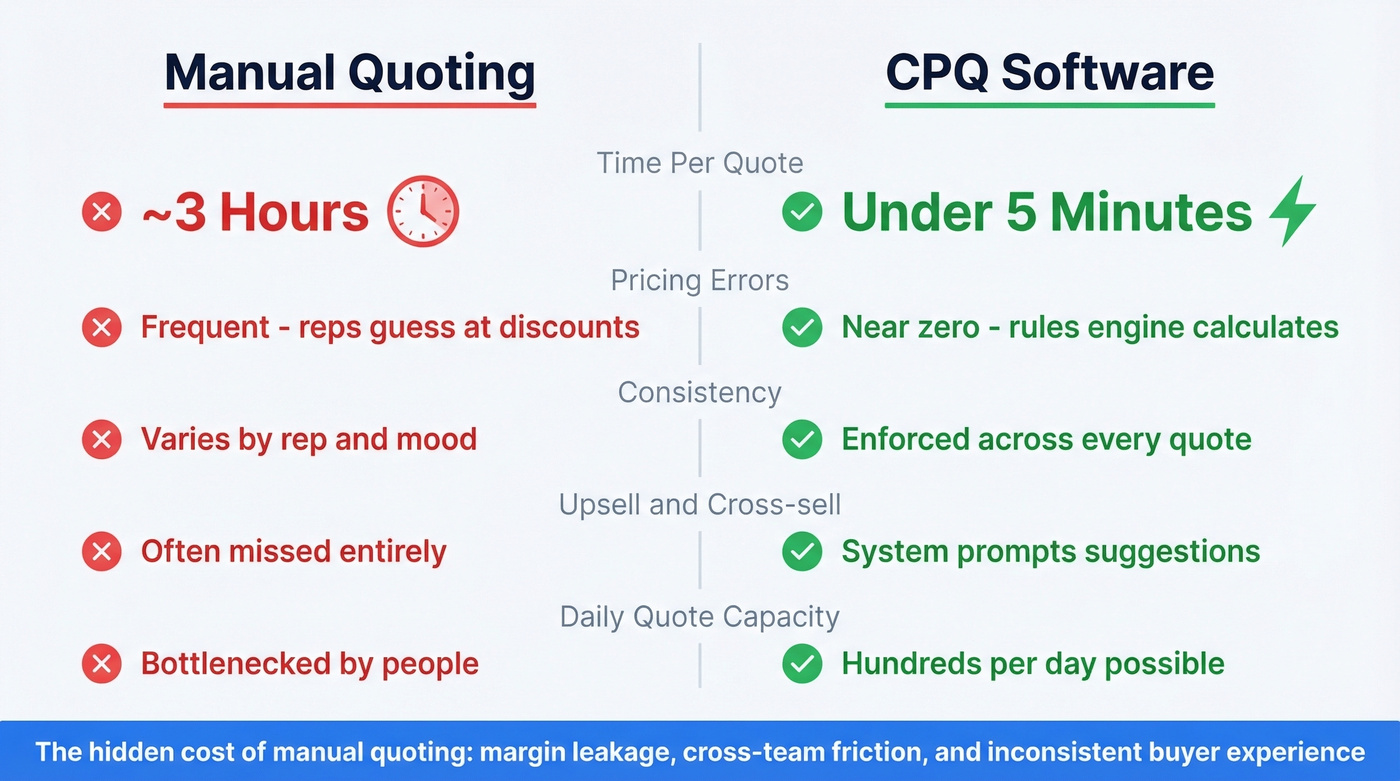
| Dimension | Manual Quoting | CPQ |
|---|---|---|
| Time per quote | ~3 hours | Under 5 minutes |
| Pricing errors | Frequent | Near-zero |
| Consistency | Varies by rep | Enforced |
| Upsell/cross-sell | Often missed | System-prompted |
| Daily capacity | Bottlenecked | Hundreds |
The table tells the obvious story, but the hidden costs of manual quoting are what really hurt. Margin leakage from inconsistent discounting is the big one - when every rep negotiates differently, you're leaving money on the table without even knowing it. Cross-functional friction is another killer: sales blames finance for slow approvals, finance blames sales for wrong pricing, and the buyer just sees a disorganized vendor.
The inconsistent buyer experience is arguably the most damaging long-term effect. When two prospects at the same company receive quotes with different formatting, different terms, and different discount structures, trust erodes fast.
In manufacturing discussions on Reddit and industry forums, the trigger is consistent: quoting takes too long, accuracy is hard to maintain, and leadership wants something that isn't a huge IT project. That's the exact pain configure, price, quote software was built to solve.
Where CPQ Fits in Quote-to-Cash
CPQ doesn't exist in isolation. It's one piece of a larger workflow called quote-to-cash (QTC), which covers everything from the first sales conversation to collected revenue.
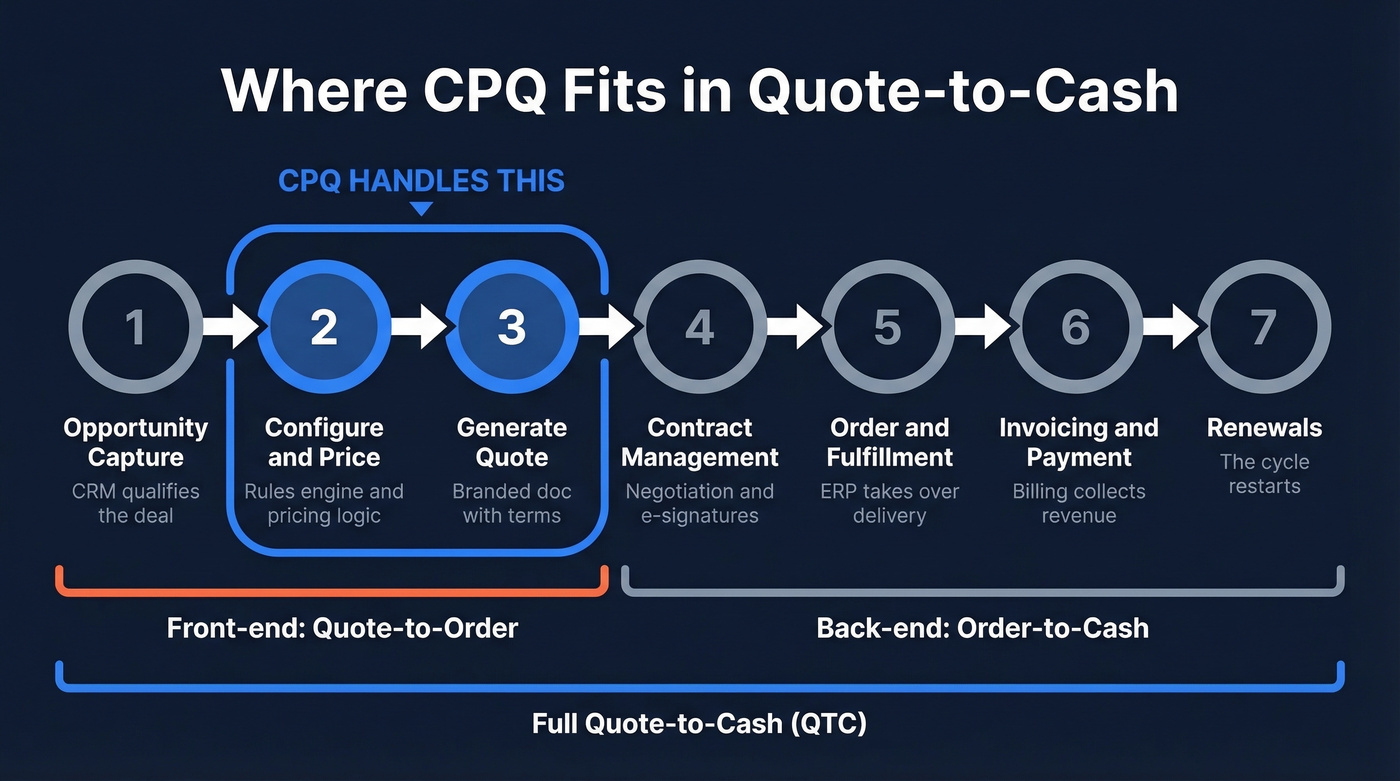
The standard QTC model runs seven steps:
- Opportunity capture - CRM records the deal and qualifies it
- Configuration, pricing, quoting - CPQ handles this entire block
- Proposal generation - formatted document with terms and conditions
- Contract management - CLM tools handle negotiation, redlines, and signatures
- Order processing and fulfillment - ERP takes over for delivery
- Invoicing and payment - billing systems collect revenue
- Post-sales and renewals - the cycle restarts
Here's the terminology that trips people up. CPQ is the front-end subset of QTC - it handles steps 2-3. Order-to-cash starts after the contract is signed and covers fulfillment through payment. QTC is the end-to-end umbrella. When vendors say "quote-to-cash platform," they usually mean they cover CPQ plus some downstream steps, but rarely the full seven.
The most common QTC bottlenecks are disconnected systems where CPQ doesn't talk to ERP, approval stalls with quotes sitting in someone's inbox for days, and revenue leakage from inconsistent discounting that nobody catches until the quarterly review.

A CPQ only works when the quote reaches the right buyer. Prospeo gives your reps 300M+ verified contacts with 98% email accuracy and 125M+ direct dials - so every quote you configure, price, and generate actually lands with a decision-maker.
Stop building perfect quotes for the wrong contacts.
Core Features to Expect
A modern CPQ platform typically includes a product configuration engine - rule-based constraint satisfaction that prevents invalid combinations and enforces dependencies across product families. This is the heart of any system. A product with 10 option categories and 5 choices each has 9,765,625 possible combinations. Most are invalid. The rules engine is what separates "configurable product" from "chaos."
Pricing automation and approval workflows work hand-in-hand. The pricing engine supports tiered, volume, subscription, usage-based, and hybrid models with margin floors. When a rep pushes a discount past the threshold, the approval workflow automatically routes the quote to the right manager - no Slack messages, no email chains. For regulated industries, this creates audit trails on every quote: who approved what discount, when, and why. That matters for SOX compliance and revenue recognition.
Beyond the core engine, expect quote document generation with branded multi-language templates, guided selling through needs-based questionnaires, CRM/ERP integration, and analytics covering quote conversion rates, average discount depth, time-to-quote, and margin analysis. Buyer-facing self-service portals are a growing trend, letting customers configure and quote products themselves without waiting for a rep.
AI-Powered CPQ in 2026
Nearly 67% of CPQ platforms incorporate AI-based analytics in some form, and the capabilities are real - but unevenly distributed.
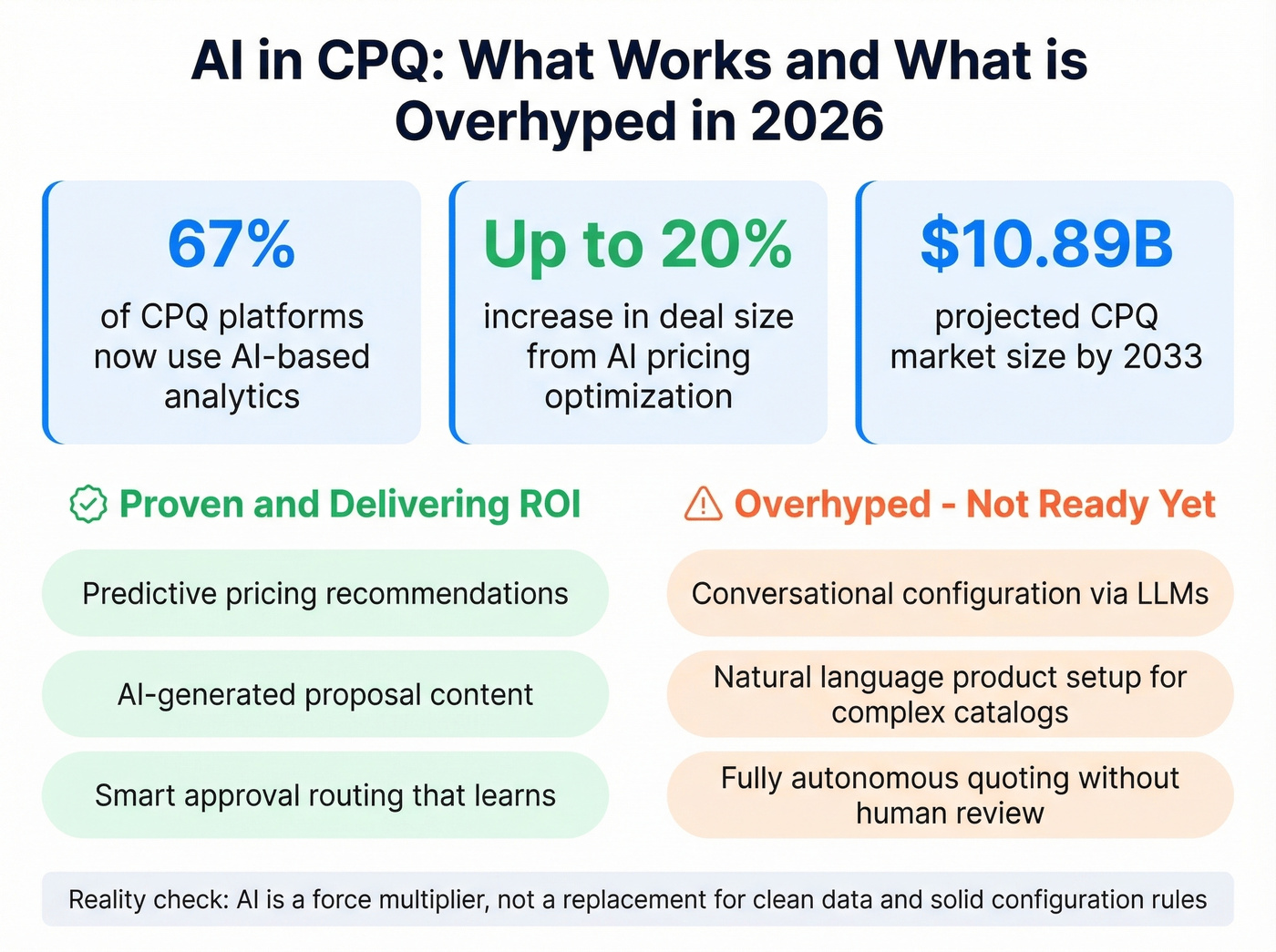
The proven stuff works well: predictive pricing recommendations that suggest optimal discount levels based on historical win rates, AI-generated proposal content that adapts to the buyer's industry and role, and automated approval routing that learns which deals need escalation. AI pricing optimization can increase deal sizes by up to 20%, though results depend heavily on deal complexity and historical data quality.
The overhyped stuff is conversational configuration via LLMs - the idea that a rep or buyer can describe what they need in natural language and the system configures the product automatically. We've seen demos. They're impressive. In production, they're still a novelty for simple catalogs. Complex manufacturing configurations with engineering constraints aren't ready for "just tell the AI what you want" workflows. Give it another two years.
Here's the thing: AI in CPQ is a force multiplier, not a replacement for solid configuration rules and clean data. If your pricing logic is a mess, AI will just optimize the mess faster. The companies getting real ROI from AI-powered CPQ are the ones that already had clean data and disciplined processes - the AI just made good teams faster.
Why Implementations Fail
Most vendor pages won't tell you this: implementation is the hard part, not the software. Here are the seven mistakes we see repeatedly.
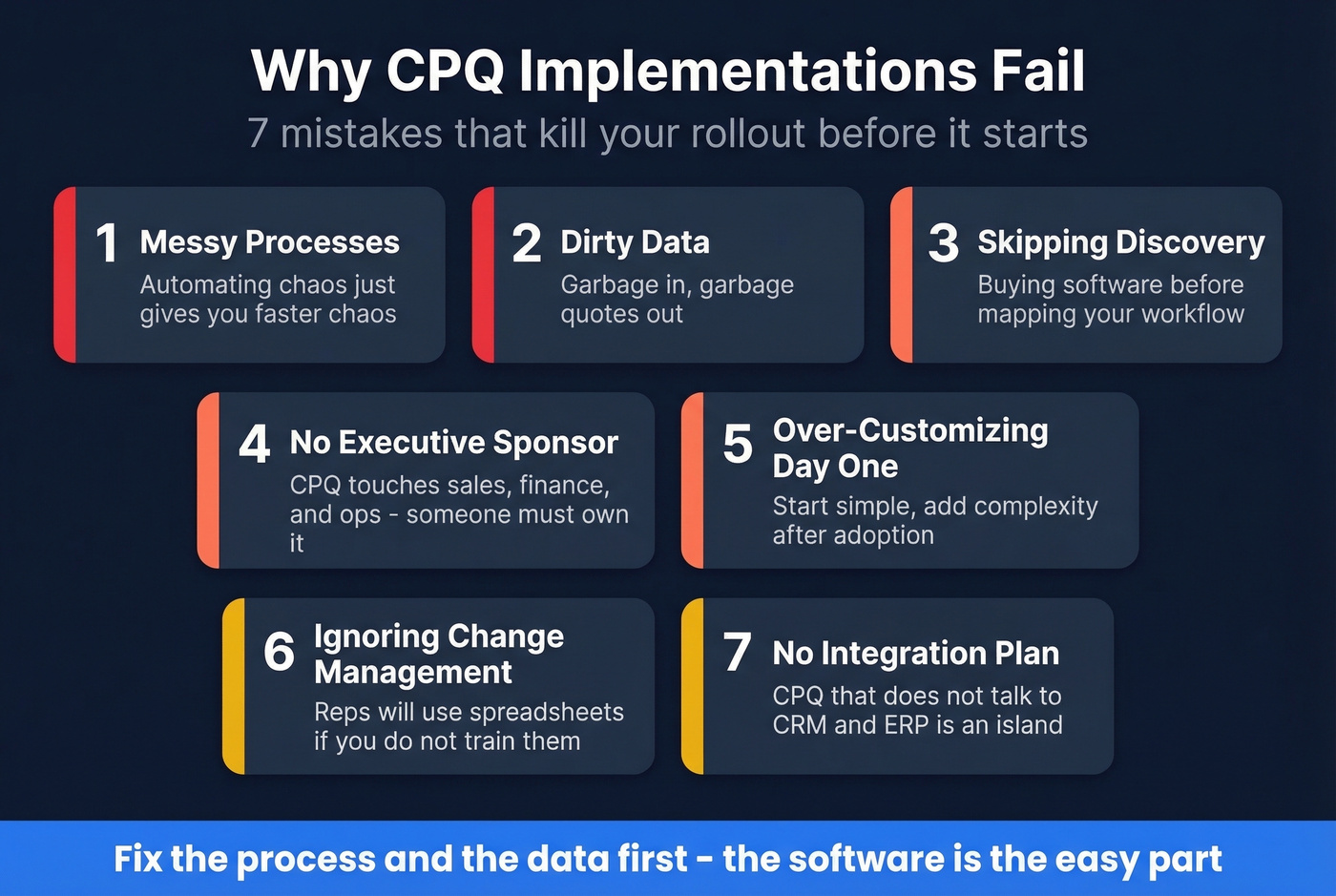
1. Layering CPQ on messy processes. If your current quoting workflow involves three spreadsheets, two email chains, and a Slack message to the VP of Sales for every discount, CPQ won't fix that. It'll automate the chaos. Cleanse and simplify your processes before you configure the tool.
2. Dirty data. Invalid picklist values, outdated pricing tables, stale contacts in the CRM - all of it flows into CPQ and produces garbage quotes. One Salesforce-specific example: a bulk product upload imported "Percent of Total" instead of "Percentage of Total" as a picklist value, silently breaking automation across the entire instance. Teams that skip data cleanup before go-live spend significantly longer in post-launch firefighting.
3. Skipping change management. Reps who've been quoting in Excel for five years won't switch because you sent a training email. Plan for resistance, build champions, and accept that adoption takes months. (If you need a rollout framework, a 30-60-90 day plan helps.)
4. Testing only new sales. Teams test the happy path - new deal, standard config, clean close. Then renewals break. Amendments break. Downgrades break. Subscription scenarios require testing upgrades, downgrades, decommissions, and renewal uplifts with price indices.
5. Ignoring legacy contracts during migration. Your project needs a defined process for both legacy contracts and new deals. Pretending legacy doesn't exist creates a two-system nightmare that lasts years.
6. Hardcoding product IDs in automations. When product catalogs change (and they always do), hardcoded references break silently. Use dynamic references and build for catalog evolution.
7. No post-go-live monitoring. Set up automated checks: orders contracted without contract creation, missing assets for one-time products, quotes stuck in approval queues. If you aren't monitoring, you're flying blind.
The Data Quality Foundation
CPQ amplifies whatever sits underneath it - including bad data.
Most systems pull customer and contact data from your CRM to generate and deliver quotes. If your CRM has high email bounce rates, stale job titles, and disconnected phone numbers, your beautifully configured quote reaches nobody. The rep follows up manually, the speed advantage evaporates, and you're back to the spreadsheet era with a more expensive tech stack.
Before you spend $30-75K+/year on CPQ software, make sure the contact data in your CRM is actually accurate. Enterprise implementations take 6-12 months; mid-market deployments run weeks to three months. Data cleanup should start now, not during UAT.
Prospeo verifies and enriches CRM contacts automatically - 98% email accuracy, 7-day refresh cycle, native Salesforce and HubSpot sync. Your quotes reach verified contacts instead of dead inboxes.

You just cut quote turnaround from hours to minutes. Now cut prospecting time too. Prospeo's 30+ search filters - including buyer intent, technographics, and headcount growth - let reps find the exact accounts worth quoting, at $0.01 per email.
Send fewer quotes to better prospects and close more deals.
CPQ Software Compared
Salesforce CPQ dominates mindshare, but it's not the only game - and for many mid-market teams, it's overkill.
| Vendor | Best For | Typical Pricing | Key Strength |
|---|---|---|---|
| Salesforce CPQ | Enterprise | ~$75-150/user/mo | Salesforce-native |
| DealHub | Mid-market | ~$75-100/user/mo | Faster go-live |
| PandaDoc | SMB | From $19/user/mo | Lightweight entry |
| SAP CPQ | Enterprise mfg | $50-150K+/yr | ETO/CTO config |
| Oracle CPQ | Enterprise mfg | $50K+/yr | Complex catalogs |
| Conga CPQ | Mid-enterprise | ~$50-100/user/mo | Flexible scaling |
| HubSpot Sales Hub | SMB (HubSpot users) | ~$100/user/mo | Native HubSpot |
| Cincom CPQ | Manufacturing | ~$40-80K+/yr | On-prem option |
Enterprise Tier
If your product catalog has 10,000+ SKUs with engineering constraints, SAP CPQ and Oracle CPQ are your shortlist. Both require significant implementation investment, but they handle engineer-to-order and configure-to-order complexity that lighter tools simply can't. Salesforce CPQ is the default for organizations already deep in the Salesforce ecosystem. It's not cheap, and implementation complexity is the consistent complaint - expect 6-12 months for a full rollout. But the ecosystem integration is unmatched if you're running Sales Cloud, Service Cloud, and Revenue Cloud together.
Mid-Market Options
DealHub can get you live in weeks where Salesforce CPQ takes months. At roughly $75-100/user/month, it offers strong guided selling and growing AI features. If you need CPQ without a 9-month implementation project, DealHub deserves a serious look. Conga CPQ bridges mid-market and enterprise at $50-100/user/month for teams that expect to scale into more complex configurations over time.
SMB: Do You Actually Need CPQ?
Honest question. If your product catalog is straightforward and you're quoting fewer than 50 deals a month, you might just need better document generation. PandaDoc starts at $19/user/month and offers lightweight features perfect for SaaS companies testing the waters. If you're already on HubSpot and your quoting needs are moderate, HubSpot's quoting inside Sales Hub is the path of least resistance. Skip the enterprise tools entirely - if your average deal size is under $10K and your product has fewer than 20 configuration options, start here and upgrade when the pain demands it.
How to Choose a Platform
The license fee is often a minority of total cost. Here's what actually determines whether your implementation succeeds:
- Configuration depth - does it support your product complexity? Engineer-to-order is different from configure-to-order.
- Pricing model flexibility - subscription, usage-based, tiered, hybrid? Make sure the engine handles your billing model natively.
- CRM/ERP integration - how deep is the connector? Bidirectional sync matters more than a basic API.
- Implementation timeline and TCO - implementation, training, and ongoing admin often outweigh the license fee.
- Guided selling and AI - does it help newer reps quote accurately, or is it just a configuration tool?
- Vendor lock-in risk - how portable is your configuration data if you switch platforms?
- Data quality prerequisites - what state does your CRM data need to be in before go-live? Start that cleanup early.
If you're evaluating vendors, it also helps to map CPQ into your broader sales process optimization work so quoting doesn't become a silo.
FAQ
What does CPQ stand for?
CPQ stands for Configure, Price, Quote - three steps that the software automates for sales teams dealing with complex products, custom pricing, or high quote volumes. The system enforces configuration rules, applies dynamic pricing logic, and generates professional quote documents in minutes rather than hours.
Who needs CPQ software?
Companies with configurable products, complex pricing rules, or high quote volumes benefit most - especially in manufacturing, SaaS, telecom, and financial services. If your reps spend more time building quotes than selling, or if pricing errors are a recurring problem, you likely need it.
How long does implementation take?
Enterprise deployments typically take 6-12 months including data migration, integration, and training. Mid-market implementations can go live in weeks to three months. The biggest variable is data cleanup and process simplification - teams that skip those steps pay for it in rework.
How much does CPQ software cost?
SMB tools start at $19/user/month with PandaDoc, mid-market runs $75-100/user/month with DealHub, and enterprise contracts typically exceed $30-75K/year depending on seats and modules. Implementation costs often equal or exceed the first year's license fee.
Can CPQ work without clean CRM data?
No. CPQ pulls contact data from your CRM to deliver quotes. If that data is stale, your quote reaches nobody and the speed advantage disappears. Tools like Prospeo keep CRM contacts verified with 98% email accuracy and a 7-day refresh cycle, so your system delivers to real, reachable buyers.