

CRM Lead Status: What It Is, How to Set It Up, and Why Most Teams Get It Wrong
A RevOps lead on r/Netsuite described inheriting an instance with 12 lead statuses spanning everything from "prospect identified decision makers" to "customer closed won/lost." Nobody on the team could explain where the list came from, and reps were skipping updates entirely. Meanwhile, the average B2B lead response time sits at 47 hours. Bad CRM lead status design and slow follow-up aren't separate problems - they're the same problem.
The Short Version
Keep five to seven lead statuses max. Use action-oriented labels that describe what's happening between the rep and the prospect, not where the lead sits in some abstract funnel. Add a separate "Unqualified Reason" field instead of creating five flavors of "Unqualified." Timestamp every status change so you can measure SLA compliance. Automate transitions wherever possible because manual updates are where data goes to die. And if your underlying lead data is bad, none of this matters - fix the data first.
What Does Lead Status Actually Track?
Lead status in your CRM tracks one thing: what's happening between the assigned rep and the prospect right now. It's not about where someone sits in the marketing funnel. It's not about how far along a deal is. It's a real-time indicator of sales outreach activity.
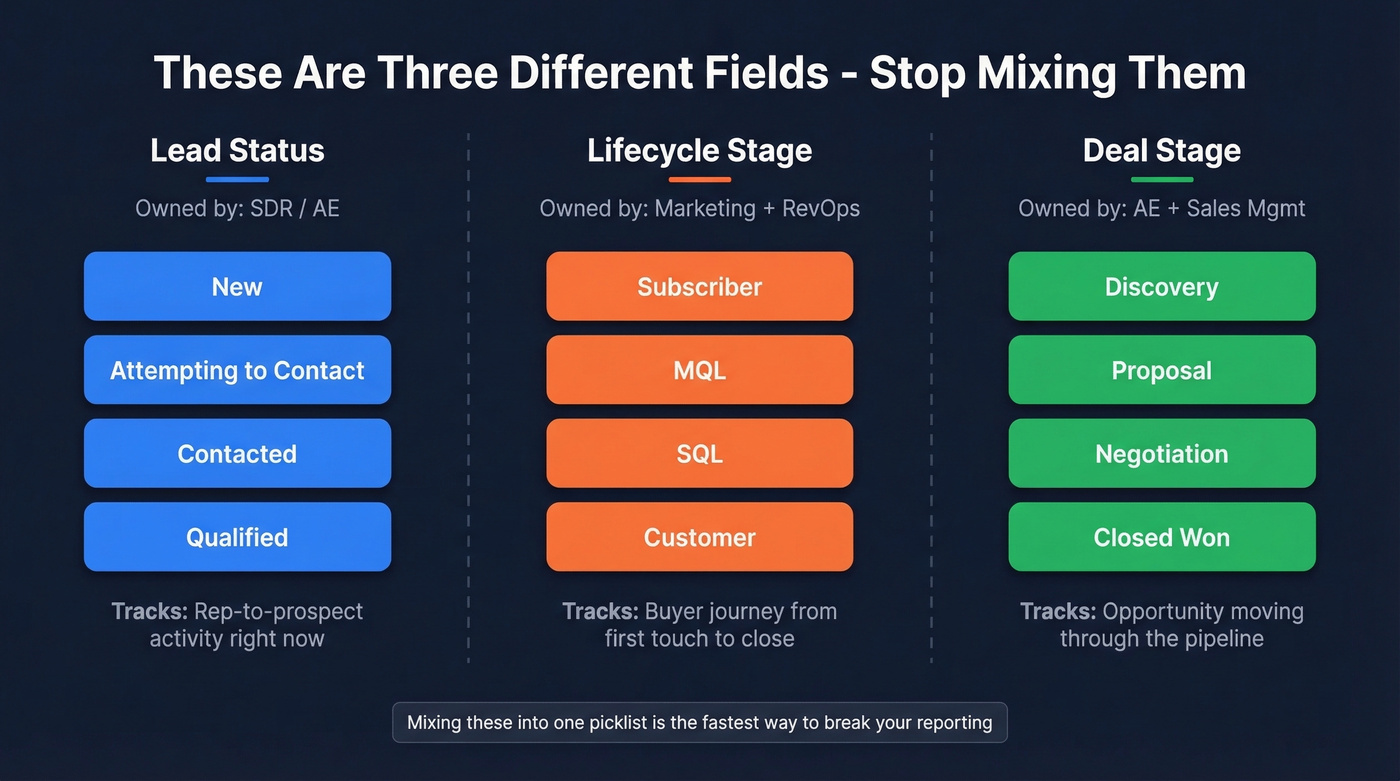
The confusion starts when teams mix up this field with lifecycle stage or deal stage. Lifecycle stage covers the broader buyer journey from subscriber to customer. Deal stage tracks an active opportunity through your pipeline. These three fields serve different teams and answer different questions, and mixing them into one picklist is the fastest way to break your reporting.
Lead Status vs. Lifecycle Stage vs. Deal Stage
| Lead Status | Lifecycle Stage | Deal Stage | |
|---|---|---|---|
| What it tracks | Rep-to-prospect activity | Buyer journey phase | Opportunity progression |
| Who owns it | Sales (SDR/AE) | Marketing + RevOps | AE + Sales Mgmt |
| Example values | New, Contacted, Qualified | Subscriber, MQL, SQL | Discovery, Proposal, Negotiation |
One common HubSpot trap worth calling out: the default "Open Deal" lead status confuses teams because it bridges lead and deal tracking. It exists to flag contacts that have moved out of lead-working statuses and are now on the deal side, so they don't clutter lead views. Most teams don't realize that and treat it as a pipeline stage.
Picklist Best Practices
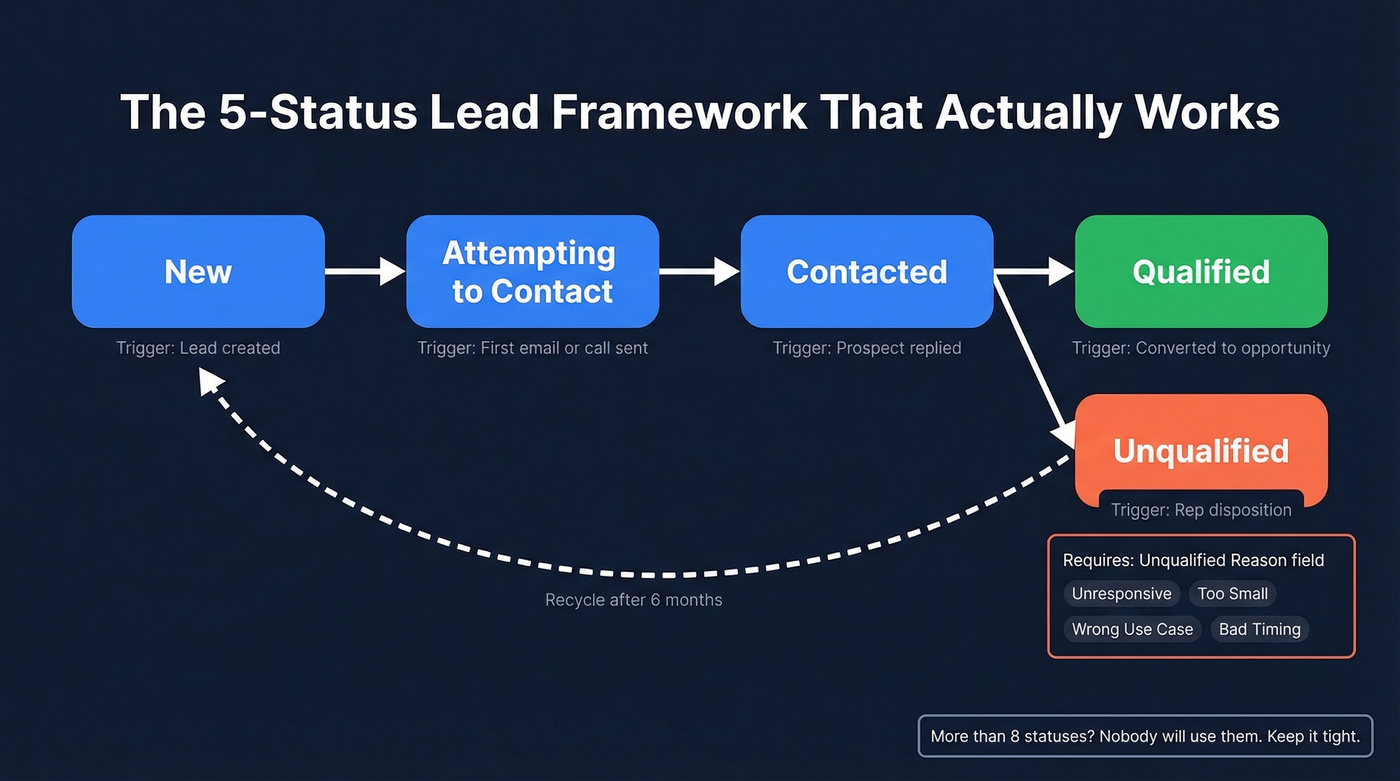
Here's the minimal set that works for most B2B teams:
| Status | What It Means | Trigger |
|---|---|---|
| New | No outreach yet | Lead created |
| Attempting to Contact | Outreach in progress | First email/call sent |
| Contacted | Two-way conversation | Prospect replied |
| Qualified | Meets ICP criteria | Converted to opportunity |
| Unqualified | Not a fit | Rep disposition |
Add a separate Unqualified Reason picklist - Unresponsive, Too Small, Wrong Use Case, Bad Timing - and require it via validation rule. This gives you disqualification analytics without bloating your status field.
If you've got more than eight statuses, you've built a system nobody will use. Reps skip updates, managers distrust reports, and your pipeline metrics become fiction. Five statuses with clear definitions beat twelve statuses with vague ones every single time.
One thing most guides skip: leads don't move in one direction. Set automation to move disqualified leads into a long-term nurture status after about six months - Iron Horse recommends using six months or half the average buyer's journey as the recycling window. Your statuses need to support re-entry, not just linear progression.

A lead stuck in "Attempting to Contact" for weeks isn't a sales problem - it's a data problem. Prospeo delivers 98% email accuracy and 125M+ verified mobile numbers with a 30% pickup rate, so your CRM statuses actually reflect rep activity, not bad contact info.
Stop blaming reps when the real problem is stale data.
Default Statuses by CRM
| CRM | Default Statuses / Mechanics | Entry Price |
|---|---|---|
| Salesforce | Open, Contacted, Qualified, Unqualified (customizable via Lead Process) | ~$25-$165/user/mo |
| HubSpot | New, Open, In Progress, Attempted to Contact, Connected, Open Deal, Unqualified, Bad Timing | Free CRM |
| Pipedrive | Leads start in the Leads Inbox, then convert into Deals that move through pipeline stages | $14.90/user/mo |
| Zoho CRM | Customizable Lead Status picklist; automate via workflows/Blueprints | Free (3 users) |
Salesforce gives you the most control. You can create different Lead Processes per record type, so inbound and outbound leads don't share the same status options. HubSpot's defaults are messier - the workaround is creating custom properties for Contact Type and Contact Status rather than overloading the default field. HubSpot's knowledge base walks through the setup if you want the step-by-step.
Automation Rules That Work
Manual status updates are unreliable. Here's what to automate:
New to Attempting to Contact - trigger when the prospect receives their first email or call. This is the single fastest way to improve status accuracy because it removes the most common manual step.
Attempting to Contact to Contacted - trigger on a prospect reply or logged live conversation. Don't let "Contacted" mean voicemail to one rep and live conversation to another. Define it once, enforce it with automation.
Contacted to Qualified - trigger on lead conversion or opportunity creation.
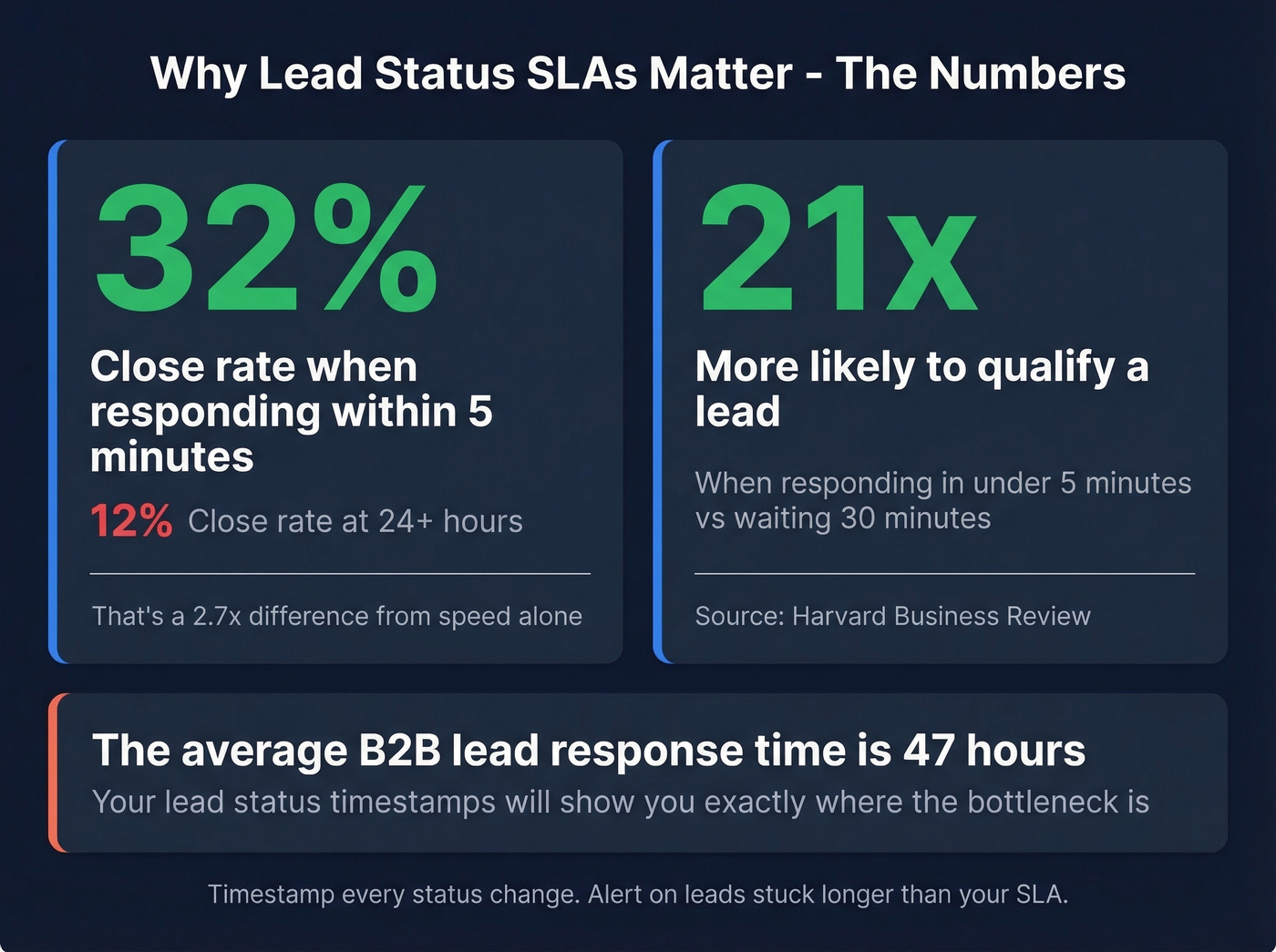
Timestamp every change. Add a "Last Status Change" date field and a "Status Age" formula field. Alert on leads stuck longer than your SLA. The benchmarks make the case: teams responding within five minutes see a 32% close rate versus 12% at 24+ hours, and they're 21x more likely to qualify than teams waiting 30 minutes.
Don't track call cadence in lead status - that's what tasks and activity dispositions are for. Status should reflect outcomes, not attempts.
How Leads Actually Move Through Your Pipeline
Let's be honest: the typical path of New to Attempting to Contact to Contacted to Qualified or Unqualified looks clean on a whiteboard, but real-world motion is messier. Leads get recycled, reassigned, and re-engaged after months of dormancy. Your system needs to handle that.
Do: Keep statuses to five to seven values with written definitions every rep has read. Don't: Let "Contacted" mean different things to different reps.
Do: Add a separate Unqualified Reason field. Don't: Create statuses like "Unqualified - Too Small." That's field bloat disguised as specificity.
Do: Timestamp every status change for SLA reporting. Don't: Keep lead status, lifecycle stage, and deal stage in the same field. That NetSuite horror story? It started exactly this way.
The Data Quality Problem Nobody Talks About
Nearly 73% of marketers report unreliable lead data quality. A lead stuck in "Attempting to Contact" for 30 days isn't necessarily unresponsive - they could have an invalid email or a disconnected number. Your status says "sales execution problem." The reality is a data problem.
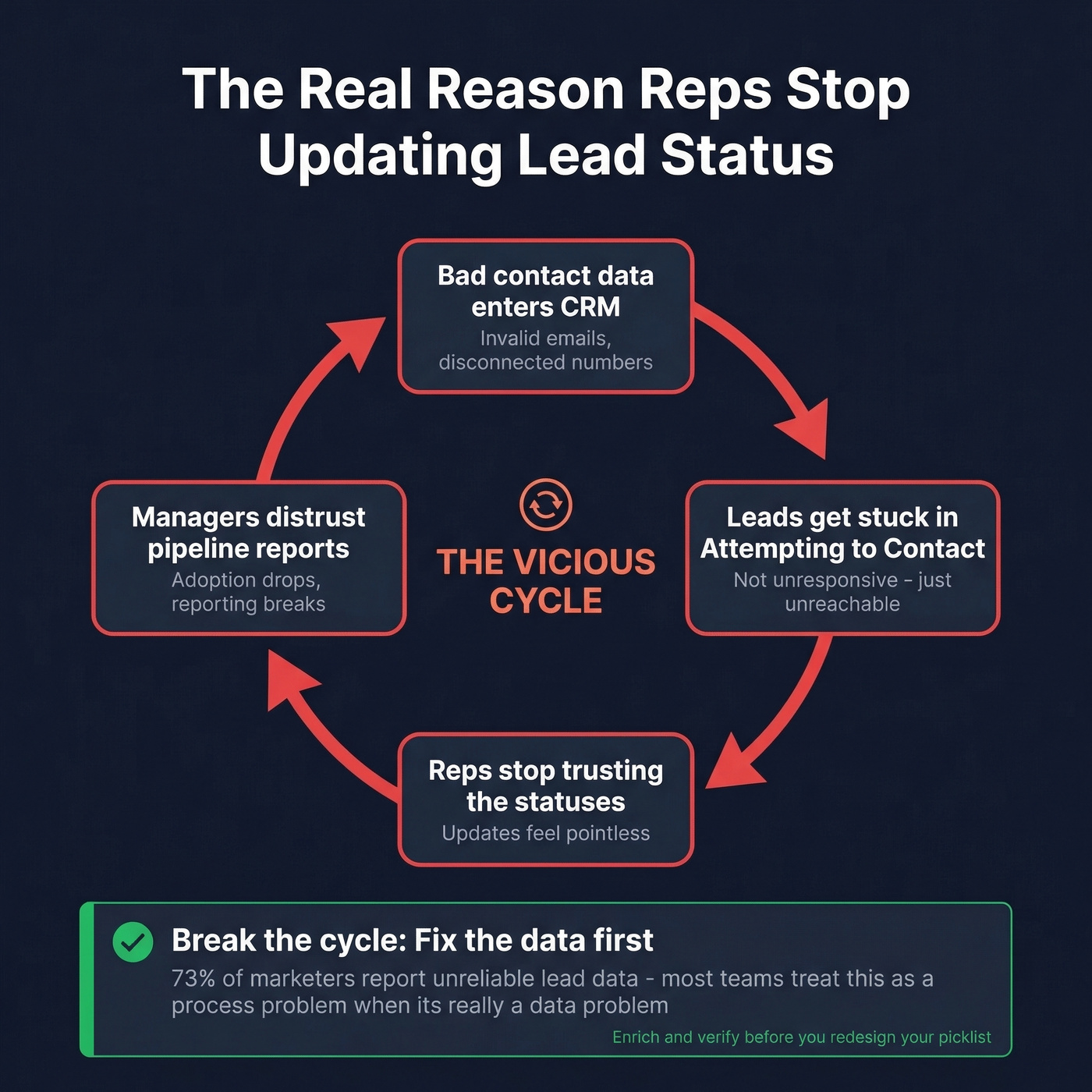
We've seen this pattern dozens of times: a team spends weeks redesigning their lead status picklist, writing definitions, running training sessions, and three months later adoption is right back where it started. The picklist wasn't the issue. The data underneath was rotten, so statuses never reflected reality, so reps stopped trusting them, so they stopped updating them.
This is where enrichment changes the equation. Prospeo's CRM enrichment returns verified contact data on 83% of leads with 98% email accuracy and 50+ data points per record, all refreshed on a 7-day cycle. When your underlying data is clean, lead statuses actually reflect what's happening in the sales process instead of masking data gaps.

Here's our strong opinion on this: most teams troubleshoot lead status adoption as a process problem - more training, stricter enforcement, better definitions. Nine times out of ten, it's a data problem wearing a process costume. Fix the data, and reps start updating statuses because the statuses finally mean something.
If you’re rebuilding your lead system end-to-end, start with a clean Ideal Customer Profile and a consistent lead scoring model so “Qualified” means the same thing across teams.
73% of marketers report unreliable lead data. Your automation rules, SLA timestamps, and five-status framework won't matter if reps are emailing invalid addresses. Prospeo refreshes every record on a 7-day cycle - not the 6-week industry average - so leads moving through your pipeline have contact data that actually connects.
Clean statuses start with clean data at $0.01 per verified email.
FAQ
How many lead statuses should a CRM have?
Five to seven. That's enough to track outreach progression without creating busywork. If reps skip updates because the dropdown is too long, your pipeline reporting is fiction. Pair action-oriented labels with a required Unqualified Reason field for granularity without bloat.
What's the difference between lead status and lifecycle stage?
Lead status tracks sales outreach activity - New, Contacted, Qualified. Lifecycle stage tracks the buyer journey - Subscriber, MQL, SQL, Customer. Marketing owns lifecycle stage; sales owns lead status. Conflating them in one field breaks reporting for both teams.
How do I fix leads stuck in "Attempting to Contact"?
Check the data first. Invalid emails and disconnected numbers masquerade as unresponsive leads. Re-verify and enrich stale records, then set an SLA: 30 days with no response triggers automatic disqualification or reassignment. Skip this if your CRM doesn't support workflow automation - you'll need to build the SLA enforcement manually or upgrade your plan.