

The Best CRM Online Software in 2026: Pricing, Picks, and What Nobody Tells You
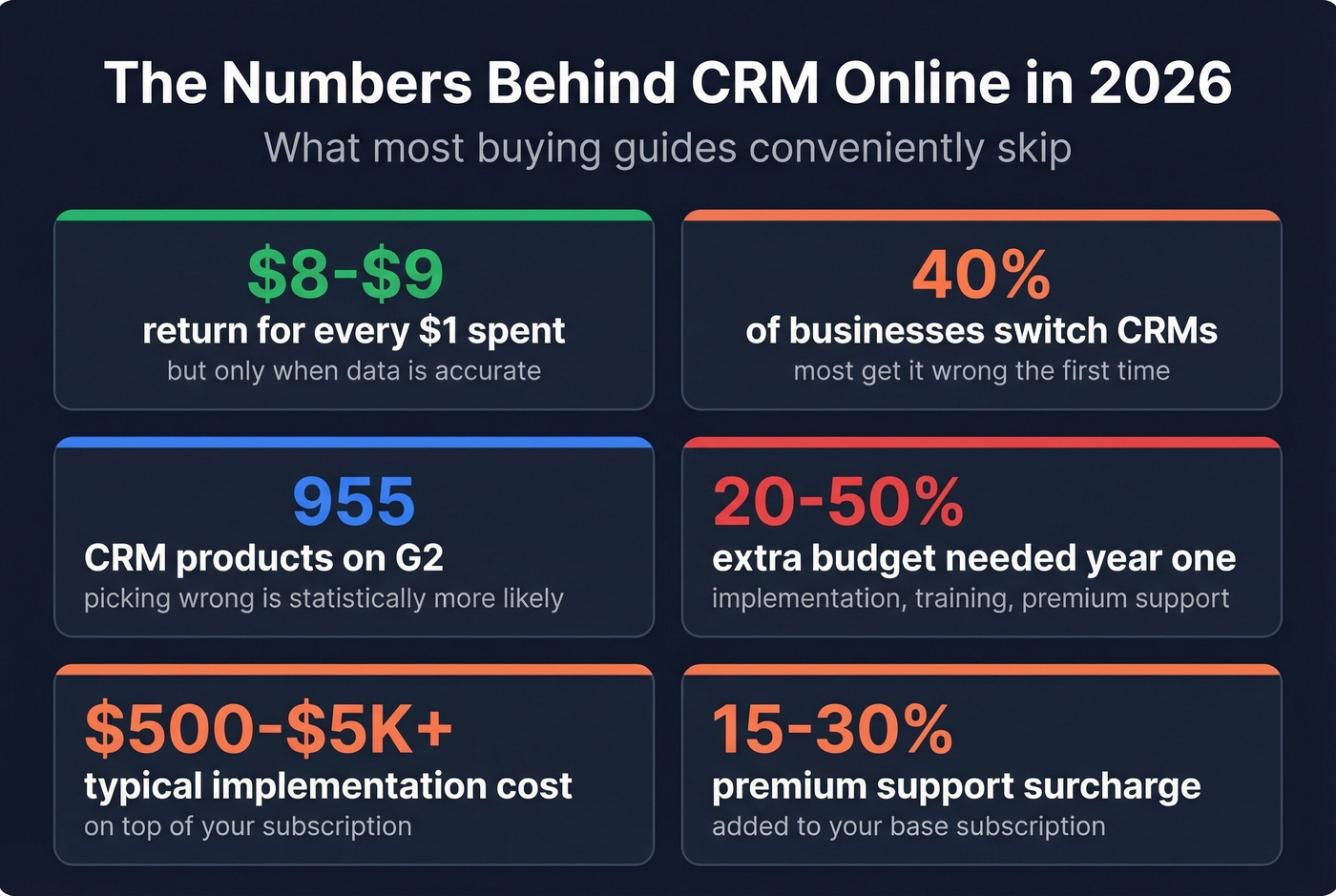
Your reps are spending half their day updating contact records instead of selling. Emails bounce. Deals that should've been in a CRM six months ago are still living in a spreadsheet someone forgot to share. G2 lists 955 CRM products right now - picking the wrong one is statistically more likely than picking the right one.
Industry benchmarks put CRM ROI at around $8-$9 for every $1 spent, but only when the data inside is accurate. We've tested dozens of cloud CRM platforms over the years, and the pattern is always the same: teams obsess over features, ignore data quality, and wonder why their pipeline stalls. This guide gives you real pricing for 12 tools, opinionated picks, and the data quality problem every other roundup conveniently skips.
40% of businesses switch CRMs specifically to improve efficiency. Most get it wrong the first time. Let's help you skip that step.
Our Picks for 2026
| Category | Pick | Why |
|---|---|---|
| Best overall | Zoho CRM | PCMag 4.5/5, $14-$40/user/mo |
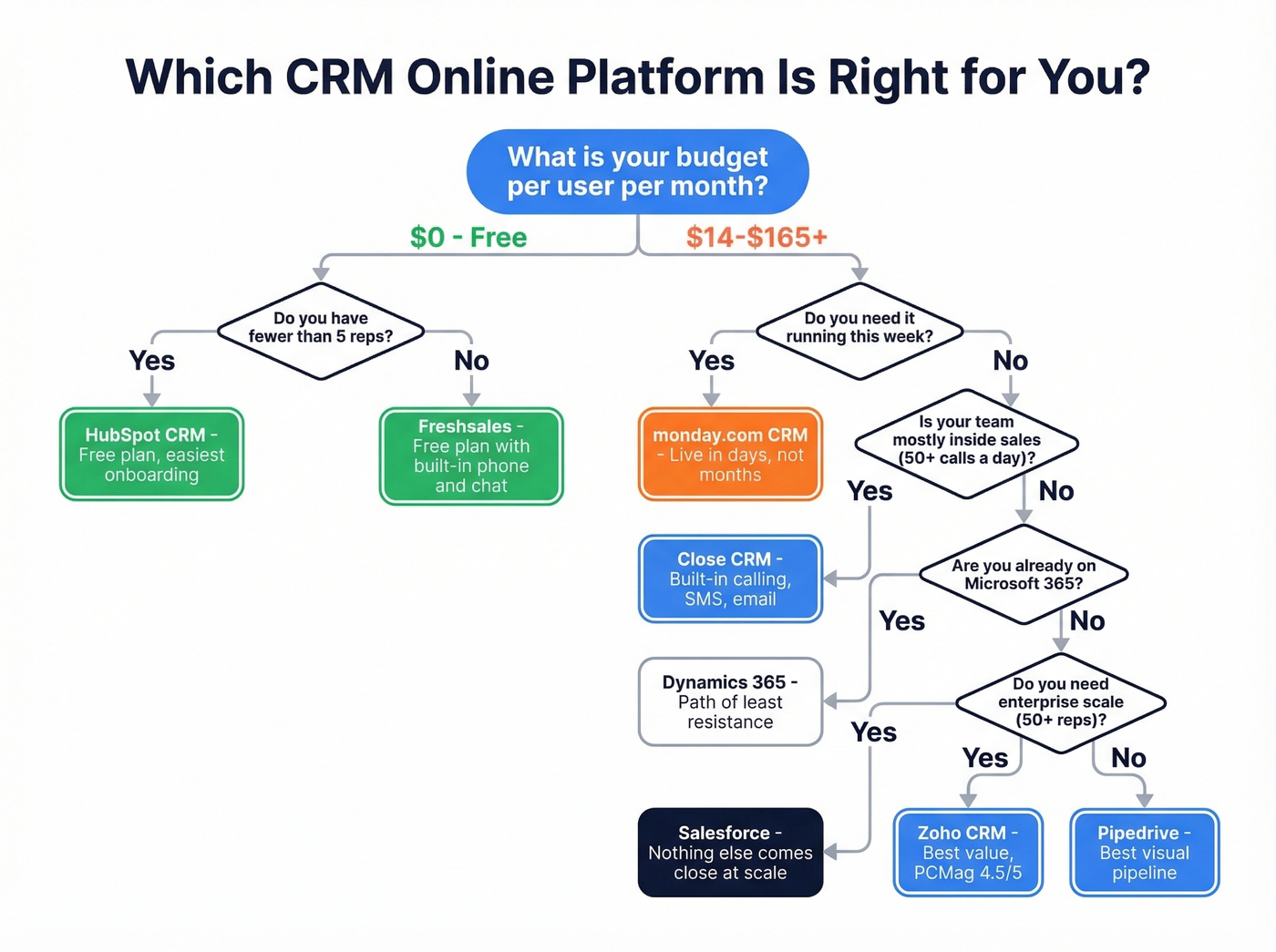
| Best free CRM | HubSpot CRM | Free plan (up to 2 users, 1,000 contacts), easiest onboarding |
| Best for sales teams | Pipedrive | Visual pipeline, starts at $14/seat/mo |
| Fastest setup | monday.com CRM | Live in days, not months |
| Best open-source | SuiteCRM | Self-hosted, zero license cost |
| Best for data enrichment | Prospeo | 98% email accuracy, 7-day refresh |
What Is a Cloud-Based CRM?
An online CRM - also called cloud CRM, SaaS CRM, or web-based customer relationship management software - is hosted by a vendor and accessed through your browser. No local installation, no IT team managing servers, no painful upgrade cycles. You pay a recurring subscription, log in, and your contacts, pipelines, reports, and automations are all there.
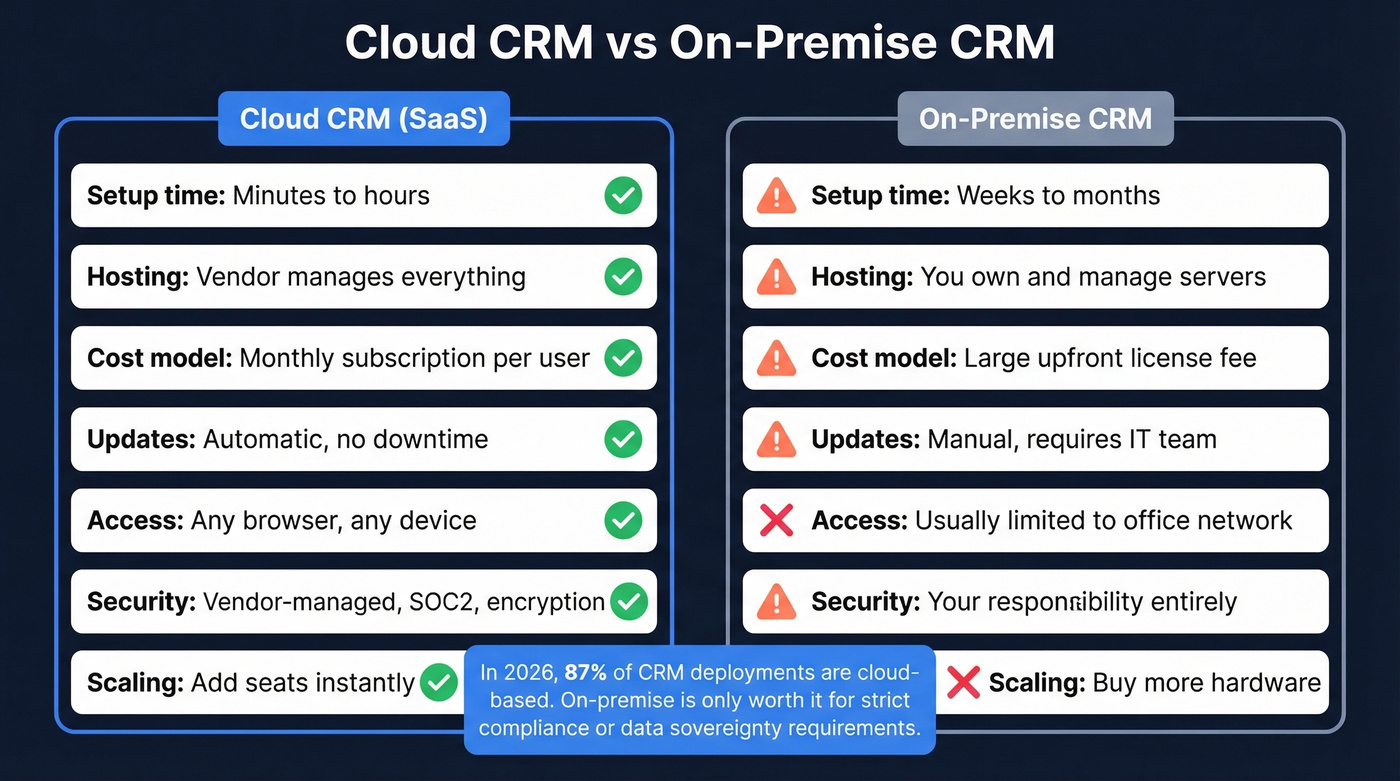
On-prem CRM is a different animal entirely. You own the hardware, manage the security patches, and handle every update yourself. Cloud CRM offloads all of that. The vendor handles maintenance, backups, and security while you just use the product. As Zendesk notes, you can get started for around $20 a month depending on your operation's size.
Core features you'll find in virtually every web-based CRM: contact management, sales pipeline tracking, forecasting, reporting dashboards, email integration, and workflow automation. The U.S. Chamber of Commerce breaks CRMs into four types - operational, analytical, collaborative, and strategic - but most modern platforms blend all four. The real differentiator isn't category. It's how well the tool fits your team's actual workflow.
CRM Online Pricing Compared
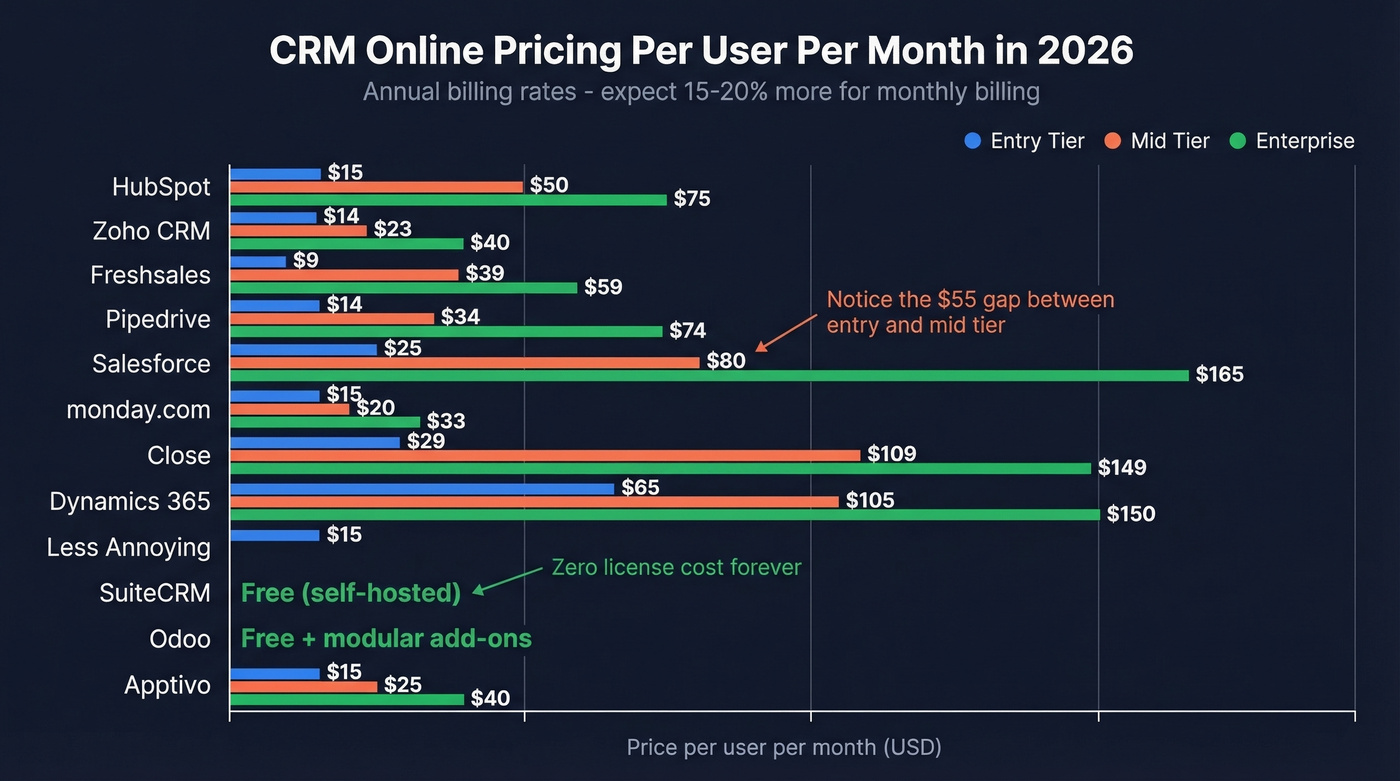
CRM pricing is where the confusion starts. TrustRadius benchmarks the range at $10-$300+ per user/month, which is technically accurate but not very helpful. Here's the actual breakdown.
| CRM | Free Plan | Entry Tier | Mid Tier | Enterprise |
|---|---|---|---|---|
| HubSpot | Yes (up to 2 users, 1,000 contacts) | $15/seat/mo | $50/seat/mo | $75/seat/mo |
| Zoho CRM | Yes | $14/user/mo | $23/user/mo | $40/user/mo |
| Freshsales | Yes | $9/user/mo | $39/user/mo | $59/user/mo |
| Pipedrive | No | $14-19/user/mo | $34/user/mo | $74/user/mo |
| Salesforce | No | $25/user/mo | $80/user/mo | $165/user/mo |
| monday.com | No | $15/user/mo | $20/user/mo | $33/user/mo |
| Close | No | $29/user/mo | $109/user/mo | $149/user/mo |
| Dynamics 365 | No | $65/user/mo | $105/user/mo | $150/user/mo |
| Less Annoying | No | $15/user/mo | - | - |
| SuiteCRM | Yes (self-host) | Free | Free | Free |
| Odoo | Yes (1 app) | Free | Modular | Modular |
| Apptivo | Yes | ~$15/user/mo | ~$25/user/mo | ~$40/user/mo |
A few things jump out. HubSpot's pricing gets expensive fast once you need advanced functionality. Zoho stays remarkably flat across tiers. Salesforce doesn't have a true midrange option between $25 and $80, which frustrates mid-market buyers constantly.
Hidden costs most guides skip: Implementation runs $500-$5K+ depending on complexity. Training isn't free. Premium support tiers add 15-30% to your bill. Annual billing typically saves 15-20%, which means monthly pricing is effectively a surcharge. Budget an extra 20-50% on top of the sticker price for the first year.

Hidden CRM costs go beyond pricing tiers - bad data is the real budget killer. Bounced emails, stale contacts, and dead phone numbers drain pipeline faster than any subscription fee. Prospeo enriches your CRM with 98% accurate emails and 125M+ verified mobiles, refreshed every 7 days - not every 6 weeks.
Stop paying for a CRM full of data that doesn't connect you to anyone.
Best CRM Online Platforms in 2026
Zoho CRM
Zoho CRM earned PCMag's Editors' Choice with a 4.5/5 "Outstanding" rating, and the reason is straightforward: it delivers enterprise-grade features at SMB pricing. The Zia AI assistant handles lead scoring, anomaly detection, and workflow suggestions. Customization runs deep - custom modules, layouts, validation rules, and scripting through Deluge.
Pricing is the headline. At $14-$40/user/mo across tiers, Zoho undercuts Salesforce by 40-75% at every level. For a 10-person team, you're looking at $140-$400/month versus $250-$1,650 for Salesforce. That math matters.
The tradeoff? Zoho has a genuine learning curve. The interface isn't as polished as HubSpot's, and the most powerful features - advanced analytics, AI predictions, multi-channel orchestration - are gated behind the Professional and Enterprise tiers. If you need something simple, Zoho is overkill.

HubSpot CRM
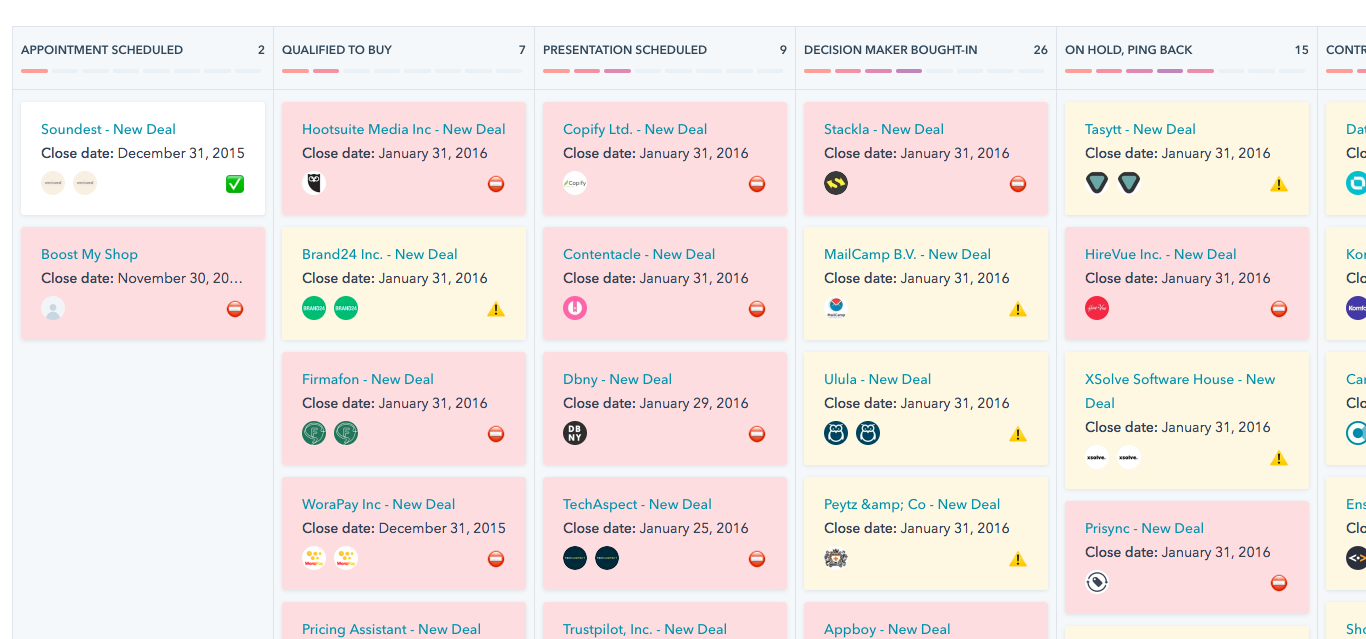
HubSpot's free plan is the best on-ramp in the CRM market. Up to two users, 1,000 contacts, deal tracking, email templates, and a surprisingly capable reporting dashboard - all at zero cost.
Here's the thing: once you need more automation, reporting depth, and advanced sales features, HubSpot gets expensive quickly. Paid plans start at $15 per seat/month, with higher tiers at $50 and $75 per seat/month. We've seen teams get locked into the ecosystem and then face a painful migration when the bill triples.
Use this if: You're starting from zero and want the fastest path to a working CRM. The free plan is genuinely excellent for small teams.
Skip this if: You're planning to scale past 5-10 reps and you know you'll need advanced automation. The pricing curve will catch you, and migrating away once you're embedded is a project nobody wants.
Salesforce Sales Cloud
Salesforce is the industry standard for a reason. G2 rates it 4.4/5 across 25,479 reviews - that's not just a good score, it's a massive sample size. The platform does everything: pipeline management, forecasting, CPQ, territory planning, Einstein AI, and an app marketplace with thousands of integrations.
Entry pricing starts at $25/user/mo for Starter Suite, which is reasonable. But there's a gap in Salesforce's lineup that frustrates mid-market buyers - no real midrange plan between Starter and Pro-level pricing around $80. You either get a basic CRM or you're paying enterprise prices. For a 20-person team, that's the difference between $6K and $19.2K per year.
Most SMBs don't need Salesforce. If your average deal size is under $15K and you're running a 5-person sales team without a dedicated admin, Salesforce will feel like driving a semi truck to the grocery store. But if you're scaling past 50 reps and need the ecosystem, nothing else comes close.
Pipedrive
Pipedrive does one thing exceptionally well: visual pipeline management. The drag-and-drop interface makes deal tracking intuitive in a way that spreadsheet-brained CRMs don't. Reps actually use it, which is half the battle with CRM adoption.
Pricing starts at $14/user/mo on annual billing and $19/user/mo monthly, scaling to $74/user/mo for the top tier. No free plan, which is Pipedrive's biggest limitation for bootstrapped teams. Marketing features are thin compared to HubSpot - if you need email sequences, landing pages, and lead capture forms baked in, Pipedrive won't cover it.
Use this if: Your team lives in the pipeline view and you want reps to actually log their activities without nagging.
Skip this if: You need a marketing hub and CRM in one platform. Pipedrive is a sales tool, not a growth suite.

Freshsales
Freshsales combines ML-based lead scoring with built-in phone, email, and chat - all in one interface. The free plan is solid for small teams, and paid tiers start at just $9/user/mo, making it the cheapest entry point on this list.
Freddy AI prioritizes leads by engagement signals, and the built-in communication tools mean you don't need to bolt on separate dialers or chat widgets. Mid-tier unlocks at $39/user/mo for custom sales activities and advanced workflows. The main gap is ecosystem - Freshsales has fewer third-party integrations than HubSpot or Salesforce, so check that your stack connects before committing.
monday.com CRM
monday.com is the CRM you set up in days instead of months. The adoption numbers back it up - monday.com reports 100% team adoption within two weeks for customers like Velv, along with a 60% drop in manual work. AI communication summaries and deal sentiment analysis are built in. At $15/user/mo entry, it's priced for teams that want speed over depth.
Use this if: You need a CRM running by Friday and your team hates complex software.
Skip this if: You need deep customization or complex multi-pipeline setups. monday.com trades power for simplicity, and that tradeoff is deliberate.
Close CRM
Close is built for inside sales teams that live on the phone. Built-in calling, SMS, and email sequencing with zero integrations needed. The interface reflects Close's "no BS CRM" philosophy - opinionated software for opinionated sales teams.
The $29/user/mo entry point is fair for what you get, though mid-tier jumps to $109/user/mo, which is steep. In our experience, Close shines when reps make 50+ calls a day and need everything in one window. If you're running a complex enterprise sales motion with multiple stakeholders and long deal cycles, it'll feel too lightweight.
Microsoft Dynamics 365
If your company already runs on Microsoft 365, Teams, and Outlook, Dynamics 365 is the path of least resistance. Contacts sync from Outlook, meetings pull from Teams, and Excel-based reporting feels like home. At $65/user/mo entry, it's expensive for SMBs, and the interface carries that enterprise-software weight. Best suited for mid-market and enterprise teams already committed to Microsoft. Everyone else should look elsewhere.
SuiteCRM
Open-source, self-hosted, zero license cost. SuiteCRM delivers powerful CRM functionality - workflows, reporting, campaign management - without per-seat fees. You'll need technical resources to deploy and maintain it, but for teams with dev capacity, it's a legitimate enterprise CRM without the license bill.
Apptivo
PCMag calls it "Most Flexible." Free plan available, modular pricing, and a wide feature set covering CRM, invoicing, and project management. No AI tools, which is a growing gap in 2026. Good for small businesses wanting an all-in-one business suite on a budget.
Less Annoying CRM
One plan. $15/user/mo. That's it.
G2 rates it "Easiest to Use," and the simplicity is the entire value proposition. No feature tiers to decode, no upsell pressure, no enterprise bloat. If you want a contact database with basic pipeline tracking and nothing else, this is your CRM.
Odoo CRM
Free for a single app, open-source, and modular - add invoicing, inventory, or marketing as needed. Odoo's strength is the broader ERP ecosystem. The CRM alone is basic, but paired with Odoo's suite of business apps, it becomes a full operating system for your company.
Worth watching: Attio is gaining traction as G2's "Top Trending" CRM, built around a flexible data model that appeals to product-led growth teams. Too early to recommend broadly, but keep it on your radar.
Your CRM Data Is Probably Broken
Here's what no CRM comparison guide tells you: the platform is only as good as the data inside it. You can pick the perfect tool, nail the implementation, train every rep - and still watch your outbound campaigns fail because 30% of your contact records are stale.
People change jobs. Emails bounce. Phone numbers disconnect. The average B2B database decays at roughly 2-3% per month, which means a quarter of your CRM contacts are unreliable within a year. This is the garbage-in, garbage-out problem, and it kills pipeline.
Prospeo plugs directly into HubSpot and Salesforce, enriching CRM contacts with 98% verified emails and 125M+ verified mobile numbers. The enrichment match rate is 83%, returning 50+ data points per contact - job title, direct dial, company firmographics, technographics, and intent signals. Data refreshes every 7 days, compared to the 6-week industry average. Your CRM stays current without manual effort.

The proof is in production results. Snyk's 50-person AE team cut bounce rates from 35-40% to under 5% after layering in enrichment workflows, growing AE-sourced pipeline 180% and generating 200+ new opportunities per month. That wasn't a CRM problem or a rep problem - it was a data problem, and fixing the data fixed everything downstream.
Every CRM on this list manages contacts. None of them guarantee those contacts are accurate. Prospeo's CRM enrichment returns 50+ data points per record at a 92% match rate - for roughly $0.01 per email. Plug it into HubSpot, Salesforce, or any CRM via native integrations.
Feed your CRM verified data and watch your pipeline actually move.
How to Choose the Right CRM
Don't evaluate 10 CRMs. Evaluate two or three, max. Run a 14-day trial with real data - not demo data, not sample contacts, your actual pipeline. That's the only way to know if a web-based CRM fits your workflow.
Map your workflow first. Document how deals move from lead to close today. The CRM should match your process, not force you into a new one. A real estate team and a SaaS sales team need fundamentally different pipeline structures - some platforms handle this natively, others require heavy customization.
Prioritize integrations over features. Your CRM needs to talk to your email platform, your sequencer, your data enrichment tools, and your billing system. If it doesn't integrate with your stack, adoption will crater. 91% of organizations with 11+ employees use CRM software, but usage doesn't equal adoption. The difference is almost always integration quality and day-one usability.
Test for usability with your actual team. Put the CRM in front of your least tech-savvy rep during the trial. If they can log a deal without asking for help, you've found a winner. If they're confused within five minutes, that confusion won't magically disappear after launch.
Plan for scale before you need it. A CRM that works for 5 reps breaks at 50. Check pricing curves, user limits, and feature gating at higher tiers before you commit. The $14/user/mo plan that looks great today turns into $74/user/mo by the time you actually need the features your team will grow into.
One more stat worth knowing: 46% of SMBs already use AI to develop customer insights, up 10% year-over-year. If AI-powered lead scoring, forecasting, or communication analysis matters to your team, make sure it's included in the tier you can actually afford - not locked behind an enterprise paywall.
CRM Mistakes That Kill Adoption
50% of CRM projects fail to deliver expected results. That's not a technology problem - it's an execution problem. Here are the five mistakes we see most often:
No clear KPIs before launch. If you can't define what success looks like - pipeline velocity, rep activity rates, forecast accuracy - you can't measure whether the CRM is working. Set targets before day one.
Botching data migration. Dumping dirty data from spreadsheets into a shiny new CRM just gives you organized garbage. Clean, deduplicate, and verify before you migrate. In our experience, teams that skip this step regret it within 30 days.
Skipping user training. A two-hour onboarding session isn't training. Reps need hands-on practice with their actual workflows, not a generic demo. Budget real time for this.
Automating broken processes. If your lead routing is a mess in spreadsheets, automating it in a CRM just creates faster mess. Fix the process first, then automate.
Ignoring integrations. A CRM that doesn't connect to your email, calendar, and data enrichment tools becomes another data silo. 31% of SMBs switch CRMs due to feature limitations, and missing integrations are a top driver.
Look, expect productivity gains within 30-60 days, not 30-60 minutes. CRM adoption is a process, not a switch you flip.
FAQ
What's the best free CRM online?
HubSpot CRM is the strongest free option - up to two users, 1,000 contacts, deal tracking, and email templates at zero cost. Freshsales and Zoho CRM also offer capable free plans with different limits. For teams needing data enrichment alongside their free CRM, Prospeo's free tier includes 75 verified email credits per month.
How much does CRM software cost?
Expect to pay $10-$300+ per user/month depending on features and scale. Most SMBs land in the $15-$50 range. Budget an extra 20-50% for implementation, training, premium support, and add-ons not included in the base price.
What's the difference between cloud and on-premise CRM?
Cloud CRM runs in your browser with the vendor managing updates, security, and backups. On-premise CRM requires local server installation and dedicated IT resources. Cloud deploys faster, costs less upfront, and is accessible from anywhere. On-premise offers more control but at significantly higher total cost of ownership.
Can I use a web-based CRM on my phone?
Yes. Every major platform - HubSpot, Zoho, Salesforce, Pipedrive, Freshsales, monday.com - offers mobile apps with contact access, pipeline updates, activity logging, and push notifications. Mobile functionality varies by tier, so confirm your plan includes full mobile features before committing.
How do I keep CRM data accurate?
Use a data enrichment tool to automatically verify and refresh contact records on a recurring schedule. B2B databases decay 2-3% per month, so quarterly audits alone won't cut it. Combine automated enrichment with deduplication rules and standardized data entry to keep your database healthy. Weekly refresh cycles - rather than the 6-week industry average - make the biggest difference.