

CRM Systems Meaning: A No-Spin Guide to What CRM Actually Is
Here's a scene that plays out in thousands of companies every week: a sales rep at Acme Corp asks their manager, for the third time, what the last conversation with a prospect looked like. The manager digs through email threads, checks Slack, opens a spreadsheet that hasn't been updated since February, and finally says, "I think Sarah talked to them?" That moment - the one where nobody knows what's happening with your own customers - is the reason CRM exists.
The CRM market is projected to reach $126.17 billion in 2026, and every dollar of it wants your attention right now. So here's the honest version: what a CRM system actually is, what it costs, why most implementations fail, and how to make yours work if you decide you need one.
The Short Answer
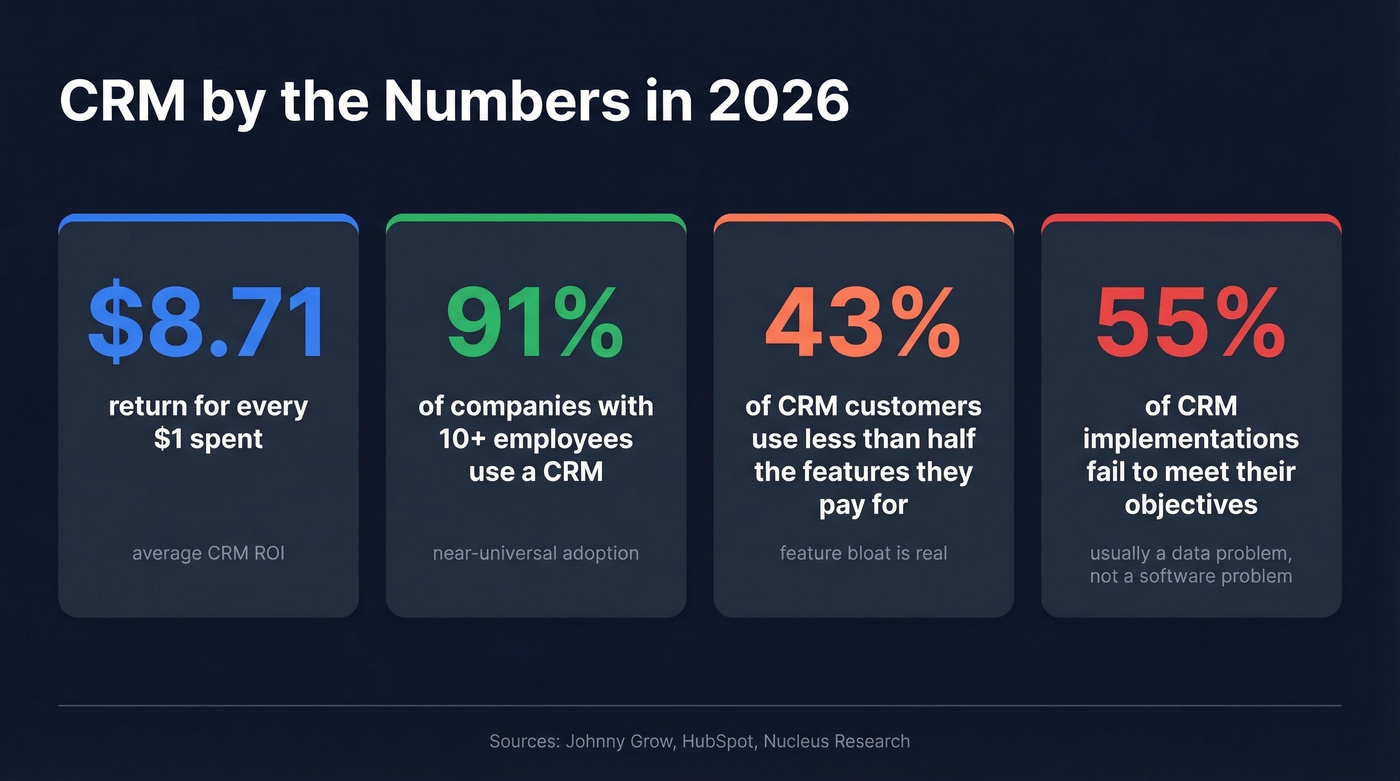
CRM stands for Customer Relationship Management. It's software that centralizes every customer interaction so your team stops losing deals in email threads and spreadsheets. You probably need one when you're juggling 10+ active deals or 50+ contacts. The catch: 55% of implementations fail - almost always because of bad data, not bad software. The fix is straightforward: start simple, get adoption right, and keep your data clean from day one.
What Is a CRM System?
That three-word phrase - Customer Relationship Management - carries two very different meanings, and confusing them is where most people go wrong.
The first meaning is a strategy: a deliberate approach to managing how your company interacts with customers and prospects across every touchpoint. The second is software - the actual tool that stores contact records, tracks deals, logs emails, and automates follow-ups. Wikipedia's CRM entry describes CRM as a "strategic process" that often involves dedicated information systems to coordinate sales, marketing, and service. In practice, when someone says "we need a CRM," they mean the software. When a consultant says "you need a CRM strategy," they mean the thinking that should happen before you buy the software. Both matter, but the strategy piece gets skipped about 90% of the time.
A practitioner on r/smallbusiness put it plainly: a CRM "organizes all your customer information in one place" so it's not scattered across "sticky notes, email threads, and random spreadsheets." That's the core value proposition, stripped of marketing language.
The global CRM market hit $101.41 billion in 2024 and is on track for $126.17 billion in 2026. Salesforce, Microsoft, Oracle, SAP, HubSpot, and Zoho are major vendors, alongside hundreds of niche players. AI integration and CRM-CDP convergence are reshaping what modern platforms include and how teams use them.
Do You Actually Need One?
Not everyone does. If you're a team of three managing 30 customers, you need a spreadsheet and discipline - not a $50/user/month platform.
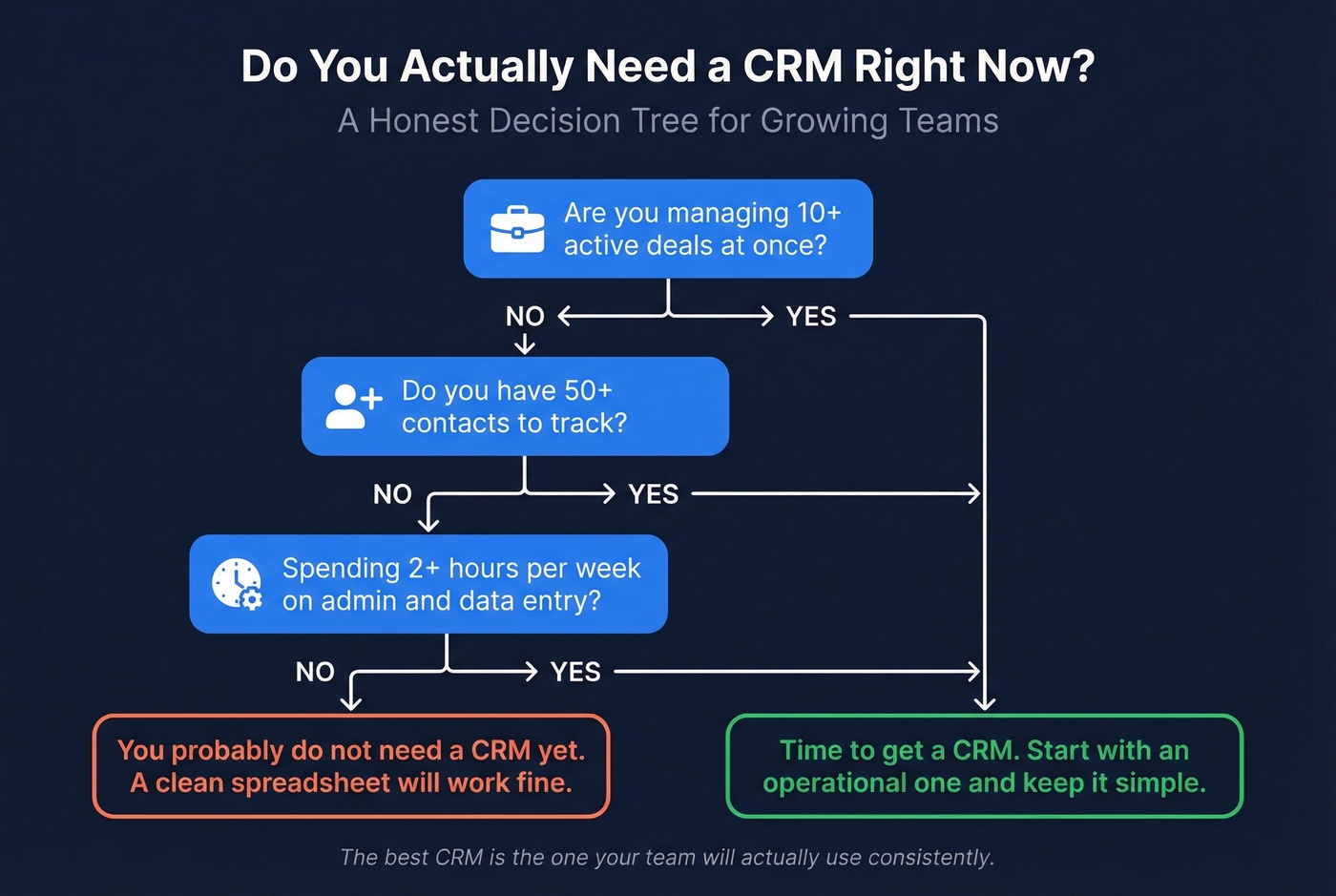
That said, there are clear signals you've outgrown manual tracking. HubSpot's framework nails the triggers:
- You're managing 10+ active deals simultaneously
- Your contact list has crossed 50+ people you need to stay in touch with
- You're spending 2+ hours per week on admin tasks like updating spreadsheets or searching for conversation history
- You're hiring a second salesperson and need shared visibility into accounts
- You've lost a deal because someone forgot to follow up - and it wasn't the first time
Here's the counter-signal most vendors won't tell you: if none of those apply, buying a CRM will slow you down. You'll spend weeks configuring custom fields and workflows when a basic contact database would've solved the problem. The Reddit consensus on r/smallbusiness is clear - the best CRM is the one your team will actually use consistently. If that's a Google Sheet today, that's fine.
Our hot take: Most companies buy a CRM 6 months too early and then blame the software when adoption stalls. The real trigger isn't a feature list - it's the moment you realize you can't hold all your customer relationships in your head anymore.
A Simple 3-Week Migration Plan
If you've hit those triggers, here's how to move from spreadsheets to a CRM without losing your mind:
Week 1 - Data prep. Export your contacts, deduplicate, and fill in missing fields. This is the most important week. Garbage in, garbage out.
Week 2 - Setup and import. Configure your pipeline stages (keep it to 5-7 max), import your cleaned data, and connect your email.
Week 3 - Team enablement. Train your team on the 3-4 workflows they'll use daily. Skip the advanced features for now. Build one dashboard everyone checks Monday morning.
What a CRM Does in Business
At its core, a CRM in business comes down to five functions. Everything else is gravy.
Contact management is the foundation - a single database of every person and company you interact with, including conversation history, deal status, and notes. Pipeline tracking visualizes where every deal stands, from first touch to closed-won. Marketing automation handles email sequences, lead scoring, and campaign tracking. Service and support manages tickets, chat, and customer success workflows. Analytics and reporting turns all that activity data into dashboards your leadership team can actually use.
The adoption numbers are striking. 91% of companies with 10+ employees now use some form of CRM, and 87% of those run cloud-based platforms. The average return is $8.71 for every $1 spent - but only if your team actually uses the system.
Here's the thing: 43% of CRM customers use fewer than half the features they're paying for. That stat should make you pause before buying the enterprise tier. Most teams need contact management, pipeline tracking, and basic email integration. The AI-powered predictive analytics and omnichannel orchestration features sound impressive in a demo, but they collect dust in most organizations. Start with the core. Add complexity only when you've earned it through consistent adoption.
Types of CRM Systems
Not all customer relationship management platforms solve the same problem. There are four distinct types, and picking the wrong one is how you end up paying enterprise prices for features your team never touches.
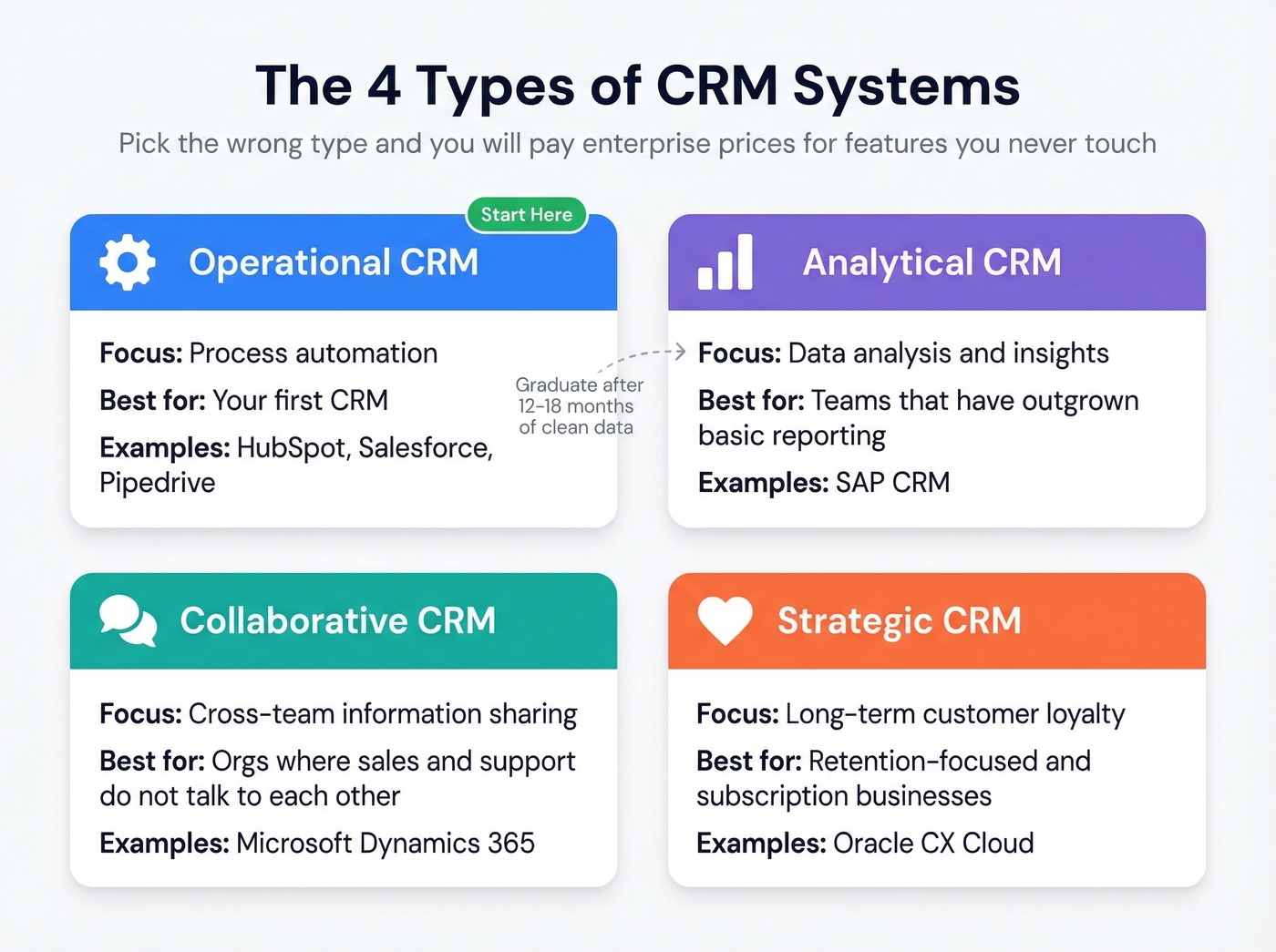
| Type | Primary Focus | Best For | Example |
|---|---|---|---|
| Operational | Process automation | Your first CRM | HubSpot, Salesforce, Pipedrive |
| Analytical | Data analysis | Outgrowing basic reporting | SAP CRM |
| Collaborative | Cross-team sharing | Orgs where sales and support don't talk | Microsoft Dynamics 365 |
| Strategic | Long-term loyalty | Retention-focused businesses | Oracle CX Cloud |
If you're reading this article, you almost certainly need an operational CRM. Start there.
Operational CRM
This is what most people mean when they say "CRM." Operational platforms automate customer-facing processes - lead tracking, email campaigns, ticketing, chatbots. Salesforce and HubSpot are the obvious examples. If you're a sales-led organization running outbound, this is your starting point. We've seen teams try to jump straight to analytical platforms and regret it within a quarter because they didn't have enough clean data to analyze in the first place.
Analytical CRM
You'll know you need an analytical CRM when your sales manager starts asking questions your operational platform can't answer - things like "which lead source produces the highest LTV?" or "what's our churn risk by segment?" SAP CRM is a common enterprise option here. You typically don't start with this type; you graduate to it after 12-18 months of clean operational data.
Collaborative CRM
Picture this: a customer calls support about a billing issue, and the agent has no idea the sales team just closed a $50k expansion deal with that same account last week. Collaborative CRMs prevent that by sharing customer context across sales, marketing, and service so everyone sees the same account history. Microsoft Dynamics 365 is the go-to example.
Strategic CRM
Skip this unless customer retention is your primary growth lever. Strategic CRMs orient everything around lifetime value - loyalty programs, relationship strategies, and customer-centric decision frameworks. Subscription businesses and high-touch service companies get the most from this type.

The article says it plainly: 55% of CRM implementations fail because of bad data. Prospeo's CRM enrichment fills your contact records with 50+ verified data points at a 92% match rate - so your new CRM starts clean and stays clean.
Stop feeding your CRM garbage. Start with verified data at $0.01 per email.
CRM vs CDP vs ERP vs Spreadsheets
The alphabet soup gets confusing fast. Here's how they differ, building on HubSpot's comparison framework:
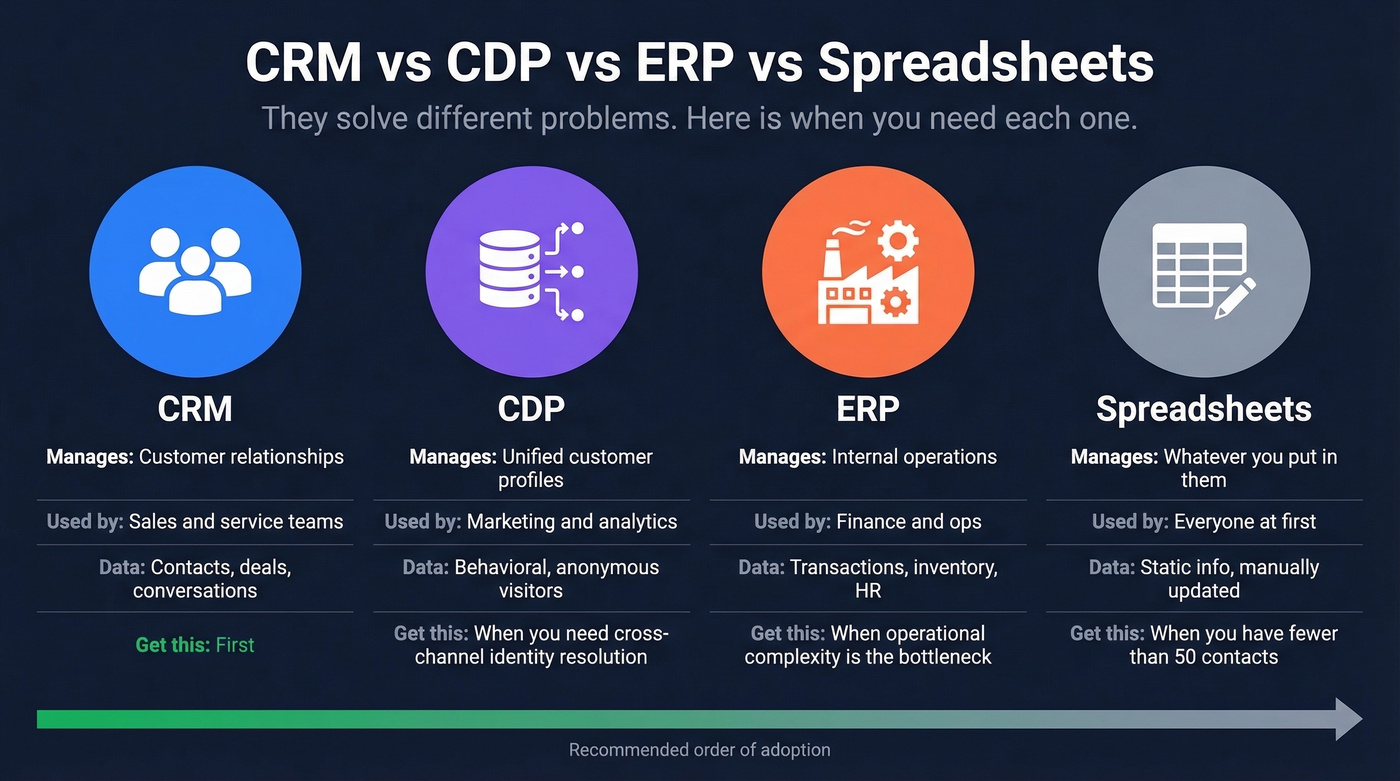
| Tool Type | Primary Use | Typical User | Data Focus |
|---|---|---|---|
| CRM | Manage relationships | Sales, service | Contacts, deals |
| CDP | Unify customer data | Marketing, analytics | Behavioral, anonymous |
| ERP | Run operations | Finance, ops | Transactions, inventory |
| Marketing automation | Execute campaigns | Marketing | Campaign performance |
| Spreadsheets | Manual tracking | Anyone | Static info |
The key distinction: a CRM manages customer-facing relationships. An ERP manages internal operations like inventory, accounting, and HR. A CDP unifies data across all touchpoints, including anonymous website visitors. And spreadsheets are where everyone starts and where too many teams stay too long.
For teams wondering whether they need a CRM or an ERP, the answer is CRM first. ERPs solve operational complexity; CRMs solve revenue complexity.
Why 55% of Implementations Fail
Everyone tells you to "get a CRM" like it's a magic bullet. It's not.
Johnny Grow's research defines CRM failure as not achieving planned objectives - and by that measure, 55% of implementations fail. When objectives weren't met, the average variance was 51%, meaning teams achieved less than half of what they planned. Only 25% of projects hit their objectives within the planned timeline and budget.
The Data Quality Problem
The #1 killer isn't the software. It's the data inside it.
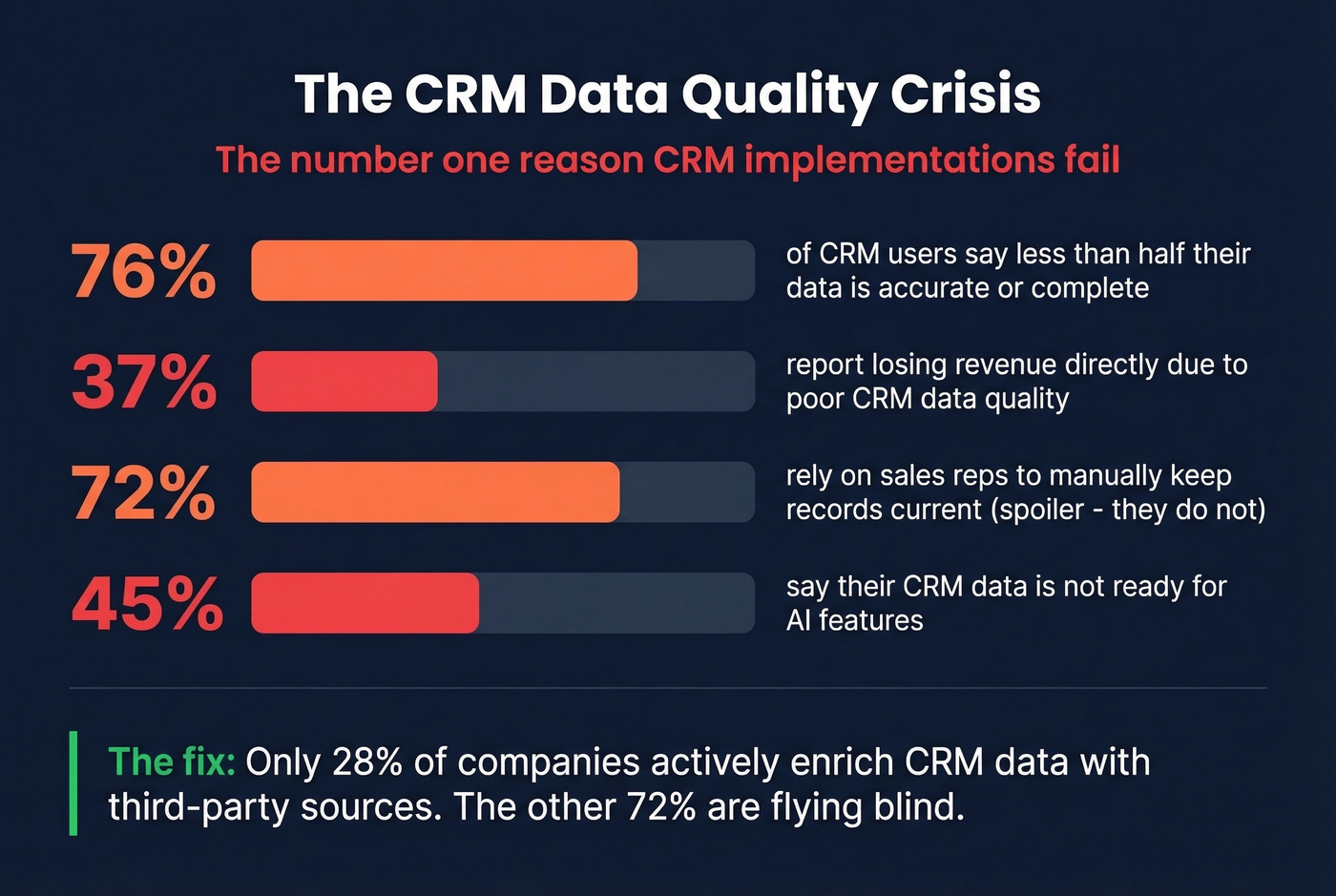
76% of CRM users say less than half of their CRM data is accurate or complete. The downstream effects are brutal: 37% report losing revenue due to poor data quality, 45% say their CRM data isn't ready for AI use, and only 32% of companies have achieved a unified customer view. Only 28% actively enrich their CRM data using third-party sources, which means the other 72% are relying on their reps to manually keep records current. We've all seen how that plays out.

Five Mistakes That Kill Adoption
Based on common patterns documented by practitioners and what we've seen firsthand:
No clear goals before implementation. Teams buy a CRM because "we need one," then wonder why nobody uses it. Define 3-5 specific outcomes before you sign a contract.
No staff buy-in or training. The CRM gets imposed top-down without input from the people who'll use it daily. Involve 2-3 reps in the evaluation process and budget for real onboarding.
Dirty data from day one. Duplicates, incomplete records, and outdated contacts poison the system before it has a chance. Clean your data before migration, not after.
Ignoring reporting features. Only 20% of small business owners use analytics and reporting weekly. Build one dashboard your team checks every Monday.
No scalability plan. You pick a tool that works for 5 users but breaks at 50. Choose a platform with a clear upgrade path, even if you start on the free tier.
Let's be honest: implementation matters more than features. A perfectly configured Salesforce instance that nobody uses is worth less than a basic HubSpot setup that your team actually opens every morning.
How to Keep CRM Data Clean
If data quality is the #1 implementation killer, then data hygiene is the #1 insurance policy. Here's what actually works.
Deduplicate aggressively. Before migration and on an ongoing basis. Most CRMs have built-in dedup tools - use them. Schedule manual cleanups at least twice a year.
Automate enrichment with a third-party tool. This is where the 28% who enrich with external sources pull ahead of everyone else. Your CRM is only as good as the data inside it. Prospeo plugs into Salesforce and HubSpot and keeps contact data verified and fresh on a 7-day refresh cycle, so your team trusts the data enough to actually use the system. With 98% email accuracy, an 83% enrichment match rate, and 50+ data points returned per contact, it solves the decay problem that manual updates never will. If you're comparing providers, start with a shortlist of data enrichment services.

Assign data ownership. 34% of organizations don't even know who's responsible for CRM data accuracy. Pick someone. Give them a quarterly review cadence. Make data quality a metric, not an afterthought.
43% of CRM users pay for features they never touch. The one feature every team needs? Accurate contact data. Prospeo delivers 98% email accuracy with a 7-day refresh cycle, plugging directly into Salesforce and HubSpot.
Your CRM works when your data works. Get 75 free verified emails now.
What a CRM Actually Costs
Pricing varies wildly, but here's what you should expect in 2026:
- SMB CRMs: typically $15-$30/user/month for basic sales pipeline + contact management
- Pro tiers: typically $50-$150/user/month once you add automation, reporting, permissions, and advanced integrations
- Enterprise contracts: often $20k-$100k+/year depending on seats, modules, support, and implementation scope
Where costs spiral isn't the sticker price - it's seats, tier upgrades for features you thought were included, and paid add-ons. A 10-seat Salesforce deployment with the modules most teams actually need can easily run $20-$30k/year. If you want a side-by-side on common tools, see these examples of a CRM.
The software cost is rarely the real problem. The implementation cost - time, training, data migration, customization - is where budgets blow up. Budget 2-3x the license cost for the first year if you're doing this properly.
Where CRM Is Headed in 2026
The CRM category is going through its biggest shift since the move to cloud. Three trends are reshaping what these platforms mean going forward.
AI is everywhere. The AI-in-CRM market is projected to grow from $4.1 billion in 2023 to $48.4 billion by 2033. Already, 83% of companies report using AI in their CRM workflows, with response times improving 30-50%. McKinsey projects productivity gains up to 40% for organizations integrating agentic AI into daily workflows.
CRM and CDP are merging. Gartner forecasts that 70%+ of enterprise CRM platforms will embed CDP capabilities by end of 2026. The line between "managing relationships" and "unifying customer data" is disappearing.
Process alignment is becoming non-negotiable. Forrester found that 58% of B2B companies cite process misalignment as their primary barrier to growth. CRM is evolving from a sales tool into the connective tissue between revenue operations, marketing, and customer success. Nearly half of new CRM-related investment is going to data architecture, AI infrastructure, and analytics rather than traditional licenses and modules. The platform matters less than the data flowing through it - which is why data quality tools that refresh records weekly are becoming table stakes, not nice-to-haves. The fanciest AI features in the world can't compensate for a database where 76% of records are incomplete. If you're building the workflow around outbound, pair your CRM with proven sales prospecting techniques and a consistent sequence management process.
FAQ
What is the meaning of CRM systems?
CRM systems meaning refers to Customer Relationship Management - both the strategy of managing customer interactions across every touchpoint and the software that automates it. In everyday use, people almost always mean the software: a platform that stores contacts, tracks deals, and logs communication history in one centralized database.
How does a CRM differ from an ERP?
A CRM manages customer-facing relationships - sales pipelines, marketing campaigns, and service tickets. An ERP manages internal operations like inventory, accounting, and HR. Most growing companies need a CRM long before they need an ERP, since revenue complexity typically outpaces operational complexity.
How much does a CRM cost for a small business?
Free tiers from HubSpot and Zoho are genuinely functional for small teams. Paid plans typically start at $15-30/user/month. Enterprise platforms run $20k-100k+/year depending on seats and add-ons. Budget 2-3x the license cost for implementation in year one.
Why do CRM implementations fail?
The #1 reason is bad data - 76% of CRM users say less than half their records are accurate. Other causes include no clear goals before implementation, poor user adoption, and overcomplication. The failure rate sits at 55% by most estimates, and it's almost always a people and data problem rather than a software problem.
How do I keep my CRM data accurate?
Use a data enrichment tool to verify and refresh contacts automatically on a recurring cycle. Schedule manual cleanups twice a year, deduplicate regularly, and assign a specific person to own data quality - if nobody owns it, nobody maintains it.