


CUFinder vs Power Almanac: Different Tools for Different Jobs
An SDR building a prospecting list for municipal software sales pulls 500 contacts from a general B2B database, loads them into a sequence, and watches half the emails bounce. The problem isn't effort - it's that general databases weren't built for government outreach.
CUFinder vs Power Almanac is a comparison that comes up because both tools "provide contacts," but they serve fundamentally different markets. Choosing between them comes down to one question: who are you selling to?
30-Second Verdict
- You sell to local government (cities, counties, townships) - Power Almanac. Nothing else comes close for this niche.
- You need both - Use two tools. These databases have zero overlap.
What Each Tool Actually Does
CUFinder
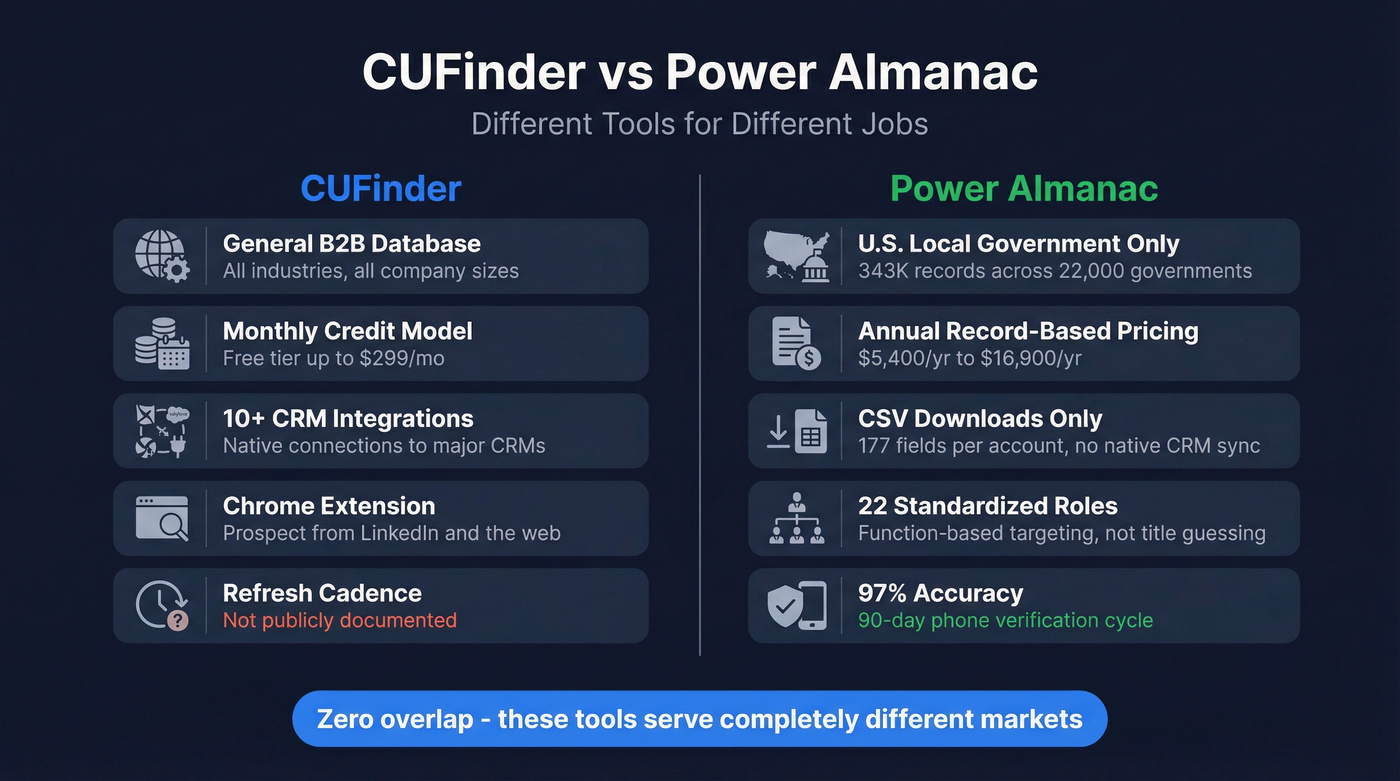
CUFinder is a general-purpose B2B sales intelligence platform offering contact search, company enrichment, Chrome extensions, and 10+ CRM integrations. Pricing runs on monthly credits from a free tier up to $299/mo. G2 reviewers rate it 4.8/5 across 906+ reviews, and Capterra scores sit at 4.9/5 with 21+ reviews.
Like any data provider, the number that matters most is your bounce rate. Test it with a small batch before you commit.
Power Almanac
Power Almanac is a U.S. local government contacts database - 343,000 records across 22,000 cities, counties, and townships, covering 99% of local governments serving populations of 1,000+. It's built exclusively for U.S. local government, not commercial B2B lists.
What makes it valuable: 18 full-time researchers call all 22,000 governments every 90 days. Emails get revalidated every two weeks through ZeroBounce. The result is 97% accuracy with 100% phone verification, and one customer testimonial reports 85% of records include email addresses. GovExec - the company behind Government Executive and Nextgov - acquired Power Almanac in 2022, giving it the backing of a major government-focused media and information company. That acquisition matters because it signals long-term investment in the dataset, not just a side project someone might abandon.
Feature-by-Feature Comparison
| Feature | CUFinder | Power Almanac | Edge |
|---|---|---|---|
| Database size | Large general B2B database | 343K records | CUFinder (volume) |
| Target market | All industries | U.S. local gov only | Depends on buyer |
| Targeting model | Contact/company search + enrichment | 22 standardized roles | Power Almanac (gov) |
| Claimed accuracy | Not publicly documented | 97%+, phone-verified | Power Almanac |
| Data refresh | Not publicly documented | 90-day call cycle | Power Almanac |
| CRM integration | 10+ native integrations | CSV downloads + Local Government Account File (177 fields) | CUFinder |
| Pricing model | Monthly credits | Annual record-based | CUFinder (flexibility) |
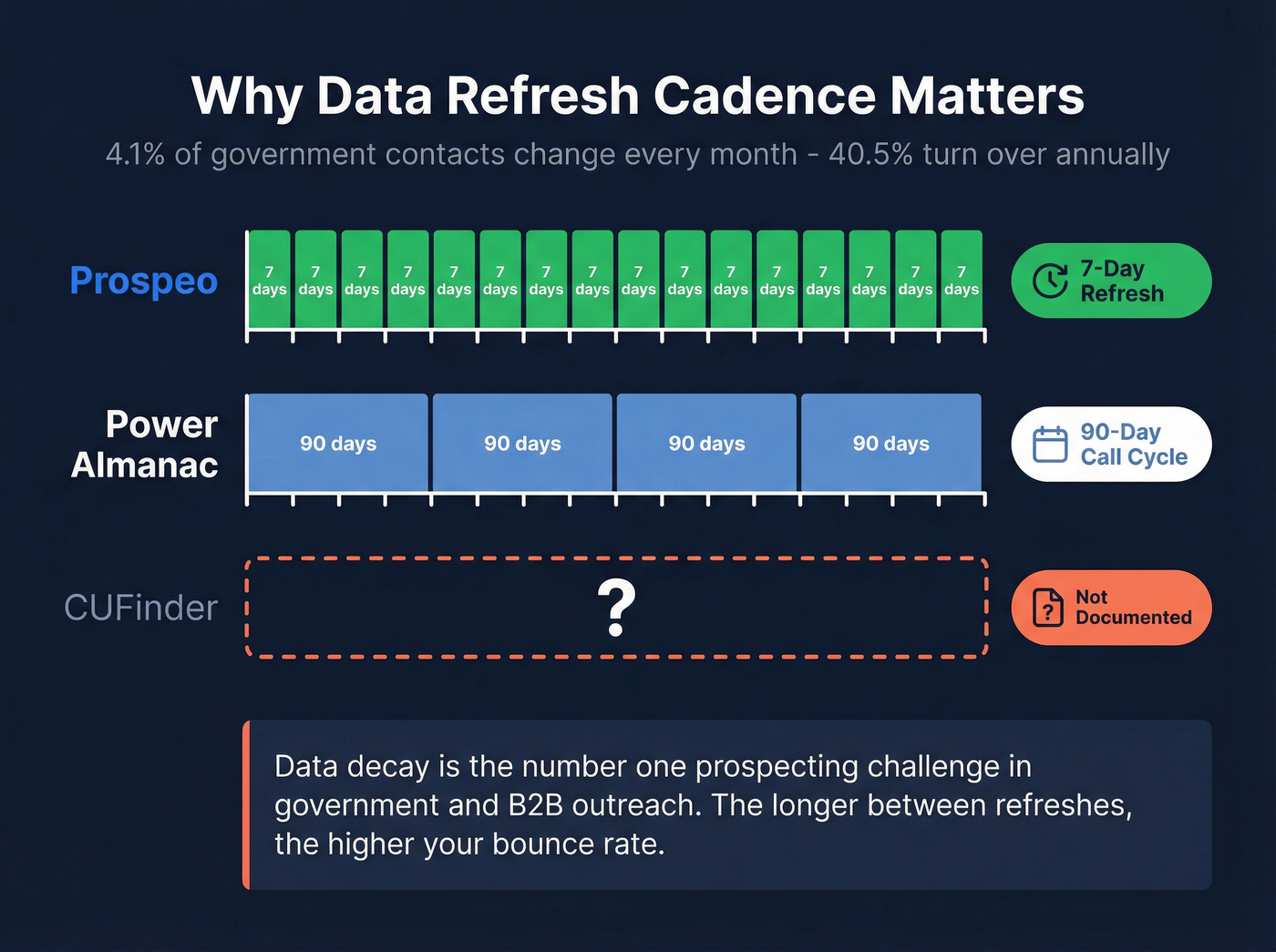
The role-based targeting deserves a closer look. In local government, titles are wildly inconsistent - a city clerk might be listed as "City Manager," "Director of Administration," or "Clerk-Treasurer" depending on the municipality. Power Almanac normalizes these into 22 standardized roles, so you're targeting by function rather than guessing at titles. That matters when 4.1% of contact records change monthly and 40.5% turn over annually.
Here's the thing SLED sellers already know: data decay is the #1 prospecting challenge in government outreach. Power Almanac's 90-day refresh cycle exists specifically because of that churn.

If you're comparing CUFinder vs Power Almanac for commercial B2B outreach, neither tool solves the core problem: data freshness. Prospeo refreshes every 7 days - not 90 - with 98% email accuracy across 300M+ profiles. That means fewer bounces and cleaner sequences at ~$0.01 per email.
Stop watching half your emails bounce. Start with 75 free verified contacts.
Pricing Compared
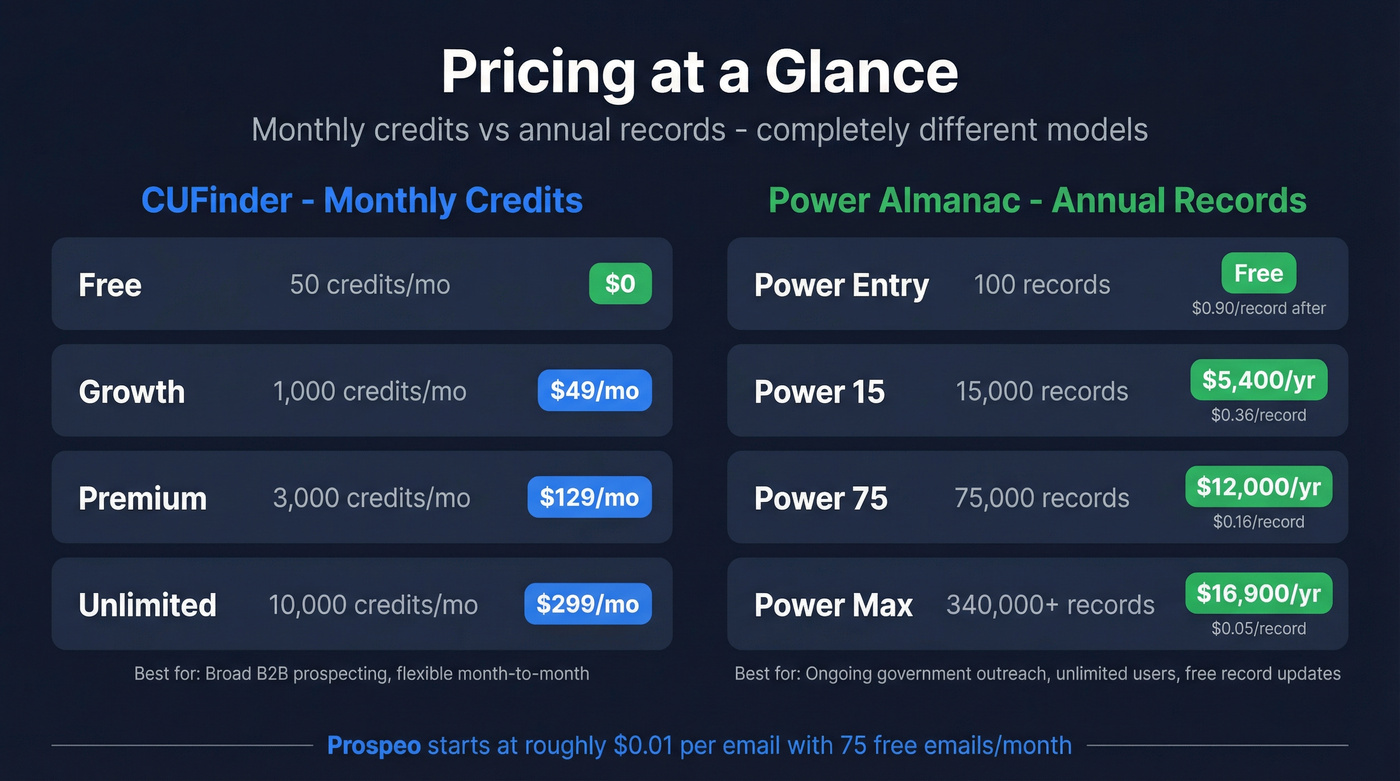
CUFinder:
| Plan | Price | Credits/mo |
|---|---|---|
| Free | $0 | 50 |
| Growth | $49/mo | 1,000 |
| Premium | $129/mo | 3,000 |
| Unlimited | $299/mo | 10,000 |
Power Almanac:
| Plan | Price | Records | Cost/Record |
|---|---|---|---|
| Power Entry | $0 (100 free) | 100 | $0.90/record |
| Power 15 | $5,400/yr | 15,000 | $0.36 |
| Power 75 | $12,000/yr | 75,000 | $0.16 |
| Power Max | $16,900/yr | 340,000+ | $0.05 |
CUFinder's monthly credits suit teams doing broad B2B prospecting - you burn credits as you search. Power Almanac's annual model makes more sense for ongoing government outreach, since plans include unlimited users and free updates for downloaded records. Subscribers can also refresh downloaded data weekly at no extra charge.
Which Should You Choose?
Use Power Almanac if you sell to municipalities, counties, or townships. Only about 25% of local governments even have a dedicated IT head, according to a CivicPulse survey of 1,199 senior officials - which means you're often selling to generalists who wear multiple hats. That's exactly why role-based targeting matters more than title-based search, and why Power Almanac's government-specific filters (population, departmental spending, fiscal year end) beat anything a general database offers. No contest.
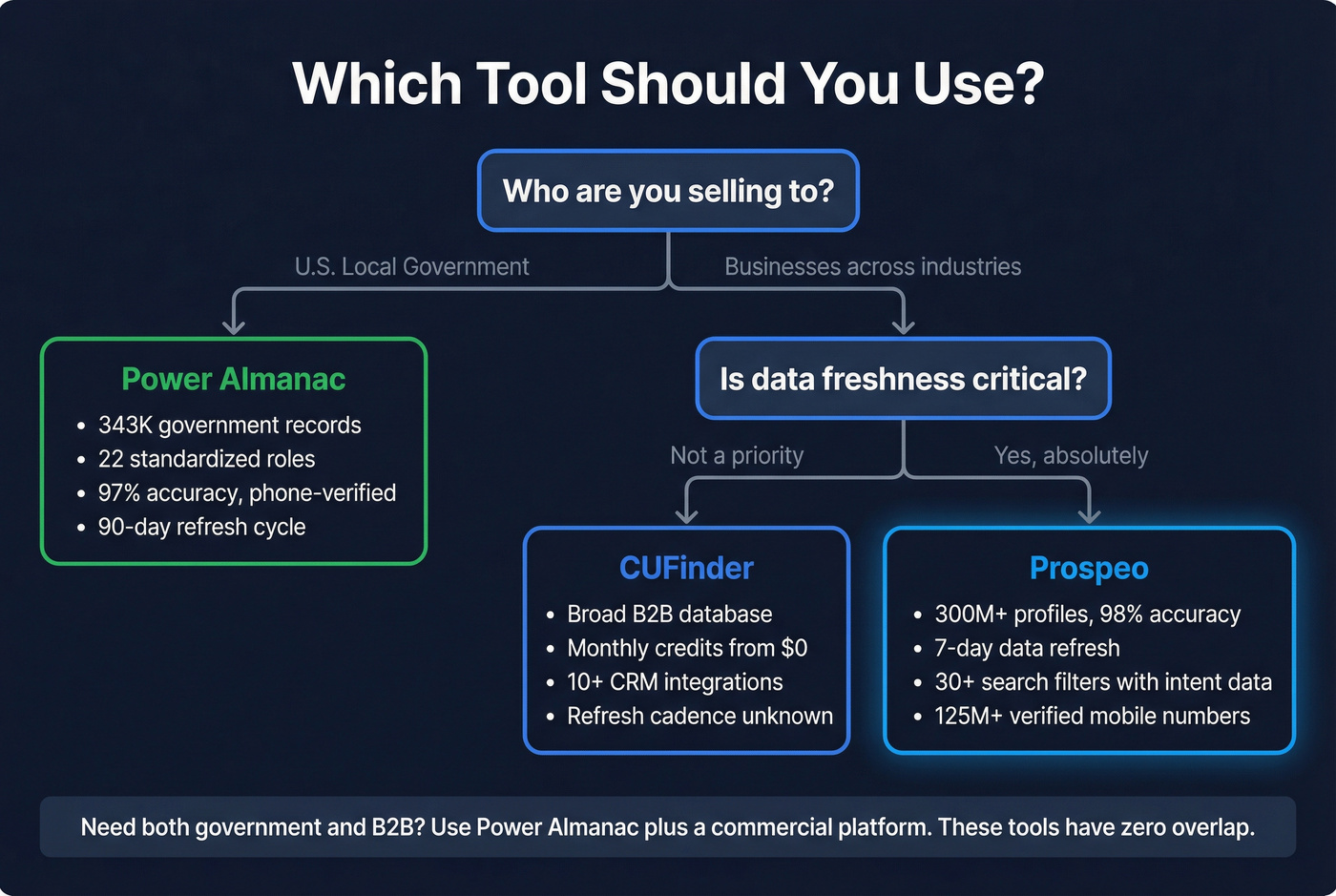
Use CUFinder if you sell to businesses across industries and need a broad, affordable prospecting tool. The low entry price makes it accessible. But the real test of any data platform is bounce rate, and CUFinder doesn't publicly document its refresh cadence - a red flag for teams running high-volume outbound.
Use both if you need general B2B and government contacts. These tools don't compete. They don't even overlap.
Look - if your average deal size is under $15k and you're selling to businesses (not government), you probably don't need a massive database. You need 500 accurate contacts per month with emails that actually land. That's a data quality problem, not a database size problem.
If Neither Tool Fits
For the reader who landed here needing general B2B data, we've tested a lot of platforms and keep coming back to Prospeo. It covers 300M+ professional profiles with 98% email accuracy and 143M+ verified emails. The 7-day data refresh cycle means fewer bounces and cleaner sequences. Paid plans start at roughly $0.01 per email, with a free tier offering 75 emails/month. Self-serve, no contracts.
When we compare CUFinder vs Power Almanac against a platform like Prospeo, the difference is clear: 30+ search filters - including buyer intent, technographics, job changes, and headcount growth - give commercial B2B teams far more targeting precision than a basic contact search. And with 125M+ verified mobile numbers (30% pickup rate), you're not limited to email-only outreach.

CUFinder doesn't publish its refresh cadence. Power Almanac only covers government. For B2B teams selling across industries, Prospeo delivers 30+ search filters - buyer intent, technographics, job changes, headcount growth - plus 125M+ verified mobile numbers with a 30% pickup rate.
Target by what matters, not just job titles. No contracts, no sales calls.
FAQ
Is Power Almanac useful outside local government?
No. It covers only U.S. cities, counties, and townships - 22,000 governments total. For B2B contacts across commercial industries, you need a general sales intelligence platform.
Does CUFinder have local government contacts?
You can sometimes find government officials in general B2B databases, but they typically lack Power Almanac's role-based targeting, 90-day call cycle, and specialized government filters like population and departmental spending. For government outreach, a general database creates more cleanup work than it saves.
Can I use Power Almanac data in my CRM?
Yes, via CSV downloads. Power Almanac provides Person ID and Role ID file formats with 177 fields per account. Use the Power Almanac Account ID - not email - as your unique identifier, since local governments often share emails across multiple officials. Include county in your naming convention to avoid merge conflicts from duplicate government names.
What's the best option if I need both B2B and government data?
Use Power Almanac for government contacts and a dedicated B2B platform for commercial prospecting. Let's be honest - trying to force one tool to do both jobs is how you end up with a 40% bounce rate and a burned domain. Split the workflows and use the right tool for each.