How to Track Sales Triggers: The Operational Playbook for 2026
Your SDR spots a $20M Series B announcement. Perfect ICP. They pull up the VP of Engineering, draft a killer opening line referencing the raise, hit send - and the email bounces. The trigger was flawless. The data was stale. That's how most trigger programs die: not from bad detection, but from bad plumbing. Knowing how to track sales triggers is only half the battle. You need the infrastructure to act on them before the window closes.
Generic cold emails pull a 3.4% reply rate. Signal-personalized outreach hits 18%. That's a roughly 5x multiplier sitting on the table for any team willing to build the system. And with 61% of B2B buyers now preferring a completely rep-free buying experience, the bar for relevance and timing has never been higher.
Let's build it.
What You Need (Quick Version)
- Track 5 triggers, not 25. Match them to your ICP and your closed-won data. More triggers means more noise, not more pipeline.
- Automate routing and SLAs in your CRM. Manual spreadsheets die within two weeks. Every time. Build workflows that assign, notify, and enforce deadlines.
- Score and decay triggers so reps work the hottest signals first. A funding round from yesterday beats a job change from six weeks ago.
- Verify contact data before outreach. A perfect trigger with a bounced email is a wasted trigger.
That's the skeleton. Now let's put muscle on it.
Sales Triggers vs. Intent Data: Definitions That Matter
These three terms get used interchangeably, and they shouldn't.
Intent data tracks anonymous content consumption at the account level - someone at Acme Corp is reading articles about "cloud migration," but you don't know who. Trigger events are specific, observable occurrences: Acme Corp just raised a Series C, or their VP of Sales just changed jobs. Signal-based selling is the umbrella that combines both, layering behavioral, financial, and competitive intelligence into a unified prioritization model.
| Intent Data | Trigger Events | Signal-Based Selling | |
|---|---|---|---|
| Definition | Anonymous content consumption signals | Specific observable events | Umbrella combining both |
| Example | Account researching "ERP migration" | CFO hired, $30M Series B | Funding + intent surge + job change |
| Limitation | Noisy, account-level only | Point-in-time, needs fast action | Requires integration across sources |
For context, the average cold email reply rate across 12 million emails analyzed by Backlinko sits at 8.5%. Signal-timed outreach more than doubles that. 73% of B2B buyers actively avoid suppliers who send irrelevant outreach. Conflating a vague intent signal with a concrete trigger event is exactly how you end up in the spam folder.
12 Triggers That Actually Move Pipeline
Most trigger lists you'll find online include 20-30 events. That's a recipe for alert fatigue. You won't track all 12 below - you'll pick the 5 that map cleanly to your ICP and closed-won data.
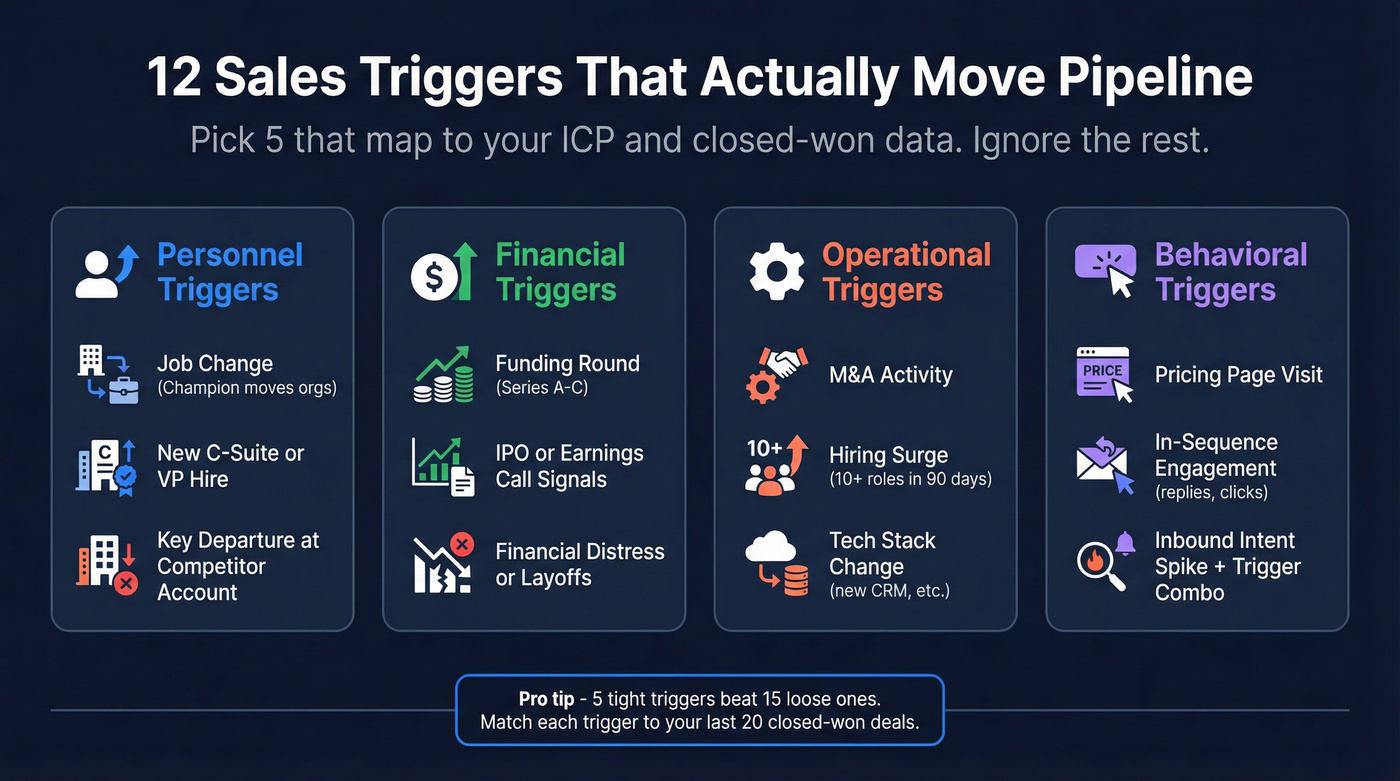
Personnel Triggers
Job change. A champion who used your product at their last company just moved to a new org. Reach out within the first 30 days before they've locked in vendors. (If you run champion programs, see job-change tracking.)
New C-suite or VP hire. New leaders bring new budgets. A freshly hired CRO is actively looking for tools to hit their first-quarter number.
Key departure. When your competitor's champion leaves an account, the replacement hasn't formed vendor loyalty yet. That's your opening.
Financial Triggers
Funding round. Post-raise companies have capital and pressure to deploy it. Series A through C are the sweet spots for most B2B vendors.
IPO or earnings. Public filings reveal strategic priorities. An earnings call mentioning "investing in go-to-market efficiency" is a direct signal for sales tools.
Financial distress. Layoffs, stock drops, or bankruptcy filings signal budget restructuring. If you sell cost-reduction solutions, these are gold.
Operational Triggers
M&A activity. Mergers create integration projects, redundant tech stacks, and new budget conversations.
Hiring surge. A 90-day spike in job postings signals growth investment. If they're hiring 15 SDRs, they need data, sequencing tools, and training. (More ideas: hiring signals.)
Tech stack change. If a prospect just adopted HubSpot, they're in buying mode for the ecosystem around it. Technographic signals are underrated. (Related: firmographic and technographic data.)
Behavioral Triggers
High-intent website actions. Pricing page visits, demo requests, and contact form submissions are fast-decaying triggers that demand fast response.
In-sequence engagement. Replies and link clicks inside your sequences are immediate "work this now" signals.
Inbound intent spikes. A sudden surge in account-level intent becomes dramatically more useful when it lines up with a concrete trigger like funding, hiring, or a leadership change.
How to Build a Trigger Tracking System
This is where most articles wave their hands and say "use a tool." Here's the thing: the hardest part isn't finding triggers. It's building the routing and SLA infrastructure to act on them before the window closes.
Step 1 - Map Triggers to Your ICP
Before you set up a single alert, answer one question for each trigger: does this event make the account more likely to buy our product in the next 90 days? If the answer isn't a clear yes, cut it.
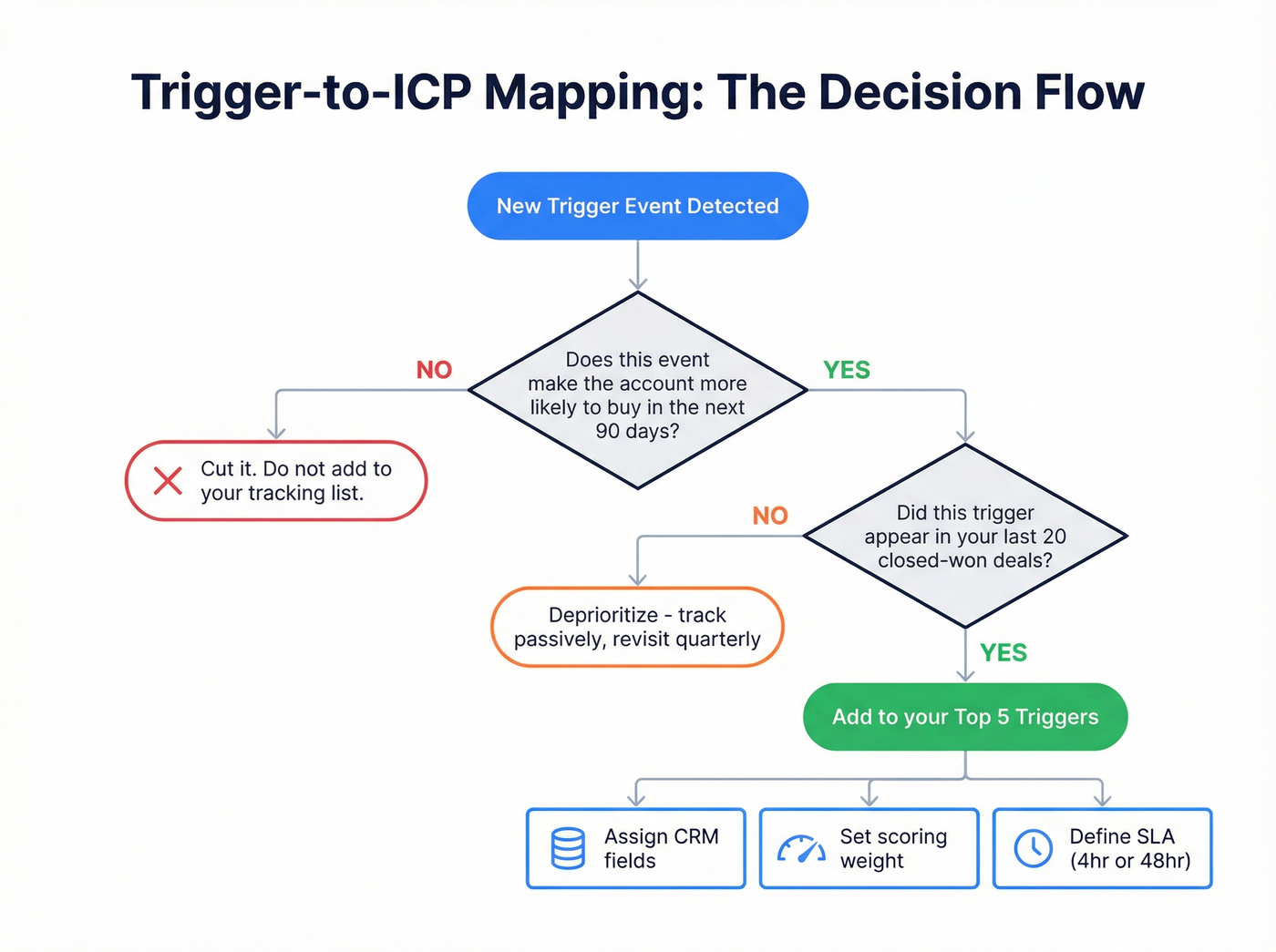
Build a simple mapping table and pressure-test it against your last 20 closed-won deals. (If you need a tighter definition, start with account qualification.)
| Trigger | ICP Criteria It Validates |
|---|---|
| Series A-C funding | Has budget, in growth mode |
| New VP Sales hired | Decision-maker with mandate |
| Hiring 10+ SDRs | Needs sales infrastructure |
| Competitor churned | Actively evaluating alternatives |
| Tech stack change (CRM) | In buying mode for ecosystem |
We've seen teams track 15+ triggers and end up with an alert feed nobody reads. Five tight triggers beat fifteen loose ones every time.
Step 2 - Set Up Your Monitoring Stack
Your monitoring stack should match your budget and team size. Don't overspend on dedicated trigger platforms until you've proven the workflow works.
Free tier. Google Alerts for company news and competitor mentions. SEC/EDGAR filings for financial events. Industry publications for regulatory changes. This works for teams tracking up to about 20-30 accounts, but it breaks fast beyond that.
Mid-market ($29-99/mo). Sales intelligence platforms that bundle contact data with alerting for common triggers like job changes, funding news, and hiring signals. Apollo from $49/mo is a popular starting point. Lusha from $29/mo and Hunter from $49/mo cover similar ground with different strengths. LeadIQ from $39/mo is solid for SDR teams needing CRM sync. (If you’re comparing options, see sales prospecting platforms.)
Enterprise ($450+/mo). Dedicated trigger platforms like Trigify from $450/mo offer 30+ pre-built trigger events and AI-powered custom triggers. UserGems specializes in job-change tracking for enterprise champion programs. These make sense once you have 50+ reps consuming trigger event data daily.
Step 3 - Automate Routing in Your CRM
If a trigger fires and sits in a spreadsheet waiting for someone to manually assign it, you've already lost the timing advantage.
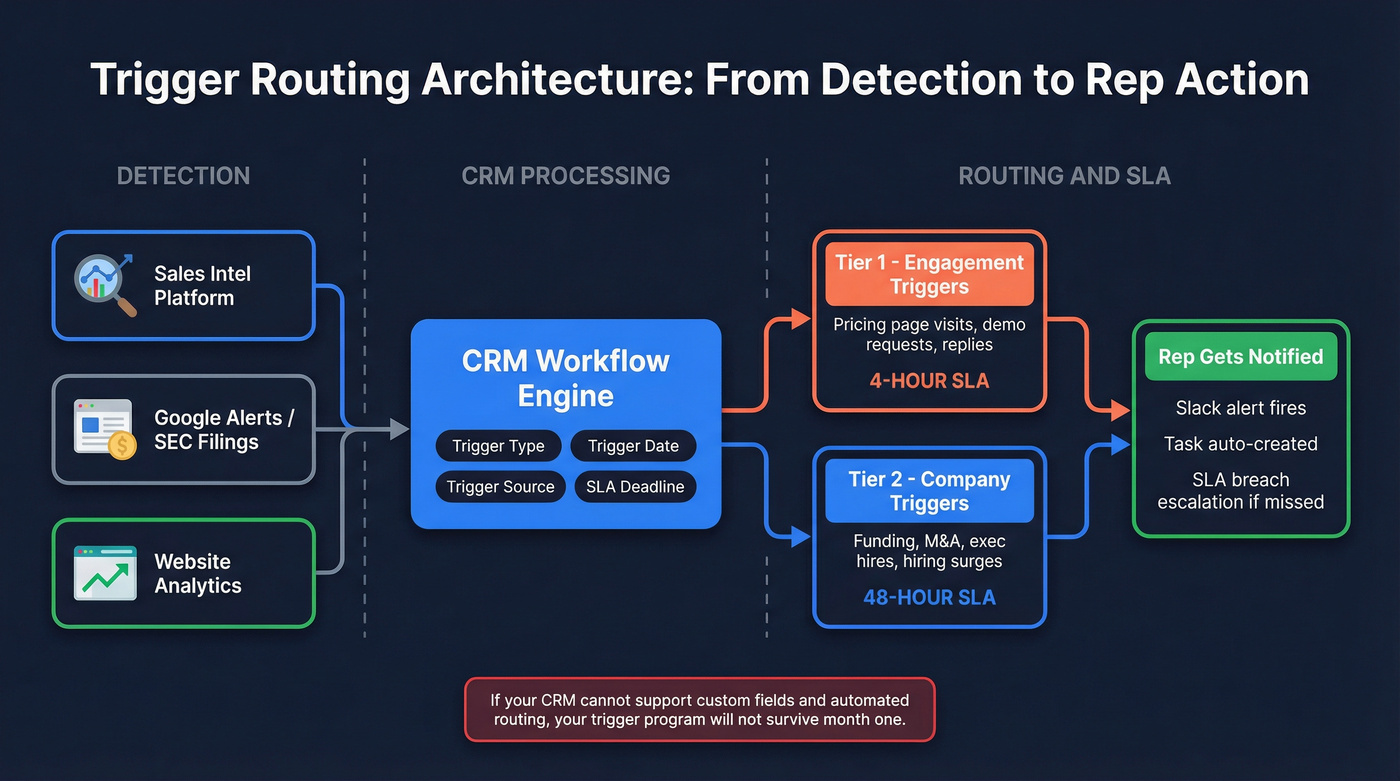
Every trigger-generated lead needs four CRM fields at minimum: trigger type, trigger date, trigger source, and SLA deadline. These fields power everything downstream - routing rules, reporting, and rep accountability. HubSpot's workflow engine handles this well, letting you build if/then branches across multiple objects and update lifecycle stages based on trigger type. Close CRM takes a different approach with event-based triggers from Custom Activities, Opportunities, and Contacts, plus guardrail features like minute-level delays that prevent reps from getting blasted with 50 alerts at once, email draft review steps for high-value triggers, and blackout dates that skip holidays.
Set two SLA tiers. Engagement triggers like pricing page visits and demo requests get a 4-hour SLA. Company-level triggers like funding, M&A, and exec hires get 48 hours. The SLA isn't a suggestion - build alerts that fire when it's breached. (If you want a routing-first framework, use AI lead qualification as a template.)
If your CRM can't support custom fields and automated routing, your trigger program won't survive its first month.
Step 4 - Score and Prioritize Triggers
Not all triggers are equal, and they decay fast. A funding round announced yesterday is gold. The same funding round six weeks later? Every sales tool on the planet has already emailed that VP.
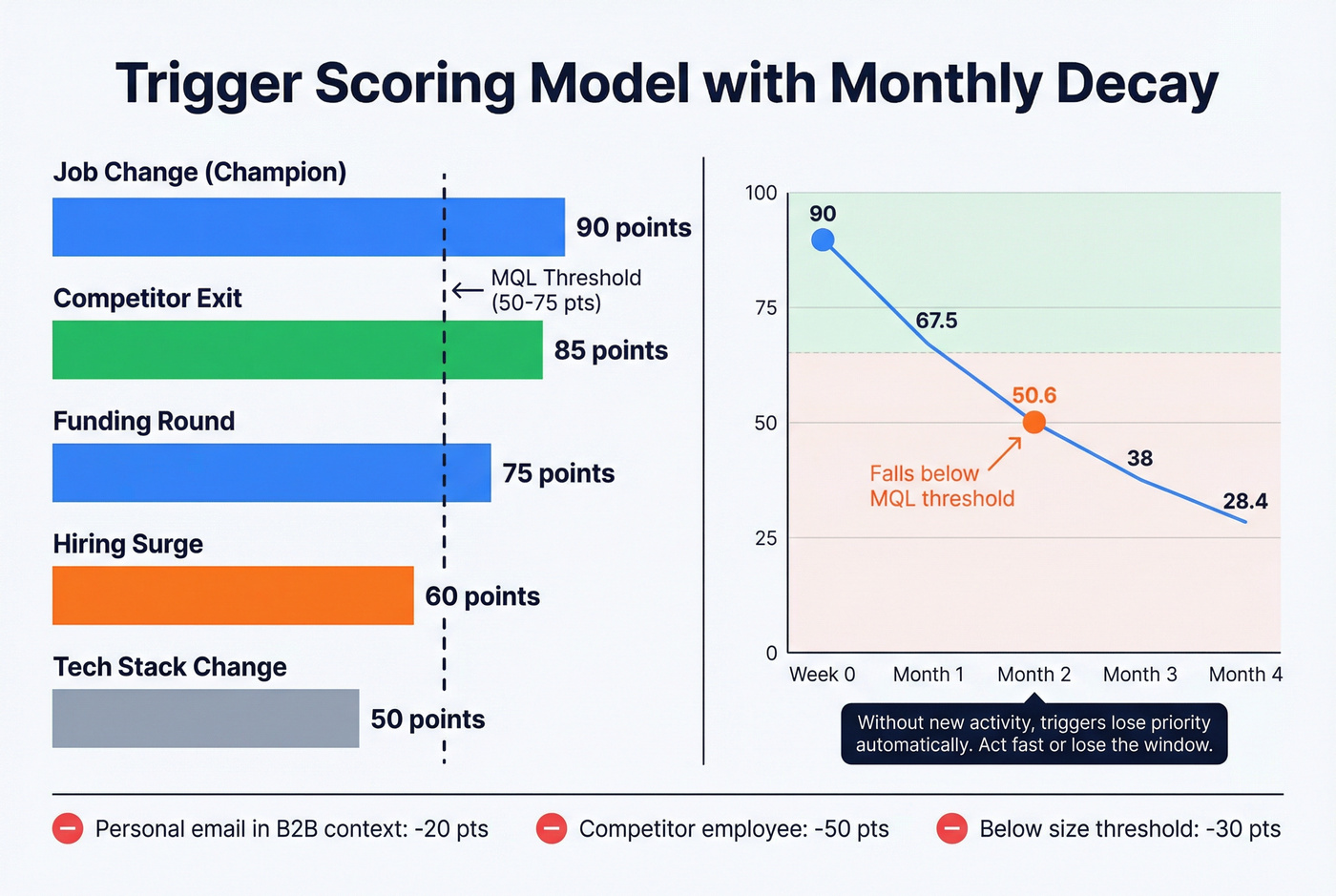
Start with 5-7 core scoring criteria that predict roughly 80% of your conversions. Set your MQL threshold at 50-75 points on a 100-point scale. Apply a 25% monthly score decay - without new activity, a trigger-generated lead should lose priority automatically. (For a full build, see lead scoring system.)
| Trigger Type | Base Points | Decay Rate |
|---|---|---|
| Job change (champion) | 90 | 25%/month |
| Competitor exit | 85 | 30%/month |
| Funding round | 75 | 25%/month |
| Hiring surge | 60 | 25%/month |
| Tech stack change | 50 | 25%/month |
Don't forget negative scoring. A personal email address in a B2B context, a competitor employee, or a company below your size threshold should subtract points. (More examples: negative lead scoring.)
One more thing: a study published in Frontiers in AI tested 15 classification algorithms against 4+ years of CRM data and found Gradient Boosting outperformed everything else for lead scoring. You don't need to build an ML model on day one, but once you have 6-12 months of trigger data with outcomes, feed it back into your scoring.

A perfect trigger with a bounced email is a wasted trigger. Prospeo's 98% email accuracy and 7-day data refresh mean your reps reach the right contact while the signal is still hot - not after the window closes.
Stop losing trigger-timed outreach to stale data.
Verify Your Data Before You Hit Send
Remember that bounced email from the intro? The industry average data refresh cycle is six weeks. Triggers move faster than that. A VP who changed jobs three weeks ago already has a new email address that your database hasn't caught up with. (If you want the benchmarks behind this, read B2B contact data decay.)
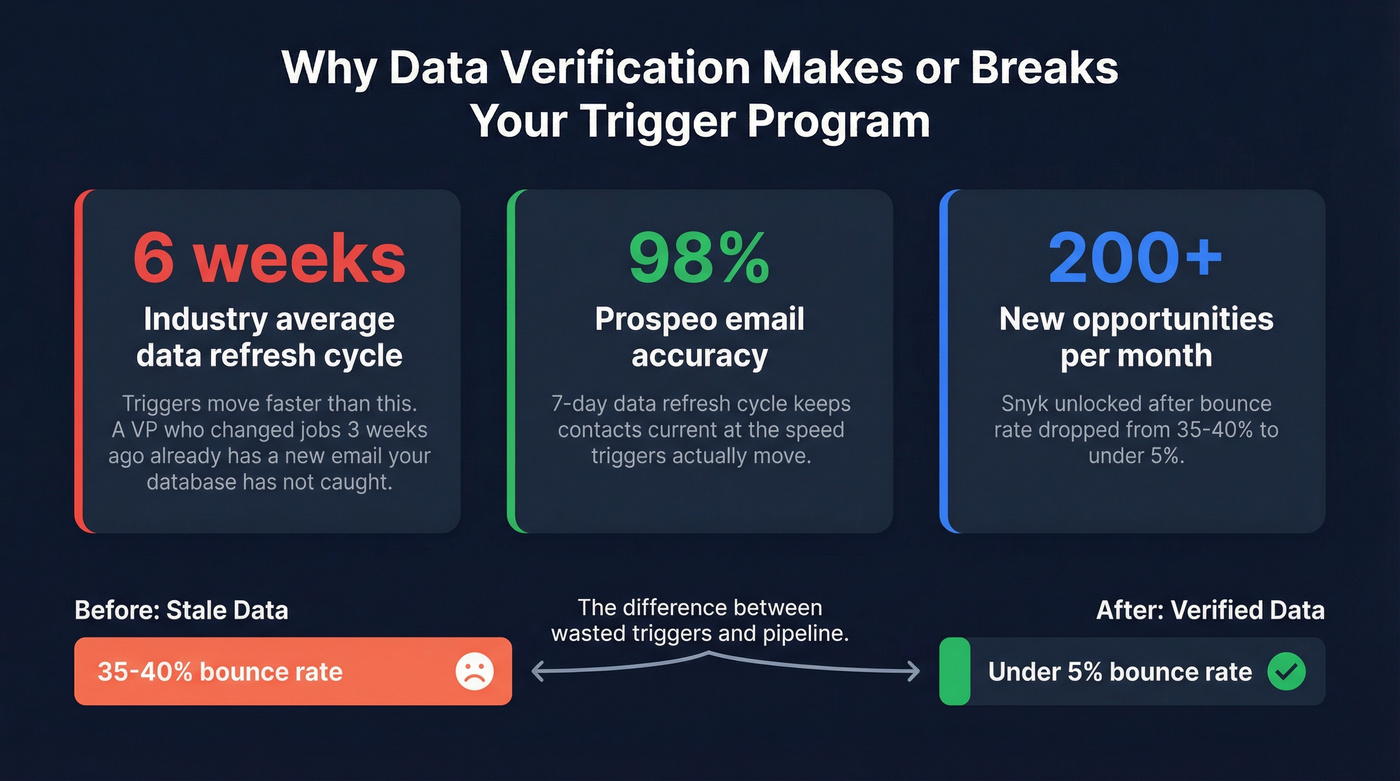
Prospeo's 7-day data refresh cycle keeps contact records current at the speed triggers actually move - 98% email accuracy, 125M+ verified mobile numbers, and intent data across 15,000 Bombora topics so you can layer buying signals on top of trigger events. Snyk's 50-person AE team saw their bounce rate drop from 35-40% to under 5% after switching, unlocking 200+ new opportunities per month. Without reliable contact data underpinning your outreach, even the best-timed triggers go to waste.
Craft Trigger-Based Outreach
Timing is everything, but it's not the only thing. You also need the right message and the right cadence.
Engagement triggers like pricing page visits and content downloads demand speed. Follow up within 1-4 hours. These signals decay fast - by tomorrow, the prospect has moved on.
Company-level triggers like funding, M&A, and exec hires give you more runway. A 1-4 week window is typical. Use that time to research the account, identify multiple stakeholders, and build a multi-touch sequence. (If you need a structure, borrow a sales cadence example.)
Here's our hot take: most teams over-invest in trigger detection and under-invest in the follow-up cadence. A mediocre trigger with a great 5-touch sequence will outperform a perfect trigger with a single email every time. It takes an average of 5 touches to engage a prospect, and reaching executives often requires 9.
Sample Funding Round Cadence
We've tested both single-touch and multi-touch approaches. Multi-touch wins consistently:
- Day 1: Email referencing the funding's implication - not the raise itself. Low-friction CTA.
- Day 3: Connection request with a personalized note.
- Day 5: Second email with a relevant case study from a similar-stage company.
- Day 8: Phone call to the direct line. Reference the email thread.
- Day 12: Final email - "closing the loop" with a specific insight about their market.
Skip the "I noticed your company just raised..." opener that every other rep is using. Reference what the trigger means for their business, not the trigger itself.
Tool Stack by Budget
Dedicated trigger platforms at $450+/month are overkill for most teams under 50 reps. Start with a sales intelligence tool, layer CRM automation, and invest in data verification. Skip the enterprise platforms until your trigger volume justifies the spend.
| Tool | What It Does | Starting Price | Best For |
|---|---|---|---|
| Google Alerts | News monitoring | Free | Getting started |
| Prospeo | Verification + enrichment + intent | Free (75 emails/mo) | Verified data for triggers |
| Apollo.io | Sales intel + triggers | From $49/mo | SMB outbound |
| Lusha | Contact data + alerts | From $29/mo | Quick enrichment |
| Hunter.io | Email finding + verification | From $49/mo | Email-first workflows |
| LeadIQ | Prospecting + CRM sync | From $39/mo | SDR teams |
| Lead411 | Verified contacts + triggers | From $99/mo | Mid-market teams |
| Trigify | Dedicated trigger platform | From $450/mo | 50+ rep orgs |
| UserGems | Job-change tracking | Custom | Enterprise champion tracking |
| Cognism | Signal + intent data | ~$1,000-3,000/mo | European coverage |
| ZoomInfo | Full-stack sales intel | $15,000-40,000+/yr | Enterprise with budget |
The sweet spot for most teams: a sales intelligence tool for detection, a verification layer for data quality, and your CRM for routing and scoring. Total cost under $200/mo to start. (To pressure-test your stack, use this B2B sales stack blueprint.)
6 Mistakes That Kill Trigger Programs
In our experience, mistake #5 is the one that kills the most programs - but they're all worth guarding against.
Creating leads too late. If your workflow takes 72 hours to route a funding trigger, you've missed the window. Automate routing so triggers hit rep queues within minutes.
Creating leads too early. Firing on every vague intent signal buries real triggers in noise. Set thresholds before you turn on alerts.
No clear ownership. When three reps email the same prospect about the same funding round, you look disorganized. Assignment rules and territory logic aren't optional.
Too many pipeline stages. Five stages with clear definitions beat twelve stages nobody agrees on.
Sales doesn't trust the triggers. This happens when marketing defines triggers without sales input. Fix it with shared definitions, a feedback loop, and a 30-day proof period where reps rate trigger quality. Teams that skip this step end up with reps ignoring the alert feed entirely within a month.
No post-assignment tracking. If you can't see whether reps actually worked the trigger, you can't improve the system. Enforce activity logging and audit weekly for the first 90 days.
90-Day Implementation Roadmap
Month 1: Foundation. Map 5 triggers to your ICP using your closed-won data. Set up Google Alerts and free monitoring tools. Create custom CRM fields for trigger type, date, source, and SLA deadline. Define ownership rules and territory assignments.
Month 2: Automation. Build CRM workflows for routing and lifecycle stage updates. Implement your scoring model with decay. Connect your data verification layer so every trigger-generated lead has a verified email and phone before it hits a rep's queue. Test SLAs with a small team.
Month 3: Optimization. Add paid monitoring tools if trigger volume justifies the spend. Optimize scoring weights based on actual closed-won data from months 1-2. By now you should have enough data to identify which triggers convert best and which are generating noise. Establish formal SLAs across the full team and set up a weekly audit cadence.
Layer buyer intent across 15,000 Bombora topics with funding, hiring surges, and job changes - all inside one platform. Score and route triggers using 30+ filters, then export verified emails and direct dials straight to your CRM.
Turn trigger events into booked meetings at $0.01 per verified email.
FAQ
How many triggers should I track?
Start with 5 that correlate with your closed-won deals. More triggers means more noise, more alert fatigue, and more unworked leads rotting in your CRM. Expand only after you've proven conversion rates justify the added volume.
What's the best free way to monitor trigger events?
Google Alerts for company news, SEC/EDGAR for financial filings, and manual monitoring of industry publications. Free tools work for up to 20-30 target accounts. Beyond that, a paid sales intelligence platform with automated alerts saves 5-10 hours per week.
How fast should I respond to a buying trigger?
Engagement triggers like pricing page visits demand action within 1-4 hours. Company-level triggers like funding rounds give you a 1-4 week window. Bake SLAs into your CRM so triggers don't sit unworked while the timing advantage evaporates.
What's the difference between intent data and trigger events?
Intent data tracks anonymous content consumption at the account level - you know someone at Acme is researching a topic, but not who. Trigger events are specific, observable occurrences like a funding round or executive hire tied to a named company. Combining both into a unified scoring model produces the highest conversion rates.
How do I keep contact data fresh enough for trigger outreach?
Use a verification provider with a 7-day refresh cycle rather than the six-week industry average. Pair it with your trigger detection tool so every lead is verified before any sequence launches.