

Data Appending: What It Is, What It Costs, and How to Do It Right
You exported your CRM last quarter and found a painful amount of missing emails, missing phone numbers, and job titles that haven't been updated in years. You launched a campaign anyway and watched the bounce rate hit roughly 30%. That's the moment most teams discover data appending - and realize they should've done it months ago.
Quick Version
Data appending fills missing fields in your existing database by matching your records against external data sources. You send out a file with partial contacts; you get back a file with the gaps filled in.
- Cost: $0.02-$0.25 per successful match, depending on data type, volume, and provider.
- Consumer email match rates: 40-60%. B2B email match rates from traditional providers: 10-30%. Purpose-built B2B platforms can push match rates far higher, into the 90%+ range on the right lists.
- Timeline: Batch appends take hours to days. Real-time API appends happen in milliseconds.
What Is Data Appending?
Data appending is the process of adding missing information - emails, phone numbers, demographics, firmographics - to existing records in your database by matching them against external data sources. Think of it as patching holes in a spreadsheet using someone else's more complete spreadsheet.
Here's the scenario that triggers it for most teams. You've got 10,000 contacts in your CRM. Maybe 6,000 have email addresses, maybe 4,000 have phone numbers, and you need to run an outbound campaign but can't reach half your list. So you send that file to an append provider, they match your records against their database using name, company, and whatever other identifiers you have, and they send back the missing fields.
The alternative is launching campaigns with incomplete data - the kind of scenario that produces a 30% email bounce rate, tanks your sender reputation, and can get your domain flagged or blocked.
Why It Matters
Bad data isn't just annoying. It's expensive. Gartner's research puts the average cost of poor-quality data at $12.9M per year for businesses. That number sounds abstract until you're the one explaining to leadership why your email domain got flagged as spam.
The decay rate is relentless. Studies show that almost a quarter of all B2B data becomes outdated within twelve months. People change jobs, companies get acquired, phone numbers rotate. If you appended your database in January and haven't touched it since, a big chunk of those records are already degrading by December.
These problems stack up fast. Bounced emails hurt deliverability scores. Bad phone numbers waste rep time. Missing firmographic data means your routing and scoring models are working with incomplete inputs. We've seen teams spend months building sophisticated lead-scoring models only to realize the underlying data was incomplete - the model was essentially guessing. The fix isn't heroic. It's just maintenance: append and clean data on a regular cadence, validate what comes back, refresh, and repeat.
Types of Data Appends
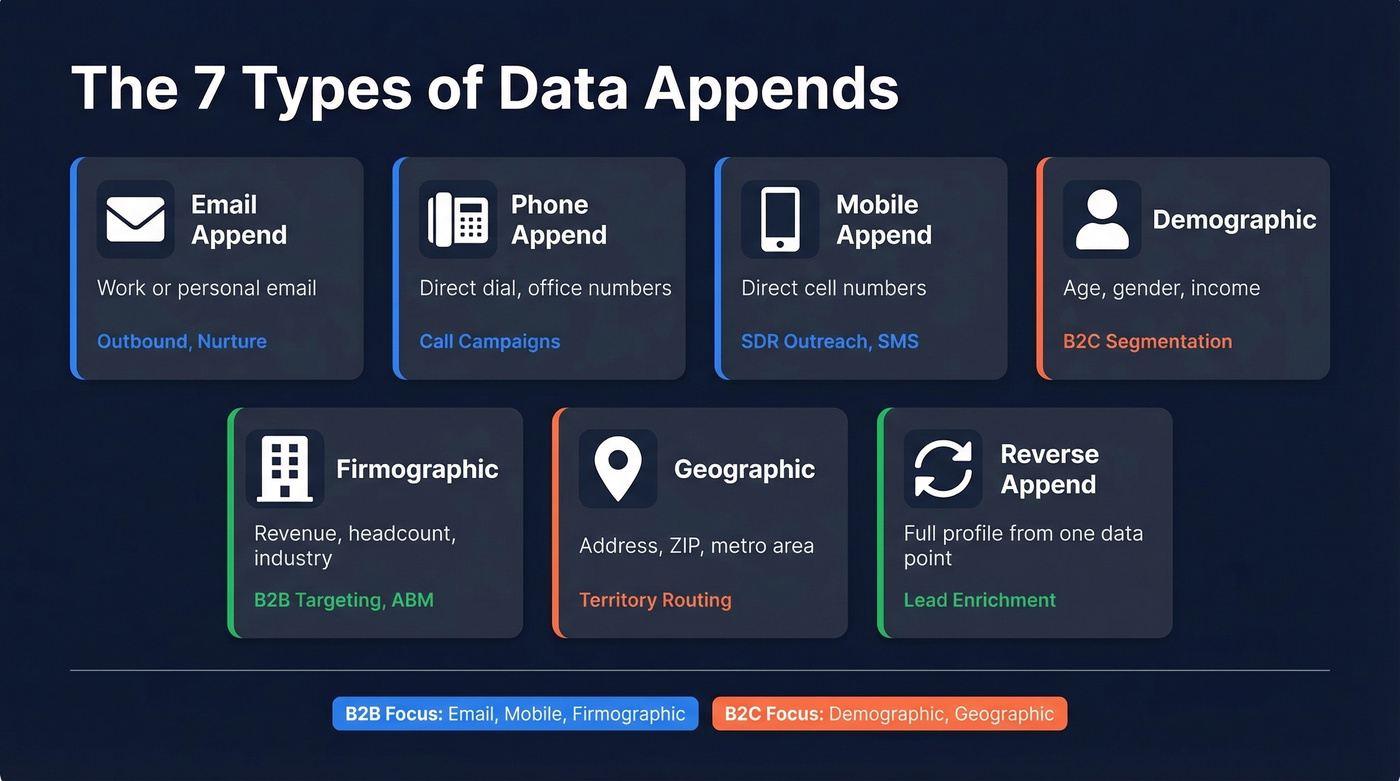
Not all appends are the same. The type you need depends on what's missing and what you're trying to do with it.
| Append Type | What It Adds | Best For |
|---|---|---|
| Work or personal email | Outbound campaigns, nurture | |
| Phone | Direct dial / office numbers | Call campaigns, verification |
| Mobile | Direct cell numbers | SDR outreach, SMS |
| Demographic | Age, gender, income, HHI | B2C segmentation, scoring |
| Firmographic | Revenue, headcount, industry | B2B targeting, ABM |
| Geographic | Address, ZIP, metro area | Territory routing, direct mail |
| Reverse | Full profile from one data point | Lead enrichment, deduplication |
Demographic and geographic appends are most common on the consumer side. Firmographic appends are B2B. Email and phone appends cross both worlds, but the providers, match rates, and compliance considerations differ significantly.
Most B2B teams don't need all seven types. If you're running outbound, you care about email, mobile, and firmographic data. A SaaS company might append firmographic data to route inbound leads by company size, while an agency might append mobile numbers to enable SMS follow-ups for event registrations. And if you're a D2C brand trying to score 2,000 leads by household income and age - like the small business owner who asked Reddit for exactly that - you need demographic appends from a consumer data provider.
How the Process Works
The process follows five steps, regardless of provider:
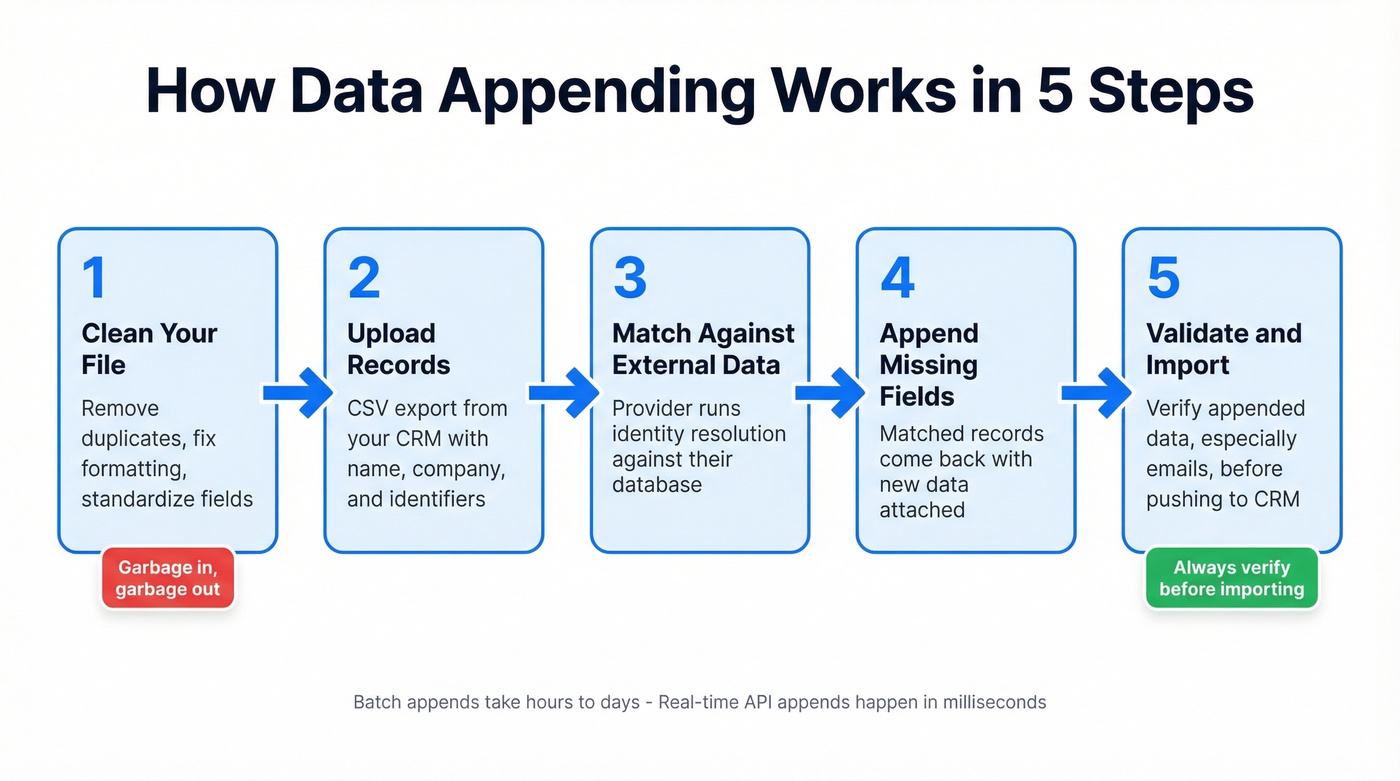
- Clean your file. Remove obvious duplicates, fix formatting issues, standardize fields. Garbage in, garbage out.
- Upload your records. CSV export from your CRM, typically with name, company, and whatever other identifiers you have.
- Match against external data. The provider runs your records against their database using identity resolution - connecting your input fields to a unique person or household in their system.
- Append missing fields. Matched records come back with the new data attached.
- Validate and import. Verify the appended data (especially emails) before pushing it back into your CRM.

Most providers use a mix of exact matching and "fuzzy" matching to handle real-world messiness like nicknames, abbreviations, and formatting differences. One baseline to keep in mind: most customer files are 60-70% complete with basic fields, so even a "good" database has meaningful gaps.
Batch vs. Real-Time
Use batch appending when you're doing a quarterly database refresh, cleaning up a large imported list, or preparing a segment for a campaign. You upload a file, wait hours or days, and get results back. It's the most common model and usually the cheapest per record. Skip it if you need data at point of capture - the turnaround is too slow for real-time routing.
Use real-time appending when you need data the moment a lead arrives - someone fills out a form with just an email, and your system instantly appends company, title, and phone number. This runs through APIs and costs more per record, but the speed enables workflows that batch can't touch. Skip it for one-time database cleanups where the API costs add up fast compared to batch pricing.
Most teams need both. Batch for the quarterly cleanup, real-time for the inbound flow.

Most append providers return 10-30% B2B match rates. Prospeo's enrichment engine hits 92% - returning 50+ data points per contact including verified emails, direct dials, firmographics, and intent signals. All records refresh every 7 days, not every 6 weeks.
Fill every gap in your CRM for roughly $0.01 per email.
Appending vs. Enrichment
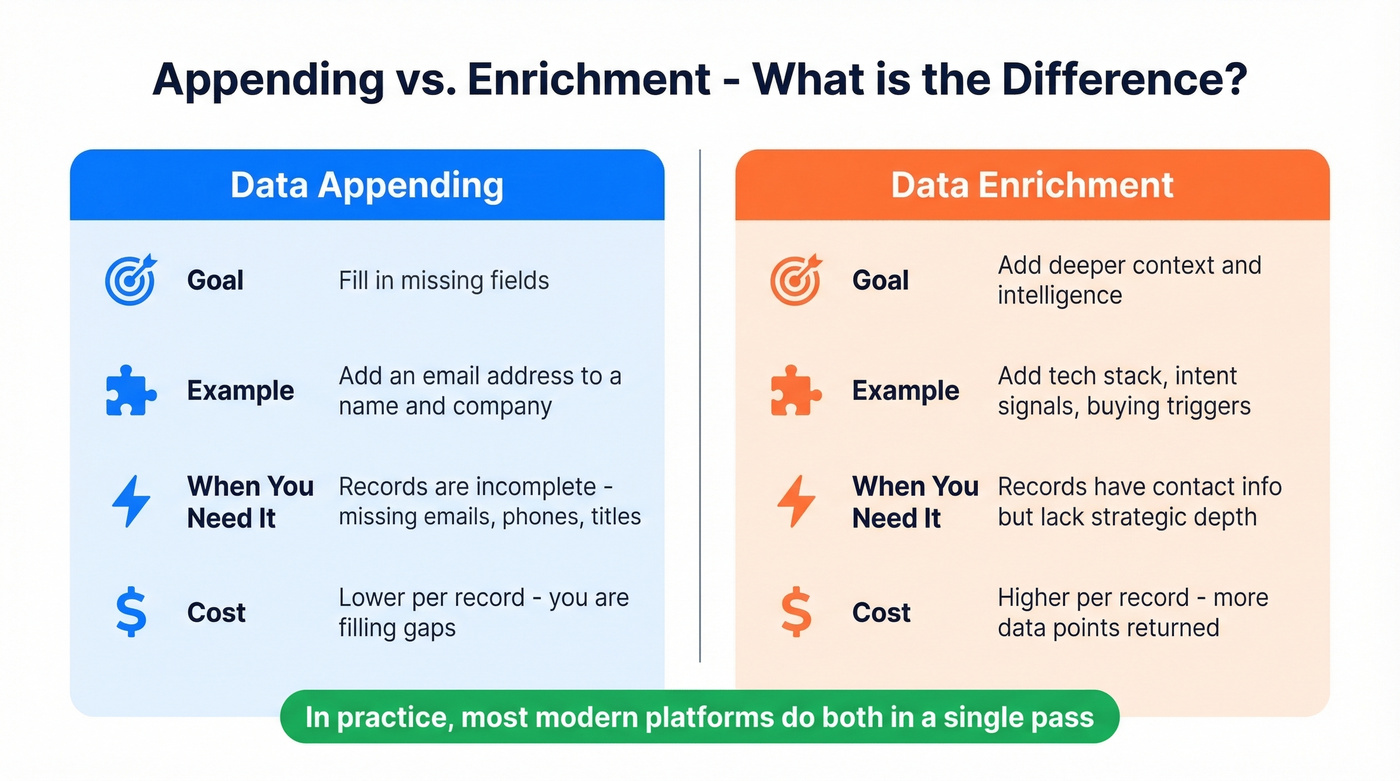
These terms get used interchangeably, and the debate is mostly semantic. But there's a useful distinction: appending fills in blanks, enrichment adds context.
| Dimension | Appending | Enrichment |
|---|---|---|
| Goal | Fill missing fields | Add deeper context |
| Example | Add email to a name | Add tech stack, intent signals |
| Trigger | Incomplete records | Complete but shallow records |
| Cost | Lower per record | Higher, more data returned |
If your records are missing basic contact info, you need appending. If your records have contact info but you want to layer on technographics, intent data, or buying signals, you need enrichment. In practice, most modern platforms do both in a single pass. If you're comparing vendors, it helps to start with a shortlist of the best data enrichment tools.
What Match Rates to Expect
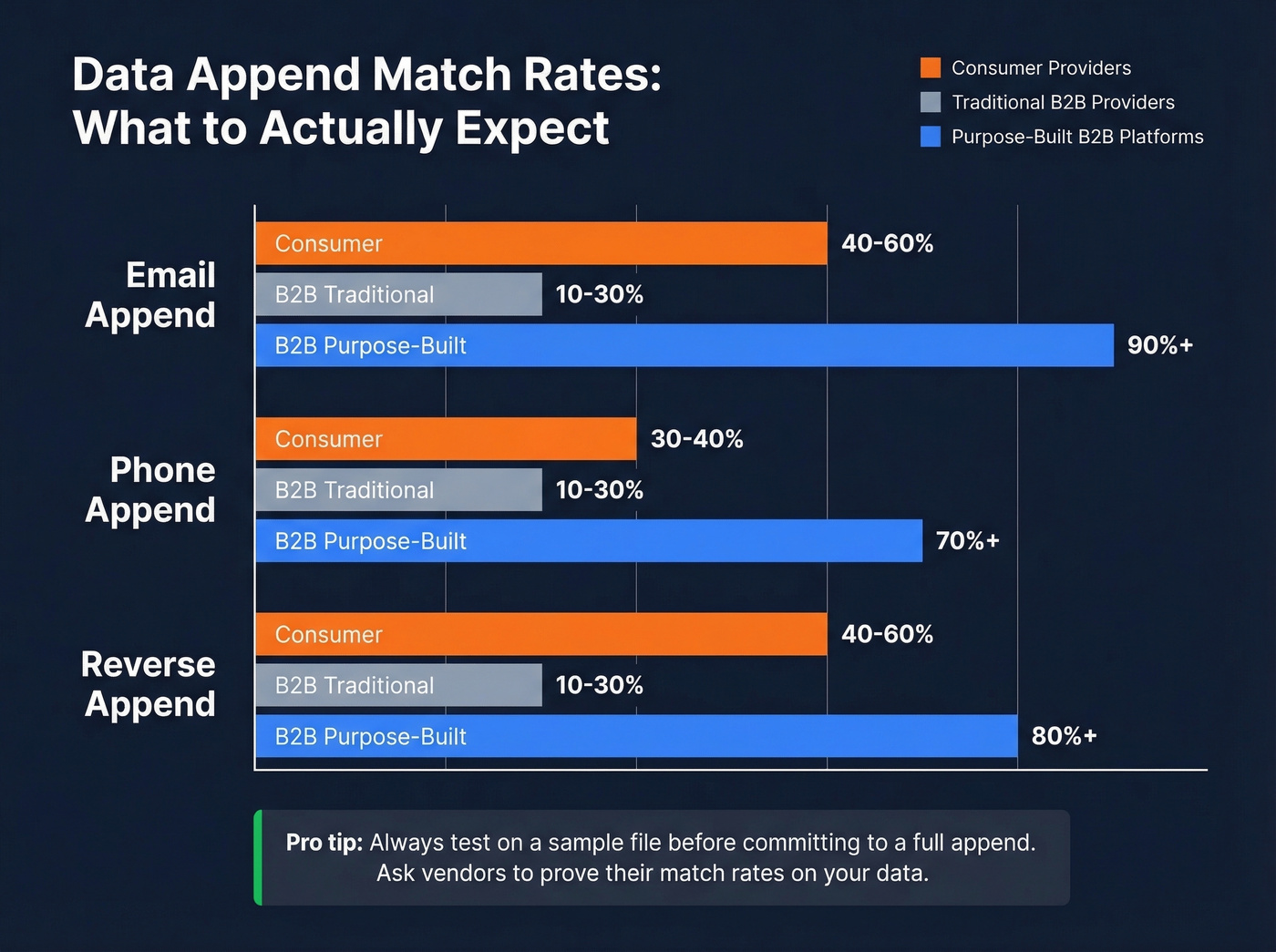
Match rates vary dramatically by data type and whether you're working with consumer or business records.
| Append Type | Consumer Match Rate | B2B Match Rate |
|---|---|---|
| 40-60% | 10-30% | |
| Phone | 30-40% | 10-30% |
| Reverse | 40-60% | 10-30% |
These ranges represent typical results from traditional providers. Your actual rates depend on list quality, the identifiers you provide, and geography. A US-based consumer list with full names and mailing addresses will match far better than a B2B list with just company names and first names.
The 10-30% B2B range exists because many traditional append providers weren't built for business contacts - they're matching against consumer-oriented data and hoping for crossover. Purpose-built B2B platforms close that gap dramatically; Prospeo, for example, delivers a 92% match rate with 98% email accuracy on B2B contacts. If a vendor promises 90%+ match rates on a B2B list without seeing your data first, ask them to prove it on a test file. If you're building lists from scratch, start with vetted B2B list providers.
How Much It Costs
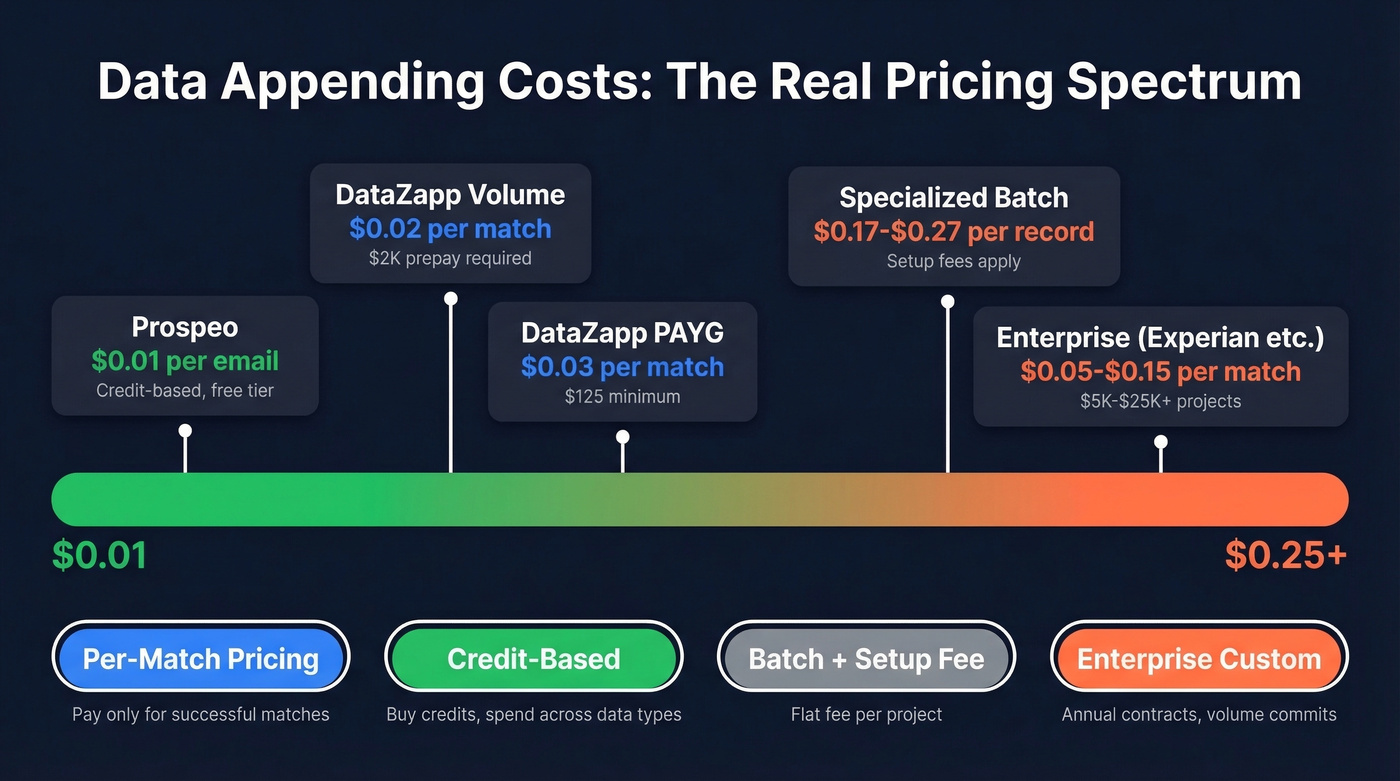
Here's the thing: most append providers don't publish pricing, and that's genuinely frustrating. You shouldn't need a sales call to find out if a service fits your budget. Here's what we've pinned down:
| Provider | Phone | Demographic | Notes | |
|---|---|---|---|---|
| DataZapp (PAYG) | $0.03/match | $0.03/match | $0.01/match | $125 minimum |
| DataZapp ($2K Prepay) | $0.02/match | $0.02/match | $0.0065/match | Volume discount |
| NAICS.com (Batch) | - | - | - | $500 setup + $850 append for 5K records |
| The Data Group (API) | - | - | $0.02/record | Free test available |
| Prospeo (Credits) | ~$0.01/email | 10 credits/mobile | - | Free tier, no contracts |
| Enterprise (Experian, etc.) | $0.05-$0.15 | Custom | Custom | $5K-$25K+ projects |
Four pricing models dominate the market.
Per-match pricing is the most buyer-friendly. You only pay for records that successfully match. DataZapp shows this clearly - $0.03 per email match at pay-as-you-go rates, dropping to $0.02 with a $2,000 prepay.
Batch pricing with setup fees is common for specialized appends. NAICS.com charges a $500 setup fee plus $850 for the append on a 5,000-record NAICS code job - $1,350 total.
API per-record pricing charges for every record submitted, matched or not. The Data Group's demographic API runs $0.02/record. Credit-based pricing lets you buy credits and spend them across different data types. The industry range spans $0.02-$0.25 per match, with enterprise providers at the high end and self-serve platforms at the low end. If you want flexible spend without contracts, compare pay-as-you-go B2B data.
B2B vs. B2C Providers
These are fundamentally different markets with different providers, different match rates, and different compliance requirements.
Consumer appending is controlled by a handful of large players - Acxiom, Experian, Melissa, Webbula. They maintain massive consumer databases built from public records, purchase data, and opt-in sources. Match rates are higher (40-60% for email) because consumer data is more standardized and widely available.

B2B appending is a different animal entirely. The provider ecosystem includes ZoomInfo (roughly $15K-$30K/year), Apollo ($49-$149/user/month), and credit-based platforms like Prospeo. Match rates from traditional providers run lower because business contact data changes faster and is harder to verify at scale. Even an industry-average 6-week refresh cycle means your database is always slightly behind reality; a 7-day refresh cycle closes that gap significantly. For teams wondering what "CSV enrichment" means in this context, it's simply the batch version of B2B appending - you upload a CSV of partial contacts and get back a file with verified emails, phone numbers, and firmographic data filled in. If you're evaluating sources, start with a ranked list of the best B2B database options.
Let's be honest: if your average deal size is under $15K, you probably don't need ZoomInfo-level pricing for append services. A credit-based platform with high match rates will get you 90% of the value at a fraction of the cost. The consensus on r/sales tends to agree - most reps find the big-name platforms overpriced for what they actually use.
Compliance and Privacy
Before appending:
- Document your lawful basis - legitimate interest for B2B, consent for B2C under GDPR
- Maintain and apply suppression files - people who've opted out must stay out
- Require a Data Processing Agreement from every append vendor
- Ask vendors about data provenance - where did their records come from?
After appending:
- Honor opt-out requests within required timeframes
- Re-apply suppression files after every append cycle
- Review and purge records that fail validation
The stakes are real. GDPR fines can reach EUR 20M or 4% of global revenue. The average data breach cost hit $4.4M in recent years, per IBM's Cost of a Data Breach report. You don't need to be a Fortune 500 company to get in trouble - regulators are increasingly targeting mid-market companies too. For a deeper framework, see our guide to B2B compliance.
Common Mistakes
Using outdated sources. If your vendor's database hasn't been refreshed in months, you're appending stale data on top of stale data.
Skipping pre-append hygiene. Appending to a dirty file just makes a bigger dirty file. Deduplicate and standardize first.
No deduplication post-append. Appending can create duplicates when records match slightly differently. Run dedup after every batch.
Expecting 90% match rates from generic providers. The industry norm for traditional B2B append is 10-30%. Budget accordingly, or use a purpose-built B2B platform.
Treating it as a one-time project. Data decays continuously. Appending is a recurring workflow, not a spring cleaning event. We've watched teams do a single append, celebrate the clean data, and then wonder six months later why their bounce rates crept back up. Set a calendar reminder.
Not requiring DPAs from vendors. If your vendor can't provide a Data Processing Agreement, that's a red flag - walk away.
Some teams layer 2-3 append providers to maximize coverage - one for emails, another for firmographics, a third for phone numbers. If you go this route, deduplication becomes critical. If email quality is your biggest issue, run a dedicated email reputation check before scaling volume.
How to Choose a Provider
You don't need a data append vendor. You need a data quality workflow. The vendor is just one component. That said, ask these five questions:
What's your match rate on a test file? Any credible vendor will run a free or low-cost test on your actual data. If they won't, move on.
Do you charge per match or per record submitted? Per-match pricing protects you from paying for misses.
What's your data refresh cycle? Weekly is best-in-class. Monthly is acceptable. Quarterly means you're getting stale data by month two.
Can you provide a DPA? Non-negotiable for any team under GDPR or CCPA.
Do you support your CRM natively? Manual CSV round-trips work, but native integrations with Salesforce, HubSpot, or your sequencer save hours per cycle. If you're trying to reduce manual work, look at CRM automation software. Data marketplaces like Datarade can also speed up vendor discovery if you're starting from scratch.
In our experience, teams that test 2-4 vendors on a sample file before committing almost always end up with better results than teams that pick based on a demo. Run the bake-off. It takes a week and saves you months of regret.
You just read that 24% of B2B data goes stale within a year. Prospeo's 7-day refresh cycle means your appended data stays accurate while competitors let records rot for 6 weeks. With 98% email accuracy and 125M+ verified mobiles, you get batch and real-time appending that actually holds up.
Append once with data that doesn't decay by next quarter.
FAQ
How often should I re-append my database?
Quarterly at minimum - about a quarter of B2B data goes stale within 12 months, so annual refreshes leave significant gaps by Q3. High-velocity pipelines benefit from monthly cycles or real-time API appending triggered by CRM events.
What's a good match rate for B2B appends?
Traditional providers deliver 10-30% on B2B email appends; consumer appends hit 40-60%. Purpose-built B2B platforms reach 90%+ match rates with verified accuracy - the gap comes from proprietary verification and weekly data refreshes.
Is data appending legal under GDPR?
Yes, with a documented lawful basis. For B2B contacts, legitimate interest is the most common justification. Maintain suppression lists, honor opt-out requests within required timeframes, and require DPAs from every vendor you use.
Can I append a small list under 5,000 records?
Yes, but watch for minimum order fees - some providers charge $125-$500 minimums that inflate per-record costs on small batches. Credit-based platforms with no minimums and free tiers are a better fit for smaller lists.
What's the difference between appending and reverse appending?
A standard append adds missing fields (email, phone, firmographics) to a record you already have. A reverse append works backward - you start with one data point like an email address and get back the full profile including name, company, and title. Match rates are similar in both directions.