

Data Deduplication: What It Is & When It's Worth It
A vendor told you data deduplication would save 20:1 on storage. Your actual ratio came back 1.8:1, and now you're burning 25 GB of RAM to maintain a dedup table you're not sure is earning its keep. That gap between marketing and reality is where most dedupe projects go sideways. Let's close it with real numbers, real sizing math, and a framework for deciding whether dedupe belongs in your environment at all.
What Is Data Deduplication?
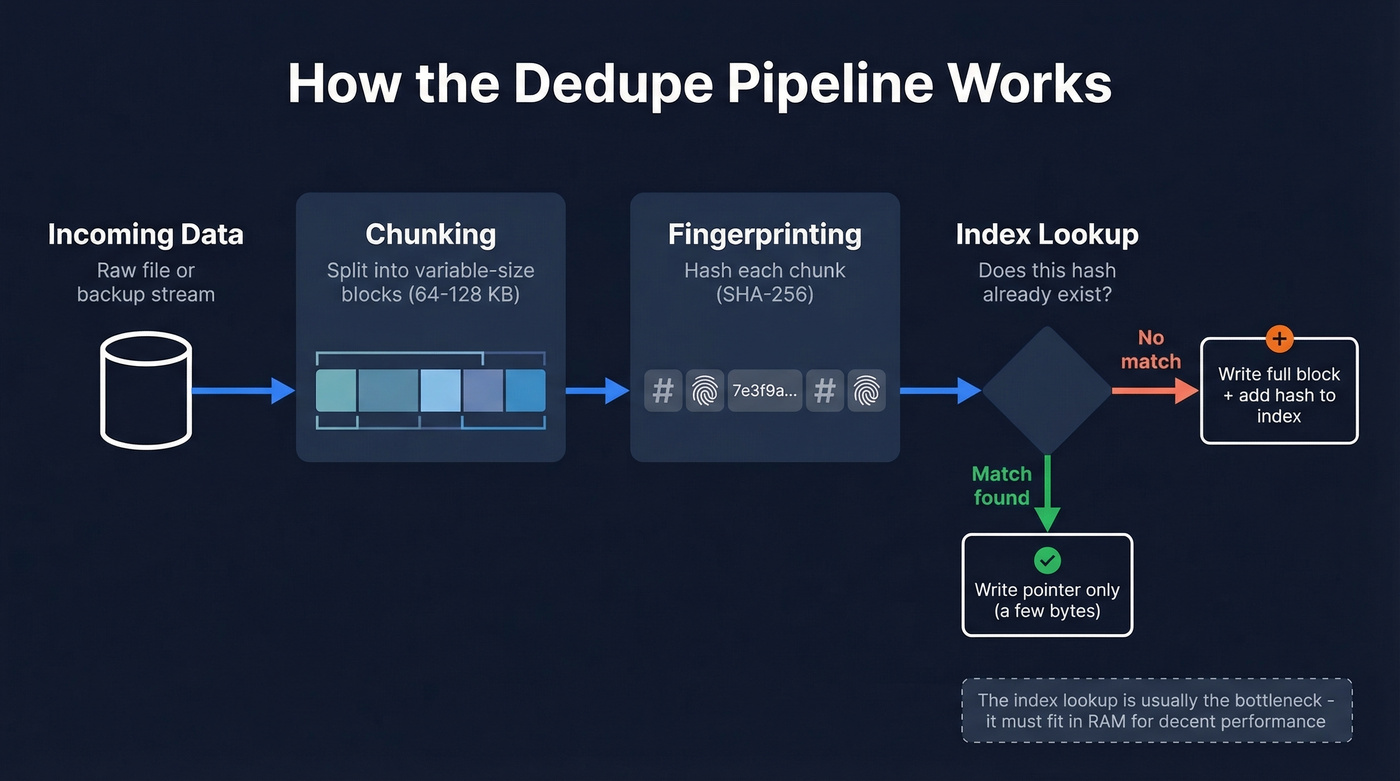
Data deduplication eliminates redundant copies of data at the block or file level. Incoming data gets split into chunks, each chunk gets hashed to produce a fingerprint, and that fingerprint gets checked against an index of everything already stored. Match? The system writes a small pointer instead of the full block. No match? It writes the block and adds the fingerprint to the index.
The result: identical data - the same OS image across 50 VMs, the same PowerPoint deck in 200 user directories - gets stored once. Everything else is a reference.
Here's where it gets confusing. "Deduplication" means two different things depending on who's talking. Storage engineers mean block-level or file-level dedupe on arrays, backup appliances, and filesystems. Sales and marketing teams often mean record-level deduplication - merging duplicate contacts, accounts, or leads in a CRM. Different disciplines, different tools entirely.
If you're here because you need to merge duplicate CRM records rather than storage blocks, tools like Prospeo handle that automatically by deduplicating search results across queries so you never import duplicate leads. For the rest of this guide, we're talking about storage-level deduplication.
Quick Version - Is Dedupe Worth It?
Before you get into the technical details, here's the decision in 60 seconds:
- Typical savings: ~2:1 for mixed VM backups. VDI and Citrix environments can hit 3:1-4:1. Media files and encrypted data? Basically 1:1.
- RAM budget: Plan for 1-5 GB of RAM per TB of deduplicated data. A common sizing outcome at 128 KiB blocks is about 2.5 GB/TB, so a 10 TB pool lands around 25 GB just for the dedup table.
- Compression first: If you haven't enabled compression yet, do that before touching dedupe. Lower overhead, almost always beneficial. (If you’re also fighting duplicate records in GTM systems, see CRM hygiene.)
- Skip dedupe if: Your data is already encrypted at rest, mostly unique like media or high-churn databases, or you're running on spinning disk with random I/O sensitivity.
- Enable dedupe if: You're backing up many similar VMs, storing versioned file shares, or running VDI with dozens of near-identical desktop images.
Think of it this way: a sysadmin consolidating ~80 Windows servers down to ~20 VMs will see strong dedupe ratios because those OS images share enormous amounts of identical data. A video production house storing unique 4K footage will see almost nothing.
How the Dedupe Pipeline Works
The pipeline has three compute-intensive stages: chunking the incoming data, fingerprinting each chunk with a hash function, and looking up that hash in an index. Each stage adds overhead to the write path, which is why inline deduplication always carries a throughput penalty compared to writing raw data.
Fixed-Size vs Content-Defined Chunking
Fixed-size chunking is the naive approach: split the data stream into equal-sized blocks (64 KB, say) and hash them. It works fine until someone inserts a single byte at the beginning of a file. That one byte shifts every subsequent chunk boundary, making every block appear "new" even though 99.99% of the content is identical. Your dedupe ratio drops to nearly zero for that file.
Content-defined chunking (CDC) solves this by choosing boundaries based on the data itself. A rolling hash function - typically a Rabin fingerprint - slides across the data stream with a window of around 64 bytes. When the hash meets a specific condition like the lowest 21 bits all being zero, that position becomes a chunk boundary.
The beauty of CDC is shift resilience. Insert a byte at the start of a file, and only the first chunk changes. Every subsequent boundary is still determined by the same content, so the remaining chunks match what's already stored.
Hash Collisions and Verification
Every hash-based system faces the pigeonhole principle: with a finite hash space, two different data blocks can theoretically produce the same fingerprint. SHA-256 makes this astronomically unlikely in practice, but production systems still protect integrity by verifying matches. Many enterprise dedupe implementations do byte-by-byte verification as a safety net, comparing the actual block contents when a fingerprint match occurs. This adds a small read penalty but eliminates the risk of silent corruption from a collision.
Chunking Algorithm Performance
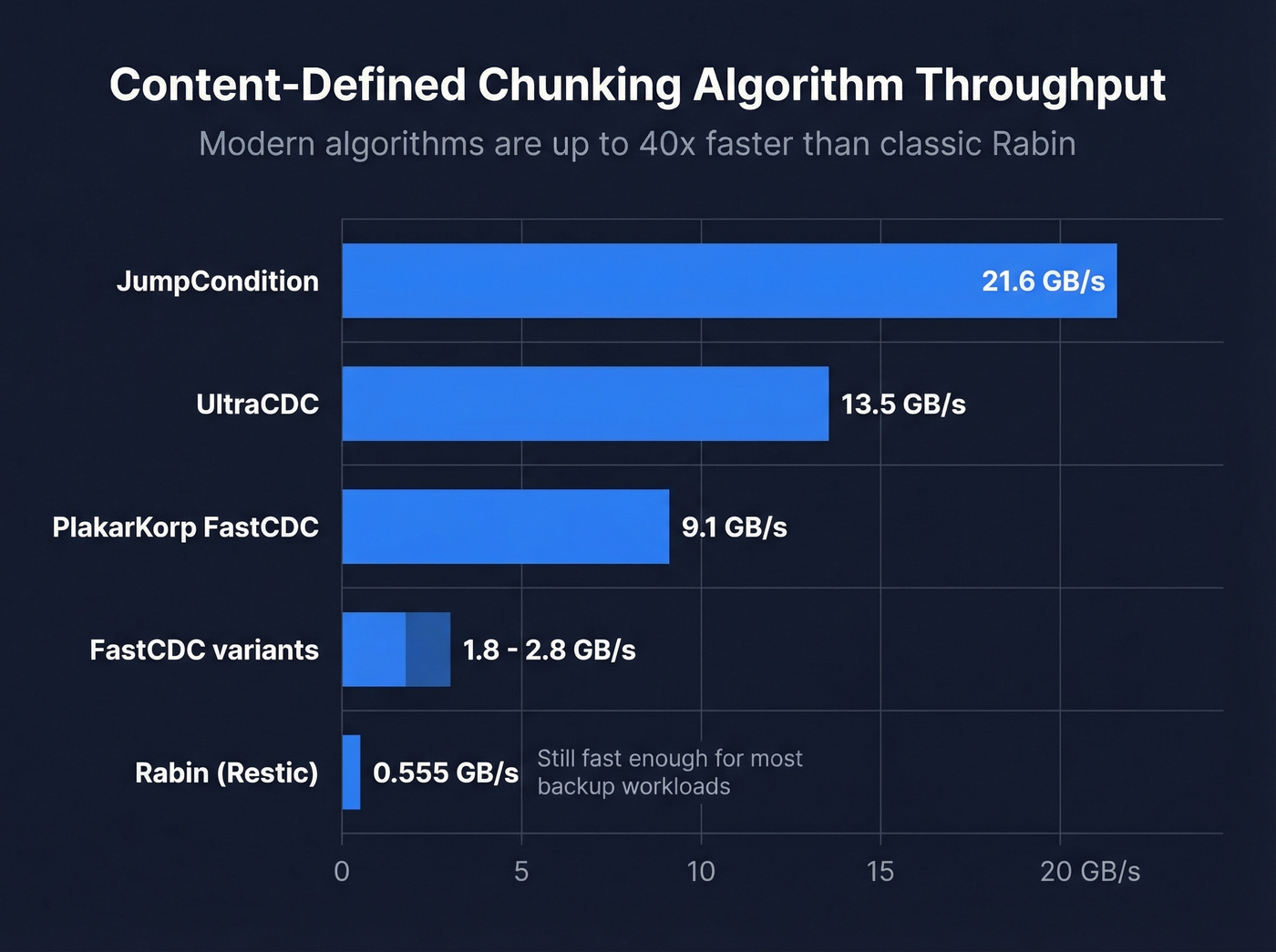
The chunking stage used to be a meaningful bottleneck. It isn't anymore - at least not with a modern implementation. Here's how current CDC algorithms compare on throughput:
| Algorithm | Throughput |
|---|---|
| Rabin (Restic) | ~555 MB/s |
| FastCDC variants | ~1.8-2.8 GB/s |
| PlakarKorp FastCDC | ~9.1 GB/s |
| UltraCDC | ~13.5 GB/s |
| JumpCondition | ~21.6 GB/s |
That's a 40x spread from the classic Rabin implementation to JumpCondition. For most backup workloads, even Rabin is fast enough - the lookup stage is usually the real bottleneck. But if you're building a dedupe pipeline that needs to handle multi-gigabit ingest rates, algorithm choice matters enormously.
Types of Deduplication
The three main axes are when it happens, where it happens, and how granular it is.
Inline vs Post-Process
Inline deduplication hashes and deduplicates data as it's written. Every block goes through the full pipeline before hitting disk. You never store a duplicate block, but every write pays the full overhead tax. For write-heavy workloads on spinning disk, this can cut throughput significantly.
Post-process deduplication writes data to disk first at full speed, then runs a background job to find and eliminate duplicates. You need temporary staging space for the unreduced data, but your write path stays clean. For backup windows where ingest speed matters more than immediate space savings, post-process is the smarter choice.
Source vs Target
Source-side deduplication runs an agent on the client that deduplicates data before sending it over the network - reducing bandwidth since you're only transmitting unique blocks. Target-side deduplication centralizes the compute on the backup server or appliance, which simplifies client management but means full data traverses the network.
File, Block, and Byte-Level
File-level dedupe is the coarsest: it only eliminates exact duplicate files. Change one byte and the whole file is treated as new. Block-level operates on fixed or variable-size chunks within files - the practical sweet spot for most environments. Byte-level is the most granular and can deliver the highest potential reduction, but it requires substantially more computational resources and metadata.
Modern filesystems also support reflinks (copy-on-write clones), which provide file-level "copy without copying" behavior at the filesystem layer without any hash index.
| Type | How It Works | Best For | Overhead |
|---|---|---|---|
| Inline | Dedupe on write | Low-write workloads | High (write path) |
| Post-process | Dedupe after write | Backup windows | Medium (staging) |
| Source-side | Agent on client | WAN/remote backup | Network savings |
| Target-side | Appliance/server | Centralized backup | Simpler clients |
| File-level | Whole-file match | Simple file shares | Low |
| Block-level | Chunk-level match | VMs, backups | Medium |
| Byte-level | Byte-range match | Niche/archival | Very high |
Deduplication vs Compression
These two get conflated constantly, but they work at different scopes. Compression operates within a single block, finding repeated patterns and encoding them more efficiently. Deduplication operates across blocks, finding identical chunks anywhere in the dataset and replacing duplicates with pointers.
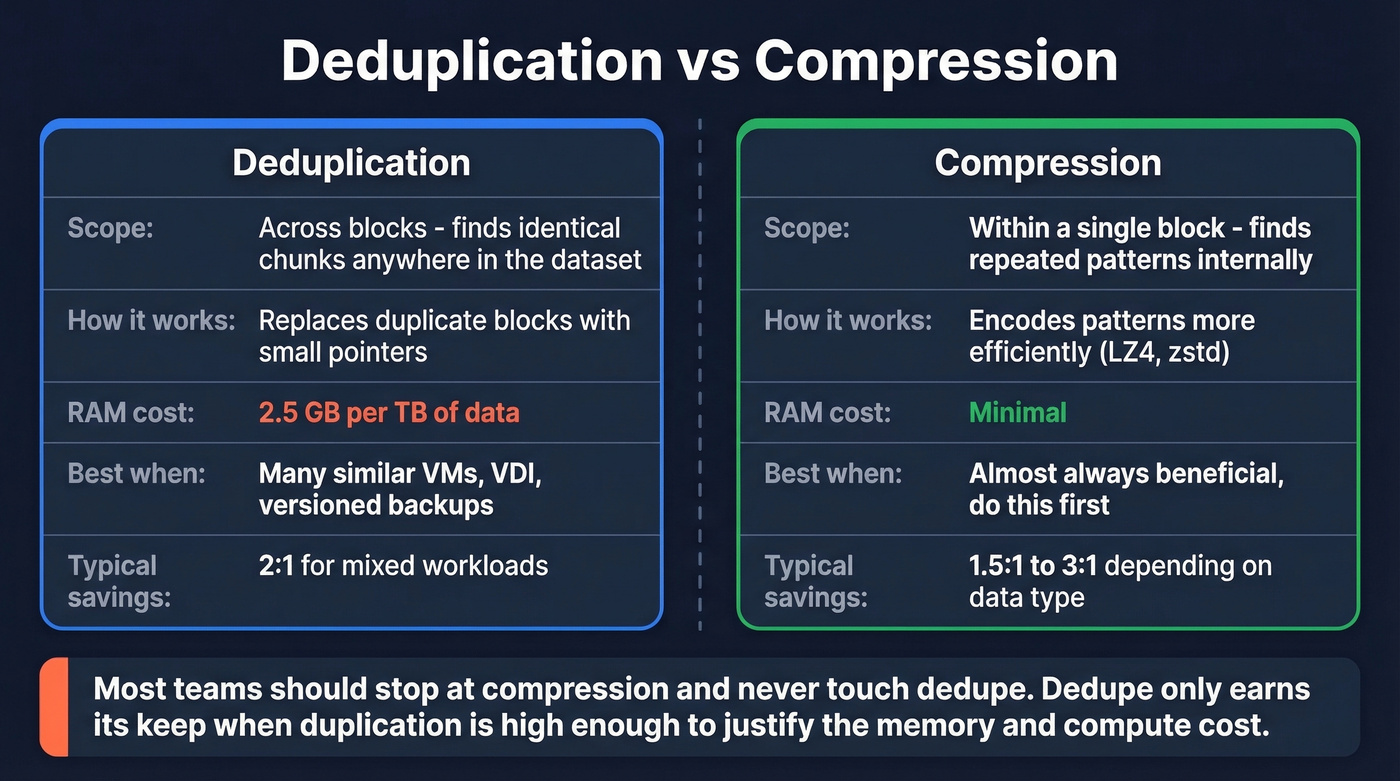
They don't always play well together. Dedupe forces data into independent blocks, which limits the compression context. A compressor works better when it can see a large, continuous stream of data. Chop that stream into 128 KB chunks for dedupe, and each chunk compresses in isolation - often less efficiently.
Here's the thing: most teams should stop at compression and never touch dedupe. Compression is low overhead, universally beneficial, and doesn't require a RAM-hungry dedup table. Dedupe only earns its keep when your workload has enough duplication to justify the memory and compute cost - and most workloads don't. (If you’re dealing with duplicates in customer systems, compare approaches in what is data matching.)

Storage dedupe saves disk space. Lead dedupe saves pipeline. Prospeo automatically removes duplicate contacts across every search you run - so your CRM stays clean and you never pay twice for the same lead.
300M+ profiles, zero duplicates. Start searching for free.
Real-World Dedupe Ratios
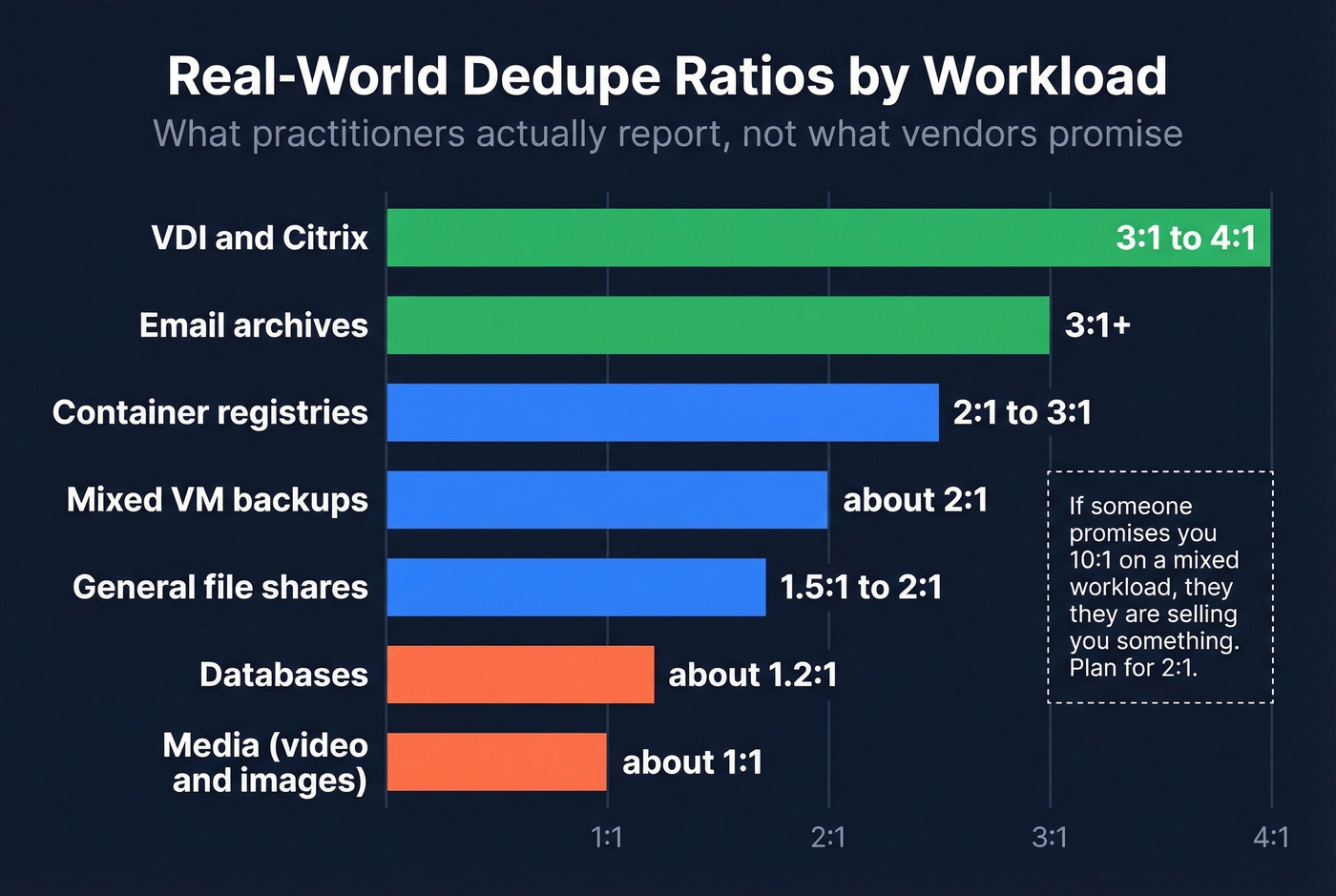
Vendor marketing loves to throw around 20:1 or even 50:1 ratios. Those numbers come from cherry-picked VDI demos with 100 identical Windows images. In the real world, practitioners on the Veeam community forums consistently report much more modest numbers.
| Workload | Typical Ratio | Notes |
|---|---|---|
| Mixed VM backups | ~2:1 | Combined dedupe + compression |
| VDI / Citrix | 3:1-4:1 | Many identical OS images; watch for boot storm I/O spikes |
| General file shares | 1.5:1-2:1 | Higher with versioned docs, lower with unique files |
| Email archives | ~3:1+ | Attachments forwarded widely |
| Databases | ~1.2:1 | High write churn, low duplication |
| Media (video/images) | ~1:1 | Already compressed, unique content |
| Container registries | 2:1-3:1 | Shared base layers |
If someone's promising you 10:1 on a mixed workload, they're selling you something. Plan for 2:1 and be pleasantly surprised if you get more.
Hidden Costs and Tradeoffs
Dedupe isn't free. The space savings come with real costs that don't show up in vendor slide decks.
RAM and Performance Overhead
The deduplication table (DDT) maps every stored block's hash to its physical location. Per community-tested ZFS sizing math, each entry runs about 320 bytes. At a 128 KiB block size, that works out to roughly 2.5 GB of RAM per TB of deduplicated data.
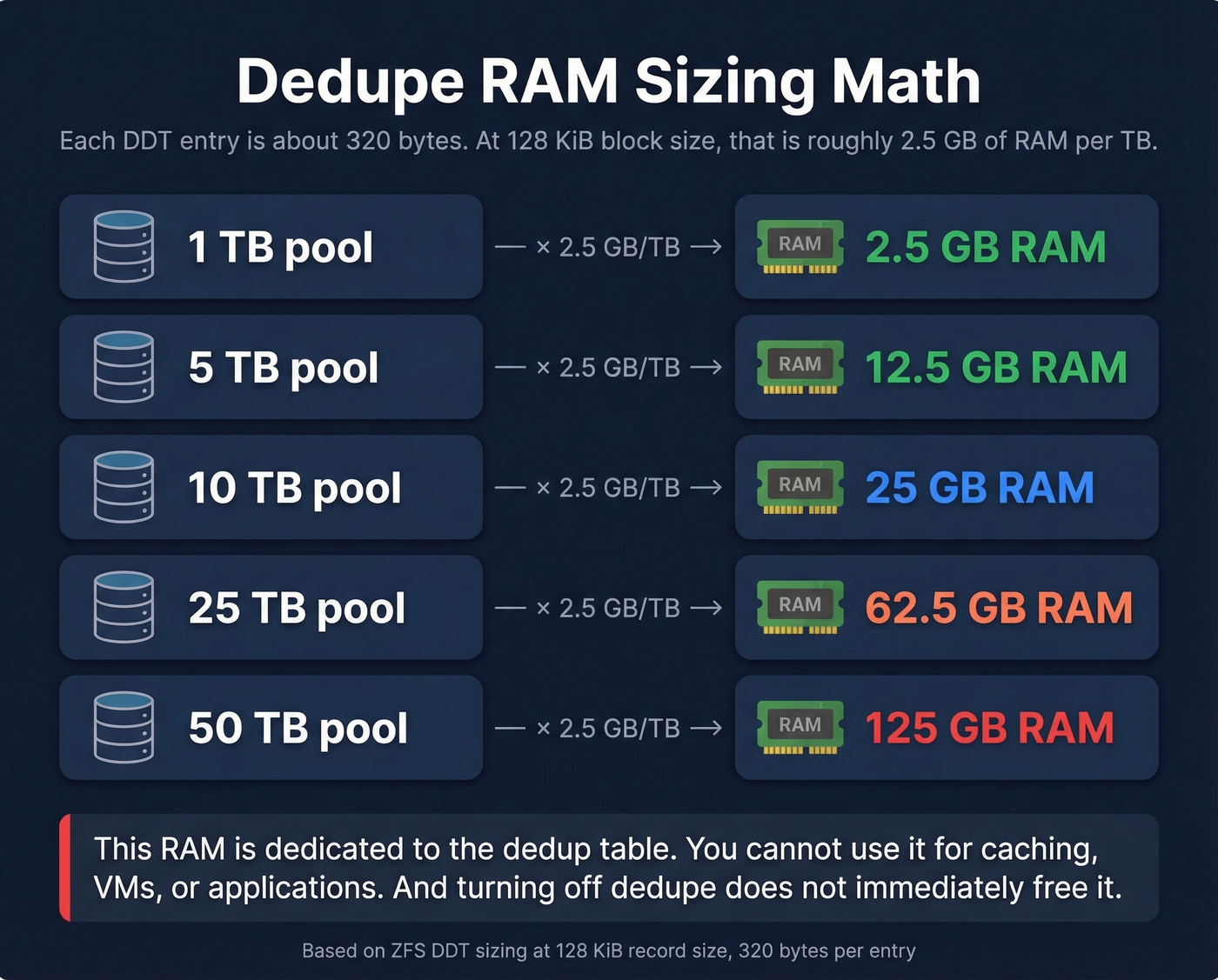
A 10 TB deduplicated pool needs ~25 GB of RAM just for the DDT. A 50 TB pool? 125 GB. That's RAM you can't use for caching, VMs, or applications.
The operational gotcha: turning off deduplication doesn't immediately free that RAM. You typically need to migrate data to a non-dedup dataset and delete the original to reclaim it.
On spinning disk, random I/O is often roughly an order of magnitude slower than sequential I/O. Because dedupe increases pointer-chasing and fragmentation, it pushes workloads toward more random reads and writes. On NVMe, this penalty shrinks dramatically but doesn't disappear.
Delete Amplification and GC
Deleting a file in a deduplicated system isn't simple. Each block might be referenced by dozens of other files. The system checks every reference before freeing a block, and this cascade can turn a simple delete into thousands of metadata operations. Garbage collection - the background process that reclaims space - can consume significant I/O and CPU. We've seen environments where GC runs took longer than the backup window itself.
Encryption Kills Dedupe
If your data is encrypted before the dedupe layer sees it, ratios collapse because encryption makes blocks look statistically unique. You get a 1:1 ratio and all the overhead with none of the savings. The fix is simple: deduplicate first, then encrypt.
There's also a subtler risk in multi-tenant environments. Deduplication can enable side-channel inference attacks - an attacker can determine whether a specific block already exists by observing whether a write was deduplicated. This matters in cloud and shared-storage environments where tenants don't fully trust each other. (For a parallel in GTM data, see common data quality issues.)
When NOT to Use Dedupe
Skip it if your data is mostly unique. Media files, scientific datasets, and high-churn databases won't deduplicate meaningfully - you'll burn RAM and CPU for a 1.1:1 ratio. Same goes for storage that's encrypted at rest in a way that hides the plaintext from the dedupe layer, spinning disk arrays sensitive to random I/O, or servers that simply can't spare ~2.5 GB per TB for the DDT. Without that RAM headroom, dedupe will either spill to disk and destroy performance or fail outright.
One more trap: don't enable dedupe on a nearly-full array hoping it'll save you. The DDT itself needs space, and the initial dedup pass can temporarily increase storage usage before it starts saving. If compression alone gets you to an acceptable capacity plan, stop there.
Implementation and Sizing
Memory Planning
The math is straightforward but unforgiving. At 128 KiB block size with ~320 bytes per DDT entry:
- 1 TiB of data = ~8.4 million blocks = ~2.5 GiB of DDT
- 10 TiB = ~25 GiB
- 50 TiB = ~125 GiB
- 100 TiB = ~250 GiB
You can shrink the DDT by increasing the block size, but you also reduce dedupe granularity. A 1 MiB block with a single changed byte won't match its predecessor. For VDI workloads where changes are small and scattered, this tradeoff cuts your ratio significantly. For backup workloads with large identical files, larger blocks work fine.
Some enterprise backup platforms let you estimate dedupe ratios against existing data without enabling it in production. Always test first. (If you’re doing similar “test before you commit” work in revenue systems, pipeline data quality is the closest analogue.)
Mistakes That Cause Data Loss
The scariest dedupe failure mode isn't poor ratios - it's data loss. One DataHoarder community member wrote a script around jdupes, made a logic error, deleted their original backups, and couldn't determine how much data they'd lost. Treat any deduplication operation as destructive until proven otherwise. Keep immutable originals. Verify results before deleting source data. Test restores.
Other operational traps we've seen teams hit: expecting RAM back after disabling dedupe (you need to migrate data off the dedup dataset entirely), forgetting that rehydrated backups are full-size so your 10 TB deduplicated pool expands to 20 TB on a non-dedup restore target, and ignoring GC scheduling so garbage collection competes with production I/O. (In CRM land, the equivalent is skipping CRM data cleaning and paying for it later.)
Dedupe in Cloud Environments
Object storage bills are driven by how many bytes you store, how often you retrieve them, and how much data you transfer out. Reducing stored size reduces your storage line item. Simple enough.
The practical approach is application-layer dedupe through backup tools. Veeam, Restic, Commvault, and similar platforms deduplicate data before uploading to cloud storage, so you're only paying for unique blocks. This is where dedupe delivers its clearest ROI in cloud environments - not on the storage layer itself, but in the pipeline feeding it.
For teams running hybrid backup from on-prem to cloud, source-side deduplication also cuts transfer volume. A 2:1 dedupe ratio on a 10 TB daily backup saves 5 TB of transfer - and that can be real money when you're paying per GB to move data. (For a GTM version of “reduce transfer waste,” see bulk data export.)
Dirty data doesn't just waste storage - it wrecks outbound campaigns. Prospeo's 5-step verification and automatic deduplication mean 98% email accuracy with no duplicate records polluting your lists.
Clean data at $0.01 per email. No dedupe cleanup needed.
FAQ
What dedupe ratio should I expect for VM backups?
Plan for 2:1 on mixed VM workloads - that's the number practitioners consistently report. VDI and Citrix environments with many identical desktop images can reach 3:1-4:1. Media-heavy VMs or databases with high write churn see almost no benefit. Always test against your actual data before committing RAM and compute resources.
Does data deduplication work on encrypted data?
No. If encryption runs before the dedupe layer, every block looks statistically unique and ratios collapse to 1:1. You get all the RAM and CPU overhead with zero space savings. The fix: deduplicate first, then encrypt. Reversing the order is one of the most common deployment mistakes we see.
How much RAM does deduplication need?
Budget 2.5 GB per TB at 128 KiB block size - each DDT entry is ~320 bytes. A 10 TB pool needs about 25 GB of dedicated RAM; a 50 TB pool needs 125 GB. Increasing block size reduces RAM requirements but also reduces granularity and can hurt ratios on VDI workloads.
Should I use compression or deduplication?
Start with compression. It's low overhead and beneficial for virtually every workload. Add deduplication only if your data has significant redundancy - VMs, VDI, versioned file shares - and you can afford the RAM. Running both is fine, but compression should always come first.