

CRM Data Cleaning: The Practitioner's Playbook for 2026
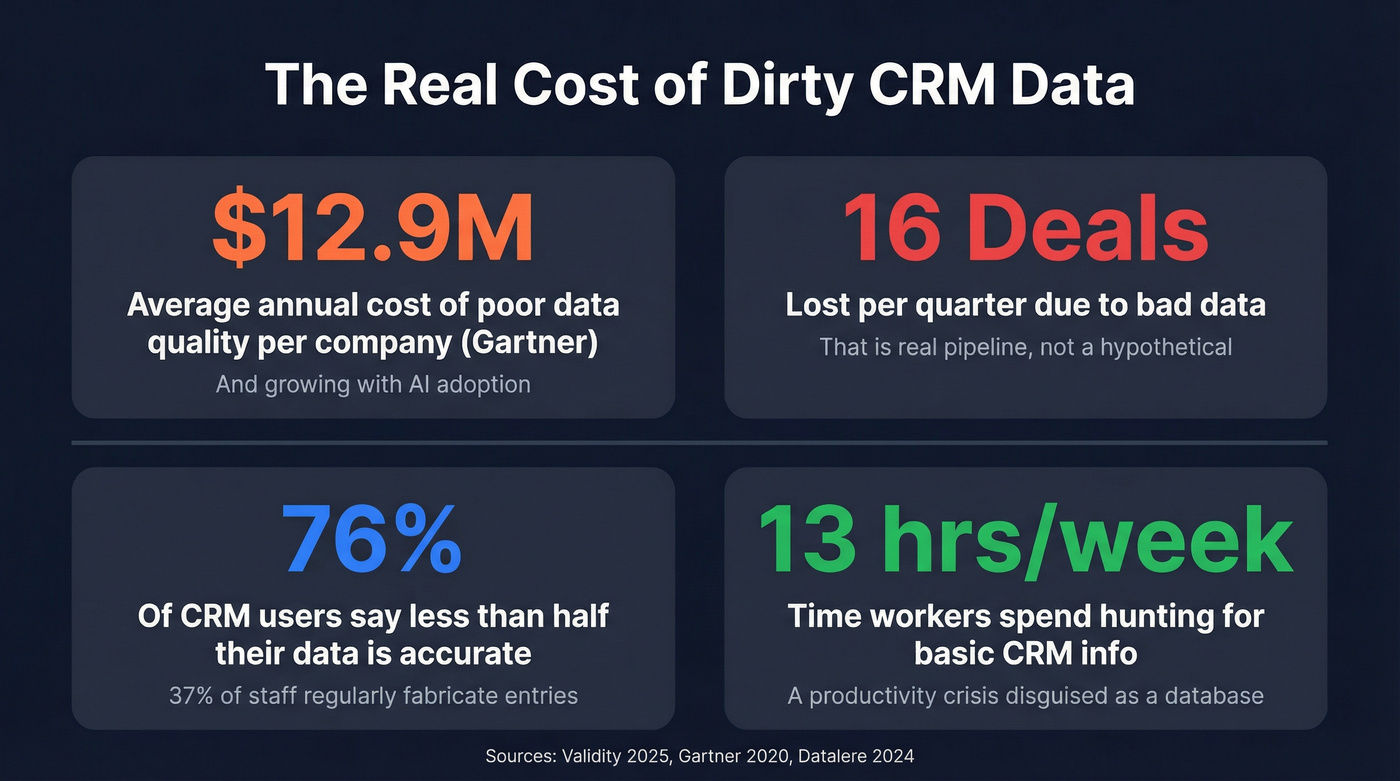
A RevOps lead we work with ran a quick audit last quarter: exported 500 random contacts from Salesforce, verified the emails, and found 31% were dead. Not "maybe risky." Dead. That's not an outlier - 76% of CRM users say less than half their data is accurate (https://www.prnewswire.com/news-releases/validity-releases-state-of-crm-data-management-in-2025-report-revealing-disconnect-between-data-quality-and-ai-implementation-302499899.html), and 37% of staff regularly fabricate data to tell leadership what they want to hear. Your CRM isn't a source of truth. It's a source of expensive fiction.
Workers spend 13 hours per week hunting for basic information in their CRM. That's not a data problem - it's a productivity crisis dressed up as a database.
Let's fix it.
What You Need (Quick Version)
If you're short on time, here's the priority order:
- Audit first. Export a sample, verify the emails, and measure your duplicate rate. You need a baseline to know what's broken and whether your cleanup actually worked.
- Clean in sequence: dedup, then standardize, then verify. Merging duplicates before standardizing fields means you'll miss fuzzy matches. Standardizing before verifying means you'll waste time formatting records that should've been deleted.
- Start with email verification. It's the fastest way to measure how bad things are. If more than 10% bounce, you've got a serious problem. (If you need a tool shortlist, start with these email validators.)
- Automate maintenance or you'll be back here in 6 months. Point-of-entry validation, scheduled dedup scans, and enrichment workflows aren't optional. They're the difference between a one-time project and an actual system.
What CRM Data Cleaning Actually Means
CRM data cleaning is the process of identifying and fixing records that are inaccurate, incomplete, duplicated, or formatted inconsistently - then building systems to prevent the same problems from recurring. Whether you call it CRM data cleansing or a full database cleanup, the goal is the same: a database you can actually trust. (This is the core of CRM hygiene.)
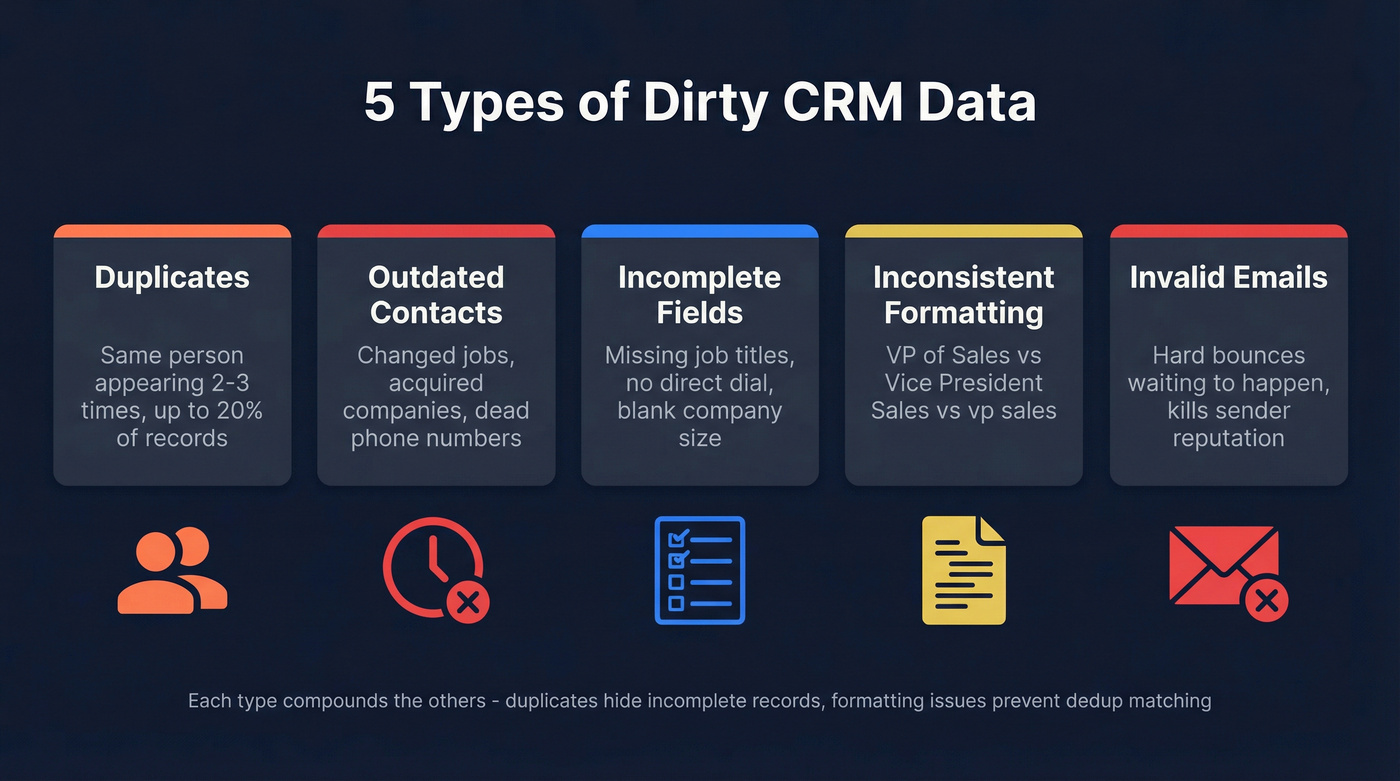
Dirty data comes in five flavors:
- Duplicates - the same person or company appearing multiple times. Duplication rates hit up to 20% in typical CRMs.
- Outdated contacts - people who've changed jobs, companies that've been acquired, phone numbers that no longer connect.
- Incomplete fields - missing job titles, no direct dial, blank company size. Your enrichment and segmentation can't work with gaps.
- Inconsistent formatting - "VP of Sales" vs "Vice President, Sales" vs "vp sales." WinPure's customer research found that variations in business names, personal names, and addresses account for 60% of data quality challenges.
- Invalid emails - hard bounces waiting to happen. These damage your sender reputation fastest. (More on invalid emails.)
This isn't just contact data. Sales pipeline records, support tickets, and engagement history all accumulate the same problems. Proper data hygiene covers every object, not just contacts.
The Real Cost of Dirty Data
Gartner pegged the cost of poor data quality at $12.9 million per year back in 2020 - and with AI adoption raising the stakes, that number has only grown. Companies lose an average of 16 sales deals per quarter due to poor-quality data, 1 in 4 report a 20%+ drop in annual revenue tied directly to data issues, and 45% of organizations say their CRM data isn't prepared for AI implementation. Every AI workflow they build will amplify the garbage already in the system. (If you're building automations, start with AI CRM data entry automation so bad inputs don’t scale.)

The revenue impact stays abstract until it hits your domain reputation. Bounce-rate thresholds are unforgiving: below 2% is safe, between 2-5% means something's wrong, and above 5% you're risking deliverability damage that takes weeks to recover from. (If you need the full playbook, use this email deliverability checklist.)
We've seen this play out firsthand. One team sent a campaign off an unverified list with a 12% bounce rate. Their sending domain collapsed in under 48 hours. Recovery took six weeks and cost roughly $18K in paused pipeline. Six weeks of zero outbound because nobody ran a verification check that takes five minutes.
Here's the thing: if your average deal size is above $5K and you're not running monthly email verification, you're gambling more pipeline value than you'd spend on verification in a decade. A $200/month tool is cheap insurance against a five-figure pipeline freeze. (If you want a broader stack view, see cold email marketing tools.)
The 7-Step Cleanup Process
Step 1: Audit Your Current State
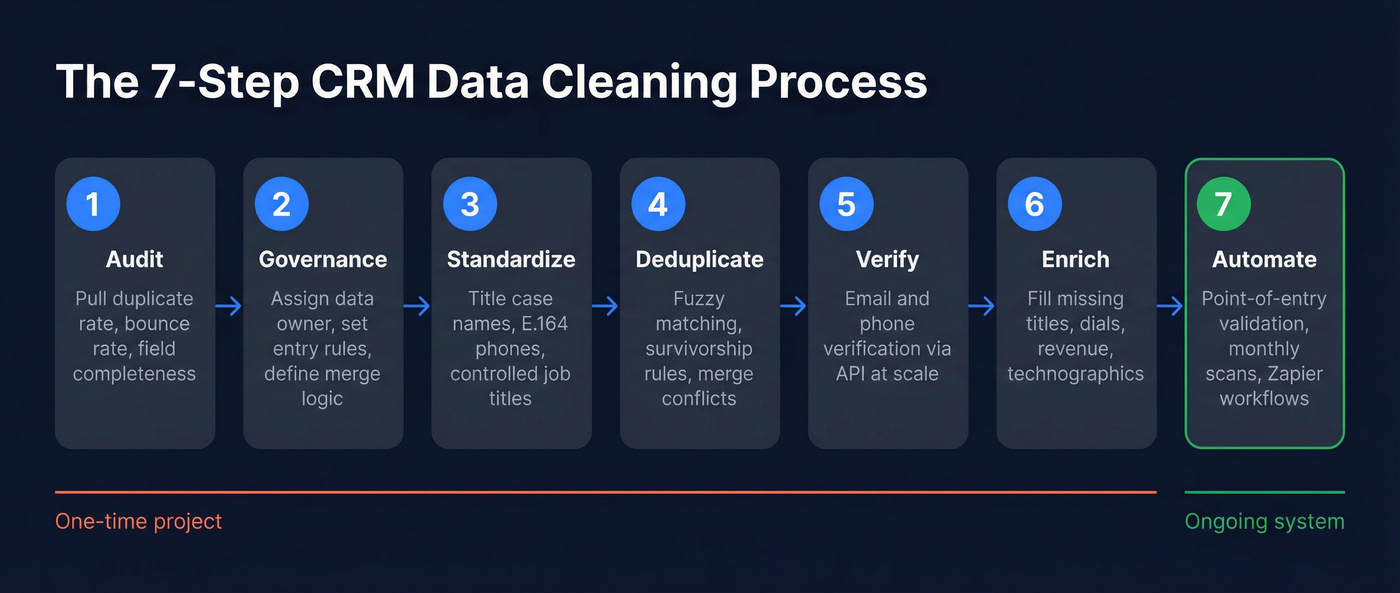
Before you touch anything, measure. Pull your duplicate rate - most CRMs surface this natively. Check your email bounce rate from the last 90 days. Calculate field completeness percentages for critical fields like job title, email, phone, and company size. You need a baseline, or you'll have no way to prove the cleanup worked. (If you’re formalizing this, build a data quality scorecard.)
Step 2: Define Governance Rules
Decide who owns data quality. If the answer is "everyone," the real answer is "nobody." Only 18% of organizations without a dedicated data quality owner plan to hire one this year - a 56% drop from 2024. Meanwhile, 57% are relying on manual cleaning while cutting investment in dedicated data quality personnel.
Assign a data owner, establish entry rules with required fields and controlled dropdowns instead of free-text, and document merge/survivorship logic for duplicates. Before you start cleaning, filter out records that fall outside your ICP entirely. If a contact doesn't match your TAM criteria - wrong industry, wrong company size, wrong geography - delete it. Don't waste time cleaning records you'll never sell to. (If you need a tighter definition, use this account qualification framework.)
This step feels bureaucratic. Skip it, and you'll be cleaning the same mess again in Q3.
Step 3: Standardize Formatting
Set rules for names in title case with no all-caps, addresses with consistent abbreviations, job titles mapped to a controlled list, and phone numbers in E.164 format. 65% of companies still rely on Excel for this - which works for 500 records and falls apart at 5,000. Use workflow automation or a dedicated data quality tool.
Step 4: Deduplicate
Run a dedup scan with fuzzy matching. Exact-match-only will miss "John Smith at Acme" and "J. Smith at Acme Inc." Define survivorship rules before merging: which record wins when two have conflicting data? The most recently updated? The one with the most complete fields? Decide this upfront or your merge will create new problems.
Step 5: Verify Emails and Phones
Email data decays at roughly 2% per month. That means a third of your email addresses will be invalid within a year if you're not re-verifying. For verification at scale, you need an API-based tool. Prospeo's enrichment API verifies emails in real time and returns 50+ data points per record with a 92% API match rate, refreshing data every 7 days instead of the 6-week industry norm. Its 5-step verification process includes catch-all handling, spam-trap removal, and honeypot filtering, which means fewer false positives slipping through. (For a deeper workflow, see CRM verify.)

Step 6: Enrich Missing Data
Verification tells you what's dead. Enrichment fills in what's missing - job titles, direct dials, company revenue, headcount, technographics. The best enrichment tools handle both verification and enrichment in the same pass, which saves you from stitching together separate tools. Look for 80%+ match rates and weekly data refresh cycles to keep records current. (If you’re doing this for outbound, use data enrichment for cold email.)
Step 7: Automate Maintenance
A one-time cleanup is a project. Automated maintenance is a system. Set up point-of-entry validation to verify emails before they hit the CRM, schedule monthly dedup scans, and build enrichment workflows via Zapier or Make that trigger when new records are created. If you're experimenting with AI agents for CRM ops, clean data is the prerequisite - an AI workflow that enriches, routes, or scores leads will amplify whatever data quality problems already exist. (This is the same logic behind how to keep CRM data clean.)
The consensus across RevOps communities on Reddit is telling: the most common complaint isn't "we have dirty data" - it's "we cleaned it six months ago and it's already bad again." That's a maintenance problem, not a cleaning problem. The goal is to never need another "big cleanup."

Stop cleaning dead records and start preventing them. Prospeo's enrichment API verifies emails in real time with 98% accuracy, returns 50+ data points per contact, and refreshes every 7 days - not the 6-week industry average. At $0.01 per email, it costs less than one bounced campaign.
Replace your quarterly data cleanup with a system that never lets it get dirty.
Platform-Specific Tips
Cleaning in HubSpot
HubSpot renamed Operations Hub to Data Hub at INBOUND 2025. The Duplicates Manager flags potential dupes for review and merge. The "Format data" workflow action standardizes text values, fixes capitalization, and cleans date formats automatically.
The frustration: HubSpot gates its best data quality tools behind Professional and Enterprise tiers. If you're on Starter or Free, the Duplicates Manager is basic and workflow-based formatting isn't available. You'll need third-party help - Insycle integrates natively with HubSpot and fills the gap cleanly for dedup and standardization. For email verification specifically, Prospeo integrates natively with HubSpot and handles verification plus enrichment in one pass.
Use controlled field types like dropdowns and radio buttons instead of free-text wherever possible. This prevents dirty data at entry rather than cleaning it after the fact.
Cleaning in Salesforce
Salesforce has native Duplicate Rules, but they're limited to exact and fuzzy matching on standard fields. For serious dedup work, the ecosystem has four solid options:
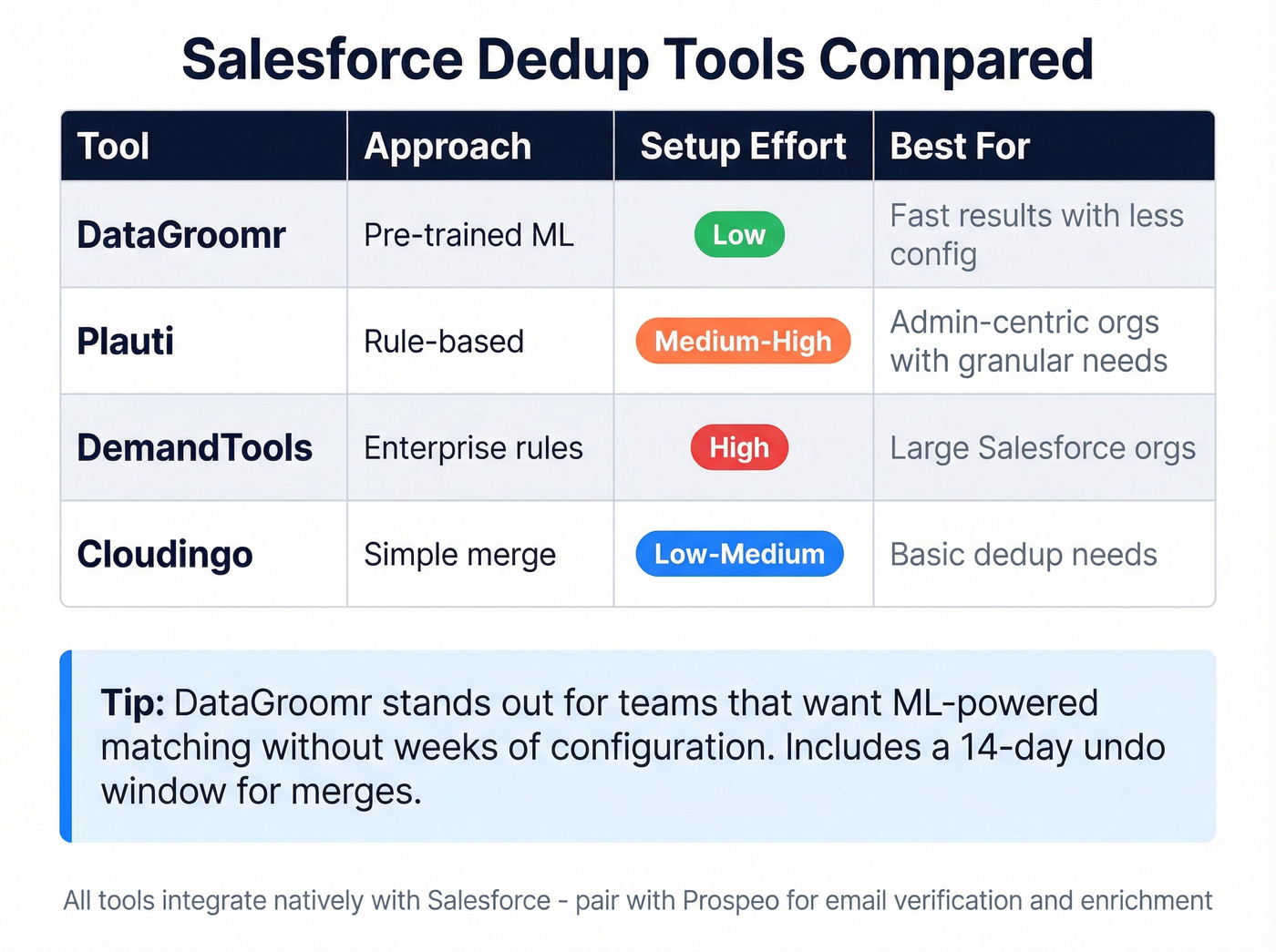
| Tool | Approach | Setup Effort | Best For |
|---|---|---|---|
| DataGroomr | Pre-trained ML | Low | Fast results, less config |
| Plauti | Rule-based | Medium-high | Admin-centric orgs |
| DemandTools | Enterprise rules | High | Large Salesforce orgs |
| Cloudingo | Simple merge | Low-medium | Basic dedup needs |
DataGroomr is the standout for teams that don't want to spend weeks configuring matching rules - its ML models detect duplicates out of the box and support tag-based mass merging with a 14-day undo window. Plauti requires more configuration but gives admins granular control over matching weights and real-time prevention via Salesforce's native Duplicate Rules. DemandTools by Validity is the enterprise workhorse - powerful but heavy. Cloudingo handles straightforward merge workflows without much complexity. Pricing for Salesforce dedup tools typically runs $500-$2,000/month depending on record volume and features.
Cleaning in Zoho CRM
Zoho's built-in dedup tool handles basic exact matching. For fuzzy matching and bulk standardization, export to CSV and use OpenRefine or WinPure. Skip this section if you're on Salesforce or HubSpot - the native tooling and third-party ecosystem are significantly better.
Tools Compared
| Tool | Best For | CRM Support | Pricing | Key Strength |
|---|---|---|---|---|
| Prospeo | Verification + enrichment | HubSpot, Salesforce, Zapier, Make | Free tier; ~$0.01/email | 98% email accuracy, 7-day refresh |
| Insycle | Cross-CRM dedup | HubSpot, Salesforce, Intercom | $1.25-$2.50/1K records/mo | Unlimited users, SOC 2 |
| DataGroomr | Salesforce ML dedup | Salesforce | ~$500-2,000/mo | Pre-trained ML, low setup |
| WinPure | Fuzzy name matching | Cross-platform (desktop) | ~$500-1,500/yr | Advanced matching algos |
| OpenRefine | One-time bulk cleanup | Any via CSV export | Free, open-source | Powerful manual cleanup |
| Cloudingo | Salesforce dedup | Salesforce | ~$500/mo+ | Simple merge workflows |
Insycle is the best cross-CRM option for dedup and standardization. It works across HubSpot, Salesforce, and Intercom with unlimited users and operations on every plan - pricing scales by record count, not seats. SOC 2 Type II certified. Note that Starter only includes one module; most teams need Growth or Professional to access both dedup and standardization.
OpenRefine is worth a look for one-time projects. It's free, open-source, and surprisingly powerful for clustering and transforming messy CSV exports. Don't try to build an ongoing process around it - it's a scalpel, not a system.
Why Verification Matters Most
Dedup gets all the attention. Verification is what actually saves your pipeline.
Email data decays at ~2% per month. Within a year, a third of your list is dead weight - and dead weight that actively damages your sender reputation. The Snyk sales team learned this the hard way: their bounce rate was running 35-40% before they integrated verification into their workflow. After switching to verified data, bounces dropped under 5% and they started generating 200+ new opportunities per month. (If you want the verification landscape, see AI email verification.)

The most common complaint in RevOps communities isn't that cleaning is hard - it's that nobody budgets time for maintenance. The cleanup project gets approved, the ongoing process doesn't. That's why point-of-entry verification matters more than batch cleanup: verify every email before it enters the CRM, and you stop the decay cycle at the source.
A solid verification workflow catches invalid emails, spam traps, and catch-all domains before they damage your sender reputation. The best tools also fill in missing job titles, direct dials, and company data in the same pass - so you don't need separate tools for verification and enrichment.
That 31% dead-email problem from the intro? Prospeo's 5-step verification catches it before it hits your pipeline - with catch-all handling, spam-trap removal, and honeypot filtering built in. 92% API match rate across 300M+ profiles.
Audit your CRM in minutes, not the 13 hours your team wastes weekly.
How to Measure If It Worked
Don't just clean and hope. Track these five KPIs before and after:
- Duplicate rate - measure before cleanup, then monthly. Target: under 3%.
- Bounce rate - the single most important outbound metric. Target: under 2%. The Stack Optimize team keeps bounce under 3% with zero domain flags across all clients. (If you’re troubleshooting, start with hard bounce.)
- Field completeness - percentage of records with all critical fields populated. Target: 80%+ for fields your sequences and routing rules depend on.
- Enrichment match rate - what percentage of records come back with usable data when you run enrichment. 80%+ is strong.
- Data age distribution - what percentage of records were updated in the last 90 days? If half your database hasn't been touched in six months, it's decaying faster than you're maintaining it.
If you can't measure these five things right now, build the dashboard before you start the cleanup. Clean data only stays clean if you're tracking the metrics that prove it.
FAQ
How often should you clean CRM data?
Monthly for email verification and dedup scans; quarterly for full audits covering field completeness, formatting, and governance compliance. Point-of-entry validation should run continuously on every new record. If you're doing annual "big cleanups," you've already lost - automate the process instead.
What's the fastest way to check if your data is bad?
Export 100 random contacts and run them through an email verifier. If more than 10% bounce, your database has a serious problem. Most verification tools offer enough free credits for a quick audit that reveals exactly where you stand.
Can you clean CRM data with Excel?
For small databases under 1,000 records, yes - sort, filter, and manually dedup. Beyond that, Excel can't handle fuzzy matching, email verification, or scheduled maintenance. 65% of companies still try, and their data stays dirty. Dedicated tools pay for themselves within a single quarter at most mid-market companies.
How much does it cost?
Free with OpenRefine plus manual effort, up to $2,500+/month for enterprise tools like DemandTools. Most mid-market teams spend $200-800/month on a combination of dedup and verification tools. Email verification specifically runs around $0.01 per email at most providers, with free tiers available for testing.
Does dirty data affect email deliverability?
Bounce rates above 5% can damage your sender reputation and get your domain blacklisted. One team's 12% bounce rate collapsed their sending domain in 48 hours - recovery took six weeks and froze $18K in pipeline. Running verification before every send isn't optional; it's the cheapest insurance your outbound program can buy.