

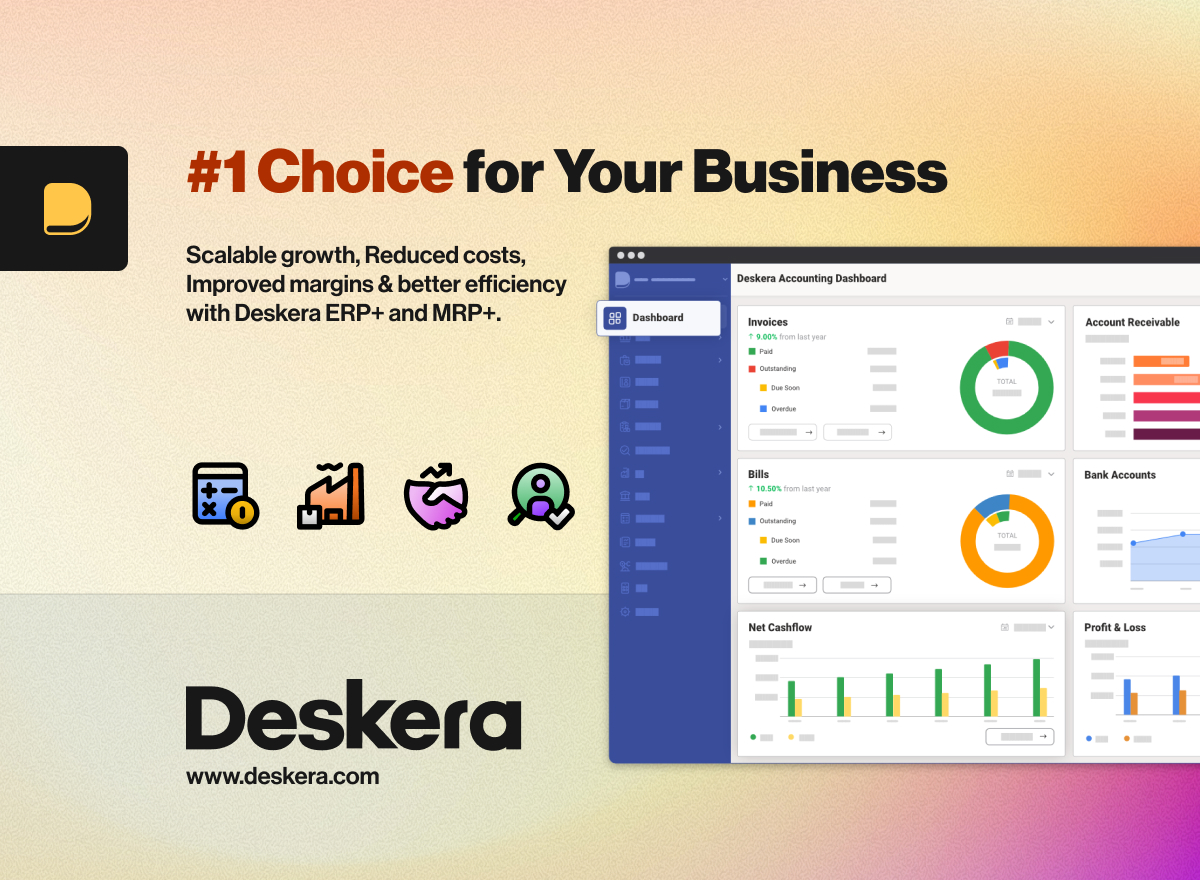
The Best Deskera Alternatives in 2026 - With Pricing Nobody Else Shows You
You're paying $995/month billed annually for five seats on Deskera's Growth plan - and that's before the required one-time implementation and setup fees they don't publish. If you're looking at Deskera alternatives, you already sense something's off. Industry estimates for SMB ERP onboarding put those hidden fees at $2,000-$20,000. Then you open a support ticket and wait. One G2 reviewer titled their review "Non-existent support." SoftwareFinder users rate Deskera 2.3/5, with 67% of reviews negative.
Deskera's all-in-one design is appealing - accounting, CRM, inventory, payroll under one login. But at $199/user/month with a five-user minimum, you're in mid-market ERP territory on price while reviews keep flagging support as a weak point. Acumatica has 1,900 G2 reviews. NetSuite has 4,438. Deskera has 33. That gap tells you something.
Our Picks (TL;DR)
- Odoo - Best overall for budget-conscious teams. Free one-app plan, all-apps from ~$10-$20/user/mo.
- Acumatica - Best for mid-market manufacturing. Transaction-based pricing, no per-seat penalty.
- MRPeasy - Best for small manufacturing shops. Starts at $49/user/mo with real production scheduling.
Top Deskera Alternatives Compared
Odoo
Odoo's free plan gives you one app with unlimited users - enough to test accounting or inventory without spending a dollar. Paid plans bundle all apps at one price, and in most regions that works out to roughly $10-$20/user/month depending on billing cycle and locale.
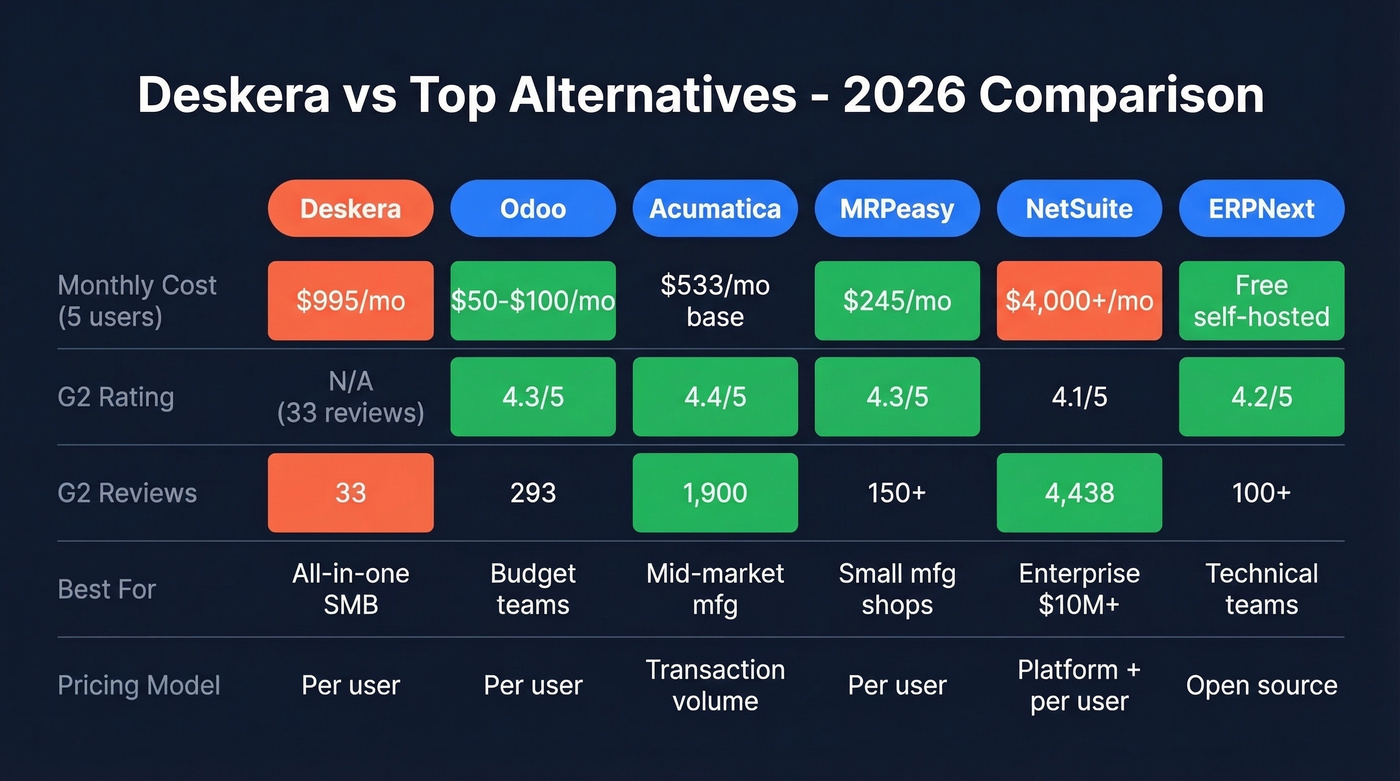
For a five-person team, that's about $50-$100/month versus Deskera's $995/month. Around 90% savings on subscription cost alone.
We've seen teams start with just accounting and inventory, then bolt on CRM or manufacturing modules over 6-12 months as they figure out what they actually need - instead of paying upfront for everything. Odoo carries a 4.3/5 on G2 with 293 reviews, nearly 9x Deskera's review count. The modular architecture is the real draw here: you're not locked into an all-or-nothing bundle where half the features collect dust.
Use it if: Budget matters and you want to pick exactly which modules you pay for.
Skip it if: You need hand-holding during implementation. Odoo's community edition is powerful but self-directed, and the learning curve can be steep without a dedicated admin.
Acumatica
Acumatica doesn't charge per seat. Pricing is based on transaction volume - specifically, the single highest monthly count among sales orders, shipments, AR invoices, customer payments, POs, receipts, AP bills, and AP payments. The General Business Edition starts at $6,396/year for up to 10 users and 1,000 monthly transactions. Most mid-sized businesses land around $25,000+/year as they scale.
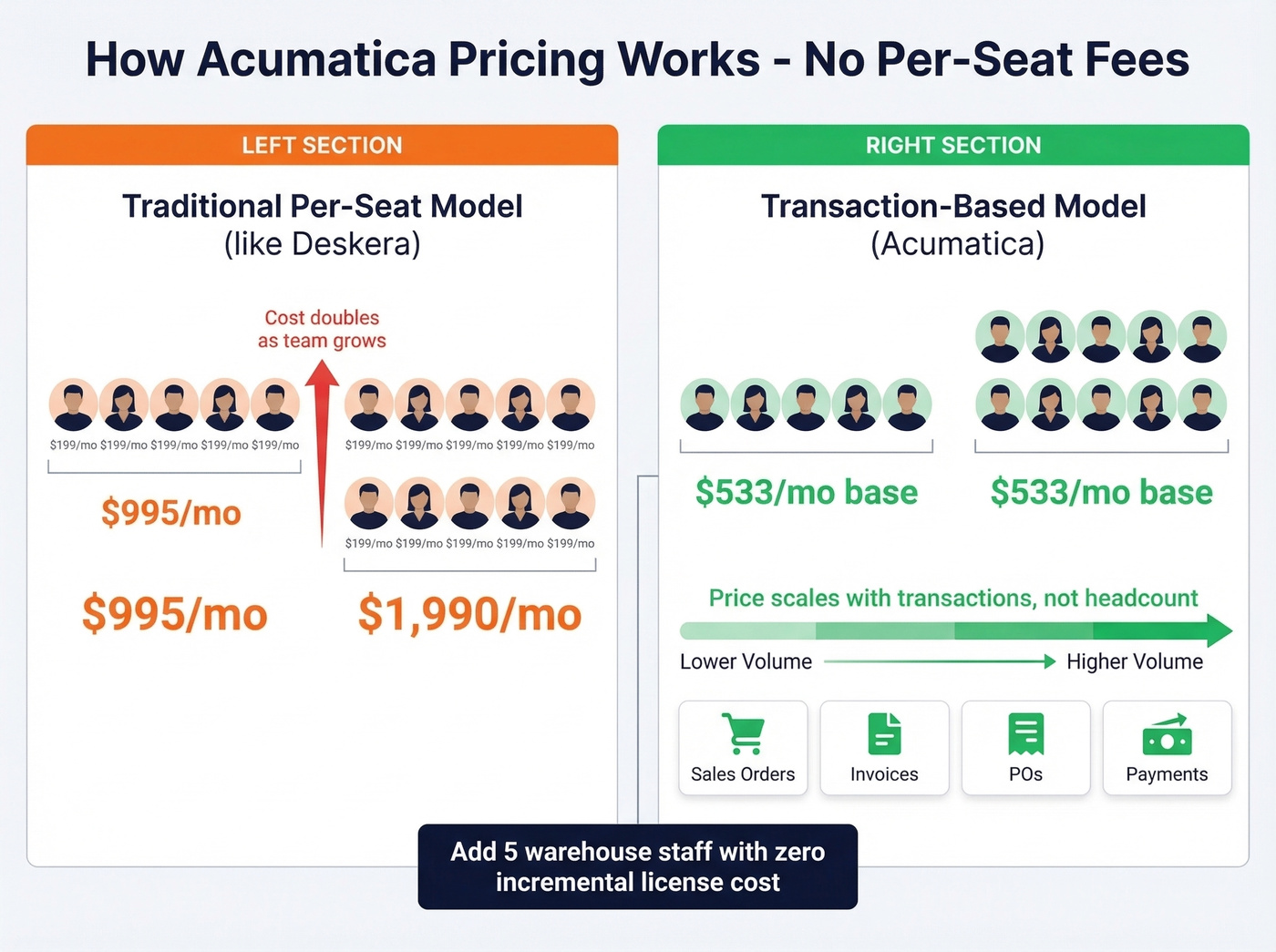
Here's what makes this interesting for growing teams: add five warehouse staff and there's no incremental license cost. Higher tiers include unlimited user licenses, so headcount growth doesn't blow up your software budget the way it does with per-seat models.
At 4.4/5 on G2 with 1,900 reviews, it's the best-reviewed option on this list. Implementation costs commonly run $60,000-$100,000+ depending on scope, so this isn't a weekend project.
Use it if: You're a mid-market manufacturer with growing headcount who's tired of per-seat math.
Skip it if: You're under 10 employees or need a quick go-live. The implementation timeline alone can stretch 3-6 months.
MRPeasy
MRPeasy isn't a full ERP. It's a focused MRP system for shops with 10-200 employees. Production scheduling, bills of materials, inventory management, and shop floor reporting. That's the scope, and it does it well.
Pricing starts at $49/user/month on the Starter tier, scaling to $149/user/month for Ultimate. They also offer reduced pricing beyond the first 10 users.
Use it if: You need production scheduling and BOMs without paying for accounting, HR, and CRM modules you'll never touch.
Skip it if: You need a full ERP with financials and payroll. Pair MRPeasy with separate accounting software like Xero or QuickBooks.
NetSuite
NetSuite is the graduation path for companies scaling past $10M in revenue. Enterprise-grade financials, multi-entity consolidation, a massive integration ecosystem. G2 rating: 4.1/5 across 4,438 reviews.
Let's be honest about the cost: first-year totals typically run $50,000-$200,000 including implementation. The base platform alone is $999-$5,000/month before user licenses at $99-$199/user/month. This isn't a Deskera replacement for cost-conscious teams - it's a different weight class entirely.
Use it if: You're past $10M revenue and need enterprise infrastructure that'll last a decade.
Skip it if: You're leaving Deskera because of cost. NetSuite's year-one spend starts where Deskera's annual bill ends.
ERPNext
Free, open-source, self-hosted. ERPNext covers manufacturing, accounting, HR, and CRM with zero license fees on your own infrastructure. Cloud-hosted plans start around $50/mo.
The Reddit consensus on r/smallbusiness and r/ERP is that ERPNext punches well above its weight for technical teams willing to manage their own stack, but the documentation can be patchy and community support varies. Use it if: You have in-house developers and want zero license costs. Skip it if: You need vendor-managed hosting and responsive support - you'll end up spending the savings on contractor hours.
Pricing Comparison
| Tool | Starting Price | Pricing Model | Best For |
|---|---|---|---|
| Deskera | $995/mo (5 users, billed annually) | Per user/mo | All-in-one SMB |
| Odoo | Free (1 app) / ~$10-$20/user/mo | Per user/mo | Budget-conscious teams |
| Acumatica | $6,396/yr | Transaction volume | Mid-market mfg |
| MRPeasy | $49/user/mo | Per user/mo | SMB manufacturing |
| ERPNext | Free (self-hosted) | Open source | Technical teams |
| NetSuite | ~$50K+ first year | Platform + per user | Scaling enterprises |

You're comparing ERPs that cost $995 to $50,000+ per year. Don't let dirty contact data undermine your investment. Prospeo enriches your entire CRM with 50+ data points per contact at 98% email accuracy and a 92% match rate - for roughly $0.01 per email.
Import clean data into your new ERP from day one.
Clean Your CRM Data Before Migrating
Here's what nobody tells you about switching ERPs: your contact data rots during the transition. Emails bounce, phone numbers go stale, job titles shift. We've watched teams spend months picking the perfect new system, then import 40,000 contacts where a third of the emails are dead. That's like moving into a new house and unpacking boxes of garbage.
If you're planning a migration, treat it like a sales process optimization project too: clean inputs first, then rebuild workflows.
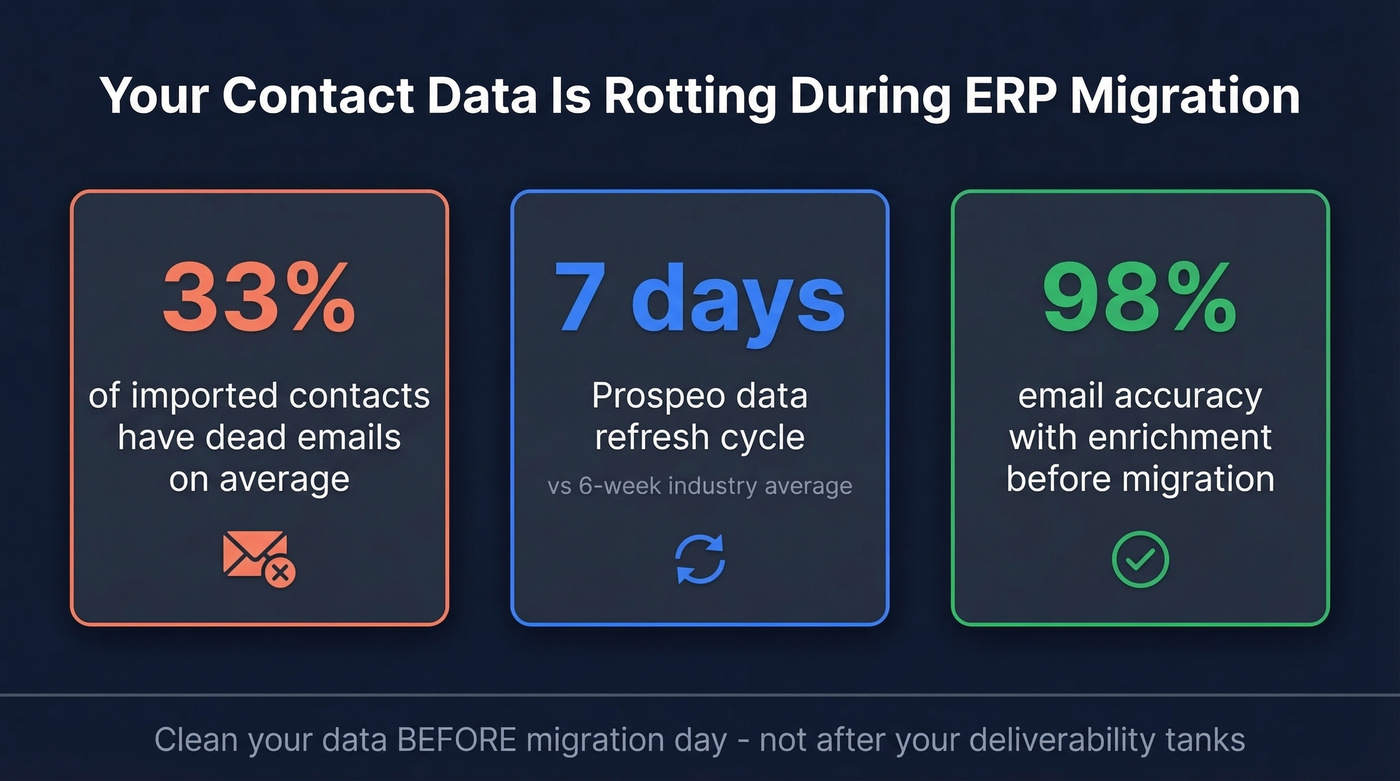
Before you migrate, run your contact database through an enrichment tool. Prospeo's API returns 50+ data points per contact with 98% email accuracy and a 92% match rate. Dead emails get flagged before they tank your email deliverability in the new system. With a 7-day data refresh cycle - compared to the 6-week industry average - you're importing records that actually reflect reality, not last quarter's org chart.
If you want to compare options, start with a shortlist of data enrichment services and validate match rates on a sample export.

Every week you delay migration, more contacts decay. Job titles change, emails bounce, phone numbers disconnect. Prospeo refreshes data every 7 days - 6x faster than the industry average - so your new ERP launches with contacts that actually connect you to real buyers.
Start with 75 free verified emails. No contract, no sales call.
Which One Should You Pick?
You don't need to evaluate all five. Here's the decision tree:
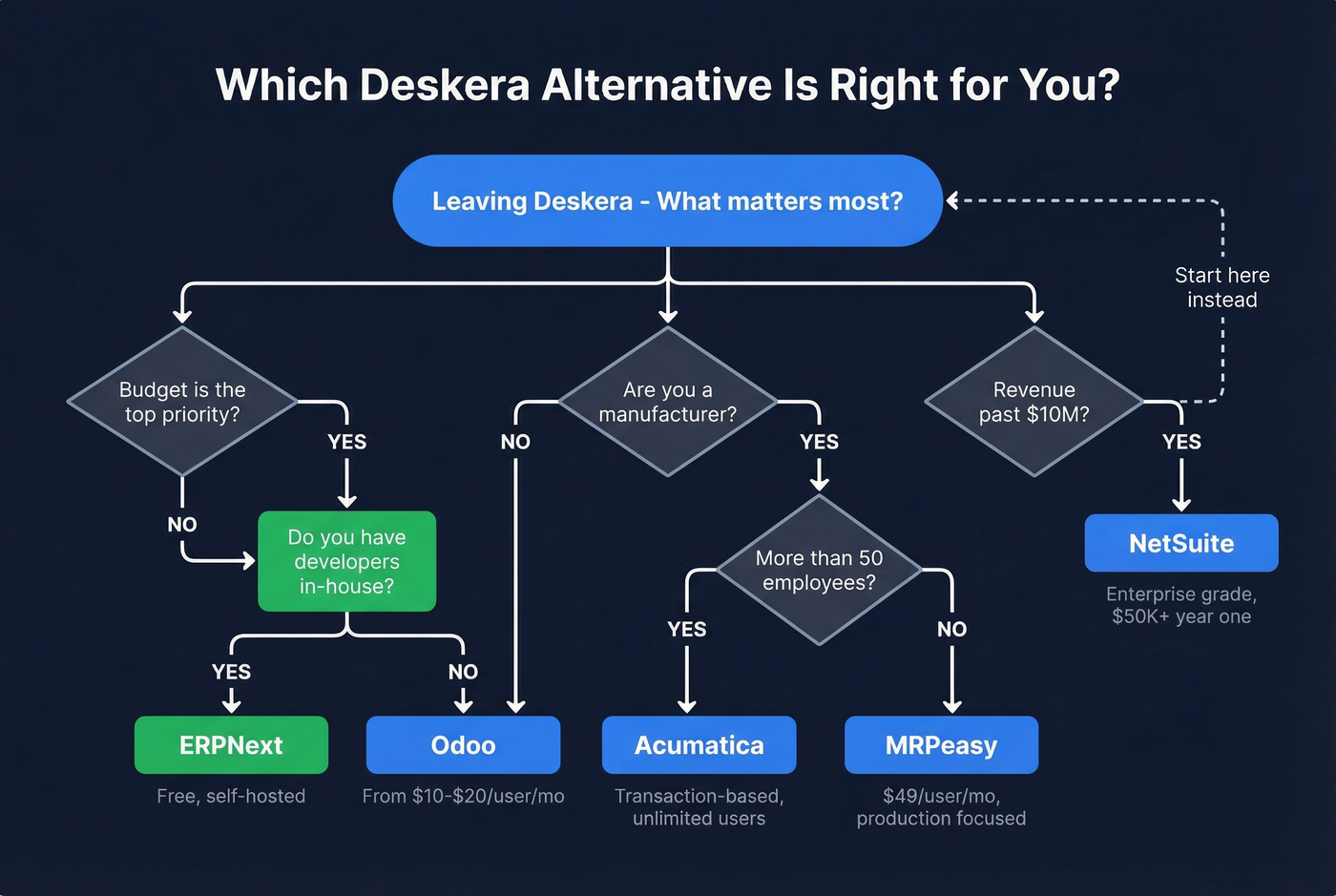
- Budget is king, want modularity → Odoo
- Mid-market manufacturer, growing headcount → Acumatica
- Small shop, just need production planning → MRPeasy
- Scaling past $10M, need enterprise infra → NetSuite
- Technical team, zero budget → ERPNext
Look, the worst outcome isn't picking the wrong ERP. It's spending six months evaluating options and staying on Deskera the whole time because the comparison spreadsheet keeps growing. Pick the one that matches your scale, run a 30-day pilot, and move. Any of these Deskera competitors will give you better support responsiveness than what reviewers report today.
If you're migrating a sales team alongside the ERP, align your contact management rules and ownership fields before you import.
Deskera Alternatives FAQ
Is Deskera worth the price?
At $995/month minimum plus implementation fees estimated at $2,000-$20,000, Deskera's cost approaches mid-market ERP territory. G2 reviewers praise the all-in-one design but consistently flag support responsiveness as a problem. If timely support matters to your team, Odoo at ~$10-$20/user/month or Acumatica's transaction-based model offer stronger value for the money.
What's the cheapest alternative to Deskera?
ERPNext is free if you self-host. Odoo offers one app free for unlimited users, with all-apps plans starting around ~$10-$20/user/month - roughly 90% cheaper than Deskera's Growth tier for a five-user team. Both require more self-directed setup, but the savings are real.
Which Deskera alternative is best for manufacturing?
Acumatica for mid-market operations - transaction-based pricing with unlimited users at higher tiers. MRPeasy for small shops at $49-$149/user/month. Both are purpose-built for production scheduling and BOMs, unlike the project management tools other lists recommend as "alternatives."
How do I clean CRM data when switching ERPs?
Export your contacts and run them through an enrichment tool before importing into the new system. Flag bounced emails, stale phone numbers, and incomplete records before migration day. Cleaning data upfront prevents deliverability problems from day one and saves your sales team from chasing ghosts in a brand-new system.