

DKIM Generator: The Complete Guide for 2026
A DKIM generator is the easy part. You click a button, you get a key pair. The hard part is everything after - publishing the record without breaking it, rotating keys before they become a liability, and understanding why 16,000 out of 500,000 DKIM records in one study were flat-out invalid.
A common question on r/sysadmin about DKIM isn't "how do I generate a key" - it's "will this break my existing email?" It won't, and this guide will prove it.
What You Need (Quick Version)
Use RSA 2048-bit. Name your selector with a date stamp like s202607. Generate with EasyDMARC's free tool or locally with OpenSSL. Publish as a TXT record at selector._domainkey.yourdomain.com. Verify with MxToolbox. Rotate every 3-6 months.
Publishing a DKIM public key in DNS doesn't change mail flow by itself. Deliverability issues happen when signing and alignment is enabled or misconfigured. The rest of this guide explains each step.
Why DKIM Is Non-Negotiable
Since February 2024, Google and Yahoo require DKIM for bulk senders (5,000+ emails/day) and strongly recommend it for everyone else. Microsoft followed suit in May 2025. If you're running outbound at any meaningful volume, DKIM is table stakes for reaching an inbox.
And yet, 58.5% of senders say they use DKIM, while 30.4% aren't even sure. That gap between "required" and "adopted" is where deliverability goes to die.
What Is DKIM?
DKIM (DomainKeys Identified Mail) is a cryptographic signature mechanism between your mail server and the receiving server. You use a DKIM key generator to create a key pair: a private key signs outgoing email, and a public key lives in your DNS so receivers can verify the signature.
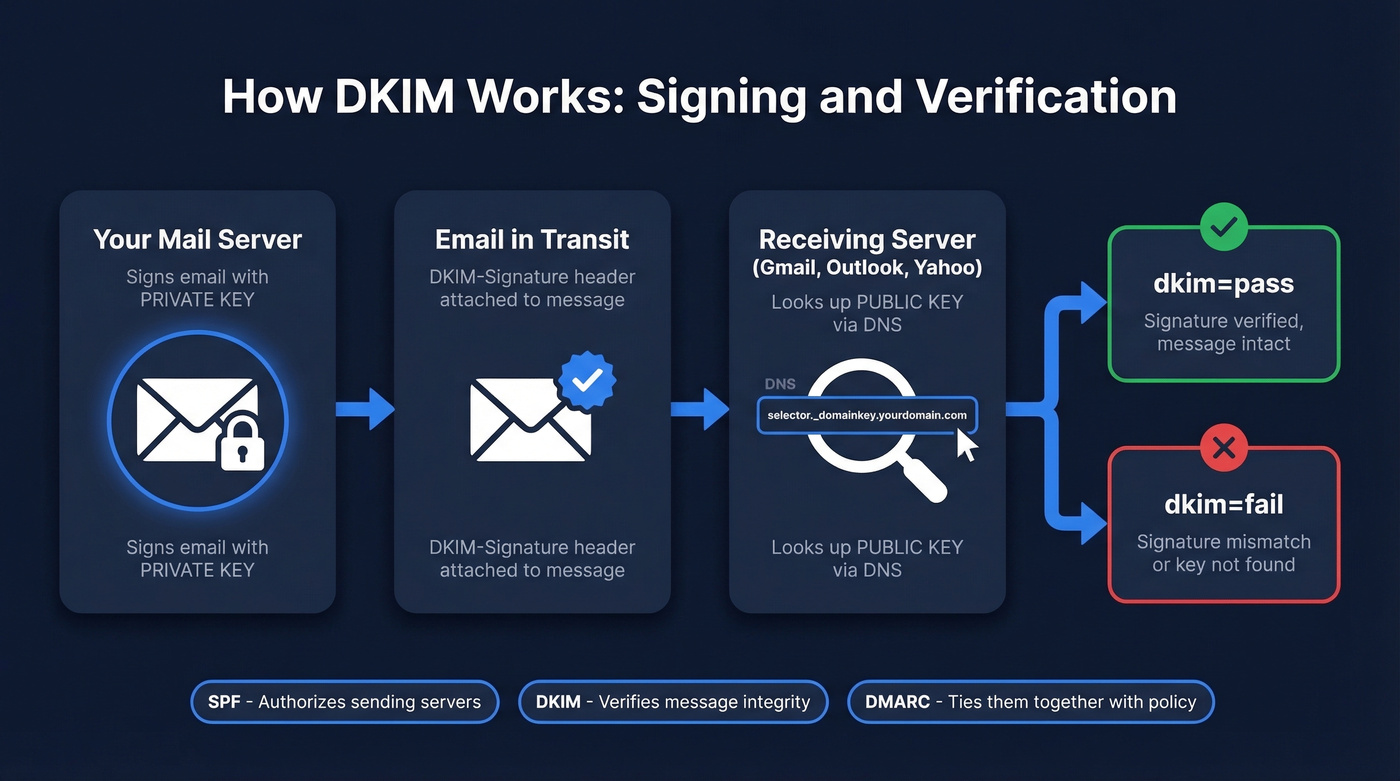
The public key sits at a DNS location determined by your selector - a label you choose that tells the receiving server where to look. DKIM is part of the authentication stack alongside SPF and DMARC. SPF authorizes which servers can send for your domain, DKIM verifies the message wasn't altered in transit for the signed parts, and DMARC ties them together with alignment and policy. For bulk sending to major providers, you need all three.
How to Create Your Key Pair
Free Online Tools
The fastest path is a web-based DKIM record generator. EasyDMARC has the best UI and includes ESP-specific publishing guidance. PowerDMARC is clean and fast if you just want a key pair. DMARCLY generates the key and gets out of your way. Any of these work well for teams that don't need local key management.
Set the key length to 2048-bit RSA - the current standard and the best balance of security and compatibility. 1024-bit is legacy and increasingly discouraged.
For your selector name, use a date-based convention like s202607 for July 2026. This makes rotation auditable. When you generate a new key next quarter, name it s202610, and anyone looking at your DNS knows exactly when each key was created.
Generate Keys Locally with OpenSSL
If you're security-conscious or self-hosting your mail server, generate keys locally so the private key never leaves your machine. We've found this is the preferred approach for anyone who wants full control over their domain key workflow.
Generate a 2048-bit RSA private key:
[openssl genrsa -out dkim_private.pem 2048](https://docs.openssl.org/3.1/man1/openssl-genrsa/)
Extract the public key in base64 for DNS:
openssl rsa -in dkim_private.pem -pubout -outform der | openssl base64 -A
The output is your p= value. For a 2048-bit key, the base64 string should be roughly 388 characters. If it's significantly shorter, you've got a truncated key - one of the most common DKIM errors in the wild.
Don't go to 4096-bit. It sounds more secure, but 4096-bit public keys can exceed the DNS UDP packet size, causing truncation and forcing TCP fallback that not every resolver handles gracefully. 2048-bit is the sweet spot.
Store your private key in a secrets manager or encrypted volume - never commit it to a git repo or share it over email. The private key is the single point of failure for your entire DKIM setup.
Testing with Port 25
If you're validating your setup by connecting directly to a receiving mail server, you can telnet to the destination MX on port 25, send a signed message, and inspect the authentication results in the response headers. Useful for debugging signing issues before they affect production mail flow.
Publishing Your DKIM Record in DNS
Record Format
You're creating a TXT record:
- Type: TXT
- Host/Name:
selector._domainkey(your registrar usually appends the domain) - Value:
v=DKIM1; k=rsa; p=YOUR_BASE64_PUBLIC_KEY - TTL: Default is fine (3600 or auto)
If v= is present, it must be the first tag. The p= tag holds your public key. No headers, no footers, no line breaks.
Cloudflare
In the Cloudflare dashboard, go to DNS > Add Record. Set the type to TXT. In the Name field, enter selector._domainkey - Cloudflare appends your domain automatically. Make sure the record is set to DNS Only (the gray cloud icon, not the orange proxy). If your ESP gives you a CNAME instead of a TXT record, use CNAME only if they explicitly tell you to.
GoDaddy & Namecheap
Standard field mapping applies. Type = TXT, Host = selector._domainkey, Value = your full DKIM record string. Watch for auto-appending: if you enter s202607._domainkey.yourdomain.com and the provider adds .yourdomain.com again, your record breaks silently. Always verify the final record with a DNS lookup tool after saving.
Common DNS Publishing Mistakes
These account for thousands of broken DKIM records:
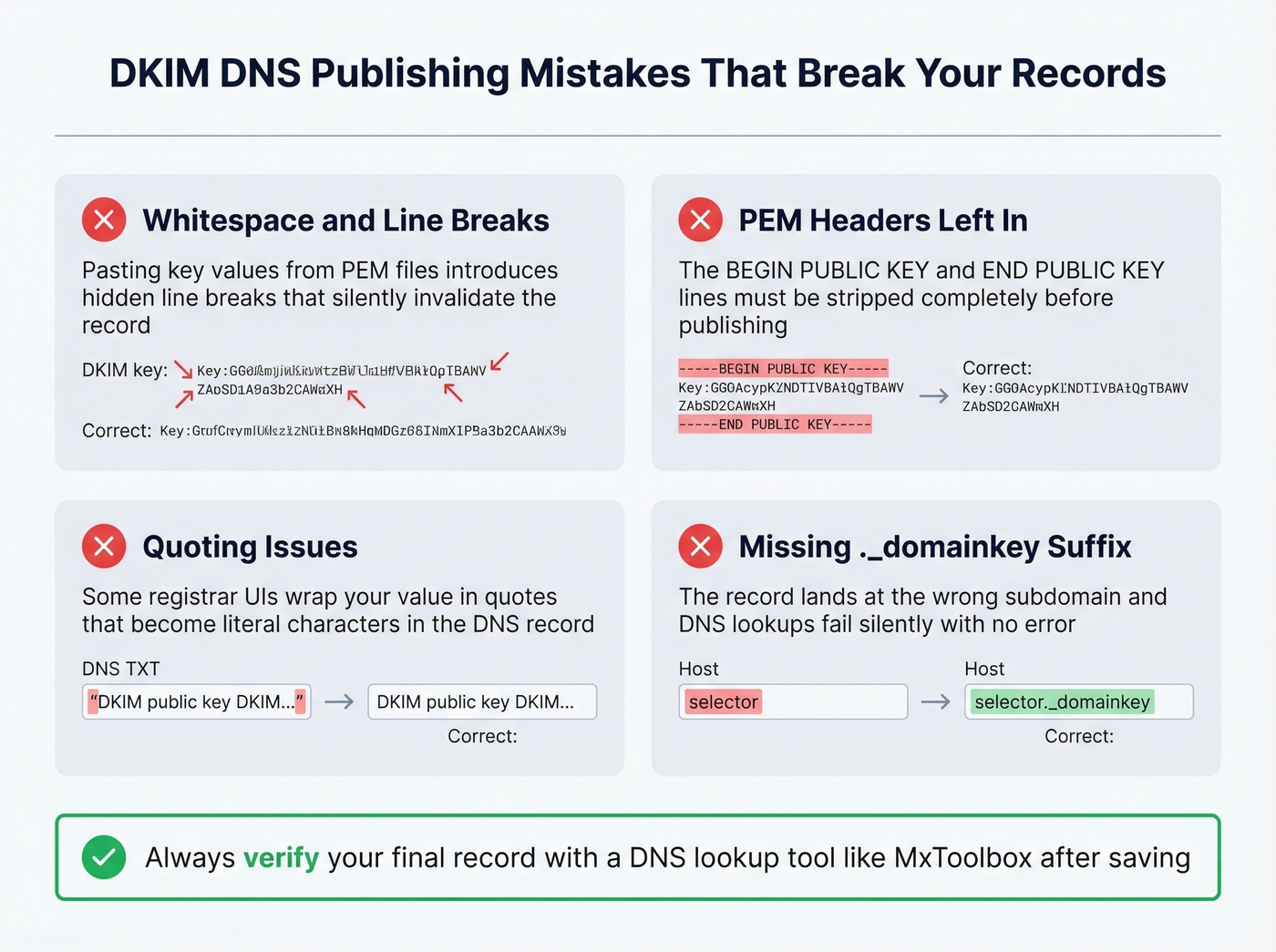
- Whitespace and line breaks pasted into the key value from a PEM file
- PEM headers/footers left in the value field - strip
-----BEGIN PUBLIC KEY-----entirely - Quoting issues - some registrar UIs wrap the value in quotes that become literal characters
- Missing
._domainkeysuffix - the record lands at the wrong subdomain and lookups fail silently
Enable DKIM Signing
Google Workspace & Microsoft 365
In Google Workspace, go to Admin Console > Apps > Google Workspace > Gmail > Authenticate Email. Google creates the DKIM key on your behalf - publish the TXT record they provide and click "Start Authentication."
Microsoft 365 uses a CNAME-based approach. You publish two CNAME records (selector1 and selector2) pointing to Microsoft's DKIM infrastructure. Follow Microsoft's current DKIM documentation for the exact CNAME targets, then double-check your records.
Transactional & Self-Hosted
Each ESP - SendGrid, Mailgun, Postmark - provides its own DKIM key. Your job is to publish the CNAME or TXT record they give you. If you use multiple ESPs, you need separate DKIM keys for each with different selectors. This is where date-based naming conventions pay off.
For self-hosted setups running Postfix or Rspamd, the OpenSSL generation above applies directly. Install OpenDKIM or configure Rspamd's DKIM signing module, point it at your private key, set the selector, and publish the public key. You get the most control over rotation - and the most rope to hang yourself with.

You're setting up DKIM to protect deliverability. But authentication only works if the emails you're sending to actually exist. Prospeo's 5-step verification and 98% email accuracy mean sub-4% bounce rates - the same standard your DKIM setup is designed to protect.
Don't let bad data undo your authentication work.
Verify Your Setup
Send a test email to a Gmail or Outlook account, open it, view full headers, and find the Authentication-Results header. You're looking for dkim=pass. For a quick external check, use MxToolbox's DKIM lookup - enter your domain and selector, and it'll query the DNS record directly and flag formatting issues. If you want a deeper walkthrough, follow our guide on how to verify DKIM is working.
DKIM Tag Reference
| Tag | Meaning | Required? | Example |
|---|---|---|---|
v |
Version (must be first if present) | Optional | v=DKIM1 |
p |
Public key (base64) | Yes | p=MIIBIjAN... |
k |
Key type | Optional | k=rsa |
t |
Flags (testing mode) | Optional | t=y |
s |
Service type | Optional | s=email |
h |
Hash algorithms | Optional | h=sha256 |
a |
Signing algorithm | Optional | a=rsa-sha256 |
x |
Signature expiration | Optional | x=1756684800 |
Since RFC 8301, SHA-256 is the only acceptable hash algorithm. Using SHA-1 results in a PERMFAIL. Don't use it.
RSA vs Ed25519 in 2026
Ed25519 (RFC 8463) produces tiny keys that fit beautifully in DNS. In theory, it's the future. In practice, it's not ready to rely on as your only signing method.
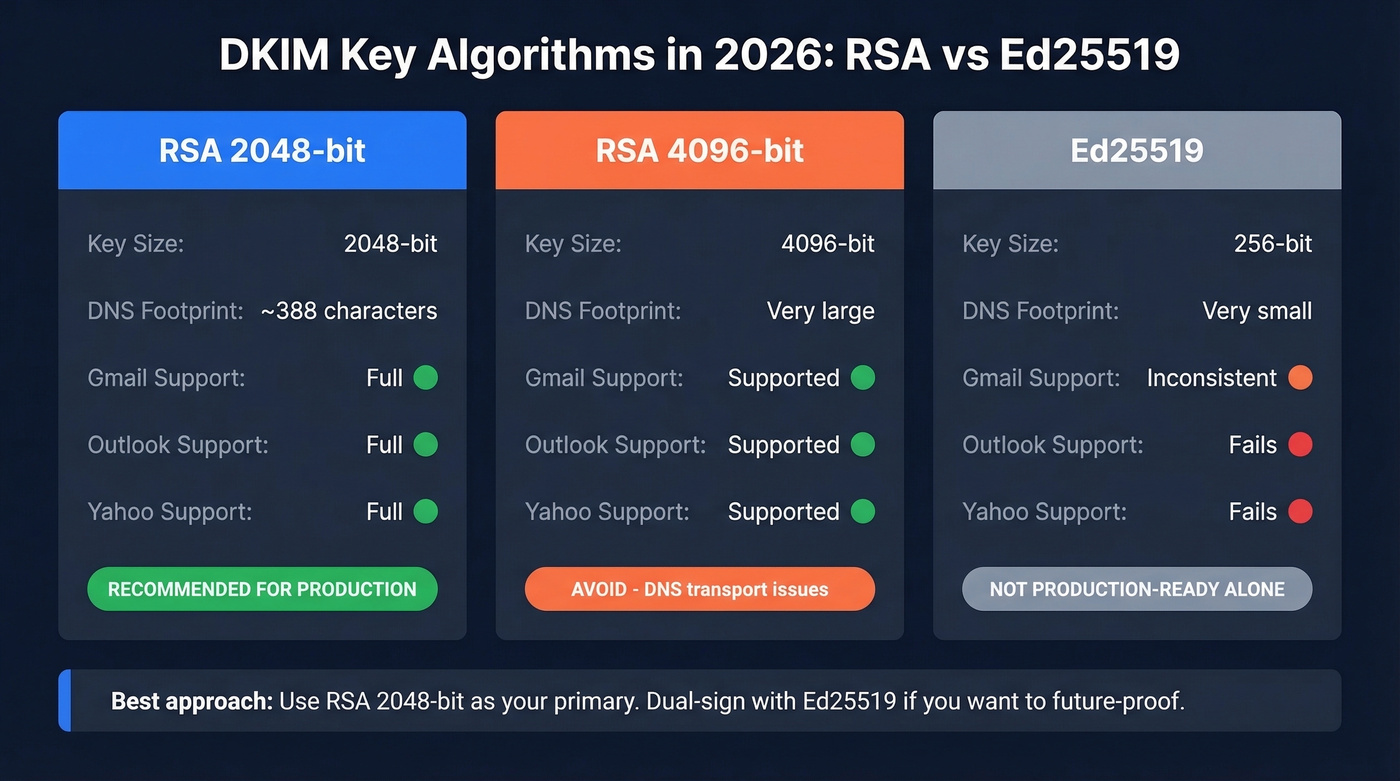
Verification support is inconsistent at major providers. In URIports' adoption and testing summary, Google, Microsoft, and Yahoo didn't verify Ed25519 DKIM signatures. One practitioner running dual-signing (Ed25519 + RSA) since 2022 found Gmail frequently failed Ed25519 verification, while Microsoft and Yahoo failed consistently in their tests. Some providers like Fastmail, ProtonMail, and GMX do validate Ed25519 reliably.
| Algorithm | Key Size | DNS Footprint | Gmail/Outlook/Yahoo | Recommendation |
|---|---|---|---|---|
| RSA 2048 | 2048-bit | ~388 chars | Full support | Use this |
| RSA 4096 | 4096-bit | Large | Supported but risky | Avoid (DNS transport issues) |
| Ed25519 | 256-bit | Very small | Inconsistent | Not production-ready alone |
Our recommendation: RSA 2048-bit for production. If you want to future-proof, dual-sign with Ed25519 alongside RSA - but never rely on Ed25519 alone.
Key Rotation Best Practices
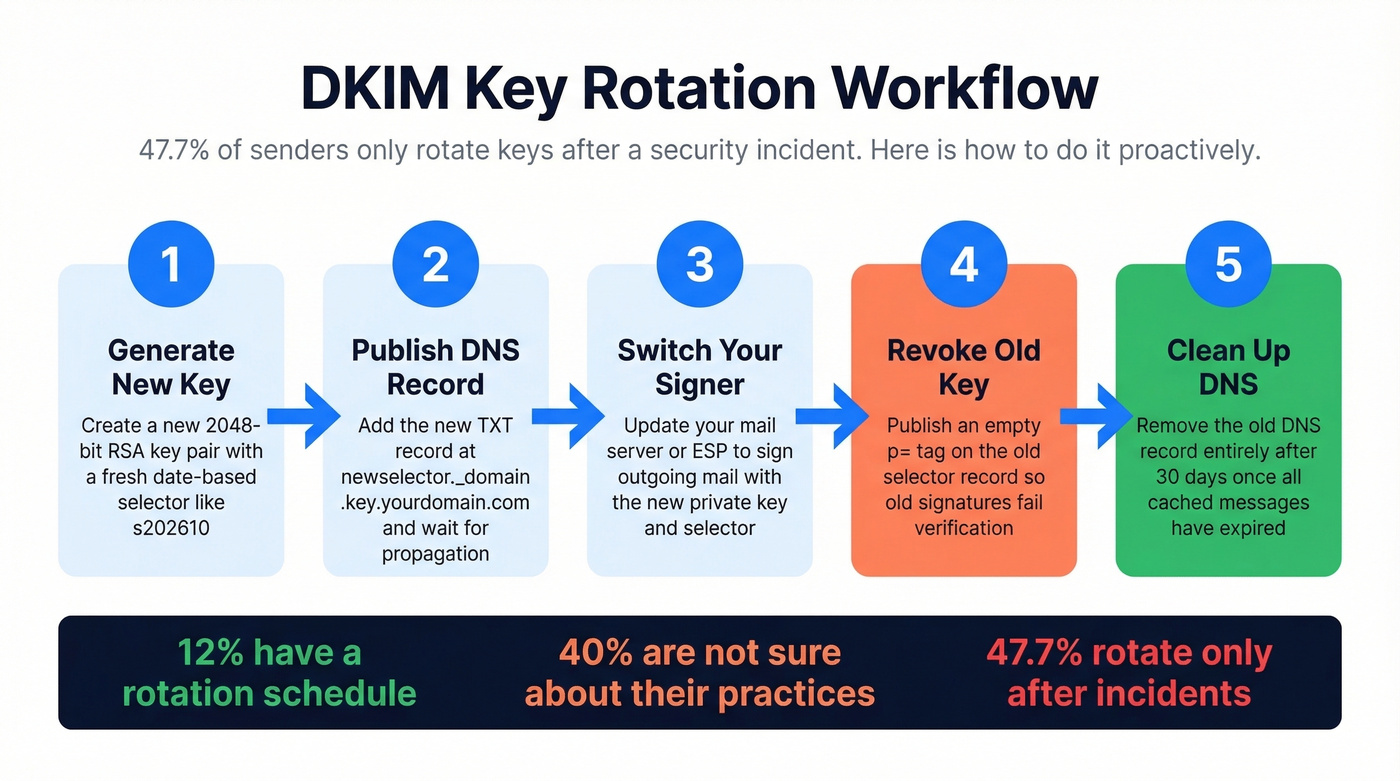
Here's a stat that should make you uncomfortable: 47.7% of senders rotate DKIM keys only after a security incident. Another 40% aren't sure about their rotation practices at all. Only about 12% have an actual schedule.
| Org Type | Cadence | Rationale |
|---|---|---|
| High-risk (finance, health) | Monthly to quarterly | Limits breach blast radius |
| Standard enterprise | Quarterly to biannual | Balances security and ops effort |
| Small business | Biannual to annual | Minimum viable rotation |
The workflow: generate a new key with a new selector, publish the new DNS record, switch your signer, revoke the old key by publishing an empty p= tag, then remove the old DNS record after 30 days.
Common Mistakes (From 500K Records)
A study of roughly 500,000 DKIM records found about 16,000 invalid - roughly 3.2%. Let's break down what went wrong.
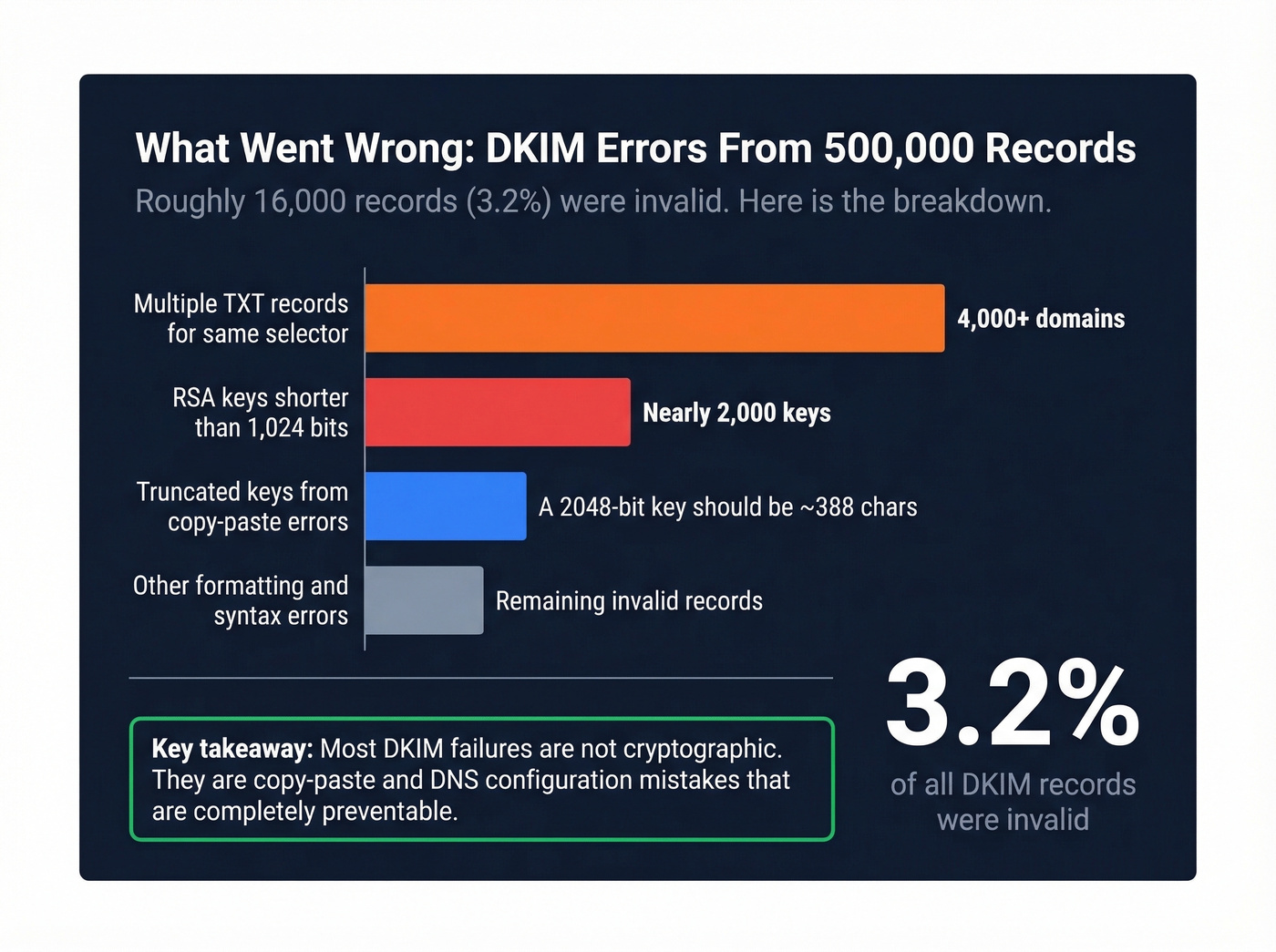
Multiple TXT records for the same selector hit over 4,000 domains. DNS returns both, and the verifier doesn't know which to use. One selector, one record. Period.
RSA keys shorter than 1,024 bits affected nearly 2,000 keys - cryptographically weak and increasingly rejected. Truncated keys are the classic copy-paste failure: a 2048-bit RSA public key should be ~388 characters in base64, and if yours is shorter, it got cut off somewhere between your generator and your DNS panel. Invalid characters like newline characters, consecutive semicolons, and PEM headers pasted into the DNS value break parsing entirely.
Less common but equally fatal: a missing p= tag where someone published just the raw key, and SHA-1 hash algorithm usage that triggers an automatic PERMFAIL. Then there's 4096-bit UDP truncation, which creates intermittent failures that are maddening to debug because they depend on the receiving resolver's TCP fallback behavior.
The fix is always the same: generate a clean key, strip it to raw base64, wrap it in proper tags, and verify with an external tool before enabling signing.
Troubleshooting DKIM Failures
Pull the full message headers from a failed email and find the Authentication-Results line. You're looking for the result code, the failure reason, and the DKIM fields d= and s=.
Signature or body hash mismatch usually means the message was modified in transit. Forwarding services, mailing lists, and content-scanning gateways alter the body after signing, which breaks the hash. This isn't a configuration error - it's a known DKIM limitation with forwarded mail, and there's no fix on your end.
Key not found means you should query selector._domainkey.yourdomain.com as a TXT record from multiple DNS resolvers. If results are inconsistent, you've got a propagation issue or a broken CNAME chain.
Intermittent failures with 4096-bit keys are the UDP truncation problem. Downgrade to 2048-bit.
Still in test mode? If you set t=y during initial setup, remove it once everything works. The flag tells receivers to treat failures leniently, which means you won't get accurate DMARC reports.
The Full Authentication Stack
DKIM alone isn't enough. Without DMARC, a receiver can see that your email passed DKIM but has no policy for messages that fail. Without SPF, you're missing the "authorized sender" check entirely.
Set up SPF first, then DKIM, then publish a DMARC record starting with p=none to collect reports. Monitor for a few weeks, move to p=quarantine, then p=reject. Once you're at enforcement, BIMI lets you display a verified brand logo in supporting inboxes.
Here's the thing most people miss: the majority of deliverability problems blamed on authentication are actually data problems. A properly configured DKIM generator proves your emails are authentic, and DMARC enforces policy. But sending authenticated emails to invalid addresses still destroys your domain reputation - bounces tank your sender score regardless of how perfect your signing setup is. We've seen teams nail their DKIM, SPF, and DMARC configuration and still land in spam because 15% of their list was dead addresses. Tools like Prospeo catch bad data before it triggers those bounces, verifying emails in real time with 98% accuracy. If you're diagnosing inbox placement issues end-to-end, start with an email deliverability guide and then work through how to improve sender reputation and email bounce rate benchmarks.
DKIM, SPF, and DMARC get your emails past the server. But 35%+ bounce rates from bad contact data will tank your sender reputation faster than a missing DNS record. Prospeo refreshes 300M+ profiles every 7 days so your outbound hits real inboxes.
Authentication is half the battle - verified data is the other half.
FAQ
Can I use the same DKIM key for multiple domains?
No. Each domain needs its own key pair published at its own _domainkey subdomain. Selectors are domain-scoped - generate and publish separately for every sending domain you operate.
Do I need DKIM if I use a third-party ESP?
Yes. Your ESP generates the signing key, but you still publish the DNS record they provide. Without it, the ESP's signatures can't be verified and messages fail authentication at Gmail, Outlook, and Yahoo.
Is 1024-bit DKIM still acceptable?
It shouldn't be. 2048-bit RSA is the current minimum for security and compatibility. Major receivers increasingly reject 1024-bit signatures, and the 500K-record study found nearly 2,000 weak keys flagged as invalid. Always use 2048-bit.
What happens if my DKIM key is compromised?
Generate a new key with a new selector immediately, publish it in DNS, switch your signer, then revoke the old key by publishing an empty p= tag. With date-based selectors, the entire process takes under an hour.