

DKIM Key Rotation: The Guide Your Email Admin Actually Needs
You set up DKIM two years ago. It passed. You moved on. Rotation hasn't happened since - because touching it means risking broken email, and broken email means angry executives. Meanwhile, a 512-bit RSA DKIM key was cracked for under $8 in cloud compute. If your keys are old and undersized, you're one motivated attacker away from domain spoofing.
Quick version: Per M3AAWG guidance, rotate DKIM keys at least every six months - quarterly if you can. Use 2048-bit RSA, keep old and new selectors live simultaneously, and don't delete the old DNS record for at least seven days.
Why Rotating DKIM Keys Matters
A compromised DKIM key lets an attacker sign emails as your domain. 512-bit keys are trivially breakable. 1024-bit is considered weak. 2048-bit RSA is the baseline, and even that only holds if you rotate regularly. If your DMARC alignment policy is set to p=reject, a botched rotation means messages get dropped, not just flagged.
The deeper problem is organizational. DNS is owned by IT, email signing config lives with the messaging team, and security sets the policy but doesn't touch either system. Everyone assumes someone else owns rotation.
The result? Keys that haven't changed in years. Fear of breaking mail flow keeps teams from acting, and that inertia is the actual vulnerability. We've seen orgs with perfect SPF and DMARC records sitting on 1024-bit DKIM keys from 2019 - it's more common than anyone wants to admit. (If you need a quick sanity check on syntax, see an SPF record example.)
Here's the thing: most orgs don't have a DKIM problem. They have a "nobody owns DKIM" problem. Assign one person, put it on a calendar, and half the risk disappears overnight.
How Often to Rotate
M3AAWG recommends rotating at least twice a year. Postmark pushes for quarterly. Mailgun's automatic rotation fires every 120 days.
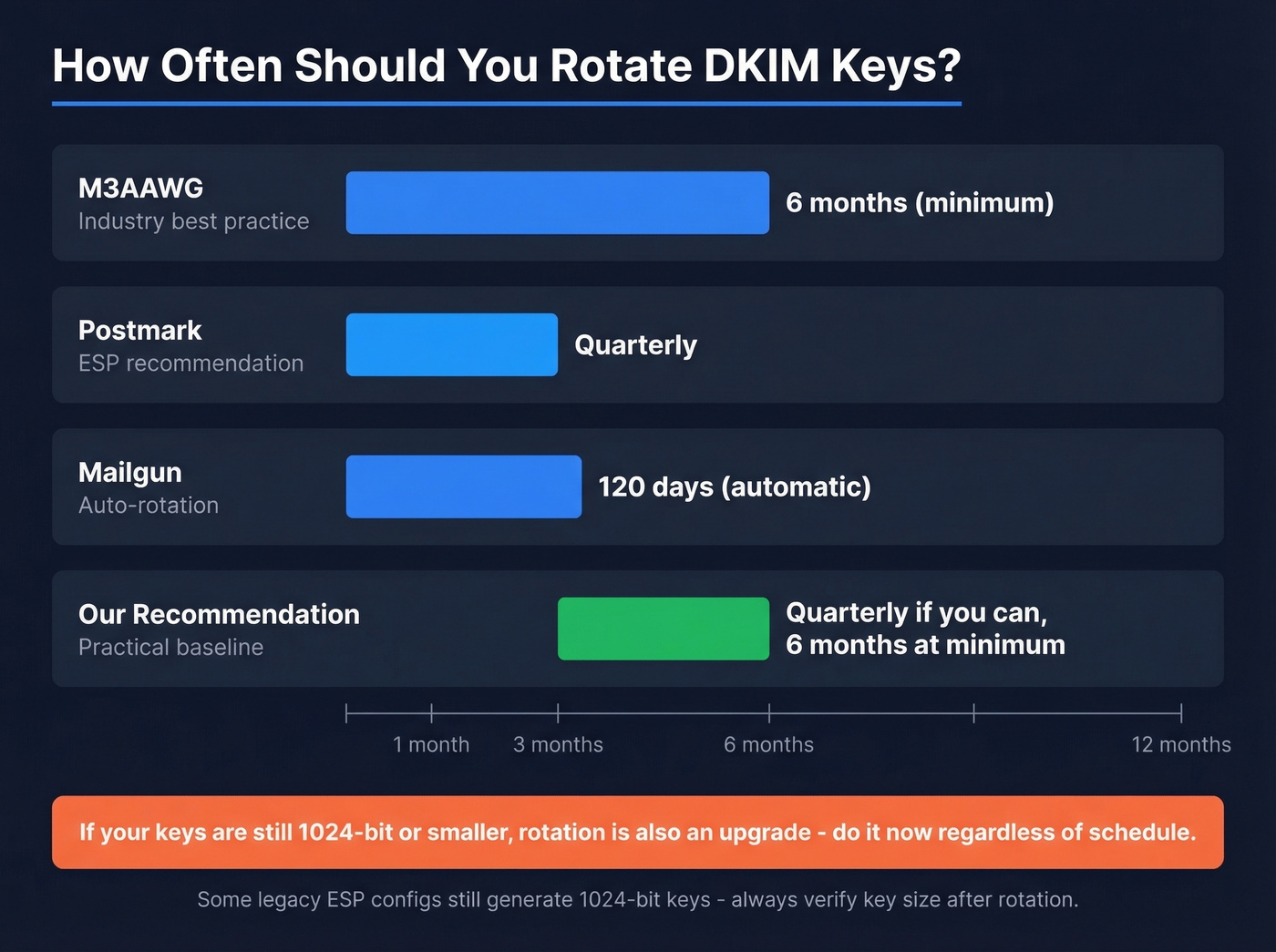
Our recommendation: six months is the floor. Quarterly is better if your team can handle it without heroics. If your ESP rotates automatically, confirm it's enabled and check the key size - some legacy configs still generate 1024-bit keys.
(After you rotate, don’t guess - use a repeatable checklist to verify DKIM is working.)

Rotating DKIM keys every quarter protects your domain from spoofing. But a 35% bounce rate destroys the reputation you just secured. Prospeo's 5-step email verification delivers 98% accuracy - so your freshly rotated keys sign messages that actually reach real inboxes.
Don't let bad data undo the DKIM rotation you just nailed.
Zero-Downtime Rotation Steps
The entire trick is overlap. Old key and new key coexist in DNS long enough that every message signed with either one validates. There are three models for managing this: manual TXT record rotation, CNAME delegation where your ESP controls the key, and subdomain delegation. The steps below apply regardless of which model you use.
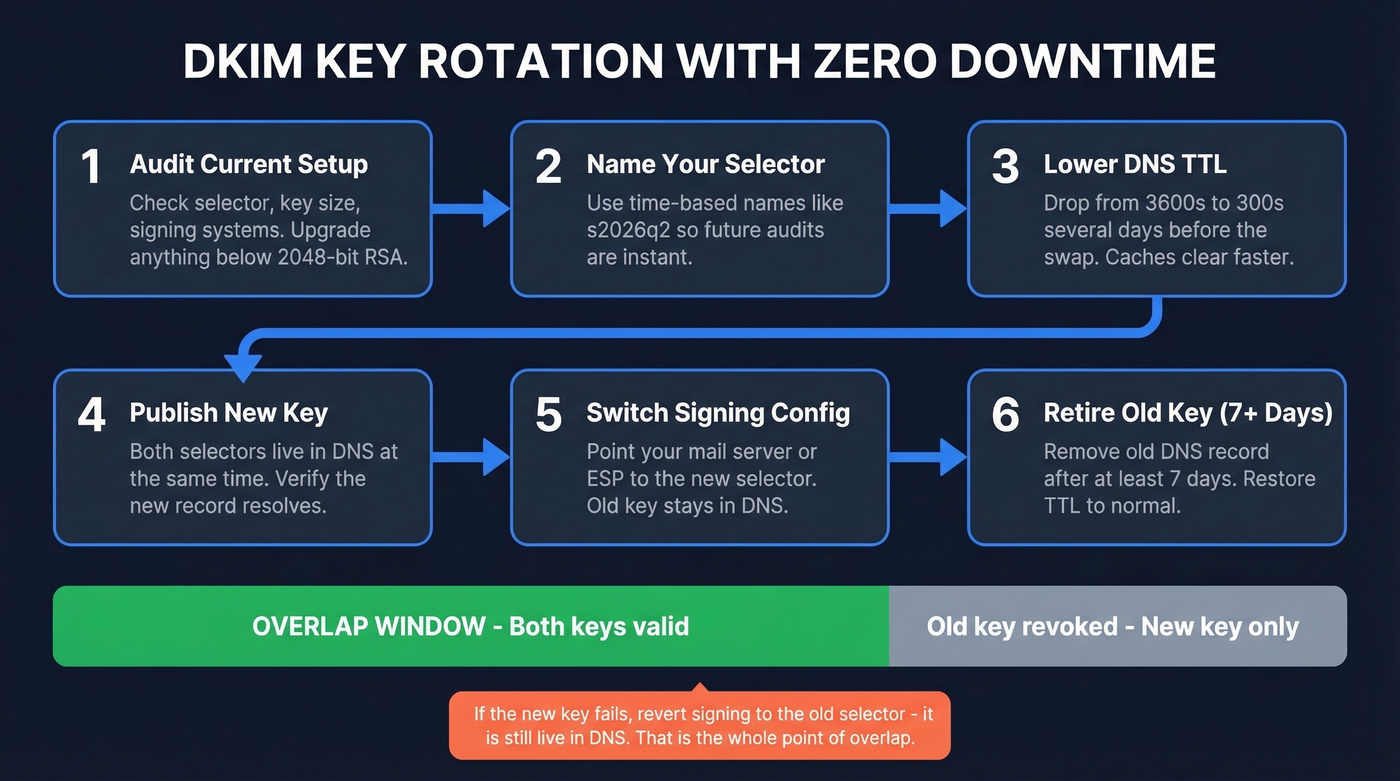
Audit your current setup. Check your active selector, key size, and which systems are signing. Anything below 2048-bit RSA means this rotation is also an upgrade.
Choose a time-based selector name. Something like
s2026q2ordkim202604. Future audits become trivial - you see at a glance when a key was deployed.Lower your DNS TTL. Drop the TTL on your existing DKIM record from 3600s to 300s several days before rotation. This ensures caches clear quickly when you publish the new record.
Publish the new key alongside the old one. Both selectors should resolve simultaneously. Generate a 2048-bit RSA key, format the DNS record correctly (watch for whitespace issues in the TXT value - this trips people up constantly), and verify it resolves before touching your signing config.
Switch your signing configuration. Update your mail server or ESP to sign with the new selector. The old selector stays in DNS.
Retire the old selector after 7+ days. Messages take days to arrive through retries, greylisting, and queued mail. After a week, remove the old DNS record or strip everything after
p=to revoke it. Restore your DNS TTL to normal.
If the new key fails verification, revert your signing config to the old selector - it's still live in DNS. That's the whole point of the overlap window.
Provider-Specific Instructions
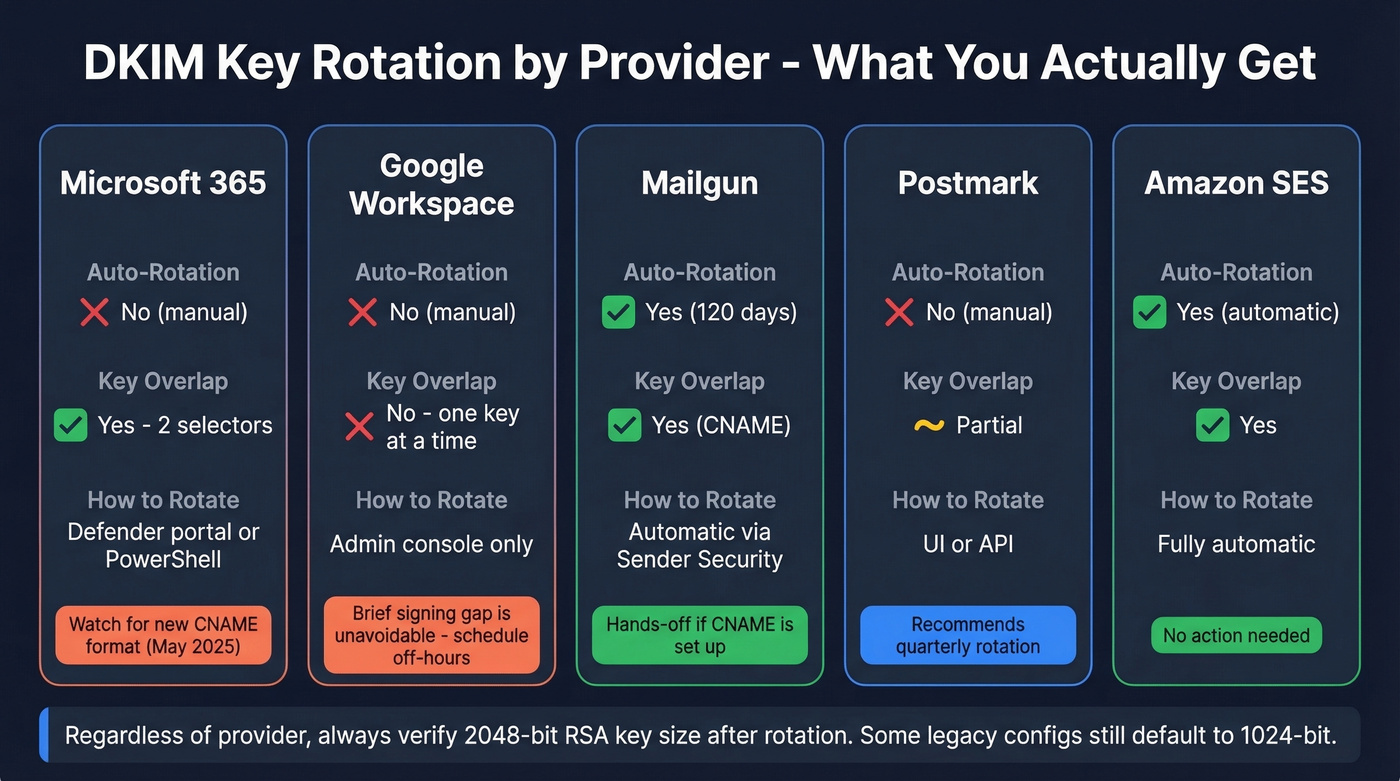
| Provider | Auto-Rotation | Key Overlap | Key Action |
|---|---|---|---|
| Microsoft 365 | No (manual) | Yes (2 selectors) | Defender portal / PowerShell |
| Google Workspace | No (manual) | No (one key active) | Admin console |
| Mailgun | Yes (120 days) | Yes (CNAME) | Automatic |
| Postmark | No (manual) | Partial | UI or API |
| Amazon SES | Yes (automatic) | Yes | Automatic |
Microsoft 365
M365's DKIM setup for custom domains uses CNAME records and two selectors, which makes rotation straightforward. Initiate from the Defender portal or PowerShell. Microsoft introduced a new DKIM CNAME target format in May 2025, and old and new formats can't coexist for the same selector - double-check which format you're on before starting.
Google Workspace
Google only lets you have one DKIM key at a time. Generating a new TXT record stops authentication until you restart signing and DNS propagates. This is frustrating, but it's how Google built it. Schedule the swap outside business hours and make sure SPF alignment is solid as a fallback during the gap.
Mailgun, Postmark & Amazon SES
Mailgun's Automatic Sender Security rotates every 120 days via CNAME delegation with 2048-bit keys. Note that 2048-bit TXT records sometimes need splitting depending on your DNS provider - we've hit this with Cloudflare and GoDaddy. Postmark recommends quarterly rotation and provides both UI and API workflows. Amazon SES handles rotation automatically at regular intervals. For self-hosted setups running OpenDKIM, automate with a script that calls your DNS provider's API - open-source examples exist on GitHub.
Common Mistakes to Avoid
Removing the old selector too early. Messages signed with the old key that are still in transit will fail verification. Keep the old record live for at least seven days. We've seen teams delete it same-day and then spend a week debugging DMARC failures.
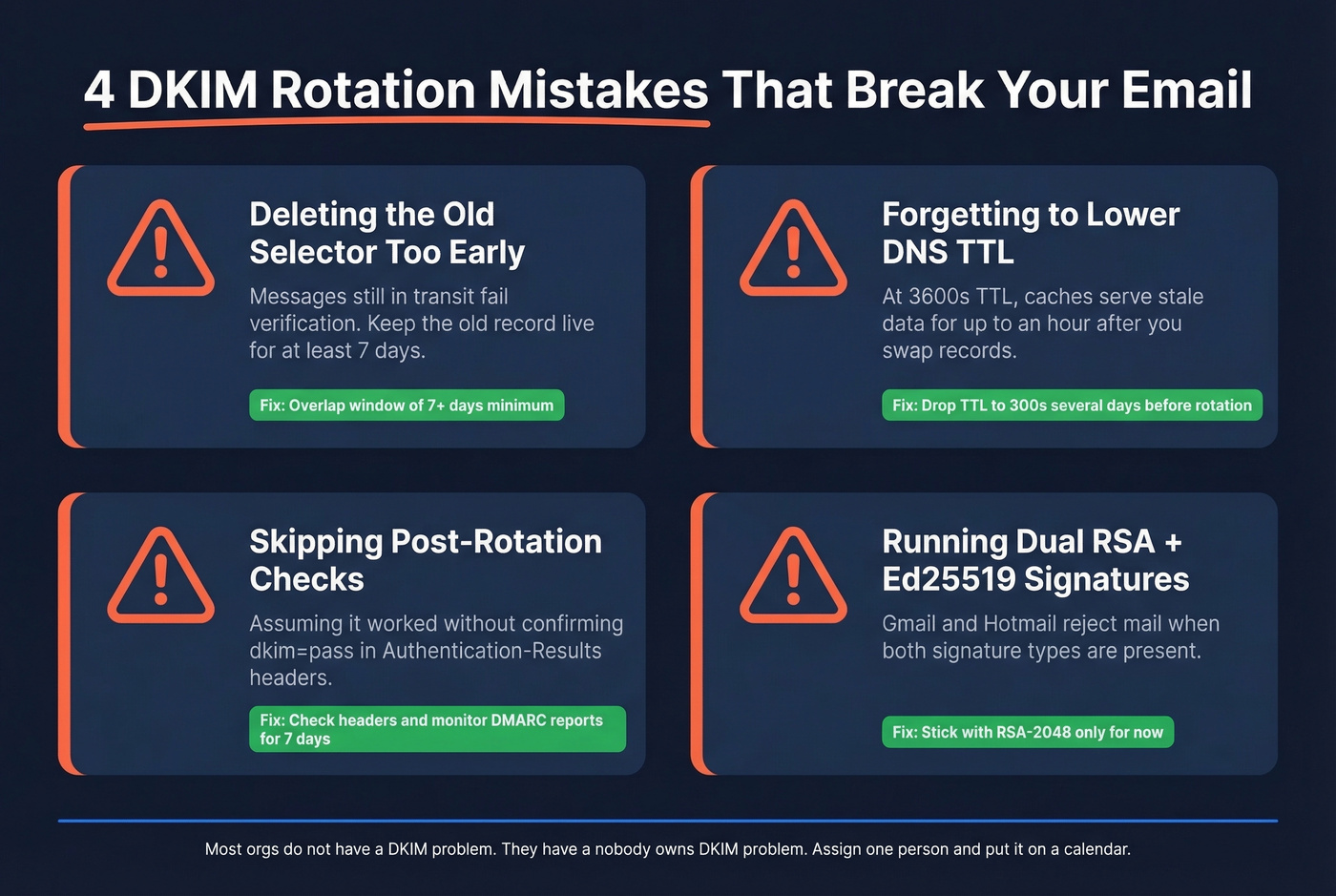
Not lowering TTL before rotation. If your TTL is 3600s and you swap records, DNS caches worldwide serve stale data for up to an hour. Lower it days in advance.
Skipping post-rotation verification. Check outbound headers for dkim=pass in Authentication-Results. Monitor DMARC aggregate reports for alignment failures over the following week. Don't assume it worked - confirm it. (If you’re also tracking deliverability signals, keep an eye on your email bounce rate and overall sender reputation.)
Running dual RSA + Ed25519 signatures. Gmail and Hotmail refuse mail when both signature types are present. Ed25519 adoption is too inconsistent. Stick with RSA-2048 for now.
Let's be honest about what DKIM key rotation actually protects: your sending reputation. But reputation is a two-sided coin. Rotating keys secures your domain from spoofing, while the other half of deliverability is data quality - sending to invalid addresses generates bounces that damage the domain reputation you just worked to protect. Prospeo verifies emails at 98% accuracy before they enter your outbound sequences, so your freshly rotated keys don't get wasted on dead addresses. (If you’re building outbound at scale, it also helps to follow a broader email deliverability guide.)
You're investing hours in DNS records, selector overlap, and post-rotation monitoring to keep your domain clean. One batch of invalid emails undoes all of it. Prospeo verifies 143M+ emails on a 7-day refresh cycle at $0.01 per lead - protecting the sending reputation your DKIM setup was built to defend.
Secure the key. Then secure the list. Start with 75 free verified emails.
FAQ
What key size should I use for DKIM?
RSA-2048 is the current minimum standard. 1024-bit is considered weak, and 512-bit keys have been cracked for under $8 in cloud compute. Ed25519 is faster and smaller, but verification support is still inconsistent - and dual-signature setups (RSA + Ed25519) can cause outright rejections at major mailbox providers.
Can I rotate DKIM keys without downtime?
Yes. Publish the new selector alongside the old one, switch signing to the new selector, then retire the old record after seven or more days. The main exception is Google Workspace, which forces a brief signing gap. Schedule that outside business hours.
How do I verify emails reach inboxes after rotating?
Check outbound headers for a valid DKIM-Signature and confirm dkim=pass in Authentication-Results. Monitor DMARC aggregate reports for alignment failures over the following week. On the data side, verifying your contact list quality before sending ensures bounces don't undercut the domain reputation you just secured.