

DMARC: The Complete Guide to Setup, Reports, and Enforcement
If you've stared at a DMARC aggregate report XML file and thought "this is supposed to help me?" - you're not alone. The protocol is technically straightforward but operationally messy, especially once third-party senders and forwarding enter the picture.
What You Need (Quick Version)
DMARC is a DNS-published email authentication policy that tells receiving servers what to do when SPF and DKIM checks fail after alignment is evaluated. Google, Yahoo, and Microsoft all enforce these requirements for bulk senders in 2026 - if you're sending at volume without a published policy, you're risking SMTP rejections and delivery failure. Below: DNS record syntax, step-by-step enforcement rollout, report interpretation that most guides skip, and the DMARCbis changes landing this year.
What Is DMARC and How Does It Work?
DMARC stands for Domain-based Message Authentication, Reporting & Conformance. It's defined in RFC 7489 and builds on two existing authentication protocols: SPF (Sender Policy Framework) and DKIM (DomainKeys Identified Mail). RFC 7489 is an Informational RFC; DMARCbis is the standards-track update effort.
Here's the distinction most people miss: DMARC doesn't authenticate email itself. SPF and DKIM do the identity verification - SPF checks whether the sending server's IP is authorized, and DKIM checks whether the message has been tampered with using a cryptographic signature. The protocol is best understood as a policy layer. It sits on top and says "here's what to do when those checks fail, and here's where to send me the reports."
A basic record looks like this:
v=DMARC1; p=none; rua=mailto:dmarc-reports@yourdomain.com
That tells receiving mail servers three things: this is a version 1 policy (v=DMARC1), don't take action on failing messages yet (p=none), and send aggregate reports to this address (rua=). It's published as a TXT record at _dmarc.yourdomain.com in your DNS. Simple to publish, harder to get right - especially once you have dozens of services sending email on your behalf.
Why It Matters in 2026
This used to be optional - a nice-to-have for security-conscious organizations. That changed fast.
As of February 2024, Google and Yahoo required an active policy for anyone sending more than 5,000 daily emails to their users. Microsoft followed suit in early 2025. By late 2025, major mailbox providers began stricter SMTP-level enforcement for non-compliant bulk senders, issuing rejections and deferrals rather than just spam-foldering. In 2026, if you're sending email at scale without authentication, you're not just risking spam folders. You're risking delivery failure.
The analogy practitioners keep using is apt: this is the HTTPS of email. Just like browsers started flagging HTTP sites as "not secure," mailbox providers now treat unauthenticated email as suspicious by default.
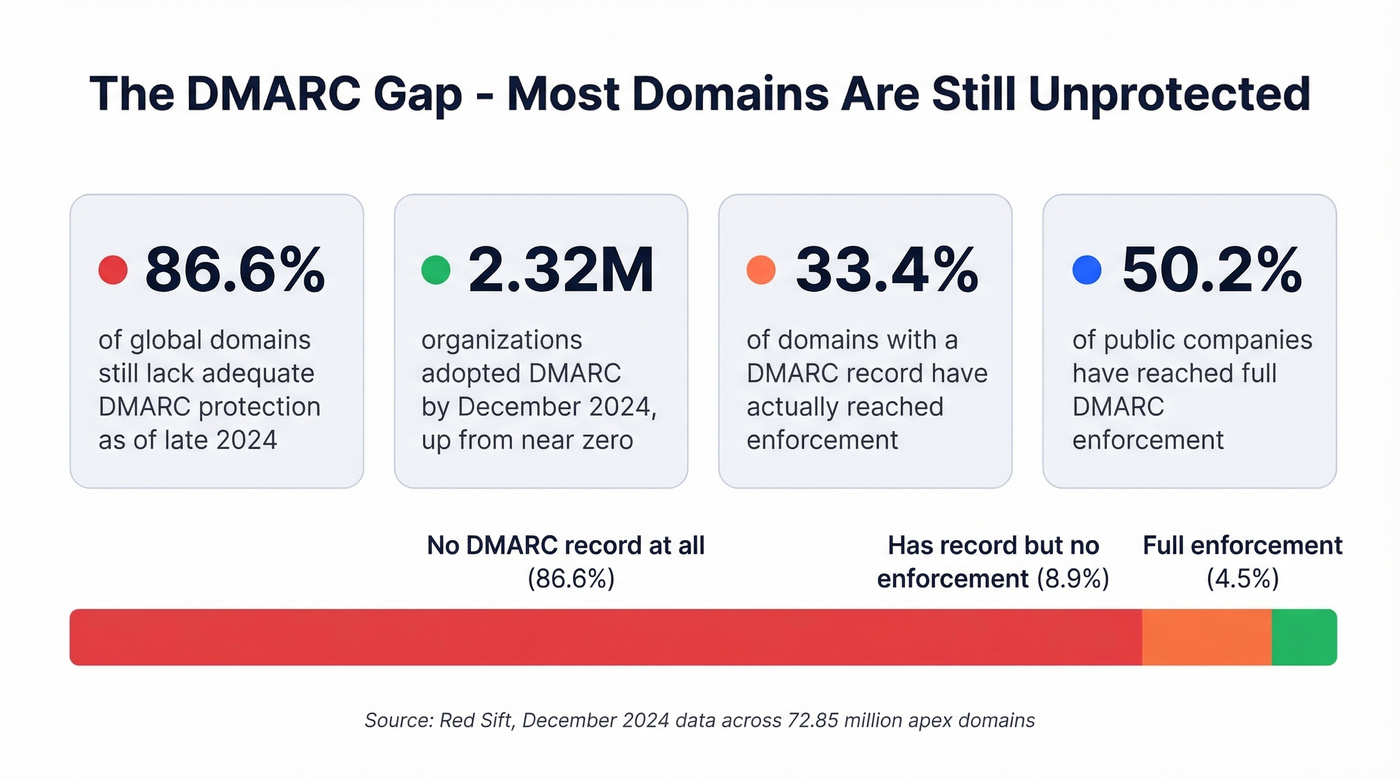
In February 2024, 91.38% of global domains lacked a published record. By December 2024, 2.32 million organizations had adopted the protocol - but 86.62% of domains tracked across 72.85 million apex domains still lacked adequate protection. Among domains that do have a record, only 33.4% have reached enforcement. The rest sit at p=none, offering zero protection. And among public companies, 50.2% have reached full enforcement - meaning nearly half of publicly traded companies still haven't locked this down.
The gap between "has a record" and "has enforcement" is where most organizations live, and where deliverability problems and spoofing attacks thrive.
How the Authentication Flow Works
Understanding DMARC requires walking through the flow. When a message arrives at a receiving server, the process is sequential:
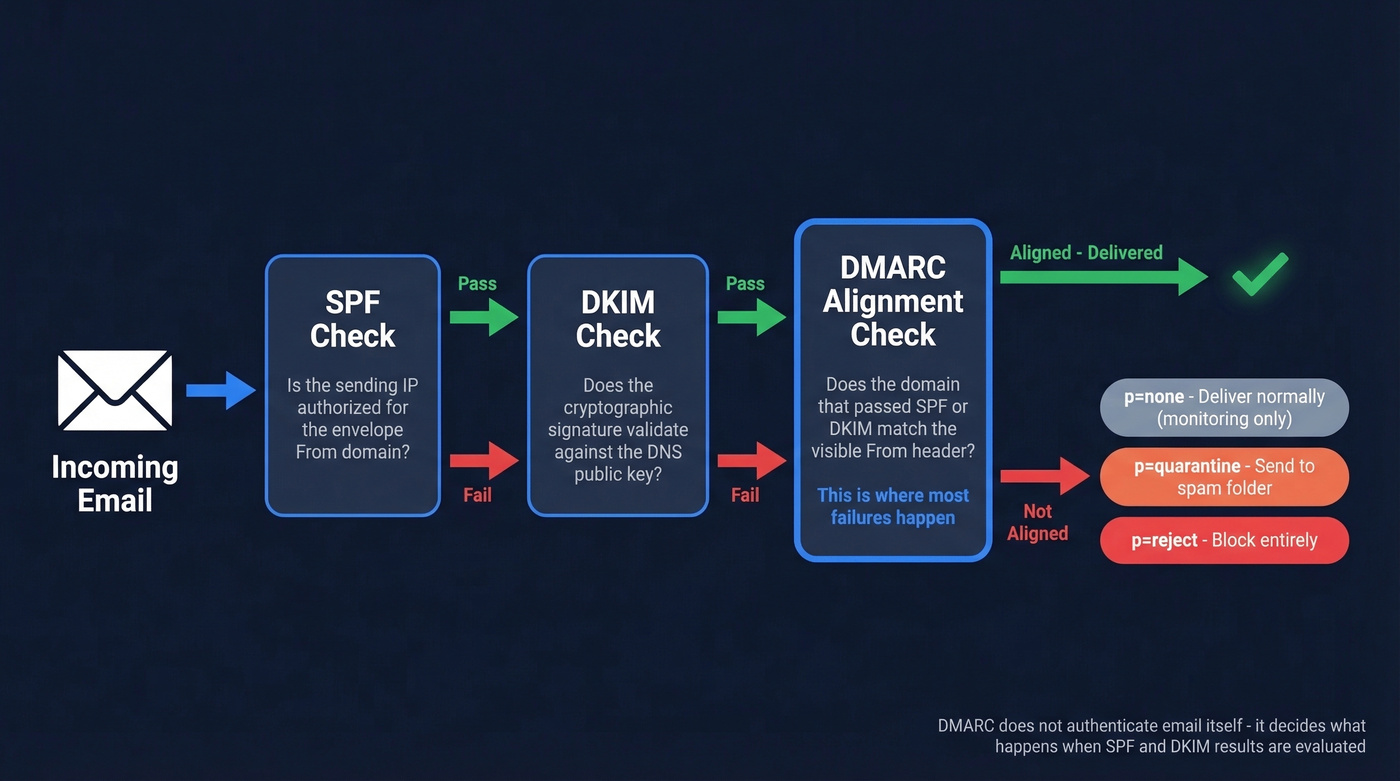
- The receiver checks SPF - is the sending server's IP authorized for the domain in the envelope From?
- The receiver checks DKIM - does the cryptographic signature in the message header validate against the public key in DNS?
- The receiver checks alignment - does the domain that passed SPF or DKIM match the domain in the visible From header?
- The receiver applies the published policy based on whether alignment passed or failed.
That third step - alignment - is where the protocol adds its value and where most failures happen. A message can pass SPF and DKIM individually but still fail DMARC if the domains don't align with the From header the recipient sees.
Alignment comes in two modes. Relaxed (r) allows subdomains to match the organizational domain, so mail.yourdomain.com aligns with yourdomain.com. Strict (s) requires an exact domain match. You control this with the adkim and aspf tags in your record.
Here's the thing: p=none isn't enforcement. It's monitoring mode. It tells receivers "let everything through and just send me reports." Useful for discovery, dangerous as a permanent state.
| Policy | Failing Mail | When to Use |
|---|---|---|
p=none |
Delivered normally | Initial monitoring only |
p=quarantine |
Sent to spam/junk | Transitional enforcement |
p=reject |
Blocked entirely | Full enforcement |
The goal is always p=reject. Everything else is a waypoint.

DMARC enforcement means nothing if you're sending to bad addresses. Bounces above 2% destroy your sender reputation - the same reputation DMARC is designed to protect. Prospeo's 5-step email verification delivers 98% accuracy, keeping bounce rates under control so your authentication work actually pays off.
Don't let bad data undo your DMARC enforcement.
DMARC Record Tags
Your record is a single TXT entry published at _dmarc.yourdomain.com. Here's the full tag reference:
| Tag | Required | Values | Default | Description |
|---|---|---|---|---|
v |
Yes | DMARC1 |
- | Protocol version |
p |
Yes | none/quarantine/reject |
- | Domain policy |
sp |
No | none/quarantine/reject |
Same as p |
Subdomain policy |
rua |
No | mailto: URI |
None | Aggregate report address |
ruf |
No | mailto: URI |
None | Forensic report address |
adkim |
No | r/s |
r (relaxed) |
DKIM alignment mode |
aspf |
No | r/s |
r (relaxed) |
SPF alignment mode |
fo |
No | 0/1/d/s |
0 |
Failure reporting options |
pct |
No | 0-100 |
100 |
% of mail subject to policy |
ri |
No | Seconds | 86400 |
Report interval |
Two rules: v must be the first tag, and p should come immediately after it.
Here's a complete record for an organization at full enforcement with strict alignment:
v=DMARC1; p=reject; sp=reject; rua=mailto:dmarc-agg@yourdomain.com; ruf=mailto:dmarc-forensic@yourdomain.com; adkim=s; aspf=s; pct=100
If you don't set sp, subdomains inherit the parent policy. If you don't set rua, you won't get reports - and flying blind defeats the purpose. The pct tag lets you apply the policy to a percentage of failing mail, which is critical for safe rollout.
How to Set Up DMARC
Here's the six-step framework that works for organizations of any size.
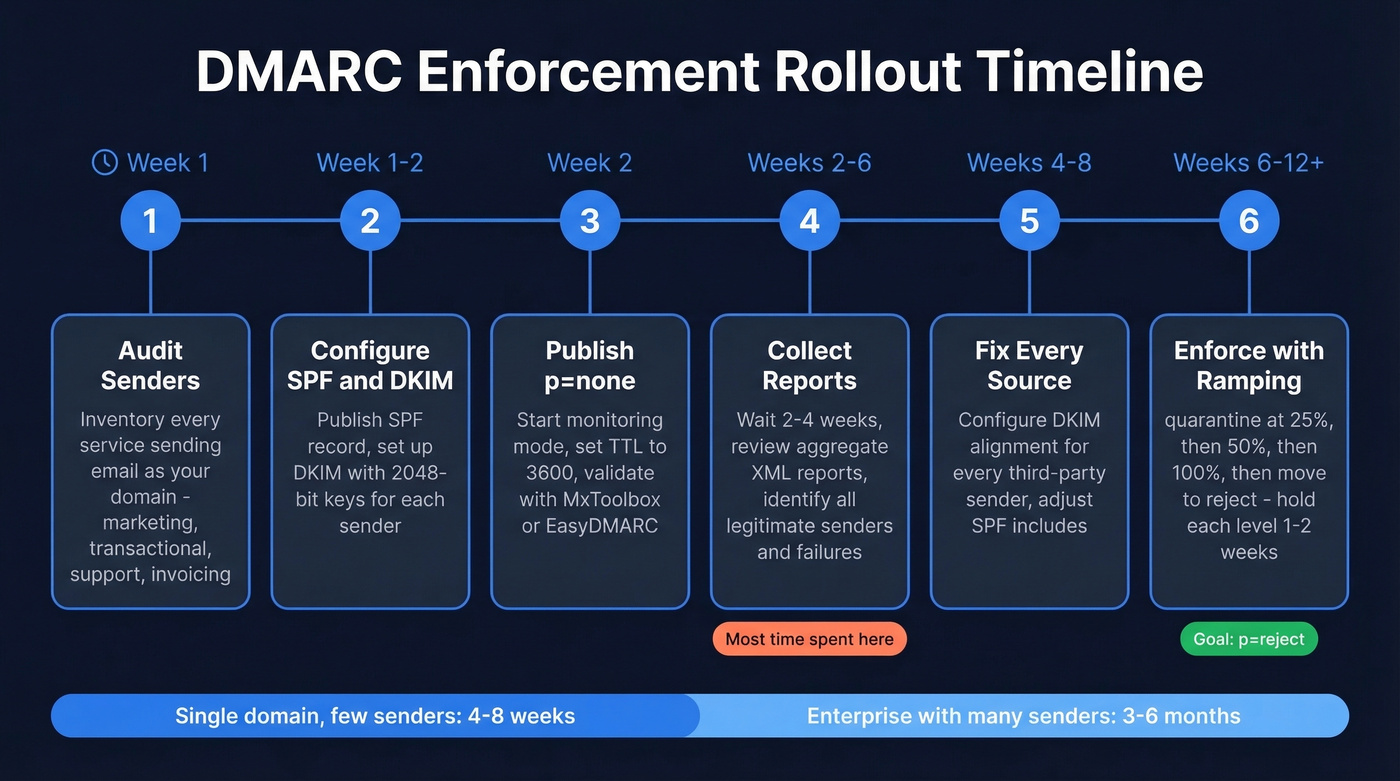
Step 1: Audit your senders. Before touching DNS, inventory every service that sends email using your domain. Marketing automation, transactional email, support tickets, invoicing, HR platforms - all of it. Miss one and you'll break their email when you enforce.
Step 2: Configure SPF and DKIM. SPF goes in a single TXT record at your root domain:
v=spf1 ip4:192.168.1.0/24 include:_spf.google.com include:amazonses.com ~all
DKIM uses selector-based TXT records:
s1._domainkey.yourdomain.com TXT "v=DKIM1; k=rsa; p=..."
Use 2048-bit keys minimum and rotate them every 6-12 months. Publish the new selector, switch signing, then retire the old one after a grace period. (If you want a quick checklist, see how to verify DKIM is working.)
Step 3: Publish at p=none. After SPF and DKIM are in place - give it roughly 48 hours for changes to settle across DNS - start with monitoring:
v=DMARC1; p=none; rua=mailto:dmarc-reports@yourdomain.com; pct=100
Set TTL to 3600 seconds during testing so DNS changes propagate faster. Validate your record with a free checker like MxToolbox, EasyDMARC, or dmarcian before moving on.
Step 4: Collect reports for 2-4 weeks. Allow 48-72 hours for reports to start arriving. Review aggregate reports to identify all legitimate senders and any authentication failures. If you're new to this, learndmarc.com is a hands-on tool that lets you send test emails and watch the authentication flow in real time.
Step 5: Fix and authenticate every source. Every sender that fails alignment needs DKIM configured with your domain, or SPF adjusted. We cover third-party senders below.
Step 6: Enforce with percentage ramping. Hold each percentage level for 1-2 weeks, monitoring reports for new failures before increasing:
p=quarantine; pct=25- watch for issuesp=quarantine; pct=50- expand graduallyp=quarantine; pct=100- hold for 2-4 weeksp=reject- full enforcement
For a single-domain business with a few senders, this takes 4-8 weeks. For enterprises with dozens of third-party senders, 3-6 months is realistic. The bottleneck is always identifying and authenticating every legitimate sender, not the DNS changes themselves.
Third-Party Senders
Third-party senders are where authentication breaks for most organizations.
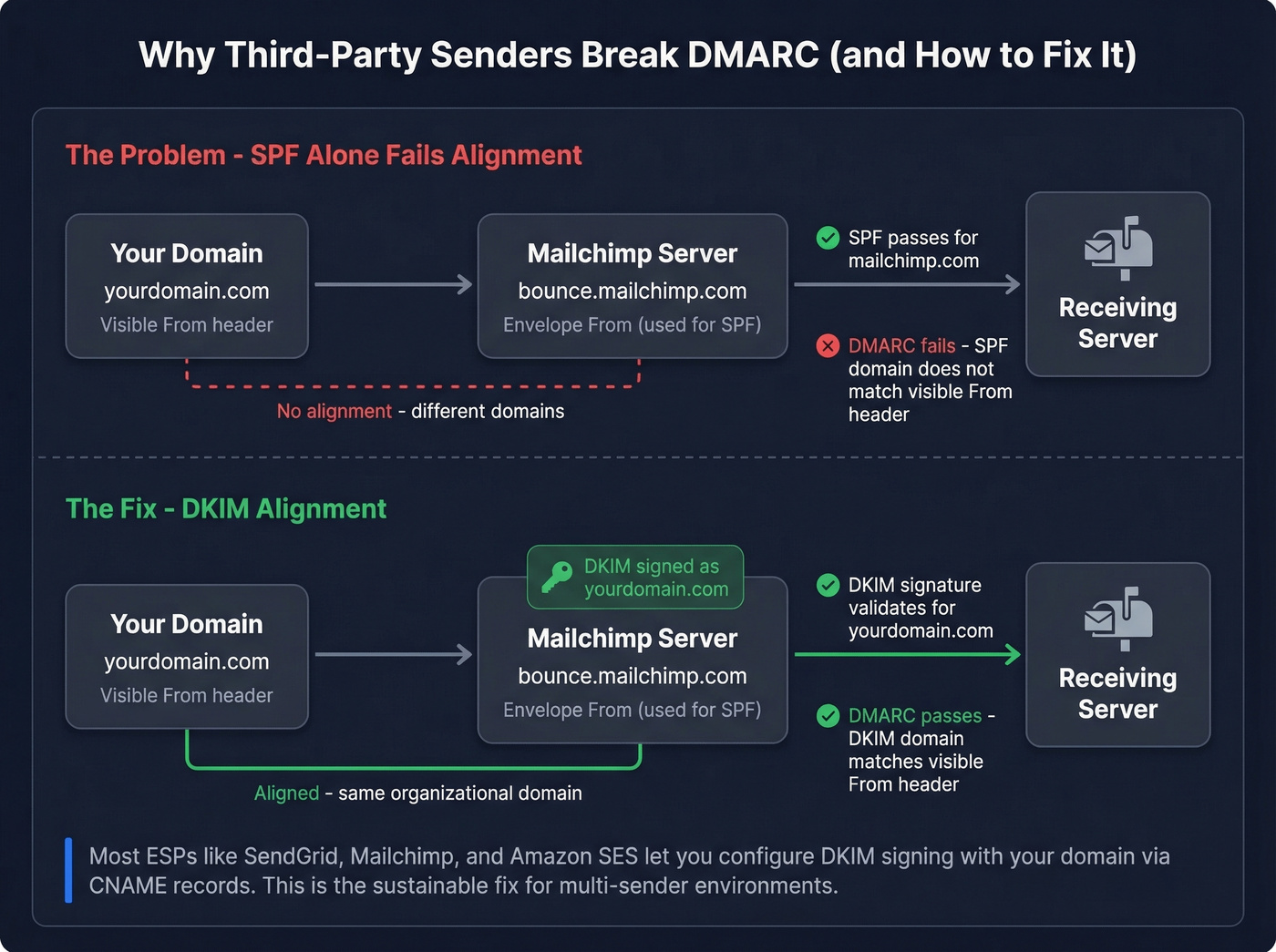
When Mailchimp or SendGrid sends email "from" your domain, the visible From header shows you@yourdomain.com. But the envelope From - the address used in the SMTP transaction - is often a vendor domain like bounce.mailchimp.com. SPF passes for the vendor's IP, but it won't align with your domain. DMARC sees the mismatch and calls it a failure.
The practical path is DKIM alignment. Most major ESPs let you configure DKIM signing with your domain via CNAME records. Once that's in place, the DKIM signature aligns with your From header, and authentication passes - regardless of what the envelope From says.
Common SPF include strings:
| Provider | SPF Include |
|---|---|
| Google Workspace | include:_spf.google.com |
| Microsoft 365 | include:spf.protection.outlook.com |
| SendGrid | include:sendgrid.net |
| Mailchimp | include:servers.mcsv.net |
| Amazon SES | include:amazonses.com |
Watch the SPF 10-lookup limit. Every include: mechanism triggers a DNS lookup, and SPF has a hard cap of 10. Exceed it and you get a permerror - SPF effectively breaks. This is another reason DKIM alignment is the more sustainable approach for multi-sender environments.
Authentication protects your domain identity, but sending to invalid addresses tanks your sender reputation from the other direction. Prospeo's real-time email verification catches bad addresses before they bounce, so your outbound doesn't undo what your authentication protects. (If you're troubleshooting bounces, start with email bounce rate benchmarks and fixes.)
Reading Aggregate Reports
Aggregate reports arrive as XML files, usually daily, from every receiving provider that processes your email. They're dense, ugly, and genuinely useful once you know what to look for.
Aggregate reports (rua) are the ones you'll actually use - daily summaries showing authentication results grouped by source IP. Forensic reports (ruf) were supposed to help with debugging individual failures, but Google and Yahoo stopped sending them due to privacy concerns, and Microsoft sends limited data. In practice, aggregate reports are your primary - and often only - source of intelligence. Don't rely on ruf for consistent, actionable output.
Here's a simplified aggregate report structure:
<!-- unknown MDX component: feedback -->
What to look for: unknown source_ip addresses you don't recognize, disposition values that don't match your policy, and patterns where SPF passes but doesn't align while DKIM carries the load. That last pattern is normal for third-party senders - it's exactly how DKIM alignment is supposed to work.
The count field tells you volume. A source IP sending 50,000 messages that all fail DKIM and SPF? That's either a misconfigured sender or an active spoofing attempt. Either way, it needs attention.
For anything beyond a handful of reports, use a report analyzer to parse the XML into something human-readable. Raw XML at scale is a punishment, not a workflow.
Why Authentication Fails
Your marketing team switched ESPs and suddenly half your emails land in spam. We've seen this play out dozens of times. Here's what goes wrong and how to fix each pattern.
SPF lookup limit exceeded. SPF allows a maximum of 10 DNS lookups. Add one too many include: mechanisms and you silently break SPF with a permerror. Fix: flatten your SPF record by replacing include: mechanisms with direct IP ranges where possible, or consolidate senders. (More examples: SPF record examples.)
Multiple SPF records. RFC 7208 is explicit: a domain must have exactly one SPF record. Two SPF TXT records = permerror. Merge them into a single record.
DKIM signing with the ESP's default domain. Many providers sign with their own domain by default. DKIM passes, but alignment fails because the signing domain doesn't match your From header. Fix: configure custom DKIM signing with your domain in every ESP.
Alias domain SMTP FROM mismatch. Google Workspace lets you send from alias domains using the primary domain's SMTP FROM. Microsoft rejects these messages citing alignment failure. The r/DMARC community has documented this extensively. Fix: ensure each alias domain has its own SPF and DKIM records, or configure the SMTP FROM to match the alias.
Forwarding breaks authentication. When mail is forwarded, the new sending IP isn't in your SPF record - SPF fails. If the intermediary modifies the message, DKIM can break too. ARC (Authenticated Received Chain) and SRS (Sender Rewriting Scheme) handle forwarding scenarios, but adoption is inconsistent across providers.
The "just allowlist it" trap. Look, the most common organizational failure isn't technical - it's the pressure from non-technical stakeholders to "just allowlist it" when a misconfigured sender's email lands in spam. We've seen organizations cave to this repeatedly. Resist it. Allowlisting bypasses the protection you spent weeks building. Fix the authentication instead.
Common Mistakes
- Leaving
p=noneindefinitely - we've seen organizations sit at monitoring mode for years, protecting nothing - Missing
ruatag - no reports means no visibility - No subdomain policy (
sp=) - attackers spoofanything.yourdomain.com - Misunderstanding
pct- it controls what percentage of failing mail gets the policy applied, not what percentage gets checked - Root-only record without
sp=reject- leaves subdomains wide open
The r/dns community keeps a running thread of these. Most are small DNS mistakes with outsized consequences.
Hot take: If your deal sizes are under five figures and you're sending fewer than 1,000 emails a day, you don't need a paid monitoring service. Free tools, aggregate reports, and a spreadsheet will get you to p=reject just fine. The paid platforms earn their keep at scale - dozens of senders, multiple domains, continuous monitoring. Skip them if you don't have that complexity. (If you're doing outbound at scale, pair this with an email deliverability guide and a plan to improve sender reputation.)
What's Coming: DMARCbis
The standard is getting an update. DMARCbis - not "DMARC2" - is a revision that clarifies ambiguities and modernizes the spec. The main documents were submitted in April 2025, with the failure reporting document following in November 2025. Expected publication as a Proposed Standard is early 2026. Don't change anything yet, but know what's coming.
| Change | Details | Impact |
|---|---|---|
| Tags removed | pct, rf, ri |
pct rarely used as anything but 0 or 100 |
| Tags added | np, psd, t |
np = non-existent subdomain policy; t = binary testing mode |
| Domain lookup | DNS tree walk replaces Public Suffix List | Better PSD support |
| Reporting | Aggregate XML format updated | New tags incorporated |
The t tag replaces pct with a cleaner binary concept - you're either testing or you're not. Most organizations already used pct as either 0 or 100, so this formalizes reality. The np tag is genuinely useful: it lets you set a policy specifically for non-existent subdomains, closing a spoofing vector that the current spec can't address cleanly.
Existing v=DMARC1 records remain valid. dmarcian's analysis confirms there's no migration required - the changes are additive. But if you're building automation around report parsing, the updated XML schema is worth tracking now.
One more thing: once you're at p=reject, BIMI (Brand Indicators for Message Identification) lets you display your brand logo in supported inboxes. It requires full enforcement as a prerequisite - another reason to stop sitting at p=none.
FAQ
Do I need DMARC if I don't send email?
Yes. Parked and non-sending domains should publish v=DMARC1; p=reject to prevent spoofing. Attackers specifically target unprotected domains. A reject policy is a one-line DNS change that eliminates an entire attack surface.
What's the difference between SPF, DKIM, and DMARC?
SPF validates the sending server's IP. DKIM validates message integrity via cryptographic signature. DMARC ties them together with alignment rules and tells receivers what to do when checks fail - it's the policy layer that makes domain-based authentication enforceable.
How long does enforcement take?
Single-domain business with a few senders: 4-8 weeks. Enterprises with dozens of third-party senders: 3-6 months. The bottleneck is always identifying and authenticating every legitimate sender, not the DNS changes themselves.
Can DMARC stop all phishing?
No. It prevents exact-domain spoofing - someone sending as yourdomain.com. It doesn't stop lookalike domains (your-dornain.com) or compromised accounts. It's one critical layer, not a complete anti-phishing solution.
Does email verification affect deliverability alongside DMARC?
Not directly - authentication handles domain identity, not list quality. But high bounce rates from invalid addresses damage the same sender reputation that your policy protects. Cleaning your lists before sending is the other half of the deliverability equation.
DMARC isn't complicated - it's just unforgiving. Get SPF and DKIM right, publish your policy, read your reports, and enforce. The protocol does the rest.
You just spent hours configuring SPF, DKIM, and DMARC to protect your domain. Now make sure every email you send lands with a real person. Prospeo verifies emails against catch-all domains, spam traps, and honeypots - the same threats DMARC can't catch on the outbound side.
Authenticate your domain, then verify your list. That's deliverability.