

DMARC & Google: The Practical Guide Google's Own Docs Don't Give You
Your emails are being rejected right now. Not spam-foldered - rejected at the SMTP level, bouncing back with cryptic 5xx codes before they ever reach an inbox. Google ramped up DMARC enforcement in late 2025, and if you haven't locked down SPF, DKIM, and DMARC, your messages to Gmail recipients are hitting a wall. Microsoft started enforcing similar high-volume sender requirements in May 2025.
Here's the kicker: organizations that reach full DMARC enforcement see roughly a 10% increase in email deliverability. That's not marginal - it's the difference between pipeline and silence. We've helped teams debug these exact failures, and the pattern is always the same: setup takes 15 minutes, maintenance takes forever, and that's the part nobody talks about.
What You Need Right Now
If you've already got these in place and you're debugging a bounce, jump to the error code table below.
- SPF published and passing for all sending sources
- DKIM signing enabled on every system that sends as your domain
- DMARC record published with at minimum
p=none - TLS encryption on all outbound connections
- Spam complaint rate under 0.3% for bulk sending (target 0.1%)
- One-click unsubscribe header, RFC 5322-compliant formatting, and valid PTR records for sending IPs
Missing any of these? You're already getting throttled or rejected.
How DMARC Authentication Works
Your message has three identity signals that matter. The envelope sender (SMTP MAIL FROM) is like the return address on a physical envelope - it's what the receiving server sees first. The header From is what the recipient sees in their inbox. And the DKIM d= domain is the domain that cryptographically signed the message.
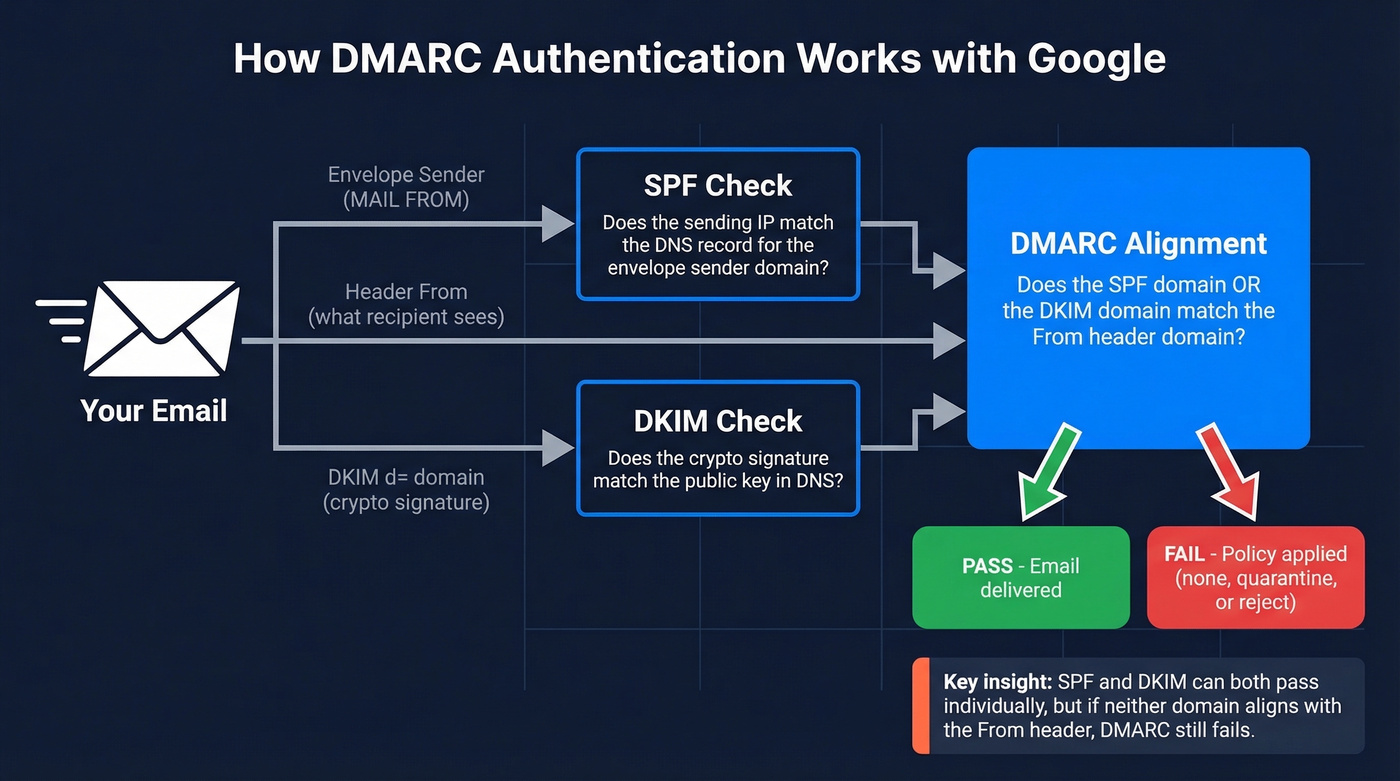
SPF checks the envelope sender against your DNS record. DKIM checks the cryptographic signature against the public key in DNS. Neither one, on its own, verifies that the domain in the From header - the one your recipient actually sees - is legitimate.
DMARC bridges that gap by requiring alignment: either the SPF domain or the DKIM domain must match the From header domain, or be a subdomain of it. If neither aligns, DMARC fails, even if SPF and DKIM both pass individually. This alignment concept is where most failures happen, and it's the core reason every domain's DMARC record matters.
Enforcement Timeline for 2026
Google, Yahoo, and Microsoft all moved to enforce email authentication within the same window:
| Provider | Start Date | Current Status | Target |
|---|---|---|---|
| Feb 2024 | Late 2025 ramp-up: more 4xx/5xx deferrals and rejections | @gmail.com recipients | |
| Yahoo | Feb 2024 | Active enforcement | @yahoo.com recipients |
| Microsoft | May 2025 | Active rejection | @outlook.com, @hotmail.com, @live.com |
Google and Yahoo announced bulk-sender requirements in 2023, with enforcement beginning in February 2024. Starting November 2025, Gmail began ramping up enforcement with more temporary 4xx deferrals and permanent 5xx rejections for non-compliant traffic. This isn't spam-foldering. It's protocol-level rejection.
Microsoft's Outlook.com requirements for high-volume senders include a hard rejection path too: 550; 5.7.515 Access denied, sending domain [YourDomain] does not meet the required authentication level.
One critical detail: these requirements target consumer inboxes - @gmail.com, @outlook.com, @hotmail.com. If your sales team sends to anyone with a personal email, you're in scope.
How to Set Up DMARC for Google Workspace
Before you touch DMARC, confirm two prerequisites. SPF must be published and passing (use these SPF patterns to sanity-check syntax). DKIM must be enabled in your Google Workspace admin console and the DNS records published. DMARC configuration itself lives in your DNS provider, not in the admin console.
Add a single TXT record to _dmarc.yourdomain.com. Here are three stages:
Stage 1 - Monitoring only:
v=DMARC1; p=none; rua=mailto:dmarc-reports@yourdomain.com
Receivers send you aggregate reports but take no action on failures. This is the minimum record you need to satisfy Google's bulk-sender requirements.
Stage 2 - Partial quarantine:
v=DMARC1; p=quarantine; pct=25; rua=mailto:dmarc-reports@yourdomain.com
Quarantines 25% of messages that fail DMARC. The pct=25 tag lets you ramp gradually.
Stage 3 - Full enforcement:
v=DMARC1; p=reject; rua=mailto:dmarc-reports@yourdomain.com
Rejects 100% of messages that fail alignment. Only move here when all legitimate senders are authenticated.
Publish the record in Cloudflare, Route 53, Squarespace Domains, or wherever you manage DNS. Propagation takes minutes to a few hours depending on TTL.
The Phased Rollout
Don't jump straight to p=reject. I've watched teams break their own transactional email, marketing automation, and support ticket notifications by skipping the monitoring phase.
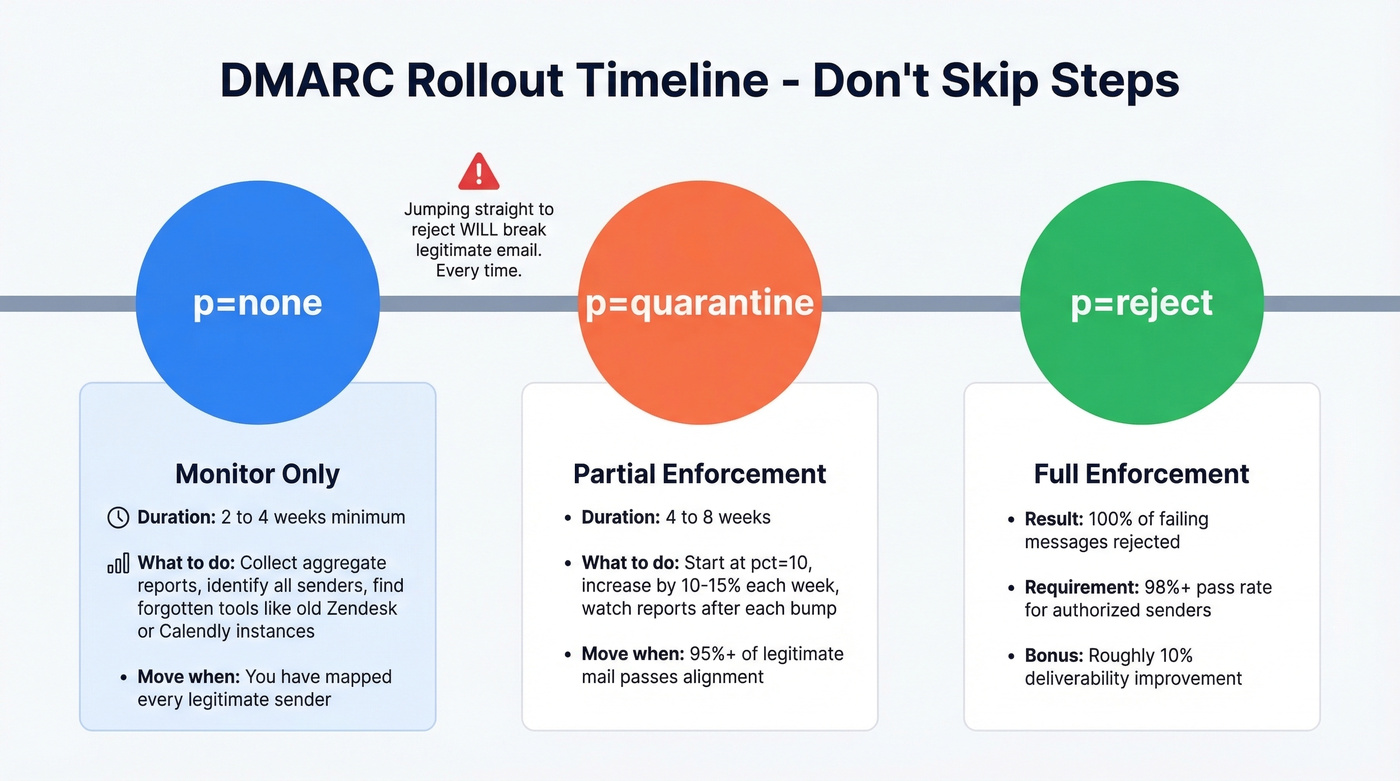
Start at p=none for a minimum of two weeks - four is better. During this time, you're collecting aggregate reports that show every system sending email as your domain. You'll be surprised what shows up: forgotten Zendesk instances, legacy marketing tools, partner platforms onboarded three years ago that nobody remembers authorizing.
Move to p=quarantine when 95%+ of legitimate mail passes alignment (if you want the deeper mechanics, see alignment). Start with pct=10 and increase by 10-15% each week. Watch your reports after each bump.
Move to p=reject when your pass rate exceeds 98% for authorized senders. Forwarded messages and mailing lists can legitimately fail DMARC - ARC (Authenticated Received Chain) helps here. Gmail, Outlook, and Yahoo all support ARC, so some forwarding failures are expected even at full enforcement, but they shouldn't block your rollout.

You're investing time in DMARC, SPF, and DKIM so your emails actually land. But authentication only matters if you're emailing real, verified addresses. Prospeo's 5-step verification delivers 98% email accuracy - so your newly protected domain doesn't waste sends on invalid contacts.
Don't fix deliverability just to send to bad data.
Third-Party Sender Alignment
This is where most deployments actually break. Your domain doesn't just send from Google Workspace. It sends from HubSpot, Salesforce, SendGrid, Mailchimp, Zendesk, and whatever else your team has wired up over the years. Every one of those tools needs to be authenticated, and each one can invalidate your DMARC policy if left unconfigured (especially if you're using a separate tracking domain for marketing sends).
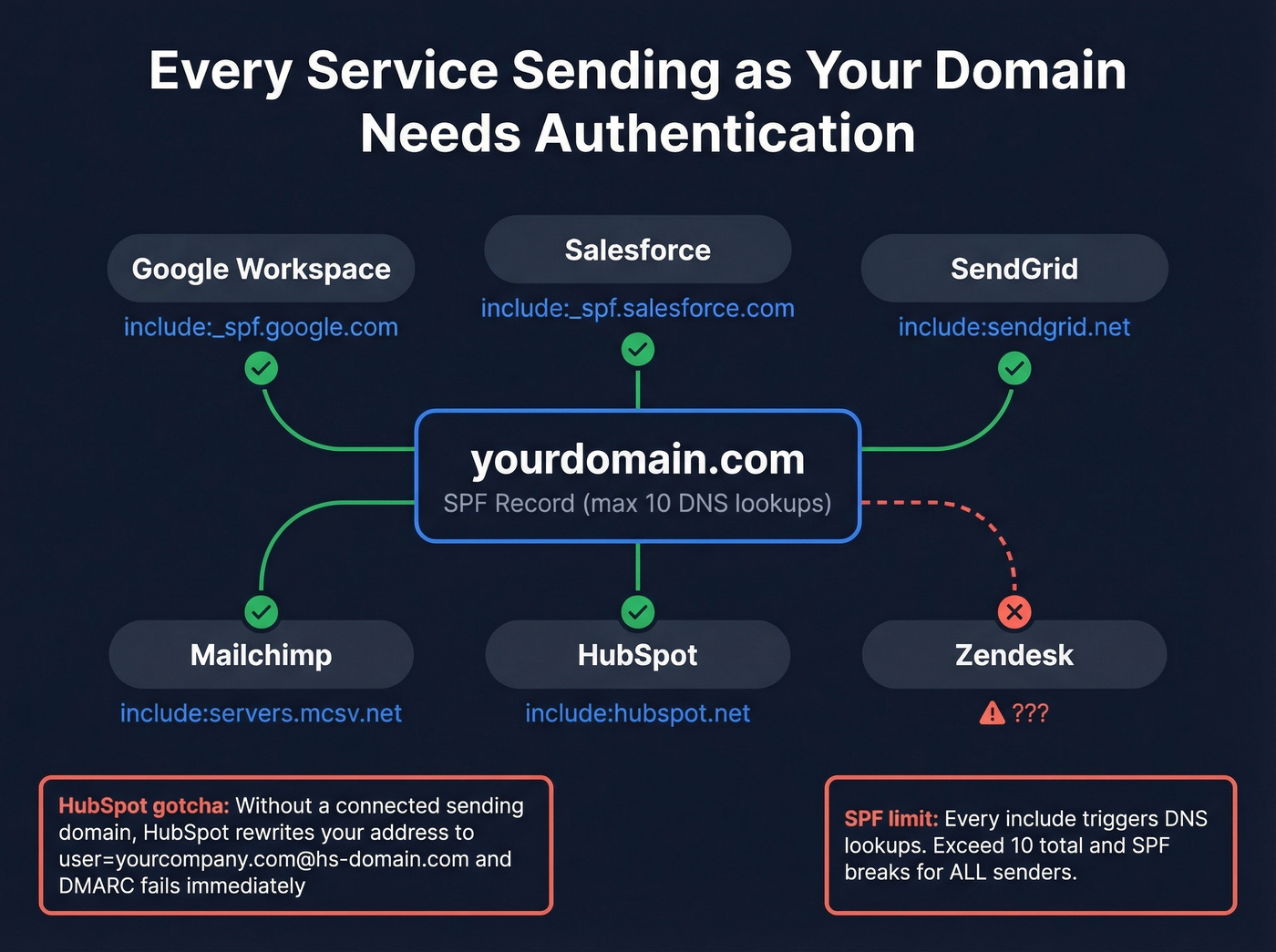
Here's a real-world failure we've seen more than once: HubSpot, if you haven't connected a sending domain, falls back to a HubSpot-managed variable domain and rewrites addresses into a format like user=yourcompany.com@hs-domain.com. DMARC alignment fails immediately. You must connect your domain in HubSpot by setting up DKIM before sending (quick check: verify DKIM is working).
Common SPF includes:
| Service | SPF Include |
|---|---|
| Google Workspace | include:_spf.google.com |
| Salesforce | include:_spf.salesforce.com |
| SendGrid | include:sendgrid.net |
| Mailchimp | include:servers.mcsv.net |
| HubSpot | include:hubspot.net |
Watch the 10-DNS-lookup limit on SPF. Every include: triggers additional lookups, and exceeding 10 breaks SPF entirely - for every sender. If you're hitting the limit, use SPF flattening tools or consolidate sending services.
DMARC Error Code Reference
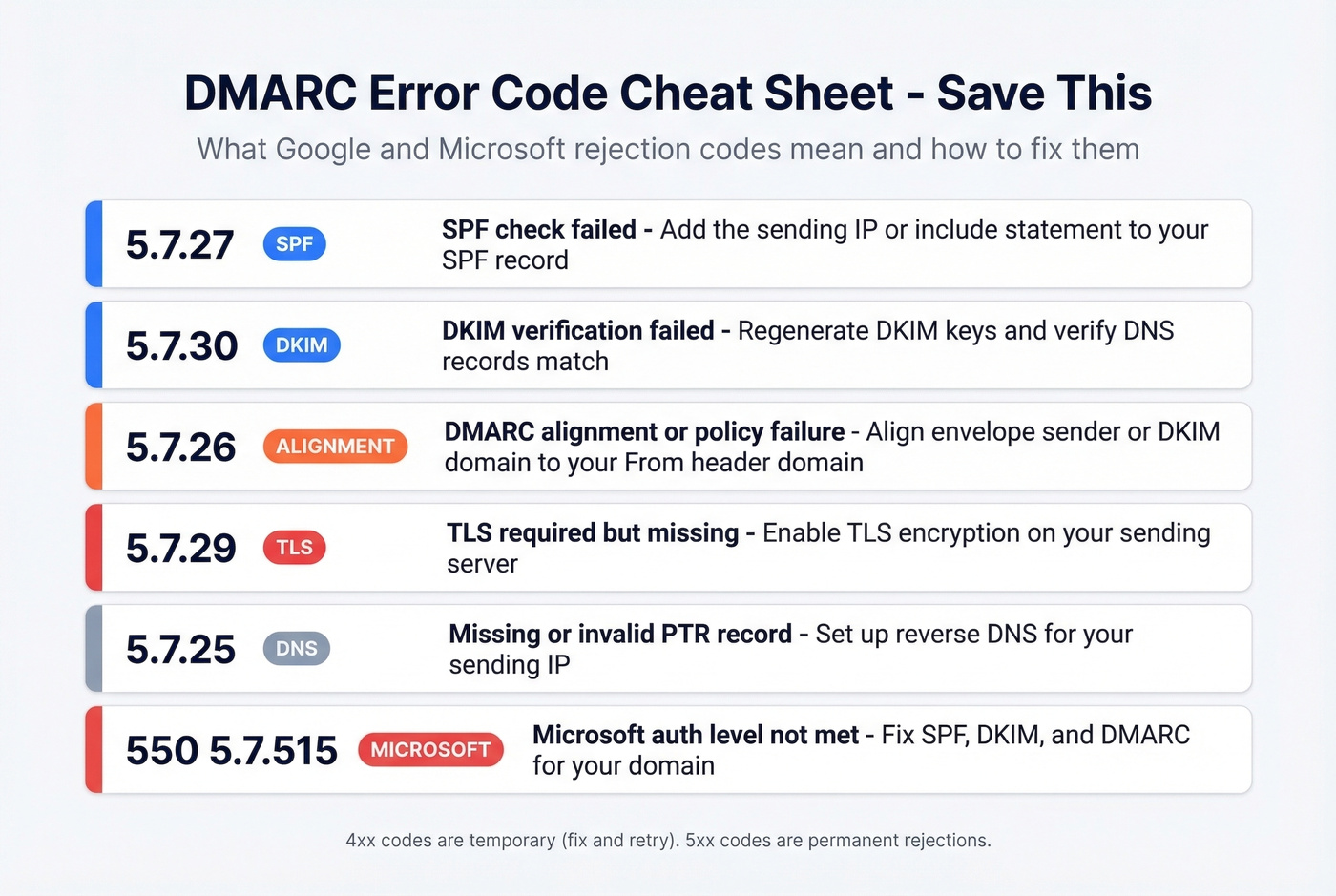
When messages get rejected, the SMTP bounce code tells you exactly what failed. These codes apply whether you're troubleshooting a Google Workspace rejection or a Microsoft one (for more context on bounces, see bounce rate):
| Code | Category | Meaning | Fix |
|---|---|---|---|
| 4.7.27 / 5.7.27 | SPF | SPF check failed | Add IP/include to SPF |
| 4.7.30 / 5.7.30 | DKIM | DKIM verification failed | Regen DKIM keys, check DNS |
| 4.7.32 / 5.7.26 | Alignment | DMARC alignment/policy failure | Align envelope/DKIM to From |
| 4.7.29 / 5.7.29 | Encryption | TLS required but missing | Enable TLS on sending server |
| 4.7.23 / 5.7.25 | DNS | Missing/invalid PTR record | Set up reverse DNS for IP |
| 5.6.0 | Format | RFC 5322 non-compliance | Fix message headers |
| 5.7.1 | Policy | Blocked for spam/reputation/RFC issues | Review compliance + content |
| 550; 5.7.515 | Microsoft | Auth level not met | Fix SPF/DKIM/DMARC |
The 4xx codes are temporary - Google's way of saying "fix this and retry." The 5xx codes are permanent rejections. If you're seeing 5.7.26 or 5.7.27, start with SPF and alignment. Those two account for the majority of failures we've encountered.
Common Workspace DMARC Mistakes
Publishing two DMARC records. DNS returns them in random order, and receivers can't determine which is authoritative. Both get invalidated. Always maintain exactly one _dmarc TXT record per domain.
The alias domain trap. Sending from an alias domain in Workspace while the SMTP MAIL FROM stays on the primary domain can trigger alignment failures for the alias domain at some recipients, including Microsoft. This one's subtle and catches even experienced admins.
Jumping to p=reject before monitoring. You will break legitimate email. Every time. No exceptions.
Missing third-party senders in SPF. That Calendly instance your marketing team set up? It's sending as your domain. And it's not in your SPF record.
Ignoring subdomain policy. Without an explicit sp= tag, subdomains inherit the parent domain's policy. If your subdomains send email differently, set separate policies or use sp=none while you sort them out.
Monitoring Your Deployment
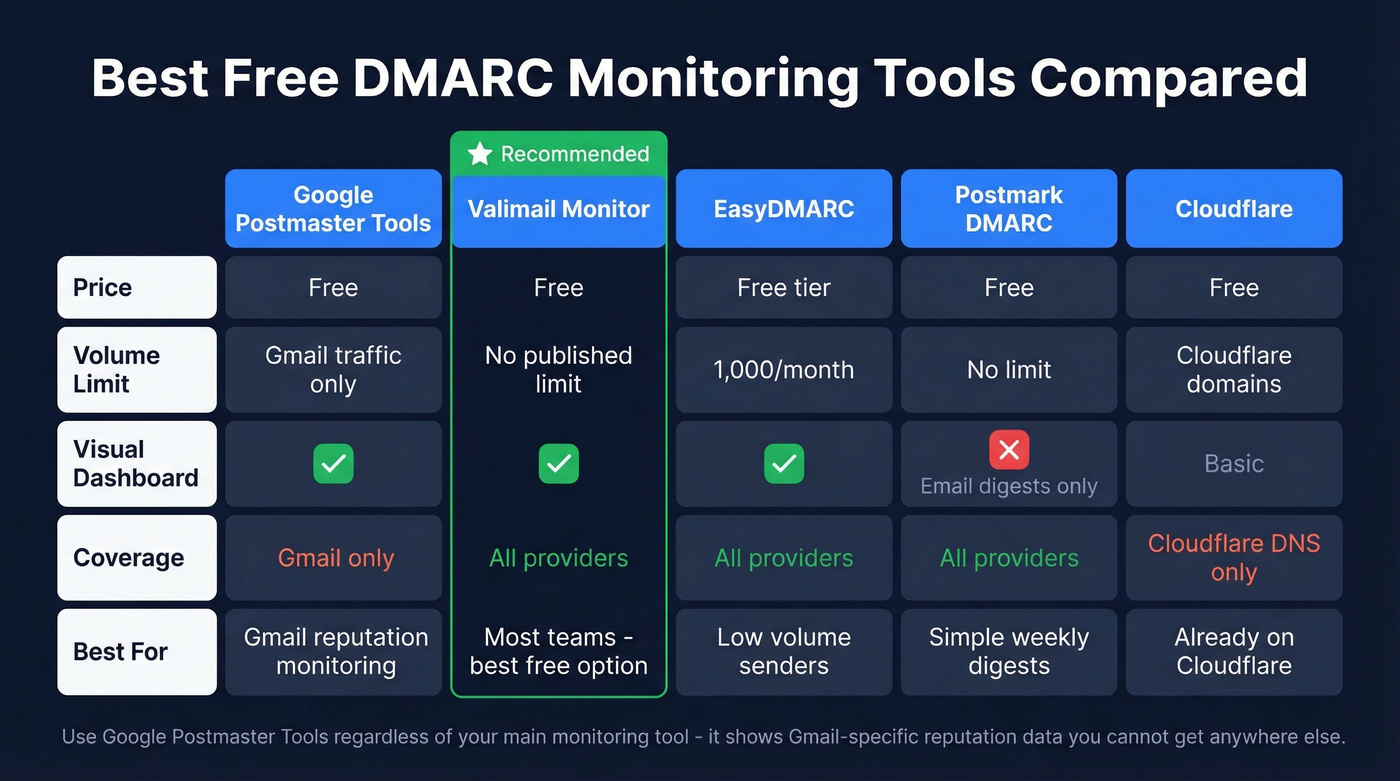
Raw DMARC aggregate reports are XML files nobody wants to read manually. Use a monitoring tool (and pair it with email reputation tools so you can correlate auth with reputation shifts):
| Tool | Price | Limit | Dashboard? |
|---|---|---|---|
| Google Postmaster Tools | Free | Gmail only | Yes |
| Valimail Monitor | Free | No published volume limit | Yes |
| EasyDMARC | Free tier | 1,000/month on free plan | Yes |
| Postmark DMARC | Free digests | Email only | No |
| dmarcian | 30-day trial | Full features | Yes |
| Cloudflare | Free | Cloudflare-managed domains | Basic |
Valimail Monitor is the best free option for most teams - no published email volume limits and a proper dashboard. Skip it if you're already paying for dmarcian or a similar platform; there's no reason to run two.
Google Postmaster Tools is essential regardless. It shows domain reputation, spam rates, and authentication results specifically for Gmail traffic. Google now includes SMTP diagnostic details in aggregate reports, so you can see whether failures were SPF, DKIM, alignment, TLS, or DNS-related directly from your report feed.
Clean Data Protects What DMARC Built
Let's be honest: most teams obsess over authentication and then torch their domain reputation by sending to garbage lists. DMARC protects your domain from spoofing, but it does nothing about bounce rates. High bounce rates destroy domain reputation just as fast as authentication failures. 64.6% of businesses report revenue loss from deliverability issues, and a huge chunk of that comes from sending to invalid addresses.
For bulk sending, Google's spam complaint-rate guidance is under 0.3%, but 0.1% is the target you really want. That's hard to maintain when you're blasting dead addresses that trigger hard bounces and spam traps (see spam trap removal). You just spent time locking down authentication - don't burn that reputation on bad contact data.
Prospeo runs every email through a 5-step verification process with catch-all handling, spam-trap removal, and honeypot filtering, delivering 98% email accuracy with data refreshed every 7 days. There's a free tier if you want to test it before committing.

Bounce rates kill domain reputation faster than a missing DMARC record. Teams using Prospeo cut bounce rates below 4% because every email is verified before it leaves your outbox. At $0.01 per email, protecting the sender reputation you just built is a no-brainer.
Keep your bounce rate under 3% with data you can trust.
FAQ
Is p=none enough for Google's requirements?
Yes - Google requires at minimum p=none with a valid rua address. But it provides zero spoofing protection. Treat it as a starting line and move to p=quarantine within 30 days, then to p=reject once 98%+ of legitimate mail passes alignment.
Does internal Workspace email count toward the 5,000/day threshold?
No. Google's bulk sender requirements apply to messages sent to personal @gmail.com accounts, not Workspace-to-Workspace traffic. Only outbound volume to consumer inboxes counts.
Can I have two DMARC records on the same domain?
No. Two TXT records for the same _dmarc subdomain invalidate both - receivers discard the result entirely. Always maintain exactly one record per domain.
What if reports show failures from senders I don't recognize?
Check if they're third-party tools sending as your domain. If legitimate, authenticate them with SPF includes and DKIM signing. If not, they're spoofing attempts - exactly what DMARC exposes and enforcement blocks.
How do I prevent bounces from ruining my new domain reputation?
Verify contact data before sending. Prospeo's 5-step verification catches invalid addresses and spam traps before they damage your sender score - 98% accuracy on 143M+ verified emails, with a free tier of 75 credits per month.