

DocSend vs PandaDoc: Which One Actually Fits Your Workflow?
There's a Reddit post from a SaaS founder trying to find a tool that combines tracked sharing, engagement analytics, reminders, and e-signatures. Their conclusion after testing everything on the market? "They all suck in some key way!" That's the honest reality when you're comparing DocSend and PandaDoc. These tools get compared constantly, but they solve fundamentally different problems - and picking the wrong one means paying for capabilities you don't need while missing the ones you do.
Let's break down how they actually stack up on pricing, analytics, workflow, and the gaps neither one fills.
30-Second Verdict
- Pick DocSend if tracking and analytics matter most - fundraising decks, investor updates, due diligence. Page-level heatmaps are unmatched.
- Pick PandaDoc if you need end-to-end document creation, templates, e-signatures, and CRM integrations. It's a workflow tool, not just a sharing layer.
- Skip both if your real problem is finding the right person to send documents to. That's a different problem entirely.
Feature Comparison at a Glance
| DocSend | PandaDoc | |
|---|---|---|
| G2 Rating | 4.6/5 (588 reviews) | 4.7/5 (3,408 reviews) |
| Starting Price | $10/user/mo | $0 (Free tier) |
| Core Strength | Analytics & tracking | Workflow & e-sign |
| E-Signatures | 4/mo on Personal | Included (plan-dependent) |
| Free Tier | No (14-day trial) | Yes (60 docs/year) |
| Best For | Fundraising, VDRs | Sales proposals |
| Doc Creation | No | Yes (templates) |
| Winner | Analytics & security | Everything else |
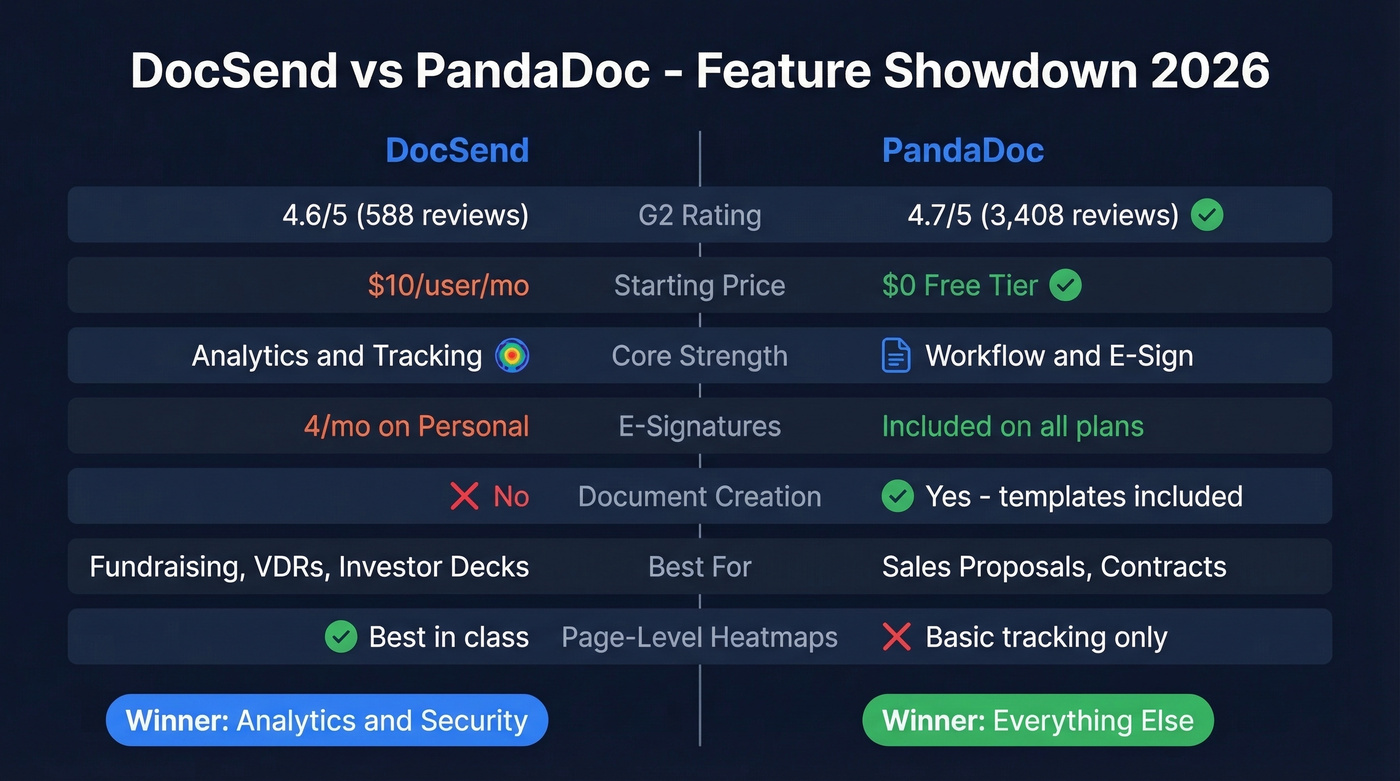
PandaDoc has about 5.8x the review volume, which makes sense - it serves a broader market. DocSend is more niche, more specialized, and frankly overpriced unless you need its specific analytics.
DocSend Deep Dive

Dropbox acquired DocSend in March 2021 for $165 million, and the product has leaned harder into its deal-management identity since. The page-level heatmaps remain the gold standard for document analytics - you can see exactly how long a prospect or investor spent on each slide, whether they forwarded the link, and who else viewed it. Nothing else on the market gives you that granularity.
Recent updates include PowerPoint multimedia support with embedded video and audio, bulk folder import handling up to 4,000 folders via CSV/XLSX, and improved role-based permissions. Deal workflows and data room Q&A are listed as coming soon.
Here's the thing: in our experience, the DocSend-to-PandaDoc comparison usually means someone hasn't clarified whether they need analytics or workflow. If you're debating, you probably need PandaDoc.
Strengths:
- Per-page engagement heatmaps nobody else matches
- Virtual data rooms for due diligence and M&A
- Dynamic watermarking and NDA gating
Weaknesses:
- No document creation - you build elsewhere, share here
- No automated reminders for unsigned documents
- "Expensive" is the #1 negative tag on G2

DocSend tracks who reads your deck. PandaDoc closes the signature. But neither helps you find the right person to send to. Prospeo gives you 98% accurate emails and 125M+ verified mobiles so your proposals land with actual decision-makers - not gatekeepers.
Stop perfecting the document. Start reaching the right inbox.
PandaDoc Deep Dive
PandaDoc's 3,408 G2 reviews with 85% five-star ratings tell you something important: when people use it for what it's designed for - creating, sending, and signing proposals - they love it. The template library, deep CRM integrations with Salesforce, HubSpot, and Pipedrive, and built-in e-signatures create a genuine end-to-end workflow that DocSend simply can't replicate.
Document tracking exists but feels like an afterthought. You get basic opens and views, plus time spent reviewing pages and clicked links, but no page-level heatmaps or per-slide analytics. "Signature Issues" is the #1 negative tag on G2, which is rough for a tool where signing is core. Reddit users also describe the UI as "clunky and inconsistent," and the confusing plan structure with Free, Launch, and Starter naming creates unnecessary friction.
We've watched sales teams try to use DocSend for proposal workflows and PandaDoc for investor analytics. Both fail. Pick the tool that matches your actual use case.
Pricing Breakdown
DocSend Pricing
| Plan | Monthly Price | Includes | Key Limit |
|---|---|---|---|
| Personal | $10/user/mo | 1 user | 4 eSignatures/mo |
| Standard | $45/user/mo | 1 user | Unlimited eSignature |
| Advanced | $150/mo | 3 users | Data rooms |
| Adv. Data Rooms | $180/mo | 3 users | 2x capacity, audit |
Annual billing saves up to 40%. Watch the renewal - first-year discounts of 50-90% are common. One founder on Reddit reported getting 90% off initially, then facing a $270/year renewal once the discount expired. That's a nasty surprise.
PandaDoc Pricing
| Plan | Monthly Price | Includes | Key Limit |
|---|---|---|---|
| Free | $0/mo | Unlimited seats | 60 docs/year |
| Launch | $9/mo | Unlimited seats | 60 docs/year, then $3/doc |
| Starter | $19/seat/mo | Per seat | Full features |
| Business | $49/seat/mo | Per seat | Advanced workflow |
| Enterprise | Custom | Per seat or per document | Contact sales |
Annual billing saves up to 46%. The 60-document cap on the Free tier works out to roughly 5 per month - fine for testing, but a sales team will blow through it in a week.
What Does a 5-Person Team Actually Pay?
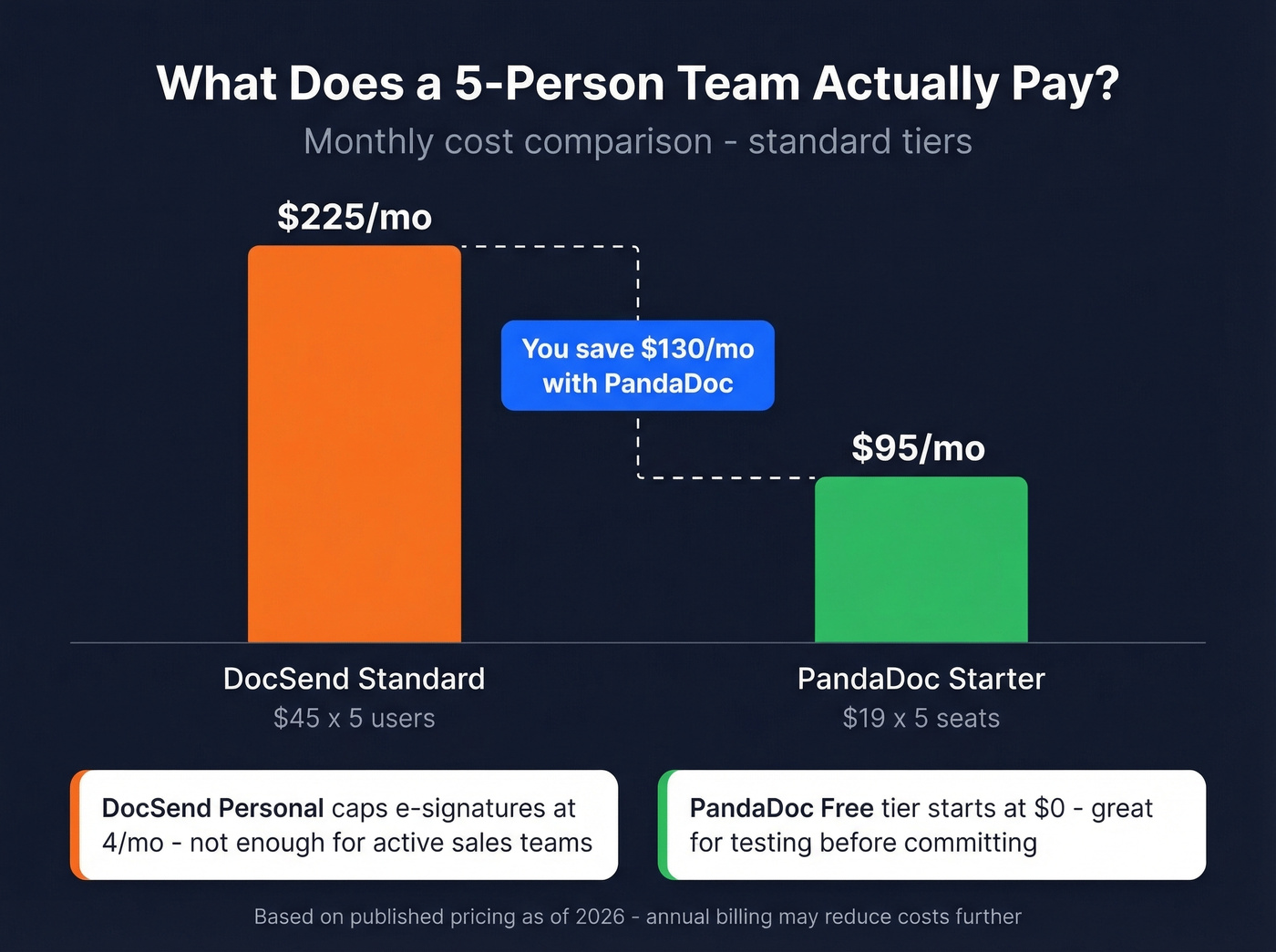
A 5-person team on DocSend Standard runs $225/mo ($45 x 5 users). The same team on PandaDoc Starter costs $95/mo ($19 x 5 seats). That's $130/mo in savings, and the gap widens fast at scale. DocSend's Personal plan caps eSignatures at 4 per month - if you're sending contracts regularly, that limit bites immediately.
When to Choose Which
You're a founder prepping for a Series A. DocSend. The page-level analytics let you see which investors actually read your deck versus which ones opened it and bounced. That intelligence shapes your follow-up strategy entirely.
Your sales team sends 50 proposals a month. PandaDoc. Templates, CRM integration, and e-signatures in one workflow beat stitching together separate tools every time. If you're tightening your outreach process, sales follow-up strategy matters as much as the document tool.
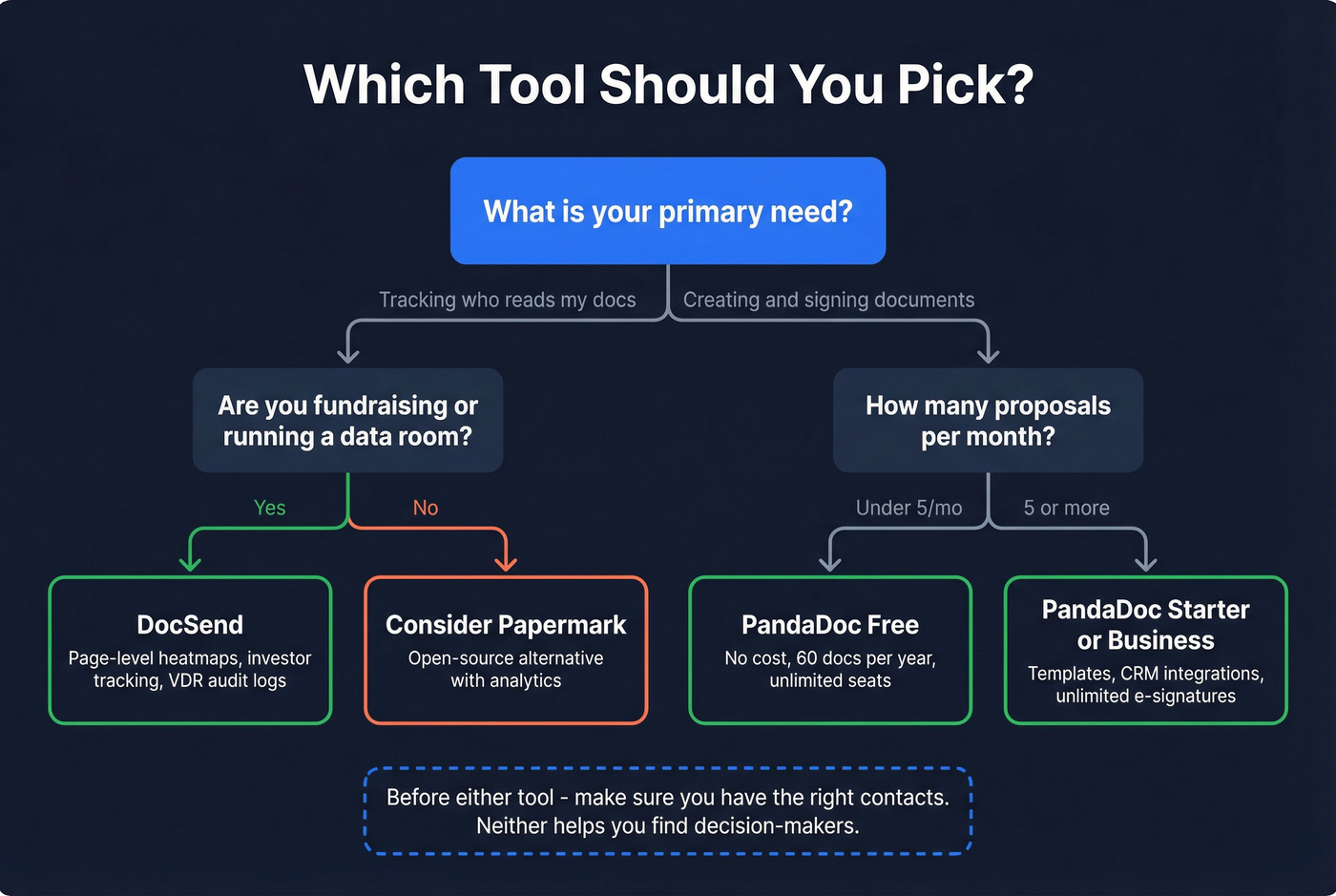
You're running due diligence or M&A. DocSend Advanced Data Rooms. The audit logs, group permissions, and automatic file indexing are purpose-built for this.
Budget is tight and you just need signed documents. PandaDoc Free or Launch. Starting at $0 beats DocSend's $10/user minimum with a 4 eSignature cap.
Look - most teams weighing DocSend vs PandaDoc actually need PandaDoc. DocSend's analytics are genuinely best-in-class, but unless you're fundraising or running a data room, you're paying a premium for capabilities that sit idle. For teams that want an open-source alternative for document sharing with analytics, Papermark is gaining traction in Reddit VDR threads as a self-hosted option worth evaluating.
The Step Before Either Tool
Both DocSend and PandaDoc assume you already know who to send your documents to. We've seen founders waste weeks perfecting pitch decks only to send them to generic info@ addresses or outdated contacts. That's the upstream problem neither tool solves.
If you're building a repeatable outbound motion, it helps to map your lead generation workflow and define your ideal customer profile before you worry about document analytics.
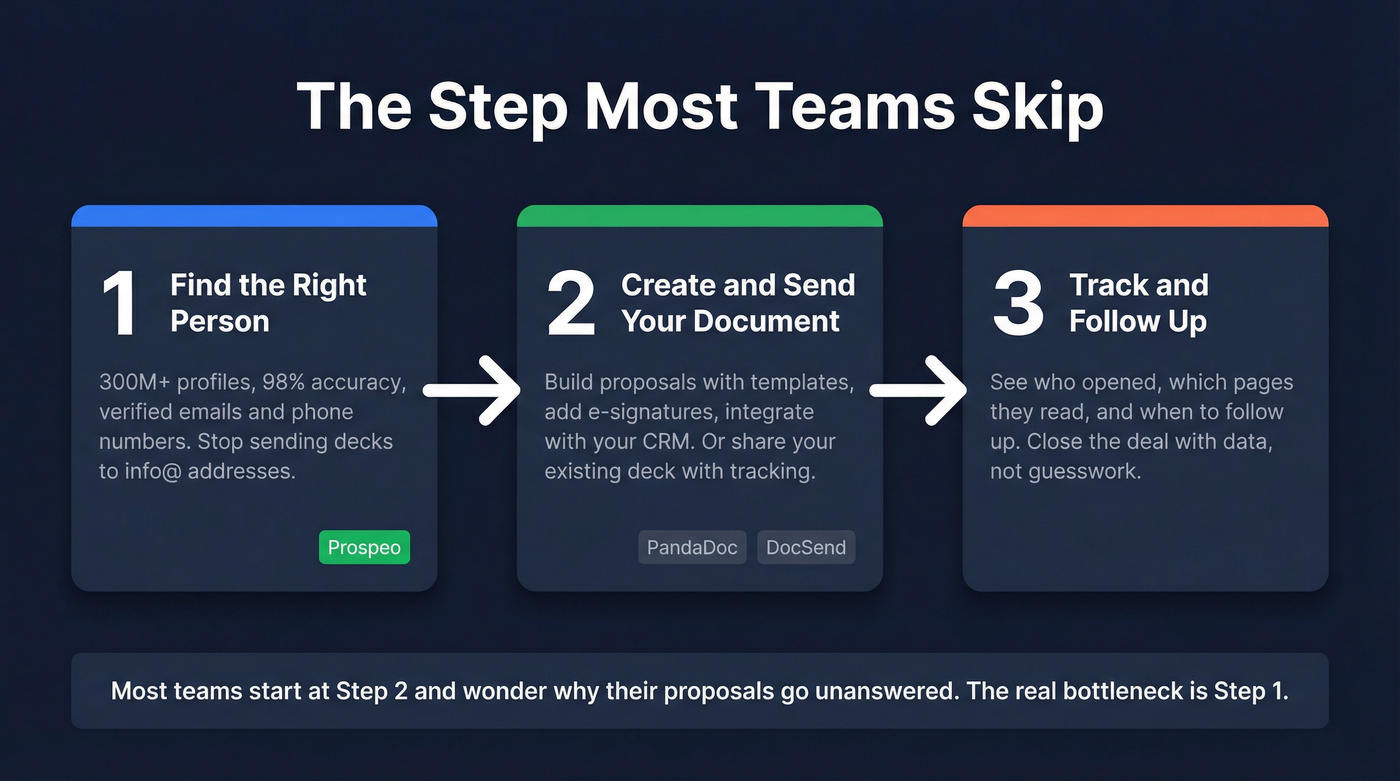
Prospeo finds verified emails for the decision-makers you actually need to reach - 300M+ professional profiles, 98% accuracy, and a 7-day data refresh cycle. The free tier gives you 75 verified emails per month, and it pairs with whichever document tool you choose. If you're comparing data vendors, start with data enrichment services and sales prospecting databases to understand what “good data” looks like.
Your sales team sends 50 proposals a month through PandaDoc. Great. But how many hours do they spend hunting for the right contact before hitting send? Prospeo's 30+ filters and CRM enrichment cut list-building from hours to minutes - at $0.01 per email.
Build your prospect list in minutes, not hours. Free tier included.
FAQ
Can DocSend replace PandaDoc?
No. DocSend doesn't create documents - no templates, no editor, no content library. It's a tracking and analytics layer for files built elsewhere. If you need proposals, contracts, and e-signatures in one platform, PandaDoc is the right choice.
Does PandaDoc have document tracking?
Basic tracking only - opens, views, time spent per page, and clicked links. No page-level heatmaps or per-slide engagement analytics. If granular engagement data drives your follow-up strategy, DocSend is significantly stronger here.
Which tool is better for small teams?
PandaDoc. The free tier and lower per-seat pricing make it far more accessible. A 5-person team saves $130/mo compared to DocSend Standard, and you get document creation included.
How do I find the right contacts to send documents to?
Neither DocSend nor PandaDoc helps with prospecting. Prospeo's Email Finder locates verified emails across 300M+ professional profiles at 98% accuracy - with a free tier of 75 emails per month. Pair it with either tool to make sure your decks and proposals reach actual decision-makers.