

Email Address Verification: What Actually Works in 2026
You send 10,000 cold emails on Monday. By Wednesday, 1,900 have bounced, your domain reputation is tanking, and your ESP is threatening to throttle your account. That scenario isn't hypothetical - it's Tuesday for a lot of outbound teams. A report analyzing nearly 1 billion email addresses across 23 industries found only 80.94% were valid. Nearly one in five emails on any given list is dead weight. Every time you submit an email address for verification and remove the ones that fail, you're protecting months of sender reputation work (and it helps to understand your email deliverability baseline).
What You Need (Quick Version)
Three picks that cover most use cases:
- Clearout - best-value budget standalone verifier. $4 per 1,000 emails, 98.4% accuracy in a 90-day test.
- NeverBounce - best for high-volume pay-as-you-go. Sliding scale from $8/1K down to $3/1K at 250K+ volume.
For quick free checks, Mailmeteor lets you verify individual addresses with no signup. ZeroBounce offers 100 free verifications per month when you sign up with a business domain.
What Email Verification Actually Is
Email verification confirms whether a specific mailbox exists and can receive messages. It's not the same as email validation, which only checks formatting - does the address have an @ symbol, a valid domain structure, no illegal characters. Validation is step one. Verification is the part that actually matters (especially if you're doing cold email marketing at any real volume).
If you landed here looking for a disposable email address to receive verification codes from apps and services, that's a different use case entirely. Tools like Guerrilla Mail or Temp Mail handle that. This guide is about verifying B2B email lists before you send outbound campaigns.
Verification works by simulating a delivery attempt - pinging the recipient's mail server to ask "does this mailbox exist?" - without actually sending a message. The server's response tells you whether the address is live, dead, or ambiguous. That ambiguity is where things get interesting.
How Verification Works Under the Hood
Every email verification tool runs the same fundamental process, regardless of what their marketing says:
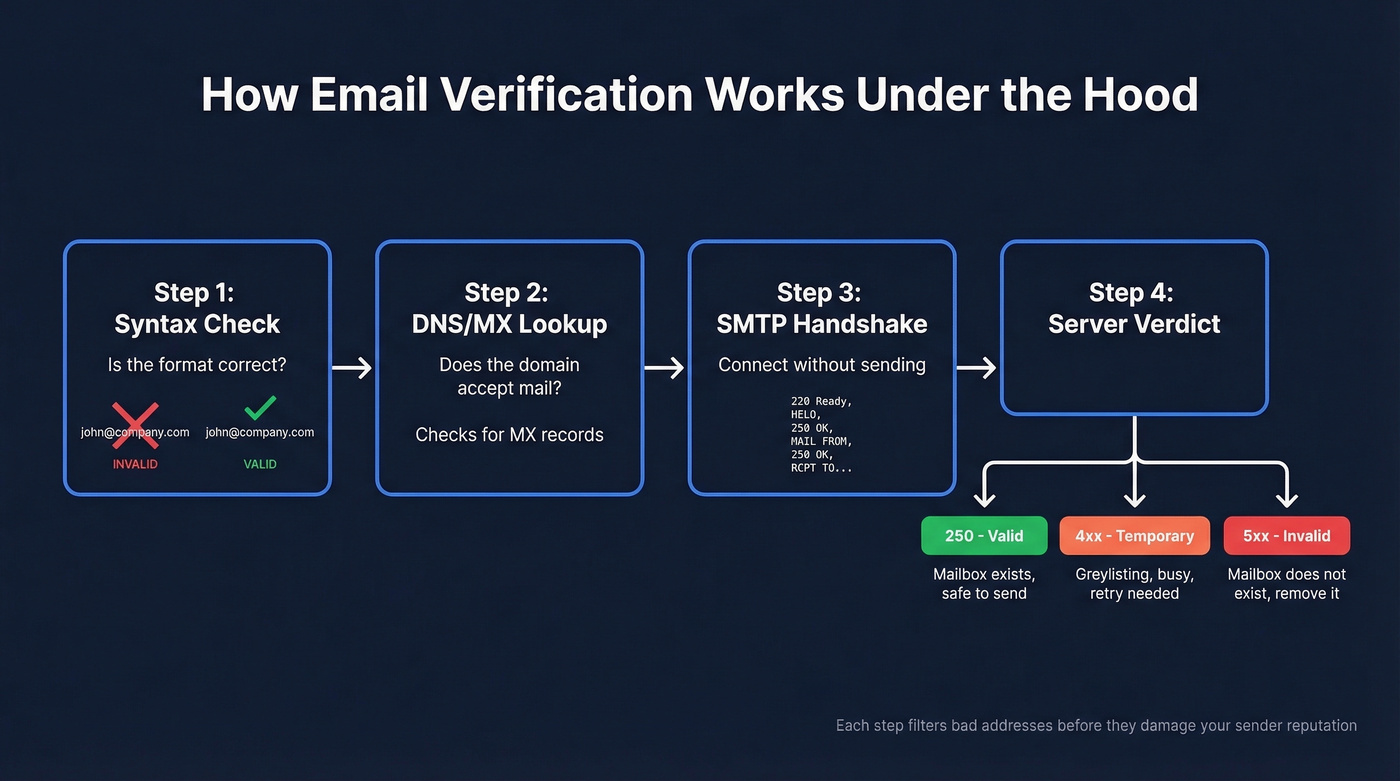
- Syntax check - is the address formatted correctly? Catches typos like
john@@company.comor missing TLDs. - DNS/MX lookup - does the domain have mail exchange records? If there's no MX record, the domain can't receive email. Full stop.
- SMTP handshake - the real verification. The tool opens a connection to the mail server and walks through the SMTP protocol without sending an actual message.
The SMTP conversation goes like this: the tool connects and the server responds with a 220 (ready). The tool sends HELO/EHLO, gets a 250 (acknowledged). It sends MAIL FROM, gets another 250 (sender accepted). Then it sends RCPT TO with the address being verified - and the server delivers the verdict.
That final response is where the magic happens. Here's what the SMTP error codes mean:
| Code | Type | What It Means |
|---|---|---|
| 250 | Success | Mailbox exists, ready |
| 421 | Temporary | Connection issue / rate limiting |
| 450 | Temporary | Mailbox busy |
| 451 | Temporary | Server error / greylisting |
| 452 | Temporary | Insufficient storage |
| 550 | Permanent | Mailbox doesn't exist |
| 551 | Permanent | User not local |
| 553 | Permanent | Mailbox name invalid |
Permanent failures (550-553) are clear signals to remove the address. Temporary failures are trickier - greylisting in particular mimics a temporary error to deter spam, and the tool needs retry logic to distinguish it from a genuinely unavailable server. This is why bulk verification takes time, and why cheap tools that skip retries produce worse results.
The Accuracy Myth
Every verification vendor plasters "99% accuracy" on their homepage. Let's be honest: benchmark testing tells a very different story.
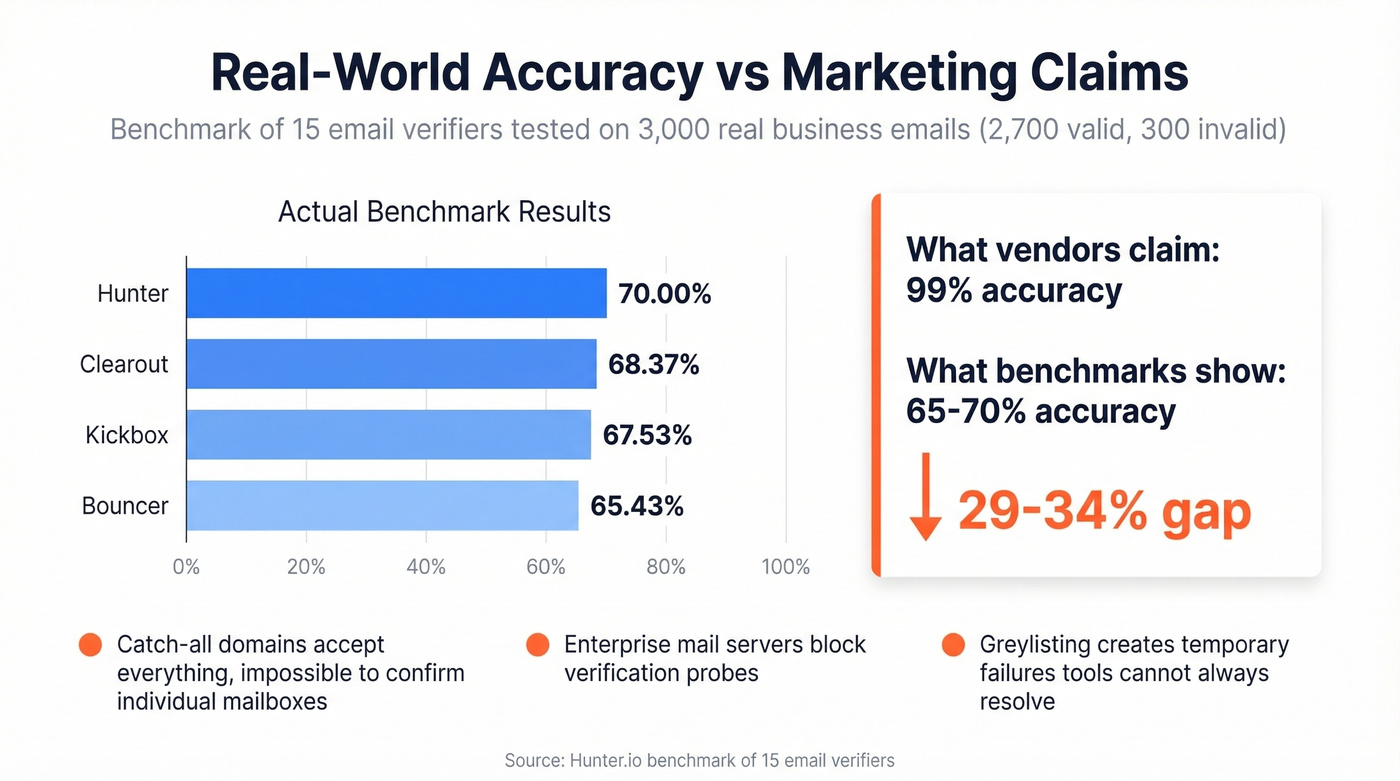
A benchmark of 15 email verifiers tested 3,000 real business emails - 2,700 valid and 300 known invalid - segmented by company size. The results were sobering:
- Top performer (Hunter): 70.00%
- Clearout: 68.37%
- Kickbox: 67.53%
- Bouncer: 65.43%
Those aren't typos. The best tool in the test correctly classified 70% of addresses. The gap between "99% accuracy" marketing and 65-70% real-world performance isn't a rounding error. It's a canyon.
Why the discrepancy? Accept-all (catch-all) domains accept every email sent to them, making it impossible to confirm whether a specific mailbox exists. Enterprise mail servers at mid-market and large companies run stricter configurations that block or obscure verification probes. Greylisting produces temporary failures that tools can't always resolve. These three factors account for most of the gap between vendor claims and field results, and they're why we always tell teams to treat verification results as a spectrum, not a binary.
How to Read Your Verification Results
Verification tools don't return a simple yes/no. They return a status category, and understanding these categories is the difference between a clean send and a bounce spike.
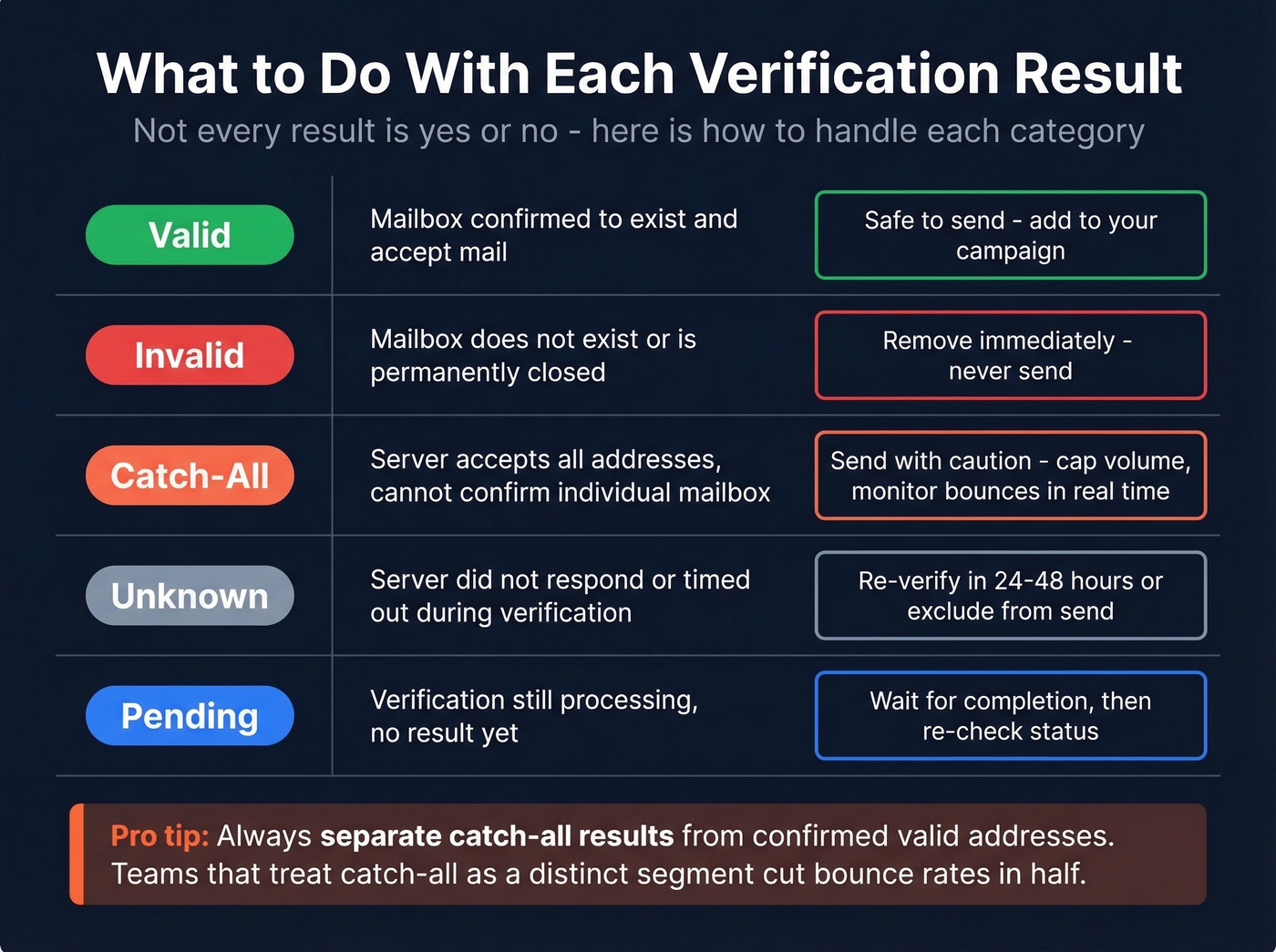
| Status | What It Means | What to Do |
|---|---|---|
| Valid | Mailbox confirmed | Safe to send |
| Invalid | Doesn't exist | Remove immediately |
| Catch-All | Server accepts all | Send with caution |
| Unknown | Server unresponsive | Re-verify or exclude |
| Pending | Still processing | Wait, then re-check |
The catch-all scenario is where most teams get burned. Say you verify 10,000 emails and 7,000 come back "valid." Sounds great - until you realize a big chunk of those are actually accept-all domains that your tool treated as safe. You send to all 7,000, and bounces spike because many of those catch-all addresses don't have real humans behind them.
Always separate catch-all results from confirmed valid addresses. We've seen teams cut their bounce rates in half just by treating catch-all as a distinct segment with its own risk tolerance - some send to catch-all addresses but cap the volume and monitor bounces in real time, while others exclude them entirely. Either approach beats lumping them in with verified addresses.
What Bounce Rate to Target
Industry benchmarks give you a clear target. Per ActiveCampaign's data:
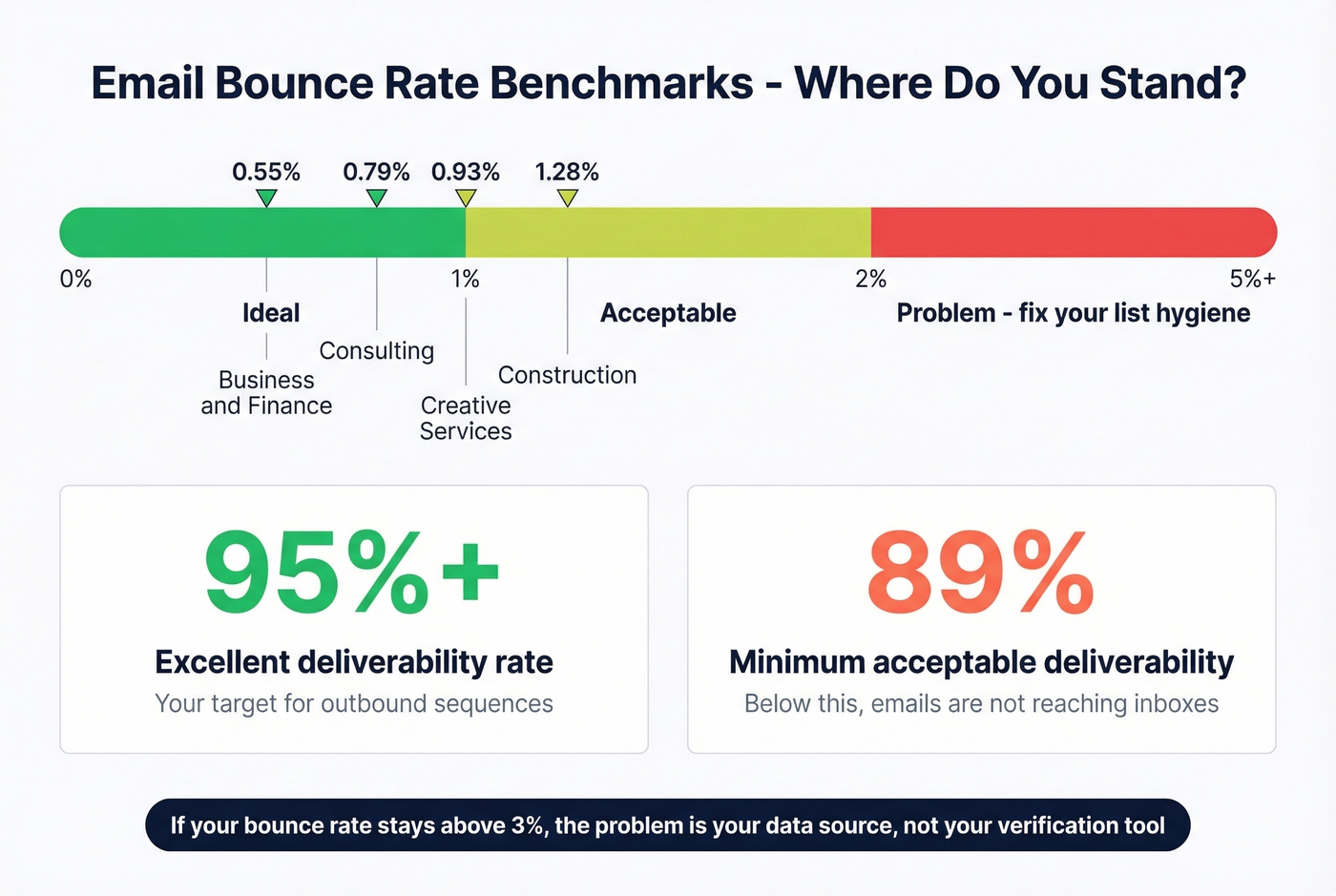
- Under 2% - acceptable
- Under 1% - ideal
- Over 2% - you've got a list hygiene problem
For context, business and finance averages 0.55%, consulting hits 0.79%, creative services runs 0.93%, and construction comes in at 1.28%. On the deliverability side, a good average rate is above 89%. Excellent is above 95%. For outbound sequences, you want to be in that excellent range - anything below 89% means a meaningful chunk of your emails aren't reaching inboxes at all.
If your bounce rate is consistently above 3%, the problem isn't your verification tool. It's your data source. No verifier can fix a fundamentally dirty list. The best teams solve this upstream by sourcing from databases that verify during the search, not after (see: sales prospecting databases and email list providers).
Best Verification Tools in 2026
| Tool | Cost/1K | Free Tier | Published Accuracy | Best For |
|---|---|---|---|---|
| Prospeo | ~$10* | 75/mo | 98% | Find + verify combined |
| Clearout | $4 | Limited | 98.4% (90-day test) | Budget bulk verification |
| NeverBounce | $3-8 | 10 credits | 99.1% (90-day test) | High volume |
| ZeroBounce | $10 | 100/mo | 96.5% (90-day test) | Deliverability suite |
| Bouncer | $7 | 1,000 trial | 97.8% (90-day test) | Budget mid-tier |
| Kickbox | $7 | Limited | 97.0% (90-day test) | Compliance-first teams |
| Hunter | ~$24.50 | 50/mo | 70.00% (15-tool benchmark) | Email finder add-on |
| Emailable | $6.90 | Limited | 97.2% (90-day test) | Speed |
| MillionVerifier | ~$3.70 | Limited | 99%+ (vendor claim) | Cheapest bulk option |
| BriteVerify | $10 | None | ~97% | Enterprise |
| Verifalia | Free | Yes | 99% (vendor claim) | Light usage |
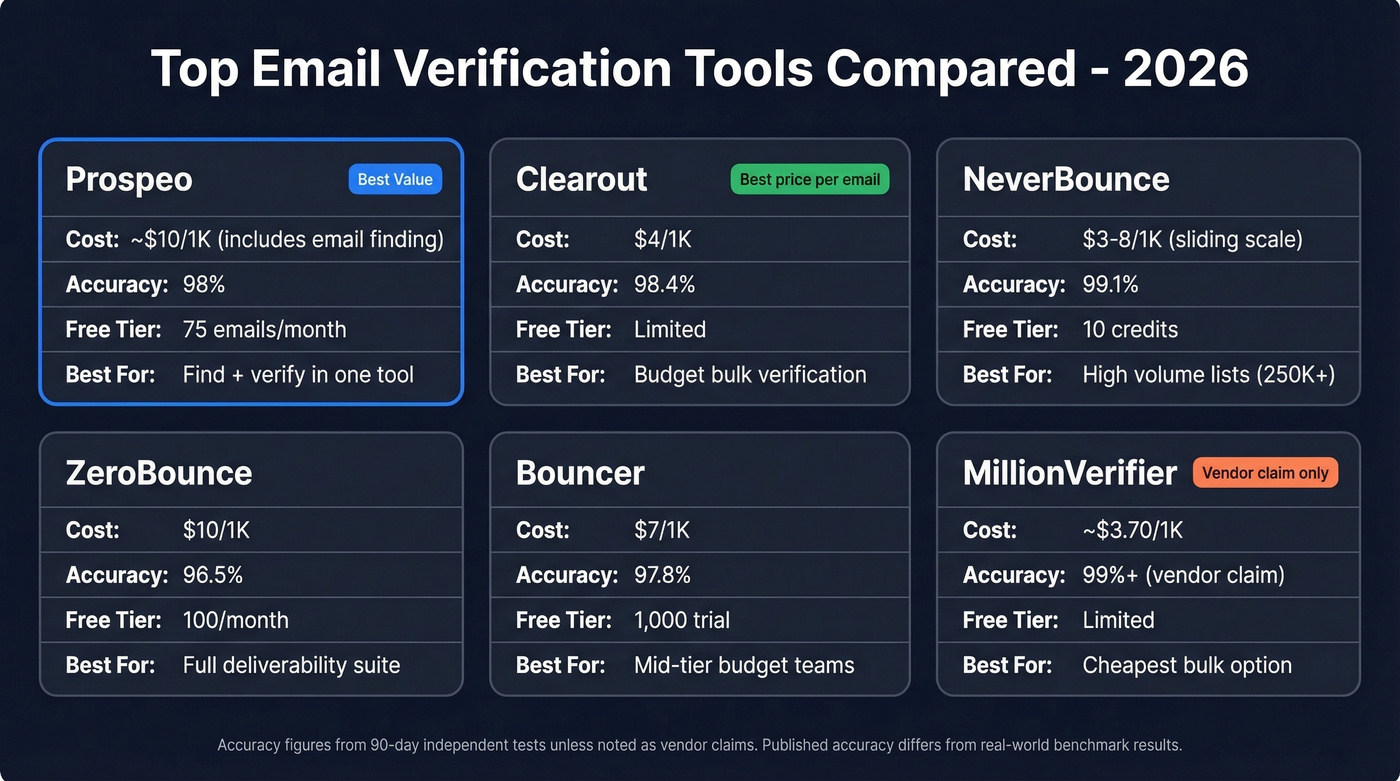
*Prospeo's ~$10/1K includes email finding + verification - not just verification. Running a separate finder + verifier typically costs $15-25/1K combined (compare with dedicated email search tools if you're building a stack).

The article above shows top verifiers max out at 70% accuracy on real business emails. Prospeo skips the problem entirely - every email in our 143M+ database passes a 5-step verification process with catch-all handling, spam-trap removal, and honeypot filtering. 98% accuracy. Data refreshed every 7 days, not 6 weeks.
Stop verifying bad data. Start with emails that are already clean.
Prospeo
Use this if you're tired of the two-step workflow of finding emails in one tool and verifying them in another.
Prospeo combines both: 143M+ verified emails, 98% accuracy, and a 5-step verification process that includes catch-all handling, spam-trap removal, and honeypot filtering before an email ever reaches your export. Records refresh on a 7-day cycle, so you're not working with stale contacts - most competitors refresh every 4-6 weeks.
At ~$0.01 per email, the cost is competitive with standalone verifiers, but you're getting the email finding included. One customer, Snyk, saw bounce rates drop from 35-40% to under 5% after switching, with AE-sourced pipeline up 180%. The free tier gives you 75 emails per month plus 100 Chrome extension credits to test it.

Clearout
Use this if you need the cheapest per-email verification that still delivers strong performance.
At $4 per 1,000 emails, Clearout came in at 98.4% accuracy in a 90-day test across 47,000 emails - one of the best price-to-performance ratios available. Upload a CSV, get results, download your cleaned list. No frills, no bloat. If you already have a reliable email source and just need to clean a list before sending, this is hard to beat on price. Skip it if you need email finding or deliverability monitoring - it's a pure verifier.
NeverBounce
NeverBounce makes the most sense at scale. The sliding pricing starts at $8/1K and drops to $3/1K at 250K+ volume - $750 for a quarter-million verifications. The 90-day test showed 99.1% accuracy, and their catch-all detection accuracy hit 94% in that benchmark. For teams processing massive lists monthly, the math works out fast.
ZeroBounce
ZeroBounce isn't just a verifier - it's a deliverability platform that happens to include verification. The $99/month ONE plan bundles 25,000 validations with inbox placement tests, blacklist monitoring, warmup features, and DMARC monitoring. At $10/1K on pay-as-you-go, it's 2.5x the cost of Clearout for verification alone. You're paying for the ecosystem. Worth it if you need the full stack; overkill if you just need clean emails.
Bouncer
At $7/1K with 1,000 free trial credits, Bouncer hits a sweet spot for teams verifying 5,000-50,000 emails monthly. The 90-day test showed 97.8% accuracy. Clean interface, fast processing, no enterprise bloat. It won't win any awards for features, but it does the core job reliably.
Kickbox
Kickbox is the compliance play. SOC 2 Type II, GDPR, CCPA, and HIPAA certifications - one of the most thorough compliance stacks in the standalone verifier space. At $7/1K with 97.0% accuracy in the 90-day test, the price is reasonable. If your legal team needs to sign off on your verification vendor, Kickbox makes that conversation short.
Catch-all domains wreck bounce rates because standalone verifiers can't tell real mailboxes from dead ones. Prospeo's proprietary email infrastructure resolves catch-all addresses before they ever reach your list - that's how teams like Snyk dropped bounce rates from 35% to under 5% across 50 AEs.
Get emails that survive the catch-all problem at $0.01 each.
Mistakes That Kill Deliverability
Even the best verifier can't save you from bad process. Here are the mistakes we see most often:
Verifying once and never again. Email lists decay at roughly 2% every four weeks. A 50,000-address list loses ~1,000 valid contacts monthly. Re-verify before every major send, not just when you first build the list.
Treating catch-all as valid. Accept-all domains are the single biggest source of unexpected bounces. In our experience, catch-all addresses account for the majority of "surprise" bounces that damage sender reputation. Segment them out and send cautiously - or don't send at all.
Verifying after sending. Look, if you're waiting for bounce reports to clean your list, the damage is already done. Your sender reputation took the hit the moment those bounces registered. Always check each email address for verification status before it enters a sequence (and keep an eye on email velocity so you don’t compound the problem).
Skipping warmup. Verification is one layer of deliverability, not the whole stack. A verified list sent from a cold domain with no warmup will still land in spam. The consensus on r/coldemail is pretty clear on this: warmup first, verify always, and don't skip either step (use a dedicated email warmup tool if you’re scaling).
Blaming the verifier when the source is the problem. If 19% of your list is invalid, the issue isn't your verification tool - it's where you got those emails. The best approach is sourcing from databases that verify during the search, not after. That upstream verification eliminates most of the garbage before it ever hits your list.
FAQ
How do I verify an email address for free?
Mailmeteor lets you verify individual addresses with no signup. ZeroBounce offers 100 free verifications per month on business domains. Prospeo's free tier includes 75 verified emails per month plus 100 Chrome extension credits, found and verified in one step. Verifalia also provides a free validator for light usage.
Can I use an online tool instead of desktop software?
Yes - in 2026, cloud-based verification is the standard. Every tool in this guide runs in the browser or via API with no software to install. Cloud verifiers handle SMTP probing from their own infrastructure, so you don't expose your IP or domain reputation during the process.
How often should I re-verify my email list?
Re-verify every four weeks at minimum. Lists decay at roughly 2% monthly, meaning a 50,000-address list loses about 1,000 valid contacts each month. Always re-verify before major sends, even if the list was clean recently.
What's a catch-all email domain?
A catch-all domain accepts messages sent to any address at that domain, including nonexistent mailboxes. Verification tools can't confirm individual mailbox existence on these domains, so results return as risky rather than definitively valid or invalid. Treat them as a separate segment with stricter sending limits.
Why did my "verified" list still bounce?
Most likely because accept-all and unknown results were treated as valid. In real B2B data, 25-40% of addresses can be ambiguous. Sending to those without caution causes bounces. Separate catch-all from confirmed-valid contacts and cap volume on risky segments.