

Email Bounce Explained: Types, Causes, and How to Prevent Them
You wake up to a campaign report showing a 15% bounce rate. Yesterday it was 1.2%. Your domain reputation is tanking in real time, and every email you send - even to valid addresses - is getting throttled. Most teams focus on fixing bounces after the damage is done. That's backwards. Understanding what an email bounce actually is, and why it happens, lets you prevent the crash instead of cleaning up after it.
The quick version:
- Hard bounces = permanent. Remove the address immediately. No second chances.
- Soft bounces = temporary. Retry 3-5 times over 72 hours, then suppress.
- Prevention beats remediation. Verify emails before sending and authenticate your domain with SPF, DKIM, and DMARC.
If your bounce rate is above 2%, you probably don't have a deliverability problem - you have a data quality problem. Everything below explains why, and how to fix it.
What Is an Email Bounce?
An email bounce is a delivery failure. Your sending server hands a message to the recipient's mail server, and that server says "no." You get back a Non-Delivery Report, also called a Delivery Status Notification, with a code explaining what went wrong.
The mechanics are straightforward. Your Mail Transfer Agent opens an SMTP connection to the recipient's server, and the two exchange a handshake covering sender identity, recipient address, and message content. At any point during this handshake, the receiving server can reject the message with a 4xx (temporary) or 5xx (permanent) response code. If it accepts the message but can't deliver it to the mailbox later, it generates a bounce notification sent back to the original sender.
Bounce rate is a core deliverability KPI. Brevo's benchmark report analyzed over 44 billion emails and tracks bounce rate alongside opens, clicks, and unsubscribes as a primary health metric. It's not a vanity number - it's the canary in your email deliverability coal mine.
Types of Email Bounces
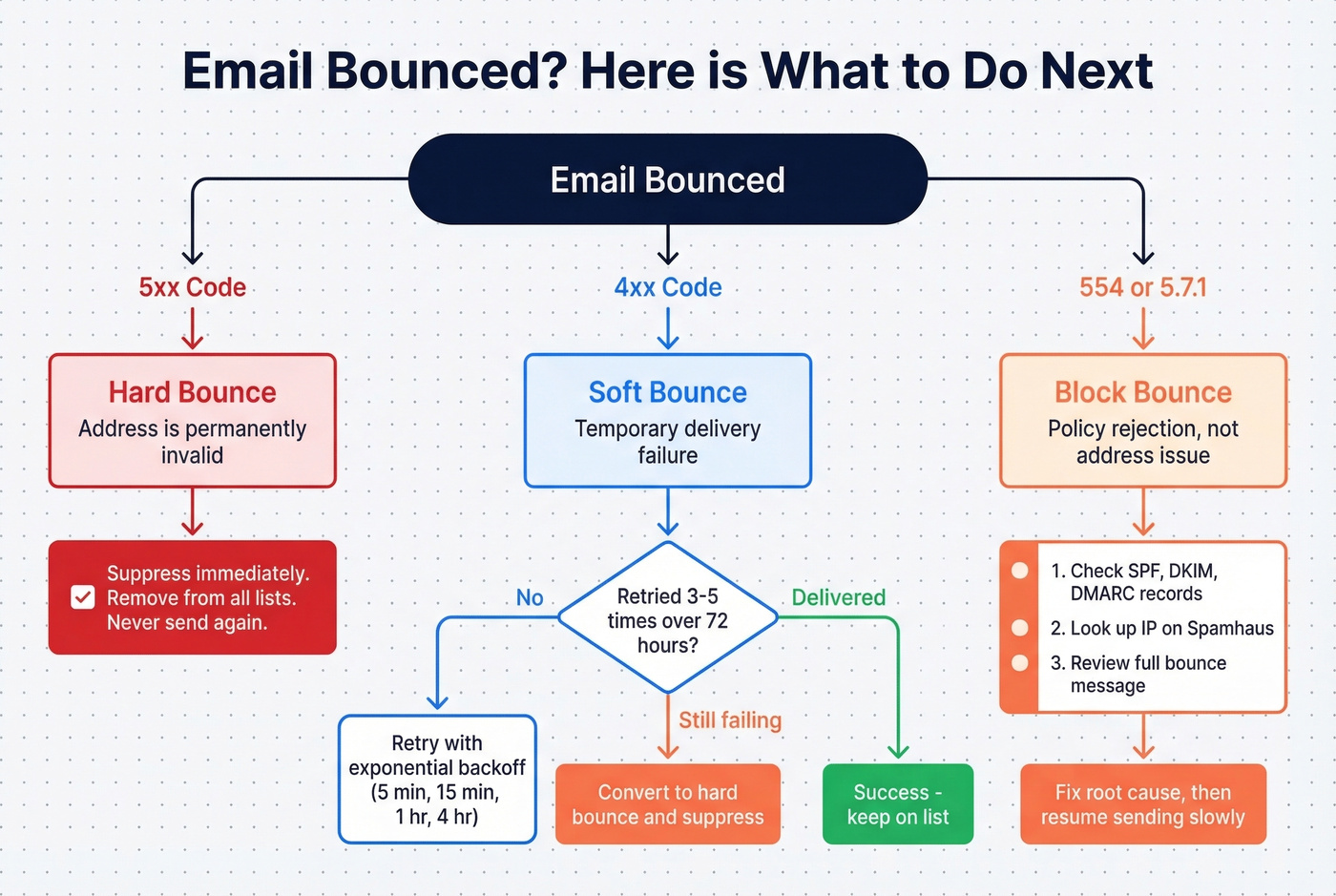
Hard Bounces (5xx)
A hard bounce means permanent failure. The address doesn't exist, the domain is dead, or the server has explicitly told you to never try again. SMTP codes in the 5xx family - especially 5.1.1 (user unknown) - signal this. In our experience, 5.1.1 accounts for over half of all hard bounces in cold outreach campaigns.
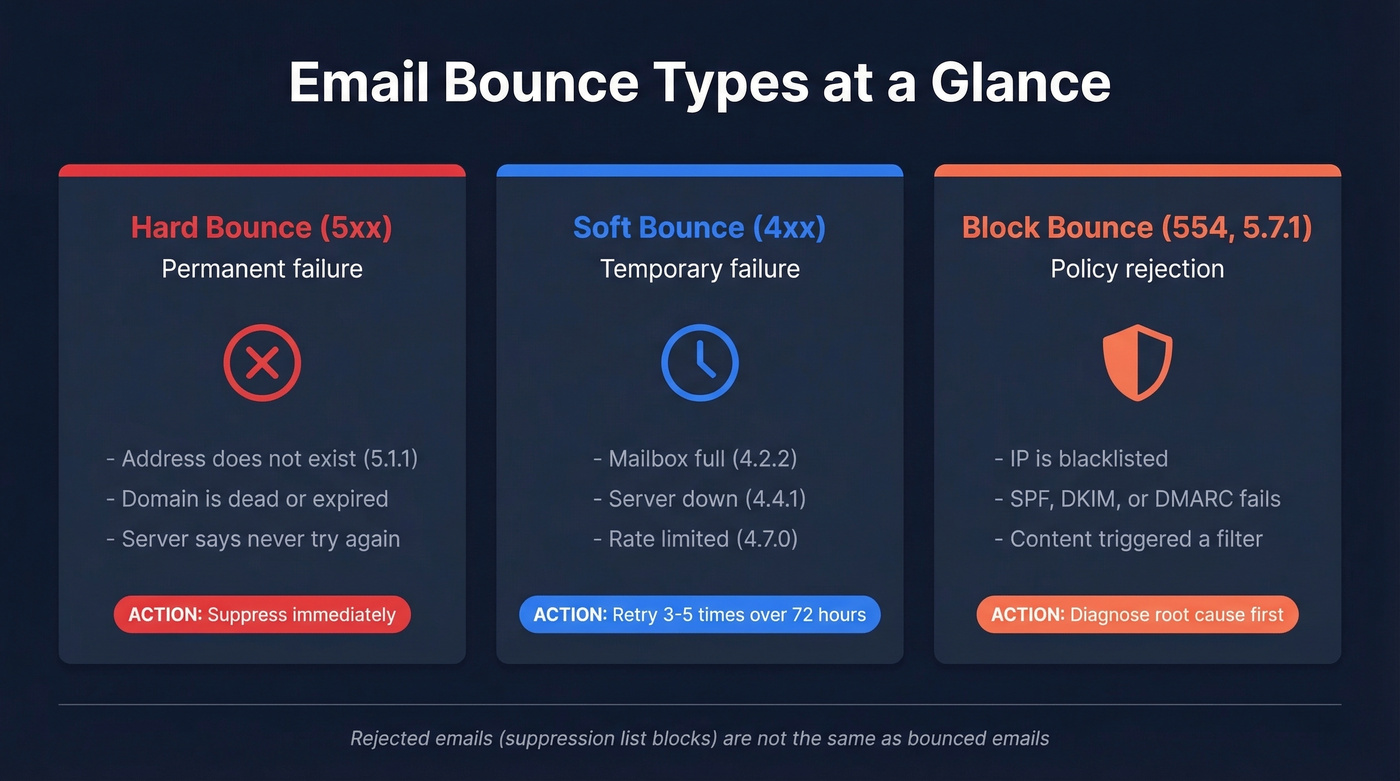
Suppress immediately. Remove the address from every list. Never send to it again.
Soft Bounces (4xx)
A soft bounce is temporary. The mailbox is full (4.2.2), the server is down (4.4.1), or you're being rate-limited (4.7.0). The address itself is valid - the delivery just failed right now.
Retry 3-5 times over 72 hours with exponential backoff. If it still fails, convert it to a hard bounce and suppress. Mailchimp's internal logic converts a soft bounce to a hard bounce after 7 consecutive soft bounces with no subscriber activity - or up to 15 if the subscriber has engaged before. That's a reasonable threshold to model.
Block Bounces (554, 550 5.7.1)
Block bounces are policy rejections. The address is valid, but the receiving server is rejecting you based on reputation or authentication - your IP is blacklisted, your authentication is broken, or your content triggered a filter.
Don't retry blindly. Diagnose the root cause first. Check your SPF/DKIM/DMARC records, look up your IP on Spamhaus, and review the bounce message for clues.
One important distinction: a rejected email isn't a bounced email. As SMTP2GO explains, a rejection happens before sending because the recipient is already on a suppression list - your own system blocked it, not the recipient's server.
Backscatter
There's also backscatter - bounce messages generated when spammers forge your domain as the sender address. You didn't send the email, but you get the NDR. If you're suddenly receiving hundreds of bounce-backs for messages you never sent, that's backscatter, not a list quality issue. A properly configured DMARC policy with p=reject is the best defense.
Common Causes of Bounced Emails
Here's the thing - most bounces trace back to a handful of root causes. Knowing which code maps to which cause saves you hours of troubleshooting.
Invalid or nonexistent address (5.1.1). The #1 cause. Typos, former employees, made-up addresses on lead forms. If you're buying lists or scraping without verification, expect this to dominate your bounce log. Prospeo's 7-day data refresh cycle catches job changes and inbox churn before they turn into delivery failures; the industry average is around 6 weeks.
Full mailbox (4.2.2). Gmail gives users 15GB of free storage; Yahoo offers 1TB. When someone maxes out, your message bounces soft. It usually resolves on its own, but a chronically full mailbox signals a dead account.
Authentication failures (5.7.26). Your email fails DMARC alignment, or your DKIM signature doesn't match. The receiving server sees an unauthenticated message and rejects it. This has become increasingly common since Gmail and Yahoo tightened enforcement.
Rate limiting and throttling (4.7.0). You're sending too fast. Gmail caps receiving at roughly 60 emails per minute, 3,600 per hour, and 86,400 per day. Hit those limits and you'll get 450 4.2.1 responses until you slow down.
Content filtering. Spammy subject lines, excessive links, or attachments that trigger malware scanners. The bounce message usually says "policy rejection" without much detail, which is maddening.
Infrastructure failures cover two related causes. Server downtime (4.4.1) means the recipient's mail server is temporarily unreachable - connection timeouts and DNS resolution failures fall here and almost always resolve on their own. DNS and domain issues are more permanent: the recipient's domain has no valid MX records, or the domain itself has expired, generating a hard bounce because there's literally nowhere to deliver the message.
Message too large (5.3.4). Most servers cap message size at 25-50MB. Heavy attachments or inline images push you over.
SMTP Bounce Codes Reference
Many ESP dashboards just label something "soft bounce" without surfacing the full diagnostic. You need the actual code to fix anything.
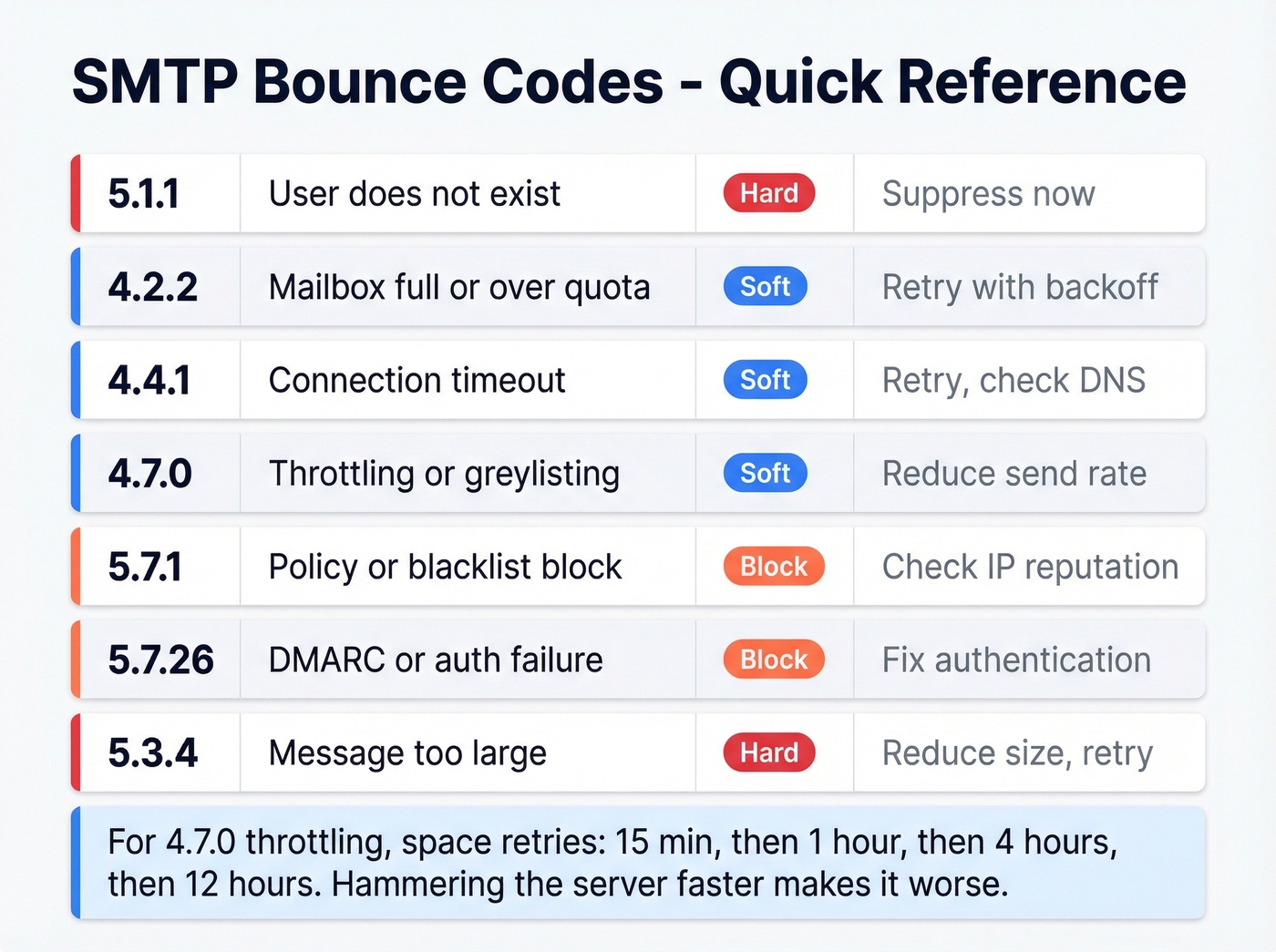
| Code | Meaning | Type | Action |
|---|---|---|---|
| 5.1.1 | User doesn't exist | Hard | Suppress now |
| 4.2.2 | Mailbox full / over quota | Soft | Retry with backoff |
| 4.4.1 | Connection timeout | Soft | Retry; check DNS |
| 4.7.0 | Throttling / greylisting | Soft | Reduce send rate |
| 5.7.1 | Policy / blacklist block | Block | Check IP reputation |
| 5.7.26 | DMARC / auth failure | Block | Fix authentication |
| 5.3.4 | Message too large | Hard | Reduce size, retry |
For 4.7.0 throttling, space your retries: 15 minutes, then 1 hour, then 4 hours, then 12 hours. Hammering the server faster just makes it worse.
What real bounce messages look like:
- Gmail hard bounce:
smtp;550 5.1.1 The email account that you tried to reach does not exist. - Gmail mailbox full:
smtp;452 4.2.2 The email account that you tried to reach is over quota. - Apple temp failure:
smtp;451 4.7.1 Service unavailable - try again later.
These examples come from Postmark's bounce guide - one of the best references for decoding actual bounce messages.

Most bounce problems are data problems. Prospeo's 5-step verification with catch-all handling, spam-trap removal, and honeypot filtering delivers 98% email accuracy - dropping bounce rates from 35%+ to under 4% for teams like Snyk and Meritt.
Fix your bounce rate at the source - before you hit send.
What's a Good Bounce Rate?
The formula is simple: bounced emails divided by total sent, multiplied by 100.
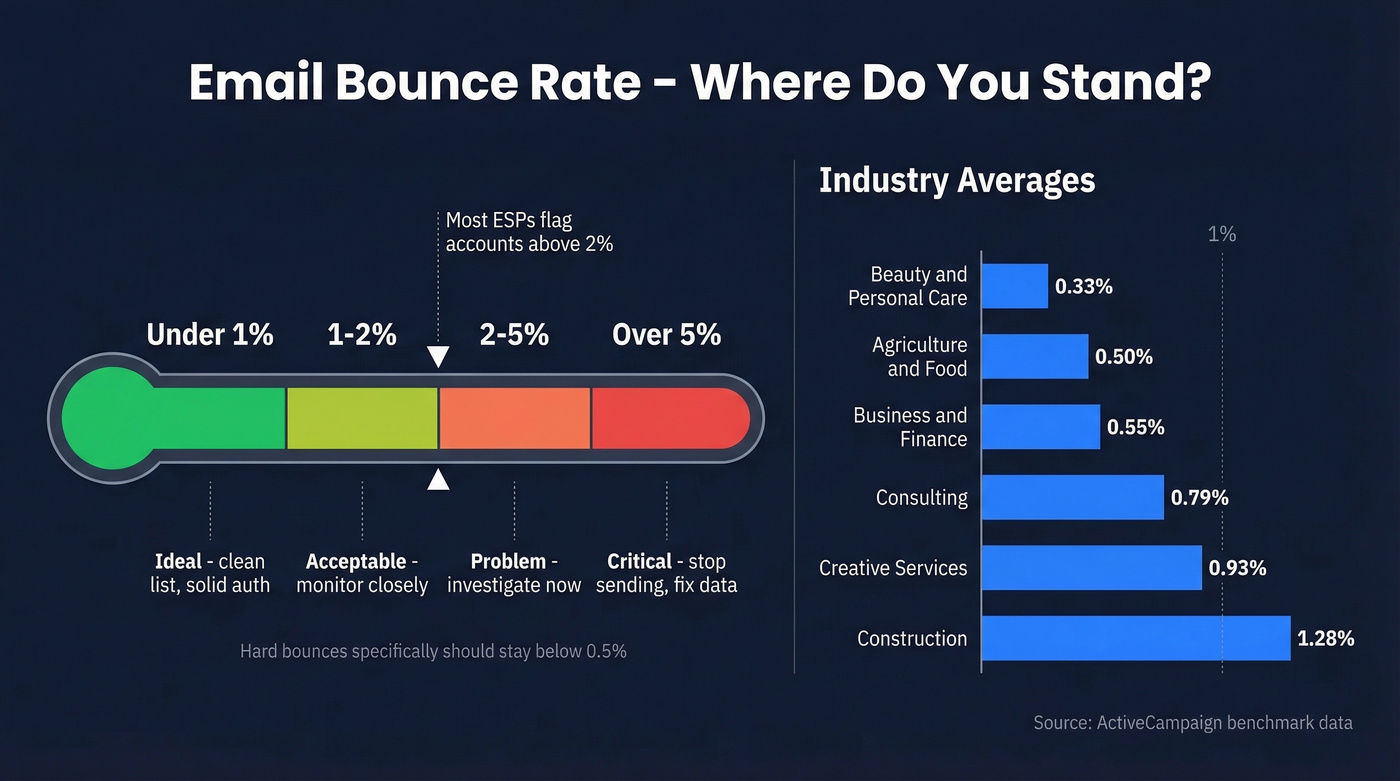
- Under 1%: Ideal. Your list is clean and your authentication is solid.
- 1-2%: Acceptable. Monitor it, but don't panic.
- Over 2%: Problem. List quality issues need immediate attention.
- Hard bounces specifically: Keep below 0.5%.
Here's how bounce rates break down by industry, compiled from ActiveCampaign's benchmark data:
| Industry | Avg Bounce Rate |
|---|---|
| Beauty & Personal Care | 0.33% |
| Agriculture & Food | 0.50% |
| Business & Finance | 0.55% |
| Consulting | 0.79% |
| Creative Services | 0.93% |
| Construction | 1.28% |
If you're significantly above your industry average, that's a signal to investigate - not next quarter, now.
How Bounces Damage Sender Reputation
Bounces don't just waste sends - they compound. We've seen the escalation chain play out dozens of times.
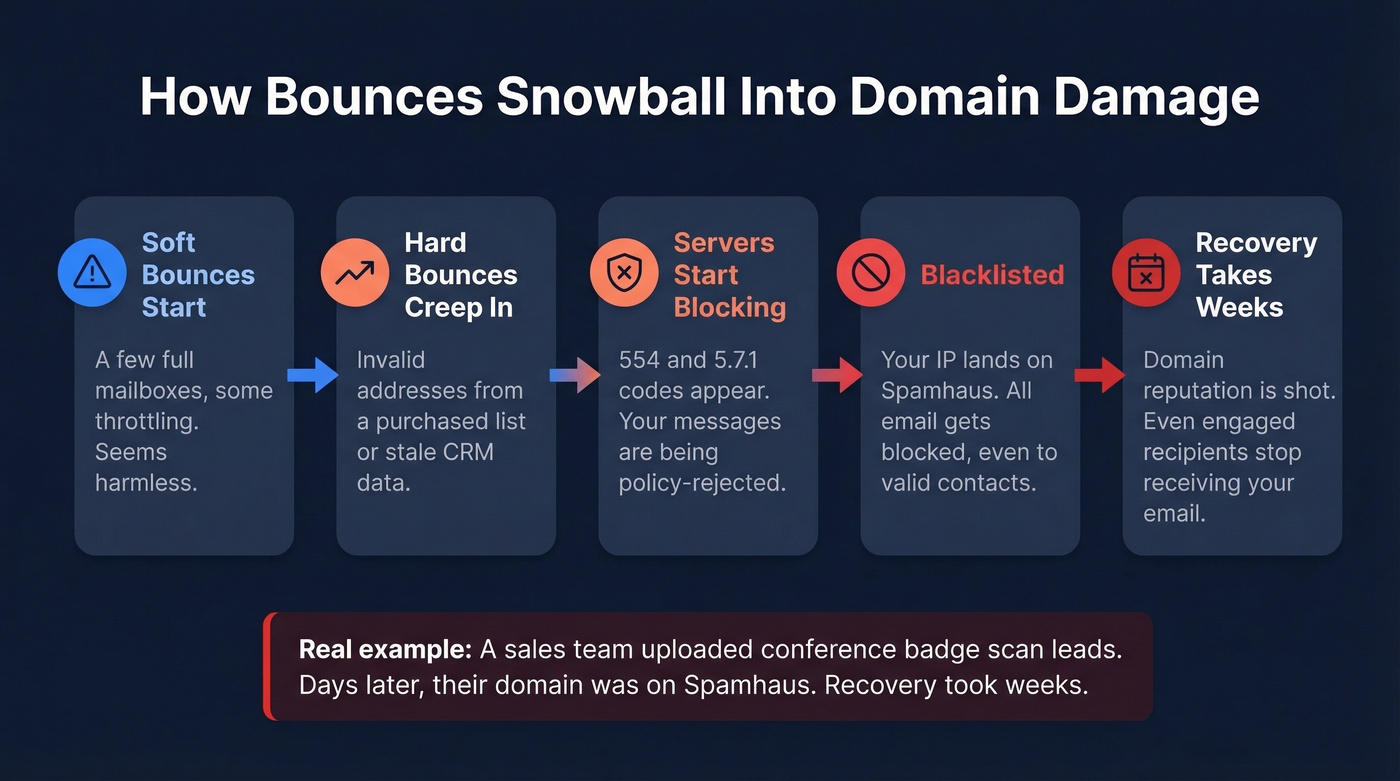
It starts with soft bounces. A few full mailboxes, some throttling. No big deal. But then hard bounces creep in - invalid addresses from a purchased list or a stale CRM. The receiving servers notice. They start blocking your messages with 554 and 5.7.1 codes. If you keep sending, your IP lands on Spamhaus. And once you're on Spamhaus, all your email gets blocked - even to perfectly valid, engaged recipients.
Your sales team uploaded a big batch of "leads" from a conference badge scan. A few days later, your domain is on Spamhaus. We've seen this exact scenario more than once, and the recovery takes weeks.
This isn't hypothetical. One r/Emailmarketing poster described 85% of their emails bouncing with "Message blocked" errors after sending small blasts from multiple accounts. The dirty-list risk goes beyond bounces, too. Old, abandoned addresses get recycled as spam traps and honeypots. Hit enough of those and mailbox providers flag you as a spammer - not because you are one, but because your data hygiene says otherwise. ActiveCampaign's research found that nearly 1 in 6 marketing emails never reach the inbox because of poor deliverability. Bounces are a major contributor.
Let's be honest about the math here. If your average deal size is under $15k and you're running outbound, you can't afford a single percentage point of bounce rate above 2%. Enterprise teams can absorb some reputation damage and recover with dedicated IPs and warm-up cycles. Smaller teams don't have that luxury - one bad list can take your domain out for a month.
How to Handle Bounced Emails
Hard Bounces
Suppress immediately. Never send again. The address is dead. Continuing to send actively damages your reputation. Every ESP should auto-suppress hard bounces, but verify this is actually happening - we've seen configurations where it wasn't.
Soft Bounces
Retry 3-5 times over 72 hours. Most MTAs handle this automatically with exponential backoff: first attempt at 5-15 minutes, then increasing intervals. If the soft bounce persists after that window, convert it to a hard bounce and suppress.
For new lists or re-engagement campaigns, up to 5% bounce rate is acceptable on the first send. If it stays above 2% after initial cleanup, you've got a structural data quality problem.
Block Bounces
Don't retry until you've diagnosed the cause. Check your authentication records. Look up your sending IP on Spamhaus and other blacklists. Review the full bounce message - it usually tells you exactly what's wrong. Fix the root issue, then resume sending slowly.
Skip this step and you'll just keep getting blocked.
How to Prevent Email Bounces
Prevention beats cleanup every time. Here are the three highest-impact tactics, ranked by how much they actually move the needle.
1. Verify Emails Before Sending
This is the single most effective thing you can do. Every email address should be verified before it enters your sending pipeline - not after it bounces.
Prospeo runs a 5-step verification process that catches invalid addresses, spam traps, catch-all domains, and honeypots before you hit send. Snyk's sales team cut their bounce rate from 35-40% to under 5% after switching, and Stack Optimize maintains under 3% bounce rates across all clients. With 98% email accuracy and a free tier available, there's no meaningful barrier to entry.
A 6-week data refresh means sending to people who changed jobs last month. Prospeo refreshes every 7 days, catching inbox churn and job changes before they become 5.1.1 hard bounces in your campaign report.
Stop emailing ghosts. Send to addresses verified this week.
2. Authenticate Your Domain
Gmail enforced SPF, DKIM, and DMARC for bulk senders starting February 2024. Outlook followed in May 2025. Yahoo requires bulk senders to authenticate with both SPF and DKIM and have a DMARC policy in place. If you haven't set these up, you're already getting bounced.
SPF: Keep DNS lookups at 10 or fewer per the RFC 7208 limit. Never publish two SPF records on the same hostname. DKIM: Use 2048-bit keys. Publish the TXT record at selector._domainkey.yourdomain.com. DMARC: Start with p=none and reporting enabled, then escalate to quarantine and finally reject once you're confident in alignment.
If you want a step-by-step, follow our guide on how to set up SPF, DKIM, and DMARC.
3. Clean Your List Regularly
Even verified lists decay. People change jobs, abandon inboxes, and let mailboxes fill up. Build suppression rules into your workflow:
- Suppress contacts who haven't engaged after 3-5 sends.
- Remove subscribers inactive for 6-12 months - they're dead weight at best, spam traps at worst.
- Use double opt-in for new signups. It adds friction, but eliminates typos and fake addresses at the source.
- Keep your Gmail spam complaint rate under 0.3%. Google Postmaster Tools tracks this for free.
Real talk: buying email lists is the fastest way to destroy your sender reputation. Every purchased list we've ever audited had bounce rates north of 15%. Don't do it.
If you need a practical checklist, use this email clean up workflow.
FAQ
How do you calculate bounce rate?
Bounced emails divided by total sent, multiplied by 100. Hard bounce rate should stay below 0.5%; overall bounce rate below 2%. Anything above 2% signals a data quality issue that needs immediate cleanup.
What's the difference between a hard and soft bounce?
Hard bounces are permanent - the address doesn't exist or the domain is dead (5xx codes). Soft bounces are temporary - full mailbox, server down, rate limiting (4xx codes). Hard bounces require immediate suppression; soft bounces get 3-5 retries before suppression.
Can you recover from a high bounce rate?
Yes, but expect 2-4 weeks of slow ramp-up. Suppress all hard bounces, verify your remaining list with a verification tool, fix SPF/DKIM/DMARC records, then resume sending at 20% of normal volume and scale gradually.
Do Gmail and Yahoo block unauthenticated senders?
Yes. Gmail enforced SPF, DKIM, and DMARC for bulk senders starting February 2024. Outlook followed in May 2025. Unauthenticated emails get bounced or routed to spam - no grace period.
How do you prevent bounces on cold outreach?
Verify every address before sending using multi-step verification that catches invalid addresses, spam traps, and catch-all domains. Pair verification with proper domain authentication and keep send volume under provider rate limits - that combination keeps bounce rates well under 2%.