

Domain Reputation Checker: Tools, Results, and How to Fix a Bad Score
The average marketing email has an 83.1% deliverability rate. That means roughly one in six marketing emails never reaches the inbox. And here's the kicker: 95% of people check their inbox daily, but only 58% bother with their spam folder. If your emails land in spam, most recipients won't ever see them.
Here's what nobody tells you upfront: a domain reputation checker means two completely different things depending on who you are. Marketers worried about inbox placement and security analysts hunting malicious domains need different tools entirely - and using the wrong ones gives you a false sense of safety.
What You Need (Quick Version)
Two types of domain reputation checks exist - email deliverability and cybersecurity - and they require different tools.
For email deliverability, start with Google Postmaster Tools, MxToolbox, and Sender Score. For security reputation, use VirusTotal, Cisco Talos, and urlscan.io. If your score's already bad, skip ahead to the fix section.
What Is Domain Reputation?
Domain reputation is a score - sometimes explicit, sometimes invisible - that mailbox providers and security filters assign to your domain. It influences whether your emails land in the inbox, get routed to spam, or get blocked entirely.
Most people miss this distinction: delivery and deliverability aren't the same thing. Delivery means the receiving server accepted your email without bouncing it. Deliverability means it actually reached the inbox instead of the spam folder or promotions tab. You can have 99% delivery and 60% deliverability, and your domain reputation is often what separates the two.
Your domain reputation is portable. Switch from Mailchimp to SendGrid and your domain's history comes with you. That's why modern providers increasingly weight domain reputation over IP reputation when making filtering decisions.
According to Litmus, 70% of emails show at least one spam-related issue. Most senders have reputation work to do whether they realize it or not.
Domain vs. IP Reputation
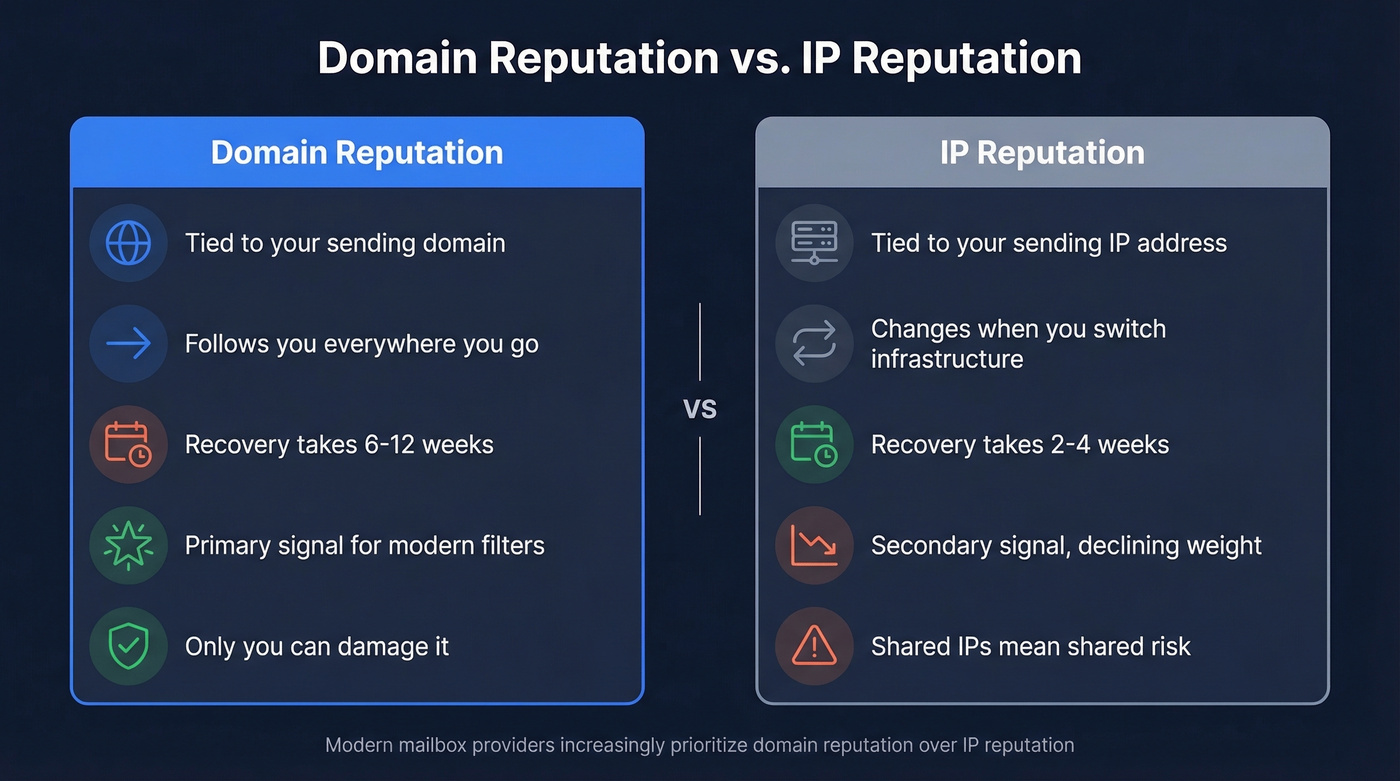
These two signals work together, but they behave differently - and recovering from damage to each takes very different timelines.
| Domain Reputation | IP Reputation | |
|---|---|---|
| Tied to | Your sending domain | Your sending IP address |
| Portability | Follows you everywhere | Changes with infrastructure |
| Recovery time | ~6-12 weeks | ~2-4 weeks |
| Modern weight | Primary signal | Secondary, declining |
| Shared risk | Yours alone | Shared IPs = shared risk |
If you're on a shared IP (most SMBs are), another sender's bad behavior can tank your IP reputation overnight. But your domain reputation is entirely yours - which is both good news and bad news. Good because nobody else can damage it. Bad because when it's damaged, recovery takes 6-12 weeks of consistent good behavior.
What Affects Your Score
Domain reputation isn't a single metric. It's an aggregate of signals that mailbox providers weigh differently. These factors matter most:
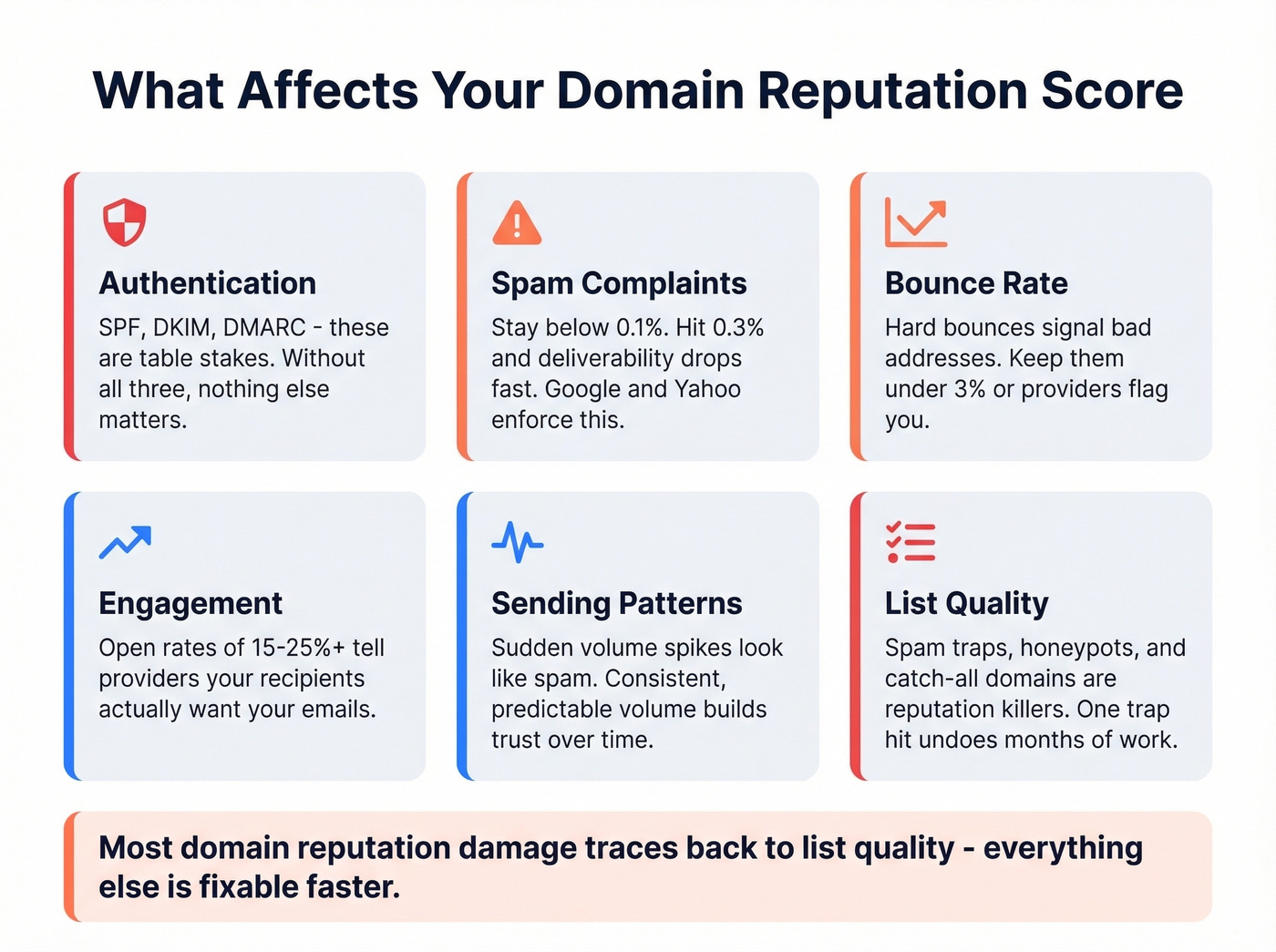
- SPF/DKIM/DMARC authentication. Table stakes. If you haven't set up all three, nothing else matters - providers treat unauthenticated email as suspicious by default.
- Spam complaint rate. Google and Yahoo's bulk sender requirements demand you stay below 0.1%. Hit 0.3% and deliverability drops fast.
- Bounce rate. Hard bounces signal you're sending to bad addresses. Keep hard bounces under 3%. (If you need benchmarks and fixes, see bounce rate.)
- Engagement metrics. Open rates in the 15-25%+ range tell providers your recipients want your emails. Low engagement signals the opposite. (Related: what is a good email open rate.)
- Sending patterns. Sudden volume spikes look like spam. Consistent, predictable volume builds trust. (Related: email velocity.)
- List quality. Spam traps, honeypots, and catch-all domains are reputation killers. A single spam trap hit can undo months of good sending behavior. (See spam trap removal.)
Marketers who describe their email programs as successful are 22% more likely to actively monitor deliverability. That's not a coincidence.
Let's be honest: most domain reputation damage traces back to list quality. Everything else is fixable faster. Bad data takes longer to recover from because the damage compounds with every send.
Email vs. Security Reputation Checks
When a marketer searches for a domain reputation checker, they want to know if their emails are landing in inboxes. When a security analyst runs the same query, they want to know if a domain is associated with malware, phishing, or abuse.
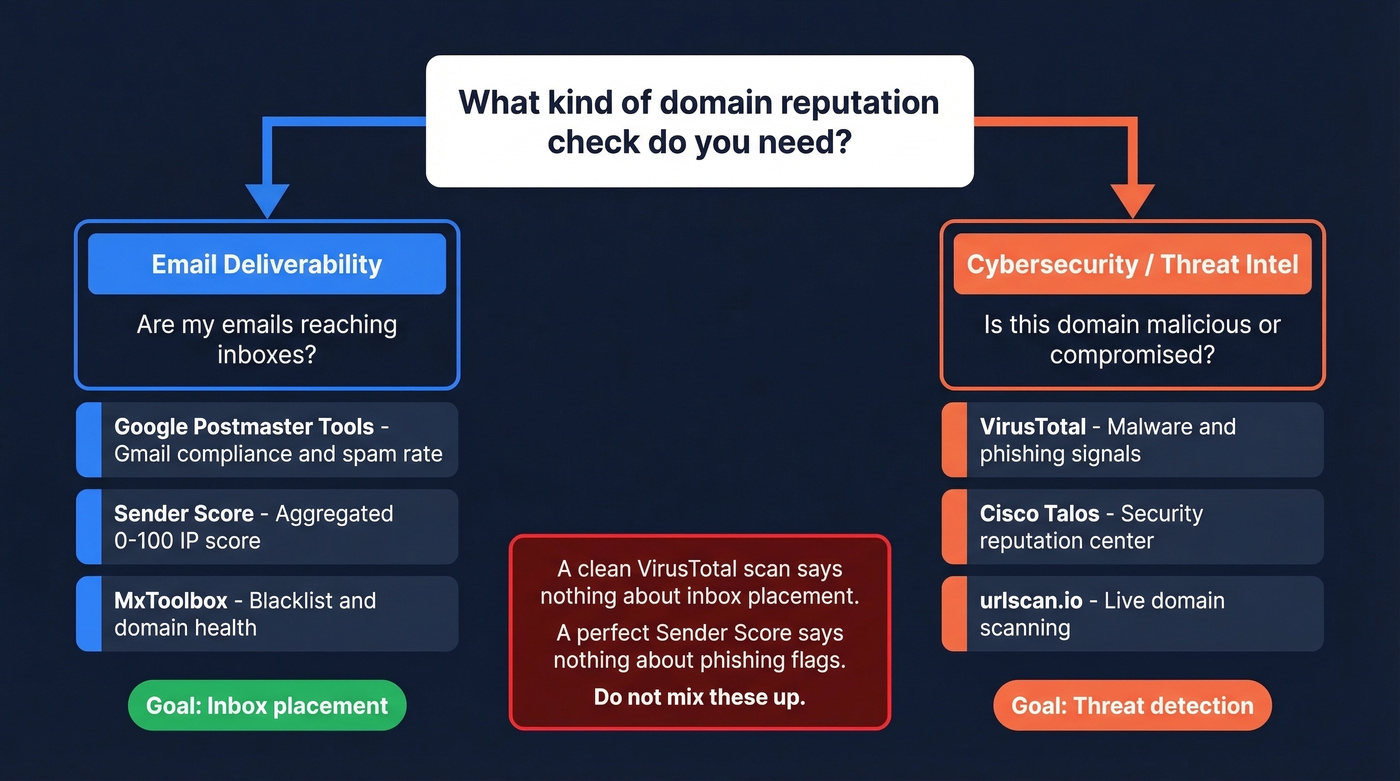
These are fundamentally different questions. A clean VirusTotal scan tells you nothing about inbox placement. A perfect Sender Score tells you nothing about phishing flags. You need to know which type of check you're running before you pick a tool.

Most domain reputation damage traces back to bad list data - bounces, spam traps, and honeypots. Prospeo's 5-step verification with catch-all handling, spam-trap removal, and honeypot filtering delivers 98% email accuracy. Teams switching from other providers cut bounce rates from 35%+ to under 4%.
Stop guessing about list quality. Start with data that's verified every 7 days.
Best Tools to Check Domain Reputation
Email Deliverability Tools
Google Postmaster Tools is the starting point for anyone sending to Gmail recipients. It's free, shows compliance status and spam rates, and it's the closest thing to a direct signal from Gmail itself. The V2 interface changed significantly in late 2025 - more on that below.
Microsoft SNDS covers the Outlook and Hotmail ecosystem. Free, focused on IP reputation and complaint data. If a meaningful chunk of your list uses Microsoft email, you need this alongside Postmaster Tools.
Yahoo Postmaster handles complaint and feedback-loop monitoring for Yahoo recipients. If you're only checking Google and Microsoft, you're missing visibility into another major consumer mailbox provider.
Sender Score from Validity aggregates multiple data sources into a single 0-100 score tied to your sending IP. The free version gives you the basics; paid tiers with deeper analytics start around ~$500+/month.
MxToolbox scans your domain against many blacklists and runs broader domain health checks. Free users get one Domain Health Check every 24 hours. Paid plans start around ~$50-$100+/mo depending on monitoring needs.
Spamhaus is one of the most authoritative blocklist ecosystems in the industry. Free lookups are available, with commercial data feeds priced by usage. (If you get listed, see Spamhaus blacklist removal.)
EasyDMARC offers a free, unlimited reputation checker that scans your domain and IP against major public blacklists and provides direct links to delisting instructions.
GlockApps runs inbox placement tests - it actually sends emails and tells you where they land across providers. Mail-Tester does pre-send spam scoring with a free limited tier and low-cost paid plans. For SMB tiers, inbox placement tools typically run ~$50-$200/month. (Related: email spam checker.)
Cybersecurity / Threat Intel Tools
VirusTotal is the default first stop for security-style reputation checks, aggregating results from dozens of scanners and reputation sources. Free manual lookups, paid API access.
Cisco Talos operates a free reputation center that security teams rely on for threat intelligence. urlscan.io provides live domain scanning with visual snapshots of what a domain serves - free tier plus paid plans.
Security-style reputation also factors in signals beyond malware flags: WHOIS redaction patterns, DNS configuration hygiene, and registration in countries associated with abuse all contribute to a domain's threat score.
AbuseIPDB tracks abuse reports across IPs and related infrastructure. AlienVault OTX is a free, open threat intelligence platform. WhoisXML API provides DNS and WHOIS intelligence with 50 free credits and paid plans.
On r/cybersecurity, the practitioner consensus is to stack VirusTotal + urlscan.io + Talos as a baseline, then layer in AbuseIPDB and OTX for deeper investigation.
Quick-Reference Comparison
| Tool | Measures | Cost | Best For |
|---|---|---|---|
| Google Postmaster | Compliance, spam rate | Free | Gmail deliverability |
| Microsoft SNDS | IP rep, complaints | Free | Outlook deliverability |
| Yahoo Postmaster | Complaints, feedback loops | Free | Yahoo deliverability |
| Sender Score | Aggregated 0-100 IP score | Free / paid | Quick health check |
| MxToolbox | Domain health + blacklists | Free / paid | Blacklist monitoring |
| Spamhaus | Blocklist status | Free / commercial | Authoritative blocklist |
| EasyDMARC | RBL scan + source links | Free / paid | Blacklist visibility |
| GlockApps | Inbox placement testing | Paid | Pre-send testing |
| Mail-Tester | Spam score analysis | Free / paid | Quick pre-send check |
| VirusTotal | Malware/phishing signals | Free / paid | Threat detection |
| Cisco Talos | Security reputation | Free | Threat intel baseline |
| urlscan.io | Live domain scanning | Free / paid | Visual domain analysis |
| AbuseIPDB | Abuse/threat reports | Free | IP abuse tracking |
| AlienVault OTX | Open threat intel | Free | Community threat data |
| WhoisXML API | DNS + WHOIS intel | Free credits / paid | Domain investigation |
Google Postmaster Tools V2 - What Changed
If you haven't logged into Google Postmaster Tools since mid-2025, you're in for a surprise. Google retired the V1 interface in October 2025, and the changes are significant.
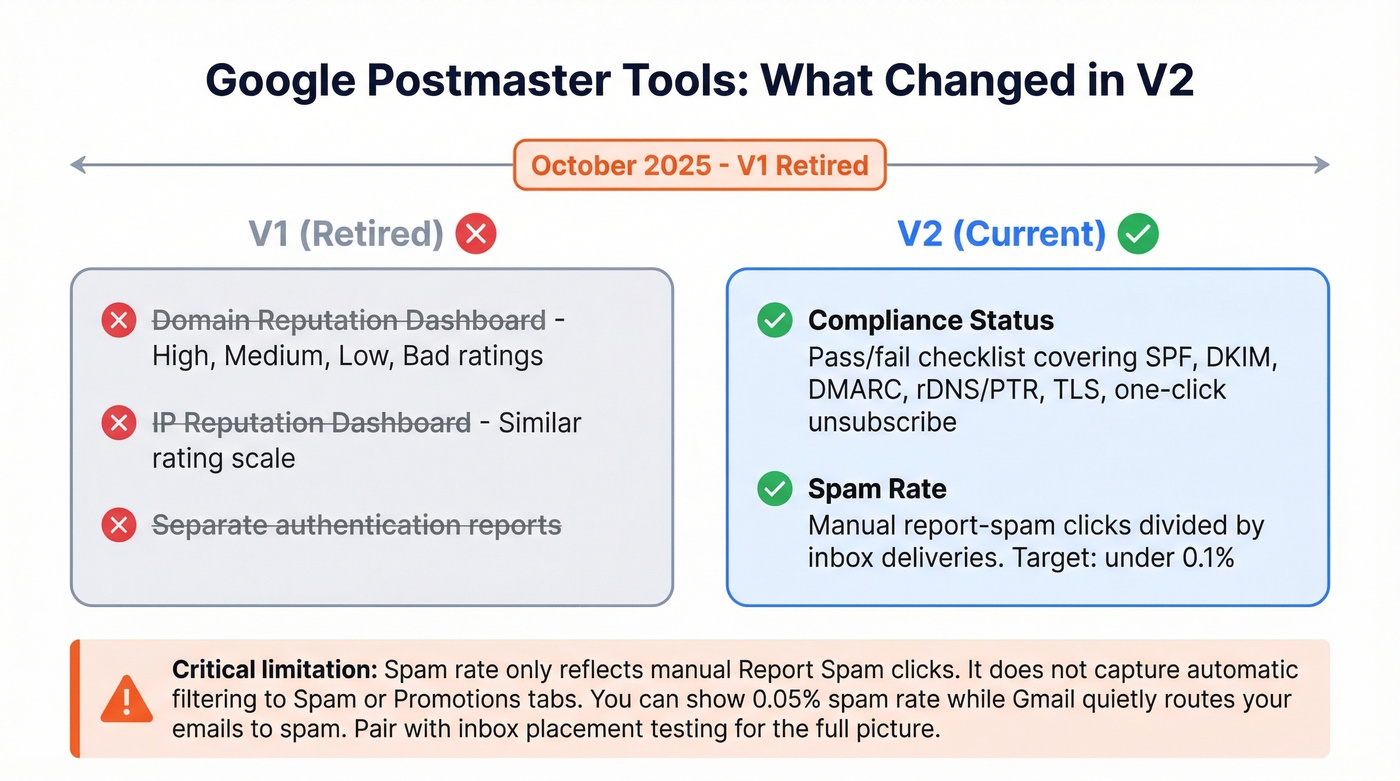
The old Domain Reputation and IP Reputation dashboards - the ones that gave you a simple High/Medium/Low/Bad rating - are gone. V2 focuses on two things: Compliance Status and Spam Rate.
Compliance Status is a pass/fail checklist covering SPF, DKIM, DMARC alignment, rDNS/PTR records, TLS, and one-click unsubscribe. If any of these fail, you know exactly what to fix. Spam Rate uses a straightforward formula: emails users manually report as spam divided by emails delivered to inbox, times 100. Google's guidance is to keep this below 0.3%, though the real target is under 0.1%.
The critical limitation most people miss: the spam rate in Postmaster Tools only reflects manual "Report spam" clicks. It doesn't capture automatic filtering into Spam or Promotions tabs. You can show a 0.05% spam rate while Gmail quietly routes a big chunk of your emails to spam. That's why Postmaster Tools alone isn't enough - you need inbox placement testing to see the full picture.
How to Read Your Results
Here's the biggest misconception in domain reputation monitoring: a clean blacklist scan means your emails are reaching inboxes. It doesn't.

Your scores will disagree across tools because they're measuring different things. Sender Score evaluates your IP. Postmaster Tools evaluates Gmail-specific compliance. MxToolbox checks blacklists. VirusTotal checks for malware. None gives you the complete picture alone.
We recommend a three-tool minimum for any serious monitoring setup: one ISP-specific tool like Postmaster Tools or SNDS, one blacklist scanner like MxToolbox or EasyDMARC, and one engagement/placement monitor like GlockApps or your ESP's built-in analytics. If inbox placement drops below 90%, investigate immediately - don't wait for a blacklisting to confirm there's a problem. (For a deeper stack, see email reputation tools.)
How to Fix a Bad Domain Reputation
Recovery isn't instant, but it's predictable if you follow the right sequence. Expect 6-12 weeks for meaningful improvement.
1. Authenticate everything. Set up SPF, DKIM, and DMARC if you haven't already. Nothing else works without it. Use EasyDMARC's free tools to verify your records. (Related: DMARC alignment.)
2. Clean your list ruthlessly. Remove invalid addresses, spam traps, honeypots, and long-inactive contacts. Run every address through a verification tool to catch spam traps and invalid emails before they hit your domain.
3. Ramp volume gradually. Increase sending volume step-by-step over 4-6 weeks. Sudden spikes after a reputation dip look like spam behavior to providers.
4. Send to engaged recipients first. During the ramp period, prioritize your most engaged contacts. High engagement signals to providers that your emails are wanted.
5. Let damaged domains rest. For severely damaged domains, let them age 2-3 weeks with minimal sending before ramping.
6. Monitor weekly. Check Postmaster Tools and MxToolbox every week during recovery. Set up blacklist monitoring alerts so you catch new listings quickly.
How Bad Data Destroys Reputation
Look - if your average deal size is under five figures and you're buying unverified prospect lists, you're spending more on domain reputation recovery than you'll ever make from those leads. The math just doesn't work.
We've seen this play out dozens of times. An SDR team buys a prospect list from a cheap data vendor, loads thousands of contacts into their sequencer, and hits send. Bounce rates spike. Spam traps in the list trigger blacklistings. The domain's reputation craters, and suddenly the marketing team's newsletter performance drops because the same domain is now distrusted across providers. Recovery takes six to twelve weeks of careful rehabilitation, assuming you stop the bleeding immediately.
Before you send a single outbound email, verify your list. Prospeo's 5-step verification process catches spam traps, honeypots, and catch-all domains at 98% accuracy. Stack Optimize, a Prospeo customer, maintains 94%+ deliverability and under 3% bounce rates across all client campaigns - zero domain flags. (If you're building outbound at scale, see cold email marketing.)
You just read that hard bounces need to stay under 3% and spam complaints under 0.1%. At $0.01 per email, Prospeo makes it affordable to send only to verified addresses - no more gambling your domain reputation on stale data refreshed every 6 weeks.
Stack Optimize built a $1M agency with zero domain flags using Prospeo data.
FAQ
What's a good domain reputation score?
There's no universal number - providers use different scales. On Sender Score, aim for 80+. On Google Postmaster Tools V2, keep spam rate below 0.1% and all compliance checks passing. Below 90% inbox placement on GlockApps means something needs immediate attention.
How often should I check?
Weekly for senders pushing 10,000+ emails per month. Biweekly minimum for everyone else. Set up monitoring alerts in MxToolbox or GlockApps - discovering a blacklisting two weeks late means two weeks of damage you can't undo.
Can I check domain reputation for free?
Yes. Google Postmaster Tools, Microsoft SNDS, Sender Score, Cisco Talos, VirusTotal, and EasyDMARC all offer free checks. No single free tool covers everything, so use at least three from different categories: ISP-specific, blacklist, and security.
Why does my domain show "clean" but emails still go to spam?
Blacklist status is one factor among many. Inbox placement also depends on authentication, engagement metrics, sending patterns, and content. A clean scan means you're not blocklisted - not that providers trust your domain enough for the inbox. Run an inbox placement test with GlockApps to see where emails actually land.
How do I prevent reputation damage from outbound prospecting?
Verify every email address before sending. Keep bounce rates under 3%, warm new domains over 4-6 weeks before heavy sends, and never send to purchased lists without verification first.