

Best Email Deliverability Tools in 2026: What Actually Works
One in six emails never reaches the inbox. That's the reality right now - an 83.1% average deliverability rate across major ESPs, which means 16.9% of your carefully crafted outreach ends up in spam or vanishes entirely.
The authentication rules have tightened fast. Gmail and Yahoo enforced DMARC for bulk senders in February 2024, Microsoft followed in early 2025, and Gmail moved to strict SMTP-level enforcement late last year - rejecting non-compliant messages outright instead of just flagging them. These rules officially target senders pushing 5,000+ emails per day, but the standards are quickly becoming baseline expectations for everyone.
The 2% bounce threshold is now the benchmark. The 0.3% spam complaint threshold is equally unforgiving - exceed it and ISPs throttle your sends. The tools below exist to keep you under those lines and inside the inbox. You don't need seventeen of them. You need two or three covering different layers.
Our Picks (TL;DR)
| Need | Our Pick | Starting Price |
|---|---|---|
| List verification & data quality | Prospeo | Free (75 emails/mo) |
| Inbox placement testing | GlockApps | Free (2 tests/mo) |
| Free technical monitoring | MxToolbox + Google Postmaster | Free |
| Warmup (if you insist) | Warmup Inbox | $15/mo per inbox |
| Enterprise deliverability suite | Validity Everest | ~$35k/yr negotiated |
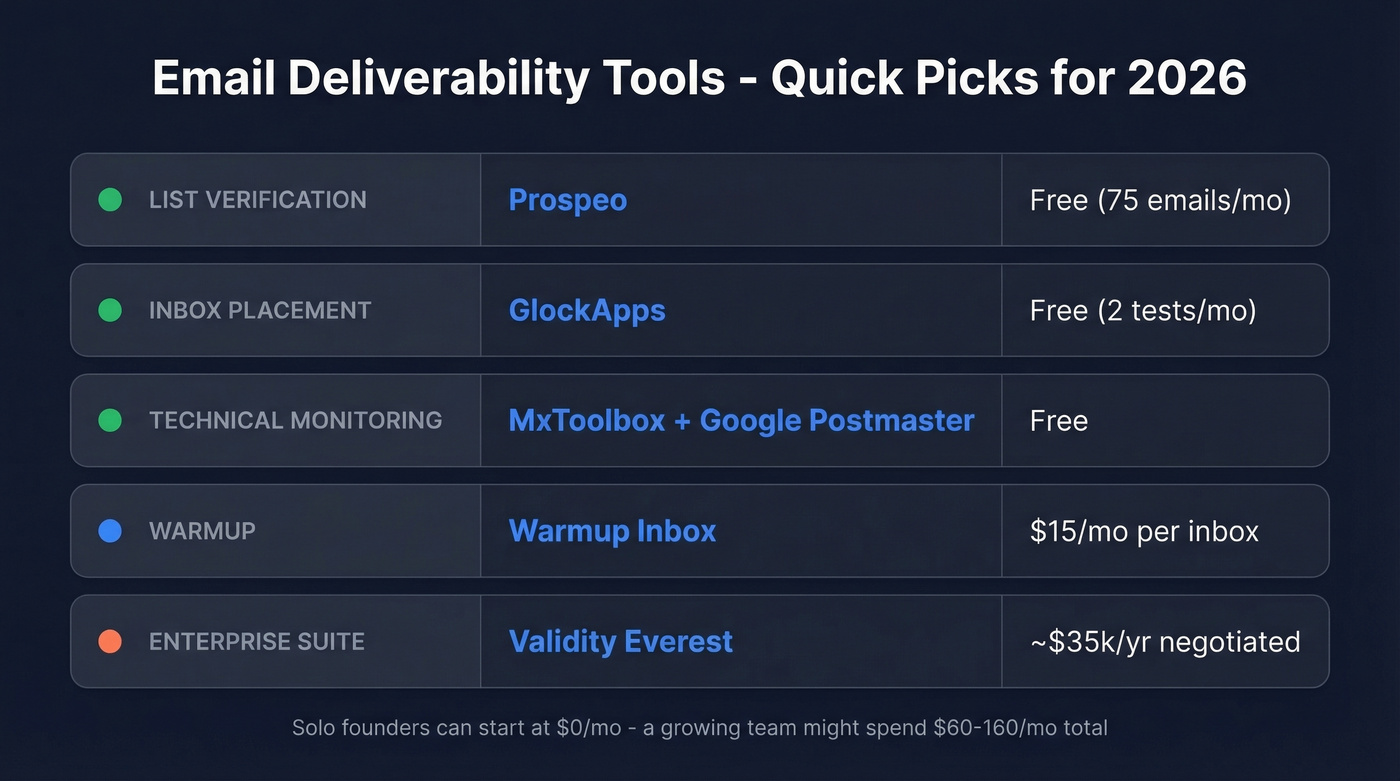
A solo founder can start at $0/month with free tiers across verification, placement testing, and monitoring. A growing team might spend $60-160/month total. Enterprise is a different conversation entirely.
What Good Deliverability Looks Like
Before picking tools, you need benchmarks.
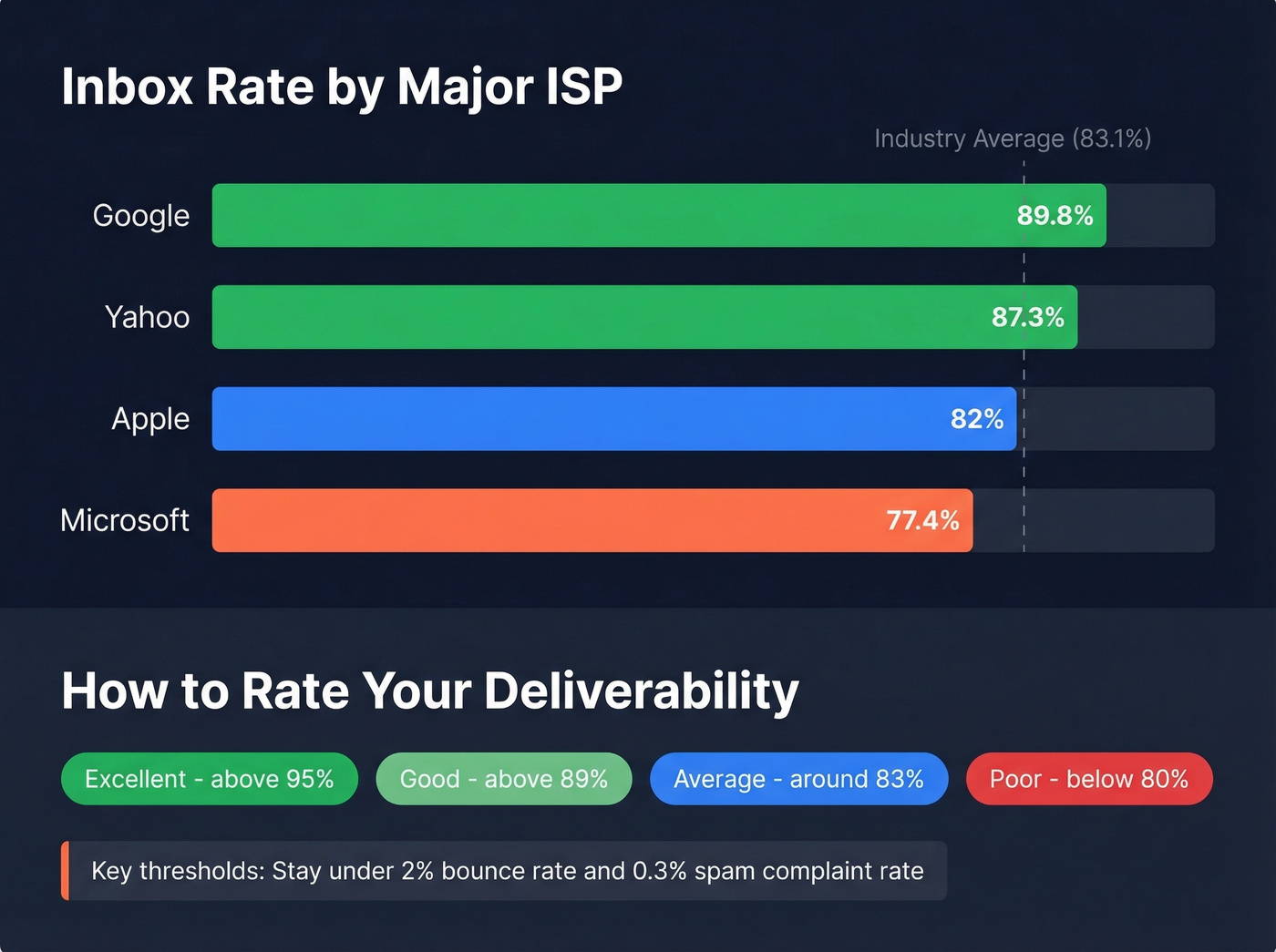
| Rating | Inbox Rate |
|---|---|
| Excellent | >95% |
| Good | >89% |
| Average | ~83% |
| Poor | <80% |
The ISP gap is real and worth understanding. Google delivers 89.8% to the inbox, Yahoo sits at 87.3%, Apple at 82%, and Microsoft lags at 77.4%. If your emails land fine in Gmail but die in Outlook, that's not unusual - it's the norm. Industry matters too: transportation companies see 97.2% deliverability while real estate struggles at 80.1%.
For bounce rates, the rule is simple: stay under 2% total, and top performers keep hard bounces under 1%. Every bounce above that threshold chips away at your sender reputation, and reputation damage compounds. One bad send can haunt you for weeks.
Feature Matrix
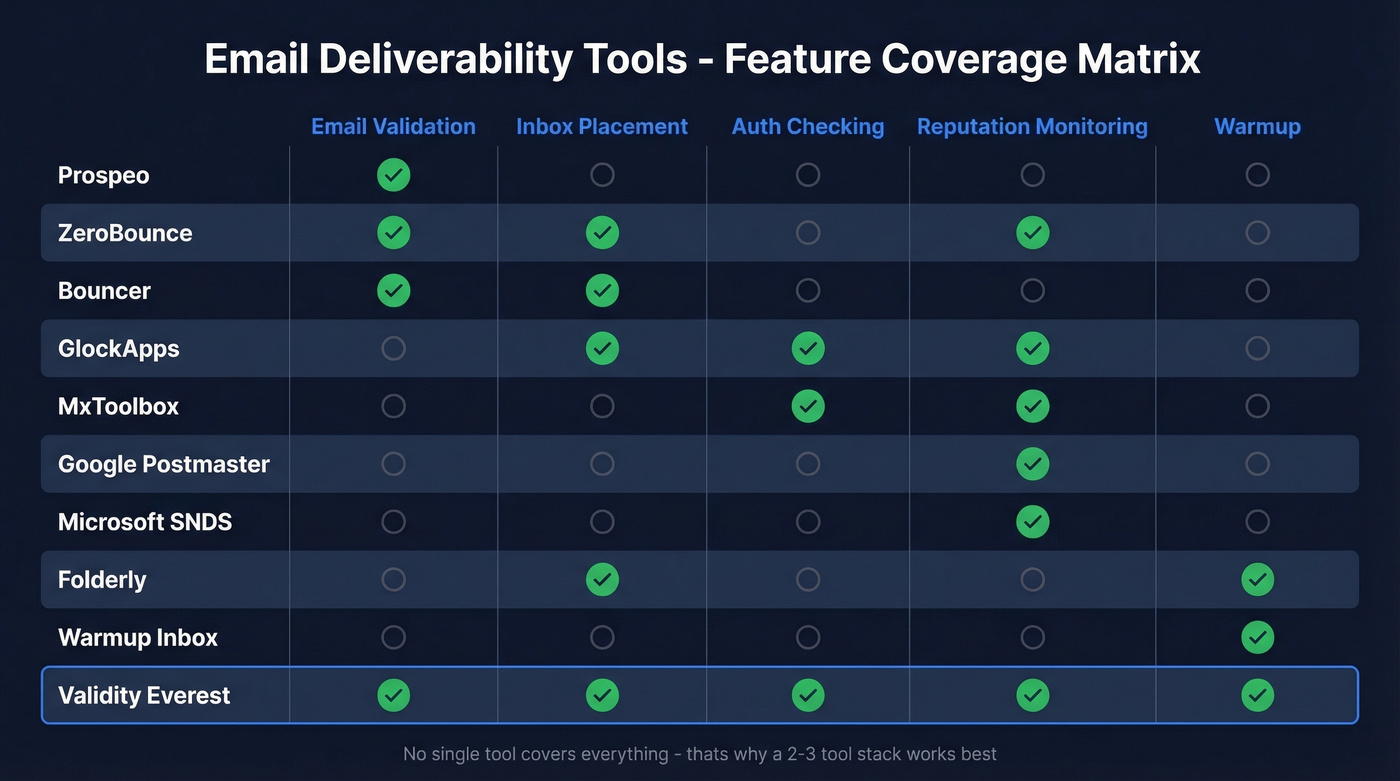
Not every tool covers every layer. This matrix shows what each tool actually does so you can spot gaps in your stack at a glance.
| Tool | Email Validation | Inbox Placement | Auth Checking | Reputation Monitoring | Warmup |
|---|---|---|---|---|---|
| Prospeo | ✓ | - | - | - | - |
| ZeroBounce | ✓ | ✓ | - | ✓ | - |
| Bouncer | ✓ | ✓ | - | - | - |
| GlockApps | - | ✓ | ✓ | ✓ | - |
| MxToolbox | - | - | ✓ | ✓ | - |
| Google Postmaster | - | - | - | ✓ | - |
| Microsoft SNDS | - | - | - | ✓ | - |
| Folderly | - | ✓ | - | - | ✓ |
| Warmup Inbox | - | - | - | - | ✓ |
| Validity Everest | ✓ | ✓ | ✓ | ✓ | - |
Notice the pattern: no single tool covers everything. That's why the 2-3 tool stack approach works better than hunting for an all-in-one.

Most deliverability problems are data problems in disguise. Prospeo's 5-step verification with spam-trap removal and honeypot filtering delivers 98% email accuracy - keeping you well under the 2% bounce threshold that triggers ISP throttling. Data refreshes every 7 days, not every 6 weeks.
Start with 75 free verified emails. No contracts, no sales calls.
Top Tools by Category
List Verification & Data Quality
Prospeo
Here's the thing: most deliverability problems are data problems. If your bounce rate is above 2%, no amount of warmup or inbox testing will fix it - you need to stop bad data from entering your pipeline in the first place.
If you're building lists from scratch, pair verification with a tighter lead generation workflow so junk data doesn't keep re-entering your CRM.
Prospeo runs a 5-step verification process with catch-all handling, spam-trap removal, and honeypot filtering, delivering 98% email accuracy across 143M+ verified emails. That's not a theoretical number. Stack Optimize built from $0 to $1M ARR using Prospeo data, maintaining 94%+ deliverability with under 3% bounce rates and zero domain flags across all clients.
What separates this from standalone verification tools is the refresh cycle. Prospeo refreshes data every 7 days versus the 6-week industry average. An email that was valid last month might bounce today - weekly refresh catches that decay before it hits your sender reputation.
Use this if you're running outbound at any scale and need verified emails that won't torch your domain. The free tier gives you 75 emails/month to test. Paid plans run about $0.01/email with no contracts.
ZeroBounce
ZeroBounce combines email validation with a broader deliverability suite. Validation starts at $20 for 2,000 credits, and the Deliverability Suite runs $49/month - which gets you inbox placement testing, blacklist monitoring, and email scoring on top of verification.

Use this if you want verification and basic deliverability monitoring in one platform. Their email scoring feature helps prioritize which contacts are worth emailing at all.
Skip this if you're already using a dedicated inbox placement tool like GlockApps - the overlap in the deliverability suite makes it redundant.
Bouncer
Pay-as-you-go verification from $8 per 1,000 credits, with a Deliverability Kit starting at $25/month for inbox placement testing. A solid budget option for teams doing occasional list cleaning who don't need a full deliverability platform - think quarterly hygiene passes rather than continuous verification workflows.
If you're comparing verifiers, see our breakdown of Bouncer alternatives.
Inbox Placement Testing
GlockApps
GlockApps is the de facto standard for inbox placement testing, and for good reason. It sends your email to a seed list of around 100 mailboxes across major ISPs and shows you exactly where you land: inbox, spam, promotions tab, or missing entirely. It checks against 50+ blacklists and can distinguish Gmail Primary vs. Promotions placement - a distinction that matters more than most teams realize.
Pricing is straightforward: Free gets you 2 tests per month (enough to diagnose a problem), Essential runs $59/month for 360 tests, Growth is $99/month for 1,080 tests with 10 sending accounts, and Enterprise hits $129/month for 1,800 tests across 20 accounts.
One caveat worth knowing: seed-list testing uses around 100 mailboxes. That's a small sample. Results can be noisy, and they won't perfectly predict what happens when you send to 10,000 real contacts with varied engagement histories. We've found GlockApps is best used to identify issues and track trends over time - don't treat a single test result as gospel.
Use this if you need to diagnose placement problems or track deliverability trends across campaigns. Skip this if you're sending fewer than a few hundred emails a month - the free tier is plenty for occasional checks.
Mailgun Optimize
Mailgun's deliverability product bundles inbox placement testing with email validation. Pilot plan starts at $49/month, Starter at $99/month. A reasonable alternative to GlockApps if you're already in the Mailgun ecosystem for sending, but it doesn't match the same depth of blacklist monitoring or community track record.
If you're evaluating sending stacks, our guide on the best way to send bulk email without getting blacklisted is a useful companion.
Authentication & Monitoring
MxToolbox
The Swiss Army knife of email diagnostics. Free tools cover SPF, DKIM, and DMARC record checking, plus blacklist monitoring across major databases. For most teams, the free tier handles everything you need for authentication troubleshooting.
If you're debugging auth issues, start with SPF record examples and then confirm your setup with how to verify DKIM is working.
Paid plans exist - Delivery Center at $129/month, Plus at $399/month - but those are for organizations managing multiple domains or needing continuous monitoring. Start free. You'll know if you need more.
Google Postmaster Tools
Free, and non-negotiable for any outbound team. Google Postmaster shows your domain and IP reputation specifically for Gmail delivery. Given that Google handles the largest share of business email and has an 89.8% inbox rate, skipping this is like driving without a speedometer.
Microsoft SNDS
Free, and just as essential if you care about Outlook delivery. Given Microsoft's 77.4% inbox rate - the lowest among major ISPs - this is where you'll diagnose why your Outlook deliverability lags behind Gmail. If you're not monitoring Microsoft SNDS, you're flying blind on roughly a quarter of your recipient base.
Warmup & Reputation Building
Look, most teams spending $100+/month on warmup tools would get better results spending that money on cleaner data and slower ramp-up. Warmup has its place, but it's become the default answer to a problem that usually starts upstream - with bad lists and aggressive sending volume.
If you're trying to fix reputation damage, use a structured plan to improve sender reputation before buying more tooling.
Folderly
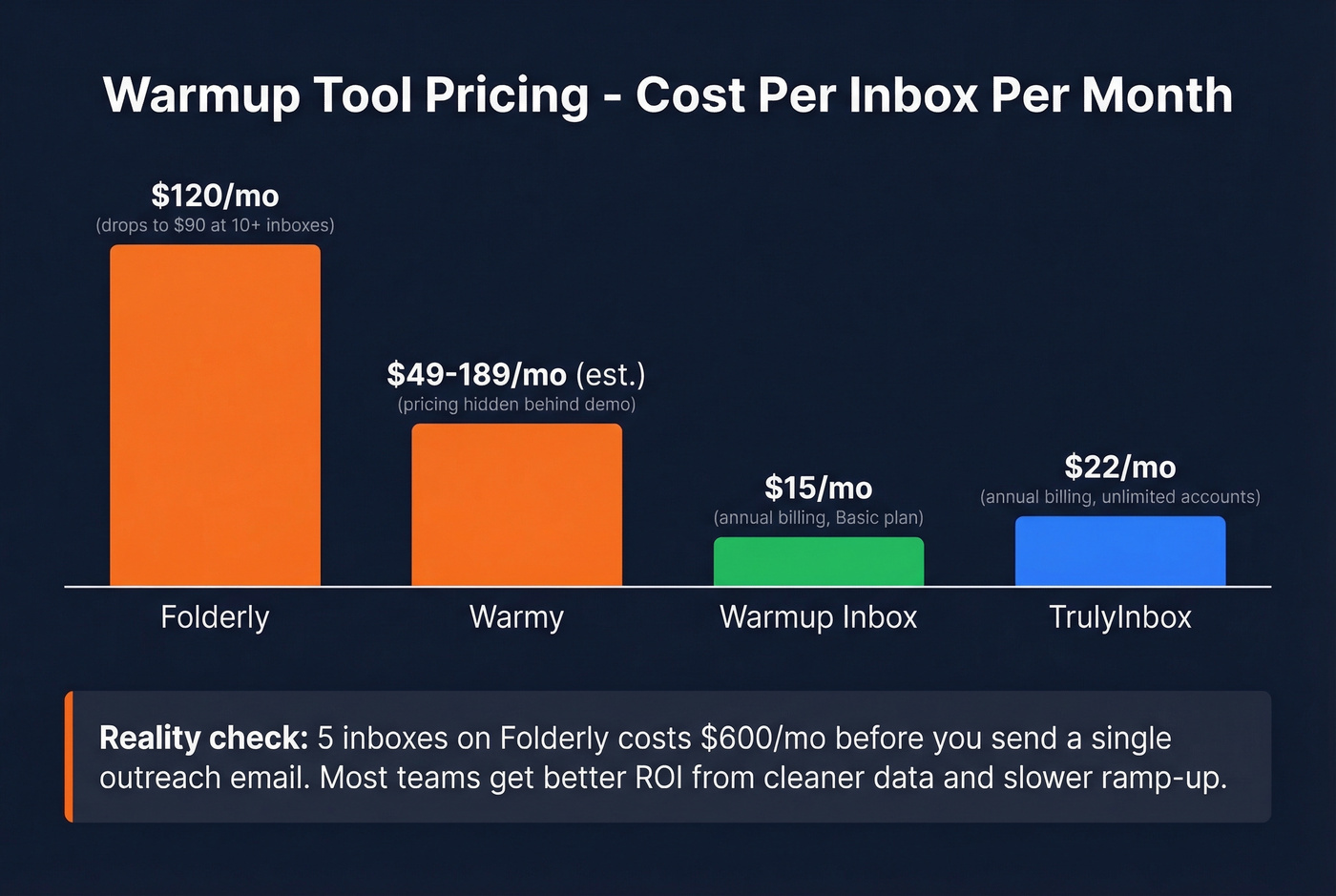
Premium warmup with a 4.8/5 rating on G2 from 101 reviews. Pricing runs $120 per mailbox for 1-9 mailboxes, dropping to $90 per mailbox at 10-24. Their Inbox Insights add-on starts at $64/month. Users praise the deliverability improvements and responsive support, though setup takes some effort.
At $120/mailbox, the math gets steep fast. Five inboxes is $600/month before you've sent a single outreach email. That's the tradeoff with premium warmup - it works, but the per-inbox economics punish teams scaling to 10+ sending accounts.
Warmup Inbox
The budget warmup option that delivers. Annual-billed pricing runs $15/month per inbox on Basic, $49/month on Pro, and $79/month on Max. If you're going to use warmup at all, this is one of the cleanest entry points.
Warmy
Warmy requires a demo to see pricing - it's volume-based with no public tiers. They offer a 7-day free trial with no credit card required. If a SaaS tool won't show you the price in 2026, they're optimizing for their sales team, not yours. Expect pricing in the $49-$189/mailbox/month range based on market positioning.
TrulyInbox
Flat-rate warmup starting at $29/month for unlimited accounts on the Starter plan. Annual pricing drops to $22/month (Starter) or $59/month (Growth). The unlimited accounts angle makes this interesting for teams running many inboxes, though "unlimited" always deserves a skeptical eyebrow.
Full-Stack Platforms
Mailtrap
Developer-focused email sending and testing platform. Mailtrap's pricing is volume-based: Free tier handles 4,000 emails/month, Basic starts at $15/month for 10k emails, Business at $85/month for 100k emails with a dedicated IP, and Enterprise from $750/month for 1.5M emails. This is sending infrastructure pricing, not inbox placement testing - an important distinction. Mailtrap is for teams building email into their product, not sales teams running outbound sequences.
Validity Everest
The enterprise play. Validity Everest has an Elements tier shown at $20/month in pricing summaries, but the real product is the enterprise bundle. Per Vendr's negotiation data, an Everest Enterprise + BriteVerify bundle lists at $146,000 but negotiates down to $35,000-$65,000 annually. For a team of 5-20 reps, you're overpaying by 10x.
Smartlead
Outreach platform with built-in warmup and inbox rotation. Free tier available, Basic at $39/month, Pro at $94/month, Custom at $174/month. The deliverability features are secondary to the outreach automation - think of it as a cold email platform that happens to include warmup, not a deliverability tool that happens to send emails. Cold email platforms like Smartlead, Instantly (~$30/month), and Lemlist (~$55-79/month) increasingly bundle deliverability features as table stakes, which means the standalone warmup market is getting squeezed from both sides.
If you're building outbound systems end-to-end, compare options in our SDR tools roundup.
Stack Optimize built a $1M agency on Prospeo data: 94%+ deliverability, under 3% bounce rates, zero domain flags across every client. That's what happens when your email data is verified through catch-all handling, spam-trap removal, and a 7-day refresh cycle.
Protect your sender reputation at $0.01 per verified email.
The Warmup Debate
Let's be honest about warmup tools: the consensus is shifting. We've seen teams report deliverability collapse after using warmup services, not before. One practitioner on r/coldemail put it bluntly - they stopped using warmup services entirely due to "way, way too many red flags," specifically calling out concerns about shared infrastructure being blacklisted.
The alternative gaining traction is manual slow ramping: start at 2-3 emails per day per inbox, gradually scale to 10-15 per day, and keep sequences to 3 steps max. It's slower, but it builds reputation on your actual sending behavior rather than simulated engagement.
If you do use warmup, practitioners recommend at least 14 days of warming before sending any outreach, and keeping warmup running continuously alongside your campaigns - not just as a one-time ramp. Budget options exist: Snov.io, WarmySender, Warmup Inbox, GMass, and Mailwarm all offer free or freemium tiers. But the Reddit sentiment on r/coldemail is increasingly skeptical. For most teams, the smarter investment is better list hygiene and slower ramp-up rather than paying $50-120/month per inbox for simulated opens.
Pricing Comparison
| Tool | Category | Free Tier | Starting Paid | Best For |
|---|---|---|---|---|
| Prospeo | Verification | Yes (75/mo) | ~$0.01/email | Verified emails + data quality |
| ZeroBounce | Verification | No | $20/2k credits | Verification + scoring |
| Bouncer | Verification | No | $8/1k credits | Budget verification |
| GlockApps | Placement | Yes (2/mo) | $59/mo | Inbox placement testing |
| Mailgun Optimize | Placement | No | $49/mo | Mailgun users |
| MxToolbox | Monitoring | Yes | $129/mo | SPF/DKIM/DMARC checks |
| Google Postmaster | Monitoring | Yes | Free | Gmail reputation |
| Microsoft SNDS | Monitoring | Yes | Free | Outlook reputation |
| Folderly | Warmup | No | $120/mailbox | Premium warmup |
| Warmup Inbox | Warmup | No | $15/mo/inbox | Budget warmup |
| Warmy | Warmup | 7-day trial | ~$49-$189/mailbox | Volume warmup |
| TrulyInbox | Warmup | No | $29/mo | Flat-rate warmup |
| Mailtrap | Sending | Yes (4k/mo) | $15/mo | Developer email infra |
| Validity Everest | Enterprise | No | ~$35k/yr | High-volume senders |
How to Build Your Stack
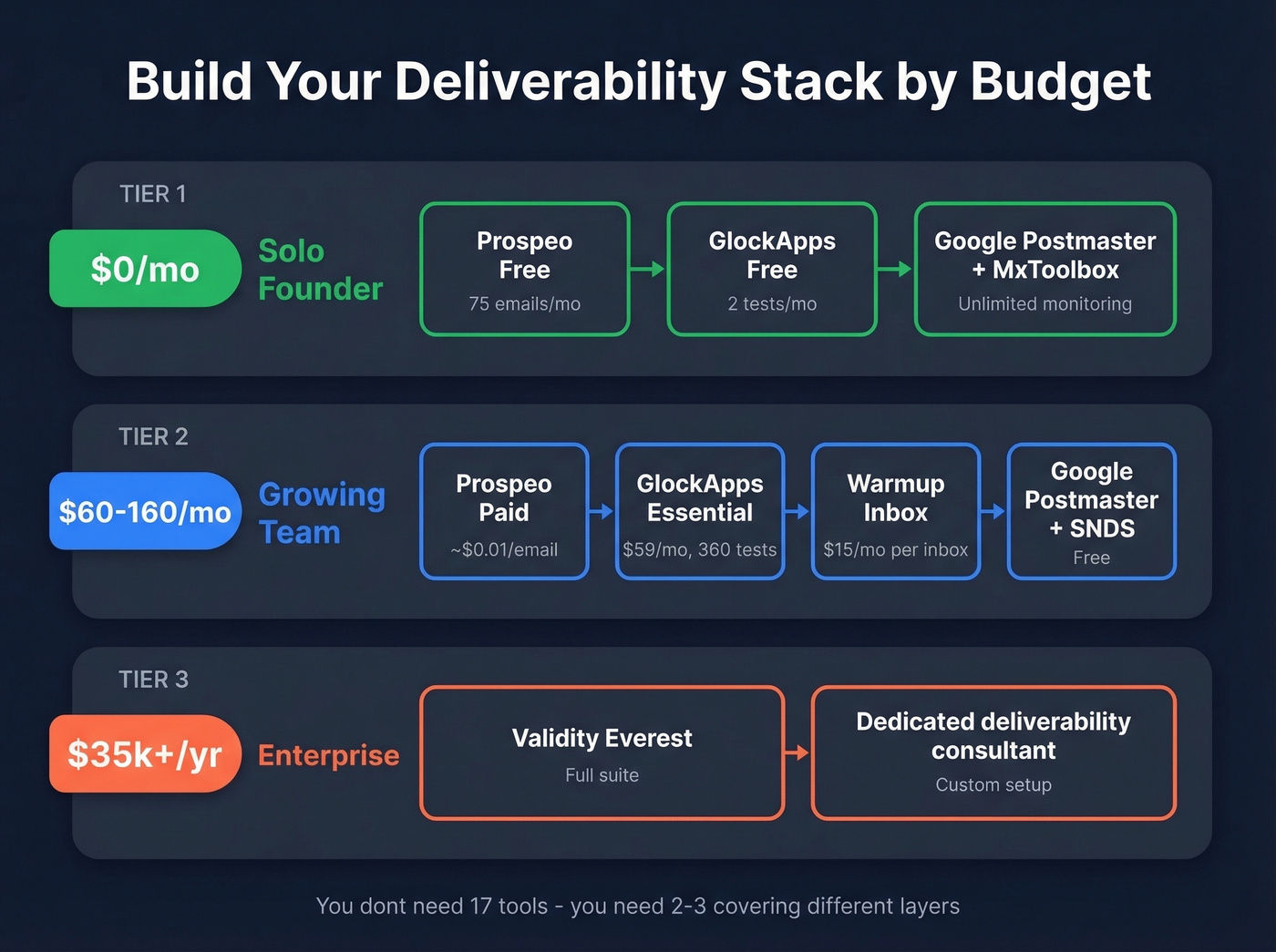
Deliverability isn't one tool - it's three layers: verification, testing, and monitoring. Here's how to stack them based on your situation.
Solo founder or small team (1-5 inboxes): In our experience, the $0/month starter stack handles 90% of what small teams need. Use a free verification tier to clean your lists, GlockApps free for placement testing, and MxToolbox plus Google Postmaster Tools for monitoring. This isn't a compromise stack - it's genuinely sufficient for low-volume outbound. Scale up when you hit the free tier limits.
Growing sales team (5-20 reps): Paid verification at ~$0.01/email plus GlockApps Essential at $59/month plus Google Postmaster Tools. Add Microsoft SNDS if Outlook deliverability is a problem - and it probably is. Budget: $60-160/month depending on verification volume. At this stage, choosing the right tools matters more than spending more on them.
Enterprise (50+ reps, millions of emails): Validity Everest for deliverability intelligence plus ZeroBounce for verification at scale plus dedicated IP infrastructure through your ESP. Budget: $35k-65k/year for Everest alone, plus verification costs. At this scale, the ROI math is straightforward - a 5% improvement in inbox placement on millions of sends pays for the tooling many times over.
FAQ
What's a good deliverability rate?
Above 89% is good, above 95% is excellent. The industry average sits at 83.1%, meaning roughly 1 in 6 emails never reaches the inbox. Below 80% signals a serious problem - check your authentication records, bounce rates, and list hygiene before anything else.
Do warmup tools actually work?
Increasingly debated. Some practitioners report worse deliverability after using warmup services, citing concerns about shared infrastructure and artificial engagement patterns. Manual slow ramping - starting at 2-3 emails per day and scaling to 10-15 - is gaining traction as a safer alternative. If you do warm up, commit to at least 14 days before sending any real outreach.
Why do emails land in spam on Outlook but not Gmail?
Microsoft's inbox placement rate is 77.4% versus Google's 89.8%. Outlook uses different filtering signals and is generally stricter with unknown senders. Use Microsoft SNDS to diagnose your specific reputation issues - replies and clicks from Outlook recipients carry significant weight in rebuilding trust with their filters.
How does verification improve deliverability?
Every bounce damages your sender reputation, and that damage compounds across sends. Verification removes invalid addresses, spam traps, and honeypots before they enter your pipeline - keeping bounce rates under the critical 2% threshold. A 7-day data refresh cycle catches email decay that monthly or quarterly cleaning misses entirely.
How much do these tools cost?
Free options cover the basics - MxToolbox, Google Postmaster Tools, and GlockApps all have free tiers. Paid tools range from $15/month for Warmup Inbox to $65,000/year for Validity Everest enterprise. Most sales teams spend $60-160/month total across verification, placement testing, and monitoring.