

Meeting Invitation Email Examples: Templates, Subject Lines, and Scripts for Every Scenario
Between 36 and 56 million meetings happen daily in the US alone. And 72% of them are ineffective. The gap between a productive meeting and a wasted hour often starts before anyone joins the call - it starts with the invite. When 79% of workers say a clear agenda is what makes a meeting productive, the meeting invitation email you send matters more than most people think.
What You Need (Quick Version)
Every meeting invitation email needs four things. Miss one and you're already losing people:
- Subject line - 5 words or fewer. Be specific, not clever. (If you want more swipeable options, see these subject line examples.)
- One-sentence purpose - Why does this meeting exist?
- Date, time, and time zone - Spell out the month. Include the zone. Always.
- Agenda or preliminary agenda - Even three bullet points beats nothing.
If you just need a template to copy, jump to the examples section below.
What Every Meeting Invite Must Include
Lucid Meetings identifies eight parts of an excellent meeting invitation email - four required, four optional.
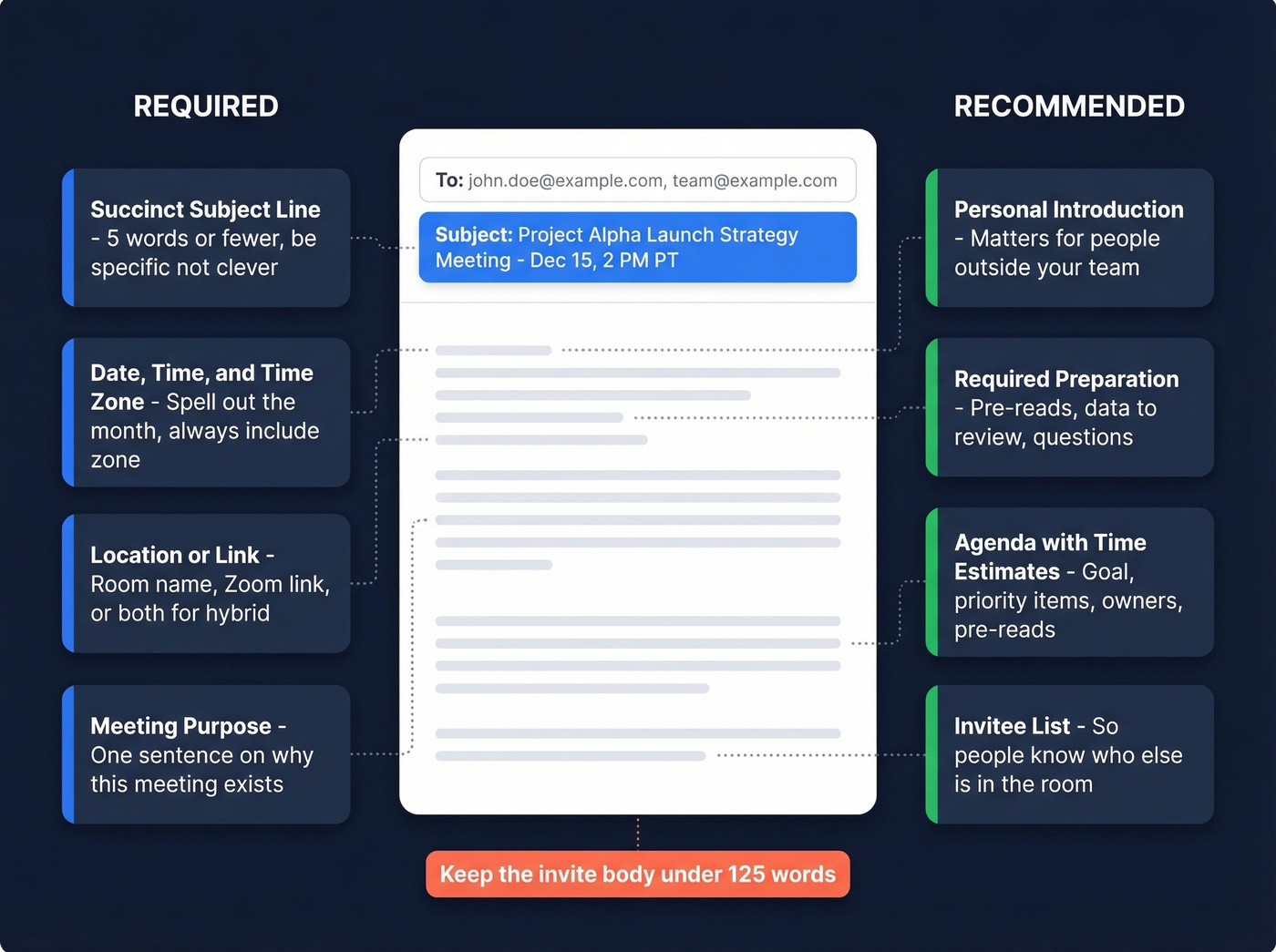
Required:
- Succinct subject line - more on this in the next section
- Meeting date and time - full date, spelled-out month (not "3/4/26" which means different things in different countries), and time zone
- Location or link - conference room name, Zoom link, or both for hybrid setups
- Meeting purpose - one sentence explaining why this meeting exists and what outcome you're aiming for
Optional but recommended:
- Personal introduction - matters when inviting people outside your team
- Required preparation - pre-reads, data to review, questions to think about (especially for discovery questions or decision meetings)
- Agenda - Zoom's recommended structure includes the meeting goal, priority items with time estimates, responsible parties, and pre-reads
- Invitee list - helpful for larger meetings so people know who else is in the room
One practical constraint: keep the invite body under 125 words. If you need more detail, link to a shared doc.

Subject Line Rules (Backed by 5.5M Emails)
A Belkins analysis of 5.5 million B2B emails gives us hard numbers on what works. The principles - brevity, clarity, personalization - apply to any email where you need someone to open and act (including cold email subject line examples).
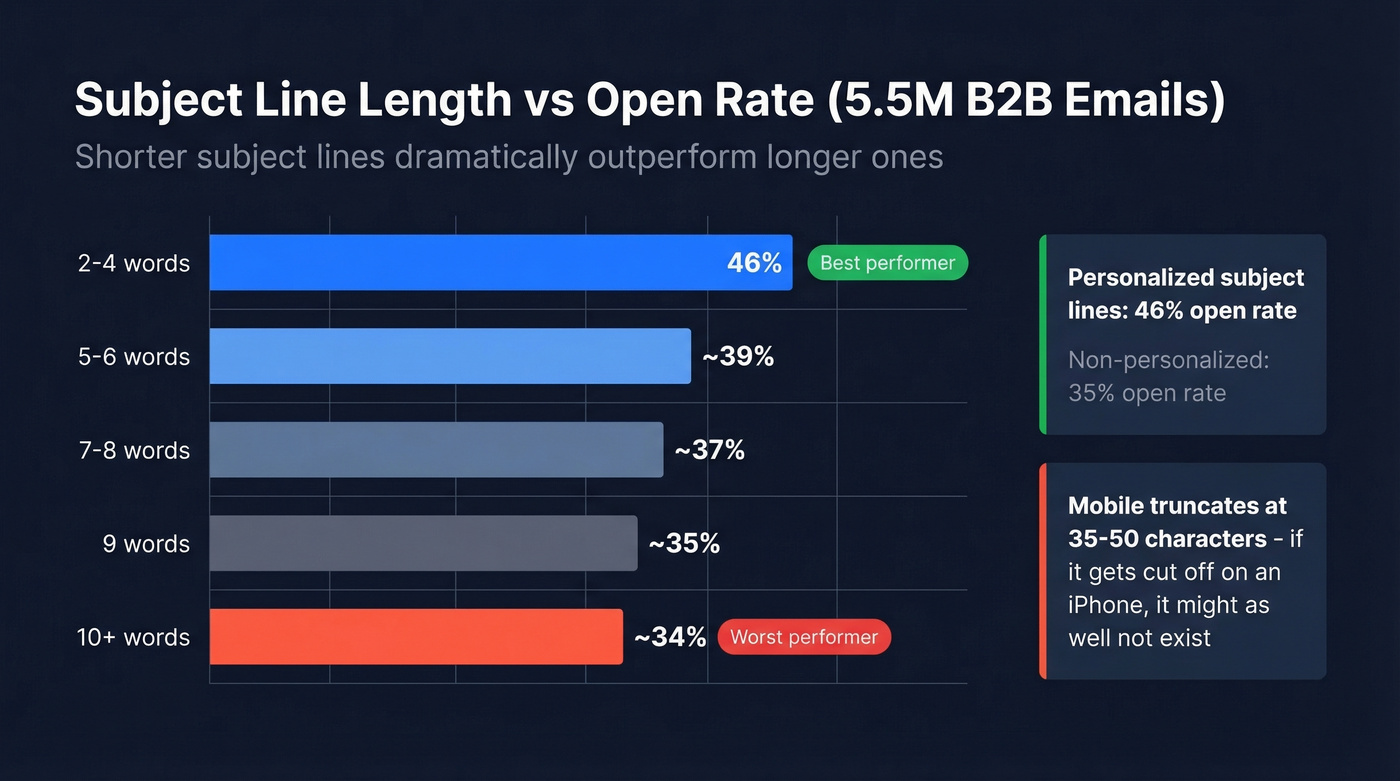
| Rule | Data |
|---|---|
| 2-4 word subject lines | 46% open rate |
| Personalized subject lines | 46% vs 35% without |
| 7+ words | Drops to ~39% |
| 9+ words | Falls to ~35% |
| 10+ words | Down to ~34% |
On mobile, subject lines truncate around 35-50 characters - another reason to keep them short. If your subject line gets cut off on an iPhone, it might as well not exist.
Lucid Meetings recommends a simple formula: Type + Date + Meeting Name. So "Scheduled: Jan 15 Q1 Planning" or "Rescheduled: Feb 3 Design Review."
For sensitive or HR-related meetings - the kind where a vague title like "Important Discussion" sends someone into a panic spiral - use neutral phrasing. This is a real concern that comes up constantly in HR communities. Good options:
- "Quick check-in - Thursday"
- "Follow-up on [specific topic]"
- "Catch-up re: [project name]"
Never use "We need to talk" or "Urgent meeting" unless the building is actually on fire. The wording for your meeting invite subject line sets the tone for the entire conversation.

The perfect meeting invitation template means nothing if it bounces. Prospeo gives you 98% accurate emails from 300M+ verified profiles - so your invite actually lands in the right inbox.
Stop crafting perfect invites for bad email addresses.
10+ Email Meeting Invitation Examples
Each template below is copy-paste ready. Swap the bracketed text for your details.
Internal Team Meeting
Your team doesn't need a preamble. Get to the point.
Subject: Weekly sync - [Day]
Hi team,
Our weekly sync is [Day, Date] at [Time] [Time Zone] in [Room/Link].
Agenda:
- [Topic 1] - [Owner] (10 min)
- [Topic 2] - [Owner] (10 min)
- Open items (10 min)
Please add anything to the agenda by [deadline]. See you there.
Client or Prospect Meeting
Subject: Intro call - [Your Company] + [Their Company]
Hi [Name],
I'd love to set up a 30-minute call to discuss [specific topic/value prop]. Based on [trigger - their recent funding, a mutual connection, a job posting], I think there's a strong fit.
Proposed time: [Day, Date] at [Time] [Time Zone] Format: [Zoom/Teams - link]
Agenda:
- Quick intros (5 min)
- [Their challenge you're addressing] (15 min)
- Next steps (10 min)
If that time doesn't work, happy to adjust - just let me know what's better.
One-on-One with a Direct Report
Keep it warm and low-pressure. The goal is an open conversation, not a performance review ambush.
Subject: 1:1 - [Day]
Hi [Name],
Let's connect for our regular 1:1 on [Day, Date] at [Time] [Time Zone].
A few things on my end:
- [Topic 1]
- [Topic 2]
Add anything you'd like to discuss. This is your time too.
Inviting a Senior Executive
Here's the thing: this is the invite that makes people freeze. You're two weeks into a new role and your manager asks you to set up a meeting with the VP of Sales. In our experience, the key is deference without groveling - be clear on why you're reaching out, make the time commitment obvious, and give them an easy out.
Subject: 20-min intro - [Your Name / Your Team]
Hi [Name],
I'm [Your Name], recently joined [Team/Department] as [Role]. [Manager Name] suggested I connect with you to align on [specific topic].
Would you have 20 minutes in the next two weeks? I'm happy to work around your schedule.
I'd love to learn about [specific thing they own/lead] and share a bit about [what you're working on].
Completely understand if timing doesn't work right now - happy to revisit later.
Discovery Call / Sales Meeting
Lead with their problem, not your product. That's the single biggest mistake in sales meeting invites - and the easiest to fix. (If you want a tighter flow, pair this with a discovery call script.)
Subject: Quick call - [their pain point]
Hi [Name],
I noticed [trigger - job posting, tech change, growth signal] and thought it'd be worth a quick conversation about [how you help].
Proposed: [Day, Date] at [Time] [Time Zone] - 25 minutes Link: [Meeting link]
If that doesn't work, grab a time here: [scheduling link]
Interview Invitation
Candidates are evaluating you as much as you're evaluating them. Be specific about format and who they'll meet - vagueness here signals a disorganized company.
Subject: Interview - [Role Title] at [Company]
Hi [Name],
We'd like to invite you to [interview round] for the [Role Title] position.
Date: [Day, Date] Time: [Time] [Time Zone] (~[duration]) Format: [Video/In-person] - [Link/Address] You'll meet: [Interviewer Name, Title]
Please confirm by [date] or suggest an alternative. Looking forward to it.
Formal Meeting with Preliminary Agenda
This one addresses a real pain point - sending steering committee invites weeks in advance when the full agenda isn't finalized. Don't wait for perfection. Hold the slot.
Subject: [Committee Name] - [Date]
Dear [Committee Members],
Please hold [Day, Date] at [Time] [Time Zone] for our next [Committee Name] meeting.
Location: [Room/Link] Duration: [Time]
Preliminary agenda:
- [Topic 1] - [Owner]
- [Topic 2] - [Owner]
- [Placeholder for additional items]
A detailed agenda with supporting materials will follow by [date]. Please send any agenda requests to [contact] by [deadline].
This placeholder invite is especially useful when you need to lock calendars before finalizing every discussion point.
Informal Catch-Up
Not every meeting needs a formal agenda. But it still needs a purpose - even if that purpose is just "I want to hear how things are going."
Subject: Coffee chat - [Day]?
Hey [Name],
It's been a while - want to grab 20 minutes on [Day] to catch up? I'd love to hear how [project/role change] is going.
[Time] work? [Link/Location]
Sensitive or HR Meeting
The subject line matters more here than anywhere else. A vague or ominous title can ruin someone's entire day before the meeting even happens. For truly sensitive topics, have a brief verbal conversation first - the email then confirms what was already discussed.
Subject: Check-in re: [project or team name]
Hi [Name],
I'd like to schedule a brief conversation about [neutral framing - e.g., "some recent feedback on the project"]. Nothing urgent - just want to make sure we're aligned.
Time: [Day, Date] at [Time] [Time Zone] Location: [Private room/Link]
Let me know if that works.
Avoid "HR Meeting," "Disciplinary Discussion," or anything that reads like a legal filing. "Check-in" and "Quick conversation" are your friends here.
Follow-Up / Reminder Email
Send a reminder 2-3 business days before the meeting, and a brief one the morning of. Keep the reminder shorter than the original invite. (If you need more nudges, use these sales follow-up templates.)
Subject: Reminder: [Meeting Name] - [Day]
Hi [Name/Team],
Quick reminder that [Meeting Name] is [Day, Date] at [Time] [Time Zone].
Link: [Meeting link] Agenda: [Link to agenda doc or 2-3 bullet recap]
See you there.
Email Invite vs. Calendar Invite
These serve different purposes. Use both.
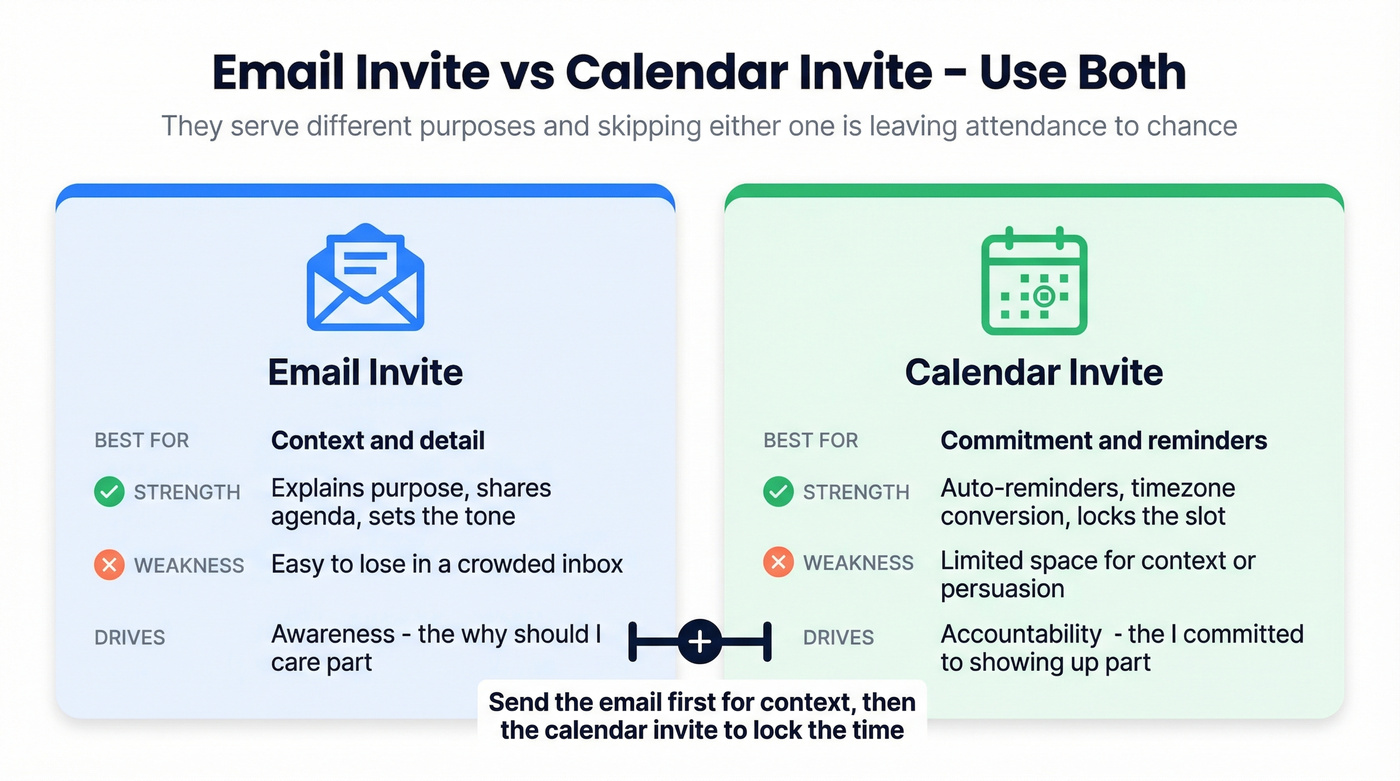
| Aspect | Email Invite | Calendar Invite |
|---|---|---|
| Best for | Context and detail | Commitment and reminders |
| Strengths | Explains purpose, shares agenda | Auto-reminders, timezone alignment |
| Weakness | Easy to lose in inbox | Limited space for context |
| Attendance impact | Awareness | Accountability |
Send the email with full context, then send a calendar invite that locks the time. The calendar invite handles auto-reminders (typically 10-15 minutes before) and timezone conversion. The email handles the "why should I care" part. Skipping either one is leaving attendance to chance.
Five Meeting Invite Mistakes
1. No agenda. If there's no agenda, there's no reason for the meeting. Full stop.
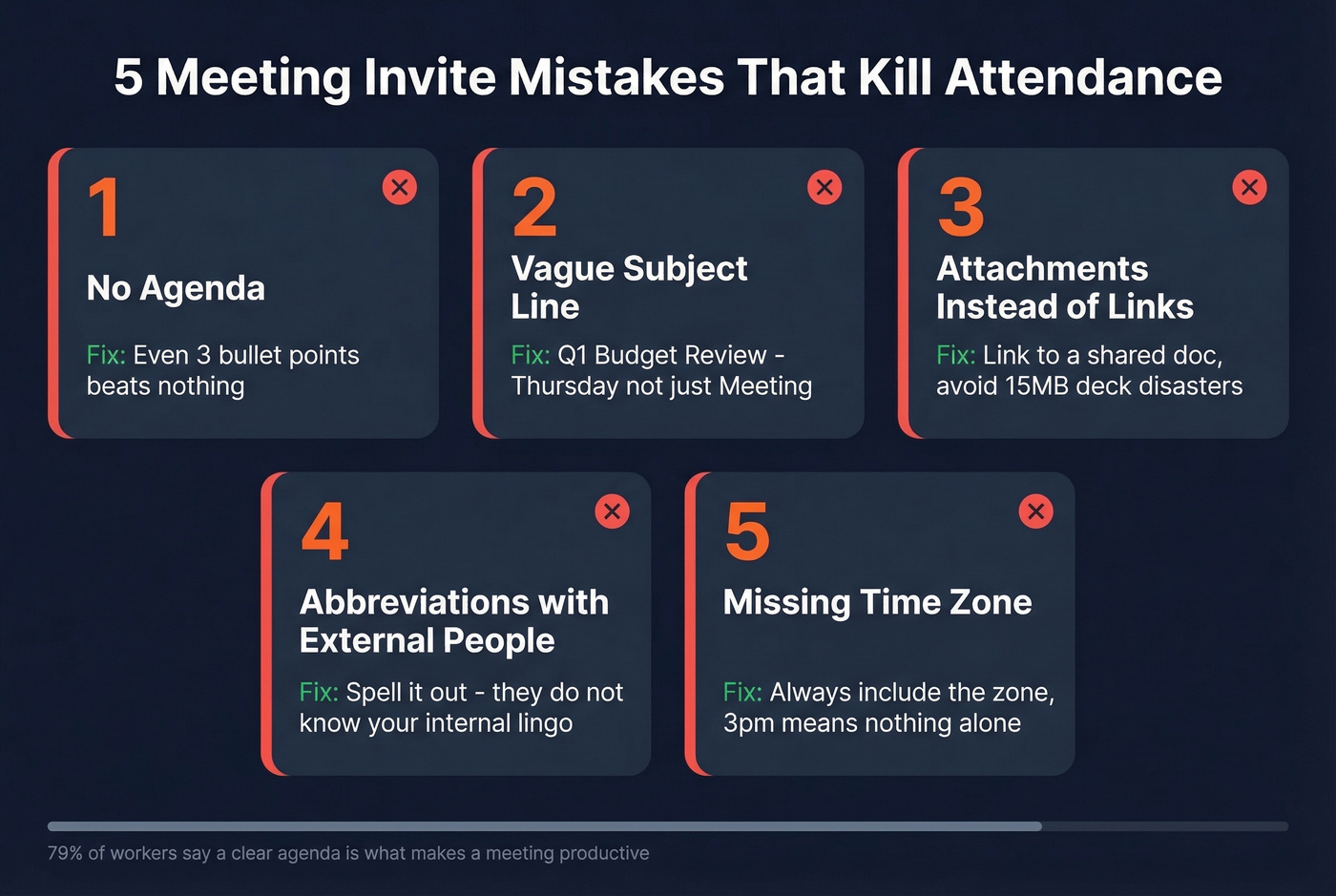
2. Vague subject line. "Meeting" tells the recipient nothing. "Q1 Budget Review - Thursday" tells them everything.
3. Attachments instead of links. A 15MB deck gets blocked by email filters and creates version control nightmares. Link to a shared doc instead.
4. Abbreviations with external recipients. Your team knows what "WBR" means. Your client doesn't. Spell it out for anyone outside your org.
5. No RSVP deadline. Without a deadline, people don't respond. Add "Please confirm by [date]" and you'll actually know who's showing up.
Bonus tip worth stealing: At the end of every meeting, use the Lencioni wrap - ask "What did we agree on?" and "What do we communicate to the team?" It doesn't go in the invite, but it makes the next invite easier to write because you'll have clear follow-up items.
Let's be honest: most meeting invite advice focuses on formatting. But the real problem isn't how your invite looks - it's whether you should be sending one at all. Before writing any invite, ask yourself: "Could this be an email or a shared doc with comments?" If yes, cancel the meeting and give everyone 30 minutes of their life back. The best meeting invitation email is the one you don't send. (If you do need to send it, make sure your email deliverability is solid so it actually lands.)
Before you send that discovery call invite, make sure you're reaching the right person. Prospeo's Chrome extension lets 40,000+ users find verified emails and direct dials in one click - right from LinkedIn or any company website.
Find the decision-maker's real email in seconds, then send the invite.
FAQ
How far in advance should I send a meeting invite?
For internal meetings, 2-5 business days ahead is the sweet spot - enough time to prepare without the invite getting buried. External or executive meetings need 1-3 weeks. Steering committees and board meetings require 4-8 weeks with a preliminary agenda, then a full agenda closer to the date.
What if I don't have a finalized agenda yet?
Send the invite anyway with a preliminary agenda and a note: "Detailed agenda to follow by [date]." Holding the calendar slot matters more than waiting for perfection. Delay too long and calendars fill up - then you're stuck playing scheduling Tetris for two weeks.
How long should a meeting invitation email be?
Under 125 words for the body text. If you need to share background materials or pre-reads, link to a shared document rather than packing it into the email. The invite's job is to get a "yes" and lock the calendar - the shared doc handles everything else.
Should I send a calendar invite, an email, or both?
Both, every time. The email provides context - purpose, agenda, preparation. The calendar invite locks the time, handles timezone conversion, and triggers auto-reminders. Sending only one means people either forget or show up unprepared.
How do I find the right email address for external invites?
Skip the guessing. We've seen too many meeting invites bounce because someone pulled an email from a two-year-old spreadsheet. Use a verified contact tool like Prospeo's Email Finder, which covers 143M+ verified emails at 98% accuracy, so your invite reaches the actual decision-maker. The free tier includes 75 lookups per month - more than enough to test it out.