

Best Email Extractor Extensions in 2026 (9 Tested)
A RevOps Manager lead we know exported 500 emails from a free Chrome email extractor extension last quarter. By morning, 34% had bounced, the sending domain took a reputation hit, and the SDR's Instantly account was flagged. The problem wasn't effort. It was the tool.
Most extensions for extracting emails fall into two camps: page scrapers that parse raw HTML for anything with an @ symbol, and database-backed finders that query verified records. That distinction matters more than any feature list. Here are the nine extensions worth knowing about - and the ones worth avoiding.
Our Top 3 Picks
Prospeo - Best for email accuracy. 98% email accuracy from 300M+ verified profiles with a 7-day data refresh. Free tier: 75 emails + 100 extension credits/month.
Hunter - Best for domain-level lookups. 6M+ users, 12K+ reviews. Queries its own crawled database and shows public sources for every email. Free tier: 50 credits/month.
Skrapp - Best credit fairness. You only pay for emails marked Valid or Catch-all. Credits roll over. Free tier: 100 credits/month.
Page Scrapers vs. Database Extensions
The phrase "email extractor extension" covers two fundamentally different technologies, and most teams don't realize it until they've already tanked a campaign.
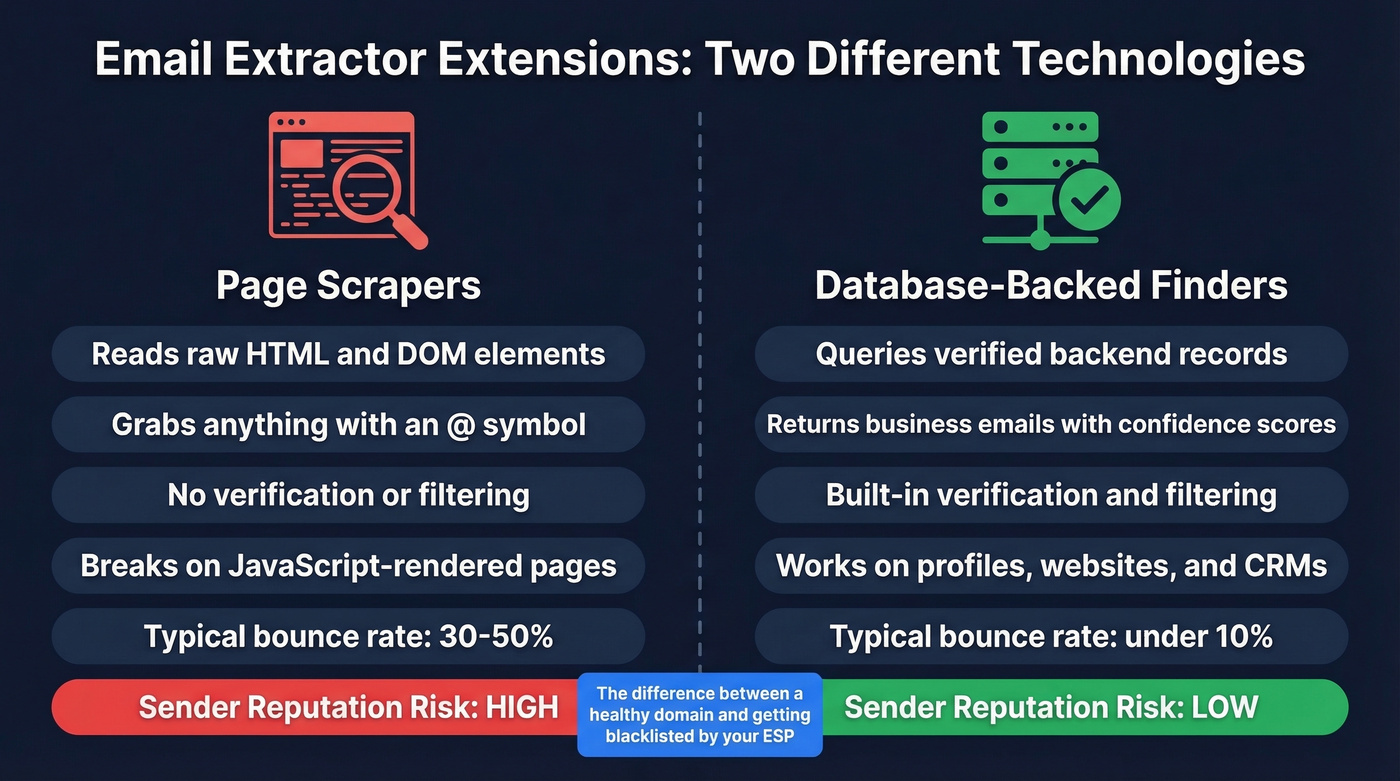
Page scrapers - sometimes called an email grabber or email sniffer - read the DOM of whatever webpage you're on. They grab mailto: links, text patterns with @ symbols, and anything that looks like an address. They're fast, free, and will happily hand you info@company.com alongside the personal Gmail of someone who commented on a blog post in 2019. No verification, no filtering. They also choke on JavaScript-rendered pages - if emails load via Ajax, a basic DOM scraper won't find them.
Database-backed extensions work differently. When you visit a company's website or a professional profile, the extension queries a backend of verified business emails. Hunter is explicit about this: their extension doesn't scrape pages you visit and instead returns results from Hunter's own crawlers.
We've seen the accuracy gap firsthand. Free page scrapers routinely produce 30-50% bounce rates. Database-backed tools with built-in verification often land under 10%. That's the difference between a healthy sender reputation and getting blacklisted by your ESP.
The 9 Best Extensions, Ranked
Prospeo
Prospeo's Chrome extension (40K+ users) queries a database of 300M+ professional profiles, 143M+ verified emails, and 125M+ verified mobile numbers. Every record runs through a 5-step verification process - catch-all handling, spam-trap removal, honeypot filtering - delivering 98% email accuracy with a 7-day data refresh cycle. Most competitors refresh every 4-6 weeks.
The extension works on company websites, professional profiles, and CRMs. One click returns verified contact data with 40+ data points. Integrations push directly into Salesforce, HubSpot, Smartlead, Instantly, Lemlist, Clay, and Zapier, so you skip the CSV export-import cycle entirely. One customer, Meritt, saw bounce rates drop from 35% to under 4% after switching from a free scraper - and their pipeline tripled from $100K to $300K per week.
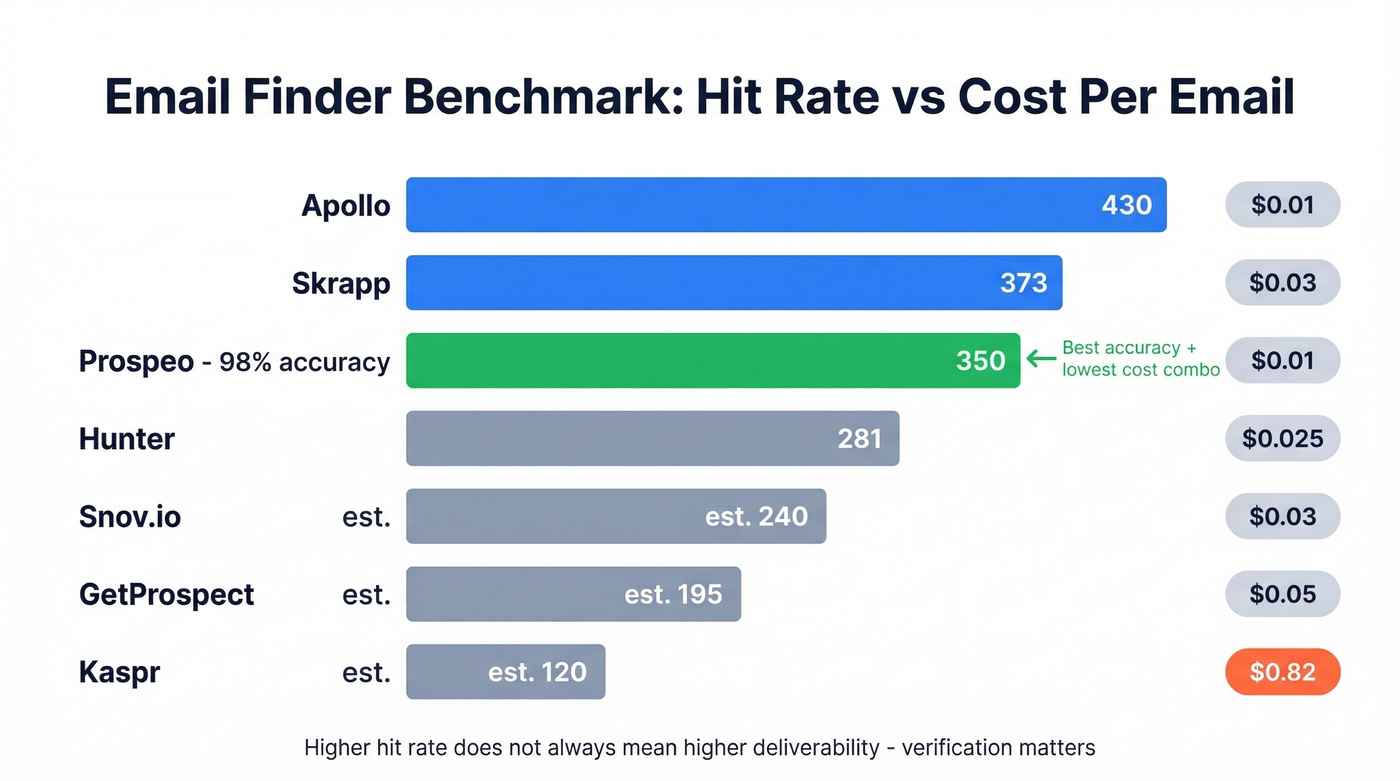
Pricing: ~$0.01 per email on paid plans. Free tier gives you 75 emails and 100 extension credits per month. No contracts, cancel anytime.
Use it if: You need verified, deliverable emails - not scraped text patterns. Teams running outbound at scale will appreciate that verification is built in, not bolted on.
Skip it if: You only need to bulk-scrape visible emails from web pages. A free page scraper handles that, though you'll regret it when the bounces roll in.
Hunter
Hunter is the name most people think of first - 6M+ users and 12K+ Chrome Web Store reviews give it the deepest trust moat in the category. The extension queries Hunter's own crawled database rather than scraping page content, and for every email returned, you see the public sources where it was found plus the discovery date. That transparency is useful for compliance-conscious teams.

Emails come back either Verified or with a confidence score. Here's the thing: if you both find and then verify the same email in Hunter, that's 1 credit for the find plus 0.5 credits for verification - 1.5 credits total per verified email. That adds up.
Pricing: Free (50 credits/month), Starter $49/month, Growth $149/month, Scale $299/month. Annual billing saves 30%. In API benchmark testing, Hunter found 281 emails per 1,000 leads - solid accuracy, but lower volume than Apollo (430) or Skrapp (373).
Use it if: You want domain-level lookups with transparent sourcing and the most established brand in the space.
Skip it if: You need high volume at low cost. Hunter's hit rate is reliable but not the highest, and credits get expensive at scale.
Skrapp
Skrapp's killer feature isn't its 92% email search success rate or its 200M+ B2B profiles - it's the Fair Credit Policy. You're only charged credits for emails that come back as Valid or Catch-all. Invalid and Unknown results? Free. Your effective cost per usable email is lower than the sticker price suggests, which makes budgeting far more predictable than tools that burn credits on dead addresses.
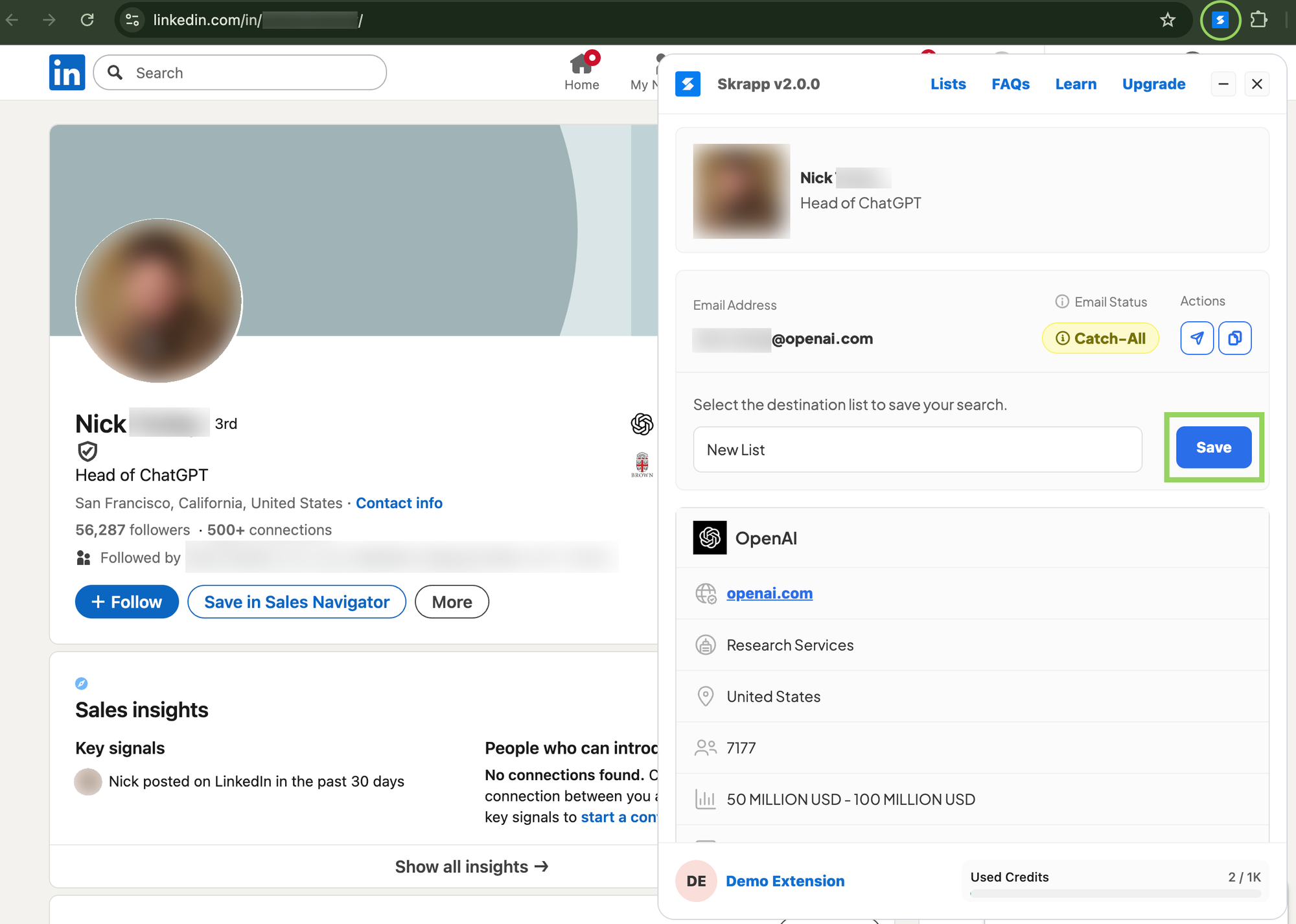
The extension has 200K+ users and has processed 3B+ email searches. Verification accuracy runs 97%+, and credits roll over month-to-month - even on the free plan. In API benchmark testing, Skrapp found 373 emails per 1,000 leads, outperforming Hunter's 281 while costing less per credit.
Pricing: Free (100 credits/month), Professional $30/month (annual) for 1,000 credits, Enterprise $262/month (annual) for 50,000 credits.
Use it if: You hate burning credits on bad data. The Fair Credit Policy makes Skrapp the most cost-predictable option on this list.
Skip it if: You need phone numbers. Skrapp is email-focused - pair it with a mobile finder if direct dials matter.
Snov.io
Snov.io bundles email finding, verification, and outreach into one platform. The extension finds emails; the platform lets you verify and send sequences without leaving the tool. That all-in-one workflow is convenient - until you check the add-on pricing. LinkedIn automation costs $69/month per slot on top of your base plan, a hidden cost most reviews don't mention.
Base pricing: Starter $29.25/month (annual), Pro $74.25/month (annual). One credit covers one email found or one verification. The Starter plan includes 1,000 credits and 5,000 email recipients.
Use it if: You want finding, verification, and outreach in a single tool and don't need LinkedIn automation. Skip it if: You're budget-conscious - the add-ons stack up quickly.
Lusha
Lusha's free tier looks generous at 70 credits per month. But here's the gotcha: 1 credit reveals an email, while 10 credits reveal a phone number. Those 70 free credits? That's 7 phone numbers. Not 70.
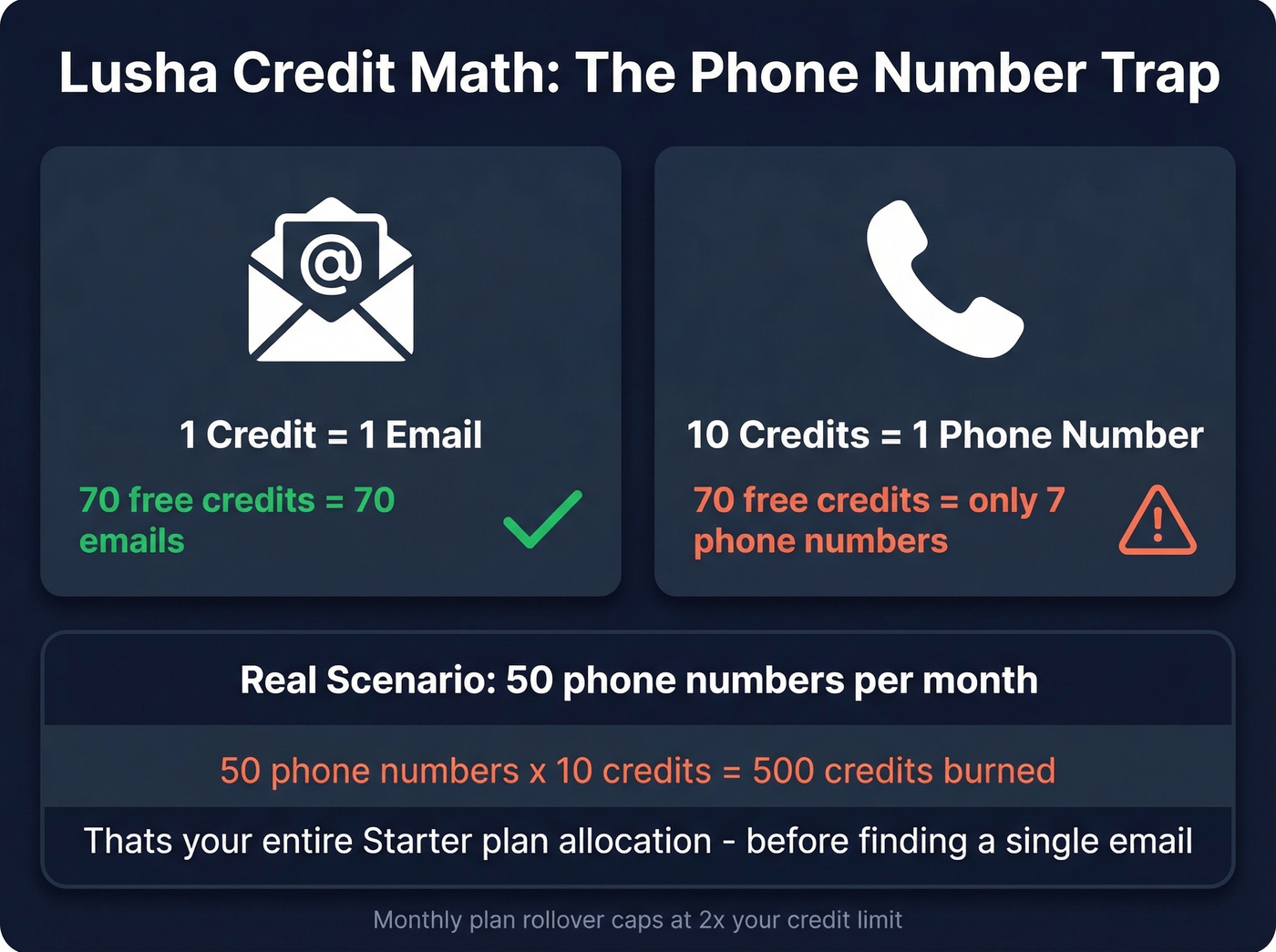
Paid plans start in the low tens per user/month. Rollover on monthly plans caps at 2x your credit limit. Lusha covers 280K+ revenue teams, but user reviews consistently flag outdated data as a pain point - particularly for contacts outside major US metros.
Use it if: You mostly need emails and the free tier covers your volume. Skip it if: You need phone numbers at scale. The 10-credit-per-reveal math gets brutal fast.
Kaspr
If your ICP is heavily EMEA, Kaspr deserves a serious look. It checks data against 120 verification sources and covers 120M+ European contacts with GDPR/CCPA alignment. Free tier available, Starter $49/month, Business $79/month. Not the cheapest per-email cost, but the European coverage is hard to match.
Apollo
Best raw volume at the lowest cost per email. In API benchmark testing, Apollo found 430 emails per 1,000 leads at ~$0.01 per email - the highest hit rate and lowest cost in the test. Generous free tier, paid plans from ~$49/month per user. The extension doubles as a full prospecting platform, which is either a feature or bloat depending on your workflow.
Let's be honest: Apollo's volume is unmatched, but we've seen teams run into accuracy issues at scale. High hit rate doesn't mean high deliverability. If you're selling deals north of $15k, the cost of a single bounced email to a VP matters more than saving $0.02 per lookup.
GetProspect
Solid mid-range option with 95% data accuracy, a free tier with 50 credits, and plans from Starter at $49/month to Growth at $99/month. Nothing flashy, nothing broken. A reasonable choice if your primary tools don't cover a specific gap.
Email Extractor (Free)
Free, no paid tier, 500K+ installs. This is a pure page scraper - it extracts mailto: links and text patterns from the DOM. No verification, no database lookup, no accuracy guarantee.
A cybersecurity thread on Reddit flagged this extension (by Conversion Boooster SL) as "super shady," raising concerns about invasive behaviors and background activity. Free and popular, but risky. Use at your own discretion.

Most email extractor extensions scrape raw HTML and hand you dead addresses. Prospeo's Chrome extension queries 300M+ verified profiles with 5-step verification - 98% email accuracy, 7-day data refresh, 40+ data points per contact. Meritt dropped their bounce rate from 35% to under 4%.
Stop scraping. Start extracting emails that actually land.
Pricing Compared
| Tool | Free Tier | Starter Plan | ~Cost/Email | Verification |
|---|---|---|---|---|
| Prospeo | 75 emails + 100 ext credits | ~$39/mo | ~$0.01 | Included |
| Hunter | 50 credits | $49/mo (2,000 cr) | ~$0.025 | Extra (0.5 cr) |
| Skrapp | 100 credits | $30/mo annual (1,000 cr) | ~$0.03 | Included |
| Snov.io | Trial credits | $29.25/mo annual (1,000 cr) | ~$0.03 | Extra (1 cr) |
| Lusha | 70 credits | Low tens/mo/user | ~$0.04 | Included |
| Kaspr | Free tier | $49/mo (60 emails) | ~$0.82 | Included |
| Apollo | Generous free | ~$49/mo/user | ~$0.01 | Included |
| GetProspect | 50 credits | $49/mo (1,000 cr) | ~$0.05 | Included |
| Email Extractor | Unlimited | Free | $0 | None |
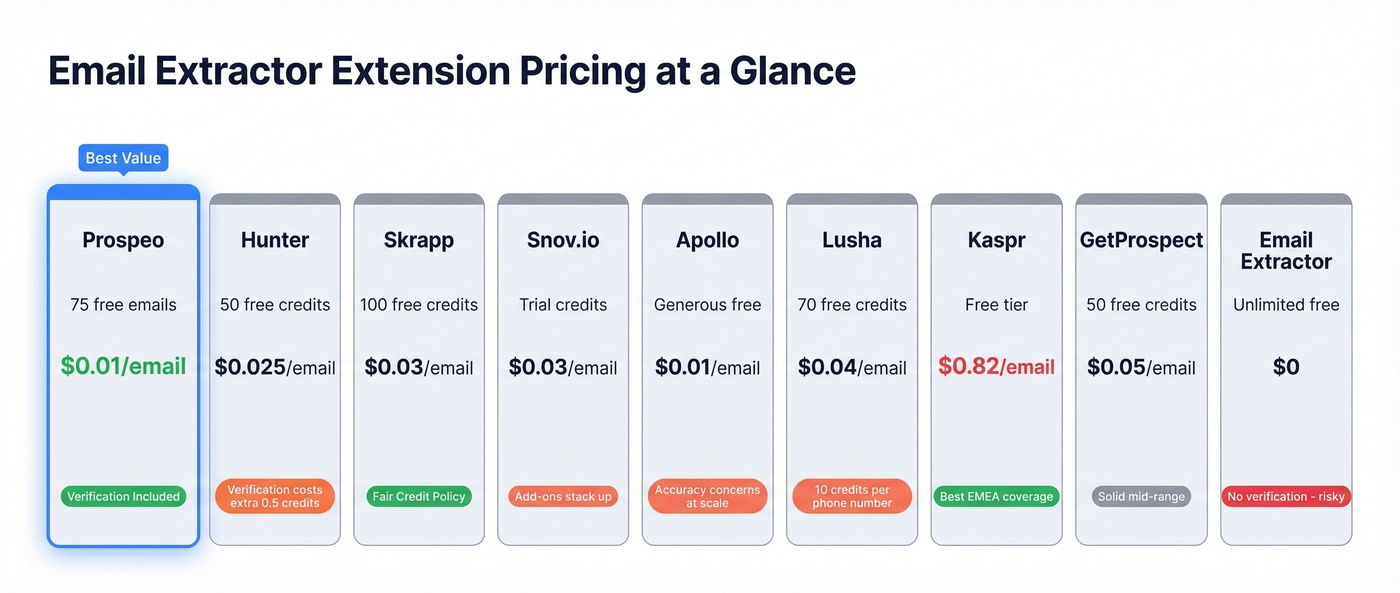
Two things worth highlighting. Hunter charges 0.5 credits per verification on top of 1 credit per find - so a fully verified email costs 1.5 credits. And Lusha's 10-credit phone reveal means a team pulling 50 phone numbers per month burns 500 credits just on dials. That's your entire Starter allocation gone before you've found a single email.
Burning credits on invalid emails is a pricing problem disguised as a data problem. Prospeo charges ~$0.01 per verified email, includes catch-all handling and spam-trap removal, and pushes contacts straight into HubSpot, Salesforce, or Instantly - no CSV gymnastics.
75 free emails per month. No contracts. No bounced-email regrets.
Is Your Extension Safe?
Not all Chrome extensions are created equal. An Ars Technica investigation uncovered 35+ suspicious extensions with 4M+ collective installs - many using obfuscated code, unlisted store listings, and permissions that effectively turn them into spyware.
Here's a quick permission audit before you install anything:
- Check requested permissions. Extensions asking for tabs, cookies, webRequest, and scripting access can intercept your browsing data and inject code. If an email finder needs all of these, ask why.
- Avoid unlisted extensions. If it doesn't appear in Chrome Web Store search results, the developer chose to hide it. Red flag.
- Run the extension ID through VirusTotal. Obfuscated code - where logic is deliberately hidden - is the biggest indicator of malicious intent.
- Prefer database-backed tools. Extensions that query their own verified database don't need to read your page content, so your browsing data stays private.
- Check the last update date. An extension untouched for 2+ years is either abandoned or running on autopilot. Neither is good.
5 Mistakes That Kill Deliverability
Sending to unverified scraped lists. Bounce rates from raw scraped lists run 30-50%, and ESPs often suspend your account after a single bad send. We've watched teams lose months of domain warming in one afternoon. (If you're troubleshooting this, start with email bounce rate and then work through an email deliverability guide.)
Collecting role-based addresses. Addresses like info@, support@, and sales@ are shared inboxes. Most ESPs flag them, and they'll never convert into a meeting.
Treating scraped data as evergreen. Email addresses decay fast as people change jobs and domains expire. Data from six months ago is already degraded. Tools with weekly refresh cycles exist for a reason.
Ignoring catch-all domains. Catch-all servers accept every email sent to any address at that domain. Your verification tool says "valid," but the email might land in a black hole. Look for tools that specifically flag catch-all results rather than lumping them in with verified addresses.
Skipping deduplication. Sending the same contact two identical cold emails from different sequences triggers spam filters and hurts your domain reputation. It also makes you look sloppy - and prospects notice. (If you're scaling sends, email velocity matters as much as list quality.)
FAQ
Are email extractor extensions legal?
Legality depends on jurisdiction. In the EU, emails linked to individuals are personal data under GDPR, and unsolicited outreach can violate it. Database-backed tools with GDPR-compliant sourcing are safer than raw page scrapers that harvest addresses indiscriminately. In the US, CAN-SPAM is more permissive but still requires opt-out mechanisms. When in doubt, talk to your legal team - not Reddit.
Do free email grabber tools actually work?
They extract text that looks like email addresses from page HTML - that's not the same as finding verified, deliverable business emails. Expect 30-50% bounce rates from free scrapers versus under 10% from database-backed tools. "Works" depends entirely on whether you care about deliverability.
Which browser has the best email finder options?
Chrome dominates. Every serious tool builds for Chrome first - Prospeo, Hunter, Skrapp, and Apollo all prioritize it. Firefox has Mail Dump. Edge has limited options. For outbound prospecting in 2026, Chrome is the only realistic choice.
How many emails can I extract for free each month?
Skrapp gives 100 free credits/month, Prospeo offers 75 emails plus 100 extension credits, Lusha provides 70 credits, and Hunter gives 50. Free page scrapers have no limits but no verification - so the volume is meaningless if half the emails bounce.
What's the difference between finding and verifying an email?
Finding means locating an email address associated with a person or domain. Verifying confirms it's deliverable - valid MX record, not a spam trap, not a honeypot, not a dead mailbox. Some tools charge separately for each step; others include verification in the finding cost. Always verify before sending. Always.