

Email Extractor Online: How It Works, What to Watch Out For, and the Best Tools in 2026
53% of SMBs say email marketing is the strategy they use most to find and retain customers. If you're looking for an email extractor online, you're in good company - but here's the take most articles won't give you: if you're doing B2B outreach, you probably don't need an extractor at all. You need an email finder with built-in verification.
The difference matters more than most people realize.
What You Need (Quick Version)
- Pulling emails from a block of text or HTML? Use a free paste tool like ConvertCSV or DeBounce. No signup, instant results.
- Whatever you do, don't send to unverified extracted emails. 10-30% will bounce, and your domain reputation will take the hit.
What Is an Online Email Extractor?
An email extractor scans text, files, or web pages and pulls out anything that looks like an email address. Most online extractors are regex parsers - they match patterns like something@something.something and spit out a list. They can't tell you if an address is active, belongs to the right person, or will bounce the moment you hit send.
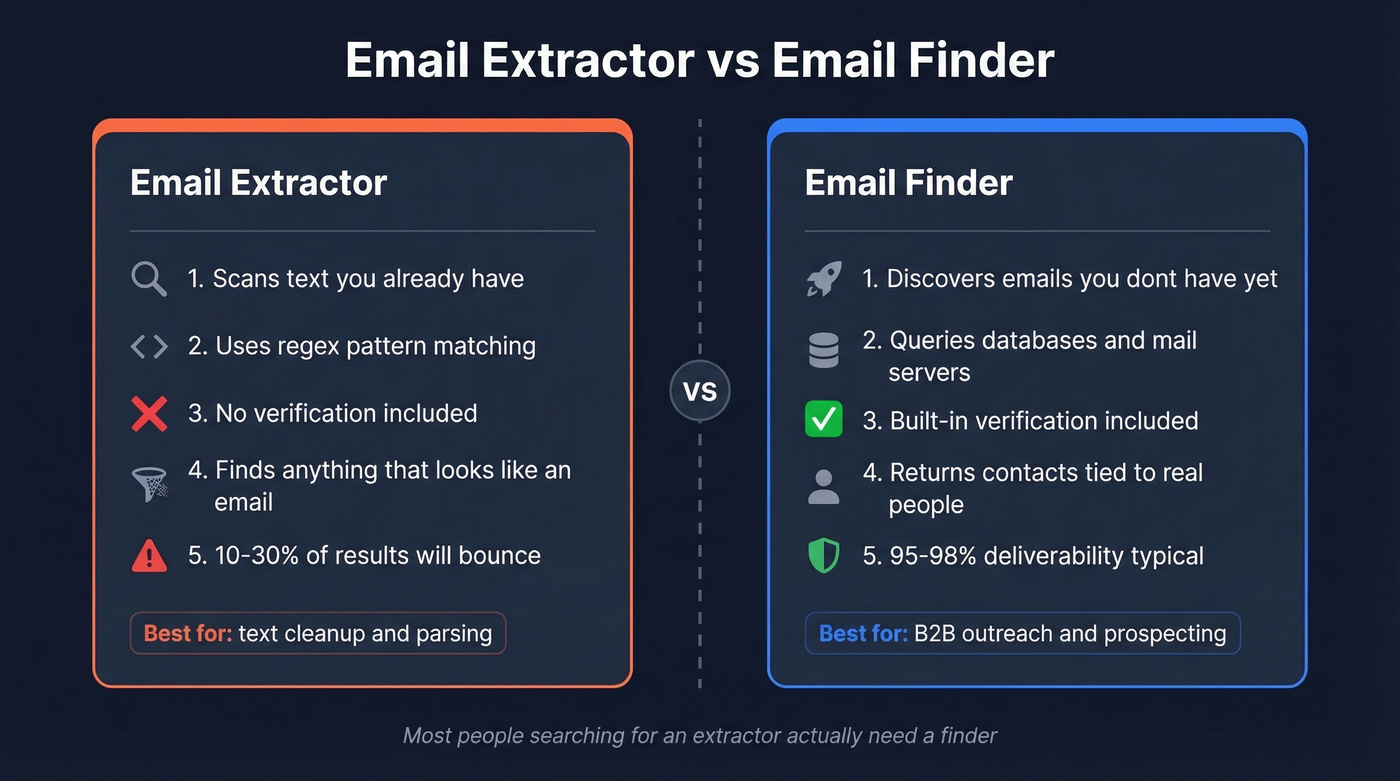
That's fundamentally different from an email finder, which discovers professional email addresses you don't already have by querying databases, verifying against mail servers, and returning contacts tied to specific people at specific companies. Extractors work with what you've got. Finders go get what you need. Most people who land on extractor tools actually need the second thing.
How Online Extraction Works
Every extraction tool runs some version of pattern matching at its core. The tool scans input text for strings that match common email address structures rather than implementing every edge case in the RFCs.
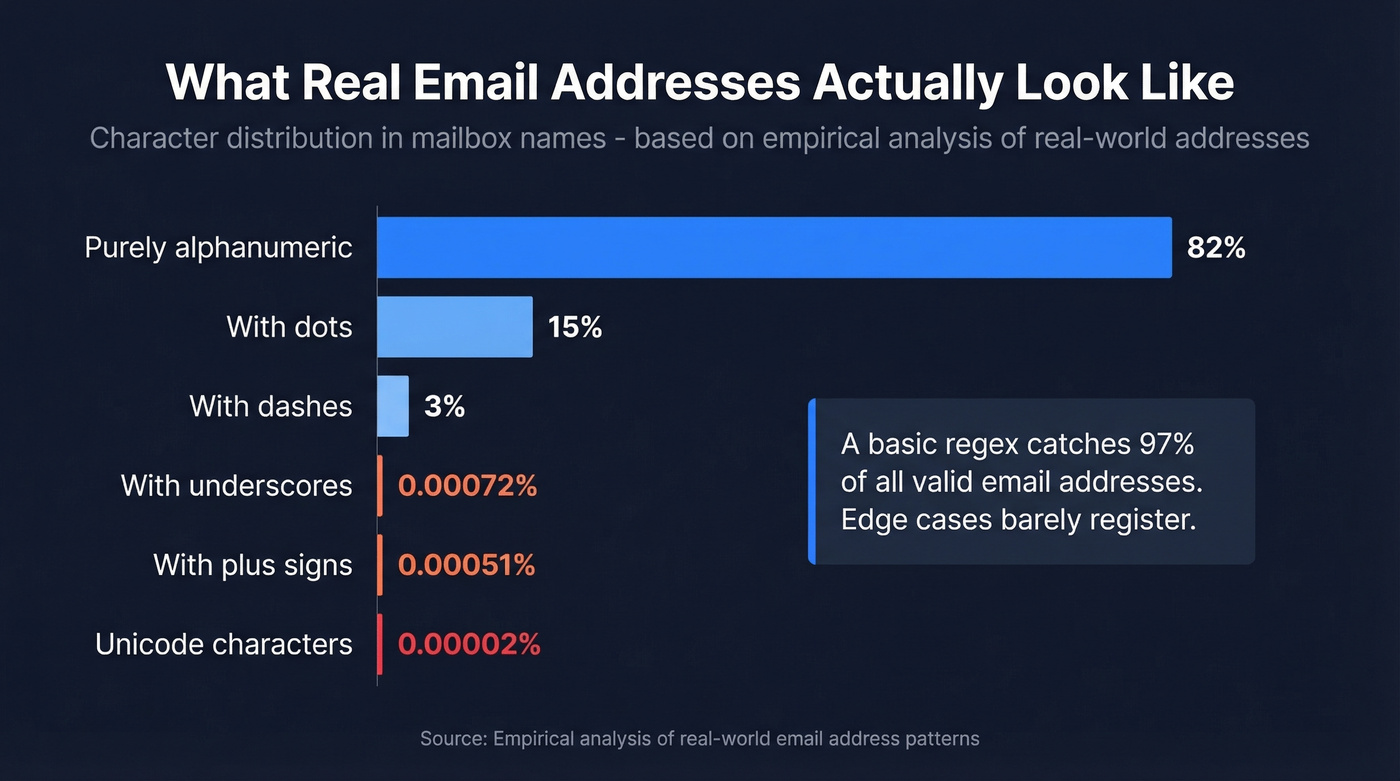
Empirical analysis of real-world email addresses shows that 82% of mailbox names are purely alphanumeric, 15% add dots, and 3% include dashes. Edge cases like underscores (0.00072%), plus signs (0.00051%), and Unicode (0.00002%) barely register. A basic regex catches the vast majority of valid addresses. At scale, newer approaches using bitmask structural checks deliver a 13.7% speed improvement over traditional regex - a meaningful gain when you're processing millions of records.
Beyond simple pattern matching, modern tools use five distinct methods: pattern matching (the regex approach above), domain crawling, B2B contact databases, network-based extraction from professional profiles and public directories, and document parsing for PDFs, spreadsheets, and attachments. An email crawler online automates the domain-crawling approach, systematically visiting pages across a site and harvesting every address it encounters.
The more sophisticated tools layer in validation: syntax checks, domain/MX record verification, and SMTP pinging to confirm an address actually exists. Some maintain databases of 180,000+ disposable email domains to filter out throwaway addresses before they ever hit your list.

You just read that 10-30% of extracted emails bounce. Prospeo skips extraction entirely - search 300M+ profiles with 30+ filters and get 98% verified emails delivered straight to your outbox. At $0.01 per email, it costs less than the domain damage from one bad batch.
Stop extracting and start finding emails that actually work.
Is Email Extraction Legal?
Extracting emails from text you own is perfectly legal. The legal complexity starts when you use those addresses for outreach. There are four categories of risk.
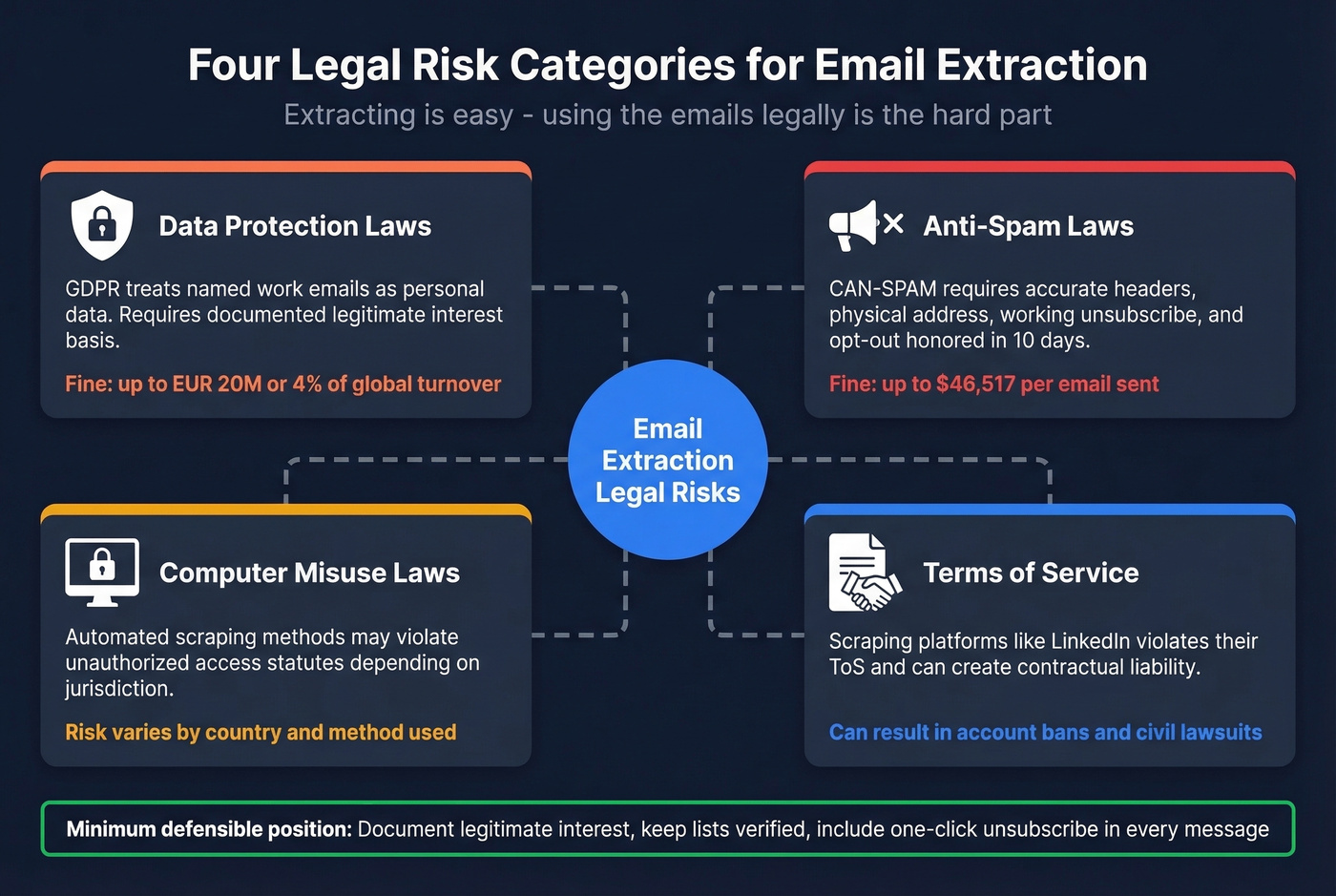
Data protection laws govern whether you can collect and store the addresses at all. Anti-spam laws dictate how you can use them. Computer misuse laws cover automated scraping methods. And terms-of-service agreements on platforms you scrape from can create contractual liability.
Under GDPR, named work emails like firstname.lastname@company.com qualify as personal data. Legitimate interest can apply for some B2B outreach, but it requires a documented balancing test, a least-intrusive approach, and a clear opt-out mechanism. CAN-SPAM is more permissive on collection - it focuses on usage rules. You need accurate headers, non-deceptive subject lines, a physical mailing address, a working unsubscribe link, and you must honor opt-outs within 10 business days.
Penalty reality check: GDPR fines run up to EUR 20 million or 4% of annual global turnover (whichever is higher). CAN-SPAM penalties can reach $46,517 per email. These aren't theoretical - they're enforced.
For B2B cold outreach where double opt-in isn't realistic, document your legitimate interest basis, keep your list verified, and include a one-click unsubscribe in every message. That's the minimum defensible position.
Privacy and Security Risks
The biggest risk with email extractors isn't accuracy - it's what happens to your data after you paste it in.
The critical distinction is client-side vs. server-side processing. Client-side tools process text entirely in your browser, so your data never leaves your machine. Open-source extractors on GitHub prove this pattern exists and works. Server-side tools upload your text to remote servers, where it can be stored, analyzed, or sold.
Chrome extensions deserve special scrutiny. A thread on Reddit's r/cybersecurity alleges the "Email Extractor" extension has concerning behavior, including remote injection capability, permanent data storage on external servers, and background operation even with no tabs open. Even if you ignore the drama, the lesson is simple: extensions with broad permissions can see far more than you think.
Here's the thing - imagine an intern pastes your entire client contact list into a random online tool. Where does that data go?
Before pasting data into any extractor, check these:
- Does it process client-side or upload to servers?
- What permissions does the extension request?
- Does it run in the background when inactive?
- Is there a published privacy policy with data retention terms?
- Can you verify the developer's identity and reputation?
Extract, Clean, Verify, Use
Raw extraction is step one of four. Skipping the rest is how teams get their ESP accounts suspended. We've seen it happen within days.
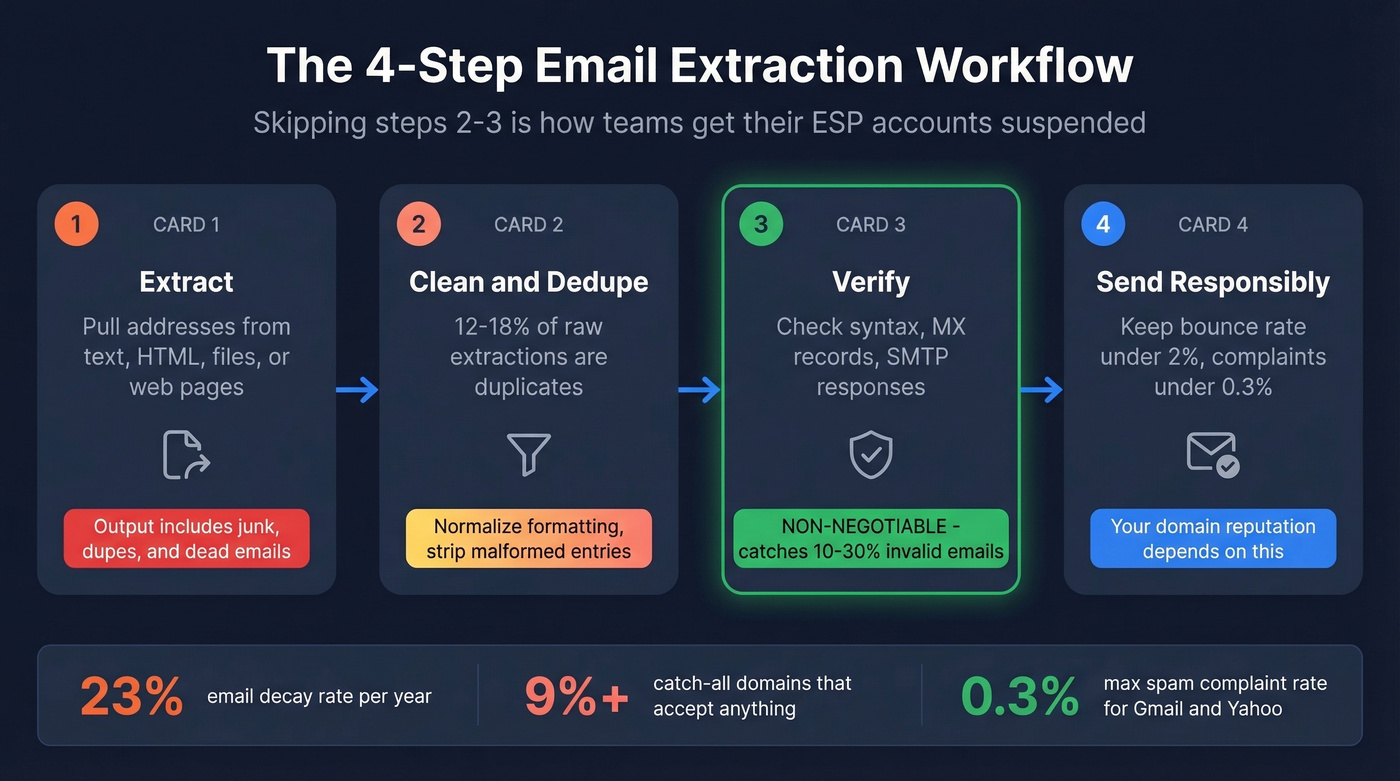
Step 1: Extract. Pull addresses from your source using a paste tool, crawler, or document parser. You'll get everything - valid addresses, malformed strings, duplicates, and disposable emails all mixed together.
Step 2: Clean and deduplicate. Typical raw extractions contain 12-18% duplicates. Remove them, strip malformed entries, and normalize formatting.
Step 3: Verify. This is non-negotiable. 10-30% of extracted emails are invalid or disposable. Email addresses decay at roughly 23% per year, so even a list that was clean six months ago is degraded now. Verification catches syntax errors, dead domains, and inactive mailboxes. Watch for catch-all domains too - over 9% of verified emails fall into this category, and they'll accept anything without confirming the specific address exists.
Step 4: Use responsibly. Gmail and Yahoo require spam complaint rates below 0.3%. A bounce rate above 2% signals poor list quality and can trigger filtering or outright blocking.
Best Web-Based Extraction Tools
B2B Data Platforms
Prospeo
Use Prospeo if you're doing B2B outreach and want verified emails without stitching together three different tools. The platform covers 300M+ professional profiles with 98% email accuracy, including 143M+ verified emails, powered by a proprietary 5-step verification process that handles catch-all domains, removes spam traps, and filters honeypots. Data refreshes every 7 days - the industry average is 6 weeks.

The Chrome extension (40,000+ users) lets you find verified emails from any website or professional profile in one click. For bulk work, upload a CSV or use the API (92% match rate). Meritt, one of Prospeo's customers, saw their bounce rate drop from 35% to under 4% and tripled their weekly pipeline after switching.
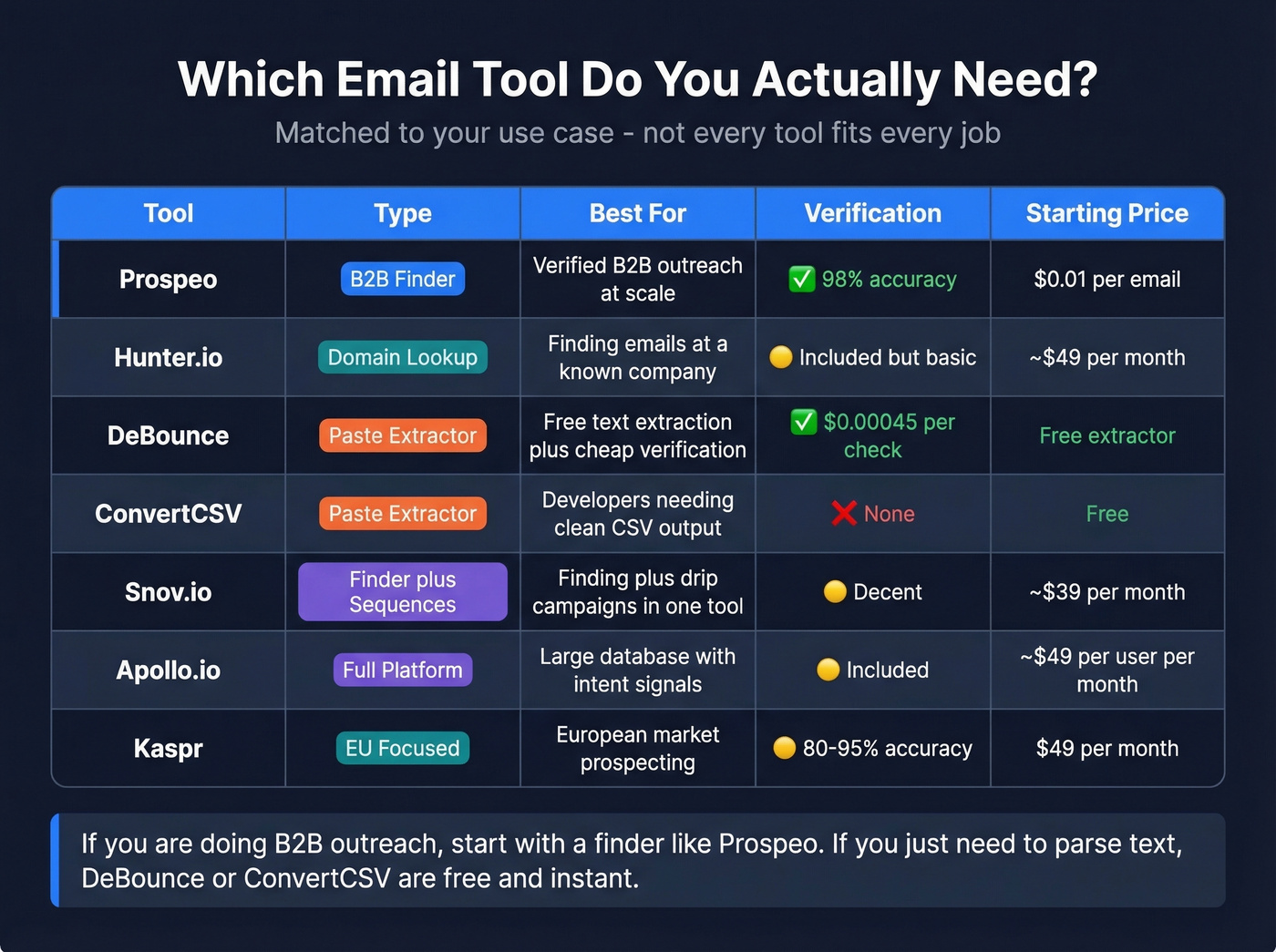
Pricing is credit-based at roughly $0.01 per email. The free tier gives you 75 emails per month plus 100 Chrome extension credits per month - enough to test before committing. No contracts, no sales calls required.
Skip this if you literally just need to pull emails from a text file. That's a regex job, not a database job.
Hunter.io
Best when you know the company but not the person's address. Enter a domain and Hunter returns associated email addresses with confidence scores. Paid plans start around ~$49/month. Verification is included but less rigorous than dedicated verification platforms.
Skip when you need to build large prospect lists or want high-confidence verification on every address. Hunter's a quick-lookup tool, not a prospecting engine.

Free Paste-and-Extract Tools
For those who just need to extract email online from a block of text or HTML source, these free tools handle the job without requiring a signup or subscription.
DeBounce
At $0.00045 per verification check, DeBounce is absurdly cheap - and the free extractor is the real hook. Paste your content, get a deduplicated list instantly, then verify in the same ecosystem without switching tools. No signup required for the extraction step. It's the best free option for pulling emails from raw text.
ConvertCSV
You're a developer. You have a messy text dump with 4,000 email addresses buried in it. You need clean CSV output with custom column configurations and multiple separator options. ConvertCSV is the tool you want. No signup, unlimited use, zero verification - just raw parsing power. Bookmark it and move on.
Other Tools Worth Knowing
Snov.io - Multi-source email finder with built-in verification and drip campaigns. Paid plans start around ~$39/month. Decent for teams that want finding and sequencing in one tool, though the verification isn't as thorough as dedicated platforms.
Apollo.io - A large B2B database with a generous free tier. Paid plans start around ~$49/user/month. Overkill if you just need emails, but strong if you want filters, sequences, and intent signals bundled together.
Kaspr - EU-focused with 80-95% accuracy for European markets. Free plan includes unlimited B2B email credits if you invite three colleagues. Paid plans start at $49/month. Worth a look if your prospects are primarily in EMEA.
Browserling - Developer-oriented paste extractor. No frills. One of those tools you bookmark and forget about until you need it.
Tool Comparison
| Tool | Type | Free Tier | Starting Price | Verification | Best For |
|---|---|---|---|---|---|
| Prospeo | B2B data platform | 75 emails/mo | ~$0.01/email | Built-in (98%) | B2B outreach |
| Hunter.io | Domain finder | Yes | ~$49/mo | Basic | Domain-based finding |
| DeBounce | Paste extractor | Yes | $0.00045/check | Yes | Extract + verify |
| ConvertCSV | Paste extractor | Unlimited | Free | No | Quick text parsing |
| Snov.io | Multi-source finder | Yes | ~$39/mo | Basic | Multi-channel |
| Apollo.io | B2B database | Yes | ~$49/user/mo | Basic | Large-scale prospecting |
| Kaspr | Extension-based | Yes (invite) | $49/mo | Basic | European contacts |
Let's be honest: if your average deal size is under $10K, you probably don't need a full prospecting platform. A free paste extractor plus a pay-per-check verifier will get you 80% of the way there. But the moment you're doing volume outreach - 500+ emails a week - the math flips hard in favor of a platform with built-in verification. The time you save not juggling three tools pays for itself in the first week. We've run both workflows, and the difference in weekly hours is staggering.
If you're worried about bounces and inboxing, start with the basics of email deliverability and keep an eye on your email bounce rate as you scale.
Extractors give you patterns. Prospeo gives you people. Every email runs through 5-step verification with catch-all handling, spam-trap removal, and honeypot filtering - refreshed every 7 days, not 6 weeks. That's why teams using Prospeo see bounce rates under 4%.
Get 75 verified emails free - no credit card, no paste tools, no guessing.
FAQ
Is email extraction legal?
Extracting emails from your own text is legal everywhere. Using those addresses for outreach triggers GDPR (EU) and CAN-SPAM (US) obligations - you need opt-out links, accurate headers, and a documented legal basis. Verify consent requirements for your jurisdiction before sending.
How accurate are free email extractors?
Free paste tools catch 99%+ of standard email formats from text you provide. The problem is downstream: 10-30% of extracted addresses are invalid, disposable, or inactive. Always run verification before sending to any extracted list.
What's the difference between an extractor and a finder?
An extractor pulls addresses from text you already have using regex pattern matching. A finder discovers professional emails you don't have by querying databases and verifying against mail servers in real time - tools like Prospeo, Hunter, and Snov.io fall in this category.
Are browser-based extractors safe?
Client-side tools that process text in your browser are safe - data never leaves your machine. Server-side tools and Chrome extensions with broad permissions are riskier. Check whether the tool uploads data, runs in the background, and has a published data retention policy before pasting anything sensitive.
When should I use a paid tool instead of a free one?
Once you're sending 500+ emails per week, free paste-and-verify workflows become a time sink. A platform like Prospeo (starting at ~$0.01/email with 75 free credits/month) combines finding, verification, and deliverability protection - saving hours of manual list cleaning each week.