

Email Tracking in Salesforce: What Works in 2026
The fact that Salesforce still can't natively log emails from Gmail without a separate product - in 2026 - is baffling. Your VP asks why last week's emails to a key account aren't showing on the Opportunity timeline, and you get to explain that Salesforce doesn't just "sit in Gmail and listen." The consensus on r/salesforce is blunt: there's still no great solution for email tracking in Salesforce that works the way most end users expect.
Let's break down what actually works, what's changed recently, and where the real gaps are.
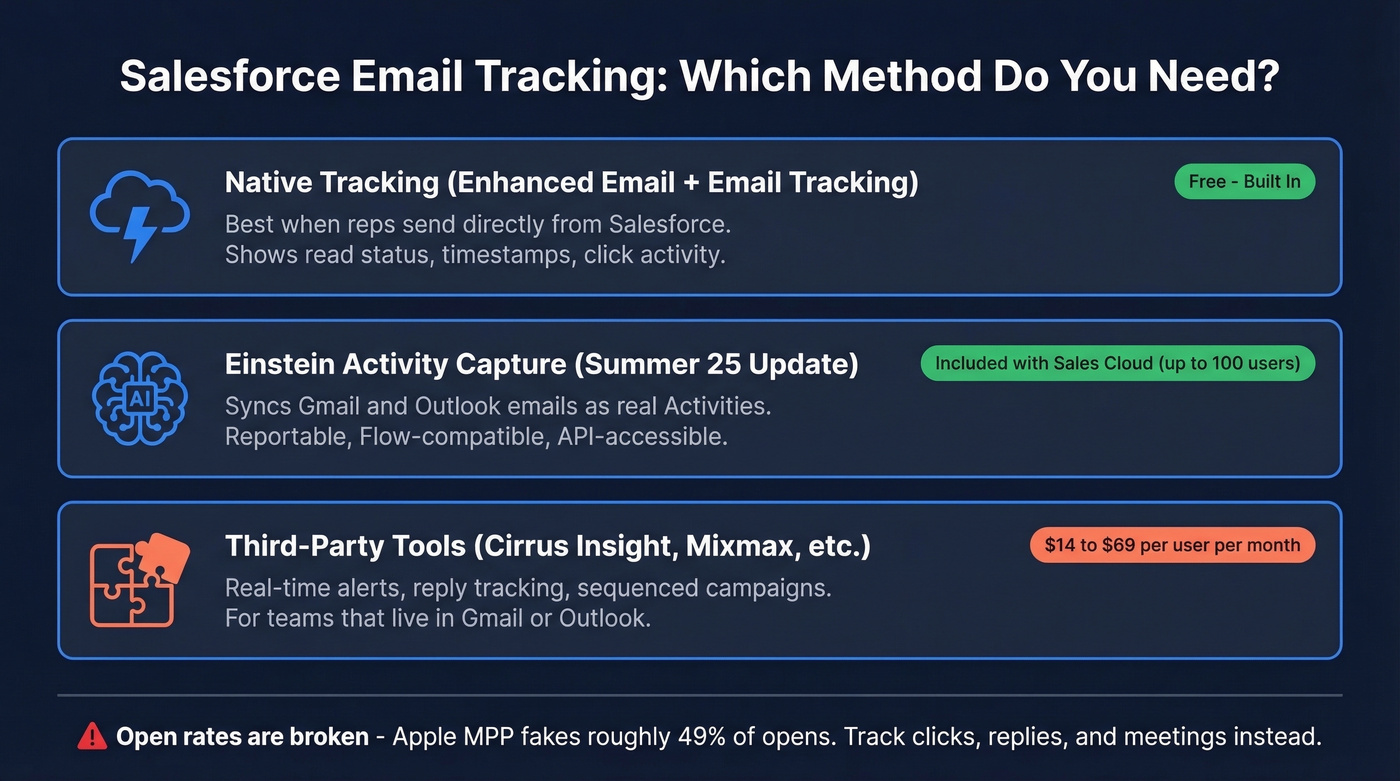
What You Need (Quick Version)
- Native tracking (Enhanced Email + Email Tracking) is best when reps send from Salesforce. It doesn't automatically capture and log everything happening in Gmail or Outlook.
- Einstein Activity Capture with its Summer '25 overhaul can sync inbox emails as real Activities - enable it if you're on Sales Cloud.
- Open rates are broken - Apple MPP fakes a huge chunk of your opens. Track link clicks, replies, and meetings instead.
What Native Salesforce Tracking Does
Use Enhanced Email if your reps send directly from Salesforce. Go to Setup, search Enhanced Email, and toggle it on. Then enable Email Tracking separately - you need both. Once they're active, Salesforce shows email status like "unopened" or "read," plus timestamps for first and last opens on the Activity Timeline.
With Enhanced Email enabled, emails are saved as EmailMessage records instead of Tasks, which powers newer email features and gives you richer data to work with.
This is sales-side, per-recipient tracking only. Marketing Cloud handles campaign-level metrics like aggregate click-throughs, unsubscribes, and deliverability separately.
Skip native tracking as your sole solution if reps live in Gmail or Outlook and expect everything to appear automatically on the right records. BCC to Salesforce exists as a workaround for outbound, but it's manual, hard to teach users, and doesn't capture inbound. Salesforce also has daily sending limits - up to 5,000 external email addresses per day org-wide for single emails - so it isn't an ESP. It's a CRM that happens to send email.
Einstein Activity Capture: The Summer '25 Overhaul
EAC has been around for years, but it used to frustrate admins because captured emails didn't behave like real Activities. You couldn't report on them, trigger Flows from them, or reliably see them where users expected. The Summer '25 release changed that significantly, and in our testing it's the single biggest improvement Salesforce has made to email tracking in recent memory.
Here's what's new:
- Emails sync as standard Salesforce Activities - reportable, API-accessible, and Flow-automatable
- Flow-based matching replaces the old matching logic, giving admins real control over which records emails attach to
- Header-only capture for regulated environments - logs that communication happened without storing subject lines or body text
- Exclusion rules for out-of-office replies, internal domains, and sensitive content
Licensing is straightforward: EAC Standard is included with Sales Cloud Starter, Professional, and Enterprise editions for up to 100 users. The catch? Each user needs the Einstein Activity Capture Included permission set assigned manually. It's not automatic, and we've seen teams go months without realizing nobody actually had access.
If you wrote off EAC before, revisit it. This isn't the same product.

Salesforce email tracking only works when emails actually reach inboxes. Prospeo's native Salesforce integration verifies contacts at 98% accuracy with a 7-day refresh cycle - so your open rates, click data, and reply metrics reflect real engagement, not bounces.
Fix the data before you track it. Start free with 75 verified emails.
Why Open Tracking Is Broken
Stop obsessing over email opens. Apple Mail Privacy Protection preloads tracking pixels on behalf of users, making emails appear "opened" even when nobody read them. Apple accounted for 49.29% of email opens in January 2025 according to Litmus data - meaning a massive chunk of your open data is fabricated. In one real newsletter tracked by EmailTooltester, Apple MPP accounted for 27% of all recorded opens, none genuine.
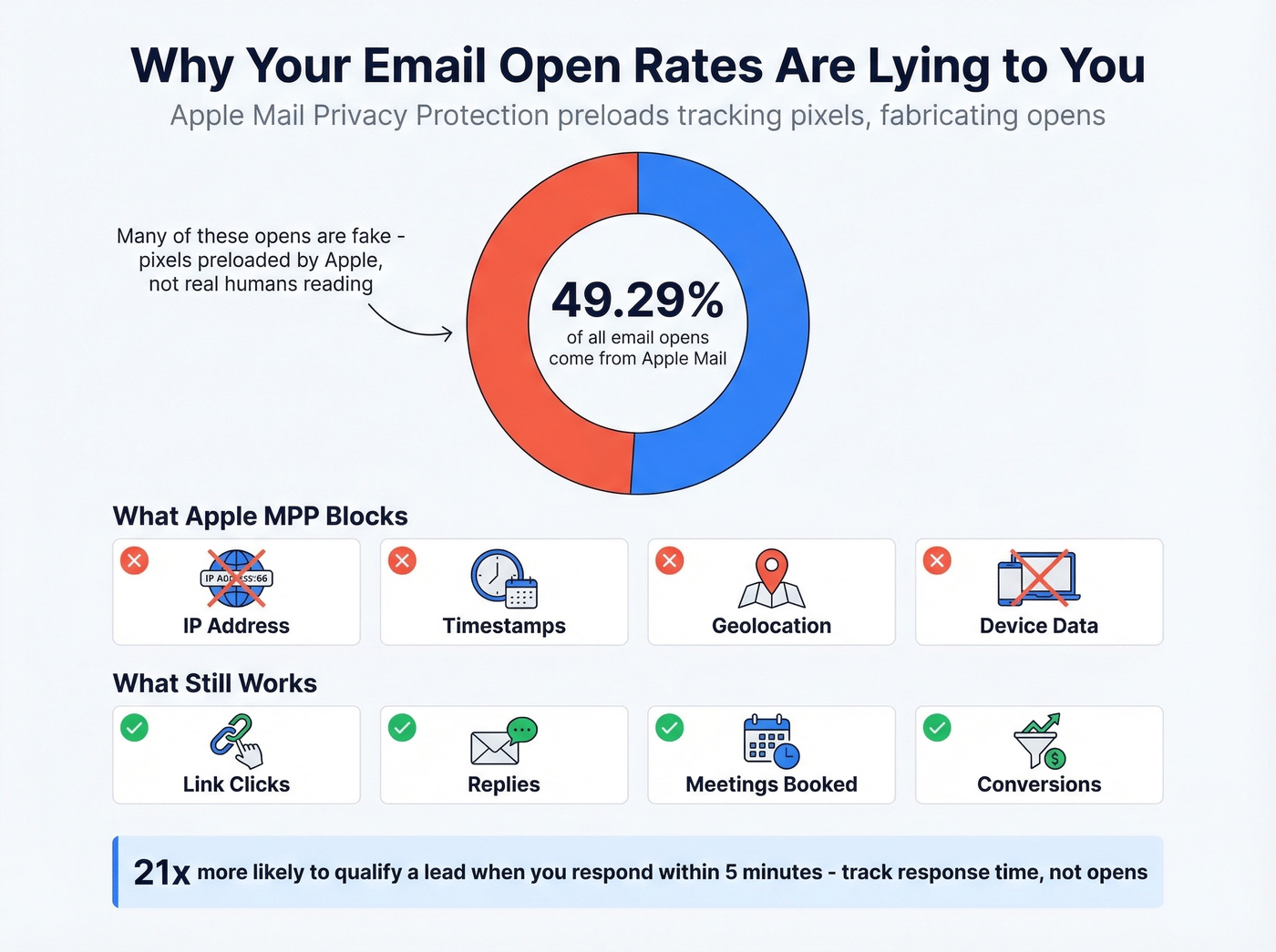
MPP doesn't just inflate open rates. It blocks IP addresses, timestamps, geolocation, and device data. Every metric that depends on pixel loading is compromised.
We've seen teams waste entire quarters optimizing subject lines based on open rates that were heavily fabricated - running A/B tests against noise. What still works: clicks (someone actually tapped a link), replies, conversions, and meetings booked. Responding within 5 minutes makes lead qualification 21x more likely than waiting 30 minutes. That's a metric worth tracking. Opens aren't.

When You Need a Third-Party Tool
Native tracking plus EAC covers a lot of ground now, but you'll hit a wall if reps need real-time open/click alerts in their inbox, reply tracking across threads, or campaign-level analytics beyond what Activity reports provide.
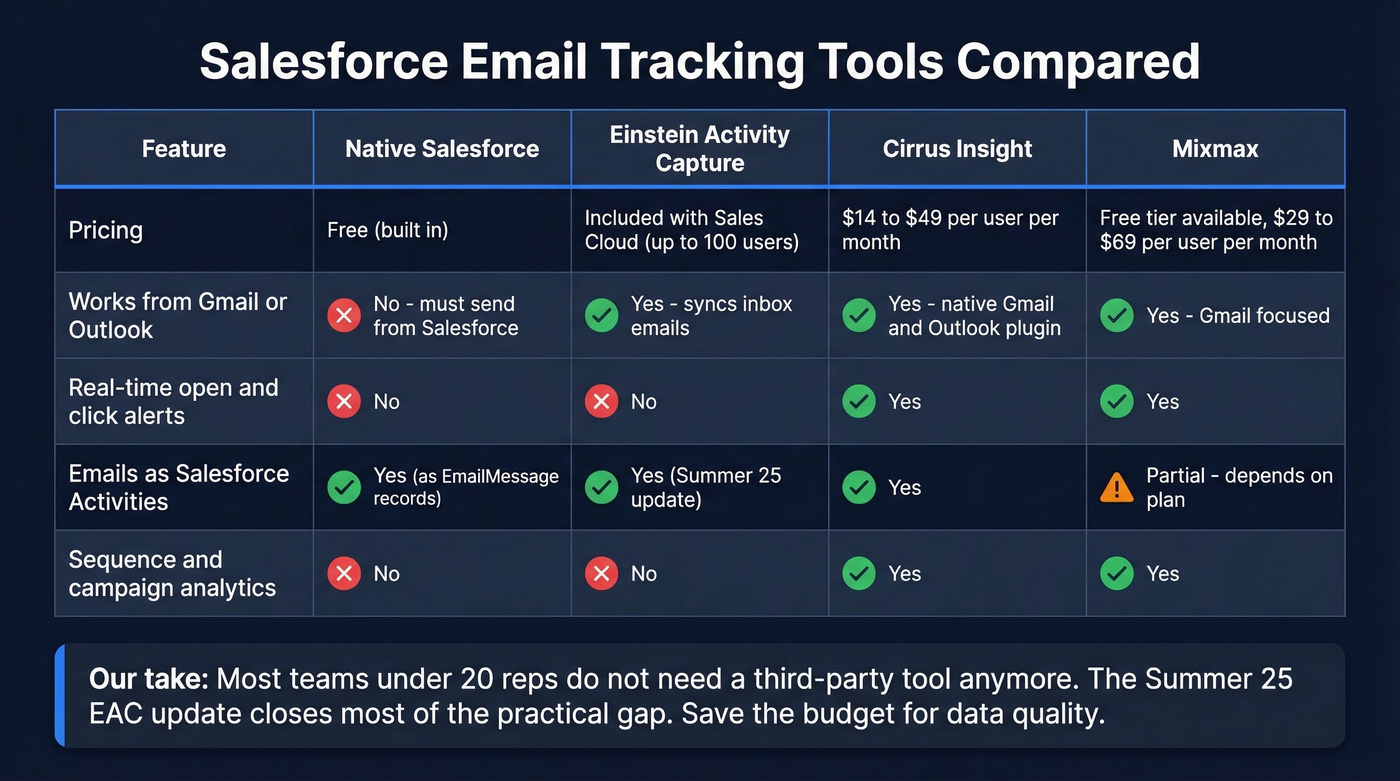
Go third-party when:
- Your team lives in Gmail or Outlook and won't switch to sending from Salesforce
- You need instant notifications when a prospect engages
- You're running sequenced campaigns that require granular analytics
Cirrus Insight ($14-$49/user/mo) plugs directly into Gmail and Outlook with native Salesforce sync - it's the most seamless option for teams that refuse to leave their inbox. Mixmax offers a free tier for basic tracking, with paid plans from $29-$69/user/mo that add sequences and scheduling. Salesforce Engage is powerful but requires a Marketing Cloud Account Engagement (Pardot) license, and pricing is typically bundled into broader Marketing Cloud packaging.
Real talk: most teams under 20 reps don't need a third-party tracking tool anymore. The Summer '25 EAC update closes most of the practical gap. Save the budget for data quality instead.
The Data Quality Problem Nobody Talks About
Here's the thing - none of this tracking matters if your contact data is garbage. If your emails bounce at scale, every downstream metric - opens, clicks, reply rates, pipeline attribution - is built on a corrupted foundation. Bounces don't just distort your reports; they damage sender reputation and tank future deliverability. You end up tracking noise, not signal, and making decisions based on data that was rotten from the start.
This is where we've seen the biggest gap for Salesforce teams running outbound. The bottleneck isn't the tracking tool. It's the data underneath. Prospeo's native Salesforce integration handles this before you ever hit send - 98% email accuracy, a 7-day data refresh cycle, and catch-all domain verification that catches the addresses most tools miss. Clean data in, clean tracking out.
If you’re seeing lots of bounces, start with email deliverability and sender reputation basics before you blame tracking.

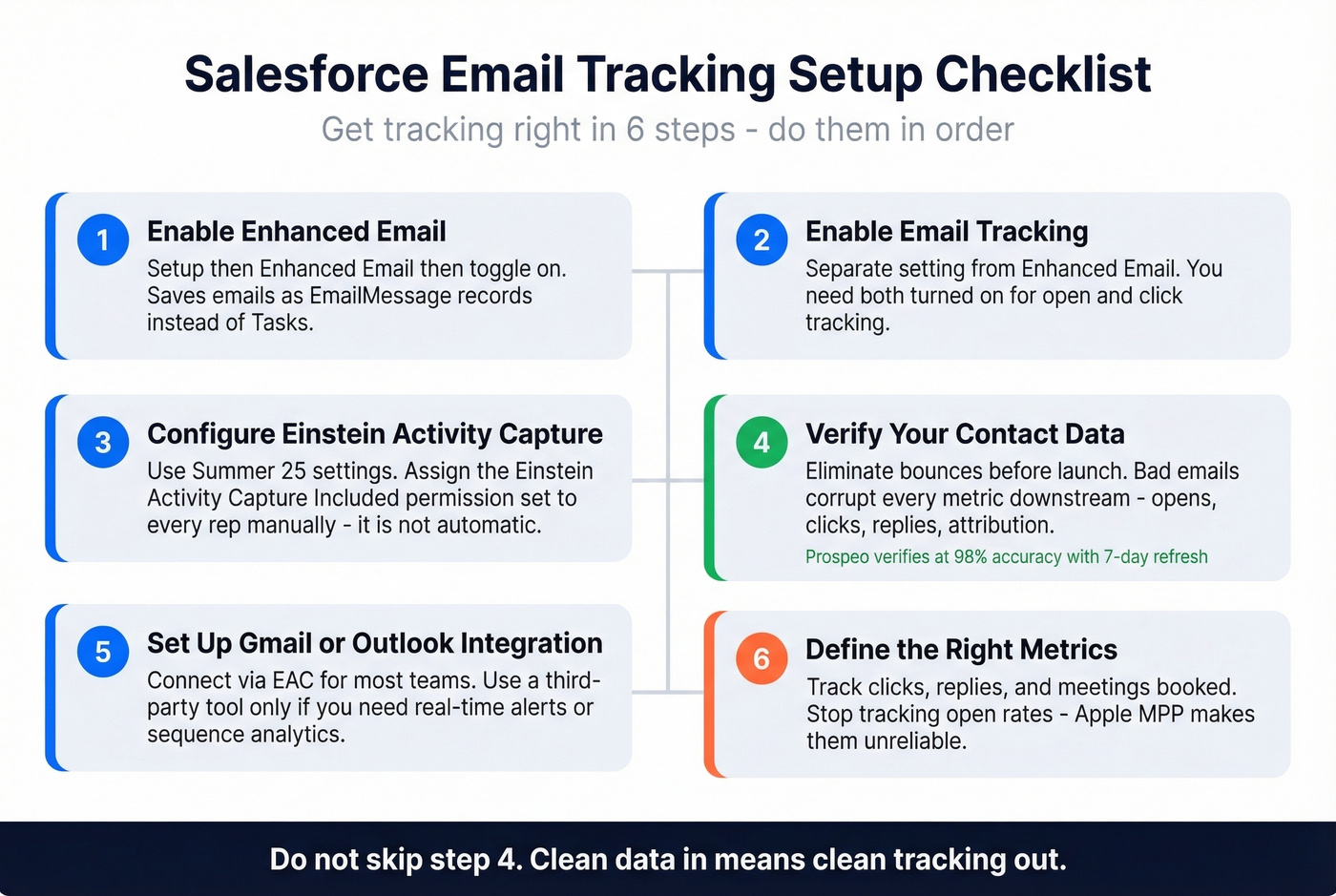
Quick Setup Checklist
- Enable Enhanced Email (Setup -> Enhanced Email -> toggle on)
- Enable Email Tracking in your org settings
- Configure Einstein Activity Capture with Summer '25 settings - assign the permission set to your reps
- Verify your contact data before launch to eliminate bounces that corrupt your metrics
- Set up Gmail or Outlook integration via EAC or a third-party tool
- Define the metrics that matter: clicks, replies, and meetings booked - not opens
Bounced emails corrupt every tracking metric downstream - opens, clicks, replies, pipeline attribution. Prospeo catches bad addresses before they hit Salesforce, including catch-all domains most tools miss. At $0.01 per email, it costs less than one wasted send.
Stop tracking noise. Send to verified contacts only.
FAQ
Does Salesforce track emails sent from Gmail?
Not automatically. You need Einstein Activity Capture (included with Sales Cloud Starter/Professional/Enterprise for up to 100 users) or a third-party tool like Cirrus Insight to sync Gmail emails into Salesforce as Activities tied to the correct records.
Why do my Salesforce email open rates look inflated?
Apple Mail Privacy Protection preloads tracking pixels, making emails appear opened when they weren't. Apple accounts for roughly 49% of email opens - track clicks and replies instead for reliable engagement data.
Can I track link clicks in Salesforce?
Yes. Enhanced Email combined with Email Tracking shows click activity on links within emails sent from Salesforce. For emails sent from Gmail or Outlook, third-party tools like Cirrus Insight or Mixmax can track link clicks and sync that data back to the relevant Salesforce record.
How do I keep my Salesforce contact emails valid?
Use a verification tool with native Salesforce integration that checks emails on an ongoing basis. Prospeo's 5-step verification process catches invalid addresses, spam traps, and catch-all domains - with a 7-day refresh cycle that keeps your CRM data current instead of decaying between quarterly cleanups.