

The Best Email Tracking Tools in 2026 - And Why Half Your Open Data Is Fake
77% of cold emails never get opened. With 376.4 billion emails sent daily and the email marketing industry pushing toward $18 billion by 2027, the tracking tools promising to tell you who opened what are, in many cases, feeding you phantom data. Here's which ones are actually worth installing - and what to fix before tracking matters at all.
Our Picks
Before you track anything: Verify your list with Prospeo - 98% email accuracy, free tier available. Tracking bounced emails is tracking nothing.
Best for Salesforce teams: Yesware - transparent pricing, native Salesforce sync at $65/seat/month on Enterprise.
Best free starting point: HubSpot Sales Hub - solid tracking foundation, 200 notifications/month on the free plan.
Best lightweight Gmail tracker: Mailsuite - simple, cheap, no CRM bloat.
Why Open Tracking Is Broken
Apple Mail Privacy Protection changed everything when it launched in 2021. MPP preloads email content - including tracking pixels - before the recipient ever sees the message. Your "open" data includes thousands of machine opens that never involved a human glancing at your subject line.
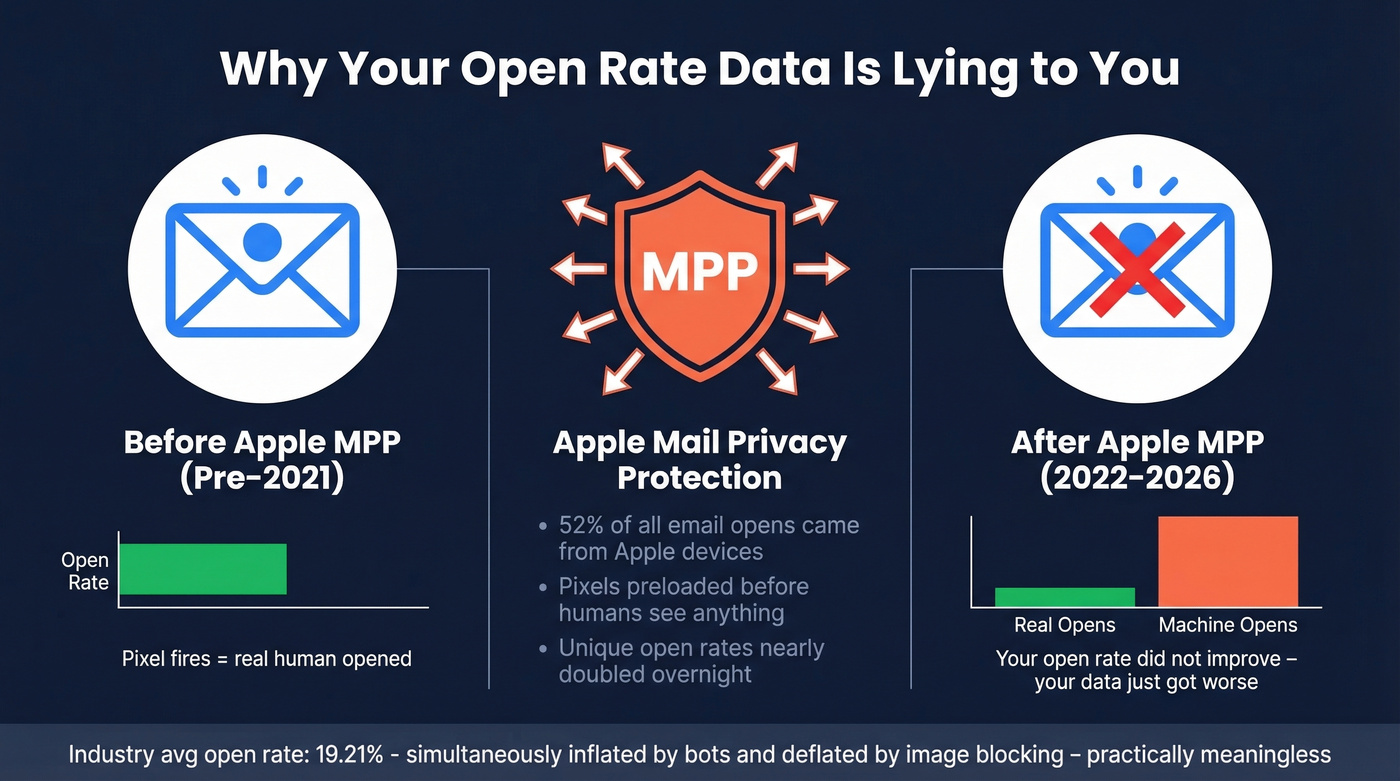
The scale is staggering. Apple devices accounted for roughly 52% of all email opens back in 2021, and nearly 50% of subscribers now use MPP. Omeda saw unique open rates nearly double within six months of MPP rolling out. Your open rate didn't improve. Your data just got worse.
MPP isn't the only culprit. Security scanners at enterprise companies click every link in inbound emails before a human sees them. Preview panes trigger pixel loads without a real open. Image blocking prevents pixels from firing at all. And Link Tracking Protection in Apple Mail strips UTM parameters entirely, so your attribution breaks on top of your open data.
The industry average open rate sits at 19.21%, with a 2.44% click-through rate. That open number is simultaneously inflated by machine opens and deflated by image blocking - it's practically meaningless as a standalone metric. Click rates, reply rates, and conversion rates are what actually tell you something in 2026. Open tracking is a directional signal at best. Any honest tool comparison has to start with this reality.
Do Tracking Pixels Hurt Deliverability?
We've seen this pattern more times than we'd like: an SDR installs a free Chrome extension tracker, sends 200 emails, and starts landing in spam within a week. Free tracking extensions are often the most expensive choice you'll make.
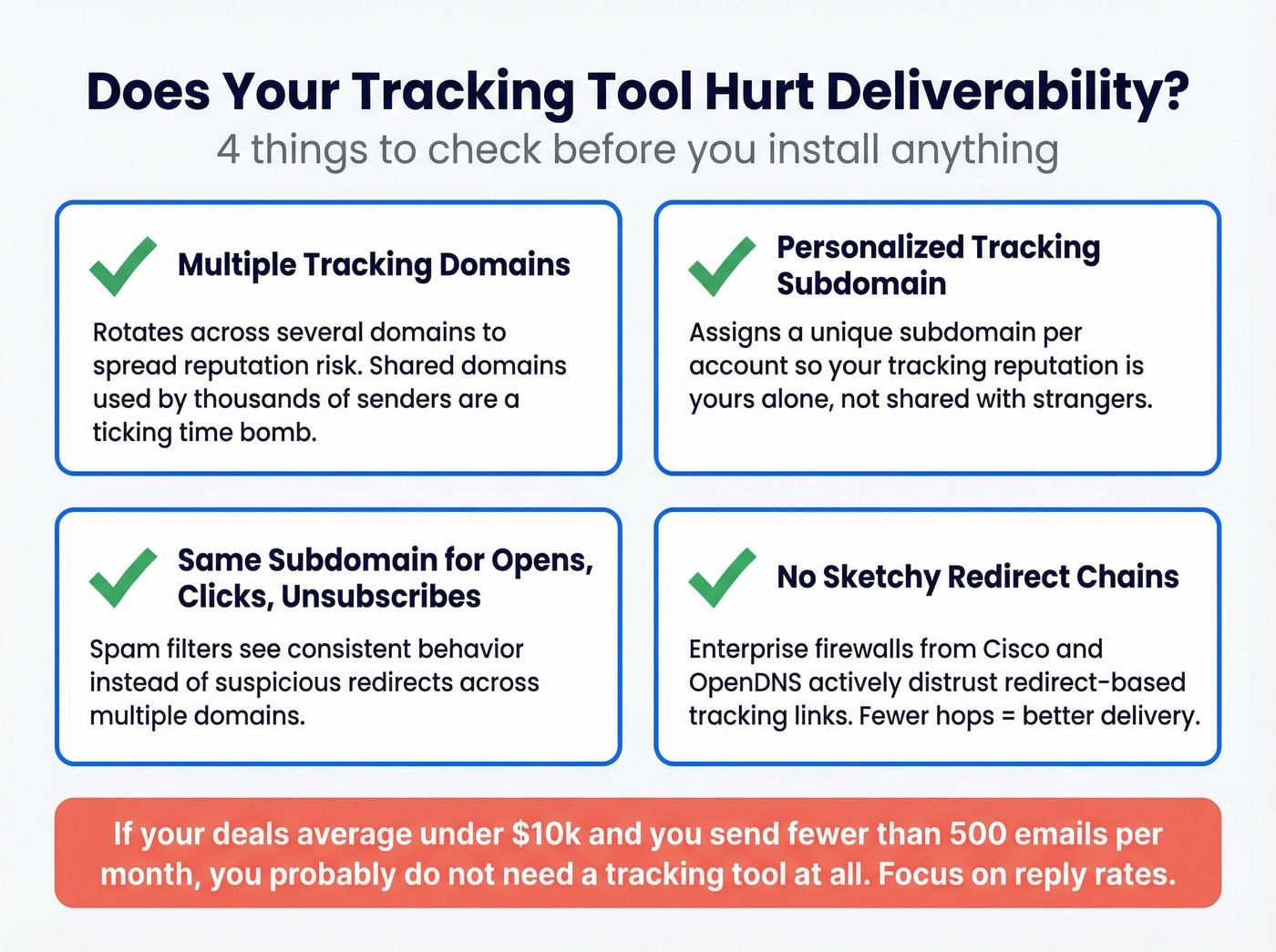
Some guides publish deliverability scores from their own testing. Let's be honest - we're skeptical of vendor-run tests. The methodology is rarely transparent and the tester always seems to win. Here's what to check yourself instead:
- Multiple tracking domains. Tools that rotate across several tracking domains spread reputation risk. A shared domain used by thousands of senders is a ticking time bomb - one bad actor tanks deliverability for everyone.
- Personalized tracking subdomain. The best tools assign a unique subdomain per account, so your tracking reputation is yours alone. (If you need the setup details, see tracking domains.)
- Same subdomain for opens, clicks, and unsubscribes. When these three functions use the same subdomain, spam filters see consistent behavior instead of suspicious redirects.
- No sketchy redirect chains. Enterprise firewalls from Cisco and OpenDNS actively distrust redirect-based tracking links. If your tracker routes clicks through three domains before landing, expect deliverability hits.
Here's the thing: if your deals average under $10k and you're sending fewer than 500 emails a month, you probably don't need a tracking tool at all. Focus on reply rates and skip the pixel drama.

Email tracking tools are useless if your emails never reach an inbox. Prospeo's 5-step verification catches spam traps, honeypots, and catch-all domains - delivering 98% email accuracy on a 7-day refresh cycle. Meritt dropped their bounce rate from 35% to under 4%.
Clean your list before you install a single tracking pixel.
Clean Your Data Before You Track
Every email tracking platform in this article assumes the email reached an inbox. If your list is full of invalid addresses, spam traps, and honeypots, you're tracking nothing - and damaging your domain in the process. Meritt saw their bounce rate drop from 35% to under 4% after switching to Prospeo's verification. Snyk, with 50 AEs prospecting 4-6 hours a week, went from 35-40% bounce rates to under 5% and generated 200+ new opportunities per month.
Prospeo's 5-step verification process catches spam traps, honeypots, and catch-all domains that other verification services miss - running on proprietary infrastructure with a 7-day data refresh cycle. The free tier gives you 75 email verifications per month. Paid plans run about $0.01 per email. Clean your list before you install a single tracking pixel. It's the step most guides skip, and it determines whether your tracking data is real or fiction. (If you're troubleshooting bounces, start with bounce rate benchmarks and fixes.)
Best Email Tracking Tools Compared
HubSpot Sales Hub
HubSpot's free plan gives you email open tracking with 200 email notifications per month - enough for a solo founder sending a handful of prospecting emails a day, not enough for any real outbound motion. You'll burn through 200 notifications by Tuesday if you're running sequences.
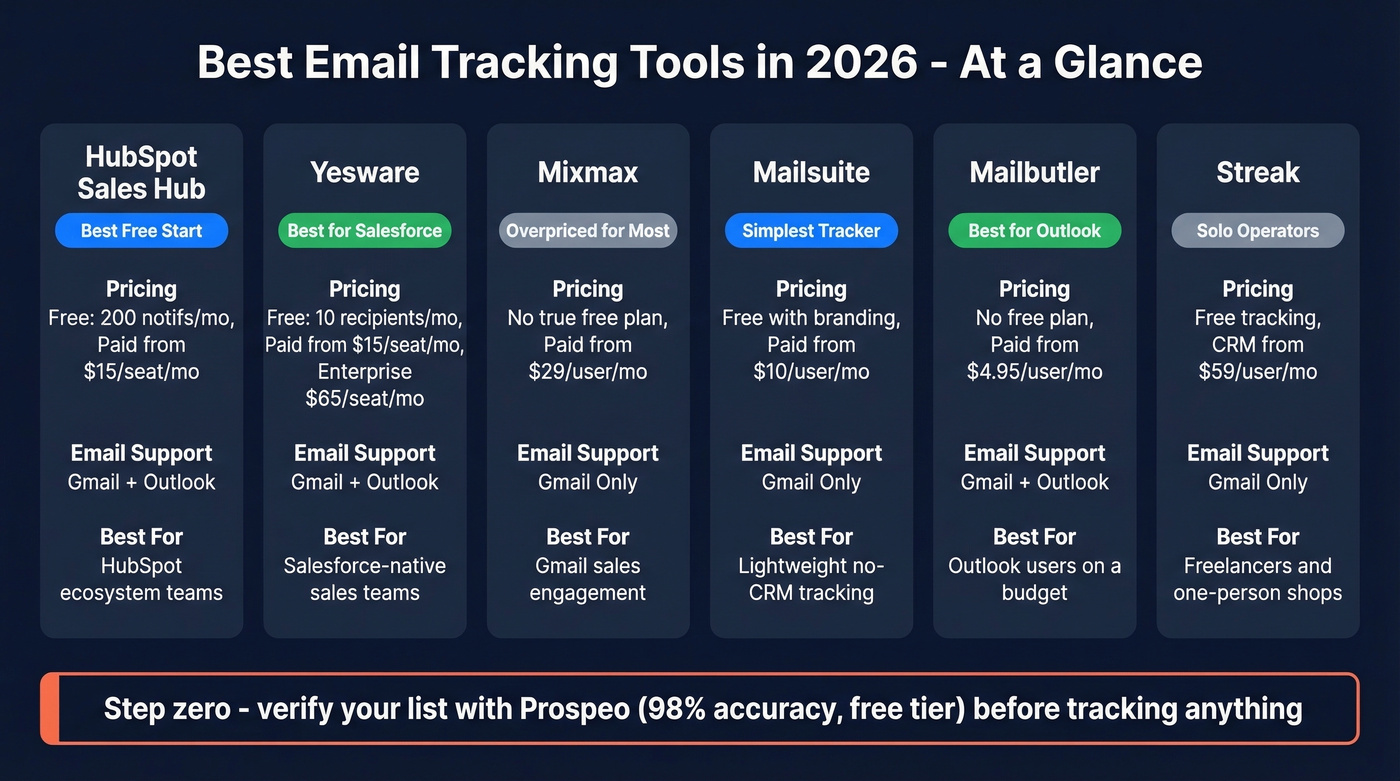
Paid plans start at $15/seat/month (Starter), scaling to around $50/seat (Professional) and $100/seat (Enterprise). The jump from free to paid unlocks more automation and the full CRM feature set. Gmail and Outlook both supported.
HubSpot Sales Hub is good enough for solo reps and small teams already paying for HubSpot Marketing or Service Hub. If you're buying HubSpot just for email tracking, you're overpaying for a CRM you don't need. (If you’re comparing CRM options, see examples of a CRM.)
Yesware
We watched a 15-person sales team switch from a Pardot setup running over $1,000/month to Yesware Enterprise at $65/seat/month and get better tracking data with native Salesforce sync. That's the Yesware pitch in a nutshell.
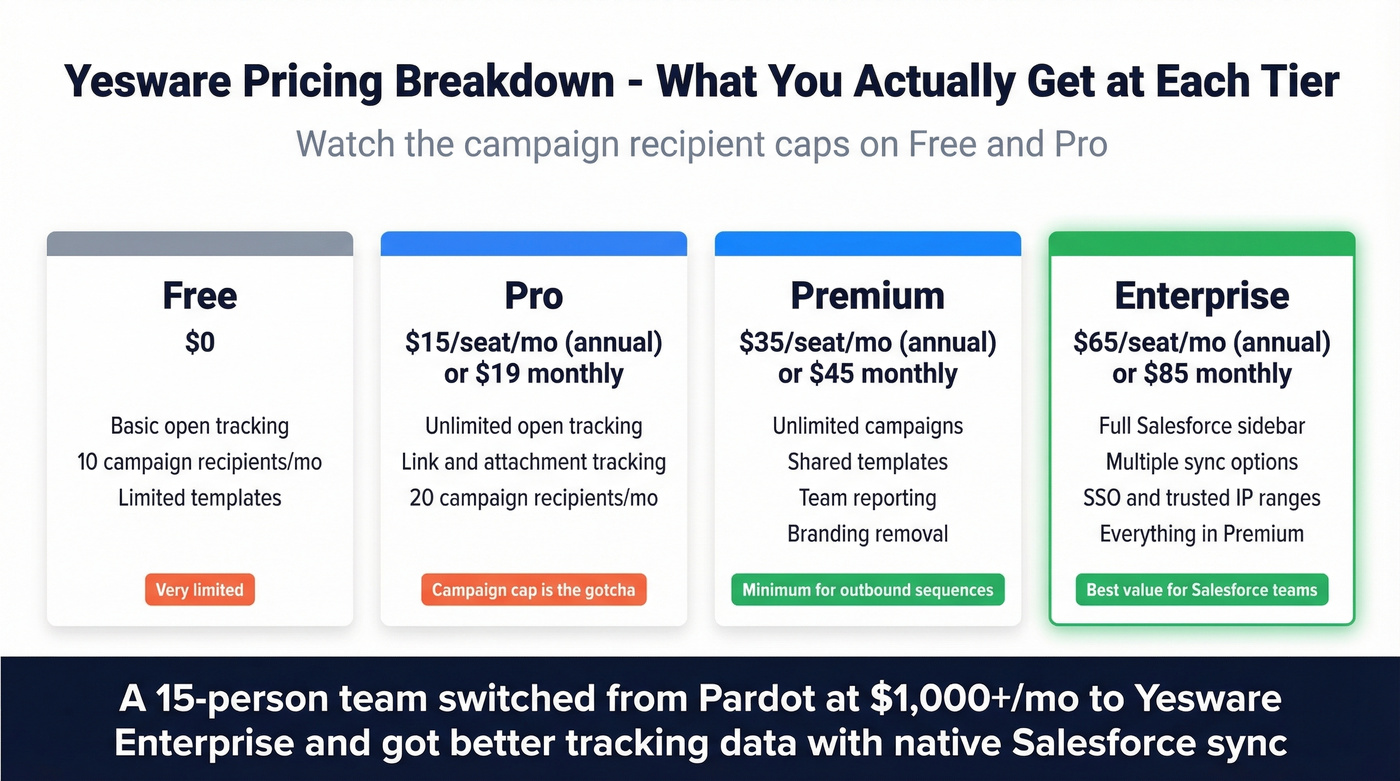
Yesware's pricing is refreshingly transparent. Free gets you basic open tracking and 10 campaign recipients per month. Pro runs $15/seat/month (annual) or $19 monthly, adding unlimited open tracking, link tracking, and attachment tracking - but caps campaigns at 20 recipients.
Premium at $35/$45 unlocks unlimited campaigns, shared templates, team reporting, and branding removal. Enterprise at $65/$85 adds the full Salesforce sidebar, multiple sync options, SSO, and trusted IP ranges. For teams that need tracking tightly coupled with Salesforce, Enterprise is the tier to evaluate.
The campaign recipient caps on Free and Pro are the gotcha. If you're running outbound sequences, you need Premium at minimum. For Salesforce-native teams, Enterprise at $65/seat is the best value in this category - tracking, sequences, and CRM sync without bolting together three separate tools. Works with Gmail and Outlook.
Mixmax
Mixmax restructured its pricing around an "AI Copilot" model, and the smart buy is hiding in plain sight. Skip the full Suite at $89-$105/user/month. (If you’re shopping around, compare Mixmax alternatives.)
The Inbox Copilot at $29/user/month (annual) or $34 monthly includes email tracking, scheduling, and follow-up signals - which is what most people actually need. The Engagement Copilot at $49/user/month ($65 monthly) adds multi-channel sequences and personalization. After the 14-day trial, you drop to Mixmax Free with basic tracking and scheduling.
Mixmax is overpriced for most teams, and the consensus on r/sales tends to agree - pricing comes up as a pain point constantly. Some users also run into tracking getting flagged by enterprise security systems. It's Gmail-only. But for Gmail-based sales teams that need sequences, templates, and tracking in one place, the Inbox Copilot tier is a reasonable deal.
Mailsuite
Use this if you want dead-simple email tracking in Gmail without touching a CRM, managing sequences, or paying more than $10/month.
Skip this if you use Outlook, need team-level analytics, or can't stomach the branded signature on the free plan. Having "Sent with Mailsuite" on your cold emails is a credibility killer.
Simplest Gmail tracker that just works. Paid plans start around $10/user/month and remove the branding. Clean interface, reliable open and click tracking, nothing more.
Streak
Streak is the tool for solo operators who want a free CRM and email tracking living inside Gmail. Open tracking is free. The CRM features - pipelines, mail merge, shared contacts - start at $59/user/month on paid plans.
Genuinely useful for freelancers and one-person shops, but Streak tries to be a CRM, a tracker, and a project management tool simultaneously and doesn't excel at any of them. Gmail-only.
Mailbutler
The best tracking option for Outlook users at a price that doesn't require a budget meeting. Tracking starts at $4.95/user/month. Professional at $8.95 adds templates and scheduling. Smart at $14.95 includes AI features. Business at $32.95/user/month covers team management.
Works with both Gmail and Outlook, which immediately sets it apart from most tools on this list. For Outlook shops looking for affordable tracking without buying into a full sales engagement platform, Mailbutler is the obvious pick.
Right Inbox
Free plan available, paid from ~$7.95/user/month. Gmail only. Basic open and click tracking that works - nothing remarkable, nothing broken. Budget option for Gmail users who don't need sequences or CRM integration.
SalesHandy
Free email tracking for Gmail users, outreach plans from ~$36/month. Good for teams that start with tracking and want to scale into sequences and automated follow-ups without switching tools. Supports Gmail and Outlook. (If you’re building the rest of your stack, start with the broader list of SDR tools.)
Boomerang
Free plan covers 10 emails/month. Personal at ~$5/month, Pro at ~$15, Premium at ~$50. Better known for send-later scheduling than tracking - the tracking features are limited compared to dedicated tools. Works with Gmail and Outlook.
Side-by-Side Comparison
| Tool | Free Plan | Paid From | Email Client | Best For |
|---|---|---|---|---|
| Prospeo (pre-send) | 75 emails/mo | ~$0.01/email | Any (verification) | Email verification before tracking |
| HubSpot Sales Hub | 200 notifs/mo | $15/seat/mo | Gmail + Outlook | HubSpot ecosystem |
| Yesware | 10 recipients/mo | $15/seat/mo | Gmail + Outlook | Salesforce teams |
| Mixmax | Post-trial only | $29/user/mo | Gmail only | Sales engagement |
| Mailsuite | Yes (branded) | ~$10/user/mo | Gmail only | Lightweight tracking |
| Streak | Yes | $59/user/mo | Gmail only | Solo CRM + tracking |
| Mailbutler | No | $4.95/user/mo | Gmail + Outlook | Outlook users |
| Right Inbox | Yes | ~$7.95/user/mo | Gmail only | Budget Gmail tracking |
| SalesHandy | Yes | ~$36/mo | Gmail + Outlook | Scaling outreach |
| Boomerang | 10/mo | ~$5/mo | Gmail + Outlook | Send-later + tracking |
You're paying per seat for tracking tools that report phantom opens. The real fix starts upstream: verified contact data that actually reaches real buyers. Prospeo gives you 143M+ verified emails at ~$0.01 each - no contracts, no sales calls.
Stop tracking ghosts. Start reaching real inboxes.
When to Skip Email Tracking
Not every team needs a tracking pixel. If you're selling into privacy-conscious industries - healthcare, legal, government - tracking feels invasive and erodes trust. In GDPR-strict European markets, the legal basis for pixel tracking is shakier than most vendors admit. And in relationship-based selling where deals close over months of trust-building, knowing someone opened your email at 2:47 AM adds nothing useful to your process.
Most guides list 15-20 email tracking tools because more tools means more affiliate links. That's padding, not useful advice. If open rates are unreliable and click rates tell you more, the real question isn't which tracker to buy - it's whether you should be optimizing for replies and conversions instead. (For the upstream fix, start with an email deliverability guide.)
FAQ
How do email tracking pixels work?
A 1x1 invisible image loads when the recipient opens the email, pinging the sender's server with the open time, device, and approximate location. Apple Mail Privacy Protection and image blockers can prevent or fake this signal, making pixel-based open data unreliable for roughly half of recipients.
Is email tracking legal?
Generally yes in the US - CAN-SPAM doesn't prohibit tracking pixels. In the EU, GDPR requires a lawful basis for processing personal data, and enforcement varies by jurisdiction. Most B2B trackers operate under legitimate interest, but check with your legal team if you're targeting EU prospects at scale.
What's the best free email tracker?
HubSpot Sales Hub offers the most features at 200 notifications per month. Mailsuite wins for pure simplicity in Gmail. For pre-send verification, Prospeo's free tier includes 75 email verifications - critical since tracking undelivered emails is pointless.
Which trackers work with Outlook?
HubSpot Sales Hub, Yesware, Mailbutler, SalesHandy, and Boomerang all support Outlook. Most popular options - Mailsuite, Streak, Mixmax, Right Inbox - are Gmail-only. Mailbutler starting at $4.95/user/month is the best value for Outlook-first teams.
Why are my open rates suddenly higher?
Apple Mail Privacy Protection is inflating your data. MPP preloads tracking pixels automatically, registering "opens" that never happened. Focus on click and reply rates instead - those metrics can't be faked by a privacy proxy.