

The Only Email Warm Up Schedule You Need
Five new Google Workspace accounts, 200 cold emails from a fresh domain, everything in spam by day three. We've watched it happen more times than we can count. That's what happens when you skip a proper email warm up schedule - or worse, wing it with vague "start slow" advice.
Below: exact daily volumes, metric gates, and scaling rules to get your domain sending safely.
Before You Send Anything
Don't fire off a single warmup email until these are locked in:
- SPF, DKIM, and DMARC authenticated. Missing any one of these can get you blacklisted before you send a real campaign. Set up custom DKIM and a custom Return-Path domain aligned with the exact domain you'll send from - subdomains build their own reputations.
- Domain aged 7-14 days. A brand-new domain with immediate sending activity is a red flag to every ISP. Just let it sit.
- Verified contact list. Bounce rates above 3% undo weeks of warmup progress. A single campaign with 5%+ bounces can nuke your reputation overnight. We use Prospeo's email finder for this - the 5-step verification catches spam traps, honeypots, and catch-all domains at 98% accuracy, and the database refreshes every 7 days instead of the industry-standard six weeks.
- Warmup tool active. Pick a dedicated tool that uses real inboxes, not the built-in warmup baked into your outreach platform.
The 4-Week Email Warm Up Schedule
This schedule is built for cold outreach from Google Workspace or Microsoft 365 accounts - shared IP pools where domain reputation is the variable that matters. If you're warming a dedicated IP for high-volume marketing sends, the ramp is different (some plans start around 480/day on Day 1 and scale to 100k+/day by Day 30 with hourly caps). Most cold email teams don't need dedicated IPs.
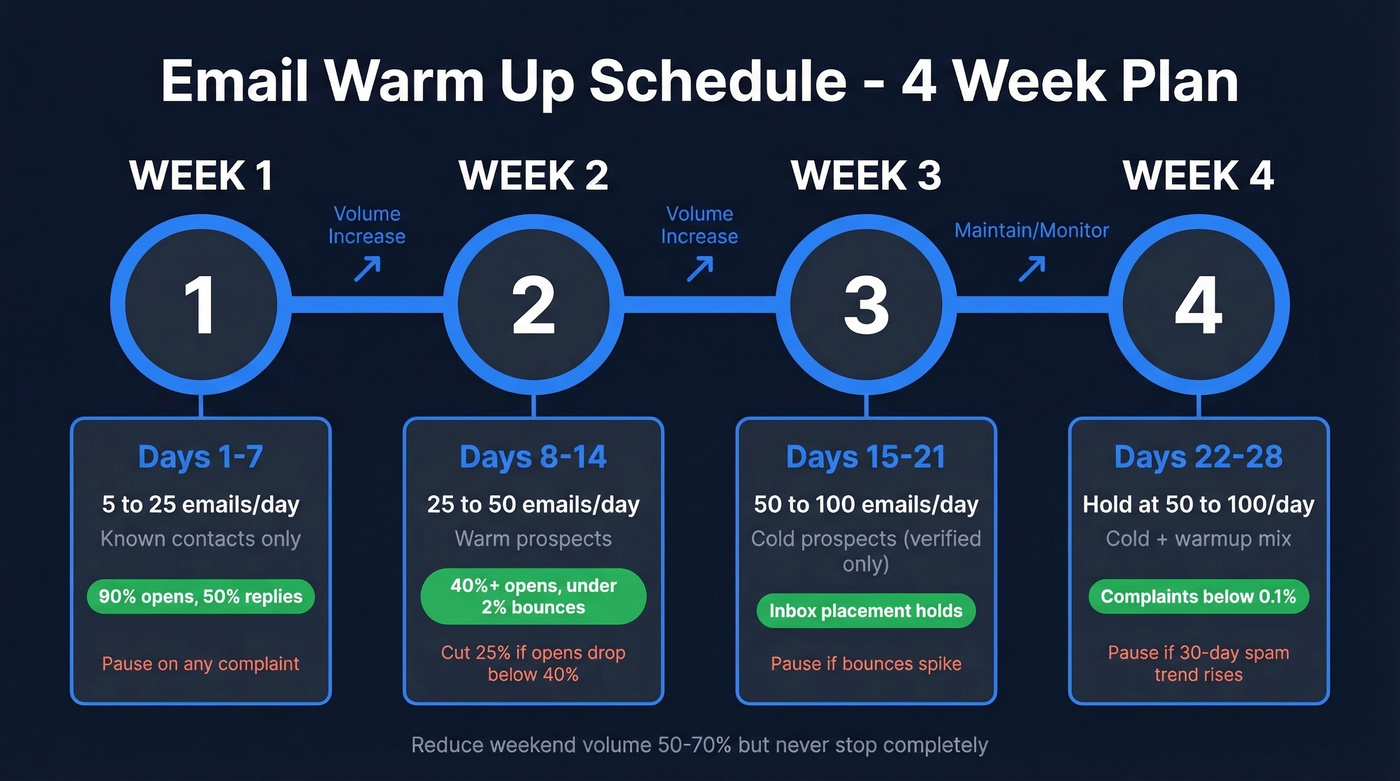
| Week | Days | Daily Volume | Audience | Metric Gate |
|---|---|---|---|---|
| 1 | 1-7 | 5 to 25 | Known contacts | 90% opens, 50% replies, 0 complaints. Pause on any complaint. |
| 2 | 8-14 | 25 to 50 | Warm prospects | 40%+ opens, <2% bounces. Pause if opens drop below 40%. |
| 3 | 15-21 | 50 to 100 | Cold (verified only) | Inbox placement holds, <2% bounces. Pause if bounces spike. |
| 4 | 22-28 | Hold 50-100 | Cold + warmup mix | Complaints below 0.1%, steady delivery. Pause if 30-day spam trend rises. |
Week 1 builds a trust buffer. Send to people who'll open and reply - teammates, friends, vendors you actually email. Near-100% engagement tells Gmail and Outlook your domain is legitimate. Space sends 2-3 minutes apart and distribute volume across business hours: roughly 25% from 8-10am, 30% from 10-12, 25% from 1-3pm, 20% from 3-5pm.
Week 2 introduces warm prospects - people who've interacted with your brand before. Increase by 5-10 emails per day, not more. If opens drop below 40%, cut volume by 25-30% and hold until metrics recover. Getting the pacing right during this phase prevents the sudden reputation drops that derail most campaigns.
Week 3 is when cold prospects enter the mix. Keep warmup running alongside real campaigns. The trust buffer from Weeks 1-2 absorbs the inevitable lower engagement from cold sends. Track placement by provider if you can - Outlook is typically the hardest to crack, while Gmail and Yahoo/AOL usually benchmark higher.
Week 4 is maintenance, not graduation. Keep 30-40% of your daily volume as warmup interactions. Here's the thing most guides get wrong: warmup isn't a two-week sprint. It's continuous. Thirty days of inactivity and your domain is considered cold again.
Reduce weekend volume 50-70%, but don't stop completely. Inconsistent patterns hurt more than low volume.
Scaling Beyond 100/Day
Once you're past the initial 4 weeks, scaling follows diminishing multipliers:
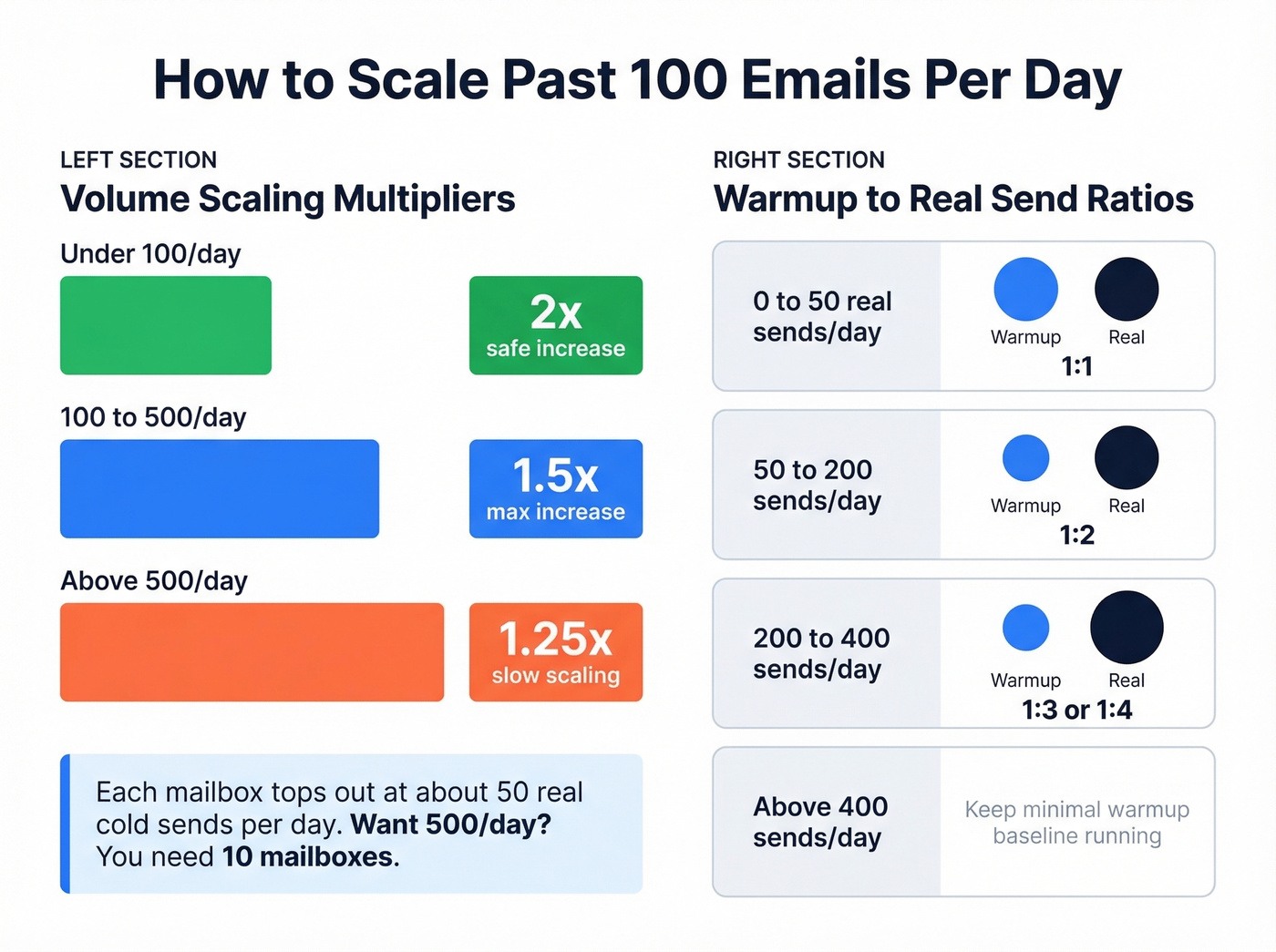
- Under 100/day: you can safely double daily volume
- 100-500/day: cap increases at 1.5x
- Above 500/day: slow to 1.25x
Warmup-to-real ratios shift as you scale. Maintain 1:1 at 0-50 real sends/day, shift to 1:2 at 50-200, and 1:3 or 1:4 at 200-400. Above 400, keep a minimal warmup baseline running.
The multi-mailbox math is straightforward. Each mailbox tops out around 50 real cold sends per day. Want to hit 500/day? You need 10 mailboxes, each with its own warmup cycle. No shortcuts here.

You just spent 4 weeks building domain reputation. One campaign with stale emails destroys it. Prospeo's 5-step verification and 7-day data refresh keep bounce rates under 1% - so your warmup actually holds.
Stop warming up domains just to burn them on bad data.
Five Mistakes That Kill Your Warmup
Starting too fast. Never increase volume more than 20% per day. We've seen teams jump from 10 to 80 emails in three days and land in spam within a week.
If you're unsure how fast to ramp, use an email velocity cap per mailbox and stick to it.
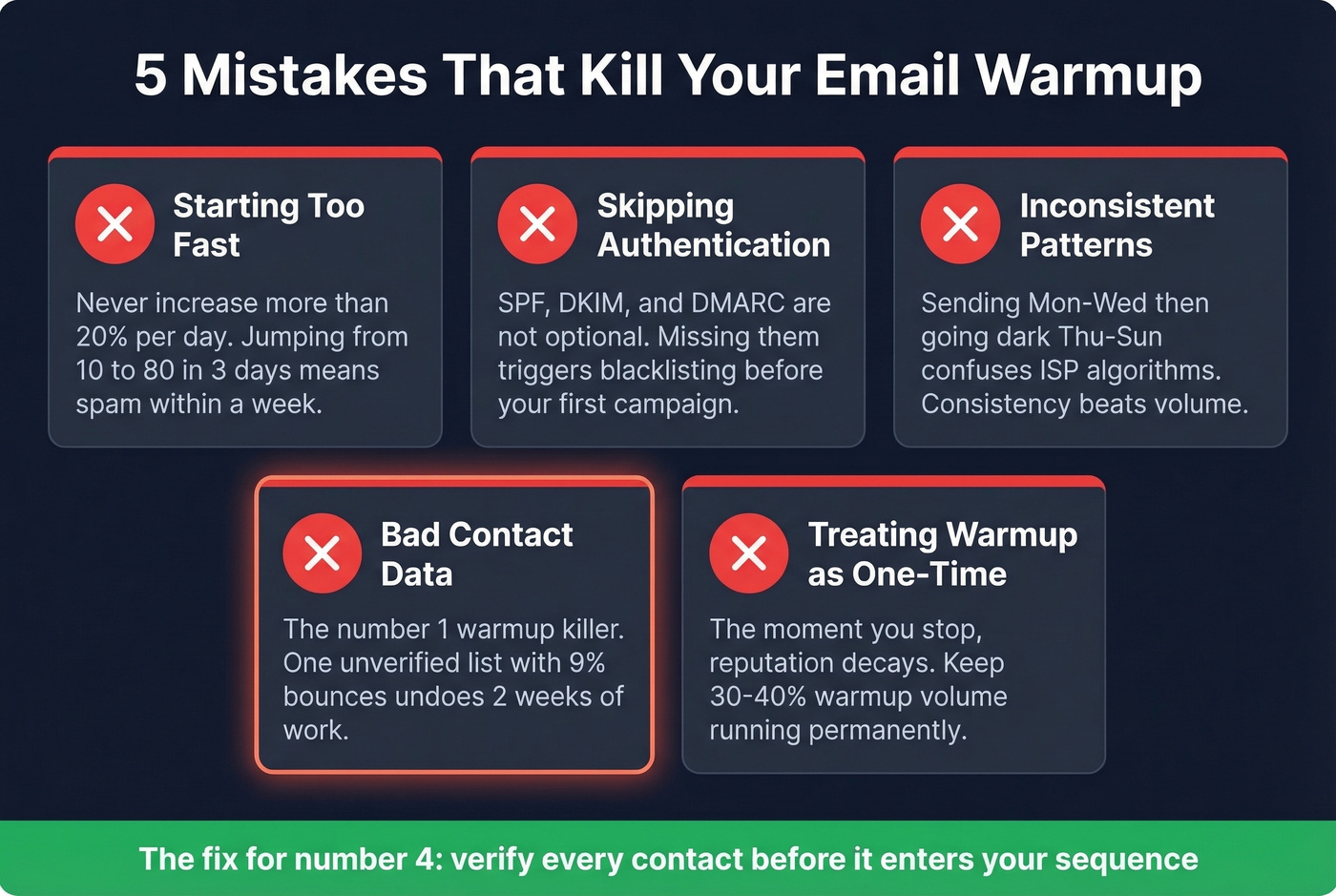
Skipping authentication. SPF, DKIM, and DMARC aren't optional. Missing them triggers blacklisting before your first real campaign even goes out. If you need a quick check, follow a guide on how to verify DKIM is working.
Inconsistent patterns. Sending Monday through Wednesday, going dark Thursday through Sunday, then blasting on Monday confuses ISP algorithms. Consistency beats volume every time.
Bad contact data. This is the #1 warmup killer, full stop. You spend two weeks building reputation, then send to an unverified list and bounce rate hits 9%. The industry-average data refresh cycle is six weeks, which means most databases serve stale emails that bounce. Verify every contact before it enters your sequence (see email bounce rate benchmarks and fixes).
Treating warmup as a one-time project. The moment you stop, reputation decays. Keep 30-40% warmup volume running permanently - it's an operational process, not a checkbox. If you're trying to stabilize deliverability long-term, use a repeatable process to improve sender reputation.
How to Monitor Progress
Google Postmaster Tools is your primary dashboard, but set expectations: data updates with a 24-48 hour lag, and you need roughly 100+ daily sends to Gmail recipients before consistent data appears. Low-volume days show zero data due to privacy thresholds - that's normal, not a red flag.
If you want a broader view beyond Gmail, keep an eye on email reputation tools that track blacklists and placement signals.
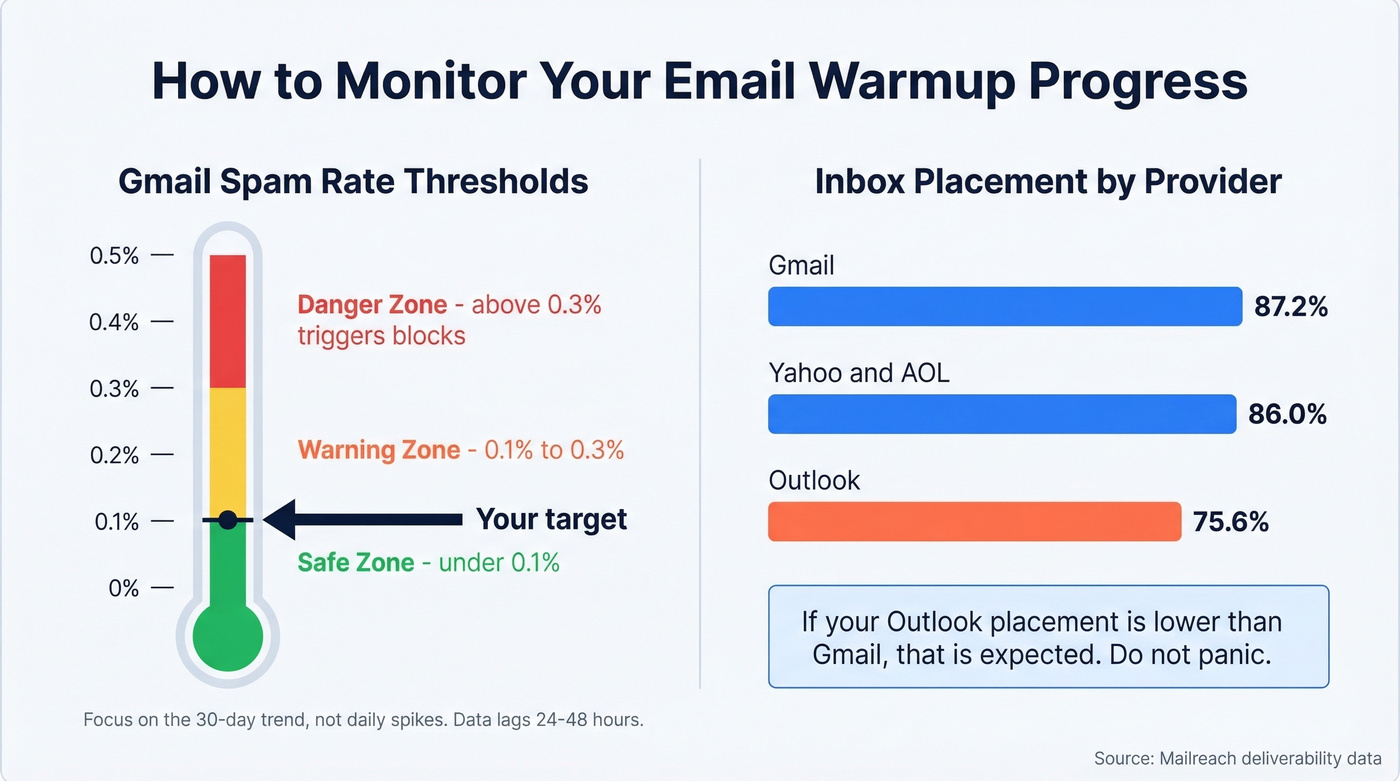
The number that matters most: keep your Gmail spam rate below 0.1%. Sustained rates above 0.3% trigger blocks. Focus on the 30-day trend, not daily spikes. In our experience, you'll occasionally see a "100% spam rate" anomaly on zero-send days due to delayed complaints. Ignore it.
For ISP-specific benchmarks, Mailreach's deliverability data shows Gmail at 87.2% inbox placement, Yahoo/AOL at 86.0%, and Outlook at just 75.6%. If your Outlook placement is lower than Gmail, that's expected - don't panic and don't blow up your schedule over it.
Let's be honest: most teams obsess over warmup tool selection when the real variable is contact data quality. A perfect email warm up schedule with a 5% bounce rate loses to a mediocre schedule with a 0.5% bounce rate every single time. If you're building lists for outbound, pair warmup with a solid B2B cold email sequence so engagement stays predictable.
Warmup Tools Worth Considering
The consensus on r/coldemail is clear: specialist warmup tools that use real inboxes outperform built-in warmup features in outreach platforms. Built-in warmup often relies on artificial inbox networks that create suspicious engagement patterns.
| Tool | Price | Best For |
|---|---|---|
| Warmbox | ~$15/mo (1 inbox) | Budget solo senders |
| Mailreach | ~$25/mo per inbox | Deliverability-focused teams |
| TrulyInbox | ~$29/mo unlimited | Agencies with many mailboxes |
| Lemwarm | ~$29/mo per inbox | Lemlist users |
| Instantly | ~$30/mo (warmup included) | All-in-one outreach + warmup |
| Warmy | ~$49-$429/mo | Enterprise reporting needs |
If you're running fewer than 5 mailboxes, TrulyInbox's unlimited plan is the best value. For teams already on Instantly, the built-in warmup is good enough - just monitor closely during the first two weeks. Skip the free options like GMass Warm-Up and Snov.io unless you're testing a single mailbox; they cap volume and features significantly.
Once warmup is stable, your next lever is copy. Use proven cold email subject line examples to protect opens as you scale.
Scaling to 10 mailboxes at 50 sends each? That's 500 verified contacts per day. At $0.01/email with 98% accuracy, Prospeo keeps every mailbox's reputation intact while you scale.
Verified contacts at scale - without nuking your sender reputation.
FAQ
How long does email warmup take?
Two to four weeks minimum for a new domain. Brand-new domains with no sending history should plan for the full four weeks. Keep warmup running continuously after launching real campaigns - maintain 30-40% of daily volume as warmup interactions. After 30 days of inactivity, you're effectively starting over.
Can I send real campaigns during warmup?
Yes, starting in Week 2 or 3 once your metric gates are green. Maintain a 1:1 warmup-to-real ratio initially, then shift to 1:2 as volume grows past 50 sends per day. Never stop warmup entirely - it's the ongoing trust buffer that protects your real campaigns.
What's the fastest way to ruin a warmup?
Sending to an unverified list. Bounces above 2-3% can undo weeks of reputation building in a single campaign. Verify every contact before your first send.