

ESP Matching: What It Is, Whether It Works, and Why It's Not Your Biggest Lever
You're running cold email at scale, you've got both Google Workspace and Microsoft 365 sending accounts, and someone on your team asks: "Should we turn on ESP matching?" The answer is yes - but only after you've handled the five things that matter more.
The Short Version
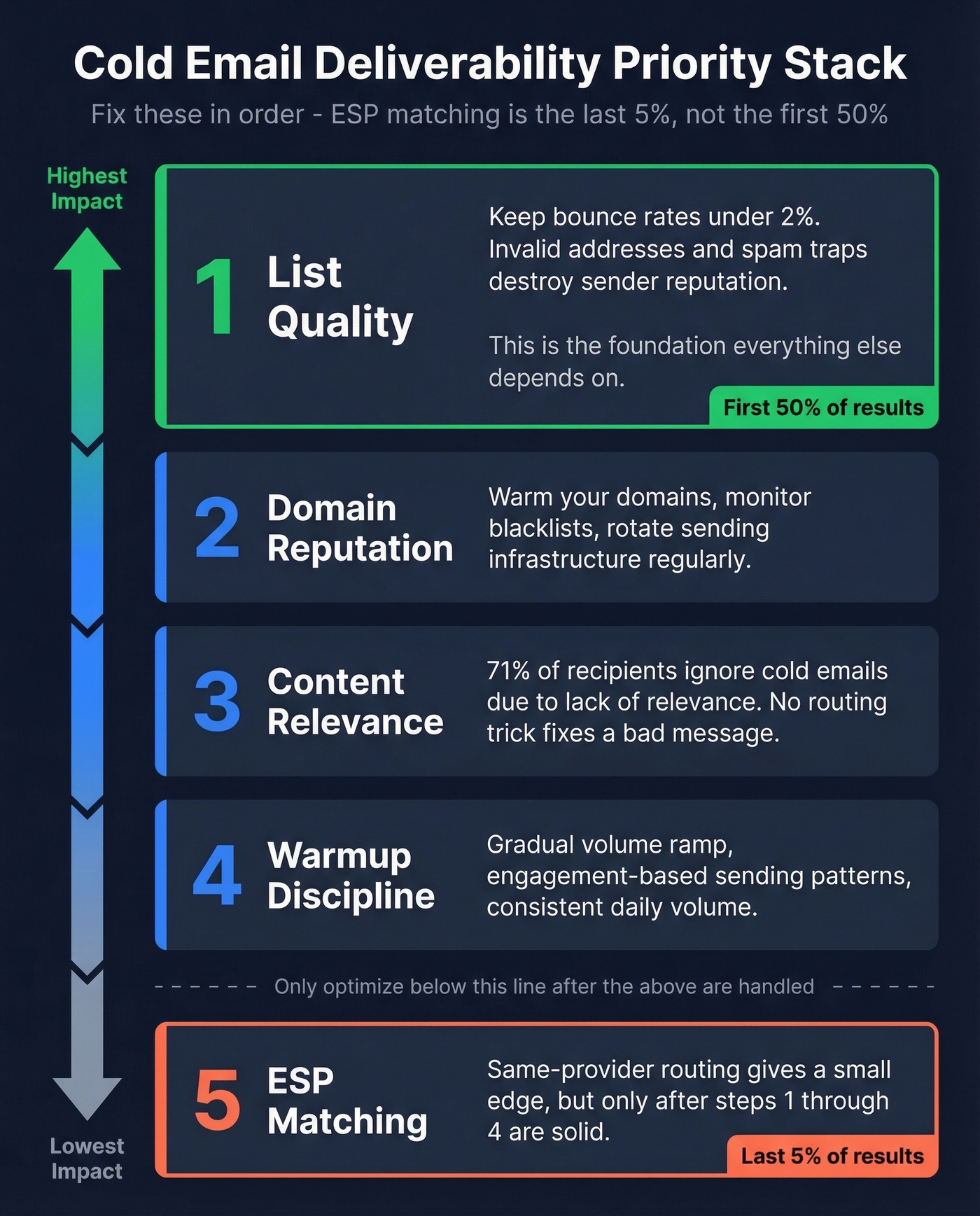
ESP matching is real, supported by limited data, and worth enabling if you already run both Google Workspace and Microsoft 365 sending accounts. But it's the last 5% of deliverability, not the first 50%. Fix your list quality and domain reputation first - those dwarf any routing optimization.
What Is ESP Matching?
ESP matching routes your cold emails based on the recipient's email provider. Gmail recipients get mail from your Google Workspace accounts; Outlook recipients get mail from your Microsoft 365 accounts. The logic is simple: same-ecosystem sends face less friction than cross-platform ones.
Tools like Instantly, Saleshandy, SmartReach, and Lemlist all offer some version of this, primarily matching between Google Workspace and Microsoft 365, with everything else falling into an "other" bucket. Smartlead goes a bit further with Zoho-to-Zoho matching, but Google/Microsoft is the core use case most teams care about. Given that those two providers cover the vast majority of B2B inboxes, that's a reasonable starting point.
How Email Provider Detection Works
The detection mechanism is straightforward: MX record lookups. When you send an email, your mail server queries DNS for the recipient domain's MX records - the entries that specify which servers handle incoming mail. If the MX records point to aspmx.l.google.com, it's Google Workspace. If they point to *.mail.protection.outlook.com, it's Microsoft 365.
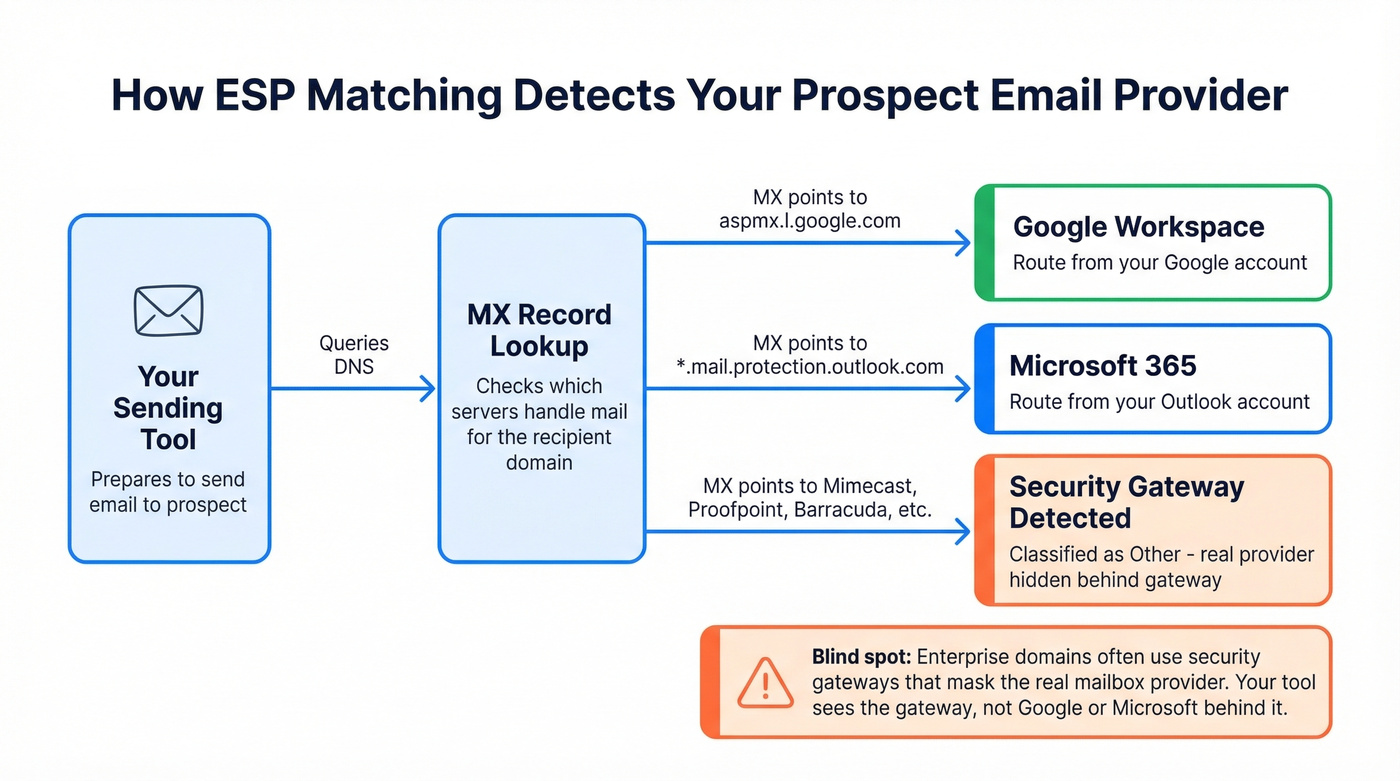
Here's the catch most articles skip: security gateways like Mimecast, Proofpoint, and Barracuda often sit in front of MX records for enterprise domains. The MX lookup returns the gateway, not the actual mailbox provider. So your tool classifies a domain as "other" even when the underlying mailbox is Google Workspace or Microsoft 365 behind a gateway. For mid-market and enterprise prospecting, this blind spot is real and worth knowing about.
For context, Litmus's January 2026 data (based on 1.1B opens) shows Gmail at 25.45% of email opens and Outlook at 4.83% combined. Those are client-based numbers, not mailbox provider share, but they confirm Google dominates inbox behavior by a wide margin.

ESP matching is the last 5% - list quality is the first 50%. Prospeo's 5-step verification catches invalid addresses, spam traps, and catch-all domains with 98% accuracy, refreshed every 7 days. At ~$0.01 per verified email, you fix the foundation before you optimize the routing.
Get your bounce rate under 2% before you touch ESP matching.
Does Same-ESP Routing Actually Work?
The consensus on r/coldemail has been asking for hard evidence on this for years. The honest answer: there's almost none.
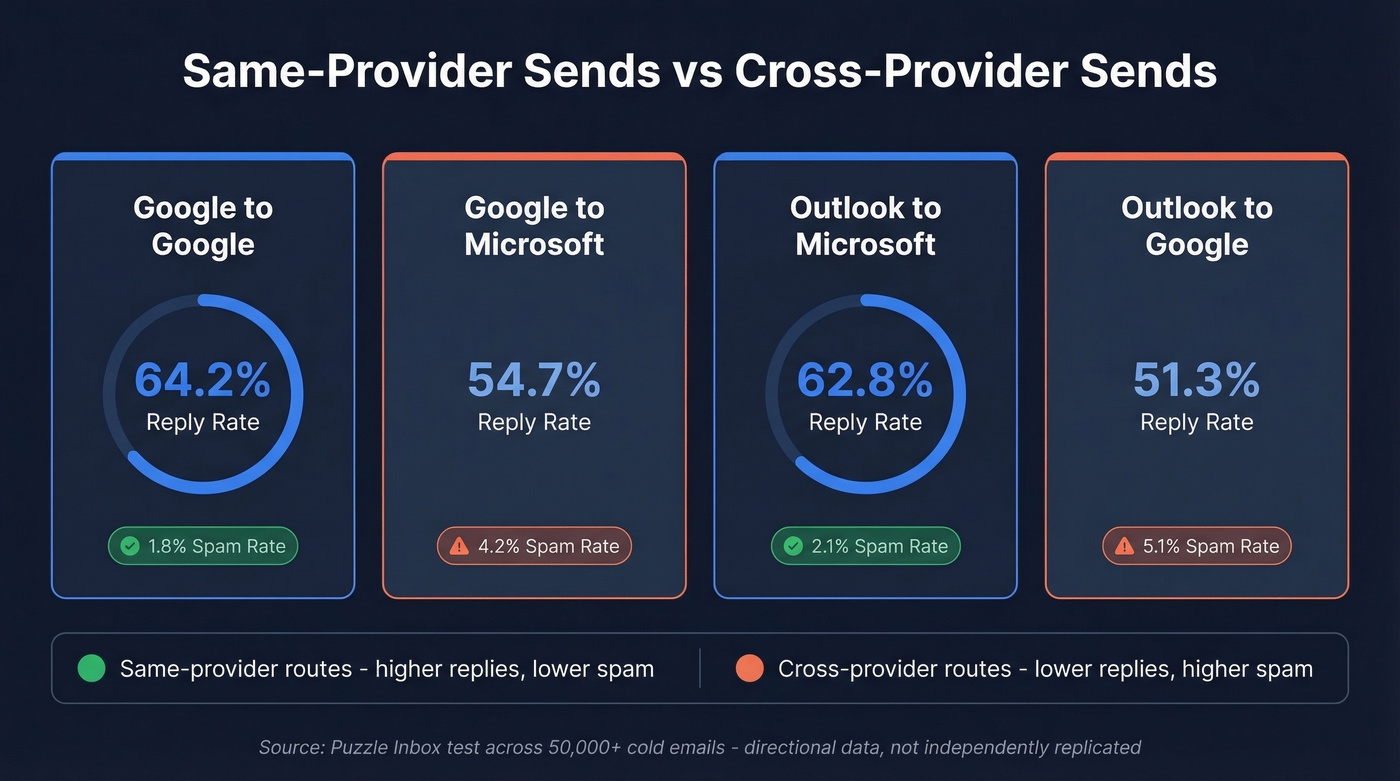
The only quasi-benchmark with actual numbers comes from Puzzle Inbox, which ran a controlled test across 50,000+ cold emails:
| Sending → Receiving | Reply Rate | Spam Rate |
|---|---|---|
| Google → Google | 64.2% | 1.8% |
| Google → Microsoft | 54.7% | 4.2% |
| Outlook → Microsoft | 62.8% | 2.1% |
| Outlook → Google | 51.3% | 5.1% |
Same-ESP sends showed a ~10-13 percentage point reply rate advantage and meaningfully lower spam rates. That's a real signal. But here's the important context: the average cold email reply rate sits around 3.4%, so these 50-60%+ reply rates suggest a warm or highly targeted list, not typical cold outbound. The relative difference between same-provider and cross-provider sends is the meaningful takeaway, not the absolute numbers.
Let's be honest - this is one quasi-benchmark with no published methodology and no independent replication. We've seen teams treat it as gospel. It's directional evidence, not proof. Use it accordingly.
Why Same-Provider Sends Perform Better
The performance gap makes technical sense.
Same-provider routing reduces hops and external handoffs compared to cross-provider delivery, which changes what filtering layers the message passes through. SPF, DKIM, and DMARC alignment still matters either way, but cross-platform sends introduce more points where authentication, reputation, and policy checks get stricter.
Provider-specific filtering matters too. Gmail leans heavily on ML and engagement signals. Microsoft filters via Exchange Online Protection / Defender and tends to be stricter about authentication alignment and sending-pattern consistency. Microsoft also surfaces external-sender indicators in many tenant configurations, which can affect how recipients perceive cold outreach - that little yellow banner saying "this sender is external to your organization" isn't helping your open rates.
And with Gmail and Yahoo enforcing bulk sender standards in 2024 and Microsoft following in 2025, authentication alignment matters more than ever across both platforms.
None of these factors are massive individually. Together, they create a small but consistent edge for same-provider routing.
ESP Matching vs. the Bigger Levers
Here's the thing: if your list hygiene is mediocre, provider matching is the wrong thing to obsess over. In our experience, the teams that see the biggest deliverability gains aren't the ones toggling this feature - they're the ones who cleaned their lists first.
We watched an agency client spend two weeks setting up dual-provider infrastructure and ESP matching, only to discover their bounce rate was sitting at 12%. All that routing optimization was pointless because half their emails were hitting dead addresses and torching their sender reputation in the process.
Here's the priority stack, in order of impact:
- List quality - if 15-20% of your list is invalid, ESP matching is rearranging deck chairs on the Titanic. Keep bounce rates under 2% or your sender reputation craters. Prospeo's 5-step email verification catches invalid addresses, spam traps, and catch-all domains with 98% accuracy, refreshed every 7 days. At ~$0.01 per verified email, fix the data before you optimize the routing.
- Domain reputation - warm your domains, monitor blacklists, rotate sending infrastructure. (If you need a checklist, see sender reputation and email reputation tools.)
- Content relevance - 71% of recipients ignore cold emails due to lack of relevance, per Salesforge's analysis of 11M+ emails. No routing trick fixes a bad message. (Start with a solid B2B cold email sequence and tighten your email copywriting.)
- Warmup discipline - gradual volume ramp, engagement-based sending patterns. (More on safe email velocity and unlimited email warmup tools.)
- Provider matching - the optimization layer that only matters once 1-4 are solid.

Should You Enable It?
Enable if:
- You already run both Google Workspace and Microsoft 365 sending accounts
- Your bounce rate is consistently under 2% (see email bounce rate benchmarks and fixes)
- Your domain reputation is healthy (check Google Postmaster Tools and Microsoft SNDS)
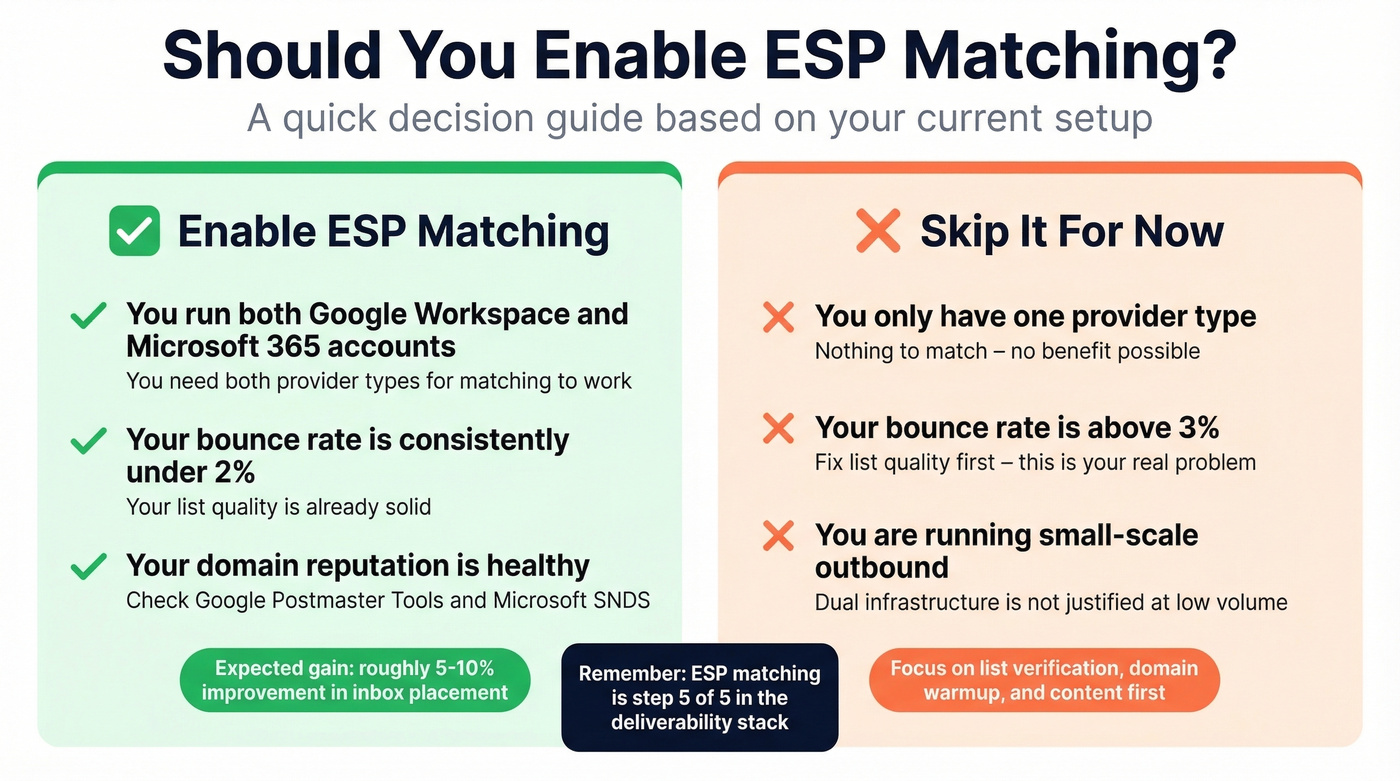
Skip it for now if:
- You only have one provider type - there's nothing to match
- Your list quality is poor and bounce rate sits above 3%
- You're running small-scale outbound where dual infrastructure isn't justified
Setup is simple: connect both provider types in your sending tool, enable the toggle, and balance your mailbox ratios to match your lead distribution. If 60% of your prospects are on Google, roughly 60% of your sending accounts should be Google Workspace. Most sending tools show a provider breakdown inside their matching view, and you can also run MX lookups yourself to estimate the split before committing to a ratio.
That agency spent two weeks on dual-provider routing with a 12% bounce rate. Don't be them. Prospeo's data refreshes every 7 days - not the 6-week industry average - so your emails hit real inboxes regardless of which ESP you route through.
Clean data makes every deliverability lever work harder.
FAQ
Does ESP matching work with Yahoo, Zoho, or other providers?
Most tools only match between Google Workspace and Microsoft 365, routing everything else as "other." A few platforms like Smartlead support additional providers such as Zoho. Check your tool's documentation before assuming full coverage.
Can enabling it reduce my sending volume?
Yes. If your leads skew heavily toward one provider but your sending accounts skew the other way, some accounts sit idle while others hit daily limits. Balance your mailbox ratios to mirror your lead distribution to avoid bottlenecks.
What matters more - provider matching or email verification?
Verification, by a wide margin. Provider matching optimizes routing for emails that actually arrive. If your list has invalid addresses or spam traps, no routing optimization saves you. Clean the list first, then optimize the routing.