

How to Extract Emails From Websites Free (Without Wrecking Your Domain)
Independent testing found only 38% of emails returned by lookup tools are correct. The other 62%? A mix of wrong addresses and emails that weren't found at all. That's the reality nobody mentions when they recommend "just scrape it."
A real person posted exactly this problem on r/coldemail - around 8,000 websites, needed emails from each, and clicking through "Contact Us" pages one by one wasn't happening. Another had roughly 6,000 links where the email lived on subpages like /contact or /about, not the homepage.
Here's the thing: pulling email addresses from websites is the easy part. Getting emails that actually work without torching your sender reputation - that's where most people get burned.
What You Need (Quick Version)
One-off extraction, under 50 URLs. Paste a URL into Mailmeteor or ContactSwing's free email extractor. You'll pull whatever email addresses are published on the pages those tools can access.
Bulk extraction across hundreds or thousands of URLs. Outscraper's free tier handles 500 domains. If you code, a Python script with BeautifulSoup gets you further. Expect cleanup work afterward.
Emails that actually work without cleanup. Skip extraction entirely. Prospeo covers 143M+ verified emails with 98% accuracy - search by company, role, or 30+ filters instead of scraping websites and hoping. The free tier gives you 75 verified emails plus 100 Chrome extension credits per month.
How Free Extractors Actually Work
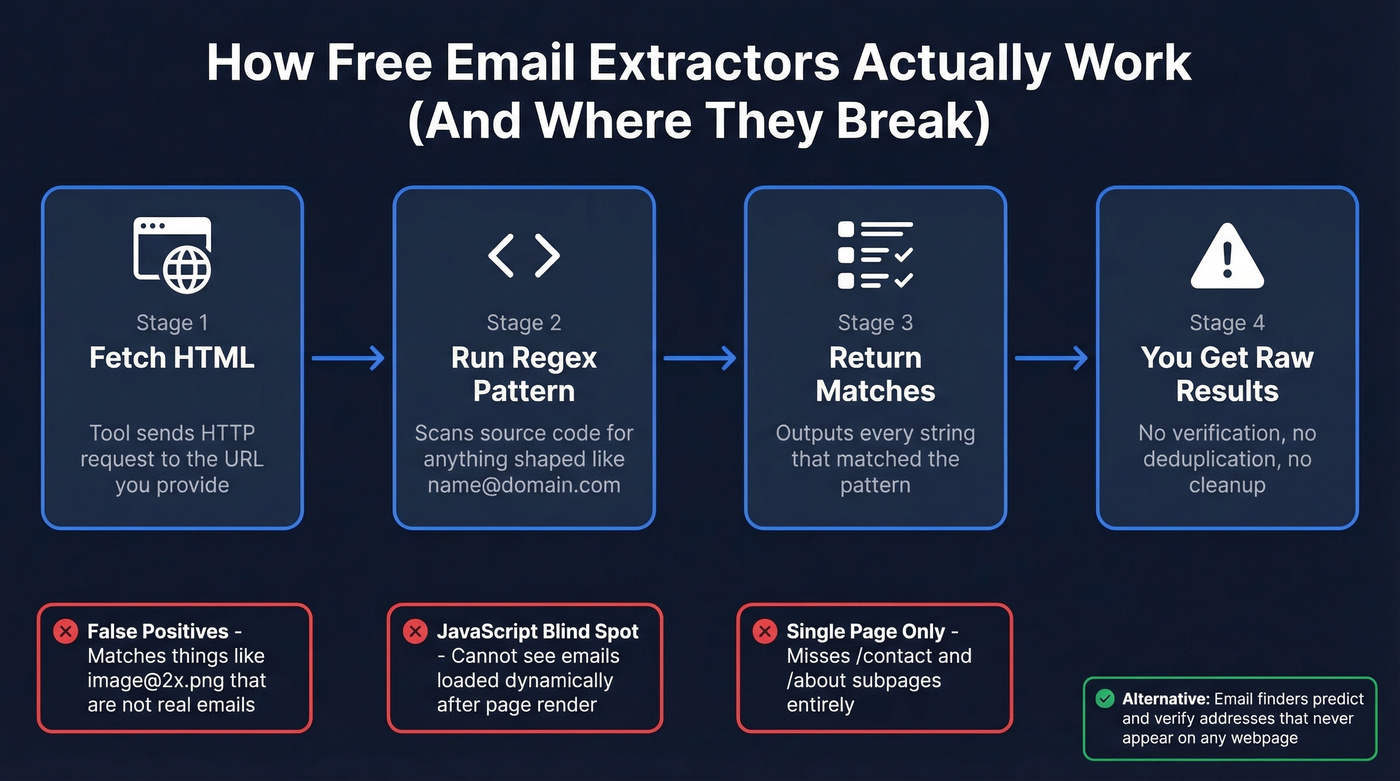
Every free email extractor does roughly the same thing under the hood. It fetches the HTML of a webpage, then runs a regex pattern across the source code looking for anything shaped like an email address:
([a-zA-Z0-9._%+-]+@[a-zA-Z0-9.-]+\.[a-zA-Z]{2,})
Simple, effective, and deeply flawed.
The first problem is false positives. That regex will happily match image@2x.png - anything that looks like an email, whether it is one or not. The second problem is JavaScript rendering. Many modern sites load contact info dynamically, and a basic HTTP request never executes that JavaScript, so your extractor sees an empty page where the email should be. Then there's the subpage problem: many free tools only scan the single URL you give them, ignoring /contact or /about pages where the email actually lives.
One distinction most people miss: extraction - scraping visible emails from HTML - isn't the same as finding, which means discovering someone's email from their name and company. Extractors only get what's already published. Finders predict and verify addresses that may never appear on any webpage. That difference matters more than most people realize.
Best Free Email Extractors Compared
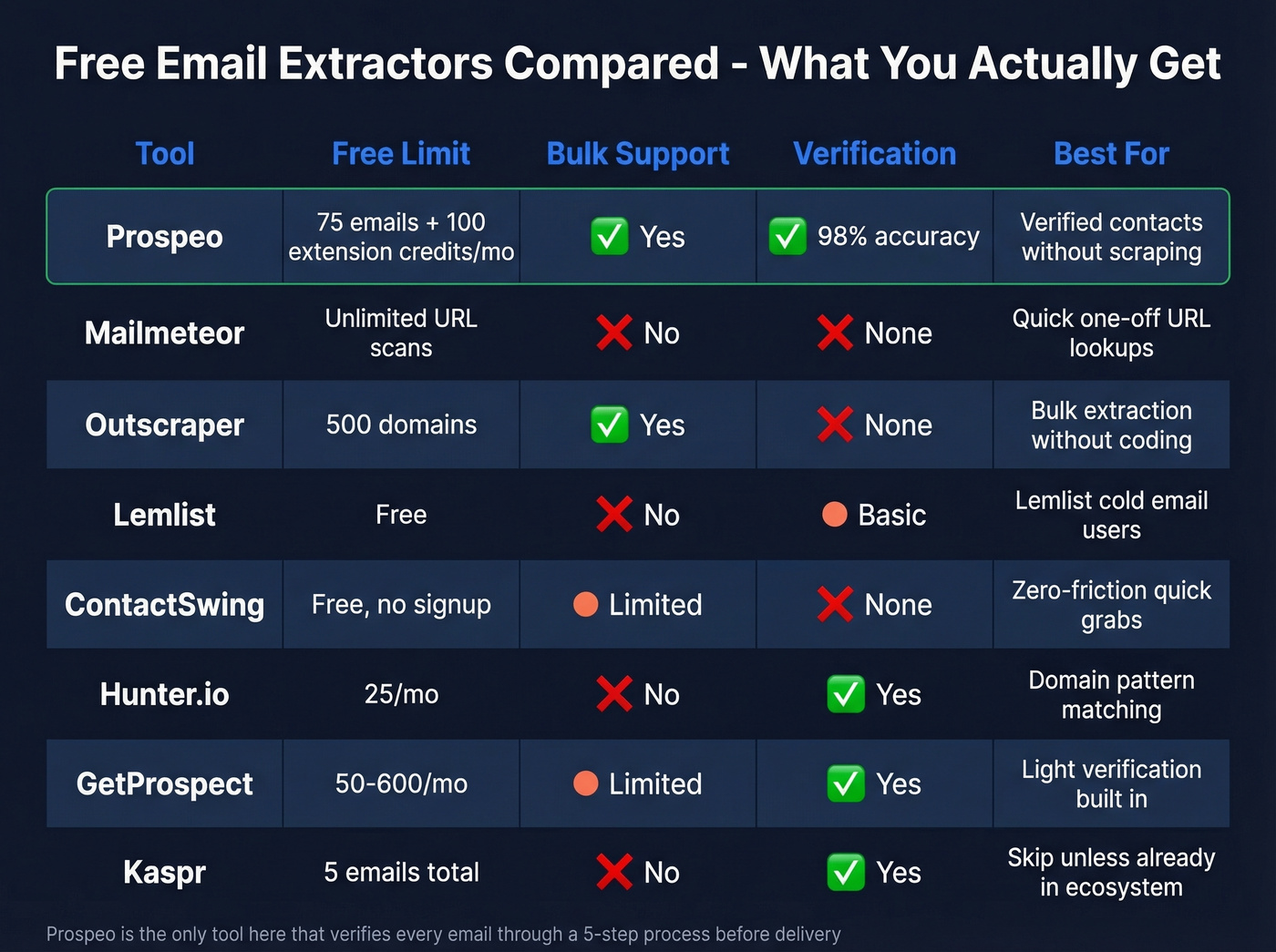
| Tool | Type | Free Limit | Bulk? | Verifies? | Paid From |
|---|---|---|---|---|---|
| Prospeo | Database / API | 75 emails + 100 extension credits/mo | Yes | Yes (98%) | ~$0.01/email |
| Mailmeteor | Web tool | Free (URL-based scan) | No | No | Free |
| Outscraper | Web tool / API | 500 domains | Yes | No | $3/1K |
| Lemlist | Web tool | Free | No | Basic | Free |
| ContactSwing | Web tool | Free | Limited | No | Free |
| Hunter.io | Web tool / API | 25/mo | No | Yes | $49/mo |
| GetProspect | Extension / Web | 50-600/mo | Limited | Yes | $49/mo |
| Kaspr | Extension | 5 emails | No | Yes | $49/mo |
Prospeo
The strongest option when you need verified, deliverable contacts rather than raw scraped addresses. The database spans 300M+ professional profiles with 143M+ verified emails, searchable by 30+ filters including job title, company size, technographics, and buyer intent across 15,000 topics. Every email goes through a 5-step verification process with catch-all handling, spam-trap removal, and honeypot filtering - delivering 98% accuracy on a 7-day data refresh cycle. The free tier gives you 75 verified emails and 100 Chrome extension credits per month, no credit card required. We've seen teams go from 35% bounce rates to under 4% just by switching from scraped lists to verified data.
Mailmeteor Email Extractor
The simplest option for grabbing visible emails fast. Paste a URL, run the scan, get results. It's 100% free with no signup required, and it can follow internal links to discover emails across multiple pages. It doesn't validate deliverability, so don't skip verification if you plan to send.
Outscraper
Best free option for bulk work. The free tier covers 500 domains, pulling emails and other data from public sources. After that, pricing runs $3 per 1,000 domains. No built-in verification, so you'll need a separate cleanup step. If you've got 2,000+ websites and zero coding skills, this is where to start.
Lemlist Email Extractor
Solid if you're already running cold email through Lemlist. Their free tool pulls emails from URLs or pasted text, but it doesn't verify them. Lemlist also has an Email Checker that can verify a few addresses.
ContactSwing
No signup required - paste a URL and get emails. It supports bulk extraction by accepting multiple URLs, one per line. For a quick grab with zero registration hassle, this is the fastest route.
Hunter.io
More of a domain-level email finder than a website scraper. Hunter predicts email patterns based on the company domain rather than scraping HTML. You get 25 free searches per month, and paid plans start around $49/mo. Hunter's documentation covers their pattern-matching approach if you're curious about the methodology.
GetProspect
A decent middle ground if you want light verification baked in. Depending on the plan, the free tier ranges from 50 to 600 credits per month. Starter plan runs $49/mo for 1,000 credits.
Kaspr
Five free email extractions. Five. That's a demo, not a tool. The $49/mo starter plan bumps you to 60 emails, which is still thin. Skip this unless you're already deep in their ecosystem.

Only 38% of scraped emails are correct. Prospeo's 5-step verification delivers 98% accuracy across 143M+ emails - no regex, no cleanup, no domain damage. The free tier gives you 75 verified emails per month.
Stop scraping. Start sending to emails that actually exist.
Why Most Extracted Emails Fail
Here's where the free extraction dream falls apart.
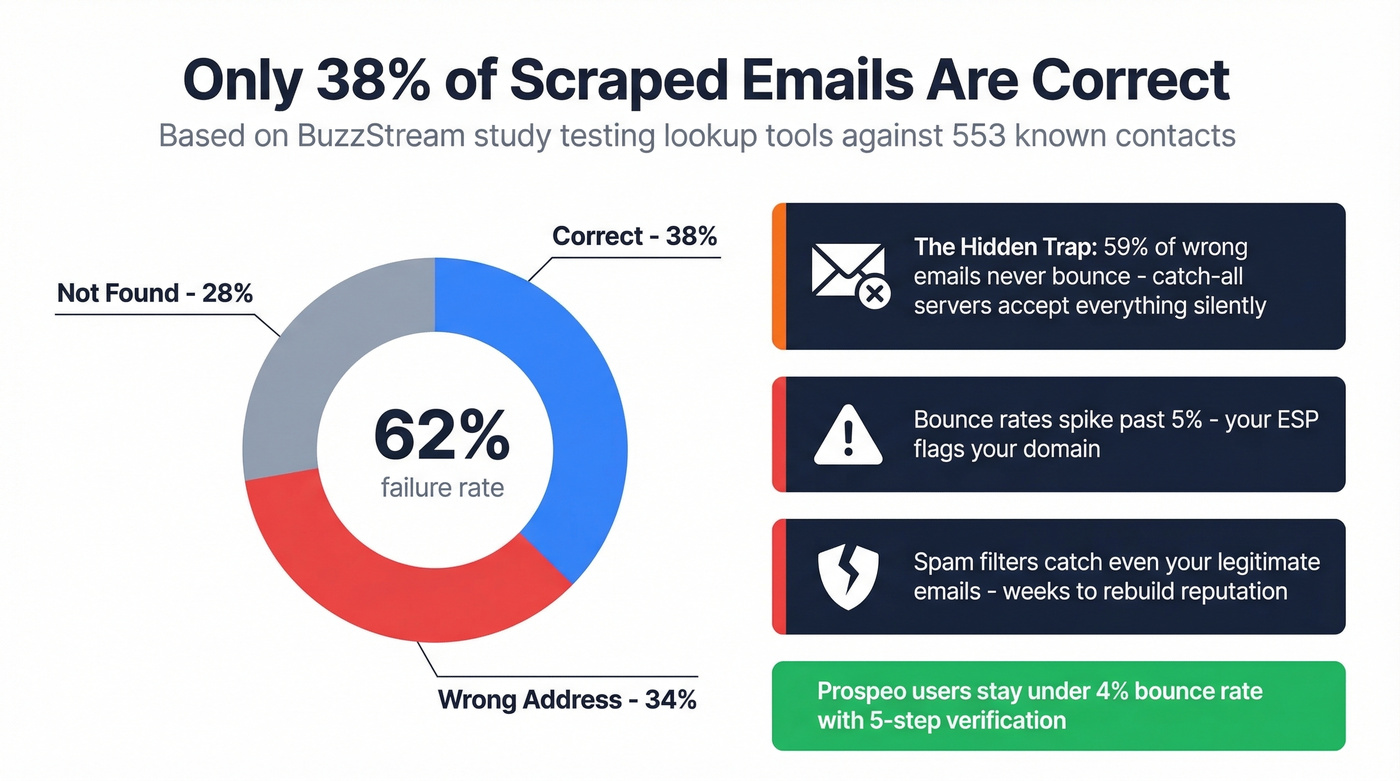
A BuzzStream study tested email lookup tools against 553 known journalist contacts. Only 38% of emails were correct. 34% were wrong. 28% weren't found at all.

That "wrong" bucket gets worse when you learn about catch-all domains. Of the incorrect addresses in that study, 59% never bounced. The receiving mail server accepted everything - valid address or not - and silently discarded it. Your email tool shows "delivered," but nobody ever sees the message.
This creates a nasty chain reaction. You send to a scraped list. Bounce rates spike past the critical bulk email threshold. Your ESP flags your domain. Spam filters start catching even your legitimate emails. We've watched teams spend weeks rebuilding domain reputation after a single bad send.
Let's be honest: if you're sending cold email from scraped lists without verification, you're playing Russian roulette with your domain.
Most teams scraping websites for email addresses don't actually need extraction. They need 50-200 verified contacts at specific companies. That's a database problem, not a scraping problem. If your average deal is under $8k, the hours spent scraping, cleaning, and verifying will cost more than just paying for verified data upfront.
Chrome Extension Security
Before you install the first "email extractor" extension you find, check the permissions. The most popular email extractor extension - over 500K users - was flagged on r/cybersecurity for spyware-like behavior: reading the owner's emails, running with no tabs open, storing data permanently on its servers, and executing scheduled background tasks.
Quick audit before installing anything:
- Does it request inbox/email access? Walk away. An extractor doesn't need to read your mail.
- Does it run in the background with no tabs open? That's surveillance, not extraction.
- Is the developer transparent? Look for a real company name, privacy policy, and published data practices.
The Extract-to-Send Workflow
Step 1: Extract. Use Outscraper, Mailmeteor, or a Python script with BeautifulSoup and the regex pattern above. If you're not a coder, stick with the web tools - the consensus on r/coldemail is that scripting solutions eat more time than they save for most people. (If you want a deeper breakdown of tools, see our guide to free email scrapers.)
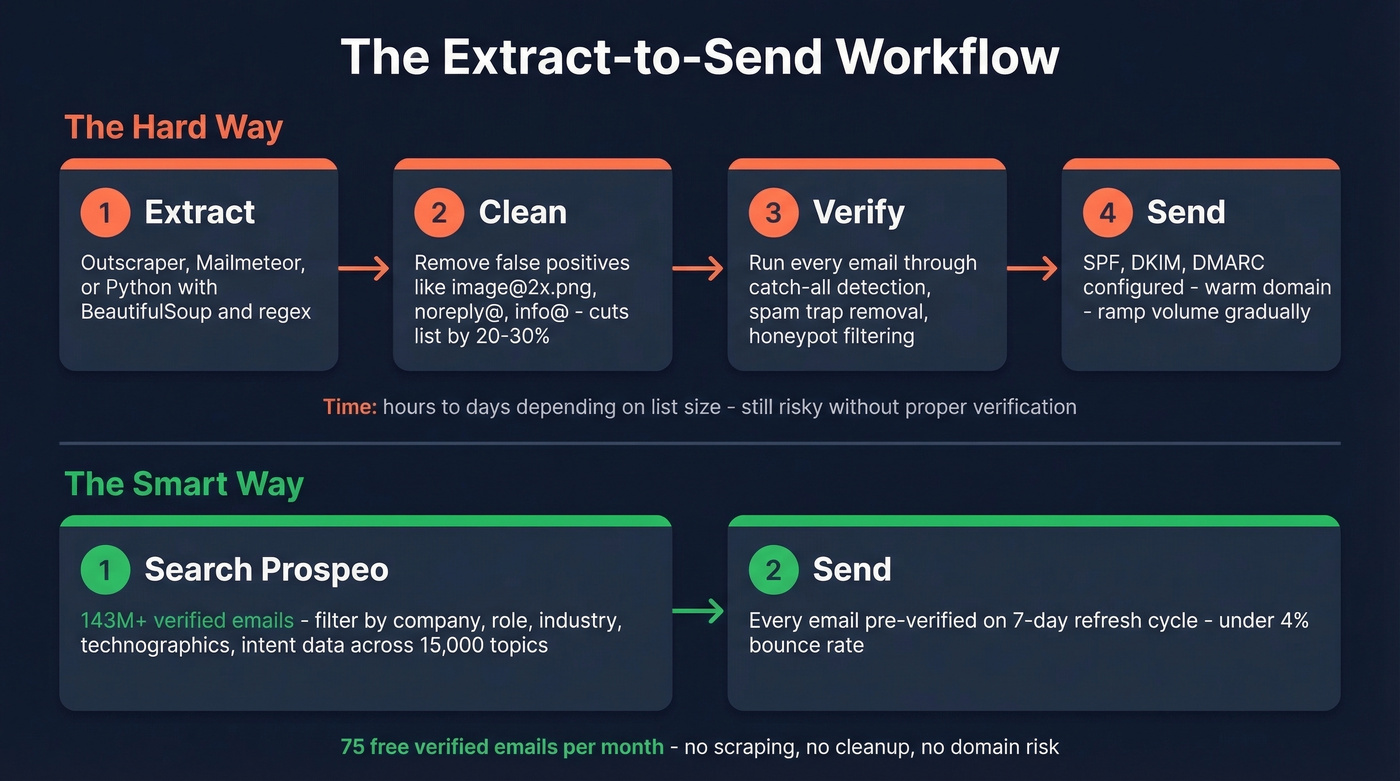
Step 2: Clean. Remove obvious false positives like image@2x.png, noreply@, and role-based addresses like info@. Deduplicate. In our experience, this step alone cuts most scraped lists by 20-30%.
Step 3: Verify every address. Not optional. Run every email through a verification service that handles catch-all domains, spam traps, and honeypots. This is the step that separates a usable list from a domain-killer. (If you’re troubleshooting bounces, start with email bounce rate.)
Step 4: Send with proper authentication. SPF, DKIM, DMARC configured. Warm your domain. Include an unsubscribe link. Ramp volume gradually. (For deliverability fundamentals, use this email deliverability guide and the DMARC alignment checklist.)
Or skip steps 1-3 entirely. Prospeo's database covers 143M+ verified emails searchable by 30+ filters - company size, industry, job title, technographics, and intent data across 15,000 topics. You get pre-verified contacts without scraping a single website. The free tier gives you 75 emails per month to test. (If you’re doing name-based discovery, see name to email.)
Teams using scraped lists hit 35% bounce rates and wreck their sender reputation. Prospeo users stay under 4% - because every email is verified on a 7-day refresh cycle, not pulled from stale HTML. Search 300M+ profiles by role, company, or 30+ filters instead of hoping a regex finds the right address.
Skip the extraction-to-cleanup pipeline entirely.
Legal Reality: "Public" Doesn't Mean "Permitted"
"It's on a public website" doesn't mean you can collect it into a marketing list. Multiple jurisdictions treat email addresses as personal data, especially named ones like firstname.lastname@company.com. The ICO's guidance on direct marketing is worth reading if you're targeting UK or EU contacts.
- Record provenance. Log the URL, date, and method for every email you collect. If a regulator asks where you got an address, "I scraped it" without documentation is a bad answer.
- Exclude data behind logins. Anything requiring authentication to access is high-risk territory.
- Map your lawful basis. Under GDPR, legitimate interest requires a balancing test - document why your outreach interest outweighs the contact's privacy expectation.
- Follow CAN-SPAM sending rules. In the US, collection isn't restricted, but sending is. Truthful headers, real sender identity, functioning unsubscribe, and honoring opt-outs within 10 days are all mandatory. (If you’re building a compliant outbound system, start with cold email marketing.)
FAQ
Is it legal to extract emails from websites?
Under GDPR, even publicly visible emails are personal data requiring a lawful basis like legitimate interest. Under CAN-SPAM, collection isn't restricted but sending rules are strict - truthful headers, real sender identity, and functioning unsubscribe are mandatory. Always record provenance for every address you collect.
Why do extracted emails bounce so much?
Free extractors scrape anything matching an email pattern - including false positives, outdated addresses, and role-based accounts. Independent testing found only 38% correct, and 59% of wrong addresses never bounce because catch-all servers silently discard messages. Always verify before sending to stay under the 5% bounce threshold.
Can I extract emails in bulk from thousands of websites?
Most free tools handle one URL at a time. Outscraper covers 500 domains free, and Python with BeautifulSoup scales further for developers. For verified emails at scale without scraping, a database approach lets you search by company, role, or dozens of filters - faster than crawling thousands of pages.
Do I need to verify emails after extracting them?
Yes, always. 59% of incorrect email addresses never bounce because catch-all mail servers accept everything - your sending tool shows "delivered" for addresses that don't exist. Run every address through a verification service with catch-all handling before sending a single message.
What's a safe free email extractor extension?
Be cautious - the most popular extension (500K+ users) was flagged for spyware-like behavior including inbox access and background processes. Audit permissions before installing anything. Look for extensions from established companies with transparent privacy policies and no inbox access requirements.