


FinalScout vs Tomba: The Honest Comparison
FinalScout vs Tomba is really a question about where your workflow starts. One tool begins with individual professional profiles and a Chrome extension. The other begins with domains and an API. That distinction matters more than any feature checklist - it determines whether the tool fits your actual prospecting motion or just looks good on a comparison page.
Here's the thing: most teams agonize over this choice when neither tool is the best fit for them. If your primary need is accurate emails with fresh data, both have gaps that a newer platform fills better. More on that below.
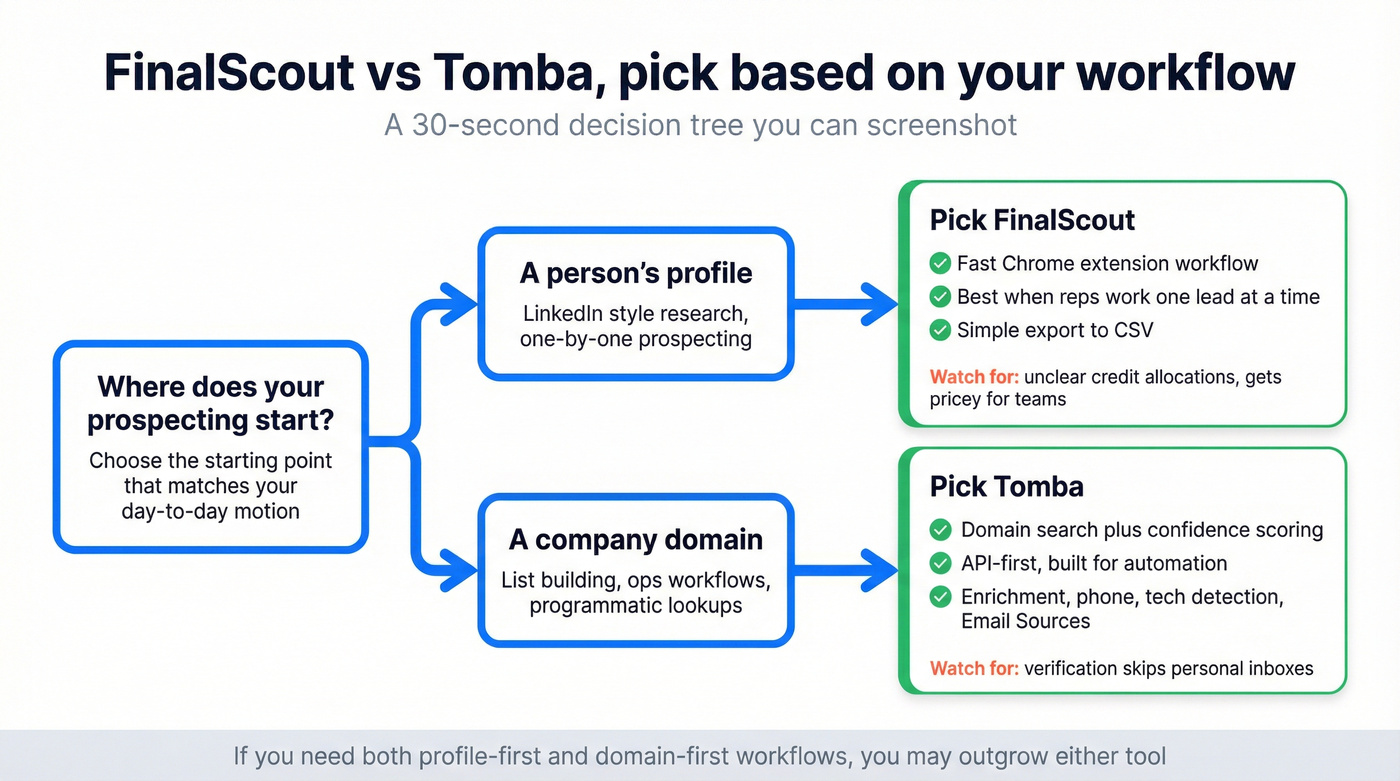
30-Second Verdict
- Pick FinalScout if your workflow starts from individual professional profiles and you want a dead-simple Chrome extension experience.
- Pick Tomba if you're doing domain-level research, need API depth (enrichment, phone, tech detection), and like a model where you aren't charged when nothing is found.
If you're evaluating broader prospecting stacks, Apollo is closer to an all-in-one, while ContactOut and Findymail are common picks for profile-first workflows. But for this comparison, let's get into the two tools head-to-head.
What Each Tool Actually Does
FinalScout is a Chrome extension built for profile-based prospecting. You browse professional profiles, click a button, and get an email that's marketed as verified. The database covers 500M+ professionals across 20M+ businesses, and the entire UX is designed around that one-click workflow. It supports bulk scraping from profile lists - search results, groups, events - and exports everything to CSV. Simple, focused, fast.
Tomba approaches things differently. It's a domain search engine first. Enter a company domain, and Tomba returns every email it can find, each tagged with a confidence score and verification status. But Tomba's real depth is in its API: endpoints for enrichment, phone finding, technology detection, similar websites, email sourcing, and - crucially - Email Sources, which traces each email back to its original URL with context and date. That traceability is a genuine differentiator for compliance-conscious teams. If you're building automated workflows or need programmatic access, Tomba has significantly more surface area than FinalScout.
Pricing Breakdown
Let's break down the numbers. FinalScout's pricing page lists six tiers. Each email you find uses 1 credit, credits roll over month-to-month, and you can buy extras. API and webhook access is included on all paid plans.
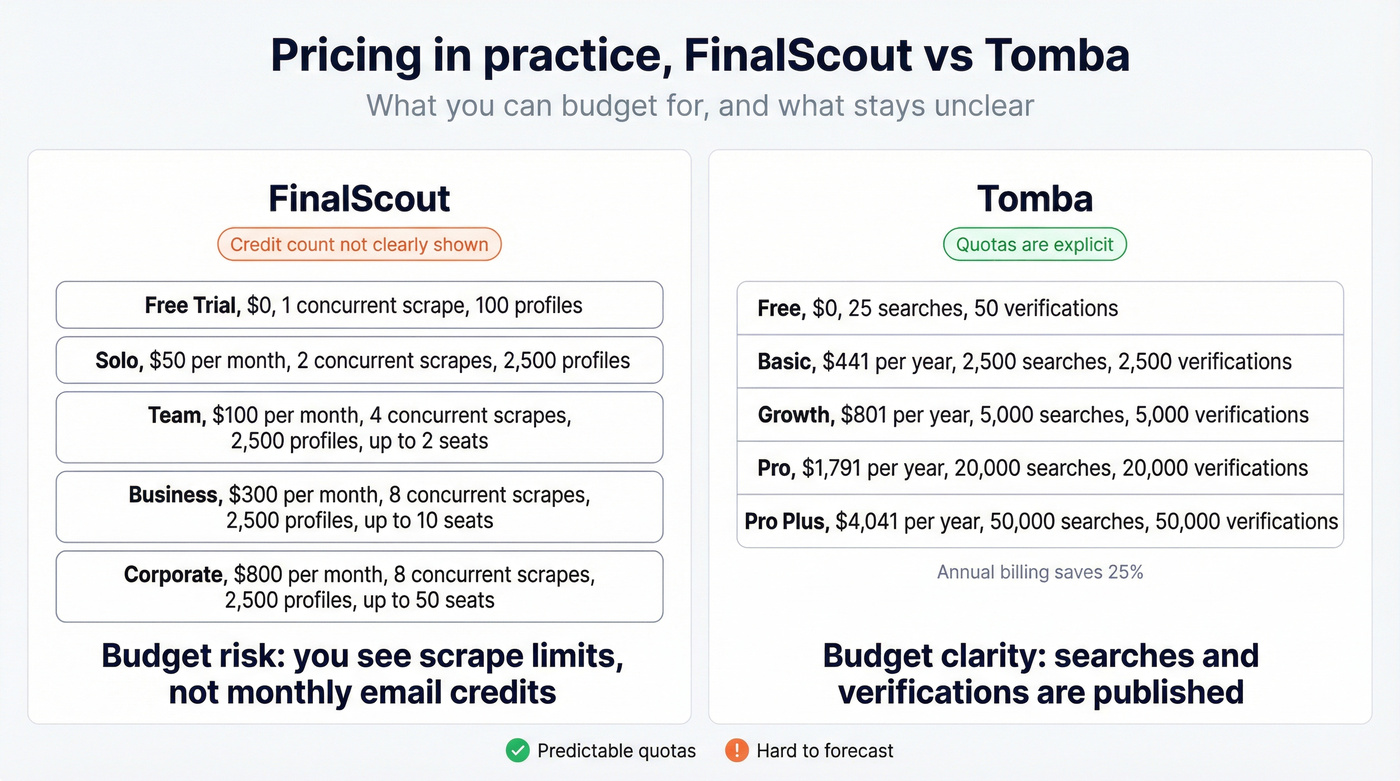
| Plan | Monthly Price | Concurrent Scrapes | Max Scrape Size | Team Seats |
|---|---|---|---|---|
| Free Trial | $0 | 1 | 100 profiles | 1 |
| Solo | $50 | 2 | 2,500 profiles | 1 |
| Team | $100 | 4 | 2,500 profiles | Up to 2 |
| Business | $300 | 8 | 2,500 profiles | Up to 10 |
| Corporate | $800 | 8 | 2,500 profiles | Up to 50 |
| Custom | Contact sales | Custom | Custom | Custom |
One frustration we've had: the plan page doesn't clearly show numeric credit allocations per tier. You know the price and the scrape limits, but the actual email credit count per month isn't obvious upfront. That's a red flag for budgeting.
Tomba's pricing is more transparent about quotas. Annual billing saves 25%.
| Plan | Annual Price | Monthly Searches | Monthly Verifications |
|---|---|---|---|
| Free | $0 | 25 | 50 |
| Basic | $441/yr | 2,500 | 2,500 |
| Growth | $801/yr | 5,000 | 5,000 |
| Pro | $1,791/yr | 20,000 | 20,000 |
| Pro Plus | $4,041/yr | 50,000 | 50,000 |
Monthly equivalents: Basic ~$37/mo, Growth ~$67/mo, Pro ~$149/mo, Pro Plus ~$337/mo.
How Tomba Counts Usage
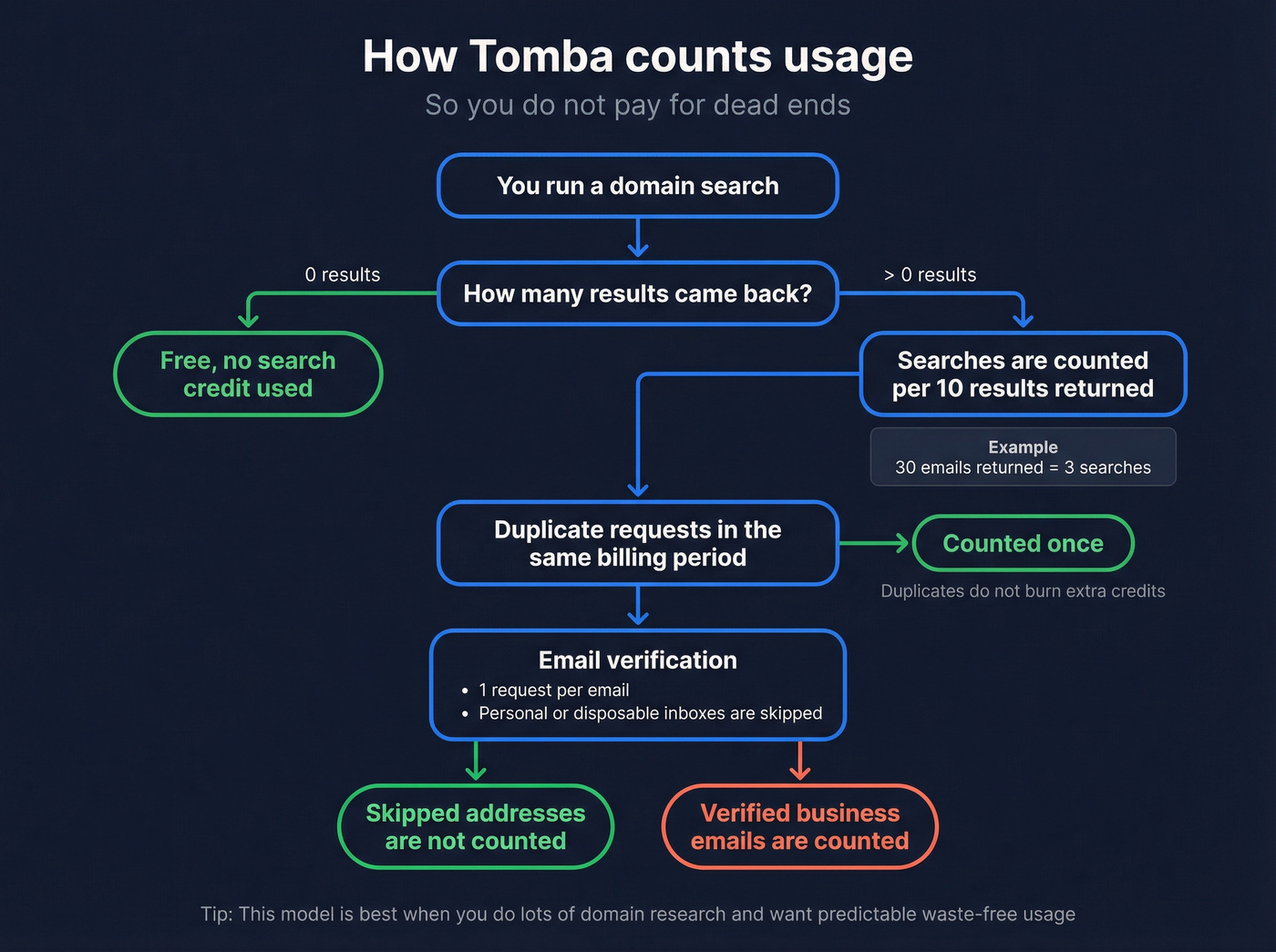
Tomba's counting rules are what make the "don't pay for dead ends" model work. Domain searches are counted per 10 results returned, so a search returning 30 emails counts as 3 searches. No-result searches are free - if Tomba finds nothing, you don't lose a credit. Duplicate requests within the same billing period count only once. Email verification uses 1 request per email, and personal or disposable addresses (Gmail, Outlook, throwaway domains) are skipped and not counted.
For teams doing 10-50 seats, FinalScout's $300-$800/mo pricing is hard to justify if you only need email lookups and can't clearly see credit allocations upfront. Tomba's economics are more predictable at scale.

Neither FinalScout nor Tomba publishes a data refresh cadence - and stale data is the #1 cause of bounces. Prospeo refreshes every 7 days (industry average: 6 weeks) and delivers 98% email accuracy through a proprietary 5-step verification process. At ~$0.01 per email, you get better data than both tools at a fraction of the cost.
Stop debating two tools when a better option already exists.
Feature Comparison
| Feature | FinalScout | Tomba |
|---|---|---|
| Data approach | Profile-first | Domain-first |
| Chrome extension | Yes | Yes |
| API access | Included but not API-first | Full API with 9+ endpoint categories |
| Email verification | Included | Included |
| Phone finder | No | Yes |
| Data enrichment | No | Yes |
| Tech detection | No | Yes |
| Source traceability | No | Yes (Email Sources) |
| Team sharing | Yes (paid plans) | Yes (invite as many users as needed) |
Operational Fit
| Dimension | FinalScout | Tomba |
|---|---|---|
| Best starting point | A person's profile | A company's domain |
| Best for | Individual reps prospecting one-by-one | Ops teams, devs, and list builders |
| Best output | Single email fast | Email list + enrichment + phone data |
The pattern is clear. Tomba has a broader feature surface. FinalScout does one thing - find emails from profiles - and wraps it in a clean UX. We've found profile-first tools win when reps prospect one person at a time and need speed over coverage. But when you need data enrichment, phone numbers, technology data, or source traceability alongside emails, Tomba wins by default because FinalScout simply doesn't offer those capabilities.
Accuracy and Data Quality
FinalScout holds a 4.8/5 on G2 from 226 reviews - an impressive sample size for a tool this focused. Tomba sits at 4.7/5 from 25 reviews, solid but a much thinner dataset.
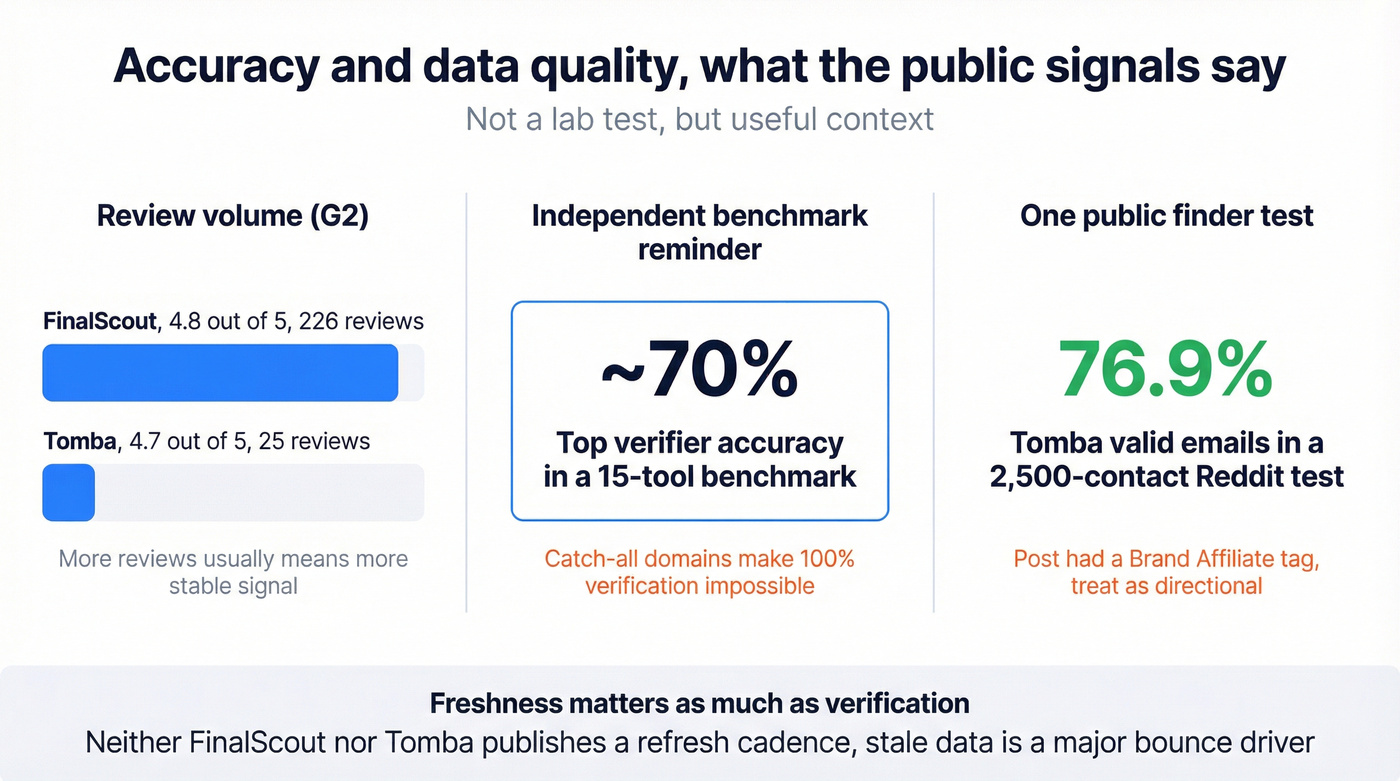
FinalScout's G2 profile includes a "100% verified" claim. Treat that as marketing shorthand, not a literal deliverability guarantee. In Hunter's verifier benchmark of 15 tools, top overall accuracy was around 70% - a reminder that catch-all and accept-all domains make perfect verification mathematically impossible. G2's own review tags for FinalScout include "Fraudulent Information" and "Search Issues," which suggests the accuracy story isn't as clean as the marketing implies.
Tomba has a more concrete data point: a Reddit test of 2,500 contacts across 8 email finders put Tomba at 76.9% valid emails - the highest of the bunch. The post carries a "Brand Affiliate" tag, so factor in potential bias. One user in the thread put it bluntly: "quality really depends on the industry." In our experience, domain-first tools look great in demos but get noisy in industries with lots of catch-all domains. SaaS and tech tend to be fine, but construction and manufacturing are a different story entirely.
The deliverability reality check: Neither FinalScout nor Tomba publicly lists a data refresh cadence. That matters because stale data is a major cause of bounces. Someone changes jobs, and you're emailing a dead address. The industry average refresh cycle is roughly 6 weeks. If you're running high-volume outbound, freshness isn't a nice-to-have - it's the difference between 3% bounce rates and 15%. (If bounce rates are a recurring issue, see our email bounce rate benchmarks and fixes.)
Where Each Tool Wins
FinalScout wins when your workflow starts from professional profiles and you need a Chrome extension that just works. The 226 G2 reviews give you more social proof than most tools in this category, and the one-click email finding is genuinely fast. The frustration: credit limits are restrictive, scaling to team use is steep, and you don't get clear visibility into credit allocations upfront.
Tomba wins when you're doing domain-level research, need API depth for automated workflows, or prefer the "free when not found" economics. The enrichment, phone finder, technology detection, and email source traceability make it more than an email finder - it's closer to a lightweight data platform. The frustration: it skips personal inboxes in verification, which is fine for B2B-only workflows and annoying if you sell to SMBs where founders use personal email. The UI also has inconsistencies that make the Leads section feel disconnected from the rest of the product.
Choose Based on Your Workflow
- You prospect one person at a time from profiles - FinalScout
- You build lists from company domains and need API access - Tomba
- You need enrichment, phone numbers, and tech data - Tomba
A Third Option Worth Testing
Both FinalScout and Tomba have credit limitations and accuracy gaps that show up at scale. We've tested dozens of email finders over the years, and the tools that win long-term are the ones where you don't have to second-guess whether the data is still good.
Prospeo covers 300M+ professional profiles and 143M+ verified emails with 98% accuracy, backed by proprietary email-finding infrastructure rather than third-party providers. The 7-day data refresh cycle means you're not emailing someone who changed jobs two months ago. That alone eliminates a huge chunk of the bounce problem.
The free tier gives you 75 emails plus 100 Chrome extension credits per month - meaningfully more room to evaluate than FinalScout's free trial (100-profile scrape limit) or Tomba's 25 searches. Paid plans scale at roughly $0.01 per email, self-serve, no contracts. The Chrome extension has 40,000+ users and works across company websites, professional profiles, and CRMs. If you're comparing options, our roundup of free lead generation tools can help you shortlist faster.

FinalScout gives you profiles. Tomba gives you domains. Prospeo gives you both - plus 125M+ verified mobiles, intent data across 15,000 topics, and 30+ search filters including technographics and job changes. One platform replaces the entire stack.
Get emails, phones, and intent signals from a single platform for $0.01/lead.
FAQ
Is FinalScout free?
FinalScout offers a free trial with 1 concurrent scrape and a 100-profile limit, plus 20 free emails monthly without a credit card. For real prospecting volume, you'll need the Solo plan at $50/mo or higher.
Does Tomba have an API?
Yes, and it's one of Tomba's strongest advantages. The API covers domain search, email finder, verification, enrichment, phone finder, technology detection, email sources, and similar websites - nine endpoint categories in total. FinalScout includes API and webhook access on paid plans, but it isn't an API-first product.
Which email finder has the best accuracy?
In a Reddit test of 2,500 contacts, Tomba hit 76.9% valid emails - the highest among 8 tools tested. Prospeo delivers 98% email accuracy with a 7-day data refresh cycle, making it the strongest option for teams where deliverability is critical. Any tool claiming 100% accuracy is stretching the truth - catch-all domains guarantee some unknowns.
Can I use both FinalScout and Tomba together?
You can, since they serve different workflows - FinalScout for profile lookups and Tomba for domain searches. Running two separate tools doubles your costs and creates data management overhead, though. Prospeo handles both profile-first and domain-level discovery in a single platform with 30+ search filters, which simplifies the stack considerably.
Final Recommendation
Match the tool to your prospecting motion:
- FinalScout - You're a solo rep or small team that prospects from professional profiles and wants the simplest possible Chrome extension workflow. Accept the credit opacity and budget $50-$100/mo.
- Tomba - You're an ops team or developer who needs domain-level email discovery with API depth, enrichment, and source traceability. The "free when not found" model keeps costs predictable. If you're building a broader outbound stack, see our guide to outbound lead generation tools.
- Prospeo - You need the highest email accuracy (98%), the freshest data (7-day refresh), and a generous free tier to prove it before you pay. Best all-around pick for teams where bounce rates directly impact revenue. For more workflow ideas, review these sales prospecting techniques and our lead generation workflow breakdown.